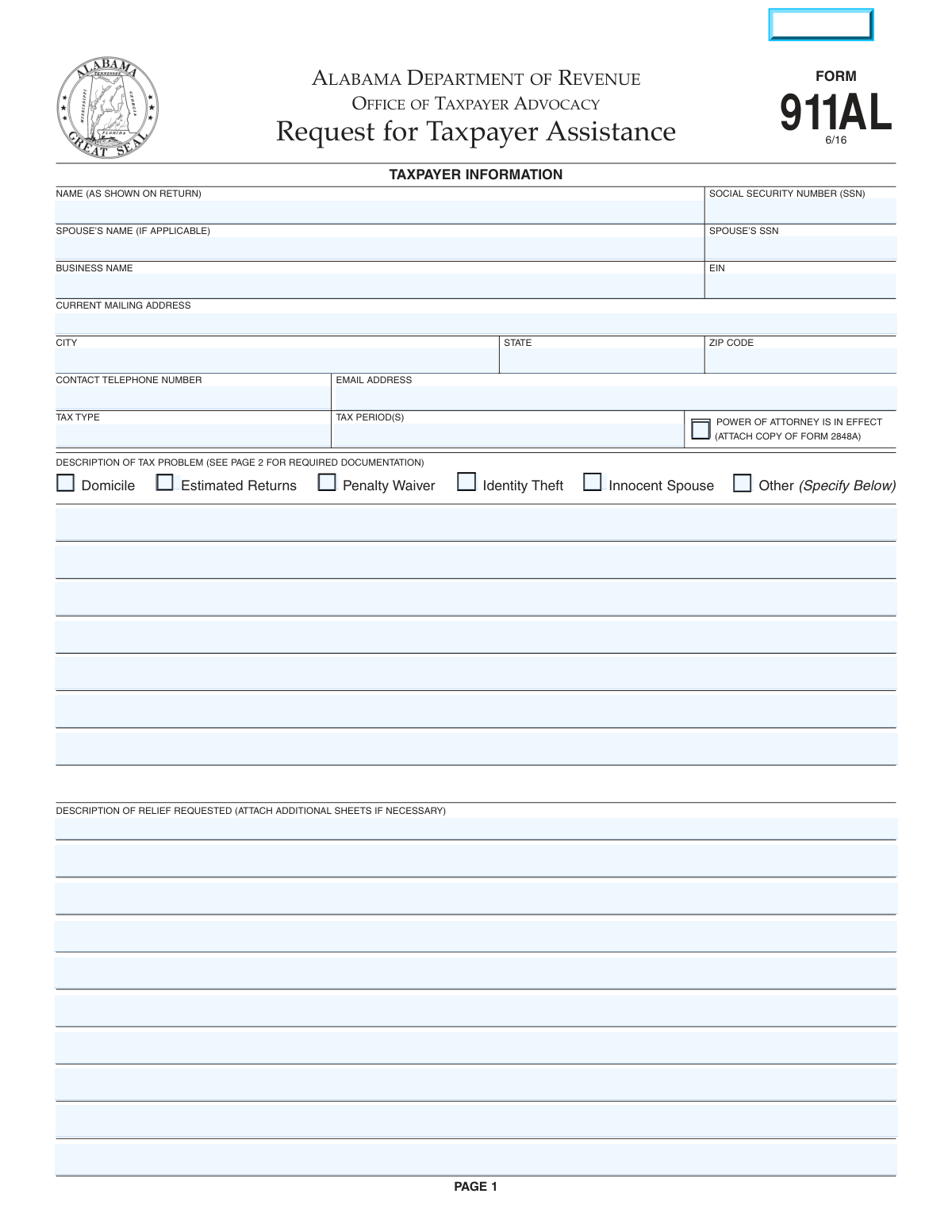
Yes! You can use AI to fill out Form 911AL, Request for Taxpayer Assistance
Form 911AL, Request for Taxpayer Assistance, is a document submitted to the Alabama Department of Revenue's Office of Taxpayer Advocacy. It is used by taxpayers who have been unable to resolve a state tax issue through normal channels or believe tax laws are being administered unfairly. This form provides a crucial pathway for taxpayers to seek intervention and resolution for complex tax problems after exhausting all other administrative remedies. Today, this form can be filled out quickly and accurately using AI-powered services like Instafill.ai, which can also convert non-fillable PDF versions into interactive fillable forms.
Our AI automatically handles information lookup, data retrieval, formatting, and form filling.
It takes less than a minute to fill out Form 911AL using our AI form filling.
Securely upload your data. Information is encrypted in transit and deleted immediately after the form is filled out.
Form specifications
| Form name: | Form 911AL, Request for Taxpayer Assistance |
| Number of pages: | 1 |
| Filled form examples: | Form Form 911AL Examples |
| Language: | English |
Instafill Demo: How to fill out PDF forms in seconds with AI
How to Fill Out Form 911AL Online for Free in 2026
Are you looking to fill out a FORM 911AL form online quickly and accurately? Instafill.ai offers the #1 AI-powered PDF filling software of 2026, allowing you to complete your FORM 911AL form in just 37 seconds or less.
Follow these steps to fill out your FORM 911AL form online using Instafill.ai:
- 1 Navigate to Instafill.ai and upload or select Alabama Form 911AL.
- 2 Enter your personal and/or business information, including name, SSN or EIN, and current contact details.
- 3 Specify the tax type and the tax period(s) related to your request.
- 4 Check the box that best describes your tax problem (e.g., Domicile, Penalty Waiver, Identity Theft) and provide a detailed written explanation.
- 5 Clearly describe the specific relief or assistance you are requesting from the Taxpayer Advocacy Office.
- 6 Gather and attach all required supporting documentation as listed on the form, such as a Power of Attorney (Form 2848A) if applicable.
- 7 Review all the information for accuracy, sign and date the form, and submit it to the Office of Taxpayer Advocacy as instructed.
Our AI-powered system ensures each field is filled out correctly, reducing errors and saving you time.
Why Choose Instafill.ai for Your Fillable Form 911AL Form?
Speed
Complete your Form 911AL in as little as 37 seconds.
Up-to-Date
Always use the latest 2026 Form 911AL form version.
Cost-effective
No need to hire expensive lawyers.
Accuracy
Our AI performs 10 compliance checks to ensure your form is error-free.
Security
Your personal information is protected with bank-level encryption.
Frequently Asked Questions About Form Form 911AL
Form 911AL is a 'Request for Taxpayer Assistance' for the Alabama Department of Revenue. You should only use it after you have tried and failed to resolve a state tax issue through normal administrative channels.
Yes, do not use this form if you haven't exhausted all other administrative remedies first. It is also not intended for seeking legal advice, tax preparation help, or appealing a final court order.
You will need to provide your full name, Social Security Number (SSN), current mailing address, and contact information. Depending on your situation, you may also need your spouse's information or your business name and EIN.
The required documents depend on your specific problem. For example, a domicile issue requires a copy of your driver's license, while an identity theft claim requires the final IRS determination letter.
To request a penalty waiver, check the corresponding box on the form and attach a detailed written request explaining why you believe the penalty should be waived. Include any documentation that supports your claim.
For identity theft cases, you must provide the final determination letter you received from the IRS, a copy of your IRS Account Transcript, and any other documents that help verify your claim.
Yes, but you must check the 'Power of Attorney is in effect' box and attach a completed copy of Form 2848A, Power of Attorney, with your submission.
Be specific and provide detailed information about your tax problem and the resolution you are seeking. Clearly state the actions you would like the Taxpayer Advocacy Office to take and attach all relevant documents.
You must mail your completed form and all required attachments to the Office of Taxpayer Advocacy at the P.O. Box address provided in the form's instructions. The form does not provide an option for electronic submission.
No, it is not necessary for both spouses to sign Form 911AL for your account to be reviewed. The signature of one taxpayer is sufficient.
Yes, services like Instafill.ai use AI to accurately auto-fill form fields, which can save you time and help prevent common errors. This is especially helpful for entering repetitive personal information.
To use Instafill.ai, simply upload the Form 911AL PDF to the platform. The AI will identify the fields, allowing you to provide your information once to have it automatically and accurately filled throughout the document.
If you have a non-fillable or 'flat' PDF, you can upload it to a service like Instafill.ai. The platform can convert the static document into an interactive, fillable form that you can easily complete and download.
Compliance Form 911AL
Validation Checks by Instafill.ai
1
SSN Format Validation
This check verifies that the Social Security Number (SSN) field contains exactly nine digits, optionally formatted as XXX-XX-XXXX. It ensures the data is structured correctly for database storage and matching with official records. If the format is incorrect, the submission will be rejected, preventing data entry errors and processing delays.
2
Conditional Spouse's SSN Requirement
This validation ensures that if the 'Spouse’s Name' field is filled out, the 'Spouse’s SSN' field must also be completed. This is crucial for correctly identifying both taxpayers on a joint account and processing the request accurately. Failure to provide the spouse's SSN when their name is present will result in a validation error prompting the user to complete the required information.
3
Conditional EIN Requirement
This check validates that if a 'Business Name' is provided, the corresponding 'Employer Identification Number (EIN)' field must also be filled. The EIN is the unique identifier for a business entity, and its presence is essential for the tax agency to locate the correct business account. A missing EIN for a listed business will block the form submission until the number is provided.
4
EIN Format Validation
This validation ensures the Employer Identification Number (EIN) is entered in the correct XX-XXXXXXX format. Proper formatting is critical for automated systems to parse and validate the number against federal and state databases. An incorrectly formatted EIN would cause processing to fail and require manual correction, so the form will prevent submission until the format is corrected.
5
Mailing Address Completeness
This check verifies that the 'Current Mailing Address', 'City', 'State', and 'ZIP Code' fields are all filled out. A complete and valid address is mandatory for the Department of Revenue to send official correspondence, determinations, and other communications regarding the case. An incomplete address will trigger an error, as it would make it impossible to contact the taxpayer by mail.
6
ZIP Code Format Validation
This validation ensures the 'ZIP Code' field contains a valid 5-digit or 9-digit (ZIP+4) numeric format. Correct ZIP code formatting is essential for mail deliverability and compliance with postal standards. An invalid format will cause a validation failure, prompting the user to enter a standard US ZIP code to ensure correspondence can be successfully delivered.
7
Email Address Syntax Check
This check verifies that the value entered in the 'Email Address' field follows the standard '[email protected]' format. A valid email address is important for providing the agency with an alternative method of contact. If the entry does not conform to the expected syntax, the form will display an error to prevent the submission of an unusable email address.
8
Tax Problem Selection Requirement
This validation ensures that the user has selected at least one checkbox under the 'Description of Tax Problem' section (e.g., Domicile, Penalty Waiver, etc.). This selection is mandatory as it categorizes the request and routes it to the appropriate personnel for review. If no problem type is selected, the form cannot be processed, and the user will be prompted to make a selection.
9
Conditional 'Other' Problem Description
This check enforces that if the 'Other (Specify Below)' checkbox is selected in the 'Description of Tax Problem' section, the corresponding text area for describing the problem must not be empty. This ensures that selecting 'Other' is accompanied by a necessary explanation for context. A validation failure will occur if the box is checked but no description is provided, preventing incomplete submissions.
10
Relief Request Description Completeness
This validation confirms that the 'Description of Relief Requested' text area is not left blank. This field is the core of the application, explaining what action the taxpayer wants the agency to take. A submission without this information is incomplete and cannot be acted upon, so the system will require this field to be filled before allowing the form to be submitted.
11
Power of Attorney Documentation Check
This check verifies that if the 'Power of Attorney is in effect' box is checked, the user is notified that a copy of Form 2848A must be attached. While this may not block submission, it serves as a critical reminder that the required legal authorization is missing. Failure to attach the document will lead to the rejection of the request or significant delays, as the agency cannot communicate with an unauthorized representative.
12
Tax Account Identification Completeness
This validation ensures that both the 'Tax Type' and 'Tax Period(s)' fields are completed. This information is fundamental for the tax agency to identify the specific account and time frame under review. Without both pieces of information, locating the relevant tax records is impossible, so the form will be rejected until these fields are properly filled.
13
Signature Date Validity
This check ensures the 'Date' field next to the signature contains a valid, properly formatted date that is not in the future. The signature date legally attests to when the document was signed and is a critical piece of metadata for the request's timeliness. An invalid or future date would render the document legally questionable and will be flagged as an error.
Common Mistakes in Completing Form 911AL
The form's second page explicitly lists required documents for each problem type, such as a copy of a driver's license for domicile issues or an IRS determination letter for identity theft. Taxpayers often forget to gather and attach these crucial documents. An application submitted without the required evidence is considered incomplete and will not be processed, significantly delaying any potential relief. To avoid this, use the list on page 2 as a final checklist before sending the form.
Filers sometimes enter a nickname or a slightly different version of their name than what appears on their official tax return. The name on Form 911AL must match the name on the tax return in question exactly for the department to locate the correct account. A mismatch can lead to significant processing delays or an inability to find the taxpayer's file, requiring further correspondence. Always double-check your name against a copy of the relevant tax return before submitting.
Entering an incorrect Social Security Number (SSN) or Employer Identification Number (EIN) is a critical error, often due to transposing digits or not providing all nine digits. Since this number is the primary identifier for a tax account, any mistake makes it impossible for the department to locate the case. This will lead to an outright rejection or a long delay until the correct information is provided. Carefully proofread these numbers, and consider using AI-powered form fillers like Instafill.ai that can help validate the format of such critical data.
In the description fields, taxpayers often write generic phrases like 'tax bill is wrong' or 'need help,' which lack the necessary detail for the Taxpayer Advocacy Office (TAO) to act. The form requires a specific account of the problem and a clear statement of the relief being sought. Vague descriptions force the TAO to request more information, halting the process and delaying a resolution. Be specific about what happened, the dates, the amounts involved, and the exact outcome you are requesting.
This form is intended as a last resort after all normal administrative channels have been tried. Many taxpayers, out of frustration, use Form 911AL as their first step in resolving an issue. The instructions clearly state not to use the form in this scenario, and doing so will result in the request being rejected. To avoid this, you must first attempt to resolve your issue with the specific tax division involved and document those attempts.
If a tax professional is representing the taxpayer, it's common to check the 'Power of Attorney is in effect' box but forget to attach a copy of the actual Form 2848A. Checking the box is not sufficient; the physical form must be included with the submission. Without it, the TAO is legally prohibited from discussing the case with the representative, bringing the entire process to a standstill. Always include the signed POA form if someone is acting on your behalf.
When asked for the 'Tax Period(s),' filers may enter vague terms like 'last year' or use an incorrect format, such as a single year for a tax type that is filed quarterly. This ambiguity can cause the department to investigate the wrong period or be unable to identify the specific liability in question. This results in delays and unnecessary back-and-forth communication. Always specify the exact period, such as 'Calendar Year 2023' for income tax or 'Q2 2023' for quarterly taxes.
Forgetting to sign and date the form is a simple but surprisingly common mistake, often happening when a person is in a rush to complete the paperwork. An unsigned form is legally invalid and cannot be processed by the department. The form will be returned to you for a signature, causing a delay of weeks or even longer. Make it a habit to perform a final check for a signature and date just before sealing the envelope.
This form is often available as a non-fillable PDF, forcing users to print it and fill it out by hand, which can lead to illegible entries. Poor handwriting for critical data like names, addresses, and SSNs can cause the department to misinterpret information or deem the form unprocessable. To prevent this, print clearly in block letters. Alternatively, services like Instafill.ai can convert flat PDFs into digitally fillable forms, ensuring every entry is perfectly clear and legible.
Taxpayers, especially sole proprietors, sometimes mix up personal and business identifiers, such as putting their SSN in the EIN field or using their personal name when the issue relates to a business tax account. This creates confusion as to whether the problem is with a personal or business account. This can lead to the department reviewing the wrong records, wasting time and effort. Ensure you use the SSN for personal issues and the EIN for business issues, and that the name field corresponds correctly.
A filer might correctly check the 'Other' box because their issue isn't listed, but then fail to provide a written explanation in the 'Description of Tax Problem' section. The checkbox by itself is meaningless to the reviewer. This omission makes the application incomplete, as the TAO has no information about the taxpayer's issue. The request will be delayed until a proper description is provided. If you check 'Other,' you must provide a full explanation in the space below.
Saved over 80 hours a year
“I was never sure if my IRS forms like W-9 were filled correctly. Now, I can complete the forms accurately without any external help.”
Kevin Martin Green
Your data stays secure with advanced protection from Instafill and our subprocessors
Robust compliance program
Transparent business model
You’re not the product. You always know where your data is and what it is processed for.
ISO 27001, HIPAA, and GDPR
Our subprocesses adhere to multiple compliance standards, including but not limited to ISO 27001, HIPAA, and GDPR.
Security & privacy by design
We consider security and privacy from the initial design phase of any new service or functionality. It’s not an afterthought, it’s built-in, including support for two-factor authentication (2FA) to further protect your account.
Fill out Form 911AL with Instafill.ai
Worried about filling PDFs wrong? Instafill securely fills form-911al-request-for-taxpayer-assistance forms, ensuring each field is accurate.