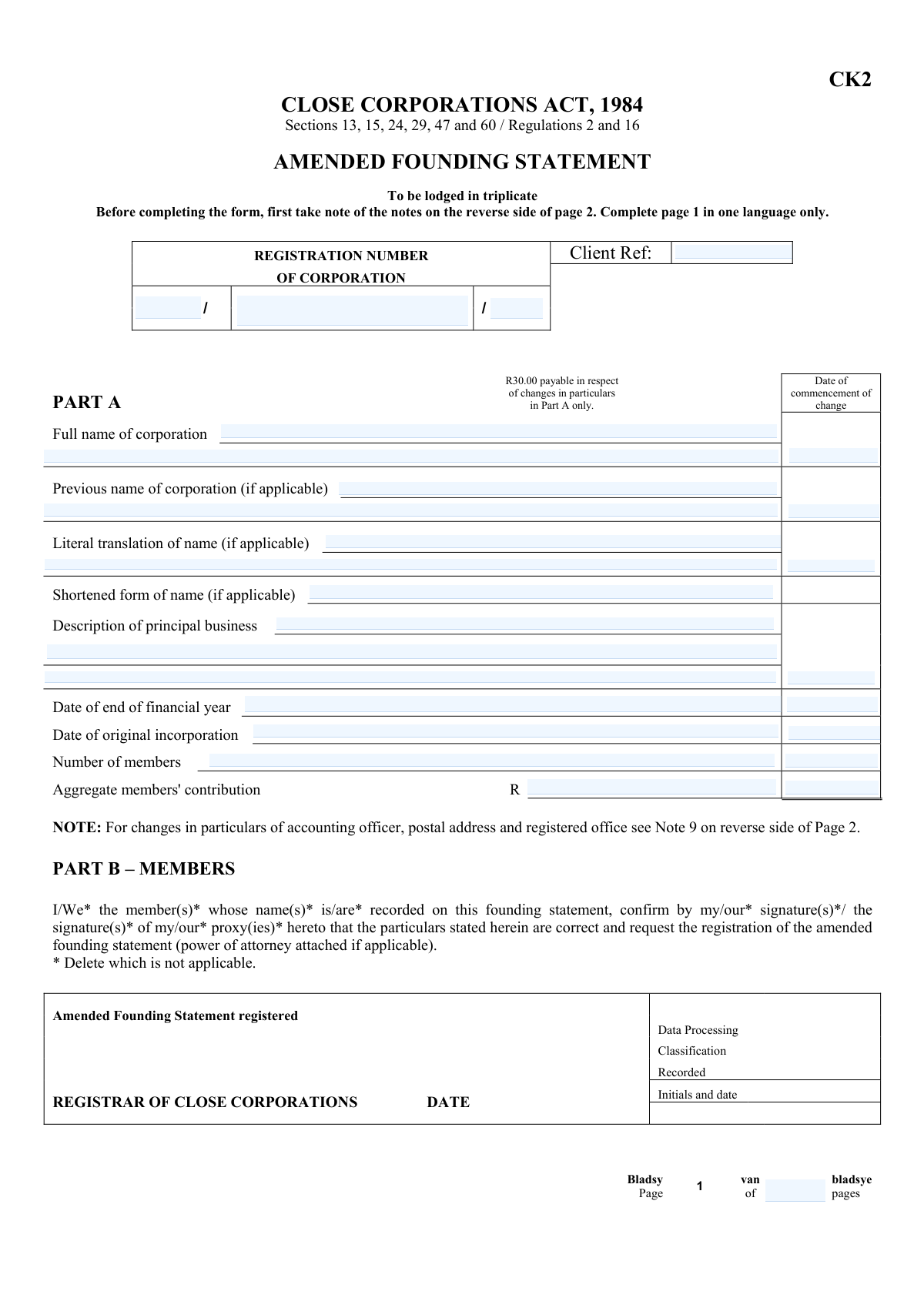
Yes! You can use AI to fill out Form CK2 (Close Corporations Act, 1984) — Amended Founding Statement

Form CK2 is the official ā€œAmended Founding Statementā€ prescribed under the Close Corporations Act, 1984 (referencing sections 13, 15, 24, 29, 47 and 60 and regulations 2 and 16) for recording and registering changes to a close corporation’s registered particulars. It captures Part A changes (e.g., corporation name, business description, financial year-end, number of members, aggregate contributions) and Part B member details, including members who cease to be members, with signatures confirming correctness and (where applicable) powers of attorney. It is important because the close corporation’s public/official record must reflect current, legally valid information, and non-compliant submissions may be rejected and certain Part A changes attract a fee. Today, this form can be filled out quickly and accurately using AI-powered services like Instafill.ai, which can also convert non-fillable PDF versions into interactive fillable forms.
Our AI automatically handles information lookup, data retrieval, formatting, and form filling.
It takes less than a minute to fill out CK2 using our AI form filling.
Securely upload your data. Information is encrypted in transit and deleted immediately after the form is filled out.

Form specifications

Form name: Form CK2 (Close Corporations Act, 1984) — Amended Founding Statement
Number of pages: 4
Language: English
Categories: CIPC forms, business registration forms, corporate forms, company registration forms
main-image

Instafill Demo: filling out a legal form in seconds

How to Fill Out CK2 Online for Free in 2026

Are you looking to fill out a CK2 form online quickly and accurately? Instafill.ai offers the #1 AI-powered PDF filling software of 2026, allowing you to complete your CK2 form in just 37 seconds or less.
Follow these steps to fill out your CK2 form online using Instafill.ai:
  1. 1 Go to Instafill.ai and upload the CK2 form (or select it from the form library) and choose your preferred completion language (complete page 1 in one language only).
  2. 2 Let the AI extract and prefill corporation identifiers (client reference and registration number segments) and confirm the corporation name as currently registered.
  3. 3 Complete Part A changes by entering the effective date(s) of change and updating the relevant particulars (e.g., full/previous name, literal translation/shortened name if applicable, principal business description, financial year-end, original incorporation date, number of members, and aggregate members’ contribution).
  4. 4 Complete Part B (Members) by adding or updating each member’s required particulars per the form notes (names/forenames, identity or registration number, percentage interest, contribution/value, residential and postal addresses, signature/date, and date/item of change).
  5. 5 If applicable, list “Persons who cease to be members” with full name, identity number, and signature, and attach supporting documents such as power of attorney or statements where no identity document exists.
  6. 6 Use Instafill.ai’s validation checks to ensure required fields are complete, dates and percentages are consistent, and the correct pages are included (pages 1–2 for 4 or fewer members; add continuation pages if more than 4).
  7. 7 Download/print the finalized CK2 for signature and lodging in triplicate with the registrar (and include any required fee for Part A changes and any required CK2A filing for accounting officer/address/registered office changes).

Our AI-powered system ensures each field is filled out correctly, reducing errors and saving you time.

Why Choose Instafill.ai for Your Fillable CK2 Form?

Speed

Complete your CK2 in as little as 37 seconds.

Up-to-Date

Always use the latest 2026 CK2 form version.

Cost-effective

No need to hire expensive lawyers.

Accuracy

Our AI performs 10 compliance checks to ensure your form is error-free.

Security

Your personal information is protected with bank-level encryption.

Frequently Asked Questions About Form CK2

Form CK2 is used to register amendments to a close corporation’s founding statement under the Close Corporations Act, 1984. It covers changes to the corporation’s particulars (Part A) and/or member details (Part B).

The member(s) recorded on the founding statement must confirm the particulars and sign, or a proxy/representative may sign if a power of attorney is attached. If a member is under legal disability (e.g., a minor), a parent/guardian/representative must assist and state their capacity.

CK2 must be lodged in triplicate (three copies). It must be completed in block capitals or typed/printed in legible characters using deep permanent black ink, and page 1 must be completed in one language only.

A fee of R30.00 is payable only for changes in particulars in Part A. No fee is payable for changes under Part B (members).

Yes. The notes specify that particulars which do not change should also be furnished, so the amended statement reflects a complete set of current details.

Use the date the change should take effect, which can be the date of registration or a specific date you indicate. Be consistent across Part A items you are changing.

Use Form CK2A if the changes relate to the accounting officer (or their address), the corporation’s postal address, or the location of the registered office. CK2 is not the correct form for those specific updates.

For each member you must provide surname and full forenames (or juristic person details/capacity), identity number (or date of birth if no ID), size of interest as a percentage, contribution and fair value (if applicable), residential and postal addresses, signature/date, and the date of change indicating which items (1–6) changed.

If no identity document has been issued, you must state the member’s date of birth and attach a written statement confirming that no ID has been issued.

List them under ā€œPersons who cease to be membersā€ with full name and surname, identity number, and signature. The form notes that membership ceases on the date the Amended Founding Statement is registered.

If there are 4 or fewer members, complete pages 1 and 2 only. The additional members page is only required if there are more than 4 members.

Forms can be rejected if they don’t comply with the Act/regulations/notes, are not lodged in triplicate, are illegible, are not completed in one language on page 1, or are missing required attachments (like a power of attorney or the no-ID statement).

Yes. AI tools can help extract details from your records and place them into the correct CK2 fields, reducing errors and saving time—services like Instafill.ai are designed to auto-fill form fields accurately.

Upload the CK2 PDF to Instafill.ai, add or connect your source information (e.g., member IDs, addresses, percentages, corporation details), and let the AI map and auto-fill the fields. Review the completed form for accuracy, then download/print for signature and submission in triplicate as required.

If the PDF is not fillable, Instafill.ai can convert flat non-fillable PDFs into interactive fillable forms so you can type directly into the fields. After conversion, you can auto-fill and export a clean, legible version for lodging.

Compliance CK2
Validation Checks by Instafill.ai

1
Validates Corporation Registration Number structure and allowed characters
Checks that the three registration number segments (Part 1, Main Number, Suffix) are present (where required) and match the expected pattern for Close Corporations (e.g., numeric year/sequence formatting and separators). It should reject non-permitted characters (letters where digits are required, spaces, or punctuation other than the form’s separators). This is critical because the registration number is the primary key used by the registry to match the filing to the correct corporation. If validation fails, the submission should be blocked and the user prompted to correct the registration number to the official certificate format.
2
Ensures Corporation Name consistency across repeated fields
Verifies that the corporation name entered in Part A (Full name of corporation) matches the ā€œNAME OF CORPORATIONā€ header fields on subsequent pages, allowing only trivial differences such as whitespace or line breaks. This prevents internal inconsistencies where page headers and Part A reflect different entities, which can cause rejection or misfiling. If a mismatch is detected, the system should require the user to reconcile the names before submission.
3
Requires at least one Part A change with a valid commencement date
Checks that the amended founding statement actually records a change in Part A (e.g., name, principal business, financial year end, number of members, aggregate contribution) and that the corresponding ā€œDate of commencement of changeā€ is provided for the changed item(s). The form notes indicate changes are effective from registration date or the date indicated, so missing dates make the amendment ambiguous. If no change is indicated or dates are missing for changed fields, the filing should be rejected as incomplete.
4
Validates all date fields for format and calendar correctness
Validates that all dates (commencement of change, original incorporation date, financial year end date, member signature dates, and any date-of-birth used in lieu of an ID) follow a single accepted format (e.g., YYYY-MM-DD or DD/MM/YYYY) and represent real calendar dates. It should also prevent impossible values (e.g., 31/02) and enforce consistent formatting across the submission. If validation fails, the system should flag the specific field and require correction to avoid registry processing errors.
5
Checks logical ordering of key dates (incorporation vs. change dates)
Ensures the Date of original incorporation is not after any ā€œDate of commencement of changeā€ recorded in Part A or Part B. An amendment cannot legally commence before the entity exists, and such inconsistencies often indicate data entry mistakes. If the ordering is invalid, the system should block submission and request corrected dates or supporting explanation where permitted.
6
Validates Financial Year End as a day-month value and consistency with change date
Checks that ā€œDate of end of financial yearā€ is a valid day/month combination (and, if a year is provided, that it is plausible) and that a commencement date is supplied if the financial year end is being changed. Financial year end is used for statutory compliance and accounting officer obligations, so incorrect values can cause downstream compliance issues. If invalid or missing required commencement date, the system should require correction before acceptance.
7
Validates Number of Members as an integer within statutory bounds
Ensures ā€œNumber of membersā€ is a whole number and falls within allowed Close Corporation limits (commonly 1–10, depending on jurisdictional rules applicable to the filing). This prevents filings that would be legally non-compliant or impossible to register. If the value is non-integer, negative, zero, or exceeds the maximum, the system should reject the submission and prompt for a compliant count.
8
Validates member interest percentages and enforces total equals 100%
For each member entry, validates that ā€œSize of interest expressed as a percentageā€ is numeric, within 0–100, and uses an acceptable precision (e.g., up to two decimals). It also checks that the sum of all active members’ interests equals exactly 100% (with a small tolerance if decimals are allowed). This is essential because member interests define ownership and voting rights; totals not equaling 100% indicate an invalid membership structure. If the total is not 100% or any entry is out of range, the system should block submission and highlight the offending rows.
9
Validates Aggregate Members’ Contribution as a Rand amount and non-negative
Checks that ā€œAggregate members' contribution (R)ā€ is a valid currency amount (digits with optional decimal cents), uses the Rand currency context, and is not negative. It should also enforce reasonable upper bounds to catch obvious keying errors (e.g., extra zeros) and disallow non-numeric characters. If invalid, the system should require correction because contribution values are part of the corporation’s founding particulars and may be used for legal and accounting purposes.
10
Ensures member identity information is complete and correctly typed (natural vs juristic person)
Validates that each member has either a valid identity number (for natural persons) or a registration number (for juristic persons), as described in Note 10(2). If ā€œno identity document issuedā€ is indicated (or the ID field is blank), the system must require a date of birth and an attachment indicator for the written statement per Note 8. This prevents unverifiable member records and reduces registry rejection risk. If the identity requirements are not met, the submission should be rejected with a clear instruction on what alternative information/attachment is required.
11
Validates member name fields and capacity requirements for special cases
Checks that member surname and full forenames are provided (or, for juristic persons/trustees/nomine officii, that the entity name and capacity are stated as required by Note 10(1)). It should flag entries that contain only initials, placeholders, or missing capacity where the member is acting as trustee/administrator/executor/curator. Correct identification is crucial for legal enforceability and registry accuracy. If validation fails, the system should require completion of the missing name/capacity details.
12
Requires residential and postal addresses for each member and validates minimum address content
Ensures each member record includes both a residential address (item 5) and a postal address (item 6), and that each address contains sufficient detail (e.g., street/stand, suburb/city, and postal code where applicable). This supports statutory contactability and service of notices. If either address is missing or clearly incomplete (e.g., only a suburb name), the system should prevent submission and request a complete address.
13
Validates member signature presence, signer authority, and signature date
Checks that each member entry includes a signature (item 7) and a date signed, and that the signature date is not in the future. If a representative/proxy signs, the system must require an indication that a power of attorney is attached (per Note 6) and capture the representative capacity. This is important because the form includes a confirmation statement that particulars are correct; missing or unauthorized signatures undermine validity. If validation fails, the filing should be rejected until signatures/authority evidence are provided.
14
Validates ‘Date of change’ and ‘items changed’ indicator for each member record
For each member row, validates that item 8 includes a date of change and clearly indicates which of items 1–6 changed (as required by Note 10(8)). This ensures the registry can interpret what was amended for that member (name, ID, interest, contribution, addresses). If the date is missing or the changed-item indicator is blank/invalid, the system should flag the row and require completion to avoid ambiguous amendments.
15
Validates ‘Persons who cease to be members’ section completeness and consistency
If any persons are listed as ceasing to be members, checks that each has full name and surname, identity number, and signature completed, and that they are not simultaneously listed as an active member with a non-zero interest. It should also ensure the cessation aligns with the note that membership ceases on the date of registration of the amended founding statement (i.e., no conflicting cessation date fields are introduced). This prevents contradictory membership records and ownership totals. If inconsistencies are found, the system should require the user to correct the membership roster and interest allocations.
16
Validates page count and required pages based on number of members
Checks that ā€œTotal number of pagesā€ is a positive integer and matches the actual included pages, and enforces the rule that if there are 4 or fewer members, only pages 1 and 2 are required, while page 3 is required when there are more than 4 members. This reduces filing defects caused by missing member continuation pages or unnecessary pages that may confuse processing. If the page count is inconsistent with the member count or missing required continuation pages, the system should block submission and prompt to add/remove pages accordingly.

Common Mistakes in Completing CK2

Using the wrong form (CK2 vs CK2A) for address/accounting officer changes

Many filers try to update the accounting officer, the accounting officer’s address, the corporation’s postal address, or the registered office on CK2, but Note 9 requires CK2A for those changes. This leads to rejection or the change not being recorded, causing delays and compliance issues. Before completing CK2, confirm whether your change falls under Part A/Part B or must be filed on CK2A instead. AI-powered tools like Instafill.ai can flag when a change belongs on CK2A and prevent submitting the wrong form.

Incorrectly splitting the corporation registration number across the three segments

The registration number is captured in multiple parts (prefix/main/suffix), and people often transpose digits, omit separators, or put the suffix in the main field. An incorrect registration number can cause the filing to be allocated to the wrong entity or rejected outright. Copy the number exactly as shown on the incorporation certificate and double-check each segment before submission. Instafill.ai can validate the expected format and reduce segmenting errors by auto-parsing the number into the correct fields.

Not completing the form in one language only (mixing English and Afrikaans entries)

The form instructs that page 1 must be completed in one language only, but applicants often mix languages across fields (e.g., business description in English and other entries in Afrikaans). Mixed-language completion can trigger administrative queries or rejection because it conflicts with the form’s instruction. Choose one language for page 1 and keep all typed/handwritten entries consistent. Instafill.ai can standardize outputs to a single language template to avoid accidental mixing.

Leaving unchanged particulars blank (only filling the changed items)

Note 4 states that particulars which do not change should also be furnished, but many people only enter the new details and leave the rest empty. This can result in an incomplete record, processing delays, or rejection because the registrar cannot confirm the full amended statement. Re-enter all required particulars for the corporation and members, even if they remain the same, and clearly indicate the effective date of any changes. Instafill.ai can prefill existing known data and ensure required non-changed fields are still populated.

Missing or inconsistent 'date of commencement of change' entries

Part A repeats ā€œDate of commencement of changeā€ alongside multiple items, and filers often forget to provide the date, use different dates for related changes, or enter an invalid date format. Missing or conflicting effective dates can cause the registrar to question when the amendment applies, delaying registration. Use a consistent date format and ensure the effective date aligns with the change being made (and with Note 5 about effectiveness). Instafill.ai can enforce date formatting and prompt for missing effective dates where required.

Incorrect member interest percentages (not totaling 100% or using the wrong format)

In Part B, the ā€œsize of interestā€ must be expressed as a percentage, but people commonly enter decimals, include the % sign when the box expects a number, or submit totals that don’t add up to 100%. This creates a logical inconsistency in ownership and can lead to rejection or a request for correction. Enter numeric percentages consistently for each member and verify the total equals 100% after any membership change. Instafill.ai can automatically sum and validate percentages and warn when totals are off.

Member identity details entered incorrectly (ID vs date of birth vs juristic person registration number)

Note 10 requires different identity information depending on whether the member is a natural person, has no ID document, or is a juristic person. Filers often put a passport number where an SA ID is expected, omit the date of birth when no ID exists, or forget to provide the juristic person’s registration number. Incorrect identity data can prevent proper member recording and trigger rejection or follow-up queries. Follow Note 10 precisely and attach the required written statement if no identity document has been issued; Instafill.ai can guide the correct identity field rules and formatting.

Missing signatures, dates signed, or required power of attorney for proxies/representatives

Part B requires confirmation by signature(s), and Note 6 requires a power of attorney when someone signs on behalf of a member. A frequent mistake is unsigned member lines, missing signature dates, or a proxy signature without the supporting power of attorney attachment. This can invalidate the filing and force resubmission. Ensure every relevant member/representative signs and dates, and attach power of attorney whenever a proxy/agent signs; Instafill.ai can checklist required attachments and highlight missing signature/date fields.

Not completing the correct pages based on number of members (pages 1–2 vs adding page 3)

The notes specify that if there are 4 or fewer members, only pages 1 and 2 must be completed, and page 3 is only needed if there are more than 4 members. People often omit page 2 member details, unnecessarily complete page 3, or fail to add page 3 when membership exceeds 4. This leads to incomplete member records or confusion during processing. Count members first, then complete the required pages and ensure the ā€œtotal number of pagesā€ matches what you submit; Instafill.ai can dynamically include the correct pages and keep page counts consistent (and can convert a flat non-fillable PDF into a fillable version if needed).

Incorrect fee handling (paying when not required or not paying when Part A changes are made)

The form states R30.00 is payable for changes in Part A only, and no fee is payable for Part B changes, but filers frequently misunderstand and either omit payment for Part A amendments or pay unnecessarily for member-only changes. Incorrect payment can delay processing while the registrar requests the correct fee or issues a rejection. Confirm whether your amendments are in Part A, Part B, or both, and pay only what is required for Part A changes. Instafill.ai can help classify the change type and remind you when a fee is triggered.

Poor legibility and non-compliant writing/printing (not in block capitals or not in permanent black ink)

Note 1 requires block capitals or a typed/printed form in legible characters with deep permanent black ink, yet many submissions are faint, handwritten in cursive, or scanned with low contrast. Illegible entries cause data capture errors and can lead to rejection because the registrar cannot reliably record the particulars. Use typed text where possible, ensure high-contrast black printing, and avoid overwriting or unclear corrections. Instafill.ai can produce clean, consistently formatted entries and reduce legibility-related rejections, especially when converting a non-fillable PDF into a properly fillable version.
Saved over 80 hours a year

ā€œI was never sure if my IRS forms like W-9 were filled correctly. Now, I can complete the forms accurately without any external help.ā€

Kevin Martin Green

Your data stays secure with advanced protection from Instafill and our subprocessors

Robust compliance program

Transparent business model

You’re not the product. You always know where your data is and what it is processed for.

ISO 27001, HIPAA, and GDPR

Our subprocesses adhere to multiple compliance standards, including but not limited to ISO 27001, HIPAA, and GDPR.

Security & privacy by design

We consider security and privacy from the initial design phase of any new service or functionality. It’s not an afterthought, it’s built-in, including support for two-factor authentication (2FA) to further protect your account.

Fill out CK2 with Instafill.ai

Worried about filling PDFs wrong? Instafill securely fills form-ck2-close-corporations-act-1984-amended-founding-statement forms, ensuring each field is accurate.