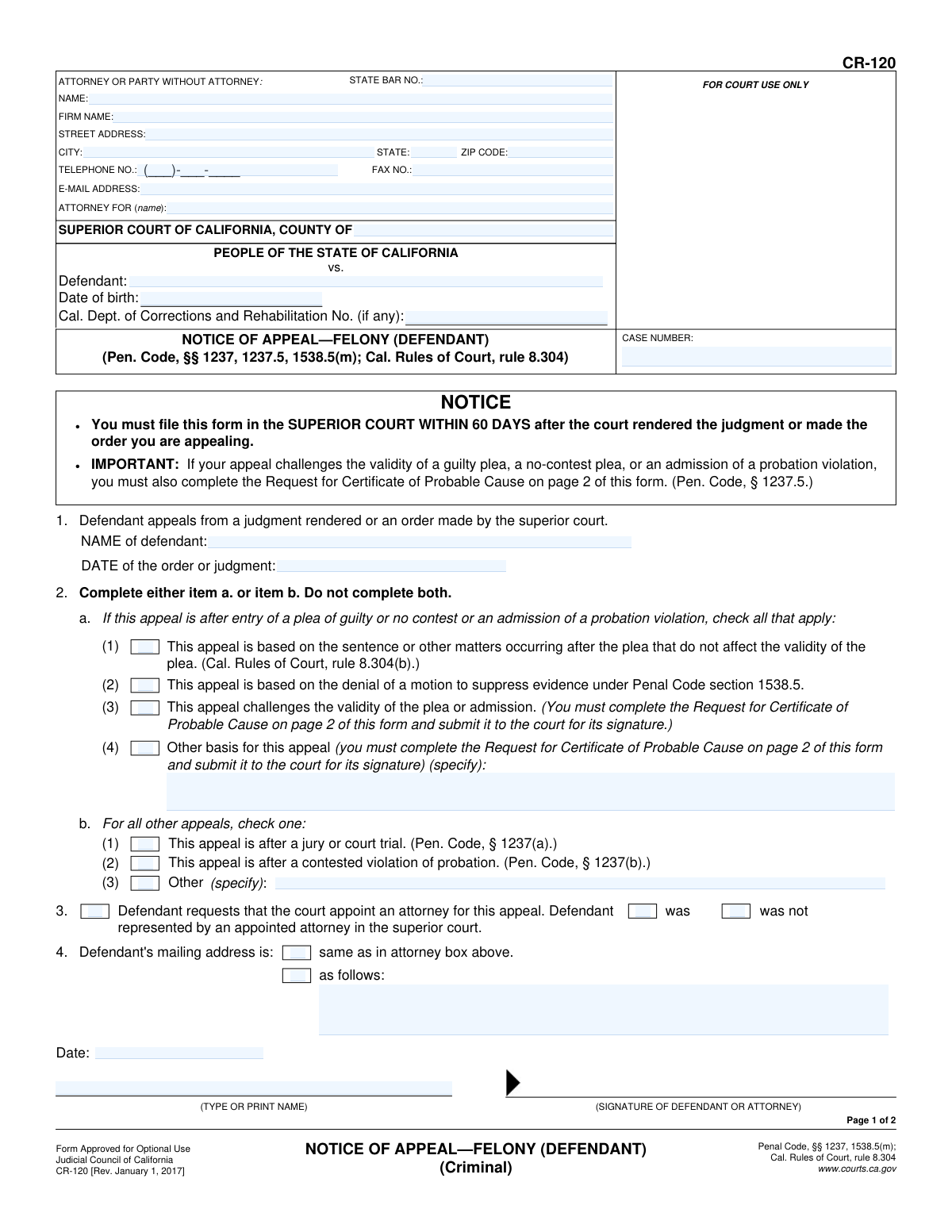
Yes! You can use AI to fill out Form CR-120, Notice of Appeal—Felony (Defendant)

Form CR-120, the Notice of Appeal—Felony (Defendant), is a legal document used in the California court system to formally begin the process of appealing a judgment or order in a felony criminal case. Filing this form is a critical first step to have a higher court review the trial court's decision, and it must be submitted within 60 days of the judgment. Today, this form can be filled out quickly and accurately using AI-powered services like Instafill.ai, which can also convert non-fillable PDF versions into interactive fillable forms.
CR-120 is part of the California court forms and court appeal forms categories on Instafill.
Our AI automatically handles information lookup, data retrieval, formatting, and form filling.
It takes less than a minute to fill out CR-120 using our AI form filling.
Securely upload your data. Information is encrypted in transit and deleted immediately after the form is filled out.

Form specifications

Form name: Form CR-120, Notice of Appeal—Felony (Defendant)
Number of fields: 47
Number of pages: 1
Language: English
main-image

Instafill Demo: How to fill out PDF forms in seconds with AI

How to Fill Out CR-120 Online for Free in 2026

Are you looking to fill out a CR-120 form online quickly and accurately? Instafill.ai offers the #1 AI-powered PDF filling software of 2026, allowing you to complete your CR-120 form in just 37 seconds or less.
Follow these steps to fill out your CR-120 form online using Instafill.ai:
  1. 1 Navigate to Instafill.ai and upload or select the CR-120 Notice of Appeal form.
  2. 2 Provide your personal, attorney (if any), and case information, including the county, case number, and your date of birth.
  3. 3 Enter the date of the judgment or order you are appealing.
  4. 4 Indicate the basis for your appeal by checking the appropriate boxes, such as an appeal after a trial or based on the sentence.
  5. 5 If your appeal challenges a guilty plea, complete the 'Request for Certificate of Probable Cause' on page 2, specifying the legal grounds.
  6. 6 Indicate whether you are requesting a court-appointed attorney for the appeal.
  7. 7 Review all the information populated by the AI, then sign and date the form before filing it with the superior court.

Our AI-powered system ensures each field is filled out correctly, reducing errors and saving you time.

Why Choose Instafill.ai for Your Fillable CR-120 Form?

Speed

Complete your CR-120 in as little as 37 seconds.

Up-to-Date

Always use the latest 2026 CR-120 form version.

Cost-effective

No need to hire expensive lawyers.

Accuracy

Our AI performs 10 compliance checks to ensure your form is error-free.

Security

Your personal information is protected with bank-level encryption.

Frequently Asked Questions About Form CR-120

This form is used by a defendant to officially inform the California superior court that they are appealing a judgment or order made in their felony criminal case.

The defendant in a felony case, or their attorney, must complete and sign this form to begin the appeal process.

You must file this form with the superior court clerk within 60 days after the court made the judgment or order you are appealing. Missing this deadline can result in losing your right to appeal.

You will need the defendant's full name and date of birth, the court case number, the specific date of the judgment or order you are appealing, and your current mailing address.

It is a document from the judge allowing you to appeal after a guilty plea. You must request one by completing page 2 of this form if your appeal challenges the validity of your guilty or no-contest plea.

No, if your appeal is based only on the sentence or other matters that occurred after your plea and does not challenge the plea's validity, you do not need a Certificate of Probable Cause. You would check box 2.a.(1) in this situation.

In section 3 of the form, check the box to request that the court appoint an attorney. You also need to indicate whether you were represented by an appointed attorney in the superior court.

You must file the completed and signed form in the superior court where your case was heard, not the court of appeal.

Section 2.a is for appeals after a guilty plea, no-contest plea, or probation violation admission. Section 2.b is for appeals that happen after a jury or court trial, or a contested probation violation hearing.

Everyone filing this notice must complete page 1. You only need to complete the 'Request for Certificate of Probable Cause' on page 2 if your appeal specifically challenges the validity of a guilty plea or admission.

Yes, services like Instafill.ai use AI to accurately auto-fill form fields with your information, which can save time and help reduce errors.

You can use a service like Instafill.ai, which can convert flat, non-fillable PDFs into interactive forms that you can complete and sign directly on your computer.

Simply upload the CR-120 PDF to the Instafill.ai platform. The AI will make the form fillable, allowing you to type your information, save your progress, and print the completed form for filing.

Compliance CR-120
Validation Checks by Instafill.ai

1
Case Number Presence and Consistency
This check ensures that the 'CASE NUMBER' field is filled out on page 1 and that the value is identical to the 'CASE NUMBER' field on page 2. This is critical for ensuring the document is correctly filed and associated with the right case throughout the appeals process. A mismatch or missing number could lead to rejection or significant delays.
2
Defendant Name Presence and Consistency
Validates that the 'Defendant' name field is populated on page 1 and that it matches the defendant's name on page 2. Consistent and accurate identification of the defendant is fundamental for legal validity. Failure to provide a consistent name could cause the notice to be deemed invalid or misfiled.
3
Date of Judgment Format and Plausibility
Verifies that the 'DATE of the order or judgment' is a valid date in a recognized format (e.g., MM/DD/YYYY) and is not a future date. This date is the starting point for the 60-day appeal deadline, so its accuracy is paramount. An invalid or future date would make it impossible to calculate the filing deadline correctly.
4
Filing Deadline Calculation
This validation compares the 'DATE of the order or judgment' with the signature date of the form. It checks if the signature date is more than 60 days after the judgment date, as stated in the notice instructions. If the deadline has passed, the system should issue a strong warning, as the appeal is likely to be rejected by the court for being untimely.
5
Mutually Exclusive Appeal Type Selection (Section 1)
Ensures that for appeals after a trial or contested probation violation, exactly one checkbox is selected in section 1. The user must choose between 'jury or court trial,' 'contested violation of probation,' or 'Other,' but not a combination. This prevents ambiguity about the procedural posture of the case being appealed.
6
Conditional 'Other' Appeal Type Specification
If the 'Other' checkbox is selected in section 1, this validation confirms that the corresponding text field ('specify') is not empty. The court needs to understand the specific basis for the appeal if it doesn't fall into the standard categories. An empty field would render the selection incomplete and require clarification.
7
Conditional Certificate of Probable Cause Requirement
Checks if checkbox (3) or (4) in section 2 ('challenges the validity of the plea' or 'Other basis') is selected. If so, it validates that the 'Request for Certificate of Probable Cause' section on page 2 has been filled out. This is a mandatory procedural step for these types of appeals, and failure to complete page 2 will result in the appeal being procedurally deficient.
8
Conditional 'Other' Appeal Basis Specification (Section 2)
If the 'Other basis for this appeal' checkbox (4) in section 2 is selected, this check ensures the adjacent text field is filled in. This specification is required to inform the court of the specific grounds for the appeal. Leaving this blank would make the selection invalid and the notice incomplete.
9
Mutually Exclusive Defendant Address Selection
Validates that in section 3, either the 'same as in attorney box above' checkbox or the 'as follows' checkbox is selected, but not both. This prevents conflicting information regarding the defendant's mailing address. The system must have one clear, unambiguous address for all official correspondence.
10
Conditional Defendant Address Entry
If the 'as follows' checkbox is selected in section 3, this check verifies that the corresponding address field is populated. Conversely, if 'same as in attorney box' is checked, it verifies the attorney address block is complete. An incomplete address selection will lead to failed communication with the defendant.
11
Required Attorney Representation Status
Ensures that in section 4, exactly one of the two checkboxes ('was' or 'was not' represented by an appointed attorney) is selected. This information is crucial for the appellate court to determine whether to appoint counsel for the appeal. Failure to select an option leaves a critical question unanswered.
12
State Bar Number Format
This check validates that the 'STATE BAR NO.' field, if an attorney is listed, contains only numbers and is of a reasonable length. This helps ensure the attorney is correctly identified in the court's system. An incorrectly formatted number could hinder verification of the attorney's status.
13
Defendant Date of Birth Validity
Verifies that the 'Date of birth' field is a valid, non-future date. This data point is a key identifier for the defendant, helping to distinguish them from others with similar names in various justice system databases. An invalid date compromises data integrity.
14
Logical Appeal Path Selection
This validation ensures that the filer has selected an appeal basis from either Section 1 (post-trial) or Section 2 (post-plea), but not from both sections. These sections represent mutually exclusive legal paths for an appeal. Selecting options from both would create a logical contradiction regarding the case's history, likely leading to rejection.

Common Mistakes in Completing CR-120

Miscalculating or Missing the 60-Day Filing Deadline

The form must be filed within 60 days of the judgment or order being appealed. People often miscalculate this date or are unaware of the strict deadline, leading to a complete loss of their right to appeal. To avoid this, confirm the exact date of the final judgment or order and file the notice well before the 60-day period expires. Using a calendar to mark the deadline is critical.

Entering an Incorrect Judgment or Order Date

In Item 1, filers sometimes enter the date of their arrest or conviction instead of the date the final judgment was rendered or the appealable order was made. This mistake is critical because the 60-day filing deadline is calculated from this specific date. An incorrect date can make a timely appeal appear late, leading to its dismissal. Always verify the exact date of judgment from court records before filling out the form.

Failing to Complete Page 2 When Challenging a Plea

If the appeal challenges the validity of a guilty or no-contest plea (Item 2, box 3 or 4), the filer must also complete the 'Request for Certificate of Probable Cause' on page 2. Many people check the box on page 1 but forget to complete and sign the second page. This is a fatal error that will prevent the court from considering the challenge to the plea, effectively dismissing that portion of the appeal.

Providing Insufficient Grounds for a Certificate of Probable Cause

When completing page 2, filers must specify the 'reasonable constitutional, jurisdictional, or other grounds' for the appeal. A common mistake is to provide vague, emotional, or legally insufficient reasons, such as 'the plea was unfair.' This will almost certainly lead to the judge denying the request, which is required to proceed with an appeal challenging the plea itself. The grounds must be specific and have a basis in law.

Confusing the Basis for the Appeal (Item 2 vs. Item 3)

The form requires the filer to choose between an appeal after a plea (Item 2) and an appeal after a trial or other proceeding (Item 3). People sometimes fill out sections in both, or choose the wrong category entirely. This creates confusion and can limit the issues that can be raised on appeal. Carefully read the descriptions for each item and select only the one that accurately describes the procedural history of your case.

Missing or Illegible Signatures and Dates

An unsigned or undated Notice of Appeal is invalid and will be rejected by the court clerk. Filers sometimes forget to sign or date page 1, or they forget the separate signature required on page 2 if requesting a certificate of probable cause. If this error isn't corrected before the 60-day deadline, the right to appeal can be permanently lost. Always double-check that all required signature and date lines are completed legibly.

Omitting or Incorrectly Entering the Case Number

The case number is the primary identifier for a legal proceeding, and it must be entered correctly on both pages of the form. Leaving it blank, transposing digits, or entering an old case number will cause significant administrative delays. The court may be unable to file the notice in the correct case file, jeopardizing the timeliness of the appeal. This information should be copied exactly from previous court documents.

Failing to Request Appointment of Counsel

Defendants who cannot afford an attorney for their appeal have a right to have one appointed. Item 4 is where this request is initiated, but it is sometimes overlooked. Forgetting to complete this section can delay the appointment of an appellate attorney, leaving the defendant without legal guidance at a critical stage. If you were represented by an appointed attorney in the trial court and need one for the appeal, ensure you complete this item.

Incomplete or Missing Contact Information

The header section requires complete contact information for the attorney or the defendant if they are self-represented. Mistakes include omitting the address, phone number, or email, which are essential for the court and other parties to send notices and documents. Incomplete information can cause crucial communications to be missed, leading to missed deadlines and other negative consequences. AI-powered tools like Instafill.ai can help prevent this by auto-filling and validating contact information.

Using a Non-Fillable PDF without Proper Tools

This form is often available as a flat, non-fillable PDF, leading to handwritten submissions that can be illegible or improperly formatted. This can cause data entry errors by court clerks and make the document difficult to process. To avoid this, use a tool that can convert the document into a fillable format. For instance, Instafill.ai can make any PDF form fillable, ensuring the final submission is clean, legible, and professional.
Saved over 80 hours a year

“I was never sure if my IRS forms like W-9 were filled correctly. Now, I can complete the forms accurately without any external help.”

Kevin Martin Green

Your data stays secure with advanced protection from Instafill and our subprocessors

Robust compliance program

Transparent business model

You’re not the product. You always know where your data is and what it is processed for.

ISO 27001, HIPAA, and GDPR

Our subprocesses adhere to multiple compliance standards, including but not limited to ISO 27001, HIPAA, and GDPR.

Security & privacy by design

We consider security and privacy from the initial design phase of any new service or functionality. It’s not an afterthought, it’s built-in, including support for two-factor authentication (2FA) to further protect your account.

Fill out CR-120 with Instafill.ai

Worried about filling PDFs wrong? Instafill securely fills form-cr-120-notice-of-appealfelony-defendant forms, ensuring each field is accurate.

Related forms by category

California court forms Judicial Council of California Form SC-105, Request for Court Order and Answer (Small Claims), Judicial Council of California Form SC-120, Defendant’s Claim and ORDER to Go to Small Claims Court (Small Claims), Judicial Council of California Form SER-001, Request for Sheriff to Serve Court Papers, Judicial Council of California Form SER-001, Request for Sheriff to Serve Court Papers, Affidavit for Collection of Personal Property California Probate Code Section 13100, Form POS-040, Proof of Service—Civil, Declaration of Facts of Death (California Superior Court), declaration-of-marriage-for-court-proceeding-california-family-law, ADOPT-200, Adoption Request, ADOPT-200, Stepparent Adoption Request, ADOPT-210, Adoption Agreement, ADOPT-310, Contact After Adoption Agreement, Judicial Council of California Form ADOPT-200, Adoption Request, Form ADR-107, Mediation Attendance Sheet, Form ADR-110, Order Appointing Referee, Form ADR-109, Stipulation or Motion for Order Appointing Referee, Form ADR-102, Request for Trial De Novo After Judicial Arbitration, Form ADR-108, Referee's Report (Code Civ. Proc., §§ 638, 639), Form ADR-106, Petition to Confirm, Correct, or Vacate Contractual Arbitration Award, Form ADR-104, Rejection of Award and Request for Trial After Attorney-Client Fee Arbitration · + 268 more →
court appeal forms Form N161, Appellant's Notice (All appeals except small claims track appeals and appeals to the Family Division of the High Court), Designation of Record on Appeal (Civil) (Maricopa County Justice Courts, Arizona) (Form APP 8150-702), Form N161, Appellant’s notice (All appeals except small claims track appeals and appeals to the Family Division of the High Court), Declaration for Court of Appeal Proceedings, Form MC 55, Claim of Appeal, Form MC 56, Bond on Appeal, Form MC 57, Certificate of Records Transmitted for Appeal and Notice to Parties, Form MC 60, Notice of Record Return from Circuit Court/Court of Appeals, Form MC 501, Reporter/Recorder Certificate of Ordering Transcript on Appeal, Form MC 503, Motion to Change Time for Filing Transcript on Appeal, Civil Appeal Case Information Statement, Form APP-014, Appellant's Proposed Statement on Appeal (Unlimited Civil Case), Form CR-125, Notice of Appeal—Commitment (Penal Code or Welfare and Institutions Code), Form APP-002, Notice of Appeal/Cross-Appeal (Unlimited Civil Case), Form CR-134, Notice Regarding Record on Appeal (Misdemeanor), Form CR-135, Proposed Statement on Appeal (Misdemeanor), Form CR-136, Order Concerning Appellant's Proposed Statement on Appeal (Misdemeanor), Form CR-137, Abandonment of Appeal (Misdemeanor), Form CR-142, Notice of Appeal and Record on Appeal (Infraction), Form CR-143, Proposed Statement on Appeal (Infraction) · + 5 more →