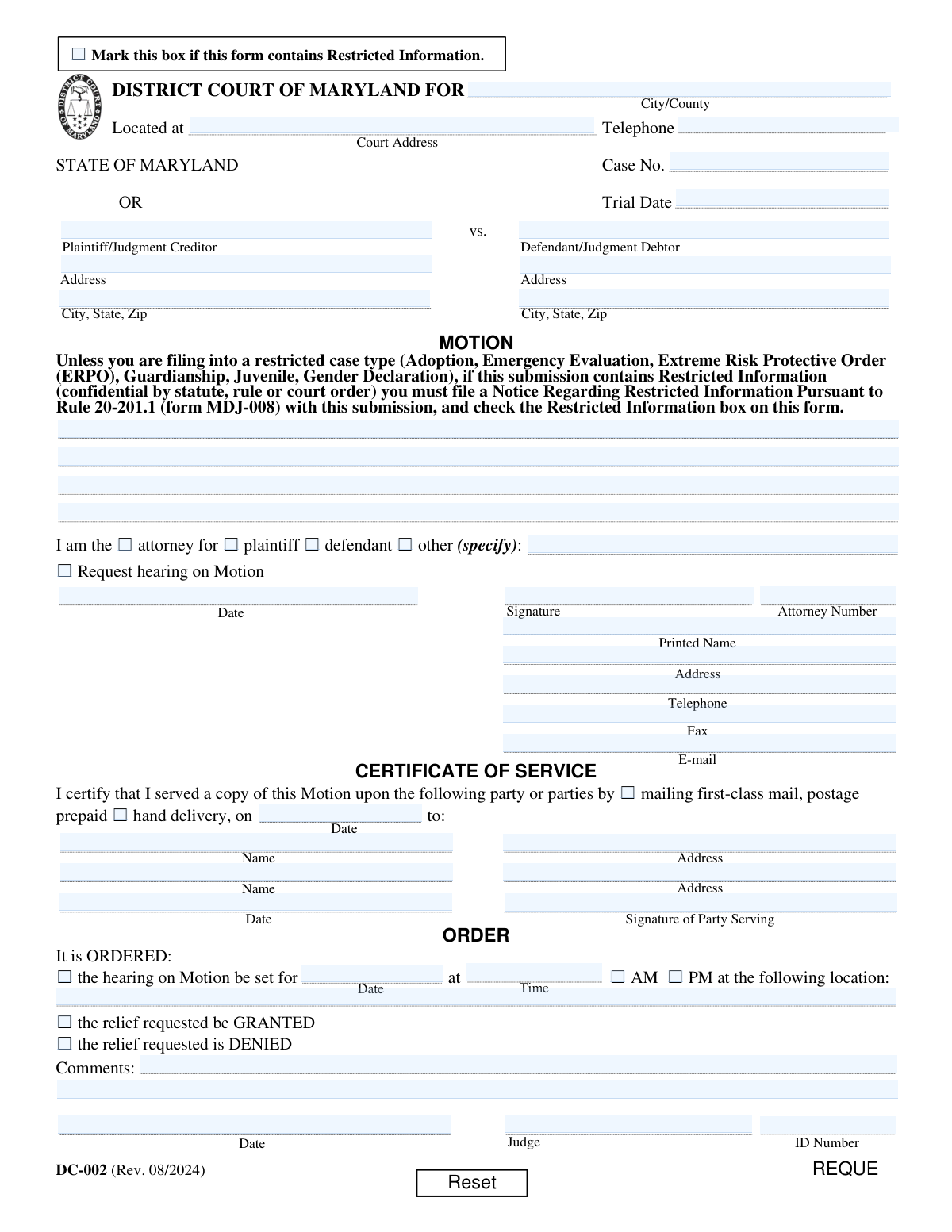
Yes! You can use AI to fill out Form DC-002, Motion

Form DC-002, known as a Motion, is a critical document filed in the District Court of Maryland by a plaintiff, defendant, or their attorney to ask the court to take a specific action in a case. Filing a motion is the proper procedural step for requesting orders, such as changing a trial date, dismissing a claim, or compelling the other party to provide information. Today, this form can be filled out quickly and accurately using AI-powered services like Instafill.ai, which can also convert non-fillable PDF versions into interactive fillable forms.
Our AI automatically handles information lookup, data retrieval, formatting, and form filling.
It takes less than a minute to fill out DC-002 using our AI form filling.
Securely upload your data. Information is encrypted in transit and deleted immediately after the form is filled out.

Form specifications

Form name: Form DC-002, Motion
Number of pages: 1
Language: English
main-image

Instafill Demo: How to fill out PDF forms in seconds with AI

How to Fill Out DC-002 Online for Free in 2026

Are you looking to fill out a DC-002 form online quickly and accurately? Instafill.ai offers the #1 AI-powered PDF filling software of 2026, allowing you to complete your DC-002 form in just 37 seconds or less.
Follow these steps to fill out your DC-002 form online using Instafill.ai:
  1. 1 Navigate to Instafill.ai and upload or select the Maryland Form DC-002.
  2. 2 Provide the court and case information, including the county, court address, case number, and trial date.
  3. 3 Enter the full names and addresses for both the Plaintiff/Judgment Creditor and the Defendant/Judgment Debtor.
  4. 4 Clearly state your role (e.g., attorney, plaintiff, defendant) and write the specific legal request and supporting arguments in the main motion text box.
  5. 5 Complete the Certificate of Service section, indicating how and when you provided a copy of the motion to the opposing party.
  6. 6 Review all the information populated by the AI for accuracy, then e-sign and date the motion before filing it with the court.

Our AI-powered system ensures each field is filled out correctly, reducing errors and saving you time.

Why Choose Instafill.ai for Your Fillable DC-002 Form?

Speed

Complete your DC-002 in as little as 37 seconds.

Up-to-Date

Always use the latest 2026 DC-002 form version.

Cost-effective

No need to hire expensive lawyers.

Accuracy

Our AI performs 10 compliance checks to ensure your form is error-free.

Security

Your personal information is protected with bank-level encryption.

Frequently Asked Questions About Form DC-002

This form is used to make a formal request to a judge in an existing District Court case. Parties use it to ask the court to take a specific action, such as postponing a trial, modifying an order, or compelling the other party to do something.

Any party involved in a District Court case can file this form, including the plaintiff, defendant, or their attorneys. You must check the box indicating your role in the case (e.g., attorney for plaintiff, self-represented defendant).

You must provide the court location, the case number, and the full names and addresses for both the plaintiff (or judgment creditor) and the defendant (or judgment debtor). This information should match all other documents in your case.

In this section, you must clearly state what you are asking the court to do and provide the factual and legal reasons supporting your request. Be specific, organized, and explain why the judge should rule in your favor.

Check this box only if your motion contains sensitive information defined as confidential by law, such as financial account numbers or medical details. If you check it, you must also file a separate 'Notice Regarding Restricted Information' (form MDJ-008).

Yes, this section is mandatory. It is your sworn statement certifying that you have sent a copy of the motion to the opposing party, and you must specify the date and method of delivery (mail or hand delivery).

Check the 'Request hearing on Motion' box if you want to argue your motion in person before the judge. If you don't request a hearing, the judge may make a decision based only on the written documents filed by both sides.

This section is for court use only and should be left blank when you file the form. The judge will complete this part to indicate their decision, set a hearing date, or provide other instructions.

Yes, services like Instafill.ai use AI to help you accurately auto-fill form fields with your saved information, which can save time and reduce the risk of errors.

You can use a service like Instafill.ai to fill out the form online. Simply upload the PDF, and the platform will convert it into a fillable format where you can type your information, save, and download the completed document.

If you have a non-fillable or 'flat' PDF, you can use a tool like Instafill.ai to convert it into an interactive, fillable form. This allows you to easily type your information directly into the fields instead of printing and writing by hand.

The Case Number is assigned by the court when the lawsuit is first filed. It appears on all official court notices and documents related to your case, and you must copy it exactly onto this form.

You must file the original, signed motion with the clerk of the court where your case is being heard. You must also send a complete copy to the other party or their attorney as indicated in your Certificate of Service.

Compliance DC-002
Validation Checks by Instafill.ai

Common Mistakes in Completing DC-002

Mishandling Restricted Information

Filers often overlook the 'Restricted Information' checkbox or fail to file the required Notice (form MDJ-008) when their motion contains sensitive data. This happens due to a misunderstanding of what constitutes restricted information, such as financial account numbers or medical details. This error can lead to the public disclosure of confidential data and rejection of the filing by the court clerk, causing significant delays. Always review your motion for sensitive details and, if present, check the box and file the separate MDJ-008 form as instructed.

Entering an Incorrect or Incomplete Case Number

People frequently enter the case number with typos, transposed digits, or missing the letters and dashes that are part of the official number. This is a critical error because the case number is the primary identifier for the court's filing system. An incorrect number will cause the motion to be misfiled or rejected, leading to significant delays and potentially missed deadlines. To avoid this, carefully copy the case number exactly as it appears on previous court documents.

Writing a Vague or Incomplete Motion

A common failure is not clearly stating the factual background, the legal reason for the request, and the specific relief the filer wants the judge to grant in the 'MOTION' text area. This often occurs when a self-represented party is unsure of legal phrasing. A vague motion is likely to be denied because the judge cannot understand what is being asked or why. To avoid this, clearly state 'I am asking the Court to...' and then list the specific order you want, followed by the facts and rules that support your request.

Errors in the Certificate of Service

This section is frequently filled out incorrectly, with filers forgetting to specify the date of service, check the method (mail or hand delivery), or sign it. An improper Certificate of Service can invalidate the entire motion, as it fails to provide the required proof that the opposing party was properly notified. Always complete this section immediately after serving the other party, ensuring every field is filled and the date, method, and signature are accurate.

Failing to Request a Hearing When Needed

Filers who want to argue their motion in person before a judge often forget to check the 'Request hearing on Motion' box. If this box is not checked, the judge may decide the motion based solely on the written documents ('on the papers'), without giving the filer a chance to present oral arguments or answer questions. If you believe a hearing is necessary to explain your position, you must explicitly request one by checking the appropriate box.

Using Incorrect or Incomplete Party Names

Filers may use nicknames, abbreviations, or misspell the full legal names of the Plaintiff/Judgment Creditor or Defendant/Judgment Debtor. The names on the motion must exactly match the names on the official court record to avoid confusion and potential legal challenges. Using an incorrect name can cause delays in processing or even lead to the motion being unenforceable against the intended party. Always use the full, correctly spelled legal names as they appear on the original complaint.

Incorrectly Identifying Filer's Role

Self-represented parties (acting as their own attorney) sometimes get confused and check the 'attorney' box or leave the entire representation section blank. This can cause confusion for the court clerk and the judge. If you are not a licensed attorney, you should check the box for the party you are (plaintiff or defendant) or, if applicable, check 'other' and specify 'self-represented' or 'pro se'.

Omitting Court Location Details

Filers sometimes forget to enter the specific City/County and address of the District Court where the case is being heard at the top of the form. This information is crucial for routing the document to the correct courthouse and clerk's office for filing. Submitting a motion without the proper court location will result in its rejection and return, delaying the legal process. Ensure the header is completely filled out with the correct court's name and address.

Submitting an Illegible Handwritten Form

When a form is only available as a non-fillable PDF, people print it and fill it out by hand, often with poor handwriting. Illegible information for names, addresses, or the motion text itself can make it impossible for the court to process the document, leading to rejection. To prevent this, it's best to use a fillable version. AI-powered tools like Instafill.ai can convert flat, non-fillable PDFs into fillable ones, ensuring all entries are clear and legible.

Attempting to Fill Out the Judge's 'ORDER' Section

A common mistake by inexperienced filers is to write in the 'ORDER' section at the bottom of the form, sometimes checking 'GRANTED' themselves. This section is reserved exclusively for the judge to issue their ruling on the motion. Filling out this part of the form will cause the filing to be rejected and demonstrates a misunderstanding of court procedure. Leave the entire 'ORDER' section blank for the judge to complete.
Saved over 80 hours a year

“I was never sure if my IRS forms like W-9 were filled correctly. Now, I can complete the forms accurately without any external help.”

Kevin Martin Green

Your data stays secure with advanced protection from Instafill and our subprocessors

Robust compliance program

Transparent business model

You’re not the product. You always know where your data is and what it is processed for.

ISO 27001, HIPAA, and GDPR

Our subprocesses adhere to multiple compliance standards, including but not limited to ISO 27001, HIPAA, and GDPR.

Security & privacy by design

We consider security and privacy from the initial design phase of any new service or functionality. It’s not an afterthought, it’s built-in, including support for two-factor authentication (2FA) to further protect your account.

Fill out DC-002 with Instafill.ai

Worried about filling PDFs wrong? Instafill securely fills form-dc-002-motion forms, ensuring each field is accurate.