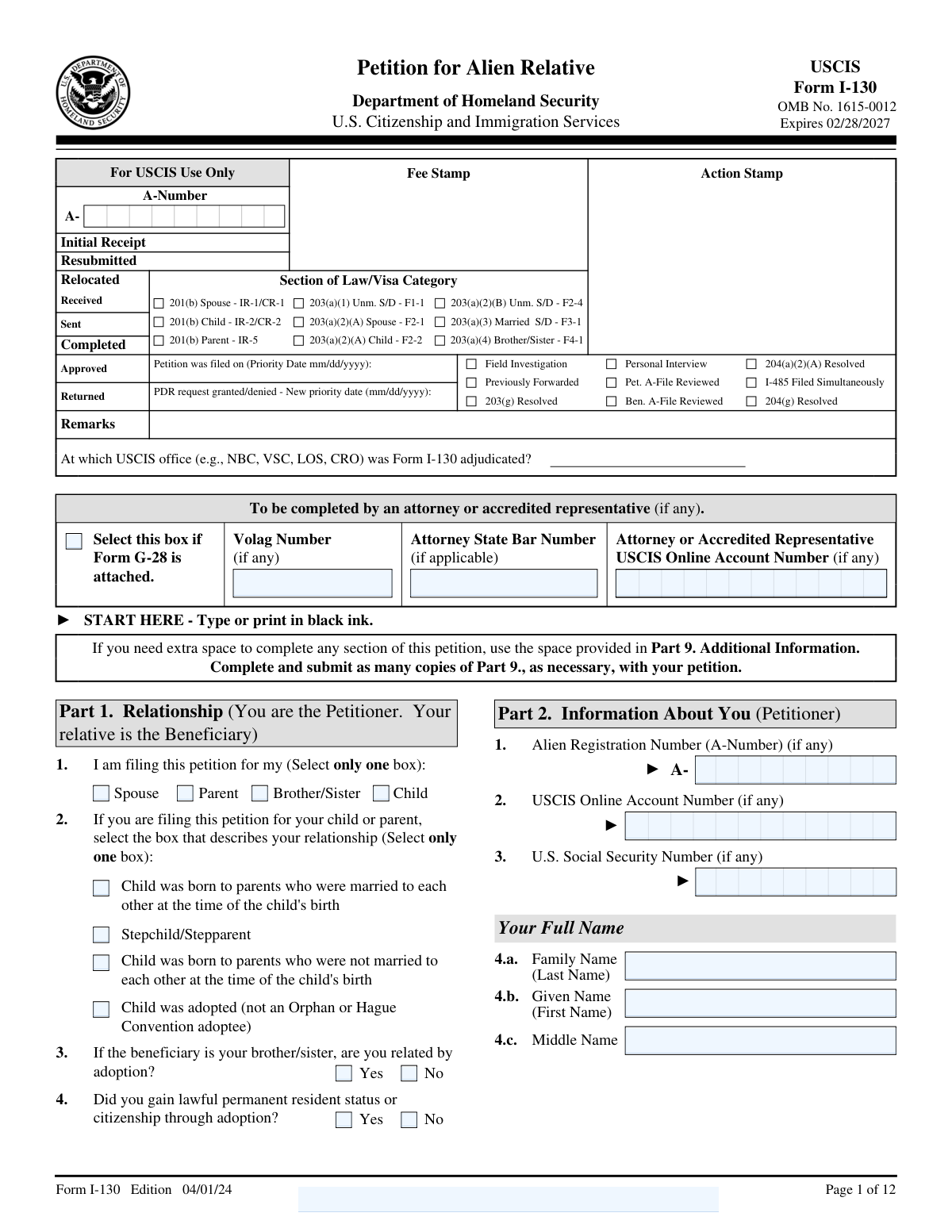
Yes! You can use AI to fill out Form I-130, Petition for Alien Relative
Form I-130 (Petition for Alien Relative) is a U.S. Citizenship and Immigration Services (USCIS) petition filed by a U.S. citizen or lawful permanent resident (the petitioner) to prove a qualifying family relationship with a foreign national relative (the beneficiary). Approval of the I-130 does not itself grant immigration status, but it is a foundational step that allows the beneficiary to apply for an immigrant visa abroad (consular processing) or apply to adjust status in the United States if eligible. The form collects detailed identity, address, marital, and immigration history information to help USCIS verify the relationship and screen for ineligibilities or fraud.
Our AI automatically handles information lookup, data retrieval, formatting, and form filling.
It takes less than a minute to fill out I-130 using our AI form filling.
Securely upload your data. Information is encrypted in transit and deleted immediately after the form is filled out.
Form specifications
| Form name: | Form I-130, Petition for Alien Relative |
| Number of pages: | 12 |
| Language: | English |
Instafill Demo: filling out a legal form in seconds
How to Fill Out I-130 Online for Free in 2026
Are you looking to fill out a I-130 form online quickly and accurately? Instafill.ai offers the #1 AI-powered PDF filling software of 2026, allowing you to complete your I-130 form in just 37 seconds or less.
Follow these steps to fill out your I-130 form online using Instafill.ai:
- 1 Select the correct relationship category in Part 1 (spouse, parent, child, or sibling) and indicate any adoption/step-relationship details that apply.
- 2 Enter the petitioner’s personal details in Part 2, including full legal name, A-Number/USCIS online account number (if any), birth information, addresses for the last five years, marital history, and parent information, plus citizenship or LPR details.
- 3 Complete the petitioner’s recent employment history and biographic information in Part 2/Part 3 (ethnicity, race, height/weight, eye/hair color) as requested.
- 4 Provide the beneficiary’s information in Part 4, including identity details, other names used, birth details, addresses (U.S. intended address and foreign address if different), contact info, marital history, family members, and any prior petitions filed for them.
- 5 Fill in the beneficiary’s entry/immigration and employment details in Part 4 (U.S. entry history, I-94 details if applicable, passport/travel document info, and any immigration proceedings).
- 6 Answer Part 5 about prior petitions and indicate whether the beneficiary will pursue adjustment of status in the U.S. or consular processing at a specific U.S. embassy/consulate abroad.
- 7 Review all answers, use Part 9 for any overflow explanations, then complete Part 6 signatures (and Parts 7–8 if an interpreter or preparer was used) and prepare supporting documents for submission.
Our AI-powered system ensures each field is filled out correctly, reducing errors and saving you time.
Why Choose Instafill.ai for Your Fillable I-130 Form?
Speed
Complete your I-130 in as little as 37 seconds.
Up-to-Date
Always use the latest 2026 I-130 form version.
Cost-effective
No need to hire expensive lawyers.
Accuracy
Our AI performs 10 compliance checks to ensure your form is error-free.
Security
Your personal information is protected with bank-level encryption.
Frequently Asked Questions About Form I-130
Form I-130 (Petition for Alien Relative) is used by a U.S. citizen or lawful permanent resident (LPR) to ask USCIS to recognize a qualifying family relationship with a foreign national relative (the beneficiary). Approval establishes the relationship for immigration purposes and may allow the beneficiary to apply for a green card through adjustment of status or consular processing.
The petitioner is the U.S. citizen or LPR filing the form. The beneficiary is the foreign national relative you are petitioning for.
In Part 1 you must choose only one relationship category: spouse, parent, child, or brother/sister. If you are filing for a child or parent, you must also select the box that best describes the relationship (for example, child born in wedlock, child born out of wedlock, stepchild/stepparent, or adopted child as listed).
If the form asks whether you gained LPR status or citizenship through adoption, answer based on how you obtained your status. If petitioning for a brother/sister, you must also indicate whether you are related by adoption, and you should be prepared to provide adoption-related documentation if applicable.
If you do not have one of these numbers, leave that field blank or follow the form’s “if any” instruction. Do not invent a number; only provide identifiers that were actually issued to you or the beneficiary.
List your mailing address in Part 2, Item 10, then answer Item 11 about whether it matches your physical address. If you answer “No,” provide your physical address details and your address history for the last five years as requested.
You must list your physical addresses for the last five years (Part 2, Address History) and your employment for the last five years (Part 2, Employment History), starting with the most recent. If you are unemployed, the form instructs you to write “Unemployed” for the employer name.
You must provide current marital status, how many times you (or the beneficiary) have been married, and list current spouse first and then prior spouses. Include marriage dates and, if a marriage ended, the date it ended (for example, divorce date).
The form states that if the beneficiary lives outside the United States in a home without a street number or name, you may leave the street number/name fields blank. Complete the remaining address fields (city/town, province, country, postal code) as accurately as possible.
For the “intends to live” U.S. address (Part 4, Item 12) or the address outside the U.S. (Part 4, Item 13), the form instructs you to write “SAME” if it is the same as the address already listed. This helps avoid repeating identical address information.
Select “Yes,” “No,” or “Unknown” in Part 4, Item 10. The form notes you should choose “Unknown” only if you and the beneficiary truly do not know whether a petition was ever filed.
If you answer “Yes” to whether the beneficiary was ever in the U.S. (Part 4, Item 45), you may need to provide entry details such as class of admission, I-94 number, date of arrival, and the authorized stay expiration date or “D/S” if shown on the I-94/I-95. You may also need passport/travel document details.
If you answer “Yes” to Part 4, Item 53, you must select the type of proceedings (for example, removal or exclusion/deportation) and provide the location and date. Provide the most accurate information you have and use Part 9 (Additional Information) if you need more space.
If the beneficiary is in the U.S. and will apply for adjustment of status, you list the USCIS office location in Part 4, Item 61. If the beneficiary will apply for an immigrant visa abroad, you list the U.S. Embassy/Consulate city and country in Part 4, Item 62; the form notes that choosing a post outside the beneficiary’s last residence does not guarantee it will accept the case.
Complete Part 7 only if you used an interpreter, and Part 8 only if someone other than you prepared the petition. If an attorney or accredited representative is representing you beyond just preparing the form, the form indicates you may need to submit Form G-28 and check the box showing it is attached.
Compliance I-130
Validation Checks by Instafill.ai
1
Part 1 Relationship Selection (Exactly One Primary Relationship)
Validate that the petitioner selected exactly one option in Part 1, Item 1 (Spouse, Parent, Child, Brother/Sister). This drives eligibility, required evidence, and downstream questions, so multiple selections or no selection can cause incorrect adjudication routing. If validation fails, block submission and prompt the user to select exactly one relationship.
2
Child/Parent Relationship Subtype Required When Applicable
If Part 1, Item 1 indicates the petition is for a Child or Parent, ensure exactly one box is selected in Part 1, Item 2 (married parents at birth, unmarried parents at birth, adopted (not orphan/Hague), stepchild/stepparent). This subtype determines legal relationship rules and required documentation. If missing or multiple are selected, flag as incomplete and require correction before acceptance.
3
Sibling-by-Adoption Consistency Check
If Part 1, Item 1 is Brother/Sister, require an explicit Yes/No answer to Part 1, Item 4 (related by adoption). This affects evidentiary requirements and may change eligibility analysis. If unanswered or inconsistent (e.g., adoption indicated but no adoption-related details provided elsewhere), fail validation and request completion/clarification.
4
A-Number Format Validation (Petitioner and Beneficiary)
Validate Alien Registration Numbers wherever provided (e.g., Part 2 Item 1; Part 4 Item 1; Part 9 header) follow USCIS formatting rules: typically 7–9 digits, may be entered with or without the leading 'A', and must not contain letters other than an optional leading 'A'. This prevents mismatches and lookup failures in USCIS systems. If invalid, reject the value and require re-entry in the correct format.
5
USCIS Online Account Number Format Validation
Where a USCIS Online Account Number is provided (petitioner and beneficiary), validate it is numeric and matches expected length/structure used by USCIS online accounts (commonly 12 digits). This ensures the case can be linked to the correct online profile. If validation fails, prompt the filer to correct the number or leave it blank if unknown.
6
U.S. Social Security Number (SSN) Format and Plausibility
If an SSN is provided for petitioner or beneficiary, validate it is 9 digits (allowing optional hyphens) and reject clearly invalid patterns (e.g., all zeros in any group, 000-xx-xxxx, xxx-00-xxxx, xxx-xx-0000). Correct SSNs reduce identity mismatches and downstream verification issues. If invalid, block submission until corrected or removed (if truly not applicable).
7
Date Field Format and Realistic Range Validation
Validate all dates use mm/dd/yyyy and represent real calendar dates (including leap-year rules), including birth dates, marriage dates, address history dates, employment dates, admission/arrival dates, passport expiration, and signature dates. Also enforce reasonable ranges (e.g., not in the far future for birth dates; not before 1900 unless explicitly allowed). If invalid, return field-level errors and require correction.
8
Petitioner Status-Dependent Required Fields (U.S. Citizen vs LPR)
If Part 2 Item 36 indicates U.S. Citizen, require completion of Item 37 (citizenship acquisition method) and, if Item 38 is 'Yes', require certificate number, place of issuance, and date of issuance (Items 39.a–39.c). If Item 36 indicates Lawful Permanent Resident, require Items 40.a–40.d (class/date/place/state of admission) and Item 41 (LPR through marriage) to be answered. If the required branch fields are missing, fail validation because eligibility cannot be determined.
9
Marital Status vs Number of Marriages and Spouse List Consistency (Petitioner)
Validate that the petitioner's current marital status (Part 2 Item 17) is consistent with the number of marriages (Item 16) and the spouse entries provided (Spouse 1/Spouse 2 sections). For example, if 'Single, Never Married' then number of marriages must be 0 and no spouse details should be present; if 'Married' then current marriage date and current spouse details must be present. If inconsistent, flag the conflicting fields and require correction to prevent relationship and eligibility errors.
10
Marriage Date/End Date Logical Ordering (Petitioner and Beneficiary)
For each marriage record, ensure the marriage start date precedes any marriage end date, and that end dates are present when marital status indicates divorced/annulled/widowed (as applicable). Also ensure no overlapping marriage periods unless explicitly supported by jurisdictional rules (generally not allowed). If ordering/overlap checks fail, block submission and request corrected dates or explanations in Part 9.
11
Address Completeness and Conditional Physical Address Requirement
Validate mailing address fields (Part 2 Item 10) are complete (street, city, state/province, ZIP/postal code, country) and that Item 11 (mailing same as physical) is answered. If Item 11 is 'No', require Physical Address 1 (Items 12.a–12.h) and address history dates (13.a–13.b) as applicable; if 'Yes', ensure physical address history still covers the last five years per instructions. If incomplete, fail validation because USCIS correspondence and jurisdiction depend on accurate addresses.
12
Five-Year Address History Coverage and Date Continuity
Validate that the petitioner’s address history (Part 2 Address History section) covers the last five years without unexplained gaps, using Date From/Date To fields and ensuring Date From <= Date To. This is important for background checks and residency verification. If gaps exist, require additional address entries or an explanation in Part 9 before submission.
13
Five-Year Employment History Coverage and Unemployed Handling
Validate that the petitioner’s employment history (Part 2 Employment History) covers the last five years, with Date From/Date To continuity and no impossible overlaps, and that 'Unemployed' is explicitly entered in Item 42 when applicable. Employment history is used for identity vetting and consistency checks. If coverage is incomplete or dates are invalid, prompt for additional employers/periods or corrections.
14
Beneficiary Presence in the U.S. Branching and I-94/D/S Validation
If Part 4 Item 45 indicates the beneficiary has been in the U.S. and is currently in the U.S., require Items 46.a–46.d, including class of admission, I-94 number, date of arrival, and authorized stay expiration or 'D/S'. Validate the I-94 number is numeric and of expected length, and validate that 46.d is either a valid date or exactly 'D/S'. If missing/invalid, fail validation because status/processing path depends on these details.
15
Passport/Travel Document Fields Consistency and Expiration Check
If a passport or travel document number is provided (Items 47–50), require country of issuance and expiration date, and validate expiration date is after the date of arrival (if provided) and is a valid future/past date as appropriate. This prevents incomplete travel identity data and reduces consular processing issues. If inconsistent or incomplete, require completion or removal of partial entries.
16
Adjustment of Status vs Consular Processing Location Requirement
Validate that exactly one processing path is completed: either the beneficiary will apply for adjustment of status in the U.S. (Part 4 Item 61 with USCIS office location) or will apply for an immigrant visa abroad (Part 4 Item 62 with city/country/province). If both are filled or both are blank, the case cannot be routed correctly. If validation fails, block submission and require the filer to complete only the applicable section.
17
Signature and Interpreter/Preparer Conditional Requirements
Require the petitioner’s ink signature and signature date (Part 6 Items 6.a–6.b) and validate the signature date is not in the future. If Part 6 Item 1.b indicates an interpreter was used, require Part 7 to be fully completed and signed/dated; if Part 6 Item 2 indicates a preparer was used, require Part 8 to be fully completed and signed/dated, and if the G-28 box is checked, ensure a representative bar number/state (if applicable) is provided. If any required signature block is missing, fail validation because USCIS will reject unsigned or improperly prepared filings.
Common Mistakes in Completing I-130
People often check the wrong box (for example, choosing “Child” when the case is actually a stepchild, or selecting multiple boxes when the form says “Select only one box”). This can place the case in the wrong legal category/visa classification and trigger delays, Requests for Evidence (RFEs), or even denial. Avoid this by confirming the exact qualifying relationship (spouse/parent/child/sibling) and, if applicable, whether it is step or adoption-based before checking a single box.
For parent/child filings, applicants frequently pick the wrong subcategory about the parents’ marital status at the child’s birth or overlook the special options for step-relationships and adoption. This mistake happens because people answer based on current family circumstances rather than the legal facts at the time of birth/adoption/step-relationship creation. The consequence is USCIS may question eligibility and request additional proof (legitimation, marriage certificates, adoption decrees, etc.). Avoid it by matching the selection to the legal record and dates (birth certificate details, parents’ marriage date, adoption finalization date).
Many filers confuse the A-Number with the USCIS Online Account Number, a receipt number, or an SSN, and either leave it blank when they have one or enter the wrong number. This can cause mis-linking to existing immigration records and slow adjudication or create mismatched identity issues. Avoid it by copying the A-Number exactly as shown on prior USCIS documents (often formatted as A-#########), and only entering the USCIS Online Account Number if you actually have one.
A very common error is writing dates in dd/mm/yyyy format, using text (e.g., “June 2020”), or creating impossible timelines (marriage end date before marriage date, address dates overlapping incorrectly). These errors happen especially for filers used to non-U.S. date formats or reconstructing history from memory. USCIS may issue an RFE or treat the form as incomplete/unclear. Avoid it by converting all dates to mm/dd/yyyy and cross-checking marriage, address, employment, and entry dates for consistency.
Filers often put a physical address in the mailing section, forget to answer whether the mailing and physical addresses are the same, or fail to provide the last five years of physical addresses with “Date From/Date To.” This happens because people assume USCIS only needs the current address or they move frequently and can’t recall dates. Consequences include returned mail, missed notices, and RFEs for incomplete address history. Avoid it by clearly separating where you receive mail from where you live and listing every physical address for the last five years with approximate dates if exact dates are unknown (and explaining in Part 9 if needed).
Applicants frequently leave “Other Names Used” blank even when there are maiden names, prior legal names, different transliterations, or common alternate spellings. This often happens because they think it only applies to “aliases” in a negative sense, or they assume USCIS will infer name changes from documents. The consequence is identity/record mismatches, background check delays, and RFEs asking for clarification. Avoid it by listing every name ever used on official records (including maiden name and alternate spellings) and keeping it consistent with passports, birth certificates, and prior filings.
People commonly enter the current marriage but forget to list prior spouses, misstate “How many times have you been married?”, or omit divorce/annulment end dates. This happens because they focus only on the relationship being petitioned or assume prior marriages are irrelevant. USCIS may question eligibility (especially for spousal cases) and request divorce decrees or additional evidence. Avoid it by counting all marriages (including annulments) and providing complete spouse names and exact marriage-ended dates as shown on legal documents.
Petitioners often select “U.S. Citizen” but fail to complete the follow-up questions (how citizenship was acquired, certificate details), or LPRs skip class/date/place of admission and the marriage-based LPR question. This happens because filers assume status is obvious from a green card or passport and overlook conditional follow-ups. Missing or inconsistent status information can lead to RFEs or delays verifying eligibility and category. Avoid it by completing every required sub-item for the status you select and copying certificate/admission details directly from the document.
Applicants frequently leave the employer name blank when unemployed, omit employer addresses, or provide only one job without covering the full five-year period. This happens because people think employment is optional or they don’t know how to present periods of unemployment, school, or informal work. USCIS may treat the section as incomplete and issue an RFE or question credibility if timelines don’t match other records. Avoid it by listing current employment first, covering the full five years, and explicitly writing “Unemployed” (and using Part 9 to explain gaps or informal work if needed).
When the beneficiary has been in the U.S., filers often enter the wrong I-94 number, confuse visa type with class of admission, or write an expiration date when the I-94 shows “D/S” (Duration of Status). This happens because people rely on the visa foil in the passport instead of the I-94 record, or they don’t understand D/S. Incorrect entry data can cause status verification problems and delays, especially if adjustment of status is planned. Avoid it by using the most recent I-94 record (and writing “D/S” exactly when applicable) and matching class of admission to the I-94, not the visa label.
Filers sometimes select a consulate in a country where the beneficiary does not reside, leave the consulate/USCIS office fields blank, or misunderstand whether the beneficiary will adjust status in the U.S. versus consular process abroad. This happens because people choose a “preferred” location without realizing consulates can refuse cases outside the beneficiary’s residence, or they are unsure of the beneficiary’s plan. The consequence is processing delays, case transfers, or additional instructions from NVC/USCIS. Avoid it by deciding the intended path (AOS vs. consular processing) and listing the correct USCIS office (for AOS) or the appropriate embassy/consulate tied to the beneficiary’s residence (for consular processing).
Saved over 80 hours a year
“I was never sure if my IRS forms like W-9 were filled correctly. Now, I can complete the forms accurately without any external help.”
Kevin Martin Green
Your data stays secure with advanced protection from Instafill and our subprocessors

Robust compliance program
Transparent business model
You’re not the product. You always know where your data is and what it is processed for.
ISO 27001, HIPAA, and GDPR
Our subprocesses adhere to multiple compliance standards, including but not limited to ISO 27001, HIPAA, and GDPR.
Security & privacy by design
We consider security and privacy from the initial design phase of any new service or functionality. It’s not an afterthought, it’s built-in, including support for two-factor authentication (2FA) to further protect your account.
Fill out I-130 with Instafill.ai
Worried about filling PDFs wrong? Instafill securely fills form-i-130-petition-for-alien-relative forms, ensuring each field is accurate.