Fill out Form I-751, Petition to Remove Conditions on Residence with Instafill.ai
Worried about filling PDFs wrong? Instafill securely fills I-751 forms, ensuring each field is accurate.
#1 AI PDF Filling Software of 2026
3 out of 4 customers say they prepare their Form I-751 forms in 37 seconds or less
Secure platform for your PDF forms and personal information
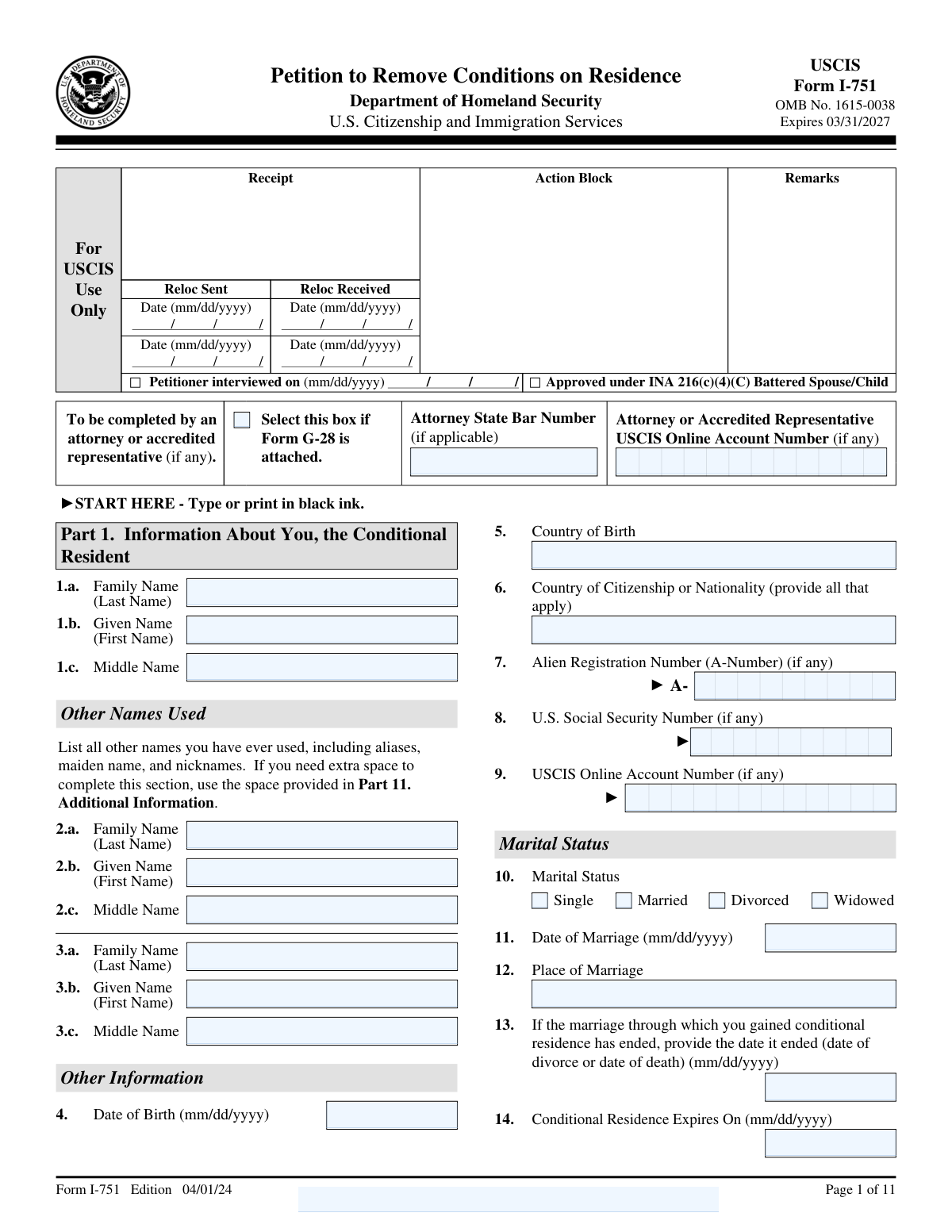
| Form name: | Form I-751, Petition to Remove Conditions on Residence |
| Number of fields: | 330 |
| Number of pages: | 11 |
| FCI: | Complex (71/100) |
Form Complexity Index
Complex
71 / 100
| Fillable fields | 330 |
| Pages | 11 |
| Fields per page | 30 |
| Sections | 79 |
| Conditional rules | — |
| Tables & lists | — |
| Instruction pages | — |
| OMB Control No. | 1615-0038 |
| Instafill Form ID | IF-I-751 |
Form I-751 has a complex Form Complexity Index of 71/100. Instafill’s AI completes it accurately in under a minute.
Instafill Demo: How to fill out PDF forms in seconds with AI
Compliance Form I-751
Validation Checks by Instafill.ai
1
Confirms that the form is completed using black ink, ensuring clarity and legibility.
This validation check ensures that the form is filled out using black ink, which is a requirement for clarity and legibility. It verifies that all entries are easily readable, preventing any misinterpretation of the information provided. By enforcing this standard, the software helps to maintain the integrity of the submission process. This check is crucial for ensuring that the reviewing authorities can accurately assess the information without confusion.
2
Verifies that the full name provided matches legal documents, including any other names used.
This validation check confirms that the full name entered on the form aligns with the names found on legal documents. It ensures that any variations or alternate names used by the individual are also accounted for, which is essential for identity verification. By cross-referencing this information, the software helps to prevent discrepancies that could delay the processing of the petition. This check is vital for establishing a clear and consistent identity throughout the application.
3
Ensures that the date of birth is accurately filled in and matches legal identification.
This validation check verifies that the date of birth provided on the form is accurate and corresponds with the information on legal identification documents. It ensures that there are no typographical errors that could lead to complications in the processing of the petition. By confirming this critical piece of information, the software helps to uphold the accuracy of the applicant's identity. This check is essential for preventing any potential issues related to age or eligibility.
4
Checks that marital status is correctly indicated and that marriage details, including date and place, are provided.
This validation check ensures that the marital status is accurately indicated on the form, along with the necessary details of the marriage. It verifies that the date and place of the marriage are included, which are crucial for the assessment of the petition. By confirming these details, the software helps to establish the legitimacy of the marriage, which is a key factor in the petition process. This check is important for ensuring that all relevant information is provided for a thorough review.
5
Validates that if the marriage has ended, the date of termination is included.
This validation check confirms that if the marriage has ended, the date of termination is clearly stated on the form. It ensures that this critical information is not overlooked, as it is necessary for the accurate processing of the petition. By validating this detail, the software helps to clarify the applicant's current marital status, which is essential for the evaluation of the case. This check is significant for maintaining transparency and completeness in the application.
6
Confirms that both mailing and physical addresses are provided if they differ.
This validation check ensures that the form includes both mailing and physical addresses when they are not the same. It verifies that the applicant has provided complete and accurate information regarding their residence. By checking this, the software helps prevent any potential issues with communication or processing of the petition. This step is crucial for maintaining the integrity of the application process.
7
Ensures that all questions regarding criminal history are answered truthfully and completely.
This validation check verifies that the applicant has answered all questions related to their criminal history in a truthful and comprehensive manner. It confirms that no relevant information is omitted, which could affect the outcome of the petition. By enforcing this check, the software helps to uphold the legal requirements and ensures that the petition is processed fairly. This step is vital for maintaining transparency and trust in the application process.
8
Verifies that biographic information, including height, weight, ethnicity, race, eye color, and hair color, is accurately filled out.
This validation check ensures that all biographic information provided by the applicant is accurate and complete. It verifies that details such as height, weight, ethnicity, race, eye color, and hair color are filled out correctly. By conducting this check, the software helps to prevent discrepancies that could lead to delays or complications in processing the petition. Accurate biographic information is essential for the identification and verification of the applicant.
9
Checks that the basis for the petition is clearly indicated, whether filing jointly or requesting a waiver.
This validation check confirms that the applicant has clearly indicated the basis for their petition, whether they are filing jointly with their spouse or requesting a waiver. It ensures that the form reflects the correct circumstances surrounding the petition, which is crucial for proper processing. By verifying this information, the software helps to streamline the review process and reduce the likelihood of misunderstandings. Clarity in the basis for the petition is essential for the adjudication of the application.
10
Ensures that the full name, date of birth, and address of the U.S. citizen or lawful permanent resident spouse are provided.
This validation check ensures that the form includes the full name, date of birth, and address of the U.S. citizen or lawful permanent resident spouse. It verifies that this critical information is accurately provided, which is necessary for the processing of the petition. By conducting this check, the software helps to ensure that all relevant parties are properly identified and that the application can be processed without unnecessary delays. Accurate information about the spouse is vital for the integrity of the petition.
11
Validates that all children are listed with their names, dates of birth, and living arrangements.
This validation check ensures that all children are accurately listed on the form, including their full names, dates of birth, and current living arrangements. It verifies that no child is omitted, which is crucial for the completeness of the petition. By confirming this information, the software helps to prevent any potential delays or issues with the processing of the petition. This thoroughness is essential for maintaining compliance with immigration requirements.
12
Confirms that any required accommodations for disabilities are indicated if applicable.
This validation check verifies that any necessary accommodations for disabilities are clearly indicated on the form, if applicable. It ensures that the petition is accessible and considers the needs of individuals with disabilities. By confirming this information, the software helps to facilitate a smoother process for those who may require special assistance. This attention to detail is vital for ensuring that all petitioners receive fair treatment under the law.
13
Ensures that the petitioner's statement is signed and dated, with provisions for a parent to sign if under 14.
This validation check ensures that the petitioner's statement is properly signed and dated, which is a critical requirement for the validity of the form. It also verifies that there are provisions for a parent or guardian to sign on behalf of any children under the age of 14. By confirming these signatures, the software helps to uphold the legal integrity of the petition. This step is essential to prevent any potential legal challenges or rejections due to missing signatures.
14
Verifies that the spouse's or individual's statement is signed if applicable, confirming their understanding of the petition.
This validation check verifies that the spouse's or individual's statement is signed when applicable, confirming their understanding and agreement with the contents of the petition. It ensures that all parties involved are aware of the implications of the petition, which is crucial for transparency and consent. By confirming this signature, the software helps to mitigate any disputes that may arise regarding the petition's validity. This thorough verification process is essential for maintaining the integrity of the application.
15
Checks that interpreter's information is provided and that they have signed the form if assistance was used.
This validation check ensures that the interpreter's information is provided on the form, along with their signature if assistance was utilized during the completion of the petition. It verifies that the interpreter is properly identified, which is important for accountability and clarity. By confirming this information, the software helps to ensure that all communications are accurately represented and understood. This step is crucial for maintaining the integrity of the petition process, especially for non-English speakers.
16
Ensures that preparer's information is completed, including contact details and signature if someone else prepared the petition.
This validation check ensures that the preparer's information is fully completed on the form. It verifies that all necessary contact details are provided, including the preparer's name, address, and phone number. Additionally, it confirms that a signature is included if the petition is prepared by someone other than the applicant. This step is crucial to maintain accountability and ensure that the petition can be properly processed.
17
Confirms that any additional information is provided in the additional information section or on attached sheets with the name and A-Number.
This validation check verifies that any additional information required by the form is adequately provided. It ensures that the applicant has utilized the additional information section or attached sheets as necessary. Furthermore, it confirms that these attachments include the applicant's name and A-Number for proper identification. This is essential to ensure that all relevant details are considered during the review of the petition.
Common Mistakes in Completing Form I-751
Filling out Form I-751 in colors other than black can lead to issues with readability and processing. It is essential to use black ink to ensure that all information is clearly visible and can be easily scanned or read by the reviewing officer. To avoid this mistake, always check your writing instrument before starting to fill out the form and consider using a black pen specifically for this purpose.
Providing a name that does not match the legal documents can result in delays or denials of the petition. It is crucial to ensure that the name entered on the form exactly matches the name on your legal identification and immigration documents. To prevent this error, double-check your legal documents before filling out the form and consider having someone else review the name for accuracy.
Omitting critical information such as the date of birth or marital status can lead to incomplete applications and processing delays. Each section of the form is designed to gather specific information necessary for the review process. To avoid this mistake, carefully read the instructions for each section and ensure that all required fields are filled out completely before submitting the form.
Failing to provide comprehensive details about the marriage or its dissolution can raise red flags during the review process. It is important to include all relevant information, such as the date of marriage, the circumstances of its end, and any supporting documentation. To mitigate this issue, take the time to gather all necessary information and documents related to your marriage and ensure that they are accurately reflected in the form.
Neglecting to include both mailing and physical addresses can lead to communication issues and delays in processing. It is essential to provide complete and accurate address information to ensure that all correspondence regarding your petition reaches you promptly. To avoid this mistake, verify that you have both addresses available and clearly indicate them on the form, ensuring that they are up to date.
Accurate disclosure of criminal history is crucial when filling out Form I-751. Failing to provide complete and truthful information can lead to delays or denials of the petition. To avoid this mistake, review your criminal history thoroughly and ensure that all relevant incidents are disclosed. It is advisable to consult with an immigration attorney if you have concerns about how to present this information.
Providing incomplete biographic information, such as height or weight, can result in processing delays or requests for additional information. It is essential to fill out all sections of the form completely and accurately. Double-check the biographic details before submission to ensure that nothing is missing. Consider using a checklist to verify that all required information is included.
Selecting the incorrect basis for your petition can lead to significant complications in the processing of your Form I-751. It is important to carefully read the instructions and understand the options available to ensure you select the correct basis. To avoid this mistake, take the time to review the eligibility criteria and consult with an immigration professional if you are uncertain. This will help ensure that your petition is filed correctly from the start.
Omitting your spouse's full name and relevant details can result in your petition being deemed incomplete. It is vital to provide accurate and complete information about your spouse, as this is a key component of the petition. To prevent this mistake, verify that you have included all necessary details, such as full name, date of birth, and any other required information. A thorough review of the form before submission can help catch any omissions.
Failing to include information about children can lead to complications in the processing of your petition. It is essential to provide complete details about any children, including their names, dates of birth, and any other relevant information. To avoid this mistake, make a list of all children and ensure that their information is accurately reflected on the form. Reviewing the form with a focus on family details can help ensure that nothing is overlooked.
Failing to indicate any required accommodations for disabilities can lead to delays in processing or even rejection of the petition. It is essential to clearly state any specific needs to ensure that the petition is handled appropriately. To avoid this mistake, review the form carefully and include any necessary accommodations in the designated section. Additionally, consider consulting with a legal professional to ensure that all requirements are met.
Omitting the signature and date on the petitioner's statement is a critical error that can result in the petition being deemed incomplete. This oversight can cause significant delays in processing your application. To prevent this mistake, double-check that all required signatures and dates are included before submitting the form. It may be helpful to create a checklist of all necessary components to ensure nothing is overlooked.
If applicable, the spouse's statement must be signed; failing to do so can lead to complications in the petition process. This requirement is crucial for validating the relationship and the petition itself. To avoid this issue, ensure that both parties review the form together and confirm that all necessary signatures are present. It is advisable to have a trusted individual review the form to catch any missing signatures.
If an interpreter was used, their information must be included and signed; neglecting this can result in processing delays. This information is vital for verifying that the petitioner fully understands the content of the petition. To avoid this mistake, ensure that the interpreter completes their section accurately and signs the form. It may be beneficial to have the interpreter present during the completion of the form to ensure all details are correctly captured.
Incomplete or unsigned preparer's information can lead to questions about the authenticity of the petition. This can cause unnecessary delays and complications in the processing of the application. To prevent this mistake, ensure that the preparer fills out their section completely and signs it before submission. It is also wise to verify that all contact information is accurate to facilitate any necessary follow-up.
Submitting Form I-751 without all necessary supporting documents can lead to delays or denials. It is crucial to carefully review the list of required documents outlined in the instructions. To avoid this mistake, create a checklist of all required documents and ensure each one is included before submission. Additionally, consider organizing the documents in the order they are listed to facilitate the review process.
Failing to thoroughly review the completed Form I-751 can result in errors that may affect the outcome of the petition. Common errors include incorrect personal information or missing signatures. To prevent this, take the time to double-check each section of the form and ensure all information is accurate and complete. It may also be helpful to have someone else review the form for any overlooked mistakes.
Omitting important details in the additional information section can lead to misunderstandings or incomplete applications. This section is provided for applicants to clarify any complex situations or provide extra context. To avoid this mistake, carefully consider if there are any unique circumstances that should be explained and utilize this section to provide that information. Clear and concise explanations can help adjudicators understand your situation better.
Not retaining a copy of the submitted Form I-751 and supporting documents can create challenges if you need to reference them later. In case of inquiries or follow-ups, having a copy can be invaluable. To mitigate this risk, make photocopies or digital scans of all documents before sending them to USCIS. This practice ensures you have a complete record of your submission for future reference.
Saved over 80 hours a year
“I was never sure if my IRS forms like W-9 were filled correctly. Now, I can complete the forms accurately without any external help.”
Kevin Martin Green
Your data stays secure with advanced protection from Instafill and our subprocessors




Robust compliance program
Transparent business model
You’re not the product. You always know where your data is and what it is processed for.
ISO 27001, HIPAA, and GDPR
Our subprocesses adhere to multiple compliance standards, including but not limited to ISO 27001, HIPAA, and GDPR.
Security & privacy by design
We consider security and privacy from the initial design phase of any new service or functionality. It’s not an afterthought, it’s built-in, including support for two-factor authentication (2FA) to further protect your account.
Fill out Form I-751 with Instafill.ai
Worried about filling PDFs wrong? Instafill securely fills i-751 forms, ensuring each field is accurate.
