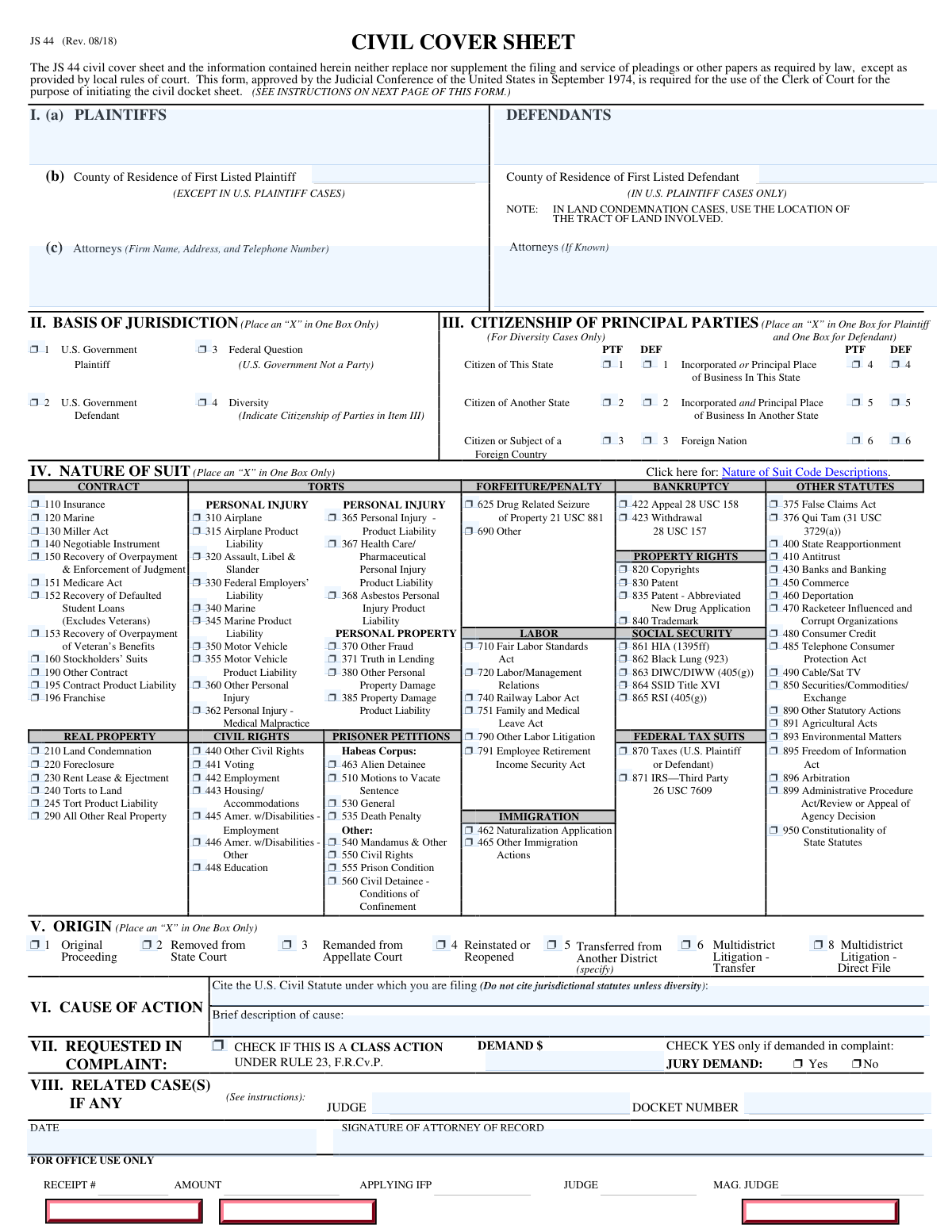
Yes! You can use AI to fill out Form JS 44 (Rev. 08/18), Civil Cover Sheet
The JS 44 Civil Cover Sheet is an administrative form required by U.S. district courts to initiate the civil docket sheet when a new civil complaint is filed. It summarizes key case details—parties, attorneys, jurisdiction basis, citizenship (for diversity), nature of suit code, origin, cause of action, requested relief, jury demand, and related cases. The cover sheet does not replace the complaint or other required pleadings, but it helps the court accurately classify and process the case at intake. Completing it correctly can prevent filing delays and misclassification of the action.
Our AI automatically handles information lookup, data retrieval, formatting, and form filling.
It takes less than a minute to fill out JS 44 using our AI form filling.
Securely upload your data. Information is encrypted in transit and deleted immediately after the form is filled out.
Form specifications
| Form name: | Form JS 44 (Rev. 08/18), Civil Cover Sheet |
| Number of pages: | 2 |
| Filled form examples: | Form JS 44 Examples |
| Language: | English |
Instafill Demo: filling out a legal form in seconds
How to Fill Out JS 44 Online for Free in 2026
Are you looking to fill out a JS 44 form online quickly and accurately? Instafill.ai offers the #1 AI-powered PDF filling software of 2026, allowing you to complete your JS 44 form in just 37 seconds or less.
Follow these steps to fill out your JS 44 form online using Instafill.ai:
- 1 Enter the full names of all plaintiffs and defendants, along with the county of residence for the first-listed plaintiff/defendant as applicable, and provide attorney/firm contact information (attach additional attorney lists if needed).
- 2 Select the single basis of jurisdiction by checking the appropriate box (U.S. plaintiff, U.S. defendant, federal question, or diversity) consistent with the complaint’s jurisdictional allegations.
- 3 If diversity is selected, complete the citizenship of principal parties section by marking the correct citizenship/business location boxes for both plaintiff and defendant.
- 4 Choose the most applicable Nature of Suit code by checking one box that best matches the primary claim(s) in the complaint.
- 5 Indicate the case origin (e.g., original proceeding, removed from state court, transferred, MDL transfer/direct file) by checking the correct origin code.
- 6 Complete the cause of action section by citing the primary U.S. civil statute (not jurisdictional statutes unless diversity) and writing a brief description of the claim.
- 7 Fill out the requested relief section (class action checkbox if applicable, demand amount/relief, and jury demand), list any related cases with judge and docket number, then date and sign as attorney of record.
Our AI-powered system ensures each field is filled out correctly, reducing errors and saving you time.
Why Choose Instafill.ai for Your Fillable JS 44 Form?
Speed
Complete your JS 44 in as little as 37 seconds.
Up-to-Date
Always use the latest 2026 JS 44 form version.
Cost-effective
No need to hire expensive lawyers.
Accuracy
Our AI performs 10 compliance checks to ensure your form is error-free.
Security
Your personal information is protected with bank-level encryption.
Frequently Asked Questions About Form JS 44
The JS 44 Civil Cover Sheet is an administrative form used by the Clerk of Court to open a civil case and initiate the civil docket sheet. It does not replace the complaint or other required filings, but it is generally required when you file a civil complaint in U.S. District Court.
The attorney filing the civil case is expected to complete and submit the JS 44 with the complaint. If you are filing without an attorney, you typically complete it as the filer, subject to local court rules.
No. The form specifically states it neither replaces nor supplements filing and service of pleadings or other papers required by law, except as local rules may provide.
List the names of the plaintiff(s) and defendant(s) (last name, first name, middle initial). If a party is a government agency, use the full agency name (or standard abbreviation), and if an official is named, identify the agency first and then the official’s name and title.
In most cases (except U.S. plaintiff cases), enter the county where the first listed plaintiff resides at the time of filing. In U.S. plaintiff cases, enter the county where the first listed defendant resides; for land condemnation cases, use the location of the tract of land involved.
Provide the firm name, address, telephone number, and the attorney of record. If there are multiple attorneys, you can attach a separate sheet and write “(see attachment)” in this section.
Check only one box and follow the precedence described in the instructions: (1) U.S. Government Plaintiff, (2) U.S. Government Defendant, (3) Federal Question, then (4) Diversity. If the U.S. is a party, the U.S. plaintiff/defendant option generally takes precedence over federal question.
Complete Section III only if you selected Diversity jurisdiction in Section II. You must mark one citizenship box for the principal plaintiff and one for the principal defendant.
Choose the single Nature of Suit code that is most applicable to the case. If multiple codes seem relevant, select the one that best matches the primary claim.
Origin describes how the case arrived in federal court (e.g., original filing, removal from state court, remand, reopening, transfer, or MDL). Check the one box that matches your situation; the instructions note there is no Origin Code 7.
Cite the U.S. civil statute directly related to your claim and provide a brief description of the cause. Do not cite jurisdictional statutes unless the case is based on diversity (the form gives an example like “47 USC 553” with a short description).
Check the class action box only if the complaint is filed as a class action under Rule 23. Enter the dollar amount demanded (or describe non-monetary relief like an injunction), and check “Yes” or “No” to indicate whether a jury trial is demanded in the complaint.
Related cases are typically other pending cases that involve similar parties, facts, or issues. If any exist, list the related case docket number(s) and the corresponding judge name(s) as instructed.
The JS 44 is submitted to the Clerk of Court along with the civil complaint when the case is filed, following local court filing procedures (often electronic). The form should be dated and signed by the attorney of record (or filer, if self-represented).
Because the form is used to open and categorize the case, missing or incorrect information can delay docketing or require correction. If you discover an error, follow the court’s local procedures to file a corrected cover sheet or contact the Clerk’s office for guidance.
Compliance JS 44
Validation Checks by Instafill.ai
1
Validates Plaintiff and Defendant Names Are Provided and Properly Formatted
Checks that at least one plaintiff name and one defendant name are present in Section I(a), and that each entry contains a minimally complete legal name (e.g., last name and first name, with optional middle initial) rather than placeholders like "N/A" or "Unknown." This is important because party names drive docket creation, captioning, and service processes. If validation fails, the submission should be rejected or flagged for clerk review with a prompt to correct/complete party names.
2
Validates County of Residence Fields Based on Case Type Rules
Ensures the correct county-of-residence field(s) in Section I(b) are completed according to the instructions: for non-U.S. plaintiff cases, the first listed plaintiff’s county must be provided; for U.S. plaintiff cases, the first listed defendant’s county must be provided. This matters because venue-related metadata and statistical reporting depend on the correct county being captured. If the wrong county field is filled (or required county is missing), the system should block submission or require confirmation/correction.
3
Validates Attorney of Record Contact Information Completeness
Checks that Section I(c) includes attorney/firm name, mailing address, and telephone number for the attorney of record, or explicitly indicates "(see attachment)" when multiple attorneys are listed elsewhere. Accurate attorney contact data is essential for notices, service coordination, and court communications. If incomplete or missing, the form should be flagged and the filer required to provide the missing contact elements.
4
Validates Attorney Telephone Number Format
Verifies that the attorney telephone number in Section I(c) matches an acceptable format (e.g., 10-digit NANP with optional country code, parentheses, spaces, or hyphens) and is not clearly invalid (too short/long, alphabetic characters, all zeros). This reduces failed contact attempts and improves data quality for court notifications. If validation fails, the system should prompt for a corrected phone number before acceptance.
5
Ensures Exactly One Basis of Jurisdiction Is Selected
Confirms that Section II has one—and only one—jurisdiction box marked (U.S. Government Plaintiff, U.S. Government Defendant, Federal Question, or Diversity). The cover sheet explicitly requires a single selection, and downstream routing/statistical coding depends on it. If none or multiple are selected, the submission should be blocked until exactly one basis is chosen.
6
Enforces Jurisdiction Precedence When U.S. Is a Party
If the parties listed indicate the United States (or a U.S. agency/officer) is a plaintiff or defendant, the system should require selection of the corresponding U.S. plaintiff/defendant jurisdiction code rather than Federal Question or Diversity, consistent with the instructions. This prevents misclassification of cases and incorrect reporting. If a conflicting selection is detected, the system should require correction or a clerk override with justification.
7
Requires Citizenship of Principal Parties Only for Diversity Jurisdiction
If Section II indicates Diversity, validates that Section III includes one citizenship selection for the principal plaintiff and one for the principal defendant. Conversely, if Diversity is not selected, Section III should be blank or ignored to avoid inconsistent metadata. If Diversity is selected but Section III is incomplete or has multiple selections per side, the system should reject the submission until corrected.
8
Validates Diversity Citizenship Selections Are Logically Consistent
When Diversity is selected, checks that plaintiff and defendant citizenship selections are not identical in a way that defeats diversity (e.g., both marked "Citizen of This State" or both marked as incorporated/principal place of business in the same state, when the filing state is known). While the cover sheet is not a legal determination, obvious inconsistencies should be caught to reduce filing errors. If detected, the system should warn the filer and require confirmation or correction before submission.
9
Ensures Exactly One Nature of Suit Code Is Selected
Validates that Section IV has exactly one nature-of-suit box checked, as required by the form instructions. Nature-of-suit coding drives statistical reporting and sometimes internal routing. If none or multiple are selected, the system should block submission and prompt the filer to choose the single most applicable code.
10
Ensures Exactly One Origin Code Is Selected and Disallows Origin Code 7
Checks that Section V has exactly one origin option selected and explicitly rejects any attempt to use origin code 7 (which the instructions state is no longer relevant). Origin affects case lifecycle classification (original, removed, transferred, MDL, etc.). If missing, multiple, or invalid (including code 7), the system should require correction before acceptance.
11
Requires Transfer/MDL Details When Applicable
If Origin indicates "Transferred from Another District" (code 5), validates that the source district is specified; if MDL Transfer or MDL Direct File is selected (codes 6 or 8), validates that the MDL identifier or master docket reference is provided if the filing system captures it. These details are necessary for proper docket linkage and administrative handling. If missing, the system should block submission or route to clerk review with a required completion task.
12
Validates Cause of Action Statute Citation Format
Checks that Section VI includes a U.S. civil statute citation in a recognizable format (e.g., "47 USC 553", "28 U.S.C. § 1331"), and that it is not empty when Federal Question or U.S. party jurisdiction is selected. Proper statute capture supports case categorization and quality control. If the statute field is blank or malformed, the system should prompt for a corrected citation or allow an "Unknown/To be determined" option only if local rules permit.
13
Prevents Use of Purely Jurisdictional Statutes as Cause of Action (Except Diversity)
Validates that the cause-of-action statute in Section VI is not solely a jurisdictional statute (e.g., 28 U.S.C. 1331, 1332, 1345) unless Diversity is the basis and local practice allows referencing 1332. This aligns with the form instruction "Do not cite jurisdictional statutes unless diversity" and reduces misclassification. If a jurisdiction-only statute is entered improperly, the system should require a substantive statute or a clearer cause-of-action description.
14
Validates Requested Demand Amount Format and Presence
Checks that the "DEMAND $" field in Section VII is either a valid currency amount (numeric, non-negative, within reasonable bounds) or a permitted non-monetary descriptor (e.g., "injunctive relief") if the system supports it. Demand information is used for reporting and sometimes internal processing. If the field contains invalid characters, negative values, or is missing when required by local configuration, the system should prompt for correction.
15
Validates Jury Demand Selection and Consistency
Ensures that exactly one of "Yes" or "No" is selected for Jury Demand in Section VII and that it is not left ambiguous. This is important for scheduling and case management expectations. If both or neither are selected, the system should block submission until a single clear choice is made.
16
Validates Related Case Entries When Indicated
If Section VIII indicates related case(s), checks that each related case entry includes both a judge name and a docket number, and that docket numbers match the court’s expected format (e.g., year-case type-sequence, depending on district conventions). Correct related-case linkage helps with assignment, consolidation considerations, and conflict checks. If incomplete or malformed, the system should require correction or allow submission only with a clerk-review flag.
17
Validates Date and Signature of Attorney of Record
Checks that the Date field is present and in a valid date format (e.g., MM/DD/YYYY) and that the Signature field is not blank (typed name, /s/ electronic signature, or captured e-signature depending on system rules). This supports accountability and compliance with filing requirements. If missing or invalid, the system should prevent submission until a valid date and signature are provided.
Common Mistakes in Completing JS 44
People often enter only a business trade name, omit middle initials, reverse first/last names, or fail to identify government parties properly (agency first, then official name and title). This happens because filers copy captions informally or assume the complaint caption is enough. Incorrect party naming can cause docketing errors, misidentification of parties, and delays in issuing summons or matching the case to related matters. Use the exact legal names as they appear in the complaint caption, and for government defendants list the agency and the official with title (e.g., “U.S. Department of X, John Doe, Secretary”).
A frequent mistake is entering a city, state, mailing address, or the attorney’s county instead of the county of residence of the first-listed party, or using the plaintiff’s county in U.S. plaintiff cases when the form requires the first-listed defendant’s county. This occurs because the rule changes depending on whether the U.S. is the plaintiff and because “county of residence” is easy to confuse with venue or mailing address. Wrong county information can lead to administrative confusion and may complicate internal court reporting and case assignment processes. Confirm whether it is a U.S. plaintiff case and enter the correct county name (and for land condemnation, use the tract location county).
Filers often omit the firm name, full address, telephone number, or the attorney of record, or they list multiple attorneys without attaching a separate sheet and noting “see attachment.” This happens when people assume the ECF filing profile is sufficient or they copy only part of the signature block. Missing contact details can delay clerk follow-up, notices, or corrections and can create confusion about who is responsible for the filing. Enter the full firm/contact information and, if multiple attorneys are involved, attach a list and clearly reference it in Section I(c).
A common error is marking more than one jurisdiction basis, or selecting “Diversity” when the complaint is actually a federal question case (or vice versa), or failing to follow the precedence rule when the U.S. is a party. This happens because filers conflate venue, claims, and jurisdiction statutes, or they try to “cover all bases.” Incorrect jurisdiction coding can cause clerk’s office follow-up, misclassification, and potential motion practice if the pleading is inconsistent. Mark only one box, apply the precedence guidance (U.S. plaintiff/defendant codes override federal question/diversity), and ensure the complaint’s jurisdiction allegations match the selection.
People often complete Section III even when they did not select Diversity in Section II, or they select Diversity but leave Section III blank. This happens because the section is visually prominent and filers may not realize it is “for diversity cases only.” Leaving it incomplete can trigger deficiency notices or create inconsistencies with the jurisdiction basis. Only complete Section III if Diversity is checked, and then mark one citizenship box for the principal plaintiff and one for the principal defendant (including corporate incorporation/principal place of business where applicable).
For business entities, filers frequently check only one corporate box, choose “Citizen of This State” instead of the incorporation/principal place of business options, or guess without confirming the entity’s legal status. This happens because corporate citizenship rules are technical and the form’s labels are easy to misread. Misstating citizenship can undermine diversity allegations and lead to jurisdiction challenges or dismissal. Verify the entity type and accurately mark whether it is incorporated and/or has its principal place of business in the same or another state, consistent with the complaint.
Filers often pick a code that matches the general topic (e.g., “Other Statutory Actions”) rather than the most applicable specific code, or they select multiple codes even though the form requires one. This happens because many categories overlap and people focus on remedies rather than the primary claim. Wrong coding can affect statistical reporting, internal routing, and can prompt clerk questions if it conflicts with the complaint. Choose the single code that best matches the primary cause of action and use the court’s “Nature of Suit Code Descriptions” to confirm the closest fit.
A frequent mistake is marking “Original Proceeding” for removed cases, using “Transferred from Another District” for within-district reassignment, or selecting a nonexistent Origin Code 7. This happens because filers confuse procedural posture with where the case is being filed and may not know the distinctions among transfer, MDL transfer, and direct-file MDL. Incorrect origin coding can cause docketing corrections and delays in properly linking the case to the correct procedural track. Confirm whether the case is removed, remanded, reopened, transferred under 1404(a), or part of an MDL transfer/direct file, and select only the matching box.
People often list only 28 U.S.C. § 1331/1332 (jurisdictional statutes) instead of the substantive statute creating the claim, or they provide a vague description without a statute. This happens because filers copy the jurisdiction paragraph rather than the claim’s legal basis. Incorrect entries can lead to misclassification and clerk follow-up, and it can create inconsistencies with the complaint. Provide the substantive U.S. civil statute directly related to the claim (e.g., “47 USC 553”) and add a brief, specific description of the cause of action.
Filers frequently omit the dollar amount, write “to be determined,” or include narrative text without indicating a clear amount or stating an alternative demand (e.g., injunction). This happens because damages may be uncertain or because the complaint seeks non-monetary relief. An unclear demand can trigger clerk questions and may create inconsistencies with the complaint’s prayer for relief. Enter the actual amount demanded if stated in the complaint, or clearly indicate the type of relief sought (e.g., “Preliminary and permanent injunction; damages per proof”) consistent with the pleading.
A common error is checking the class action box when the complaint does not plead Rule 23 allegations, or marking “Jury Demand: Yes” when no jury demand appears in the complaint (or vice versa). This happens because filers treat the cover sheet as a preference form rather than a reflection of what is demanded in the pleading. Inconsistencies can cause confusion, require amendments, or lead to disputes about whether a jury was properly demanded. Check “Class Action” only if the complaint asserts a Rule 23 class, and mark the jury demand box to match exactly what is demanded in the complaint.
Saved over 80 hours a year
“I was never sure if my IRS forms like W-9 were filled correctly. Now, I can complete the forms accurately without any external help.”
Kevin Martin Green
Your data stays secure with advanced protection from Instafill and our subprocessors
Robust compliance program
Transparent business model
You’re not the product. You always know where your data is and what it is processed for.
ISO 27001, HIPAA, and GDPR
Our subprocesses adhere to multiple compliance standards, including but not limited to ISO 27001, HIPAA, and GDPR.
Security & privacy by design
We consider security and privacy from the initial design phase of any new service or functionality. It’s not an afterthought, it’s built-in, including support for two-factor authentication (2FA) to further protect your account.
Fill out JS 44 with Instafill.ai
Worried about filling PDFs wrong? Instafill securely fills form-js-44-rev-0818-civil-cover-sheet forms, ensuring each field is accurate.