Yes! You can use AI to fill out Form MC-020, Additional Page (Attach to Judicial Council Form or Other Court Paper)
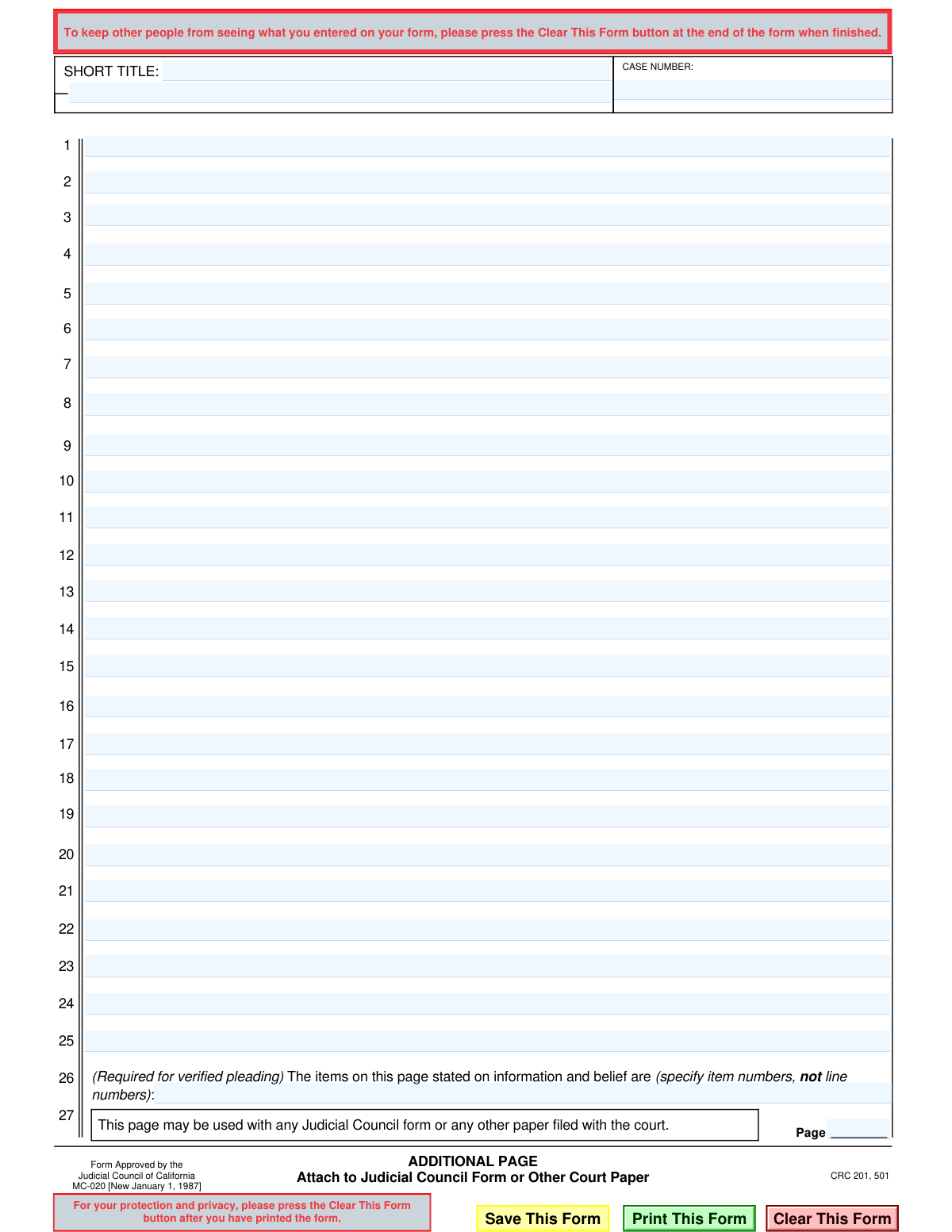
Form MC-020 is a supplemental document approved by the Judicial Council of California, designed to be attached to any other court form or paper that requires more space than is provided. It allows filers to include additional statements, explanations, or details in a standardized format, ensuring the court receives all necessary information. Today, this form can be filled out quickly and accurately using AI-powered services like Instafill.ai, which can also convert non-fillable PDF versions into interactive fillable forms.
MC-020 is part of the
California court forms, California judicial forms and Judicial Council forms categories on Instafill.
Our AI automatically handles information lookup, data retrieval, formatting, and form filling.
It takes less than a minute to fill out MC-020 using our AI form filling.
Securely upload your data. Information is encrypted in transit and deleted immediately after the form is filled out.
Form specifications
| Form name: | Form MC-020, Additional Page (Attach to Judicial Council Form or Other Court Paper) |
| Number of fields: | 36 |
| Number of pages: | 1 |
| Language: | English |
Instafill Demo: How to fill out PDF forms in seconds with AI
How to Fill Out MC-020 Online for Free in 2026
Are you looking to fill out a MC-020 form online quickly and accurately? Instafill.ai offers the #1 AI-powered PDF filling software of 2026, allowing you to complete your MC-020 form in just 37 seconds or less.
Follow these steps to fill out your MC-020 form online using Instafill.ai:
- 1 Navigate to Instafill.ai and upload or select the MC-020 form template.
- 2 Enter the Case Number and Short Title exactly as they appear on the primary document you are attaching this page to.
- 3 Use the numbered lines to provide the additional information, statements, or text that did not fit on the original form.
- 4 If the document is a verified pleading, identify the specific item numbers (not line numbers) that are stated on information and belief in the designated field.
- 5 Indicate the page number in the sequence of the total filing.
- 6 Review all entered information for accuracy and completeness before saving, printing, and attaching it to your main court document.
Our AI-powered system ensures each field is filled out correctly, reducing errors and saving you time.
Why Choose Instafill.ai for Your Fillable MC-020 Form?
Speed
Complete your MC-020 in as little as 37 seconds.
Up-to-Date
Always use the latest 2026 MC-020 form version.
Cost-effective
No need to hire expensive lawyers.
Accuracy
Our AI performs 10 compliance checks to ensure your form is error-free.
Security
Your personal information is protected with bank-level encryption.
Frequently Asked Questions About Form MC-020
This form provides extra space when you run out of room on another official court form. You can use it to continue your statements, explanations, or lists of information that don't fit on the original document.
Use the Additional Page anytime you need more space than a standard Judicial Council form or other court document provides. Simply attach it to the original form you are completing.
You must enter the 'CASE NUMBER' assigned by the court and the 'SHORT TITLE' of the case, which is a shortened version of the case name (e.g., Smith v. Jones).
On the main form where you ran out of space, write 'See attached MC-020' or 'See attached Additional Page.' Then, on the MC-020, you can reference the section or question number you are continuing from the main form.
You can use as many Additional Pages as you need. Be sure to number each page consecutively at the bottom and attach them in the correct order behind your main form.
This section is only for 'verified' documents where you swear the contents are true. If some statements are based on information you believe to be true but don't have direct personal knowledge of, you must list the item numbers of those statements here.
No, this form should never be filed alone. It must be attached to the Judicial Council form or other court paper it is providing additional information for.
In the 'Page' box at the bottom, you should number this page as part of the total document package. For example, if your main form is 2 pages long, this would be Page 3.
While possible, it is highly recommended to use Form MC-020. This official form ensures your information is presented in a standardized format that the court accepts and expects, including the proper case identifiers.
Yes, services like Instafill.ai use AI to auto-fill repetitive form fields accurately, such as your case number and short title. This saves time and helps prevent errors across multiple documents.
You can use a service like Instafill.ai to fill out this form online. The platform provides an interactive version where you can type your information directly into the fields, save your progress, and download the completed PDF.
If you have a non-fillable or 'flat' PDF, you can upload it to Instafill.ai. The service's technology can convert the document into an interactive, fillable form for you to complete on your computer.
Compliance MC-020
Validation Checks by Instafill.ai
1
Case Number Presence Check
This validation ensures that the 'CASE NUMBER' field is not empty. The case number is the primary identifier for a legal case within the court system, and its absence would make it impossible to file the document correctly. If this check fails, the user is prompted to enter the case number before proceeding, preventing the submission of an un-fileable document.
2
Case Number Format Validation
This check verifies that the entered 'CASE NUMBER' conforms to standard court numbering conventions, which often include a mix of letters and numbers in a specific pattern. While formats vary by jurisdiction, this validation flags entries that are clearly incorrect, such as those containing only random letters or special characters. An invalid format can lead to rejection by electronic filing systems or misfiling by court clerks.
3
Short Title Presence Check
This validation confirms that the 'SHORT TITLE' field contains text. The short title provides a human-readable identifier for the case, which is crucial for court staff to quickly associate this additional page with the correct case file. Submitting a page without a short title increases the risk of it being misplaced, potentially delaying legal proceedings.
4
Main Content Area Non-Empty Check
This check verifies that at least one of the numbered lines (1-25) in the main content area contains text. The purpose of an 'Additional Page' is to provide more information, so submitting a blank one likely indicates a user error. This validation prevents the submission of empty, useless pages and prompts the user to confirm if they intended to submit a blank document.
5
Page Number Integer Validation
This validation ensures the value entered in the 'Page' field is a positive whole number. Court documents require sequential, integer page numbers for proper organization and reference. Entries like 'two', '2.5', or negative numbers are invalid and would cause confusion, leading to potential rejection by the court.
6
Page Number Logical Consistency
This check ensures the page number is greater than 1. Since this is an 'Additional Page' meant to be attached to another form, it logically cannot be the first page of the entire submission. This validation helps prevent clerical errors in document assembly and ensures the final packet of documents is ordered correctly.
7
'Information and Belief' Item Number Format
This check validates the format of the entry in the 'information and belief' field, ensuring it consists of numbers, commas, and hyphens (for ranges) only. This field is legally significant for verified pleadings, and incorrect formatting (e.g., using words or random symbols) would make the declaration ambiguous and legally unsound. The validation ensures the specified items are clearly and correctly identified.
8
'Information and Belief' Item Number Range
This validation ensures that all numbers specified in the 'information and belief' section are within the valid range of 1 to 25. It is impossible to make a declaration about a line number that does not exist on the form, such as line 0 or 26. This check prevents nonsensical entries and ensures the legal declaration refers to actual content on the page.
9
'Information and Belief' Content Correlation
This is a logical check that verifies that any line number specified in the 'information and belief' section actually contains text. Declaring a blank line as being stated on 'information and belief' is illogical and likely an error. If a specified line is empty, the system should alert the user to either add content to that line or remove the number from the declaration field.
10
Line Content Character Limit
This validation enforces a maximum character limit for each of the 25 numbered text lines. This is important to ensure that text does not overflow its designated space, which could make it unreadable or cut off when printed or viewed electronically. Maintaining the document's formatting is critical for its acceptance by the court and for clear communication.
11
Invalid Character Check for Identifying Fields
This check scans the 'CASE NUMBER' and 'SHORT TITLE' fields for prohibited special characters (e.g., !, @, #, %) that could interfere with electronic filing systems or databases. Allowing only alphanumeric characters, spaces, and hyphens helps maintain data integrity and prevents system errors during processing. If invalid characters are detected, the user is prompted to correct the entry.
12
Attachment Purpose Verification
This validation checks if the form is being submitted by itself without any content. Since this is an 'Additional Page' designed to be attached to another form, submitting it alone and empty is an invalid action. The system should display an error, stating that this page must contain information and be part of a larger submission.
Common Mistakes in Completing MC-020
Filers often forget to enter the case number or accidentally transpose digits, especially when filling this page out separately from the main form. Without the correct case number, the court clerk cannot link this page to the proper case file, causing the information to be disregarded and potentially leading to the rejection of the entire filing. Always double-check the case number against the primary court documents, or use a tool like Instafill.ai to auto-populate consistent data across all related forms.
The 'SHORT TITLE' field is frequently left blank or filled with the full, lengthy case name instead of the abbreviated version (e.g., 'Smith v. Jones'). This creates confusion and slows down processing as court staff must manually identify the correct case. To avoid this, use the exact same short title that appears on the main petition or complaint to ensure all documents are clearly linked.
The 'Page __ of __' field is small and easily overlooked, yet it is critical for document integrity. Failing to number pages can lead to confusion if pages are lost or placed out of order, making the filer's argument impossible to follow. Always fill this in after the entire document package is assembled, ensuring the numbering is sequential with the main form (e.g., if the main form is 3 pages, this becomes 'Page 4 of 5').
This is a generic continuation page, and users often start writing without stating what information they are continuing. This makes the content contextless, as the court won't know if it pertains to a statement of facts, a legal argument, or a specific numbered item on another form. To prevent this, use the first line to specify the document being supplemented, such as 'Continuation of Section 7a of Form FL-100, Petition'.
This is a legal term of art that pro se litigants often misunderstand, either ignoring it or incorrectly listing line numbers instead of the required 'item numbers'. For a verified pleading, this error can invalidate the verification, potentially causing the court to strike the document. This section should only be used to identify statements you believe are true but do not have direct personal knowledge of, referencing the item number from the main form.
People often try to squeeze extra information into the margins or below the last line when they run out of space. This content may be cut off during the court's scanning process, and it makes the document look unprofessional and difficult to read. To avoid this, be concise and use an additional 'Additional Page' form if more space is needed, keeping all text within the designated lines.
When a fillable version of a form isn't available, people may print it and fill it out by hand, which can often be illegible. If court staff or a judge cannot read the information, it is rendered useless and may lead to the document being rejected for not meeting court formatting rules. Use a fillable PDF whenever possible; tools like Instafill.ai can convert flat PDFs into fillable versions to ensure all entries are typed and perfectly clear.
A common procedural error is attaching this page in the wrong order (e.g., before the main form) or forgetting to include it altogether. This disorganizes the filing and can cause critical information to be missed by the reader. Always place additional pages directly after the specific page they are supplementing and review the complete document package before stapling and filing.
The form contains lines numbered 1-25, which filers mistakenly use for reference (e.g., 'see line 12') instead of the paragraph or item number from the primary document they are continuing. This creates ambiguity, as it's unclear whether the reference is to the additional page or the main form. When continuing a specific point, always refer to the original source, for example: 'Continuing from Item 9 of the attached Request for Order'.
Saved over 80 hours a year
“I was never sure if my IRS forms like W-9 were filled correctly. Now, I can complete the forms accurately without any external help.”
Kevin Martin Green
Your data stays secure with advanced protection from Instafill and our subprocessors

Robust compliance program
Transparent business model
You’re not the product. You always know where your data is and what it is processed for.
ISO 27001, HIPAA, and GDPR
Our subprocesses adhere to multiple compliance standards, including but not limited to ISO 27001, HIPAA, and GDPR.
Security & privacy by design
We consider security and privacy from the initial design phase of any new service or functionality. It’s not an afterthought, it’s built-in, including support for two-factor authentication (2FA) to further protect your account.
Fill out MC-020 with Instafill.ai
Worried about filling PDFs wrong? Instafill securely fills form-mc-020-additional-page-attach-to-judicial-council-form-or-other-court-paper forms, ensuring each field is accurate.