Yes! You can use AI to fill out Form MC-025, Attachment to Judicial Council Form
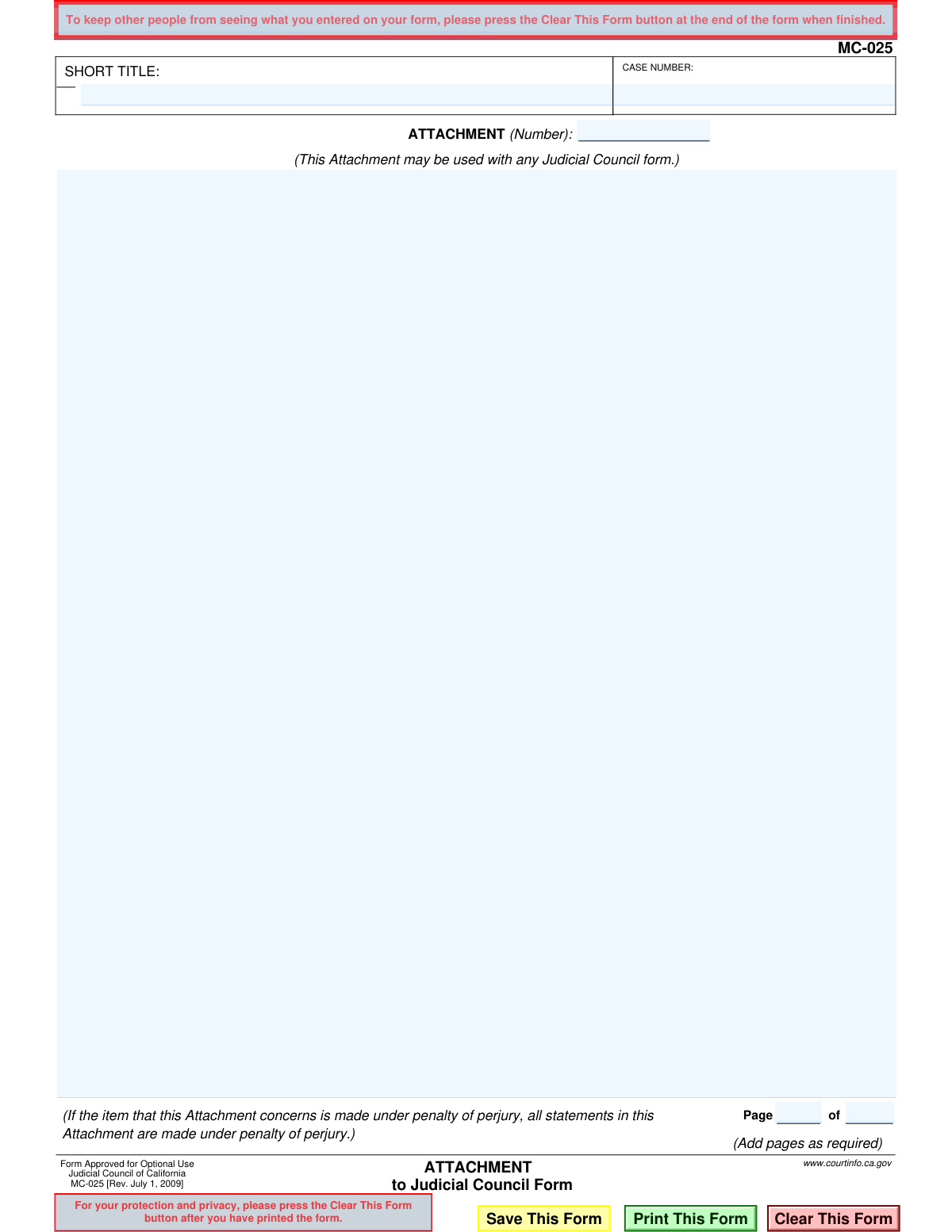
Form MC-025 is an official document from the Judicial Council of California designed to be used as an attachment to any other Judicial Council form. Its purpose is to provide extra space for information when the original form does not have enough room, ensuring all necessary details are included in a legal filing. Today, this form can be filled out quickly and accurately using AI-powered services like Instafill.ai, which can also convert non-fillable PDF versions into interactive fillable forms.
MC-025 is part of the
California court forms, California judicial forms and Judicial Council forms categories on Instafill.
Our AI automatically handles information lookup, data retrieval, formatting, and form filling.
It takes less than a minute to fill out MC-025 using our AI form filling.
Securely upload your data. Information is encrypted in transit and deleted immediately after the form is filled out.
Form specifications
| Form name: | Form MC-025, Attachment to Judicial Council Form |
| Number of fields: | 12 |
| Number of pages: | 1 |
| Language: | English |
Instafill Demo: How to fill out PDF forms in seconds with AI
How to Fill Out MC-025 Online for Free in 2026
Are you looking to fill out a MC-025 form online quickly and accurately? Instafill.ai offers the #1 AI-powered PDF filling software of 2026, allowing you to complete your MC-025 form in just 37 seconds or less.
Follow these steps to fill out your MC-025 form online using Instafill.ai:
- 1 Navigate to Instafill.ai and upload your MC-025 form, or select it from their library of official documents.
- 2 Enter the case details, including the Short Title and Case Number, in the designated header fields.
- 3 Clearly state the number of the attachment and which Judicial Council form it is supplementing in the 'ATTACHMENT (Number)' field.
- 4 Carefully type or paste the additional information required for your case into the main body of the form, adding pages as needed.
- 5 Use the AI assistant to review your entries for clarity, consistency, and completeness, ensuring it aligns with legal standards.
- 6 Once complete, securely download, print, or electronically file the finished Form MC-025 with the primary court document it supports.
Our AI-powered system ensures each field is filled out correctly, reducing errors and saving you time.
Why Choose Instafill.ai for Your Fillable MC-025 Form?
Speed
Complete your MC-025 in as little as 37 seconds.
Up-to-Date
Always use the latest 2026 MC-025 form version.
Cost-effective
No need to hire expensive lawyers.
Accuracy
Our AI performs 10 compliance checks to ensure your form is error-free.
Security
Your personal information is protected with bank-level encryption.
Frequently Asked Questions About Form MC-025
Form MC-025, the Attachment to Judicial Council Form, is used when you need more space to provide information than is available on a standard California court form. It ensures your additional details are officially attached to your primary document and case file.
Anyone filing a California Judicial Council form who runs out of space in a particular section should use Form MC-025. It allows you to continue your statements or provide required information that doesn't fit on the main form.
On the main form, write "See Attachment" in the section you are expanding. Then, on Form MC-025, fill in the "ATTACHMENT (Number)" field with the corresponding item number from the main form (e.g., "Attachment 7c").
You must enter the "SHORT TITLE" and "CASE NUMBER" at the top of the form. This information must match the main form exactly to ensure the court clerk files it with the correct case.
This statement means that if the main form you are attaching this to is signed under penalty of perjury, all information on this attachment is also considered a sworn statement. Providing false information on this attachment carries the same legal consequences as lying on the main form.
You can use multiple copies of Form MC-025. Simply fill out the "Page __ of __" section on each page to keep them in order (e.g., Page 1 of 3, Page 2 of 3) and staple them all behind the main form.
No, this form should never be filed alone. It must be securely attached to the primary Judicial Council form it is supplementing and submitted together as a single document package.
It is highly recommended to use Form MC-025. This official form includes the required case identifying information in the header, which prevents your additional pages from being lost or misfiled by the court.
If you are only using one attachment page, you would write "Page 1 of 1." If you are using multiple pages for the same attachment, number them sequentially, for instance, "Page 1 of 2" and "Page 2 of 2."
Yes, services like Instafill.ai use AI to auto-fill repetitive information like your case number and short title accurately. This saves time and helps reduce errors when you are filling out multiple forms for the same case.
You can use a service like Instafill.ai to fill out the form online. Simply upload the PDF, and the platform will allow you to type your information directly into the fields before downloading or printing the completed document.
If you have a non-fillable or 'flat' PDF, you can upload it to Instafill.ai. The service can convert the document into an interactive, fillable form that you can easily complete on your computer.
Use the main blank space to provide the additional information. It is good practice to start by referencing the item from the main form, for example: "Continuation of Item 4: List of Assets."
Compliance MC-025
Validation Checks by Instafill.ai
1
Case Number Format Validation
This check verifies that the 'CASE NUMBER' field follows the standard format used by California courts, which typically includes a mix of letters, numbers, and sometimes hyphens. A valid format is crucial for the document to be correctly indexed and associated with the existing legal case file. Submissions with invalid case number formats may be rejected by the court clerk, causing filing delays.
2
Short Title Presence Check
This validation ensures that the 'SHORT TITLE' field is not left empty. The short title provides a quick reference to the case (e.g., 'Smith v. Jones') and is required for proper identification by court staff. An empty short title will likely lead to the document being returned for correction or misfiled.
3
Required Attachment Number
This validation mandates that the 'ATTACHMENT (Number)' field must be filled in. This number is the primary link between this supplemental page and the specific section of the main form it relates to. Without this number, the court would not know where the information belongs, potentially causing the attachment to be ignored.
4
Attachment Number Format
This check validates that the 'ATTACHMENT (Number)' field contains a valid number or alphanumeric identifier (e.g., '3' or '5a'). This number links the attachment back to a specific item on the primary Judicial Council form it accompanies. An incorrect or missing attachment number can cause confusion and may result in the attachment being disregarded or misfiled.
5
Page Number Logical Consistency
This validation compares the current page number against the total number of pages. It ensures the current page is not zero and is not greater than the total, which would be a logical impossibility. This check prevents data entry errors that could cause confusion about the document's structure and completeness.
6
Total Pages Consistency
This check verifies that the 'of Page' value, representing the total number of pages, is consistent across all pages of the same attachment. For example, if the first page says 'Page 1 of 3', the second page must also state the total is '3'. This ensures the entire set of pages is treated as a single, cohesive document and helps the clerk verify that no pages are missing.
7
Attachment Content Presence
This validation confirms that the main text area of the attachment contains content. Since the purpose of this form is to provide additional information, an empty attachment serves no purpose and is likely an error. Submitting a blank attachment would be rejected as it adds no value to the case filing.
8
Case and Title Consistency Across Forms
This check verifies that the 'CASE NUMBER' and 'SHORT TITLE' are identical on this attachment and the main Judicial Council form it accompanies. Inconsistency can lead to the attachment being filed with the wrong case or rejected altogether. This ensures all parts of a submission are correctly linked within the court's system.
9
Case Number Character Set Validation
This check ensures that only valid characters (typically letters, numbers, and hyphens) are used in the 'CASE NUMBER' field. Prohibiting invalid special characters (e.g., !, @, #, $) prevents data corruption and ensures compatibility with the court's electronic systems. An invalid character could cause the entire filing to be rejected by an automated system.
10
Field Length Limitation for Identifiers
This validation ensures that the text entered into the 'CASE NUMBER' and 'SHORT TITLE' fields does not exceed a predefined character limit. This is important to prevent data truncation in the court's electronic filing or case management system. Overly long entries could be cut off, rendering the identifier incomplete and causing filing errors.
11
Perjury Clause Association Check
This is a logical check that associates the attachment with the perjury declaration of its parent form. If the main form item is declared under penalty of perjury, the system should flag all content in this attachment as also being under that same legal declaration. This is critical for legal validity and ensures the filer understands the gravity of the statements made in the attachment.
12
Pagination Completeness
This validation ensures that both the current page number and the total page number fields are filled out. Leaving either of these fields blank makes it impossible for the court to verify the document's sequence and completeness. A failure in this check would require the user to complete the pagination before submission.
Common Mistakes in Completing MC-025
Filers often forget to enter the case number or make typographical errors. Without the correct case number, the court clerk cannot link the attachment to the proper case file, which can lead to the document being rejected or lost. To avoid this, always double-check the case number against official court documents and ensure it is entered in the top right corner of every page.
The 'SHORT TITLE' field requires the abbreviated name of the case (e.g., 'Smith v. Jones'), not a description of the attachment's content. Using the wrong title or leaving it blank causes confusion and can delay the processing of your documents. Always use the exact short case title that has been established in prior filings to ensure consistency and proper identification.
The main form often refers to a specific attachment by number (e.g., 'See Attachment 3'). People frequently forget to fill in the 'ATTACHMENT (Number):' field on the MC-025 form itself. This makes it impossible for the court to know which attachment corresponds to which part of the main filing, potentially rendering the information useless. Always number your attachments sequentially and ensure the number matches the reference on the main form.
The 'Page __ of __' fields are often filled out incorrectly, such as only writing 'Page 1' and ignoring the total page count. If a multi-page attachment becomes separated, incorrect numbering makes it difficult to reassemble in the correct order or even know that pages are missing. For a three-page attachment, the pages must be numbered 'Page 1 of 3', 'Page 2 of 3', and 'Page 3 of 3' to maintain document integrity.
This attachment is meant to provide more space for a specific item on another Judicial Council form. A common mistake is failing to state which item the attachment is for (e.g., 'Continuation of Item 7a on Form FL-150'). Without this context, the judge and court staff have no idea how the information relates to your case, and it may be disregarded. Always begin the text of your attachment by clearly identifying the form and item number you are elaborating on.
The form states that if the main document is signed under penalty of perjury, all statements in the attachment are also made under penalty of perjury. Filers may not read this warning and include unverified or false information, exposing themselves to serious legal consequences. You must treat every statement on this attachment as sworn testimony, ensuring it is truthful and accurate to the best of your knowledge.
People often type or write a single, long block of text without paragraphs, headings, or lists, making it extremely difficult for a judge to read and understand. A poorly organized document can obscure key facts and weaken your position. To avoid this, use short paragraphs, bullet points, and clear headings to structure your information for maximum clarity and impact.
Many people download the 'flat' PDF from the court's website and fill it out by hand, which can result in illegible handwriting. This can lead to data entry errors by court staff or misinterpretation of critical information by the judge. To ensure legibility, it is best to use a fillable PDF. If one is not available, AI-powered tools like Instafill.ai can convert the form into a fillable version, ensuring your submission is clean and professional.
Filers sometimes believe that providing more detail is always better, leading them to include information that is not directly responsive to the question on the main form. This can bury the important points and frustrate the reader, potentially diluting the strength of your argument. Be concise and stick to providing only the necessary information required to complete your answer.
A simple but critical mistake is physically attaching the MC-025 to the wrong document or in the wrong order within a large filing packet. This clerical error can cause significant confusion, leading to the information being missed entirely or applied to the wrong part of your case. Before filing, carefully review your entire packet to ensure each attachment is placed directly behind the form it supplements.
Saved over 80 hours a year
“I was never sure if my IRS forms like W-9 were filled correctly. Now, I can complete the forms accurately without any external help.”
Kevin Martin Green
Your data stays secure with advanced protection from Instafill and our subprocessors

Robust compliance program
Transparent business model
You’re not the product. You always know where your data is and what it is processed for.
ISO 27001, HIPAA, and GDPR
Our subprocesses adhere to multiple compliance standards, including but not limited to ISO 27001, HIPAA, and GDPR.
Security & privacy by design
We consider security and privacy from the initial design phase of any new service or functionality. It’s not an afterthought, it’s built-in, including support for two-factor authentication (2FA) to further protect your account.
Fill out MC-025 with Instafill.ai
Worried about filling PDFs wrong? Instafill securely fills form-mc-025-attachment-to-judicial-council-form forms, ensuring each field is accurate.