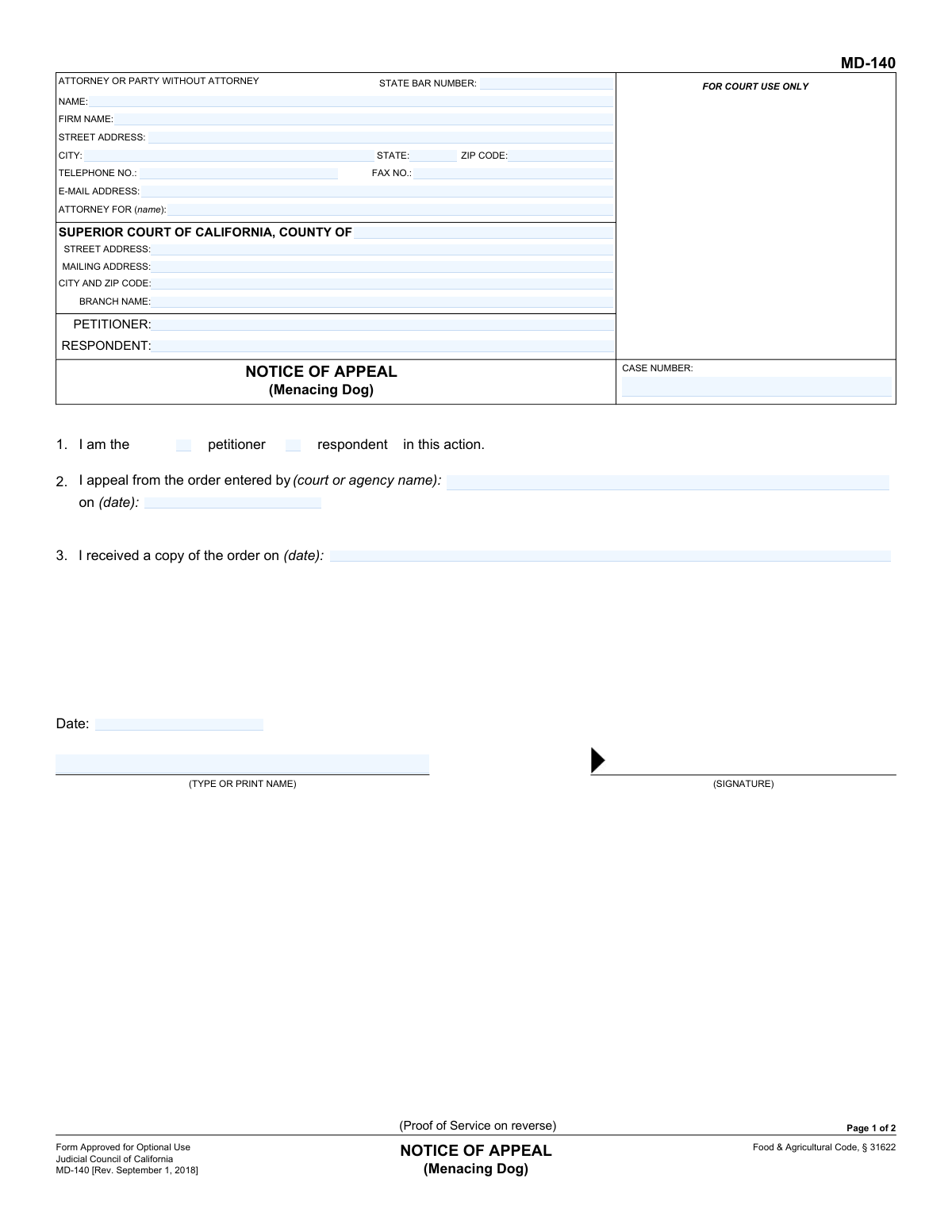
Yes! You can use AI to fill out Form MD-140, Notice of Appeal (Menacing Dog)
The California Form MD-140, Notice of Appeal (Menacing Dog), is used to formally challenge a legal decision made about a dog that has been classified as menacing under the Food & Agricultural Code. Filing this form with the Superior Court initiates the appeals process for the petitioner or respondent who disagrees with the initial order. Today, this form can be filled out quickly and accurately using AI-powered services like Instafill.ai, which can also convert non-fillable PDF versions into interactive fillable forms.
Our AI automatically handles information lookup, data retrieval, formatting, and form filling.
It takes less than a minute to fill out MD-140 using our AI form filling.
Securely upload your data. Information is encrypted in transit and deleted immediately after the form is filled out.
Form specifications
| Form name: | Form MD-140, Notice of Appeal (Menacing Dog) |
| Number of fields: | 47 |
| Number of pages: | 1 |
| Language: | English |
Instafill Demo: How to fill out PDF forms in seconds with AI
How to Fill Out MD-140 Online for Free in 2026
Are you looking to fill out a MD-140 form online quickly and accurately? Instafill.ai offers the #1 AI-powered PDF filling software of 2026, allowing you to complete your MD-140 form in just 37 seconds or less.
Follow these steps to fill out your MD-140 form online using Instafill.ai:
- 1 Navigate to Instafill.ai and upload or select the Form MD-140, Notice of Appeal (Menacing Dog).
- 2 Provide the Superior Court information, including the county, branch name, and address.
- 3 Enter the names of the petitioner and respondent, along with your personal or attorney's contact details and State Bar number if applicable.
- 4 Clearly state the details of the appeal, including the name of the court or agency that made the original order, the date of the order, and the date you received it.
- 5 Complete the 'Proof of Service' section on the second page, indicating how and when the notice was delivered to the opposing party.
- 6 Review all auto-filled information for accuracy, then sign and date the form.
- 7 Download the completed MD-140, ready for filing with the court.
Our AI-powered system ensures each field is filled out correctly, reducing errors and saving you time.
Why Choose Instafill.ai for Your Fillable MD-140 Form?
Speed
Complete your MD-140 in as little as 37 seconds.
Up-to-Date
Always use the latest 2026 MD-140 form version.
Cost-effective
No need to hire expensive lawyers.
Accuracy
Our AI performs 10 compliance checks to ensure your form is error-free.
Security
Your personal information is protected with bank-level encryption.
Frequently Asked Questions About Form MD-140
This form is used to formally notify the court and the opposing party that you are appealing a court or agency's order regarding a 'menacing dog' determination.
Either the petitioner (who brought the complaint) or the respondent (the dog's owner/keeper) from the original case should fill out this form if they disagree with the final order and wish to appeal it.
You will need the court information, the case number from your original hearing, the name of the agency that issued the order, and the date the order was entered. You also need the name and address of the other party for service.
The petitioner is the person who initiated the legal action about the dog. The respondent is the person defending against that action, who is typically the dog's owner or keeper.
The 'Proof of Service' is a sworn declaration that a copy of the appeal was delivered to the other party. It must be filled out and signed by the person who served the notice, not by you.
No, you cannot serve the notice yourself because you are a party to the case. You must have someone who is at least 18 years old and not involved in the case serve the papers for you.
The notice can be served by personally delivering the papers to the other party or by mailing them via first-class mail with postage prepaid.
First, have a non-party serve the notice and complete the Proof of Service on page 2. Then, you must file the entire completed form with the clerk of the Superior Court listed at the top of the form.
Your case number is located on the original order or any other official court documents you received related to the menacing dog case.
Yes, services like Instafill.ai use AI to help you accurately auto-fill form fields with your saved information, which saves time and reduces the chance of errors.
Simply upload the MD-140 PDF to the Instafill.ai platform. The service will make the form fillable online, allowing you to type your information directly into the fields or use AI to auto-fill them.
You can use a tool like Instafill.ai, which is designed to convert non-fillable PDFs into interactive, fillable forms that you can easily complete on your computer.
Filing the appeal initiates the review process by a higher court. The court will then provide you with further instructions, deadlines, and hearing dates for your appeal.
Compliance MD-140
Validation Checks by Instafill.ai
1
Case Number Consistency Across Pages
This check ensures the 'CASE NUMBER' entered on Page 1 is identical to the 'CASE NUMBER' on Page 2. The case number is the primary identifier for the legal action, and inconsistencies can lead to misfiling or rejection of the document. If the numbers do not match, the system should flag the error, requiring the user to correct the discrepancy before submission.
2
Party Name Consistency Across Pages
Validates that the Petitioner/Plaintiff and Respondent/Defendant names are consistent between Page 1 and Page 2. Mismatched party names can cause significant confusion and legal processing delays. This check prevents filing errors by ensuring the correct parties are referenced throughout the entire document.
3
Exclusive Appellant Role Selection
Ensures that in Section 1, exactly one checkbox is selected, identifying the filer as either the 'petitioner' or the 'respondent'. The form requires a clear declaration of who is filing the appeal. A failure to select one, or selecting both, makes the filing ambiguous and will result in its rejection.
4
Logical Order Date Chronology
This validation confirms that the 'date received' of the order (Section 3) is on or after the 'date of order' (Section 2). It is logically impossible to receive a legal order before it has been officially entered by the court or agency. An error here suggests a data entry mistake that could impact the timeliness and validity of the appeal.
5
Valid Date Format
Checks that all date fields on the form (e.g., date of order, date received, date of service, signature dates) are entered in a valid and recognizable format, such as MM/DD/YYYY. This is crucial for establishing a clear timeline of events for the appeal process. Invalid formats would prevent the court from accurately calculating deadlines and processing the appeal.
6
Conditional Attorney Bar Number Requirement
This check requires the 'STATE BAR NUMBER' field to be populated if the 'ATTORNEY FOR' or 'FIRM NAME' fields are filled out. When a party is represented by an attorney, the bar number is essential for verifying the attorney's credentials and active status with the state bar. Missing this information can halt the processing of the legal document.
7
Exclusive Proof of Service Method Selection
On Page 2, this validation ensures that exactly one method of service ('Personal service' or 'First-class mail') is checked. The method of service is a critical legal requirement that must be clearly stated. Selecting neither or both creates ambiguity and can invalidate the proof of service, potentially leading to dismissal of the appeal.
8
Completeness of Personal Service Details
If the 'Personal service' checkbox is selected on Page 2, this check verifies that the name of the person served, the address, the date, and the time of service are all completed. These details are legally required to constitute valid personal service. Incomplete information would render the proof of service defective.
9
Completeness of Mail Service Details
If the 'First-class mail' checkbox is selected on Page 2, this check ensures the name of the person served, their address, the date of mailing, and the place of mailing are all filled in. Proper documentation of mail service is necessary to prove that the other party was legally notified. Failure to provide these details can invalidate the service.
10
Court County Requirement
Verifies that the 'COUNTY OF' field for the Superior Court on Page 1 is filled out. This specifies the jurisdiction in which the appeal is being filed, which is a fundamental requirement for any court document. Without this information, the form cannot be routed to the correct courthouse for processing.
11
Appellant Signature and Date Completeness
Ensures that both the signature date and the typed or printed name of the appellant are present on Page 1. The signature and date attest to the authenticity of the appeal and the filer's intent. Missing either of these elements can render the entire notice invalid and lead to its immediate rejection by the court clerk.
12
Proof of Service Declaration Completeness
This check validates that the person who served the notice has provided their printed name, signature, and the date of signing on Page 2. This declaration is made under penalty of perjury and is the core of the 'Proof of Service'. Incomplete information here invalidates the proof, which is a critical step in the legal process.
Common Mistakes in Completing MD-140
Appellants often serve the notice themselves and sign the Proof of Service on page 2. The form explicitly states that the server must be at least 18 and not a party to the legal proceeding. This error will invalidate the service, potentially causing the appeal to be dismissed for failure to properly notify the other party. To avoid this, the appellant must have a neutral third party, such as a friend, family member, or professional process server, deliver the notice and complete the Proof of Service section.
Filers frequently mistype the case number or forget to enter it on both page 1 and page 2. The case number is the primary identifier that links the appeal to the original menacing dog hearing and ensures it is filed correctly. An incorrect or missing case number can lead to significant delays, misfiling, or even rejection of the document by the court clerk. Always double-check the case number from the original order and ensure it is transcribed identically on both pages of the form.
People often get confused about whether they were the 'petitioner' or 'respondent' in the original action and check the wrong box in Section 1. This can create ambiguity about the parties involved in the appeal. The filer should refer to the original court or agency order to confirm their designation and check the corresponding box accurately. This ensures the court understands who is initiating the appeal and their role in the initial case.
A common oversight is forgetting to sign and date the appeal on page 1, or the server forgetting to sign and date the Proof of Service on page 2. An unsigned legal document is invalid and will be rejected by the court, which could cause the filer to miss the deadline for their appeal. Always perform a final review of the form to ensure all signature and date lines are completed before filing.
In Section 2, filers mistakenly write 'Superior Court' as the agency that entered the order, when it was actually an administrative body like a local Animal Control department or hearing officer. The appeal is filed *with* the Superior Court, but it is an appeal *from* the decision of another entity. This error can cause confusion about the jurisdiction and origin of the case. The filer must accurately name the specific agency that issued the original menacing dog order.
When filling out the Proof of Service, the server often forgets to check the box for the manner of service (Personal or Mail) or fails to fill in all required details like the date, time, and specific address of service. Each detail is legally required to prove that service was properly completed. Incomplete information can be grounds for the other party to challenge the validity of the service. Using a checklist or a tool like Instafill.ai, which can highlight required fields, helps ensure every necessary detail is provided.
Filers sometimes overlook the header at the top of page 2, leaving the Petitioner, Respondent, and Case Number fields blank. This makes the Proof of Service page difficult to connect to the first page if they become separated. This can cause administrative delays or filing problems at the courthouse. To prevent this, ensure that the case information is filled out completely and consistently on every page of the document.
In Section 2, people often confuse the date the order was 'entered' with the date they 'received a copy' of it. The date the order was entered is the official date of the ruling and is critical for calculating appeal deadlines, while the receipt date confirms when the filer was notified. Mixing them up can lead to a miscalculation of the filing window, potentially resulting in a time-barred, dismissed appeal. Carefully read the original order to find the official entry or issuance date.
Filers may not know the specific branch name or full street address of the correct Superior Court and leave these fields blank or incomplete. Filing the appeal at the wrong court branch can cause it to be rejected or significantly delayed while it is rerouted. It is crucial to look up the proper Superior Court location and branch that handles appeals for the jurisdiction where the original order was made. AI-powered tools like Instafill.ai can often help populate correct court addresses based on the county.
A party representing themselves (in pro per) may get confused by the 'ATTORNEY FOR' section and either leave their own contact information blank or incorrectly fill in the attorney fields. This can make it difficult for the court and other parties to communicate with them. A self-represented filer should enter their own name, address, and contact details in this section and write 'In Pro Per' or 'Self-Represented' in the 'ATTORNEY FOR (name):' field. If the form is a non-fillable PDF, a tool like Instafill.ai can convert it to a fillable version to make entering this information easier.
Saved over 80 hours a year
“I was never sure if my IRS forms like W-9 were filled correctly. Now, I can complete the forms accurately without any external help.”
Kevin Martin Green
Your data stays secure with advanced protection from Instafill and our subprocessors

Robust compliance program
Transparent business model
You’re not the product. You always know where your data is and what it is processed for.
ISO 27001, HIPAA, and GDPR
Our subprocesses adhere to multiple compliance standards, including but not limited to ISO 27001, HIPAA, and GDPR.
Security & privacy by design
We consider security and privacy from the initial design phase of any new service or functionality. It’s not an afterthought, it’s built-in, including support for two-factor authentication (2FA) to further protect your account.
Fill out MD-140 with Instafill.ai
Worried about filling PDFs wrong? Instafill securely fills form-md-140-notice-of-appeal-menacing-dog forms, ensuring each field is accurate.