Yes! You can use AI to fill out Form N-400, Application for Naturalization
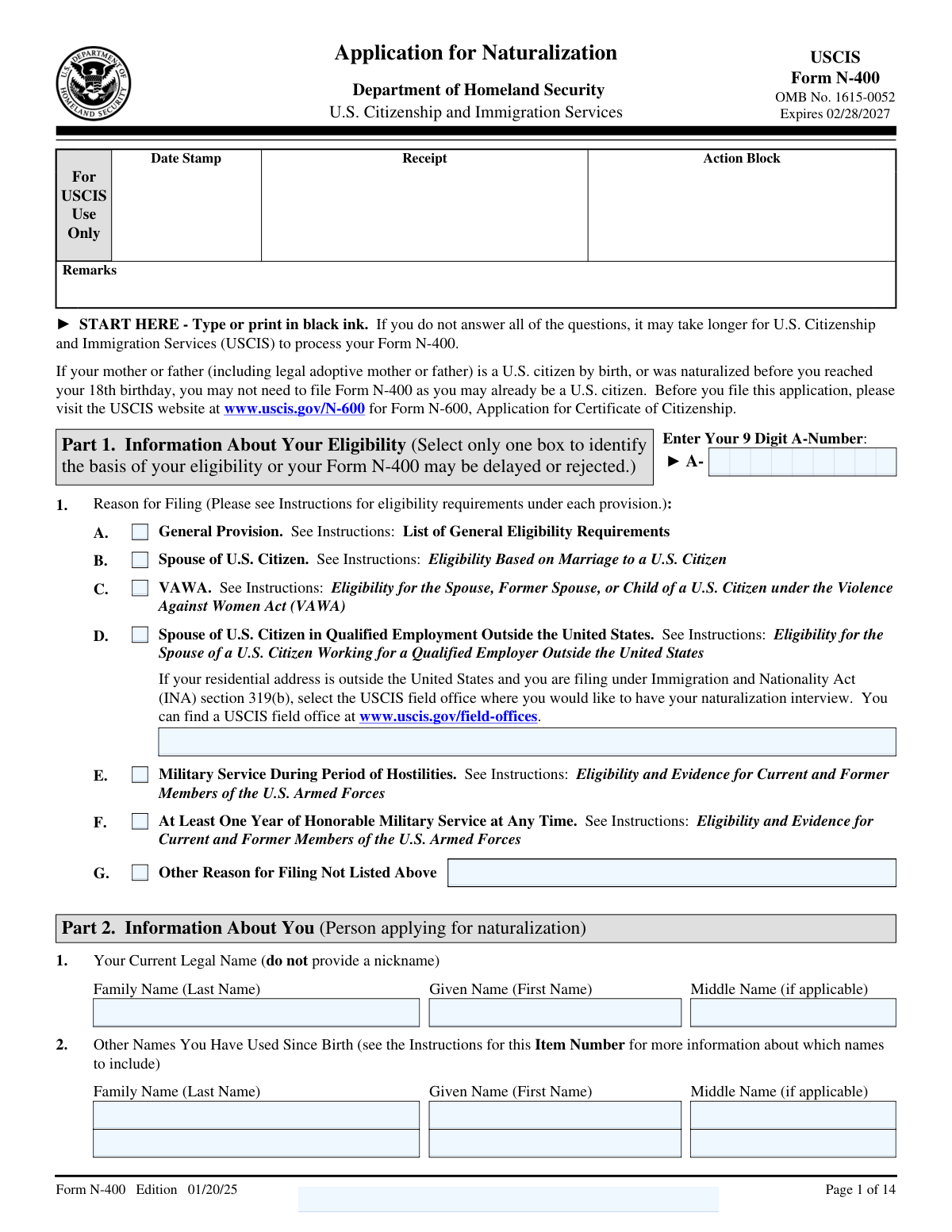
Form N-400 is the official USCIS application used to request U.S. citizenship through the naturalization process. It collects eligibility details, biographic information, residence and travel history, marital and family information, employment/school history, and extensive background/security and good-moral-character disclosures. USCIS uses the information to run background checks, determine eligibility under the Immigration and Nationality Act (including special categories such as military service, marriage-based eligibility, and VAWA), and schedule the interview and oath process. Today, this form can be filled out quickly and accurately using AI-powered services like Instafill.ai, which can also convert non-fillable PDF versions into interactive fillable forms.
Our AI automatically handles information lookup, data retrieval, formatting, and form filling.
It takes less than a minute to fill out N-400 using our AI form filling.
Securely upload your data. Information is encrypted in transit and deleted immediately after the form is filled out.
Form specifications
| Form name: | Form N-400, Application for Naturalization |
| Number of pages: | 14 |
| Filled form examples: | Form N-400 Examples |
| Language: | English |
| Categories: | immigration forms |
Instafill Demo: filling out a legal form in seconds
How to Fill Out N-400 Online for Free in 2026
Are you looking to fill out a N-400 form online quickly and accurately? Instafill.ai offers the #1 AI-powered PDF filling software of 2026, allowing you to complete your N-400 form in just 37 seconds or less.
Follow these steps to fill out your N-400 form online using Instafill.ai:
- 1 Go to Instafill.ai and upload Form N-400 (PDF) or select it from the form library.
- 2 Let the AI detect and map the form fields, then confirm the form version/pages and any pre-populated identifiers (for example A-Number and page/part identifiers).
- 3 Enter your eligibility basis (Part 1) and personal details (name, A-Number, USCIS online account number, date of birth, sex, country of birth/citizenship), including any requested name change information.
- 4 Complete biographic information (ethnicity, race, height/weight, eye and hair color) and provide your residence and mailing addresses for the required period, including dates of residence.
- 5 Add your employment and school history, marital history, and children’s information, ensuring dates, addresses, and relationship/support fields are consistent.
- 6 Fill in travel outside the United States and answer the full set of background, tax, voting, military, and good-moral-character questions; use the Additional Information section for explanations where required.
- 7 Review for completeness and consistency, generate the final PDF, and follow the form’s signature requirements (print and sign where electronic signatures are not allowed) before submitting to USCIS per the official instructions.
Our AI-powered system ensures each field is filled out correctly, reducing errors and saving you time.
Why Choose Instafill.ai for Your Fillable N-400 Form?
Speed
Complete your N-400 in as little as 37 seconds.
Up-to-Date
Always use the latest 2026 N-400 form version.
Cost-effective
No need to hire expensive lawyers.
Accuracy
Our AI performs 10 compliance checks to ensure your form is error-free.
Security
Your personal information is protected with bank-level encryption.
Frequently Asked Questions About Form N-400
This is Form N-400, Application for Naturalization. It is used by eligible lawful permanent residents (and certain special categories, such as military applicants or VAWA-based applicants) to apply to become a U.S. citizen.
Check the single box that matches the eligibility category you are using to apply (for example, General Provision, Spouse of a U.S. Citizen, VAWA, or Military service). If none of the listed options apply, select âOther Reason for Filing Not Listed Aboveâ and briefly explain in the âOther Reasonâ field.
Your A-Number (Alien Registration Number) is typically on your Permanent Resident Card (green card) and many USCIS notices. Enter all 9 digits exactly as issued, using digits only (no spaces or dashes).
If you do not have a USCIS Online Account Number, you can leave that field blank. Only enter it if USCIS has issued you one for an online account.
If you do not have a middle name, leave the middle name field blank. If you have used other names since birth (such as a maiden name, prior married name, or alternate spelling), list them in the âOther Names You Have Used Since Birthâ rows and use Part 14 (Additional Information) if you need more space.
Answer âYesâ to the name change question and enter the new family, given, and (if applicable) middle name exactly as you want it to appear. If you answer âNo,â skip the name-change name fields and continue to the next item.
YesâPart 3 asks you to list every location where you have lived during the last 5 years, starting with your current physical address. If you run out of lines, continue in Part 14 (Additional Information).
Answer âNoâ to the question asking whether your mailing address is the same as your physical address, then complete the âCurrent Mailing Address (Safe Mailing Address, if applicable)â section. This is especially important if you need mail sent somewhere safer or more reliable.
List all trips outside the U.S. during the last 5 years, starting with the most recent, including the date you left, the date you returned, and the countries visited. Do not include day trips that were completed within 24 hours.
Trips longer than 6 months can affect âcontinuous residence,â and the form instructions may require additional evidence. Be sure to list the trip accurately and review the N-400 instructions for the âContinuous Residenceâ evidence you should provide.
Yesâif you answer âYesâ to the relevant questions, you must list each crime or offense even if records were sealed, expunged, or you were told you donât have to disclose it. Complete the table with the offense, dates, location, disposition, and sentence, and provide explanations/evidence as instructed.
If you opt in, USCIS can share information with the Social Security Administration to issue or replace your Social Security card and update your immigration status after naturalization. If you choose âNo,â you skip the SSA fields; if you choose âYes,â you may need to provide your SSN (if you have one) and consent for disclosure.
Noâthis form requires a handwritten (âwetâ) signature in the signature fields, and typed names are not accepted as signatures. The form can be rejected if it is submitted without the required signature.
Part 14 is where you continue answers that donât fit in the main sections (extra addresses, trips, children, explanations for âYesâ answers, spouse address differences, etc.). Include the page number, part number, and item number you are referencing so USCIS can match your explanation to the correct question.
YesâAI tools can help organize your information and auto-fill fields accurately; services like Instafill.ai use AI to speed up form completion and reduce errors. To fill it online with Instafill.ai, upload the N-400 PDF, follow the prompts to map your details to the correct fields, and review before downloading/printing for signature; if your PDF is flat/non-fillable, Instafill.ai can convert it into an interactive fillable form first.
Compliance N-400
Validation Checks by Instafill.ai
1
Validates A-Number is exactly 9 digits and consistent across all pages
Checks that the A-Number field contains exactly 9 numeric digits with no spaces, dashes, or letters. Also verifies that any read-only/pre-populated A-Number fields on later pages match the value entered on Page 1 and are not left as "No Entry" when the primary A-Number is present. This is critical for identity matching and case routing within USCIS systems. If validation fails, block submission and prompt the user to correct the A-Number or resolve page-to-page mismatches.
2
Ensures exactly one eligibility basis is selected (Reason for Filing A–F or Other)
Validates that the applicant selects oneâand only oneâprimary reason for filing among General Provision, Spouse of U.S. Citizen, VAWA, Military (hostilities), Military (1 year honorable), Spouse in qualified employment outside the U.S., or Other. Multiple selections can create conflicting adjudication paths and evidence requirements, while no selection makes the filing basis unclear. If validation fails, require the applicant to choose a single basis or confirm the correct category before continuing.
3
Conditional requirement: 'Other Reason for Filing (specify)' must be completed when 'Other' is checked
If 'Other Reason for Filing Not Listed Above' is checked, the adjacent free-text explanation must be non-empty and sufficiently specific (e.g., not just "N/A" or "see attached"). This ensures USCIS can understand the claimed eligibility category and request appropriate evidence. If the text is missing or too generic, the system should flag the field and prevent submission until a meaningful explanation is provided.
4
Conditional requirement: USCIS Field Office must be provided for spouse in qualified employment outside the U.S.
When 'Spouse of U.S. Citizen in Qualified Employment Outside the United States' is selected, validates that the 'USCIS Field Office' field is completed with a recognizable office name/location (not blank or placeholder text). This is important for interview scheduling and jurisdictional routing, especially when the applicant resides abroad. If validation fails, prompt for a valid field office selection/value and do not allow submission.
5
Validates name change section completeness and prevents partial new-name entries
If the applicant answers 'Yes' to the legal name change question, validates that at least the new family name and new given name are provided, and that the middle name is either provided or intentionally left blank. If the applicant answers 'No', ensures the new-name fields are empty to avoid accidental data capture. This prevents inconsistent legal identity records and court name-change processing issues. On failure, require correction or clearing of conflicting fields.
6
Validates current legal name fields are present and contain plausible characters
Checks that current legal family name and given name are not blank and do not contain invalid characters (e.g., digits-only, control characters), while allowing common punctuation such as hyphens and apostrophes. Middle name may be blank, but if present must follow the same character rules. Accurate names are essential for background checks and document matching. If validation fails, highlight the specific name field and require correction.
7
Validates sex selection is mutually exclusive and required
Ensures exactly one of 'Male' or 'Female' is checked and that both are not selected simultaneously. This is required biographic information used for identity verification and background checks. If validation fails, require the applicant to select one option before proceeding.
8
Validates all date fields use MM/DD/YYYY and represent real calendar dates
Applies to all date inputs (e.g., applicant DOB, LPR date, signature dates, residence dates, employment dates, trip dates, spouse DOB/marriage date, crime/offense dates). Ensures the format is 2-digit month, 2-digit day, 4-digit year and that the date exists (e.g., not 02/30/2024). Standardized dates are necessary for automated eligibility calculations and timeline checks. If validation fails, reject the field and request a corrected date.
9
Chronology check: Date of Birth, LPR date, and signature date must be logically ordered
Validates that the applicant's date of birth is in the past, the date became a lawful permanent resident is after the date of birth, and the applicant signature date is not before the LPR date and not in the future. These checks prevent impossible timelines that can break eligibility logic and trigger manual review. If validation fails, flag the conflicting dates and require correction or an explanation in Additional Information where appropriate.
10
Validates Social Security opt-in logic, SSN format, and consent selection
If the applicant selects SSA opt-in 'Yes', requires a valid SSN (9 digits, digits only) unless the form explicitly allows blank for no SSN, and requires exactly one consent choice (Yes/No) for disclosure. If the applicant selects SSA opt-in 'No', ensures SSN and consent fields are blank/ignored to avoid contradictory instructions. This is important for SSA data sharing authorization and downstream card issuance. If validation fails, block submission and prompt the user to complete or clear the dependent fields.
11
Validates ethnicity is single-select and race is multi-select with at least one selection
Ensures exactly one ethnicity option is selected (Hispanic or Latino vs Not Hispanic or Latino) and that race allows multiple selections but requires at least one race box checked. These fields are required by USCIS for background checks and statistical reporting. If validation fails, require the applicant to correct the selection rules (single vs multi) before continuing.
12
Validates height and weight are numeric and within reasonable human ranges
Checks that height feet/inches are numeric, inches are 0â11, and the combined height is within a plausible range (e.g., 3â8 feet). Validates weight digits form a 3-digit number (or otherwise per form constraints) and is within a plausible range (e.g., 50â700 lbs). This reduces data-entry errors that can cause biometric mismatches. If validation fails, prompt for corrected values and prevent submission.
13
Validates residence history rows have complete address components and valid date ranges
For each residence line used, requires address line/city and either (state + ZIP) for U.S. addresses or (province/region + country + postal code if applicable) for foreign addresses. Validates 'From' date is not after 'To' date, and that the first row represents the current address (e.g., 'To' date may be blank or 'Present' depending on implementation). Accurate residence history is essential for continuous residence and jurisdiction determination. If validation fails, flag the specific row and require completion/correction.
14
Validates mailing address dependency on 'Is mailing same as physical' response
If the applicant answers that the mailing address is the same as the physical address, ensures the separate mailing address fields are empty or ignored to prevent conflicting addresses. If the applicant answers 'No', requires the mailing address fields to be completed with the same U.S. vs foreign structure rules (state/ZIP vs province/country/postal code). This prevents misdirected notices and interview scheduling issues. If validation fails, require either completion of the mailing address or clearing of conflicting entries.
15
Validates travel outside the U.S. entries: date order, required countries, and no day-trip entries
For each trip row used, requires both departure and return dates, ensures departure is on/before return, and requires at least one destination country listed. Also flags trips with duration less than 24 hours as likely day trips (which the instructions say not to include) and prompts the applicant to remove or confirm. Correct travel history supports continuous residence and physical presence calculations. If validation fails, require correction of dates/countries or removal of invalid trip entries.
16
Validates applicant contact information: phone number format and email format (if provided)
Checks that the daytime telephone number is present and matches an acceptable phone format (e.g., 10 digits for U.S. numbers, or E.164 if international is allowed), and that the mobile number (if provided) follows the same rules. Validates email address (if provided) conforms to standard email syntax and is not obviously invalid (e.g., missing '@' or domain). Reliable contact info is necessary for USCIS communications and appointment coordination. If validation fails, prompt for corrected contact details and block submission if the required daytime phone is invalid/missing.
17
Validates required wet signatures and signature dates are present and not typed placeholders
Ensures the applicant signature field is not empty and does not contain typed text (e.g., the applicantâs name typed into the signature box) since the form states it cannot be signed electronically. Also validates that the applicant signature date is present, properly formatted, and not in the future; similarly enforces interpreter/preparer signature and date fields when those sections are completed. Missing or invalid signatures are a common rejection reason and can invalidate the filing. If validation fails, prevent submission and instruct the user to print/sign where required or provide the correct signature artifacts per system design.
Common Mistakes in Completing N-400
Applicants often copy the A-Number from a card/notice that includes dashes (e.g., A-123-456-789) or they enter fewer than 9 digits, leading zeros omitted, or spaces. Because the form specifies â9-digitâ and âdigits only,â a formatting mismatch can cause data capture issues and delays, and the A-Number is also used to pre-populate read-only fields on later pages. To avoid this, enter exactly 9 digits with no punctuation and confirm it matches your USCIS documents; AI tools like Instafill.ai can validate length/format and prevent missing leading zeros.
Part 1 eligibility options (General Provision, Spouse of U.S. Citizen, VAWA, Military provisions, spouse in qualified employment abroad, etc.) are frequently misunderstood, and people sometimes check more than one âreason for filingâ without realizing the downstream requirements differ. Selecting an incorrect basis can trigger inconsistent answers later (marital history, military service, overseas interview office selection) and may lead to RFEs or a rejected/denied filing if the evidence doesnât match the claimed category. Carefully choose the single category that truly applies and ensure the rest of the form aligns; Instafill.ai can flag incompatible selections and missing dependent fields.
This form has many âFill only ifâŠâ rules (e.g., SSA opt-in fields 12.bâ12.c only if 12.a is Yes; name change fields only if Item 3 is Yes; âOther reasonâ text only if the âOther reason not listedâ box is checked; overseas spouse field office only if that eligibility box is checked). People often complete everything âjust in case,â or they miss required follow-ups after selecting Yes, which can create contradictions or incomplete sections. The consequence is delays, RFEs, or a form that appears internally inconsistent. Follow the skip logic exactly and use a tool like Instafill.ai to enforce conditional logic and highlight required follow-ups.
Applicants commonly use nicknames, anglicized spellings, or inconsistent ordering of family/given names, and they often forget to list prior names (maiden names, previous married names, alternate spellings) in the âOther Names You Have Used Since Birthâ rows. USCIS uses names for identity and background checks, so omissions or inconsistencies can cause delays, additional questioning, or requests for clarification. Enter names exactly as shown on legal documents, list all prior/alternate names, and only complete the ânew nameâ fields if you truly want a legal name change; Instafill.ai can standardize formatting and prompt for missing aliases.
The form repeatedly requires 2-digit month, 2-digit day, and 4-digit year for dates (DOB, LPR date, residence dates, employment dates, trip dates, spouse dates, crime/disposition dates). A frequent error is using DD/MM/YYYY, writing month names, entering partial dates, or creating impossible sequences (e.g., âtoâ date before âfromâ date, trip return before departure). These errors can lead to data entry problems, credibility concerns, and RFEs. Always use MM/DD/YYYY and double-check chronological order; Instafill.ai can auto-format dates and flag timeline conflicts.
Applicants often list only their current address or omit short stays, leaving gaps in the last 5 years, or they confuse âphysical addressâ with âmailing addressâ and fail to complete the mailing address section when they answer âNoâ to the âsame asâ question. For foreign addresses, people frequently forget to include province/region, postal code, and country as instructed. Gaps and unclear addresses can slow background checks and trigger requests for more information. Provide every residence for the last 5 years with continuous coverage and complete the mailing address only when required; Instafill.ai can detect gaps and ensure country/province/postal fields are completed correctly.
The âTime Outside the United Statesâ section instructs applicants not to include day trips under 24 hours, to list trips in reverse chronological order, and to include dates left/returned plus countries traveled. Common mistakes include listing day trips anyway, forgetting brief trips, mixing up departure/return dates, or writing only one country when multiple were visited. Inaccurate travel history can affect continuous residence/physical presence analysis and may lead to RFEs or interview issues. Reconstruct travel from passports, tickets, and I-94/travel records and ensure each trip has complete dates and countries; Instafill.ai can help structure entries and validate date logic.
Applicants frequently enter height/weight in the wrong units or fail to place each digit into the correct box (weight is split into three digits), and they sometimes select multiple options where only one is allowed (ethnicity and eye/hair color are âselect only one,â while race is âselect all applicableâ). These fields are used for identity verification and background checks, so incorrect entries can cause processing friction or require correction at interview. Follow the selection rules exactly and enter height in feet/inches and weight as three digits; Instafill.ai can format numeric fields and enforce single-select vs multi-select constraints.
A common issue is checking âYesâ to SSA opt-in but leaving SSN blank even though the applicant has one, or checking âNoâ to opt-in but still filling SSN/consent fields, or forgetting to answer the consent (12.c) after opting in. This creates incomplete or contradictory SSA instructions and can delay SSA updates after naturalization. Decide whether you want SSA updates through USCIS, then complete only the fields that apply and ensure consent is answered if you opt in. Instafill.ai can prevent contradictory entries and prompt for missing consent/SSN when required.
Many Part 9 questions require an explanation and sometimes evidence if answered âYesâ (e.g., armed groups, detentions, removals, crimes/arrests, selective service issues, and other sensitive topics). Applicants often check âYesâ but forget to complete the related tables (crime/offense details, dates, dispositions, sentences) or omit the Part 14 narrative with page/part/item references. Missing explanations can lead to RFEs, interview delays, or credibility concerns. When any âYesâ is selected, immediately complete the corresponding table and add a clear Part 14 entry referencing the exact page/part/item; Instafill.ai can generate structured prompts and ensure the Part 14 cross-references are complete.
This form explicitly states certain signatures cannot be electronic and the applicantâs name cannot be typewritten in the signature box; applicants also mistakenly sign sections reserved for the USCIS officer (Part 15) or oath ceremony (Part 16), or they forget interpreter/preparer signatures when those sections are used. Missing or improper signatures are a top reason for rejection. Print the form and sign in ink only where instructed, leave officer/oath sections blank, and ensure interpreter/preparer sign and date if applicable. If youâre working from a flat non-fillable PDF, Instafill.ai can convert it into a fillable version while still preserving the requirement for wet signatures at the end.
Saved over 80 hours a year
âI was never sure if my IRS forms like W-9 were filled correctly. Now, I can complete the forms accurately without any external help.â
Kevin Martin Green
Your data stays secure with advanced protection from Instafill and our subprocessors
Robust compliance program
Transparent business model
Youâre not the product. You always know where your data is and what it is processed for.
ISO 27001, HIPAA, and GDPR
Our subprocesses adhere to multiple compliance standards, including but not limited to ISO 27001, HIPAA, and GDPR.
Security & privacy by design
We consider security and privacy from the initial design phase of any new service or functionality. Itâs not an afterthought, itâs built-in, including support for two-factor authentication (2FA) to further protect your account.
Fill out N-400 with Instafill.ai
Worried about filling PDFs wrong? Instafill securely fills form-n-400-application-for-naturalization forms, ensuring each field is accurate.




