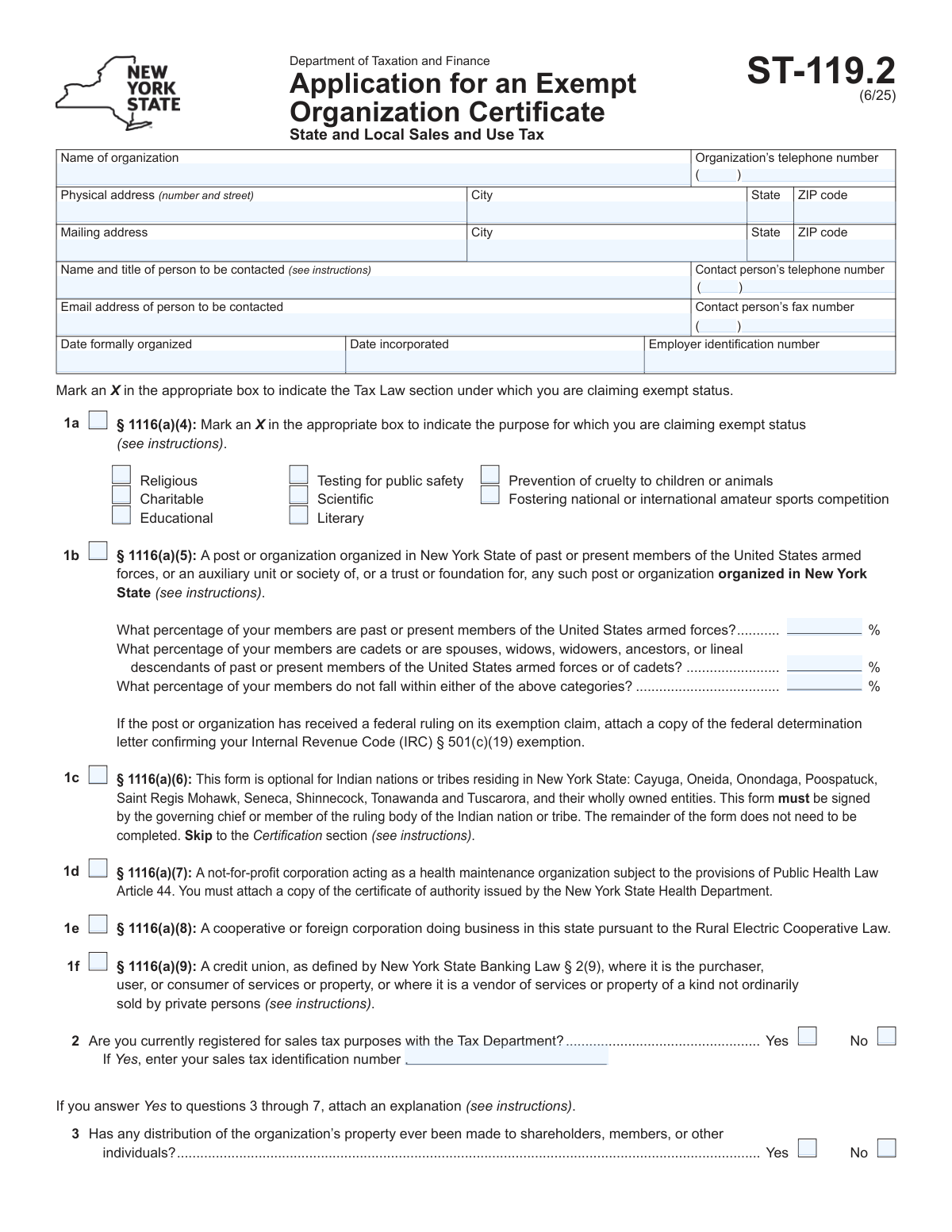
Yes! You can use AI to fill out Form ST-119.2, Application for an Exempt Organization Certificate

Form ST-119.2, Application for an Exempt Organization Certificate, is a document submitted to the New York State Department of Taxation and Finance by non-profits and other qualifying entities. Its purpose is to apply for a certificate that grants exemption from paying state and local sales and use taxes on their purchases. This is crucial for organizations operating for religious, charitable, scientific, educational, or other specified exempt purposes to reduce their operational costs. Today, this form can be filled out quickly and accurately using AI-powered services like Instafill.ai, which can also convert non-fillable PDF versions into interactive fillable forms.
Our AI automatically handles information lookup, data retrieval, formatting, and form filling.
It takes less than a minute to fill out ST-119.2 using our AI form filling.
Securely upload your data. Information is encrypted in transit and deleted immediately after the form is filled out.

Form specifications

Form name: Form ST-119.2, Application for an Exempt Organization Certificate
Number of pages: 2
Filled form examples: Form ST-119.2 Examples
Language: English
main-image

Instafill Demo: How to fill out PDF forms in seconds with AI

How to Fill Out ST-119.2 Online for Free in 2026

Are you looking to fill out a ST-119.2 form online quickly and accurately? Instafill.ai offers the #1 AI-powered PDF filling software of 2026, allowing you to complete your ST-119.2 form in just 37 seconds or less.
Follow these steps to fill out your ST-119.2 form online using Instafill.ai:
  1. 1 Navigate to Instafill.ai and upload or select Form ST-119.2.
  2. 2 Provide the organization's identification details, including its legal name, physical and mailing addresses, contact information, and Employer Identification Number (EIN).
  3. 3 Select the appropriate Tax Law section under which the exemption is being claimed and specify the organization's purpose (e.g., religious, charitable, educational).
  4. 4 Answer the series of yes/no questions regarding the organization's activities, distribution of property, political influence, and federal tax-exempt status.
  5. 5 Indicate the organization's legal structure (e.g., corporation, LLC, trust) and gather all required attachments, such as articles of incorporation, bylaws, financial statements, and the federal determination letter.
  6. 6 Review all the information populated by the AI for accuracy and completeness before proceeding to the certification section.
  7. 7 An authorized officer must sign and date the form, providing their name, title, and email. Download the completed application and submit it with all attachments to the NYS Department of Taxation and Finance.

Our AI-powered system ensures each field is filled out correctly, reducing errors and saving you time.

Why Choose Instafill.ai for Your Fillable ST-119.2 Form?

Speed

Complete your ST-119.2 in as little as 37 seconds.

Up-to-Date

Always use the latest 2026 ST-119.2 form version.

Cost-effective

No need to hire expensive lawyers.

Accuracy

Our AI performs 10 compliance checks to ensure your form is error-free.

Security

Your personal information is protected with bank-level encryption.

Frequently Asked Questions About Form ST-119.2

Form ST-119.2 is used by certain organizations in New York to apply for an Exempt Organization Certificate, which grants exemption from paying state and local sales and use taxes on their purchases.

This form should be filed by organizations claiming tax-exempt status for purposes such as religious, charitable, educational, scientific, prevention of cruelty to children or animals, and certain veterans' posts or health maintenance organizations.

Yes, a federal exemption does not automatically grant a state sales tax exemption. You must file Form ST-119.2 and, as stated in question 8, you are required to attach a copy of your federal IRC § 501(c)(3) determination letter.

You must attach your organization's governing documents (e.g., articles of incorporation, bylaws), a statement of activities, and financial statements for your most recent fiscal year. Depending on your organization type, you may also need to include a federal determination letter or other specific certificates.

If you have been in existence for less than a year, you should submit a statement of your receipts and expenditures to date, a proposed budget for the rest of the year, and a statement of assets and liabilities as of the application date.

If you are a branch or chapter, you must indicate in question 9 whether your parent organization has a group exemption that applies to you. If so, you must attach a copy of the parent organization's federal determination letter.

If you answer 'Yes' to any of the questions from 3 through 7, the form instructions state that you must attach a separate sheet with a detailed explanation for each 'Yes' answer.

No, this form is optional for the specific Indian nations or tribes listed in section 1c. If they choose to file, they only need to complete the top identification section, check the box in 1c, and provide a signature from a governing member.

The 'Physical address' is the actual street location of your organization, which cannot be a P.O. Box. The 'Mailing address' is where you want to receive correspondence from the Tax Department, and this can be a P.O. Box.

Yes, services like Instafill.ai use AI to help you accurately auto-fill form fields with your saved information, which can save time and reduce the risk of errors.

You can use a service like Instafill.ai to upload the PDF and complete it online. Their platform allows you to easily type into the fields, save your data, and ensure all required information is entered before printing.

If you have a non-fillable or 'flat' PDF, you can upload it to a platform like Instafill.ai. The service can convert the document into an interactive, fillable form that you can complete on your computer.

No, the form explicitly states in section 11 not to attach federal Form 1023, which is the Application for Recognition of Exemption. However, you must attach your federal determination letter if you have one.

The certification must be signed by an officer, trustee, governing chief, or member of the ruling body of the organization. The signer certifies that all information provided is true and complete.

Compliance ST-119.2
Validation Checks by Instafill.ai

1
Validates Employer Identification Number (EIN) Format
This check ensures the Employer Identification Number (EIN) is a 9-digit number, conforming to the IRS standard format (XX-XXXXXXX). A valid EIN is critical for the Tax Department to verify the organization's federal status and identity. An incorrectly formatted EIN will prevent cross-referencing with federal records and lead to application rejection.
2
Ensures Sales Tax ID is Provided When Required
This validation verifies that if the applicant answers 'Yes' to question 2 ('Are you currently registered for sales tax purposes?'), the 'Sales tax identification number' field is also filled. This is crucial for the Tax Department to link the application to an existing account and avoid creating duplicate records. Failure to provide the ID when required will result in an incomplete application and processing delays.
3
Verifies a Single Exemption Claim Section is Selected
This check ensures that the applicant has selected only one primary exemption category from the available sections (1a, 1b, 1c, 1d, 1e, or 1f). An organization can only apply under one specific section of the Tax Law at a time. Selecting multiple categories creates ambiguity regarding the basis of the claim and will cause the application to be returned for correction.
4
Requires Specific Purpose for §1116(a)(4) Claim
If an applicant marks the box for section 1a, this check confirms that at least one of the specific purpose sub-boxes (e.g., Religious, Charitable, Educational) is also marked. The general claim under section 1a is insufficient without specifying the exact nature of the organization's purpose. An application missing this detail is considered incomplete and cannot be properly evaluated.
5
Validates Membership Percentages in Section 1b Sum to 100%
For applicants claiming exemption under section 1b, this check ensures that the three percentage values entered for membership composition add up to exactly 100%. This is a logical requirement to confirm a complete and accurate breakdown of the membership. If the percentages do not sum to 100, it indicates a data entry error and the application will be considered invalid.
6
Validates Chronological Order of Organization and Incorporation Dates
This validation checks that the 'Date incorporated,' if provided, is on or after the 'Date formally organized.' An organization cannot be legally incorporated before it is formally organized or founded. This check prevents logical impossibilities in the application timeline and ensures the integrity of the organization's historical data.
7
Ensures All Required Contact Information is Complete
This check verifies that the fields for the contact person's name, title, telephone number, and email address are all filled out. This information is essential for the Tax Department to communicate with the organization regarding questions or the status of the application. Missing contact details can severely delay or halt the application process.
8
Validates Format of Contact and Officer Email Addresses
This check confirms that the email addresses provided for the contact person and the signing officer follow a standard format (e.g., [email protected]). A valid email address is critical for official electronic communication from the Tax Department. An invalid format could lead to missed notifications and important updates regarding the application.
9
Validates Applicability of Questions 5, 6, and 7
This check ensures that questions 5, 6, and 7 (regarding influencing legislation, political campaigns, and sports facilities) are only answered if the applicant has claimed exemption under section 1a. These questions are specific qualifiers for IRC § 501(c)(3) type organizations, which fall under section 1a. Answering them for other exemption types is irrelevant and may indicate a misunderstanding of the form.
10
Ensures Organization Type is Selected in Question 10
This validation confirms that the applicant has selected one and only one organization type in question 10 (e.g., Corporation, Trust, LLC). This selection determines which legal documents must be attached to the application. Failure to specify the organization type makes it impossible to verify the legal structure and will result in an incomplete application.
11
Verifies Completeness of the Certification Section
This check ensures that the signature date, the printed name and title of the officer, and the officer's email address are all provided in the final certification section. The certification is a legal attestation of the application's accuracy and completeness. An unsigned or incomplete certification invalidates the entire submission.
12
Validates Indian Nation Form Skip Logic
If the applicant selects option 1c for an Indian nation or tribe, this validation checks that the rest of the form (questions 2-11) is left blank, as per the instructions. The form states that these applicants only need to complete the top identification section and the final certification. Filling out unnecessary sections could cause confusion and processing errors.
13
Validates Phone and Fax Number Structure
This check verifies that all telephone and fax numbers are entered in a consistent format, with a 3-digit area code and a 7-digit local number. This ensures the data is structured properly for the department's contact database and prevents communication failures. Incorrectly formatted numbers can prevent the department from being able to contact the organization, causing delays.
14
Checks for Mandatory Address Information
This validation ensures that the organization's full physical address (street, city, state, ZIP code) is provided. A physical address is required for legal and verification purposes, even if a separate mailing address is used. An incomplete physical address will render the application invalid as it is a core piece of identification for the entity.

Common Mistakes in Completing ST-119.2

Forgetting Required Supporting Documents

This form requires numerous attachments based on the answers provided, such as articles of incorporation (Question 10), federal determination letters (Questions 8, 9), and financial statements (Question 11). Applicants often forget to include one or more of these documents, which is a primary cause for application rejection or significant processing delays. To prevent this, create a checklist based on your answers and carefully gather all necessary paperwork before submitting the application.

Failing to Attach Explanations for 'Yes' Answers

Questions 3 through 7 are critical eligibility questions, and the instructions state that a 'Yes' answer requires a separate, attached explanation. A common mistake is to check 'Yes' without providing the required narrative, rendering the application incomplete. This forces the tax department to request more information, halting the review process until the explanation is received.

Omitting the Federal IRC § 501(c)(3) Determination Letter

If an organization answers 'Yes' to Question 8 or 9, indicating it has a federal tax exemption, attaching the IRS determination letter is mandatory. This letter is the primary evidence supporting the claim, and failing to include it is a frequent and critical error. An application submitted without this required letter will be considered incomplete and will not be processed until it is provided.

Using an Incorrect or Inconsistent Organization Name

The application requires the full, legal name of the organization as it appears on its articles of incorporation or other founding documents, not a DBA ('doing business as') name. Applicants sometimes use an abbreviated or informal name, or the name on the form does not match the name on the attached documents. This inconsistency creates confusion and can lead to processing delays or rejection while the department seeks clarification.

Invalid or Incomplete Signature and Title

The certification must be signed by a legally authorized individual, such as an 'officer, trustee, governing chief, or member of the ruling body.' A frequent error is having a lower-level employee or volunteer sign the form, or forgetting to print the signer's name and official title. An improper signature can invalidate the entire application, requiring a complete resubmission with the correct authorization.

Incomplete Membership Percentages for Veterans' Organizations

Organizations applying under §1116(a)(5) (Section 1b) must provide a percentage breakdown of their membership across three specific categories. Applicants often leave these fields blank or enter numbers that do not total 100%. This information is essential for verifying eligibility under this specific statute, and its omission or inaccuracy will stop the application from being processed.

Selecting the Wrong Exemption Category in Section 1

The form provides several distinct legal bases for exemption (1a through 1f), each with specific criteria. Applicants may not fully understand the legal distinctions and select the wrong category, such as a veterans' post choosing 'Charitable' under 1a instead of the correct category in 1b. This fundamental error can lead to an automatic denial because the supporting documentation will not match the requirements of the selected category.

Incorrectly Submitting Federal Form 1023

Section 11 contains a specific note stating, 'Do not attach federal Form 1023.' Despite this clear instruction, applicants sometimes include this lengthy federal application, assuming more documentation is better. Submitting this form shows a failure to follow instructions and adds unnecessary documents to the file, which can slow down the review by state officials.

Confusing Physical and Mailing Addresses

The form asks for both a physical address and a separate mailing address. Organizations that use a P.O. Box for mail sometimes enter it in the physical address field or leave the physical address blank entirely. A valid physical street address is required, and failing to provide it correctly can cause issues with verification and official correspondence, delaying the application process.

Omitting the Sales Tax ID Number When Applicable

In Question 2, if an organization is already registered for sales tax in New York and checks 'Yes,' it must also enter its sales tax identification number. It is a common oversight to check the 'Yes' box but leave the ID number field blank. This missing data requires the tax department to perform extra research or contact the applicant, causing unnecessary delays in processing the exemption certificate.
Saved over 80 hours a year

“I was never sure if my IRS forms like W-9 were filled correctly. Now, I can complete the forms accurately without any external help.”

Kevin Martin Green

Your data stays secure with advanced protection from Instafill and our subprocessors

Robust compliance program

Transparent business model

You’re not the product. You always know where your data is and what it is processed for.

ISO 27001, HIPAA, and GDPR

Our subprocesses adhere to multiple compliance standards, including but not limited to ISO 27001, HIPAA, and GDPR.

Security & privacy by design

We consider security and privacy from the initial design phase of any new service or functionality. It’s not an afterthought, it’s built-in, including support for two-factor authentication (2FA) to further protect your account.

Fill out ST-119.2 with Instafill.ai

Worried about filling PDFs wrong? Instafill securely fills form-st-1192-application-for-an-exempt-organization-certificate forms, ensuring each field is accurate.