Yes! You can use AI to fill out Formulaire IMM 5476 (11-2025) F — Recours aux services d'un représentant
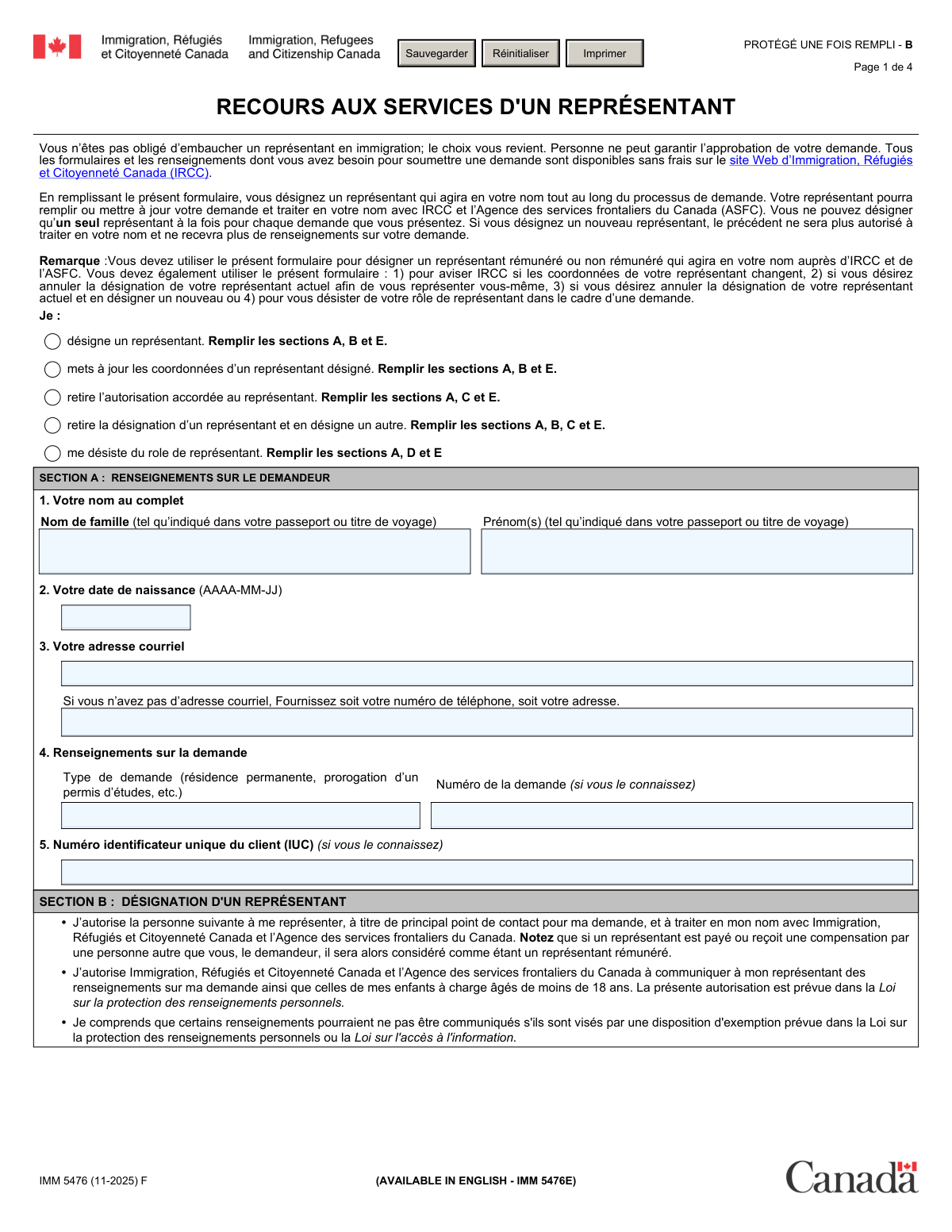
Le formulaire IMM 5476 dâImmigration, RĂ©fugiĂ©s et CitoyennetĂ© Canada (IRCC) permet Ă un demandeur (ou rĂ©pondant) dâautoriser une personne Ă agir comme reprĂ©sentant principal pour une demande dâimmigration ou de citoyennetĂ©, ou de mettre fin/modifier cette autorisation. Il encadre aussi les situations oĂč le reprĂ©sentant est rĂ©munĂ©rĂ© ou non, et recueille ses coordonnĂ©es et attestations afin quâIRCC/ASFC puisse communiquer lĂ©galement des renseignements sur le dossier. Ce formulaire est important, car sans autorisation valide, IRCC/ASFC peut refuser de partager des informations avec un tiers et le traitement peut ĂȘtre retardĂ© si les sections requises ne sont pas complĂ©tĂ©es. Aujourdâhui, ce formulaire peut ĂȘtre rempli rapidement et avec prĂ©cision grĂące Ă des services IA comme Instafill.ai, qui peuvent aussi convertir des PDF non remplissables en formulaires interactifs remplissables.
Our AI automatically handles information lookup, data retrieval, formatting, and form filling.
It takes less than a minute to fill out IMM 5476 using our AI form filling.
Securely upload your data. Information is encrypted in transit and deleted immediately after the form is filled out.
Form specifications
| Form name: | Formulaire IMM 5476 (11-2025) F — Recours aux services d'un représentant |
| Number of pages: | 4 |
| Language: | English |
| Categories: | IRCC forms, immigration forms, Canadian immigration forms, representative forms |
Instafill Demo: filling out a legal form in seconds
How to Fill Out IMM 5476 Online for Free in 2026
Are you looking to fill out a IMM 5476 form online quickly and accurately? Instafill.ai offers the #1 AI-powered PDF filling software of 2026, allowing you to complete your IMM 5476 form in just 37 seconds or less.
Follow these steps to fill out your IMM 5476 form online using Instafill.ai:
- 1 Aller sur Instafill.ai, puis téléverser le PDF du formulaire IMM 5476 (ou le sélectionner depuis la bibliothèque de formulaires).
- 2 Choisir l’action appropriée (désigner un représentant, mettre à jour ses coordonnées, retirer l’autorisation, remplacer le représentant, ou se désister comme représentant) afin que l’IA active les bonnes sections (A à E).
- 3 Renseigner la Section A avec les informations du demandeur (nom complet, date de naissance, courriel ou autre contact, type de demande, numéro de dossier et IUC si connus).
- 4 Si vous désignez/mettez à jour un représentant (Section B), entrer son nom, indiquer s’il est rémunéré ou non et sa catégorie (CICC, barreau, notaire du Québec, ami/famille, autre), puis compléter ses coordonnées (organisation, adresse, téléphone, courriel).
- 5 Si vous retirez l’autorisation (Section C) ou si le représentant se désiste (Section D), compléter l’identité du représentant concerné et les champs requis pour la résiliation.
- 6 Compléter les déclarations et signatures requises (signature du représentant en Section 9 si applicable, signature du demandeur/parent-tuteur en Section E, et signature du conjoint pour un parrainage si applicable), puis vérifier les dates au format AAAA-MM-JJ.
- 7 Laisser Instafill.ai effectuer la validation (champs manquants, cohérence des sections), puis générer et télécharger le PDF final pour soumission à IRCC selon les instructions de votre demande.
Our AI-powered system ensures each field is filled out correctly, reducing errors and saving you time.
Why Choose Instafill.ai for Your Fillable IMM 5476 Form?
Speed
Complete your IMM 5476 in as little as 37 seconds.
Up-to-Date
Always use the latest 2026 IMM 5476 form version.
Cost-effective
No need to hire expensive lawyers.
Accuracy
Our AI performs 10 compliance checks to ensure your form is error-free.
Security
Your personal information is protected with bank-level encryption.
Frequently Asked Questions About Form IMM 5476
IMM 5476 is used to authorize a representative to act on your behalf with IRCC and the CBSA, or to update/cancel that authorization. It also covers situations where a representative resigns from representing you.
No. The form states you are not required to hire a representative, and all IRCC forms and instructions are available for free. Using a representative is your choice and does not guarantee approval.
Choose the option that matches your situation: appoint a representative (Sections A, B, E), update representative contact details (A, B, E), withdraw authorization (A, C, E), replace a representative (A, B, C, E), or resign as representative (A, D, E). Only complete the sections listed for the option you select.
No. The form explains you can designate only one representative at a time for each application. If you appoint a new representative, the previous one is no longer authorized and will stop receiving information.
Youâll need your full name exactly as shown on your passport or travel document, your date of birth, and your email (or a phone number or mailing address if you donât have email). You should also provide your application type and, if known, your application/file number and UCI (IUC).
If you donât know them, you can leave those fields blank. The form indicates these numbers are provided âif you know it,â so they are not required in every case.
In Section B, enter the representativeâs full name and select the âNON RĂMUNĂRĂâ category that applies (for example, friend/family). Then provide the representativeâs contact details in Section 8 and ensure the representative signs and dates the declaration in Section 9.
Select the âRĂMUNĂRĂâ option and indicate which authorized group they belong to (CICC consultant, provincial/territorial lawyer or articling student, or Quebec notary). You must include the membership number and province/territory where requested, plus full contact details and the representativeâs signature/date.
You should identify them under the lawyer/law society option and provide the required province/territory and membership details. In Section 8, include the supervising lawyerâs name and the supervising lawyerâs professional membership number, and complete the supervising lawyer signature fields in Section 9 if applicable.
Select the option to withdraw authorization and complete Sections A, C, and E. In Section C, provide the representativeâs name (and organization if applicable), then sign and date Section E so IRCC knows you no longer authorize that person.
Select the option to withdraw the current designation and designate another, then complete Sections A, B, C, and E. Section C identifies the representative you are removing, and Section B identifies the new representative you are appointing.
By listing the representativeâs email, you authorize IRCC to send your personal information to that email address. This is part of the communication consent described on the form.
The applicant (or a parent/legal guardian if the applicant is under 18) must sign and date Section E. If you are appointing/updating/changing a representative, the representative must also sign and date Section 9; for sponsorship cases, the spouse/common-law partner may also need to sign in Section E.
The form itself doesnât provide a specific processing time, but it warns that incomplete forms can delay processing or lead to refusal. To avoid issues, complete all required sections for your selected option and ensure all required signatures/dates are included.
YesâAI tools like Instafill.ai can help auto-fill form fields accurately and save time by extracting your details and placing them into the correct fields. You typically upload the PDF to Instafill.ai, review the suggested entries for Sections AâE, and then download the completed form for signature and submission.
If the PDF isnât fillable, Instafill.ai can convert flat, non-fillable PDFs into interactive fillable forms so you can type directly into the fields. After conversion, you can auto-fill, review, and export the completed document.
Compliance IMM 5476
Validation Checks by Instafill.ai
1
Ensures exactly one representative action is selected
Validate that the submitter selects one (and only one) option under âJe :â (appoint, update, withdraw authorization, withdraw+appoint new, or representative resigns). This is critical because the selected action determines which sections are legally applicable and which data IRCC will use. If none or multiple actions are selected, the submission should be rejected and the user prompted to choose a single action before continuing.
2
Section completion rules enforced based on selected action
Check that the required sections are completed according to the chosen action: A+B+E for appoint/update, A+C+E for withdraw authorization, A+B+C+E for withdraw+appoint new, and A+D+E for representative resignation. This prevents incomplete or contradictory submissions (e.g., appointing a representative without providing representative details). If the required sections are missing or extra sections conflict with the action, the system should block submission and highlight the missing/invalid sections.
3
Applicant full name completeness and character validation
Ensure the applicantâs family name and given name(s) are both present and contain only reasonable name characters (letters, spaces, hyphens, apostrophes) and are not placeholders like âN/Aâ or a single initial. Accurate names are essential for identity matching with passport/travel documents and IRCC records. If validation fails, the form should be returned for correction to avoid misidentification and processing delays.
4
Applicant date of birth format and plausibility check (YYYY-MM-DD)
Validate that the applicant date of birth is provided in the required format (AAAA-MM-JJ / YYYY-MM-DD) and represents a real calendar date. Also enforce plausibility (e.g., not in the future and not unreasonably old such as >120 years). If invalid, the submission should be blocked because DOB is a key identifier and errors can cause record mismatches or refusal to process.
5
Applicant contact requirement: email OR alternate contact present
If the applicant email is blank, require that an alternate contact is provided (either a phone number or a complete mailing address, per the form instruction). This ensures IRCC can communicate with the applicant if email is unavailable. If neither email nor a valid alternate contact is present, the system should fail validation and request at least one valid contact method.
6
Email address format validation (applicant and representative)
Validate that any provided email (applicant and/or representative) matches standard email syntax (local@domain) and does not contain spaces or invalid characters. Email is used for official communication and may carry personal information, so malformed addresses can lead to missed notices or privacy risks. If invalid, the system should require correction or removal (if optional) before submission.
7
Application type required and non-empty when Section A is applicable
When Section A is required by the selected action, ensure âType de demandeâ (application type) is not blank and is meaningful (not just punctuation or âunknownâ). This field helps route and associate the representative authorization with the correct IRCC process. If missing, the submission should be flagged as incomplete and blocked until a valid application type is entered.
8
Application/file number format check (if provided)
If an application/file number is entered, validate it meets expected constraints: non-empty, reasonable length, and composed of allowed characters (typically alphanumeric; no long free-text sentences). This reduces downstream matching errors and prevents accidental entry of unrelated text. If the value fails format checks, the system should prompt the user to correct it or leave it blank if truly unknown.
9
UCI/IUC format validation (if provided)
If the Unique Client Identifier (IUC/UCI) is provided, validate it matches common IRCC UCI patterns (typically 8 or 10 digits, sometimes displayed with a hyphen; store normalized digits). Correct UCI improves identity matching and reduces duplicate client records. If the UCI is malformed, the system should reject the value and request correction or allow the user to leave it blank if unknown.
10
Representative identity required when appointing/updating/appointing new
When Section B is required, ensure the representativeâs family name and given name(s) are both completed and not placeholders. This is necessary to clearly identify who is authorized to act and to avoid ambiguity between individuals at the same firm. If missing or invalid, the submission should be blocked because the authorization cannot be applied to an unidentified representative.
11
Representative compensation status and category selection consistency
Validate that the representative is classified as either NON RĂMUNĂRĂ (unpaid) or RĂMUNĂRĂ (paid) and that the selected category checkboxes align with that choice (i.e., do not allow selecting both paid and unpaid categories). This is important because paid representation is restricted to authorized professionals and affects compliance checks. If inconsistent, the system should fail validation and require the user to correct the compensation/category selections.
12
Representative authorization eligibility: member number required for regulated categories
If the representative is indicated as a CICC member, provincial/territorial bar member (or articling student), or Quebec notary (paid or unpaid), require the corresponding membership number field to be completed and within reasonable length/character rules. This supports regulatory verification and ensures the representative is authorized to provide services where required. If the membership number is missing or malformed, the submission should be blocked and the user prompted to provide a valid number.
13
Province/territory required when law society category is selected
When the representative is identified as a member of a provincial/territorial bar (or articling student), require the province/territory field and validate it against a controlled list of Canadian provinces/territories (or accepted standard abbreviations). This is needed to verify the correct regulator and interpret the membership number. If missing or not a valid province/territory, validation should fail and request a corrected selection.
14
Representative address completeness and postal code validation
When Section B contact details are required, validate that the mailing address is complete enough to be usable (street number and name, city, province/state/territory, country, and postal/ZIP code). Also validate postal/ZIP code format based on country when possible (e.g., Canadian postal code pattern A1A 1A1). If incomplete or invalid, the system should block submission because IRCC/ASFC correspondence and identity checks may rely on accurate address data.
15
Representative phone/fax number format validation (with country code)
If telephone or fax is provided, require a country calling code and validate that the remaining number contains only allowed digits and formatting, and meets minimum length for the selected country. Reliable phone contact supports time-sensitive communication and reduces failed outreach attempts. If invalid, the system should require correction (or removal for optional fax) before submission.
16
Signature and date requirements across Sections D, E, and representative declaration
Enforce that required signatures and dates are present and correctly formatted (YYYY-MM-DD) for the sections triggered by the selected action: Section 9 (representative signature/date) when Section B applies, Section D signature/date when representative resigns, and Section E applicant/guardian signature/date always. Also validate that signature dates are not in the future and are logically consistent (e.g., representative signature date should not be after applicant signature date if your business rules require same-day or prior authorization). If missing or invalid, the submission should be rejected because the authorization/withdrawal is not legally effective without proper attestation.
Common Mistakes in Completing IMM 5476
People often misunderstand the purpose of IMM 5476 and select the wrong option (e.g., âmets Ă jourâ instead of âdĂ©signeâ, or âretire lâautorisationâ when they actually want to replace the representative). Checking more than one action can also create conflicting instructions and lead IRCC to treat the form as incomplete or unclear, delaying processing. To avoid this, decide the single outcome you want (appoint, update, withdraw, replace, or representative resigns) and complete only the sections listed beside that option. AI-powered tools like Instafill.ai can help by guiding the correct action selection and ensuring only the required sections are completed.
A very common error is completing Section B when the request is only to withdraw authorization (Section C), or forgetting Section C when replacing a representative (which requires both B and C). This happens because the form spans multiple pages and the required sections change depending on the action chosen. The consequence is a form that looks âfilledâ but is functionally invalid for the requested change, which can delay updates to your file. Follow the formâs instructions exactly (e.g., replace = A, B, C, E) or use Instafill.ai to automatically enforce section logic and completeness.
Applicants frequently enter nicknames, omit middle names, swap given/family names, or use accents/spelling that differ from the passport. This usually happens when people copy from other Canadian forms or from everyday usage rather than the travel document. Mismatched identity details can cause confusion in matching the authorization to the correct IRCC file and may trigger follow-up requests. Avoid this by copying the family name and given name(s) exactly as shown in the passport/travel document; Instafill.ai can help standardize names and reduce transposition errors.
The form requires dates in YYYY-MM-DD (AAAA-MM-JJ), but many people enter DD/MM/YYYY, MM/DD/YYYY, or write the month in letters. This is especially common for applicants used to local date formats, and it can lead to validation errors or misinterpretation of the date of birth or signature dates. Always use four-digit year, two-digit month, two-digit day (e.g., 1994-07-03) and ensure the signature date is not earlier than the form completion context. Instafill.ai can automatically format dates correctly and flag impossible or inconsistent entries.
Applicants sometimes leave the email field empty and also forget to provide a phone number or mailing address, despite the form explicitly requiring an alternate contact if no email exists. This happens when the applicant expects the representativeâs email to be sufficient, but IRCC may still need the applicantâs own contact details for certain communications. Missing contact information can delay communication and processing. Provide the applicantâs email whenever possible; if none, enter a reachable phone number or full mailing addressâInstafill.ai can prompt for the required alternate contact when email is blank.
People often mix up the Unique Client Identifier (UCI/IUC) with the application/file number, or they enter only part of the number from an email/letter. This happens because both fields are âif you know itâ and applicants may guess or copy the wrong identifier. Incorrect identifiers can prevent IRCC from matching the representative authorization to the correct file, causing delays. Only enter these numbers if you can copy them exactly from official IRCC correspondence; Instafill.ai can help validate expected formats and reduce copy/paste mistakes.
Applicants frequently select âNON RĂMUNĂRĂâ even when the representative is paid indirectly (e.g., compensated by a family member, employer, or through gifts/benefits). The form states that compensation from anyone other than the applicant still counts as ârĂ©munĂ©rĂ©,â and misclassification can raise compliance issues because paid representatives must be authorized (CICC/law society/notary). This can lead to refusal to recognize the representative or requests for clarification. Confirm whether any compensation exists and select the correct paid/unpaid category; Instafill.ai can help by prompting the correct classification based on your inputs.
When a representative is a consultant, lawyer, articling student, or Quebec notary, applicants often forget the membership number, enter the wrong regulator, or omit the province/territory for law society membership. This happens because the form has multiple similar checkboxes and âNumĂ©ro de membreâ fields, and people may not know which one applies. If the representativeâs credentials canât be verified, IRCC may not accept the representation and may communicate only with the applicant. Avoid this by selecting exactly one appropriate category and entering the membership number and province/territory exactly as issued; Instafill.ai can help ensure the right fields are completed for the chosen representative type.
Applicants often put the full address into one line, omit the country, or enter a phone number without a country calling code and area code. This happens because address formats vary by country and the form separates unit number, street number, street name, and requires country/territory and postal/ZIP code. Incomplete or poorly formatted contact details can prevent IRCC from reaching the representative and can slow down time-sensitive requests. Enter each address component in its proper field and include phone country code + area code + number; Instafill.ai can format and validate addresses and phone numbers to reduce delivery/contact failures.
A frequent reason for rejection is missing signatures: the representative must sign Section 9 when being appointed/updated/replaced, and the applicant (or parent/guardian if under 18) must sign Section E. People miss these because signatures are on later pages, or they assume typing a name is enough when a signature is required by the submission method. Without proper signatures and dates, IRCC may treat the authorization as invalid and continue communicating with the wrong party. Double-check that every required signer has signed and dated in YYYY-MM-DD; Instafill.ai can highlight missing signature blocks before submission (and if you only have a flat non-fillable PDF, Instafill.ai can convert it into a fillable version to reduce missed fields).
When applicants want a new representative, they sometimes complete only Section B for the new representative and forget Section C to withdraw the previous authorization. This happens because âretire la dĂ©signation⊠et en dĂ©signe un autreâ requires both actions, and users focus on the new details. The consequence is that IRCC may not clearly remove the old representative, causing confusion about who is authorized to receive information. Use the âreplaceâ option and complete A, B, C, and E so the old representative is explicitly withdrawn; Instafill.ai can enforce this dependency so Section C isnât skipped.
Saved over 80 hours a year
âI was never sure if my IRS forms like W-9 were filled correctly. Now, I can complete the forms accurately without any external help.â
Kevin Martin Green
Your data stays secure with advanced protection from Instafill and our subprocessors

Robust compliance program
Transparent business model
Youâre not the product. You always know where your data is and what it is processed for.
ISO 27001, HIPAA, and GDPR
Our subprocesses adhere to multiple compliance standards, including but not limited to ISO 27001, HIPAA, and GDPR.
Security & privacy by design
We consider security and privacy from the initial design phase of any new service or functionality. Itâs not an afterthought, itâs built-in, including support for two-factor authentication (2FA) to further protect your account.
Fill out IMM 5476 with Instafill.ai
Worried about filling PDFs wrong? Instafill securely fills formulaire-imm-5476-11-2025-f-recours-aux-services-dun-reprsentant forms, ensuring each field is accurate.