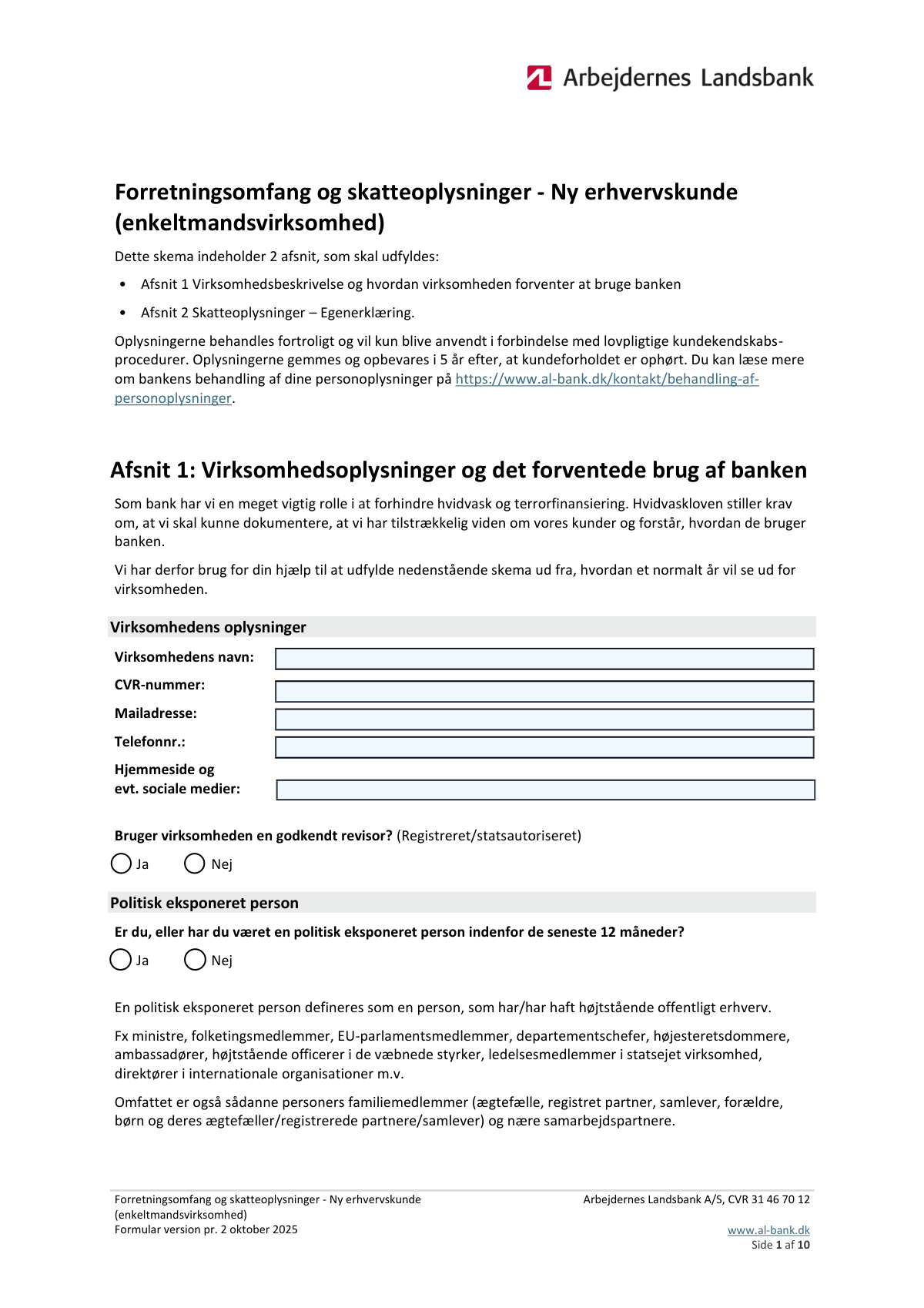
Yes! You can use AI to fill out Forretningsomfang og skatteoplysninger - Ny erhvervskunde (enkeltmandsvirksomhed) (Arbejdernes Landsbank A/S) – Formular version pr. 2 oktober 2025

“Forretningsomfang og skatteoplysninger - Ny erhvervskunde (enkeltmandsvirksomhed)” er et bankskema, der dokumenterer virksomhedens aktiviteter, pengestrømme, udenlandske relationer, kontantbrug samt ejerens skatteoplysninger. Banken bruger oplysningerne til at opfylde krav i hvidvaskloven og til skatteindberetningspligt efter OECD CRS og FATCA, herunder vurdering af risiko og korrekt rapportering til relevante myndigheder. Skemaet er vigtigt, fordi manglende eller ukorrekte oplysninger kan forhindre etablering af kundeforholdet eller medføre begrænsninger (fx spærring af kort/konti), hvis erklæringer ikke underskrives. I dag kan formularen udfyldes hurtigt og præcist med AI-baserede tjenester som Instafill.ai, som også kan omdanne ikke-udfyldelige PDF-versioner til interaktive, udfyldelige formularer.
Our AI automatically handles information lookup, data retrieval, formatting, and form filling.
It takes less than a minute to fill out AL-Bank Forretningsomfang og skatteoplysninger (Ny erhvervskunde – enkeltmandsvirksomhed) using our AI form filling.
Securely upload your data. Information is encrypted in transit and deleted immediately after the form is filled out.

Form specifications

Form name: Forretningsomfang og skatteoplysninger - Ny erhvervskunde (enkeltmandsvirksomhed) (Arbejdernes Landsbank A/S) – Formular version pr. 2 oktober 2025
Number of pages: 9
Filled form examples: Form AL-Bank Forretningsomfang og skatteoplysninger (Ny erhvervskunde – enkeltmandsvirksomhed) Examples
Language: English
main-image

Instafill Demo: filling out a legal form in seconds

How to Fill Out AL-Bank Forretningsomfang og skatteoplysninger (Ny erhvervskunde – enkeltmandsvirksomhed) Online for Free in 2026

Are you looking to fill out a AL-BANK FORRETNINGSOMFANG OG SKATTEOPLYSNINGER (NY ERHVERVSKUNDE – ENKELTMANDSVIRKSOMHED) form online quickly and accurately? Instafill.ai offers the #1 AI-powered PDF filling software of 2026, allowing you to complete your AL-BANK FORRETNINGSOMFANG OG SKATTEOPLYSNINGER (NY ERHVERVSKUNDE – ENKELTMANDSVIRKSOMHED) form in just 37 seconds or less.
Follow these steps to fill out your AL-BANK FORRETNINGSOMFANG OG SKATTEOPLYSNINGER (NY ERHVERVSKUNDE – ENKELTMANDSVIRKSOMHED) form online using Instafill.ai:
  1. 1 Gå til Instafill.ai og upload PDF’en (eller vælg formularen, hvis den findes i formularbiblioteket).
  2. 2 Lad AI’en identificere felter og oprette en udfyldelig version, hvis dokumentet ikke allerede er fillable.
  3. 3 Udfyld virksomhedsoplysninger (virksomhedens navn, CVR, kontaktoplysninger, hjemmeside/sociale medier) og angiv revisorforhold samt PEP-status.
  4. 4 Beskriv virksomhedens forretningsmodel: forretningsområder, produkter/ydelser, salgskanaler, kundesegmenter, leverandører, branchekode og antal medarbejdere samt eventuelle udenlandske tilknytninger.
  5. 5 Angiv formålet med kundeforholdet og forventet brug af bankprodukter, samt midlernes oprindelse og forventede årlige indbetalinger/indtægtskilder og betalingsstrømme (antal overførsler pr. type).
  6. 6 Udfyld oplysninger om engangsbeløb, kontant ind-/udbetaling (hvis relevant), overførsler fra/til udlandet (lande, antal, beløb, formål, afsender/modtager og tidspunkter) samt eventuelle overførsler af indestående/værdipapirer fra andre pengeinstitutter.
  7. 7 Udfyld Afsnit 2 (ejerens skatteoplysninger: fødselsdata, statsborgerskab, skattemæssigt hjemland(e) og evt. TIN), gennemgå AI’ens validering for mangler, og eksportér/indsend til banken samt underskriv erklæringen i netbank eller fysisk efter bankens anvisning.

Our AI-powered system ensures each field is filled out correctly, reducing errors and saving you time.

Why Choose Instafill.ai for Your Fillable AL-Bank Forretningsomfang og skatteoplysninger (Ny erhvervskunde – enkeltmandsvirksomhed) Form?

Speed

Complete your AL-Bank Forretningsomfang og skatteoplysninger (Ny erhvervskunde – enkeltmandsvirksomhed) in as little as 37 seconds.

Up-to-Date

Always use the latest 2026 AL-Bank Forretningsomfang og skatteoplysninger (Ny erhvervskunde – enkeltmandsvirksomhed) form version.

Cost-effective

No need to hire expensive lawyers.

Accuracy

Our AI performs 10 compliance checks to ensure your form is error-free.

Security

Your personal information is protected with bank-level encryption.

Frequently Asked Questions About Form AL-Bank Forretningsomfang og skatteoplysninger (Ny erhvervskunde – enkeltmandsvirksomhed)

This form is used by Arbejdernes Landsbank to collect information about your sole proprietorship’s business activity, expected banking usage, and the owner’s tax residency details. The bank uses it for legally required customer due diligence (anti-money laundering/terror financing) and tax reporting obligations (CRS/FATCA).

You need to complete it if you are opening a new business customer relationship as an enkeltmandsvirksomhed (sole proprietorship) with Arbejdernes Landsbank. The tax self-certification section must be completed for the owner, even if you are only tax liable in Denmark.

The form has two sections: (1) business description and expected use of the bank, and (2) tax information self-certification. Yes—both sections must be completed, because the bank needs both business/transaction expectations and the owner’s tax residency information.

You’ll need your company name, CVR number, email, phone number, and any website/social media links. You also need to indicate whether you use an approved auditor (registered/state-authorized).

A PEP is someone who holds or has held a prominent public function within the last 12 months (and it can also include close family members and close associates). If you fall into that category, select “Ja”; otherwise select “Nej,” and answer truthfully to avoid delays.

List your primary and secondary business activities, what you sell, and how you sell it (e.g., physical store, web sales, wholesale). Include the countries you sell to and any foreign relationships or cooperation partners, if applicable.

Foreign connection refers to more substantial ties such as a production site, business premises, collection activities, or donations abroad. The form states that ordinary e-commerce, ordering goods, or business travel is not considered a foreign connection for this question.

Provide your best estimate for a normal year and only fill in the income categories that apply (sales/fees, state aid/loans/grants, capital injection, dividends, capital returns, or other). If you choose “Other,” briefly explain the source in the comment field.

Indicate the typical ways you receive money (invoice payments, account transfers, card payments/Nets, MobilePay, etc.) and estimate the number of transactions per year for each method. Use “Other” if you receive funds in a different way and describe it.

Engangsbeløb are one-off deposits not already covered elsewhere (e.g., a loan payout, tax refund/settlement, or sale of assets). If you expect them, list the amount, expected date, and who the money is from and why; tick the box if you expect more than five.

Yes, if you expect to use ATMs for cash deposits or withdrawals, you must provide annual totals, number of transactions, and the largest single amount. You also need to state the source of cash deposits (e.g., sales, change, returned previously withdrawn cash, or other) and what expenses you pay in cash.

If you expect international account transfers (not card payments), select “Ja” and fill in the table with country, number of transfers per year, largest amount, total annual amount, purpose, sender/recipient, and expected timing. If you have more than 12 countries or expect non-DKK/other currency situations, tick the relevant boxes.

You must provide the owner’s date of birth, place of birth (country and city), citizenship(s), and the countries where you are tax resident. If you are tax liable outside Denmark, you must also provide the foreign tax identification number (TIN).

The form states that if you do not sign the tax declaration (in netbank or physically), the customer relationship cannot be established. If you are an existing customer, the bank may block your cards and accounts until it is signed.

Yes—AI tools can help you complete the form faster and more accurately; services like Instafill.ai can auto-fill form fields based on your provided information. If your PDF is flat/non-fillable, Instafill.ai can convert it into an interactive fillable form and then guide you to review, edit, and export the completed document for submission to the bank.

Compliance AL-Bank Forretningsomfang og skatteoplysninger (Ny erhvervskunde – enkeltmandsvirksomhed)
Validation Checks by Instafill.ai

1
Company Name is present and appears to be an official business name
Validates that “Company Name” is not blank and contains a plausible legal/official name (not only initials, emojis, or placeholder text like “N/A”). This is important for KYC documentation, account setup, and matching against external registries. If the value is missing or clearly invalid, the submission should be rejected and the user prompted to enter the official registered name.
2
CVR Number format and checksum validation (8 digits)
Checks that the CVR number is exactly 8 digits and passes any applicable modulus/checksum validation used for Danish CVR identifiers. This prevents typos and ensures the business can be reliably identified in the CVR register. If validation fails, block submission and request a corrected CVR number.
3
Consistency between “Registered in Denmark” and CVR presence
Ensures logical consistency: if the company is marked as registered in Denmark (Yes), a valid CVR number must be provided; if marked No, the CVR field should be empty or explicitly marked as not applicable per bank policy. This matters because CVR is a core identifier for Danish-registered entities and drives downstream onboarding checks. If inconsistent, flag the form for correction and prevent completion until aligned.
4
Email address format and deliverability sanity checks
Validates that the email address follows standard email syntax (local@domain), contains a valid domain structure, and does not include obvious invalid patterns (spaces, missing TLD, repeated '@'). This is important for customer communication and for sending required signing/confirmation steps. If invalid, reject the field and require a corrected email before submission.
5
Phone number format validation (DK/E.164 compatible)
Checks that the phone number contains only allowed characters and can be normalized to a valid format (preferably E.164, e.g., +45XXXXXXXX for Denmark). This reduces failed contact attempts and supports automated verification workflows. If the number cannot be normalized or is too short/long, the submission should fail with a clear formatting requirement.
6
Mutually exclusive Yes/No checkbox pairs are enforced
Validates that for each binary question (approved auditor, PEP status, registered in Denmark, other bank account, use ATMs for deposits, use ATMs for withdrawals, etc.) exactly one of Yes/No is selected. This prevents ambiguous states that break risk scoring and routing logic. If both or neither are selected, the form should be returned to the user to choose exactly one option.
7
PEP declaration completeness and recency requirement
Ensures the PEP question is answered and, if “Yes” is selected, the submission is flagged for enhanced due diligence (EDD) workflow because the form explicitly references the last 12 months. This is critical for AML compliance and determines additional documentation/approval steps. If unanswered, block submission; if “Yes,” allow submission but route to EDD and require any additional internal fields/documents configured by policy.
8
Business description fields are complete and non-trivial
Validates that key narrative fields (business areas/foreign relations, products/services and countries, sales channels and countries, customer segments, suppliers and countries) are not empty and meet a minimum content threshold (e.g., length and meaningful words). These fields are required to understand expected activity and AML risk, especially cross-border exposure. If content is missing or clearly placeholder, prevent submission and request more detail.
9
Industry code (branchekode) format and plausibility
Checks that the industry code is provided and matches an expected format (e.g., numeric code length consistent with Danish industry classification) and that any sub-industries are not contradictory (if structured). Correct industry classification supports risk models and regulatory reporting. If invalid or missing, block submission and prompt for a valid branchekode.
10
Number of employees is a non-negative integer within reasonable bounds
Validates that “Number of Employees” is an integer (no decimals, no text) and is not negative; optionally enforce a reasonable upper bound for a sole proprietorship context. This helps ensure the business profile is coherent and supports risk/segment classification. If invalid, reject the value and require correction.
11
Foreign connection rows: country/type pairing and “>5 countries” indicator consistency
Ensures that for each foreign connection row, if a country is entered then a connection type is also selected (and vice versa), and that the “Connection to More Than 5 Countries” checkbox is checked if more than five distinct countries are provided. This prevents incomplete foreign exposure data and supports AML risk assessment. If any row is partially filled or the count indicator is inconsistent, flag and require correction.
12
Annual income sources: selected source requires amount; amounts must be valid DKK numbers
Validates that when an income source checkbox is selected (sales, state aid/loans, capital injection, dividends, capital return, other), the corresponding annual amount field is present and numeric (>= 0) in DKK with acceptable separators. This ensures the bank can quantify expected inflows and compare them to transaction patterns. If a source is selected without an amount (or amount is non-numeric/negative), block submission and request fixes; if “Other” is selected, also require a description.
13
Payment inflow methods: selected method requires a transfer count; counts must be integers
Checks that if an inflow method (invoice payments, account transfers, card payments, MobilePay, other) is selected, the corresponding “count” field is provided and is a non-negative integer. This supports expected transaction volume profiling and monitoring thresholds. If a method is selected without a count or with an invalid count, fail validation and prompt for a correct number; if “Other” is selected, require the “Other Payment Details” text.
14
Lump sum entries: amount/date/source required per row and date format validation
Validates that each lump sum row is either fully empty or fully complete: amount (numeric DKK > 0), expected receipt date (valid date format, not impossible), and sender/reason text are all required together. This is important for explaining atypical inflows and for AML documentation. If any row is partially filled or the date is invalid, reject submission and require completion/correction; if more than five lump sums are indicated, ensure the “Expects More Than 5 Lump Sums” checkbox is checked.
15
Cash deposit/withdrawal sections: conditional required fields and internal numeric consistency
If the company expects to use ATMs for cash deposits/withdrawals (Yes), validates that annual total, number of transactions, and largest single amount are all provided, numeric, and logically consistent (largest single amount ≤ annual total; counts are integers; amounts are >= 0). Also requires a source-of-cash selection for deposits and a description of cash-paid expenses for withdrawals. If any conditional field is missing or inconsistent, block submission and request corrected values/explanations.
16
Cross-border transfer tables: row completeness, numeric logic, and “>12 countries/foreign currency” flags
For both incoming and outgoing foreign transfers, validates that each populated row includes country, annual count (integer), largest amount (numeric), annual total (numeric), purpose, counterparty (sender/recipient), and expected timing; also checks largest amount ≤ annual total. Ensures the “more than 12 countries” checkbox is checked when applicable and that the foreign-currency indicator is consistent with any non-DKK expectations captured by the form. If any row is incomplete or numeric logic fails, reject submission and require corrections; if the user indicates transfers but provides no rows, require at least one completed row.
17
Owner tax information: required fields present and date of birth validity
Validates that the owner’s date of birth, place of birth (country and city), citizenship(s), and tax-resident countries are all provided, and that the date of birth is a valid past date (not in the future) in an accepted format. These are mandatory for CRS/FATCA-related self-certification and reporting obligations. If any required tax field is missing or the date is invalid, block submission and require completion.
18
TIN requirement when tax resident outside Denmark (and basic TIN format sanity)
Ensures that if the owner lists any tax-resident country other than Denmark, a Tax Identification Number (TIN) is provided for the relevant non-Danish jurisdiction(s), and that the TIN is not obviously invalid (e.g., too short, placeholder text). This is essential for correct CRS/FATCA reporting and to avoid regulatory breaches. If non-Danish tax residency is declared without a TIN, fail validation and prompt for the missing TIN (or require an allowed reason code if the process supports it).

Common Mistakes in Completing AL-Bank Forretningsomfang og skatteoplysninger (Ny erhvervskunde – enkeltmandsvirksomhed)

Using a non-official company name (trade name vs. registered name)

Many sole proprietors enter a marketing name, Instagram handle, or a shortened version instead of the official registered virksomhedsnavn. This can cause mismatches with CVR data and slow down the bank’s KYC/AML checks, leading to follow-up questions or delays in onboarding. Always copy the exact name as shown in CVR (including punctuation and any “v/” owner notation if applicable). AI-powered form filling tools like Instafill.ai can pull the registered name from authoritative sources and keep it consistent across fields.

Incorrect CVR number format or mixing CVR with CPR

A frequent error is typing too few/many digits, adding spaces, or accidentally entering a CPR number instead of the company’s CVR. The consequence is failed validation and manual verification, which can delay account creation. Enter the CVR exactly as an 8-digit number and double-check it against virk.dk. Instafill.ai can validate the CVR length/format and flag mismatches before submission.

Leaving contact fields incomplete or using personal contact details inconsistently

Applicants often omit the company email/phone, use a private email in one place and a business email elsewhere, or provide an unreachable number. This creates friction when the bank needs clarifications, signatures, or documentation, and can stall the process. Use one primary email and phone number that you actively monitor and keep them consistent across all pages/attachments. Instafill.ai can standardize formatting (e.g., country code) and ensure required contact fields aren’t missed.

Misunderstanding the PEP question (politically exposed person) and answering incorrectly

People commonly answer “No” because they think PEP only applies to themselves, overlooking that close family members and close associates can also make them PEP-relevant, and that the form covers the last 12 months. Incorrect PEP status can trigger compliance issues, rework, or additional documentation requests later. Read the definition carefully and answer based on both your own roles and covered relations; when in doubt, disclose and add context. Instafill.ai can prompt clarifying questions to reduce accidental misclassification.

Providing vague business descriptions without countries, partners, or concrete activity

Fields like business areas, products/services, sales channels, customers, suppliers, and countries are often filled with generic text (e.g., “consulting” or “e-commerce”) without specifying what is sold, to whom, and where. This prevents the bank from understanding the expected transaction pattern and can lead to follow-up questionnaires or rejection due to insufficient AML detail. Include primary and secondary activities, typical customer types (B2B/B2C), key suppliers, and explicitly list relevant countries. Instafill.ai can guide you to include the missing specifics and keep descriptions consistent across related fields.

Incorrectly reporting ‘tilknytning til udlandet’ by including normal trade/travel

The form states that net trade, ordering goods, and business travel are not considered “tilknytning til udlandet,” yet many applicants list these anyway. This can unnecessarily increase perceived risk and trigger extra compliance checks. Only report foreign connections that match the listed types (production site, business premises, collection, donation) and provide the country and connection type. Instafill.ai can help interpret the rule and prevent over-reporting by validating the connection type against the form’s definition.

Income source section filled inconsistently (checkboxes vs. amounts, missing ‘Other’ description)

A common mistake is entering amounts without selecting the corresponding source, selecting sources but leaving amounts blank, or checking “Other” without describing it. This creates ambiguity about the origin of funds and often results in the bank requesting clarification. Only fill the fields that apply, ensure each selected source has a realistic annual amount in DKK, and always describe “Other” clearly (e.g., insurance payout, one-time grant, asset sale). Instafill.ai can cross-check that selections and amounts align and that required descriptions are present.

Confusing counts vs. amounts for incoming payments (antal overførsler)

Applicants frequently enter kroner amounts where the form asks for number of transfers (antal), or they provide rough text like “many” instead of a numeric estimate. This undermines the bank’s ability to model expected account activity and can lead to additional questions or monitoring flags later. Provide numeric annual estimates for each payment method (invoice, transfers, card/Nets, MobilePay) and use the comment field for seasonal variations. Instafill.ai can enforce numeric-only input where required and catch swapped units early.

Engangsbeløb section missing sender/reason/date or not using the ‘more than 5’ marker

For lump sums, people often list an amount but forget the expected date, who the money comes from, and why it is received, or they have more than five items but don’t tick the “more than 5” box. Missing context is a red flag in AML reviews and typically triggers manual follow-up. For each lump sum, provide all three: amount (DKK), expected receipt date/period, and clear source/purpose (e.g., loan from X bank, sale of equipment to Y). Instafill.ai can ensure each row is complete and remind you to mark the “more than 5” option when needed.

Cash deposit/withdrawal expectations answered ‘No’ but later implying cash activity

Some businesses select “No” to cash deposits/withdrawals to avoid scrutiny, but then describe cash-based sales or cash-paid expenses elsewhere, creating contradictions. Inconsistencies can delay onboarding and may lead to enhanced due diligence requests. Answer honestly and, if cash is used, provide realistic annual totals, number of transactions, largest single amount, and the source/expense categories. Instafill.ai can detect contradictions across sections (e.g., cash sales vs. ‘no cash deposits’) and prompt corrections before submission.

Foreign transfer tables incomplete or not converted to DKK / missing currency flags

When answering “Yes” to transfers from/to abroad, applicants often omit key columns (purpose, sender/recipient, timing), provide totals without the largest single amount, or forget that amounts are requested in DKK while also failing to tick the foreign-currency marker. This can cause compliance delays and repeated requests for clarification. For each country, provide annual count, largest single transfer, annual total (in DKK), purpose, counterparty, and expected timing; tick the currency box if not DKK (incoming) or if sending in a different currency than the recipient country (outgoing). Instafill.ai can help format amounts consistently in DKK and ensure all required columns are completed.

Tax self-certification errors (tax residency misunderstood, missing TIN, incomplete birth details)

People often list only Denmark as tax residency even when they have full tax liability elsewhere, confuse citizenship with tax residency, or leave the TIN blank despite being tax liable abroad. Errors here can prevent the bank from generating the required CRS/FATCA declaration and may block account establishment until corrected (the form explicitly notes the relationship cannot be established without signature). Provide full birth city/country, all citizenships, all countries of tax residency, and the correct foreign TIN(s) where applicable; if unsure, confirm with local tax authorities or your auditor. Instafill.ai can prompt for missing tax fields and validate that a foreign tax residency selection is accompanied by a TIN entry.
Saved over 80 hours a year

“I was never sure if my IRS forms like W-9 were filled correctly. Now, I can complete the forms accurately without any external help.”

Kevin Martin Green

Your data stays secure with advanced protection from Instafill and our subprocessors

Robust compliance program

Transparent business model

You’re not the product. You always know where your data is and what it is processed for.

ISO 27001, HIPAA, and GDPR

Our subprocesses adhere to multiple compliance standards, including but not limited to ISO 27001, HIPAA, and GDPR.

Security & privacy by design

We consider security and privacy from the initial design phase of any new service or functionality. It’s not an afterthought, it’s built-in, including support for two-factor authentication (2FA) to further protect your account.

Fill out AL-Bank Forretningsomfang og skatteoplysninger (Ny erhvervskunde – enkeltmandsvirksomhed) with Instafill.ai

Worried about filling PDFs wrong? Instafill securely fills forretningsomfang-og-skatteoplysninger-ny-erhvervskunde-enkeltmandsvirksomhed-arbejdernes-landsbank-as-formular-version forms, ensuring each field is accurate.