
Yes! You can use AI to fill out Form G-1145, e-Notification of Application
Don't type this form by hand. Tell our AI about yourself, or upload a document you already have, and it fills every field in seconds. You check it, then download, print or sign.
The AI does the filling. You just check it.
No typing into boxes, nothing to install.
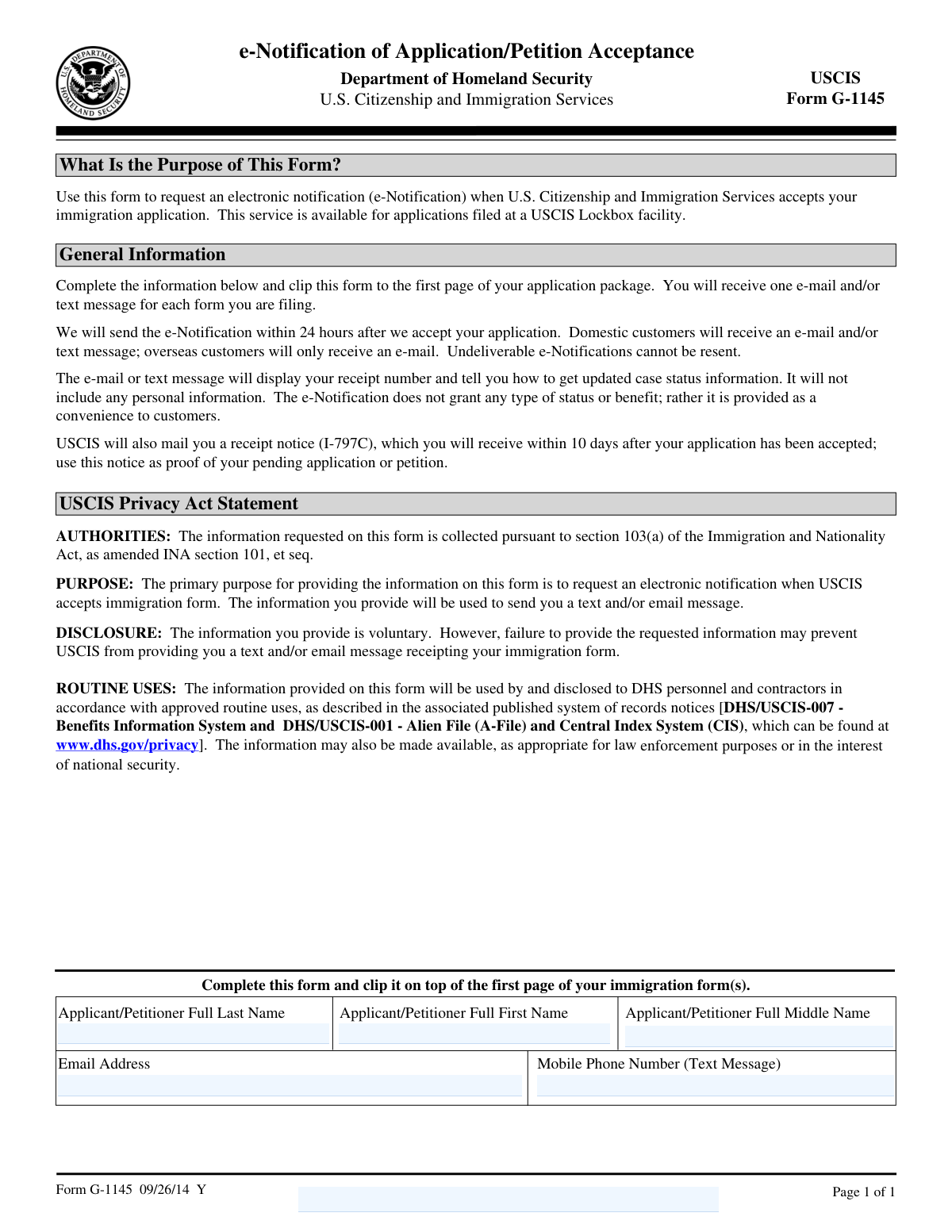
What this form asks for
The AI fills all of it, from your answers or your documents.
The AI checks your answers before you download
15 checks built for this form, so a wrong date or a missing answer is caught before anyone else sees it.
This validation check ensures that the full last name of the applicant or petitioner is accurately provided. It confirms that the last name matches the one on the application to prevent any discrepancies. The software verifies the consistency of the last name across all relevant documents. This step is crucial to maintain the integrity of the application process.
This check confirms that the full first name of the applicant or petitioner is entered correctly. It ensures that there are no typographical errors in the first name, which could lead to processing delays. The software cross-references the first name with other provided documents to ensure accuracy. This validation is essential for the correct identification of the applicant.
The software verifies that the full middle name of the applicant or petitioner is included when applicable. It checks for the presence of a middle name and ensures it is correctly spelled. This validation is important for applicants who have a middle name, as it helps in distinguishing between individuals with similar first and last names. The inclusion of the middle name adds an additional layer of identification.
This validation check ensures that a valid email address is provided for the purpose of receiving e-Notifications. It confirms that the email address is in the correct format and is capable of receiving messages. The software also checks for any common errors in email entry, such as missing '@' symbols or domain names. Providing a valid email address is crucial for timely communication regarding the application status.
The software validates that a mobile phone number is provided if the applicant opts to receive text message notifications. It ensures that the phone number is in the correct format and is capable of receiving text messages. This check is important for applicants who prefer to receive updates via SMS. The validation helps in ensuring that the applicant receives timely notifications about their application status.
Verifies that all necessary fields on the form are filled out correctly to prevent any processing delays. Ensures that the applicant has provided all required information, such as contact details, to facilitate the e-Notification process. Confirms that there are no missing or incorrect entries that could lead to errors in notification delivery. Validates the overall completeness of the form to ensure it meets submission standards.
And 9 more checks
- Ensures that the form is clipped to the first page of the application package for proper processing.
- Confirms that the email address provided is capable of receiving notifications within 24 hours of application acceptance.
- Verifies that the mobile phone number is capable of receiving text messages, if applicable.
- Ensures that the applicant understands that the e-Notification will not contain personal information.
- Confirms that the applicant understands the purpose of the form and the service it provides.
- Verifies that the applicant is aware that the e-Notification service is available for applications filed at a USCIS Lockbox facility.
- Confirms that the applicant is aware that a receipt notice (Form I-797C) will be mailed within 10 days.
- Verifies that the applicant understands the privacy and disclosure terms regarding the information provided.
- Ensures that the applicant is aware that failure to provide information may prevent receiving the e-Notification.
Let AI fill out your Form G-1145
No typing. Every field filled in seconds, checked, ready to sign.
Common Mistakes in Completing Form G-1145
The ones the AI is built to catch.
Incorrect or incomplete email address
Failure to attach form to application package
Misspelling names as per application
Providing an international phone number for text notifications
Omitting middle name when applicable
Leaving email or phone number fields blank
Using an outdated or incorrect form version
Not understanding the purpose of the form
Frequently Asked Questions About Form G-1145
Is it really free for 7 days?
Can I fill other forms too?
How do I cancel?
How does the AI fill out Form G-1145?
What happens to my information?
What is the purpose of Form G-1145?
How do I use Form G-1145 to receive e-Notifications?
What information do I need to provide on Form G-1145?
How soon will I receive an e-Notification after my application is accepted?
Will I receive both an email and a text message notification?
What information will the e-Notification contain?
Does the e-Notification grant any immigration status or benefit?
What should I do if I do not receive an e-Notification?
Will I still receive a physical receipt notice after submitting Form G-1145?
Is it mandatory to fill out Form G-1145 to receive notifications?
Can overseas customers receive text message notifications?
What happens if the e-Notification is undeliverable?
What are the routine uses of the information provided on Form G-1145?
Is the information provided on Form G-1145 shared with other agencies?
What should I do if I want to receive notifications for multiple forms?
How is my privacy protected when I submit Form G-1145?
What happens if I do not provide my email or mobile phone number?
Where can I find more information about the privacy practices related to Form G-1145?
What authority does USCIS have to collect information on Form G-1145?
How should I attach Form G-1145 to my application package?
Get your Form G-1145 filled out by AI
$0 today. Cancel before Nov 1 and you pay nothing.
Let AI fill out your Form G-1145
Your trial starts once a card is added. You pay nothing before Nov 1.
Skip the typing: tell it about yourself, or upload what you have, and it fills the whole form in seconds.
- AI fills every field on the form, checkboxes included
- No typing into boxes: answer a few questions, or upload a document you already have, an old copy of this form, a photo of a document
- The AI checks the answers; you review and change anything before you download
- Download the finished PDF, print it, or sign it online
- Encrypted, and never used to train AI
Cancel before Nov 1 and you pay nothing.
A card is needed to start the trial. Cancel in two clicks from your account.
Terms · Privacy