
Yes! You can use AI to fill out Form G-325A, Biographic Information
Don't type 172 fields by hand. Tell our AI about yourself, or upload a document you already have, and it fills every field in seconds. You check it, then download, print or sign.
The AI does the filling. You just check it.
No typing into boxes, nothing to install.
What this form asks for
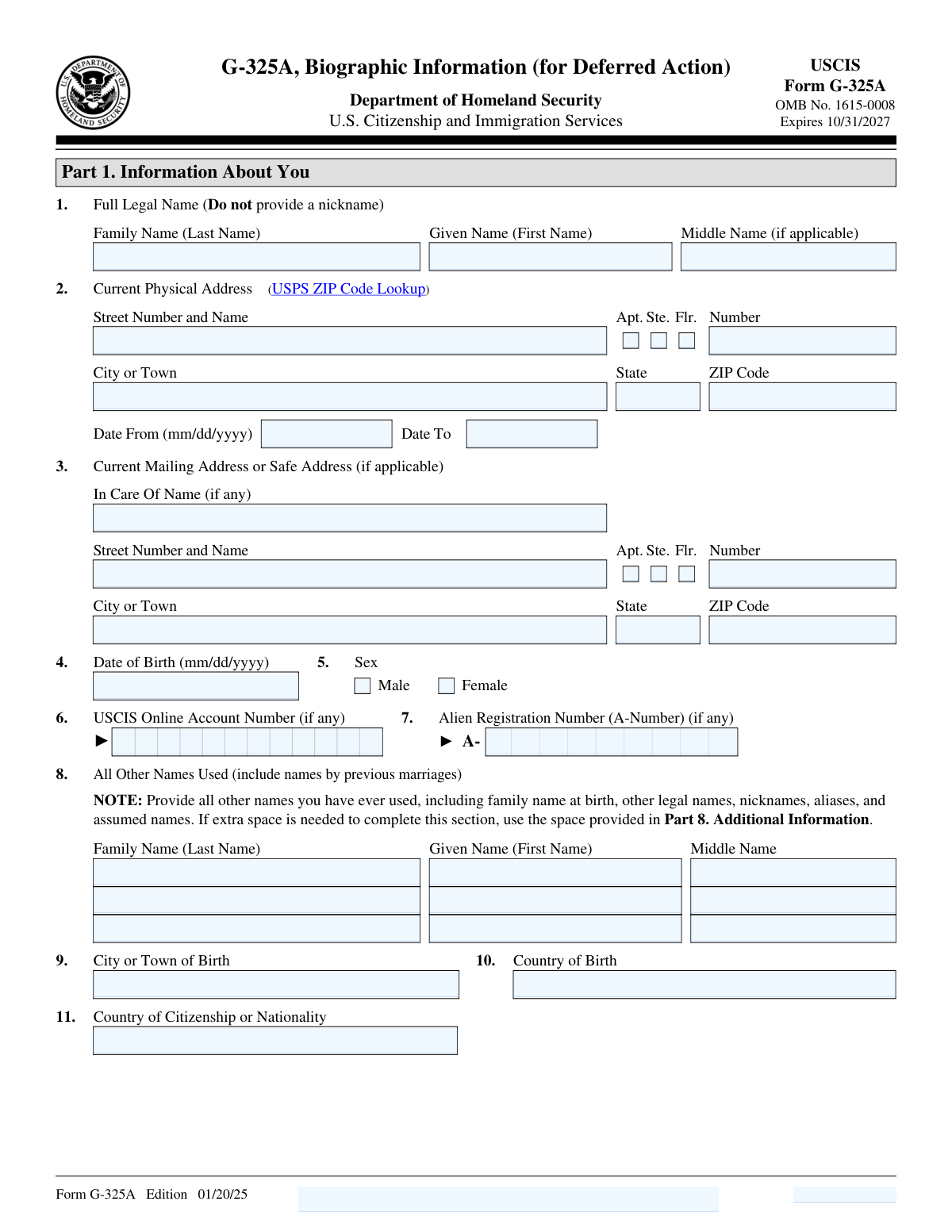
The AI fills all of it, from your answers or your documents.
The AI checks your answers before you download
15 checks built for this form, so a wrong date or a missing answer is caught before anyone else sees it.
This validation check ensures that the full legal name is accurately captured, matching the name on official identification documents. It confirms that no nicknames or abbreviations are included, which could lead to discrepancies in identity verification. By enforcing this requirement, the software helps maintain the integrity of the biographic information provided. This is crucial for processing applications where precise identification is necessary.
This validation check verifies that the current physical address is fully detailed, ensuring that all components such as street number, street name, and any additional identifiers like apartment or suite numbers are included. It checks that the ZIP code is accurate and corresponds to the provided address, which is essential for effective communication and processing. By confirming the completeness of the address, the software minimizes the risk of delays or misdeliveries. This thoroughness is vital for maintaining accurate records and facilitating correspondence.
This validation check ensures that the date of birth is entered in the correct format of mm/dd/yyyy, which is critical for consistency and data integrity. It verifies that the month, day, and year are all represented numerically and in the proper order, preventing any potential confusion or misinterpretation. By enforcing this format, the software helps streamline data processing and reduces the likelihood of errors in age verification. This attention to detail is essential for compliance with regulations that require accurate biographic information.
This validation check confirms that the applicant has selected the appropriate box indicating their sex, either Male or Female. It ensures that this critical demographic information is provided, which is often required for statistical and processing purposes. By verifying this selection, the software helps maintain accurate records and supports compliance with data collection standards. This step is important for ensuring that all necessary information is captured for the application.
This validation check verifies that the Alien Registration Number (A-Number) is accurately entered when applicable, ensuring that it conforms to the expected format. It confirms that the number is complete and correctly reflects the individual's immigration status, which is essential for processing applications related to residency or citizenship. By validating this information, the software helps prevent errors that could lead to complications in the application process. This check is crucial for maintaining the integrity of immigration-related data.
This validation check ensures that all other names used by the individual, such as maiden names and aliases, are accurately captured in the form. It verifies that no variations or misspellings are present, which could lead to discrepancies in identification. By confirming the accuracy of these names, the software helps to prevent potential issues during processing. This thoroughness is crucial for maintaining the integrity of the biographic information provided.
And 9 more checks
- Confirms that the country and city of birth are provided correctly.
- Verifies that previous addresses for the last five years are listed, excluding the current address.
- Checks that the details of the most recent entry into the U.S. are complete, including date, location, immigration status, and Form I-94 details if applicable.
- Ensures that the information about parents, including names, dates of birth, and current residences, is filled out accurately.
- Validates that the current spouse's information is provided if applicable, including name and date of marriage.
- Confirms that the type of deferred action request is indicated by checking the appropriate box.
- Ensures that a brief statement explaining the deferred action request is included along with any supporting evidence.
- Checks that the request for Employment Authorization Document (EAD) is indicated if applicable, along with current financial information.
- Verifies that the requestor's contact information, including phone numbers and email address, is provided and accurate.
Let AI fill out your Form G-325A
No typing. Every field filled in seconds, checked, ready to sign.
Common Mistakes in Completing Form G-325A
The ones the AI is built to catch.
Using nicknames instead of full legal name
Incorrect or missing ZIP code in address
Date of birth not in mm/dd/yyyy format
Failing to check Male or Female box
Omitting Alien Registration Number if applicable
Not listing all other names used
Incorrect country or city of birth
Missing previous addresses for the last five years
Not providing details of most recent U.S. entry
Incomplete information about parents
Omitting current spouse information if applicable
Failing to check the appropriate box for deferred action
Not providing a statement for deferred action request
Missing indication of initial or subsequent request
Not indicating request for Employment Authorization Document
Omitting financial information for EAD request
Failing to answer SSN questions for Social Security card
Missing contact information in Part 5
Not signing and dating the form
Omitting interpreter's information if applicable
Not providing preparer's information if applicable
Neglecting to use Part 8 for additional information
Not reviewing the form for accuracy before submission
Frequently Asked Questions About Form G-325A
Is it really free for 7 days?
Can I fill other forms too?
How do I cancel?
How does the AI fill out Form G-325A?
What happens to my information?
How complex is Form G-325A to fill out?
What is Form G-325A and what is its purpose?
Who needs to fill out Form G-325A?
What information is required in Part 1 of Form G-325A?
How do I provide my previous addresses on Form G-325A?
What should I include in the section for 'All Other Names Used'?
What is the significance of the Alien Registration Number (A-Number)?
How do I request deferred action on Form G-325A?
What types of deferred action requests can I select on this form?
What information do I need to provide for employment authorization?
How can I obtain a Social Security card through Form G-325A?
What should I do if I need more space to provide additional information?
What is the importance of the requestor's certification and signature?
What information is required in Part 2 regarding deferred action?
How do I indicate my current financial situation on Form G-325A?
What happens if I do not provide all required information on the form?
Can I submit Form G-325A online?
What is the expiration date of Form G-325A?
How do I contact USCIS if I have questions about Form G-325A?
What should I do if I made a mistake on my Form G-325A?
Is there a fee associated with submitting Form G-325A?
Get your Form G-325A filled out by AI
$0 today. Cancel before Nov 1 and you pay nothing.
Let AI fill out your Form G-325A
Your trial starts once a card is added. You pay nothing before Nov 1.
Our AI already knows this form, all 172 fields of it. Skip the typing: tell it about yourself, or upload what you have, and it fills the whole form in seconds.
- AI fills every field on all 6 pages, checkboxes included
- No typing into boxes: answer a few questions, or upload a document you already have, an old copy of this form, a photo of a document
- The AI checks the answers; you review and change anything before you download
- Download the finished PDF, print it, or sign it online
- Encrypted, and never used to train AI
Cancel before Nov 1 and you pay nothing.
A card is needed to start the trial. Cancel in two clicks from your account.
Terms · Privacy