
Yes! You can use AI to fill out Gesundheitsberuferegister – S 1: Antrag auf Eintragung in das GBR – PA/PFA
Don't type 61 fields by hand. Tell our AI about yourself, or upload a document you already have, and it fills every field in seconds. You check it, then download, print or sign.
The AI does the filling. You just check it.
No typing into boxes, nothing to install.
What this form asks for
The AI fills all of it, from your answers or your documents.
The AI checks your answers before you download
16 checks built for this form, so a wrong date or a missing answer is caught before anyone else sees it.
Validates that the applicant selects exactly one of the two options: Pflegeassistent/in (PA) or Pflegefachassistent/in (PFA). The form explicitly states that an application can only be submitted for one profession at a time, so multiple selections or no selection would make the request ambiguous. If validation fails, the submission must be rejected or returned for correction with a prompt to choose exactly one profession.
Checks that all required personal identity fields are present: Familienname(n), Vorname(n), Geschlecht, Geburtsdatum, Geburtsort, Geburtsland, Staatsangehörigkeit, and (if applicable) Geburtsname. These fields are necessary to uniquely identify the applicant and to match the application to identity documents. If any required field is missing, the application should be marked incomplete and not processed until corrected.
Ensures all dates provided follow the required format TT.MM.JJJJ and represent real calendar dates (e.g., no 31.02.2024). Additionally checks plausibility: birth date cannot be in the future, and signature date should not be earlier than key form completion dates if captured. If validation fails, the system should block submission and request corrected date entries.
Calculates age from Geburtsdatum and verifies it meets the minimum age required to register for the selected profession (commonly 18+, depending on policy). This prevents processing registrations that cannot be legally valid. If the applicant is under the threshold, the submission should be rejected with a clear reason and guidance on eligibility.
Checks that the main residence address includes Straße, Hausnummer, Postleitzahl, Ort, and Staat, and that optional fields like Stiege/Tür are only required when applicable. Address completeness is essential for identity verification and official correspondence. If validation fails, the application should be flagged as incomplete and the applicant prompted to provide the missing address components.
If the country (Staat) is Austria, validates that Postleitzahl is a 4-digit numeric code and is not all zeros. This ensures deliverability and consistent address normalization for Austrian addresses. If validation fails, the system should require correction before allowing submission.
And 10 more checks
- Validates Zustelladresse in Österreich requirement and conditional fields
- Validates Zustellungsbevollmächtigte/r details and required attachment when used
- Validates electronic correspondence consent vs. contact data availability
- Validates email address format for all email fields
- Validates phone number format and country consistency
- Validates qualification evidence fields are complete and consistent
- Validates Berufsanerkennung mit Auflagen logic and required details when 'Ja'
- Validates optional public register entries are internally complete when selected
- Validates required attachments checklist based on applicant inputs
- Validates signature, place, and date are provided for the declaration of truthfulness
Let AI fill out your GBR S 1 (PA/PFA)
No typing. Every field filled in seconds, checked, ready to sign.
How to Fill Out GBR S 1 (PA/PFA) Online for Free in 2026
What the AI walks you through.
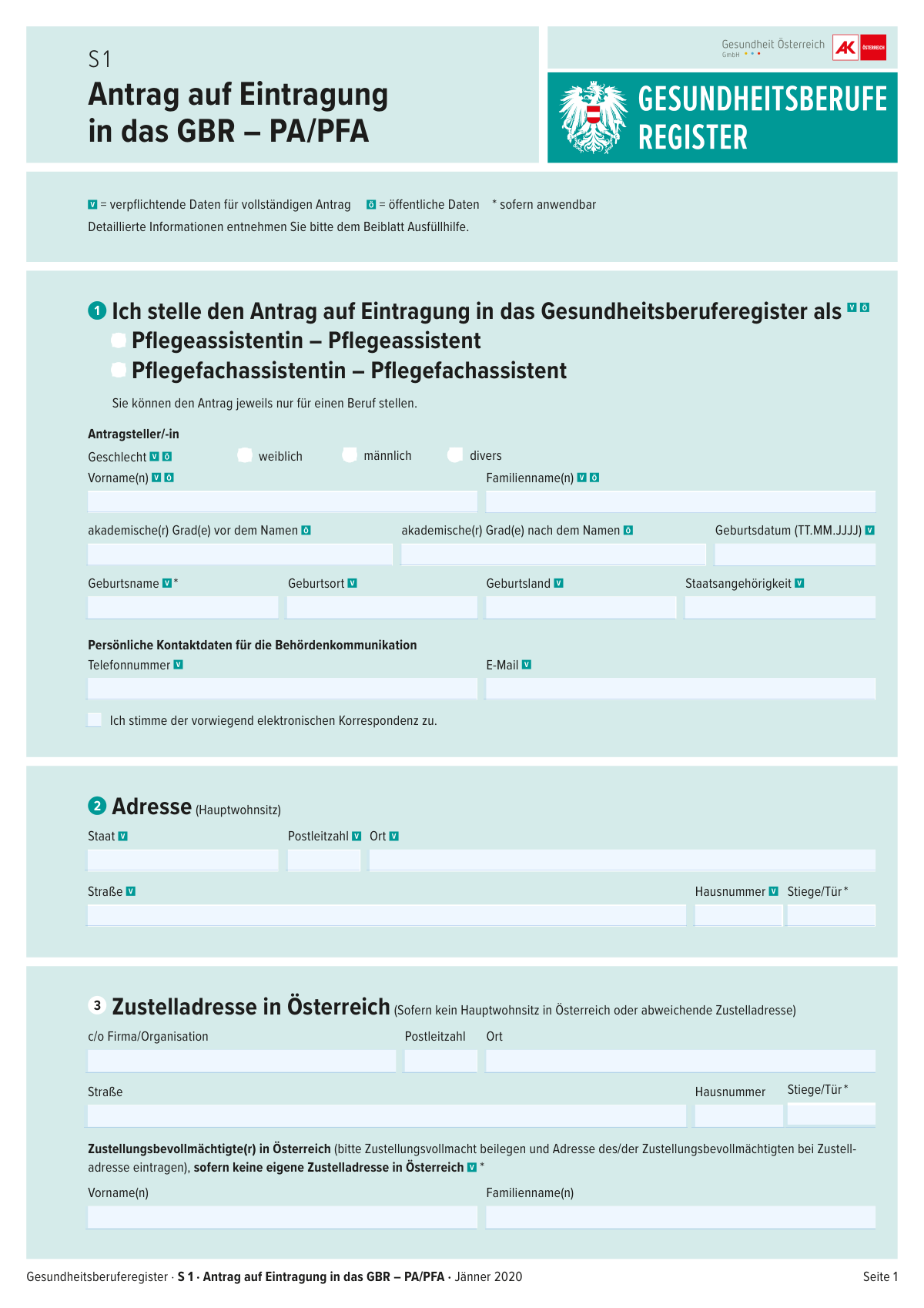
- Beruf auswählen: Angeben, ob die Eintragung als Pflegeassistent:in (PA) oder Pflegefachassistent:in (PFA) beantragt wird (nur ein Beruf pro Antrag).
- Personendaten erfassen: Name, Geschlecht, Geburtsdatum, Geburtsort/-land, Staatsangehörigkeit, ggf. Geburtsname sowie akademische Grade eintragen.
- Hauptwohnsitz und Behördenkontakt angeben: Adresse (Hauptwohnsitz), E-Mail und Telefonnummer eintragen und ggf. Zustimmung zur vorwiegend elektronischen Korrespondenz auswählen.
- Zustellung in Österreich klären: Falls kein Hauptwohnsitz in Österreich oder abweichende Zustelladresse, Zustelladresse in Österreich ausfüllen; falls erforderlich Zustellbevollmächtigte:n eintragen und Zustellvollmacht beilegen.
- Qualifikation nachweisen: Angaben zur beruflichen Erstqualifikation (Staat, ausstellende Institution, Ort, Art des Nachweises, Ausstellungsdatum) machen und ggf. „Berufsanerkennung mit Auflagen“ (Ja/Nein) angeben.
- Freiwillige öffentliche Registerdaten auswählen: Optional veröffentlichbare Angaben wie Fremdsprachenkenntnisse, Fort-/Weiterbildungen, Zielgruppen, Spezialisierungen/Sonderausbildungen sowie Kontakt-/Webdaten auswählen und eintragen.
- Unterlagen hochladen/zusammenstellen und unterschreiben: Erforderliche Beilagen (u. a. Ausweis, Qualifikationsnachweise, Strafregisterbescheinigung, ärztliches Zeugnis, ggf. Deutschnachweis, Foto, Unterschriftsblatt sowie ggf. Namensänderungs- und Gradnachweise) beifügen, Erklärung bestätigen und Ort/Datum/Unterschrift leisten.
Common Mistakes in Completing GBR S 1 (PA/PFA)
The ones the AI is built to catch.
Falsches Berufsfeld angekreuzt (PA vs. PFA) oder beide ausgewählt
Pflichtfelder nicht vollständig ausgefüllt (Stern/Markierung übersehen)
Geburtsdatum oder Ausstellungsdatum im falschen Format eingetragen
Adresse unvollständig oder falsch aufgeteilt (Straße/Hausnummer/Stiege/Tür/PLZ/Ort)
Zustelladresse in Österreich nicht angegeben, obwohl erforderlich
Zustellbevollmächtigte/r eingetragen, aber Zustellvollmacht fehlt oder Adresse nicht im richtigen Feld
Namensangaben inkonsistent (Familienname, Geburtsname, Namensänderung nicht belegt)
Staatsangehörigkeit/Geburtsland/Geburtsort unvollständig oder widersprüchlich
Qualifikationsnachweis unklar: falscher „Art des Nachweises“ oder fehlende Angaben zur ausstellenden Institution
Freiwillige öffentliche Daten mit Pflichtdaten verwechselt (oder ungewollt veröffentlicht)
Unterschrift/Ort/Datum am Ende vergessen oder nicht korrekt gesetzt
Beilagen unvollständig oder nicht im Original (Identität, Strafregister, ärztliches Zeugnis, Foto, Unterschriftsblatt)
Frequently Asked Questions About GBR S 1 (PA/PFA)
Is it really free for 7 days?
Can I fill other forms too?
How do I cancel?
How does the AI fill out GBR S 1 (PA/PFA)?
What happens to my information?
How complex is GBR S 1 (PA/PFA) to fill out?
Wofür ist dieses Formular „Antrag auf Eintragung in das GBR – PA/PFA“?
Wer muss dieses Formular ausfüllen?
Kann ich mit einem Antrag gleichzeitig PA und PFA beantragen?
Welche Angaben sind verpflichtend und welche werden öffentlich angezeigt?
Welche Adresse muss ich angeben: Hauptwohnsitz oder Zustelladresse?
Was ist eine/ein Zustellungsbevollmächtigte/r und wann brauche ich das?
Kann ich der elektronischen Korrespondenz zustimmen und was bedeutet das?
Welche Identitätsdokumente muss ich im Original vorlegen?
Welche Nachweise zur Ausbildung/Qualifikation muss ich einreichen?
Was bedeutet „Berufsanerkennung mit Auflagen“ und muss ich das angeben?
Welche Unterlagen brauche ich für „Vertrauenswürdigkeit“ und „gesundheitliche Eignung“?
Muss ich einen Nachweis über Deutschkenntnisse beilegen?
Welche zusätzlichen Dokumente brauche ich bei Namensänderung oder akademischen Graden?
Welche Angaben sind freiwillig und wie werden sie veröffentlicht?
Was muss ich am Ende des Formulars unterschreiben und was erkläre ich damit?
Get your GBR S 1 (PA/PFA) filled out by AI
$0 today. Cancel before Nov 18 and you pay nothing.
Let AI fill out your GBR S 1 (PA/PFA)
Your trial starts once a card is added. You pay nothing before Nov 18.
Your bank declined that card, so the trial did not start and nothing was charged. Please try another card.
Our AI already knows this form, all 61 fields of it. Skip the typing: tell it about yourself, or upload what you have, and it fills the whole form in seconds.
- AI fills every field on both pages, checkboxes included
- No typing into boxes: answer a few questions, or upload a document you already have, an old copy of this form, a photo of a document
- The AI checks the answers; you review and change anything before you download
- Download the finished PDF, print it, or sign it online
- Encrypted, and never used to train AI
Cancel before Nov 18 and you pay nothing.
A card is needed to start the trial. We check it with a $19.99 hold that is released right away. Cancel in two clicks from your account.
Terms · Privacy