Yes! You can use AI to fill out Gesundheitsberuferegister S 1 – Antrag auf Eintragung in das GBR – PA/PFA (Jänner 2020)
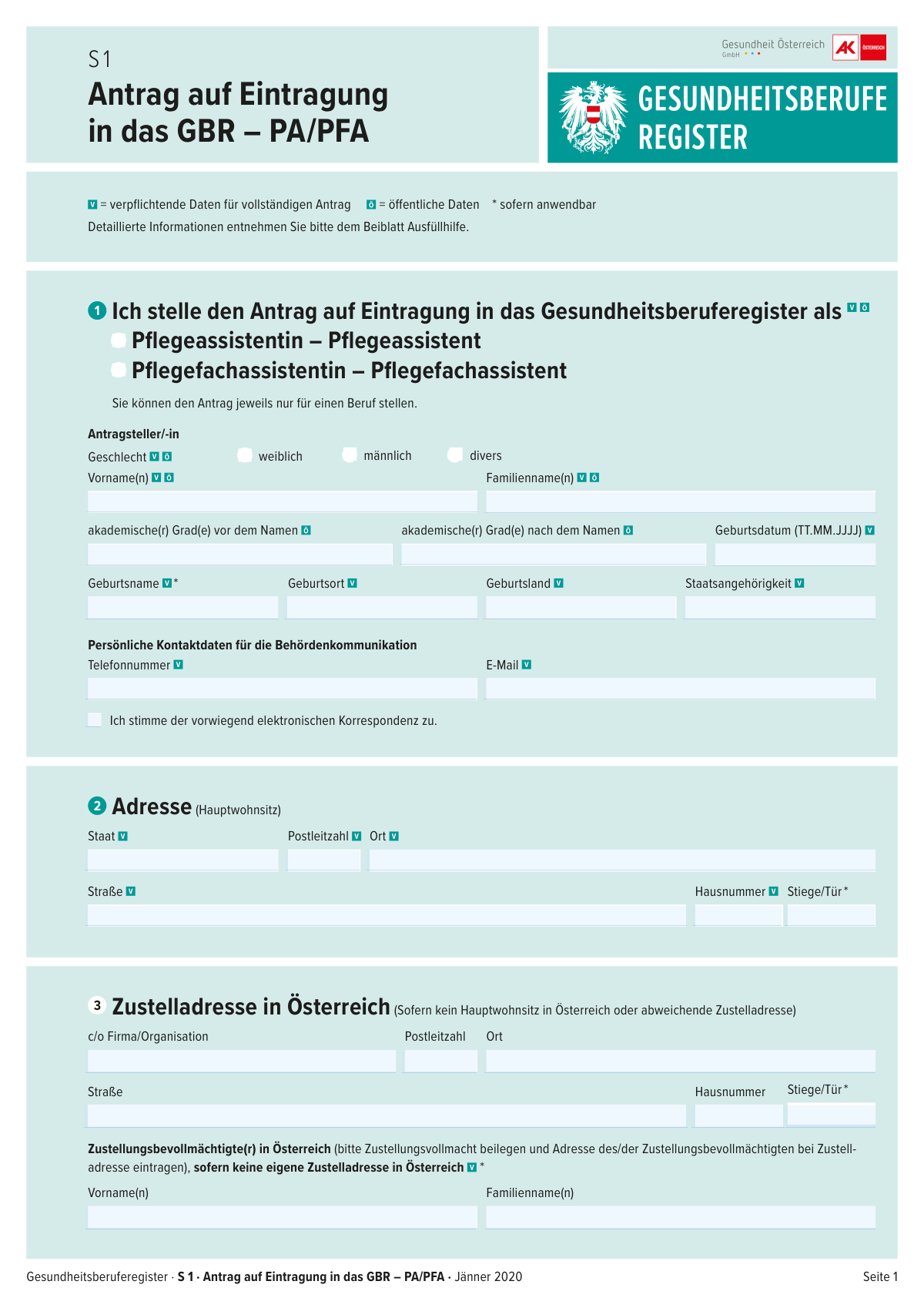
Dieses Formular ist der offizielle Antrag zur Eintragung in das österreichische Gesundheitsberuferegister (GBR) fĂŒr die Berufsgruppen Pflegeassistenz (PA) bzw. Pflegefachassistenz (PFA). Es erfasst IdentitĂ€ts-, Kontakt- und Adressdaten, Angaben zur beruflichen Qualifikation sowie optional veröffentlichbare Daten (z. B. Fremdsprachen, Webadresse) und enthĂ€lt ErklĂ€rungen/Unterschrift sowie eine Checkliste der beizulegenden Nachweise. Die Eintragung ist wichtig, um die BerufsausĂŒbung bzw. den Nachweis der Berufsberechtigung im Register zu dokumentieren und behördliche Kommunikation zu ermöglichen. Heute kann das Formular schnell und prĂ€zise mit KI-Services wie Instafill.ai ausgefĂŒllt werden, die auch nicht-ausfĂŒllbare PDF-Versionen in interaktive, ausfĂŒllbare Formulare umwandeln können.
Our AI automatically handles information lookup, data retrieval, formatting, and form filling.
It takes less than a minute to fill out GBR S 1 (PA/PFA) using our AI form filling.
Securely upload your data. Information is encrypted in transit and deleted immediately after the form is filled out.
Form specifications
| Form name: | Gesundheitsberuferegister S 1 – Antrag auf Eintragung in das GBR – PA/PFA (Jänner 2020) |
| Number of pages: | 2 |
| Filled form examples: | Form GBR S 1 (PA/PFA) Examples |
| Language: | English |
Instafill Demo: filling out a legal form in seconds
How to Fill Out GBR S 1 (PA/PFA) Online for Free in 2026
Are you looking to fill out a GBR S 1 (PA/PFA) form online quickly and accurately? Instafill.ai offers the #1 AI-powered PDF filling software of 2026, allowing you to complete your GBR S 1 (PA/PFA) form in just 37 seconds or less.
Follow these steps to fill out your GBR S 1 (PA/PFA) form online using Instafill.ai:
- 1 Instafill.ai öffnen und das Formular „Gesundheitsberuferegister S 1 – Antrag auf Eintragung in das GBR – PA/PFA“ auswählen oder die PDF-Datei hochladen.
- 2 Den gewünschten Beruf (Pflegeassistent/in oder Pflegefachassistent/in) auswählen und die persönlichen Basisdaten (Name, Geschlecht, akademische Grade, Geburtsdaten, Staatsangehörigkeit) eintragen.
- 3 Hauptwohnsitz-Adresse erfassen und festlegen, ob der elektronischen Korrespondenz zugestimmt wird; E-Mail und Telefonnummer für die Behördenkommunikation ergänzen.
- 4 Falls erforderlich, eine Zustelladresse in Österreich bzw. eine/n Zustellungsbevollmächtigte/n eintragen und die Zustellvollmacht als Anlage hochladen.
- 5 Qualifikationsdaten eintragen (Art des Nachweises, ausstellende Institution, Ort/Datum der Ausstellung, Staat der Erstqualifikation) und angeben, ob eine Berufsanerkennung mit Auflagen vorliegt.
- 6 Optionale öffentliche Registerdaten auswählen und ausfüllen (z. B. Fremdsprachen, Telefon/E-Mail/Webadresse, Weiterbildungen/Fortbildungen, Spezialisierungen, Zielgruppen).
- 7 Alle Angaben per KI-Check auf Vollständigkeit/Format (z. B. Datumsformat TT.MM.JJJJ) prüfen, erforderliche Nachweise gemäß Checkliste beifügen, Ort/Datum eintragen und das Formular unterschriftsreif exportieren bzw. einreichen.
Our AI-powered system ensures each field is filled out correctly, reducing errors and saving you time.
Why Choose Instafill.ai for Your Fillable GBR S 1 (PA/PFA) Form?
Speed
Complete your GBR S 1 (PA/PFA) in as little as 37 seconds.
Up-to-Date
Always use the latest 2026 GBR S 1 (PA/PFA) form version.
Cost-effective
No need to hire expensive lawyers.
Accuracy
Our AI performs 10 compliance checks to ensure your form is error-free.
Security
Your personal information is protected with bank-level encryption.
Frequently Asked Questions About Form GBR S 1 (PA/PFA)
Mit diesem Formular beantragen Sie die Eintragung in das österreichische Gesundheitsberuferegister (GBR) als Pflegeassistenz (PA) oder Pflegefachassistenz (PFA). Die Eintragung ist erforderlich, um den jeweiligen Beruf in Ăsterreich offiziell ausĂŒben zu können.
Alle Personen, die sich als Pflegeassistentin/Pflegeassistent oder Pflegefachassistentin/Pflegefachassistent in das Gesundheitsberuferegister eintragen lassen möchten, mĂŒssen dieses Formular ausfĂŒllen. Sie können den Antrag jeweils nur fĂŒr einen Beruf stellen.
Nein. Im Formular steht ausdrĂŒcklich, dass Sie den Antrag jeweils nur fĂŒr einen Beruf stellen könnenâalso entweder PA oder PFA.
Verpflichtende Daten sind im Formular als solche gekennzeichnet (fĂŒr einen vollstĂ€ndigen Antrag). Freiwillige Angaben betreffen vor allem Daten, die im öffentlichen Register veröffentlicht werden können (z. B. E-Mail, Telefonnummer, Webadresse, Fremdsprachen).
Erforderlich sind u. a. IdentitÀtsnachweis (Reisepass/Personalausweis), Qualifikationsnachweis (Zeugnis/Diplom/Anerkennungs- oder Nostrifikationsbescheid/FH-Bachelorurkunde), Strafregisterbescheinigung inkl. Beiblatt, Àrztliches Zeugnis, ggf. Deutschnachweis sowie Foto und Unterschriftsblatt.
Falls zutreffend: Zustellvollmacht fĂŒr eine/n ZustellbevollmĂ€chtigte/n, Urkunden zu akademischen Graden, Nachweise zu NamensĂ€nderungen (z. B. Heirats-/Scheidungsurkunde) sowie Nachweise zu Sonderausbildungen/Spezialisierungen.
Tragen Sie Ihren tatsĂ€chlichen Hauptwohnsitz (Staat/Land, PLZ, Ort, StraĂe, Hausnummer usw.) ein. ZusĂ€tzlich mĂŒssen Sie dann in der Regel eine âZustelladresse in Ăsterreichâ angeben oder eine/n ZustellbevollmĂ€chtigte/n in Ăsterreich benennen.
Wenn Sie keinen Hauptwohnsitz in Ăsterreich haben oder eine abweichende Zustelladresse wĂŒnschen, fĂŒllen Sie die Zustelladresse in Ăsterreich aus. Wenn Sie keine eigene Zustelladresse in Ăsterreich haben, können Sie eine/n ZustellbevollmĂ€chtigte/n angeben und mĂŒssen eine Zustellvollmacht beilegen.
Wenn Sie dieses Feld ankreuzen, erklĂ€ren Sie sich damit einverstanden, dass die Behördenkommunikation ĂŒberwiegend elektronisch (z. B. per E-Mail) erfolgt. Geben Sie dafĂŒr eine gut erreichbare E-Mail-Adresse und Telefonnummer an.
Die âPersönlichen Kontaktdaten fĂŒr die Behördenkommunikationâ dienen der Kontaktaufnahme durch die Behörde. Separat können Sie unter âWelche freiwilligen Daten möchten Sie eintragen?â Daten (z. B. E-Mail/Telefon/Webadresse/Fremdsprachen) zur Veröffentlichung im öffentlichen Register auswĂ€hlen.
Tragen Sie Art des Nachweises (z. B. Diplom/Zeugnis), ausstellende Institution, Ort und Datum der Ausstellung sowie den Staat der beruflichen Erstqualifikation ein. Kreuzen Sie auĂerdem an, ob eine âBerufsanerkennung mit Auflagenâ vorliegt (Ja/Nein).
Kreuzen Sie âJaâ an, wenn Ihre Berufsanerkennung an Bedingungen/Auflagen geknĂŒpft ist (z. B. zusĂ€tzliche Nachweise oder EinschrĂ€nkungen). Wenn keine Auflagen bestehen, wĂ€hlen Sie âNeinâ.
Sie bestĂ€tigen mit Ihrer Unterschrift, dass alle Angaben wahrheitsgemÀà und vollstĂ€ndig sind. Tragen Sie auĂerdem Ort und Datum der ErklĂ€rung ein.
Ja. KI-gestĂŒtzte Dienste wie Instafill.ai können Formulardaten aus Ihren Angaben/Dokumenten ĂŒbernehmen, Felder automatisch ausfĂŒllen und so Zeit sparen sowie Tippfehler reduzieren.
Laden Sie das Formular bei Instafill.ai hoch, geben Sie Ihre Daten ein bzw. laden Sie unterstĂŒtzende Dokumente hoch, und lassen Sie die Felder automatisch befĂŒllen. AnschlieĂend prĂŒfen Sie die EintrĂ€ge, exportieren das ausgefĂŒllte PDF und unterschreiben es wie gefordert.
Wenn das PDF keine interaktiven Felder hat, kann Instafill.ai ein nicht-ausfĂŒllbares (flaches) PDF in ein ausfĂŒllbares Formular umwandeln. Danach können Sie die Felder digital ausfĂŒllen und das Dokument sauber speichern/ausdrucken.
Compliance GBR S 1 (PA/PFA)
Validation Checks by Instafill.ai
1
Ensures exactly one Profession Type is selected (PA vs. PFA)
Validates that the applicant selects exactly one of the two profession checkboxes (Pflegeassistent/in OR Pflegefachassistent/in). The form explicitly states that an application can only be submitted for one profession, so selecting both (or neither) creates an invalid request. If validation fails, the submission must be blocked and the applicant prompted to choose exactly one profession.
2
Validates Applicant Gender selection is single-choice and present
Checks that exactly one gender option (female, male, diverse) is selected and that at least one is chosen if the field is required for the register entry. Multiple selections indicate a form capture/processing error because the field is conceptually single-choice. If validation fails, the system should reject the submission and request a single, unambiguous selection.
3
Validates Applicant name fields are complete and contain only plausible characters
Ensures Applicant First Name and Applicant Last Name are provided and are not empty, whitespace-only, or placeholder text. It also validates that names contain plausible characters (letters, spaces, hyphens, apostrophes) and do not contain numbers or unsupported symbols that commonly indicate OCR or input errors. If validation fails, the submission should be flagged for correction to prevent incorrect register entries and identity mismatches.
4
Validates Birth Date format (TT.MM.JJJJ) and logical range
Checks that Birth Date matches the required Austrian date format TT.MM.JJJJ and represents a real calendar date (e.g., no 31.02.2020). It also validates a reasonable range (e.g., not in the future and not implausibly old) to catch typos. If validation fails, the applicant must correct the date because it is a key identifier for registration and document matching.
5
Validates Birth information completeness (place, country, nationality) and consistency
Ensures Place of Birth, Country of Birth, and Nationality are provided when required and are not contradictory (e.g., nationality field left blank while other identity fields are filled). Country fields should be validated against an allowed country list or standardized codes to avoid free-text variants that break downstream processing. If validation fails, the submission should be stopped or routed to manual review because identity verification depends on these fields.
6
Validates Birth Name requirement and conditional applicability
Checks that Birth Name is provided when applicable (e.g., if the form marks it as mandatory for complete application) and is not identical to a placeholder like 'N/A' unless the system explicitly allows it. This field is important for matching qualification documents and name-change evidence. If validation fails, the applicant should be prompted to provide the birth name or confirm that it is not applicable under the form rules.
7
Validates Academic titles formatting and prevents misuse as name fields
Ensures Academic Title Before Name and Academic Title After Name contain only title text (e.g., 'Dr.', 'Mag.', 'MSc') and do not duplicate the applicantâs first/last name or include unrelated content. Titles should be length-limited and checked for invalid characters to prevent injection of extra data into the public register display. If validation fails, the system should request correction and, if necessary, require supporting documentation per the form instructions.
8
Validates Official Communication Email format and consent consistency
Checks that the Official Communication Email Address is syntactically valid (e.g., [email protected]) and not obviously malformed. If Electronic Correspondence Consent is checked, an email address must be present because electronic delivery depends on it; if consent is not checked, email may be optional but still must be valid if provided. If validation fails, the submission should be blocked to avoid undeliverable official communications.
9
Validates Official Communication Telephone Number format (E.164 or Austrian format)
Ensures the Official Communication Telephone Number contains only allowed characters and matches a recognized phone format (preferably E.164 like +43..., or a defined national format). This prevents unusable contact data and reduces failed outreach by authorities. If validation fails, the applicant must correct the number or remove it if optional.
10
Validates Main Residence address completeness and postal code format by country
Checks that Main Residence State/Country, Postal Code, City/Town, Street, and House Number are present when the main residence is required. Postal code should be validated according to the specified country (e.g., Austria typically 4 digits) and house number should be alphanumeric but not empty. If validation fails, the submission should be rejected because address data is required for identity and correspondence handling.
11
Validates conditional requirement for Austrian delivery address or authorized recipient
If the applicant indicates no main residence in Austria or provides a non-Austrian main residence, the form requires either a Delivery Address in Austria or a ZustellungsbevollmÀchtigte(r) (authorized recipient) with power of service. The system should enforce that at least one valid Austrian delivery mechanism is provided and that the relevant name/address fields are complete. If validation fails, the submission must be blocked because official service of documents may not be legally possible.
12
Validates Delivery Address in Austria fields when provided
When any Delivery Address in Austria field is filled, validates that the address is complete (postal code, city, street, house number; staircase/door and c/o optional as applicable). Postal code should match Austrian format (typically 4 digits) and city/street should not be numeric-only. If validation fails, the system should request completion/correction to prevent undeliverable mail.
13
Validates Authorized Recipient name presence when authorized recipient is used
If the applicant provides an authorized recipient (ZustellungsbevollmÀchtigte/r), validates that both first name(s) and last name(s) are present and not placeholders. This ensures the power of service can be correctly associated with a real person and matched to the attached authorization document. If validation fails, the submission should be rejected or routed to manual review due to legal service risks.
14
Validates Qualification certificate details completeness and date logic
Ensures Type of Qualification Certificate, Place of Issue, Issuing Institution, Country of Initial Professional Qualification, and Date of Issue are provided as core qualification evidence. Date of Issue must be a valid TT.MM.JJJJ date and should not be in the future; it should also be logically compatible with the applicantâs birth date (e.g., not issued before a plausible minimum age). If validation fails, the application should be blocked because qualification verification cannot proceed.
15
Validates 'Berufsanerkennung mit Auflagen' is answered and mutually exclusive
Checks that exactly one of 'Ja' or 'Nein' is selected for professional recognition with conditions, since it is a binary question. Selecting both or neither creates ambiguity for registration status and potential restrictions. If validation fails, the system must require a single answer before submission.
16
Validates public register optional contact fields only if provided and prevents conflicts with official contact fields
For the optional public register fields (public phone, public email, website), validates correct formats (phone number rules, email syntax, URL format with http(s):// or valid domain). It also checks that if these fields are left blank, they are not accidentally populated with the official communication values unless the applicant explicitly intended publication (to reduce privacy mistakes). If validation fails, the system should prompt correction and warn that these fields may be publicly visible.
Common Mistakes in Completing GBR S 1 (PA/PFA)
Applicants often overlook the note that you can submit the application for only one profession and accidentally tick both âPflegeassistent/inâ and âPflegefachassistent/in,â or forget to tick either box. This can lead to delays, requests for clarification, or the application being treated as incomplete. Avoid this by confirming which qualification you are registering for and selecting exactly one checkbox; AI-powered tools like Instafill.ai can flag mutually exclusive selections before submission.
A frequent error is entering dates in the wrong format (e.g., YYYY-MM-DD or DD/MM/YYYY) instead of the required TT.MM.JJJJ. Wrong formats can cause data entry problems for the authority and may trigger follow-up questions or rejection as âformally incorrect.â Always enter dates as day.month.year with leading zeros (e.g., 03.09.1998); Instafill.ai can automatically format dates correctly and validate that they are plausible.
Many people enter their current last name in âGeburtsnameâ or leave it empty because they think it only applies after marriage. If the birth name is wrong, identity matching with documents (passport, certificates, name-change records) can fail and you may be asked to resubmit. Enter the legal birth/maiden name exactly as shown on official records, and if it does not apply, follow the form guidance (e.g., repeat the current name if required); Instafill.ai can prompt for clarification when a field is commonly misunderstood.
Applicants often put the house number into the street field, omit âStiege/TĂŒr,â or enter an invalid postal code lengthâespecially when copying from a single-line address. Incorrect address segmentation can cause delivery issues and delays in official correspondence. Enter each component in its dedicated field and double-check Austrian formatting (PLZ + Ort, StraĂe + Hausnummer, optional Stiege/TĂŒr); Instafill.ai can standardize and split addresses into the correct fields.
If you do not have a main residence in Austria (or need a different Zustelladresse), applicants frequently forget to complete the âZustelladresse in Ăsterreichâ section or fail to attach the required Zustellungsvollmacht for a ZustellbevollmĂ€chtigte/r. This can prevent the authority from legally serving documents and may stall the registration process. Provide a complete Austrian delivery address or appoint an authorized recipient and attach the signed power of attorney; Instafill.ai can remind you when conditional sections become mandatory based on your residence situation.
People sometimes tick consent for primarily electronic correspondence but provide an email with typos, an inbox they rarely check, or an address that differs from their official contact email. Missed emails can mean missed deadlines, delayed processing, or lost requests for additional documents. Use a stable email address, verify spelling, and ensure you can receive messages; Instafill.ai can validate email syntax and reduce typo risk.
The form separates personal contact data for authority communication from voluntary data that may be published in the public register, but applicants often enter the same phone/email in the wrong section or unintentionally opt into publication. This can lead to privacy issues (unwanted public visibility) or, conversely, the authority lacking a reliable contact channel. Carefully decide what should be public and only fill the publication fields if you truly want them listed; Instafill.ai can highlight which fields are optional/public and confirm your publication choices.
Applicants frequently put all titles into one field, include non-academic honorifics, or list degrees without attaching the required Verleihungsurkunde. Incorrect title placement can result in wrong register entries or requests for proof. Enter titles exactly as awarded and split them into âbefore nameâ and âafter name,â and attach the awarding certificate when required; Instafill.ai can enforce consistent formatting and remind you about supporting documents.
In the qualification section, people often omit the issuing institution, mix up âOrt der Ausstellungâ with âStaat der beruflichen Erstqualifikation,â or provide a date that doesnât match the certificate. Inconsistencies can trigger manual verification, prolong processing, or require resubmission. Copy details directly from the diploma/recognition decision and keep country/place/date consistent across documents; Instafill.ai can cross-check fields for completeness and common inconsistencies.
Applicants sometimes tick both âJaâ and âNein,â or choose an answer without understanding whether their recognition/nostrification includes conditions. A wrong answer can lead to incorrect registration status or additional compliance steps later. Verify your recognition decision wording (auflagen/conditions) and select exactly one option; Instafill.ai can prevent double-selection and prompt you to confirm based on uploaded decision documents.
A very common reason for delays is forgetting mandatory documents (ID, qualification proof, Strafregisterbescheinigung + Beiblatt, medical certificate, photo, signature sheet) or bringing copies when originals are required. Missing or incorrect document form can cause the application to be deemed incomplete and require another appointment or resubmission. Use the checklist on the form, ensure documents are current where applicable, and prepare originals plus any required supplements; if the form is only available as a flat non-fillable PDF, Instafill.ai can convert it into a fillable version and help track required attachments.
Saved over 80 hours a year
âI was never sure if my IRS forms like W-9 were filled correctly. Now, I can complete the forms accurately without any external help.â
Kevin Martin Green
Your data stays secure with advanced protection from Instafill and our subprocessors

Robust compliance program
Transparent business model
Youâre not the product. You always know where your data is and what it is processed for.
ISO 27001, HIPAA, and GDPR
Our subprocesses adhere to multiple compliance standards, including but not limited to ISO 27001, HIPAA, and GDPR.
Security & privacy by design
We consider security and privacy from the initial design phase of any new service or functionality. Itâs not an afterthought, itâs built-in, including support for two-factor authentication (2FA) to further protect your account.
Fill out GBR S 1 (PA/PFA) with Instafill.ai
Worried about filling PDFs wrong? Instafill securely fills gesundheitsberuferegister-s-1-antrag-auf-eintragung-in-das-gbr-papfa-jnner-2020 forms, ensuring each field is accurate.



