Yes! You can use AI to fill out Giving Fund Shares to Organizations Form
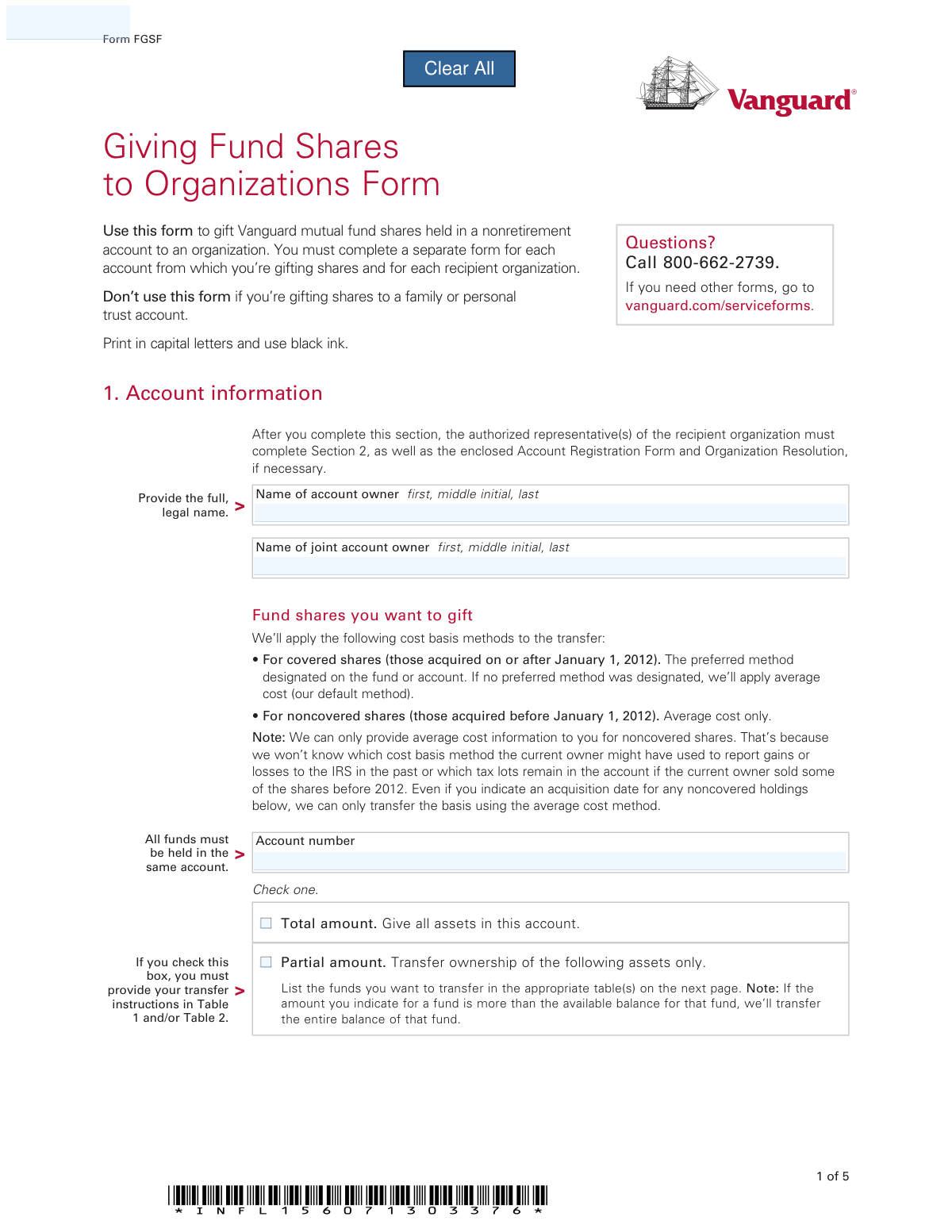
The Vanguard Giving Fund Shares to Organizations Form, also known as Form FGSF, is a document used by Vanguard account holders to transfer mutual fund shares from a personal nonretirement account to a charitable or other organization. This process allows for a direct donation of securities, which can be an effective way to support a cause while potentially gaining tax advantages. Today, this form can be filled out quickly and accurately using AI-powered services like Instafill.ai, which can also convert non-fillable PDF versions into interactive fillable forms.
Rather not fill this in by hand? Instafill is an online form filler that completes PDF forms automatically — upload the blank form, answer a few questions, and the AI fills every field.
Form specifications
| Form name: | Giving Fund Shares to Organizations Form |
| Number of pages: | 1 |
| Language: | English |
Our AI automatically handles information lookup, data retrieval, formatting, and form filling.
It takes less than a minute to fill out FGSF using our AI form filling.
Securely upload your data. Information is encrypted in transit and deleted immediately after the form is filled out.
Instafill Demo: How to fill out PDF forms in seconds with AI
How to Fill Out FGSF Online for Free in 2026
Are you looking to fill out a FGSF form online quickly and accurately? Instafill.ai offers the #1 AI-powered PDF filling software of 2026, allowing you to complete your FGSF form in just 37 seconds or less.
Follow these steps to fill out your FGSF form online using Instafill.ai:
- 1 Navigate to Instafill.ai and upload or select the Vanguard Giving Fund Shares to Organizations Form (FGSF).
- 2 As the giver, provide your personal and Vanguard account information for Section 1, letting the AI guide you through the required fields.
- 3 Specify the fund shares you wish to gift, indicating whether it's the total account balance or a partial amount detailed in the tables.
- 4 Review all the information populated by the AI for accuracy, then provide your digital signature and date in the designated area for the account owner.
- 5 Securely share the partially completed form with the authorized representative of the recipient organization for them to complete their section.
- 6 The recipient's representative will then fill out Section 2 with their organization's details, account information, and required signatures.
- 7 Once all sections are complete and signed by both parties, download the final document and mail it to the Vanguard address provided on the form.
Our AI-powered system ensures each field is filled out correctly, reducing errors and saving you time.
Why Choose Instafill.ai for Your Fillable FGSF Form?
Speed
Complete your FGSF in as little as 37 seconds.
Up-to-Date
Always use the latest 2026 FGSF form version.
Cost-effective
No need to hire expensive lawyers.
Accuracy
Our AI performs 10 compliance checks to ensure your form is error-free.
Security
Your personal information is protected with bank-level encryption.
Frequently Asked Questions About FGSF
This form is used to gift Vanguard mutual fund shares from your personal nonretirement account to an organization. It serves as the official instruction to transfer ownership of the shares from you to the designated entity.
Both the person gifting the shares (the donor) and an authorized representative of the recipient organization must complete and sign the form. The donor fills out Section 1, and the organization completes Section 2.
Yes, the minimum gift amount is $1,000. Additionally, if the recipient organization is new to the fund you're giving, your gift must meet that fund's minimum initial investment requirement.
No, this form is strictly for gifting shares held in a nonretirement account. To make a gift from a Vanguard retirement account, you must use the IRA Distribution Form instead.
First, you (the donor) complete Section 1 and sign it. Then, you must send the entire form to the recipient organization, which will complete Section 2 and mail it to Vanguard with any other required documents.
If the organization is opening a new Vanguard account, it must also submit a completed Account Registration Form. It must also have an Organization Resolution on file with Vanguard or submit a new one with this form.
No, you must complete a separate form for each organization you are gifting to. You also need to use a separate form for each Vanguard account you are gifting from.
To have your gift processed for a particular tax year, Vanguard must receive the fully completed form and all required documentation in good order by the last business day of that year.
Vanguard will process your request as soon as they receive the completed form and all required documentation in good order. If the form is incomplete, processing will be delayed, which could affect the timing of your gift.
Yes, AI-powered services like Instafill.ai can help you accurately auto-fill your personal information on this form. This can save you time and help reduce the chance of making errors.
You can upload the PDF form to a platform like Instafill.ai. The service will make the form fillable online, and you can use its AI features to automatically populate your details before downloading the completed document for submission.
If you have a non-fillable or 'flat' PDF, you can use a service like Instafill.ai to convert it into an interactive, fillable form. This allows you to easily type your information into the fields before printing.
No, this form is specifically for gifting shares to organizations. It explicitly states not to use this form if you are gifting shares to a family or personal trust account.
Once the shares have been transferred to the organization’s account, they can be kept, exchanged for shares of another Vanguard fund, or sold. The recipient organization can indicate their preference in Section 2 of the form.
The recipient organization is responsible for mailing the completed form to Vanguard. The address is P.O. Box 1110, Valley Forge, PA 19482-1110 for regular mail, or 455 Devon Park Drive, Wayne, PA 19087-1815 for overnight delivery.
Compliance FGSF
Validation Checks by Instafill.ai
1
Giver's Account Number Validation
This check verifies that the account number provided in Section 1 is a valid, existing Vanguard nonretirement account. It ensures the source of the gift is legitimate and eligible for this type of transfer. If the account number is invalid, does not exist, or is a retirement account, the form will be rejected, causing significant processing delays.
2
Giver's Signature and Name Consistency
This validation ensures that the printed name next to the signature in Section 1 exactly matches the name registered to the provided Vanguard account number. This is a critical security measure to prevent unauthorized transfers and fraud. A mismatch will halt the process until the identity of the signer can be verified, likely requiring a new, correctly signed form.
3
Joint Account Signature Completeness
If the source account number is identified as a joint account, this check confirms that signatures from all required account owners are present in Section 1. Omitting a required signature from a joint owner invalidates the transfer instruction. The form will be considered 'not in good order' and returned, delaying the gift until all parties have signed.
4
Gift Amount Selection Logic
This check ensures that exactly one box is checked in Section 1 to specify the gift amount: either 'Total amount' or 'Partial amount'. The form cannot proceed if neither or both options are selected, as the system would have ambiguous instructions. Failure to make a clear selection will result in the form being returned for correction.
5
Partial Gift Specification Completeness
If 'Partial amount' is selected in Section 1, this validation confirms that at least one fund is detailed in either Table 1 or Table 2. Selecting 'Partial amount' without specifying which assets to transfer makes the request impossible to fulfill. The form will be rejected as incomplete, and the giver will need to resubmit with the specific fund details.
6
Minimum Gift Value Threshold
This check verifies that the total value of the shares being gifted meets the $1,000 minimum requirement stated in the form instructions. This rule ensures that transactions are substantial enough to warrant the administrative process. If the specified dollar amount, or the calculated value of shares/percentage, is less than $1,000, the request will be denied.
7
Table 1 Gift Specification Exclusivity
For any fund listed in Table 1, this validation ensures that only one of the three options ('Dollar amount', 'Number of shares', or 'Percentage') is filled out. Providing multiple instruction types for a single fund creates a conflict that cannot be resolved automatically. The form will be flagged for manual review or rejected, delaying the transfer.
8
Table 2 Acquisition Date Format and Validity
This check validates that the 'Date shares acquired' in Table 2 is in the correct 'mm/dd/yyyy' format and is not a future date. An invalid date format prevents proper record-keeping and tax basis identification. A future date is logically impossible and indicates a user error, which will cause the form to be rejected.
9
Recipient Tax ID (EIN) Format
This validation ensures the 'Employer or other taxpayer ID number' provided for the recipient organization in Section 2 follows the standard format for a U.S. EIN (XX-XXXXXXX). A correctly formatted TIN is essential for tax reporting and for properly identifying the recipient entity in Vanguard's systems. An incorrectly formatted number will cause the form processing to fail.
10
Recipient Account Destination Requirement
This check confirms that the recipient organization has selected one of the two options in Section 2 for where to deposit the shares: either a 'New... account' or an 'Existing... account'. This choice is mandatory to direct the transfer. Without this selection, Vanguard cannot complete the gift, and the form will be returned to the recipient.
11
Existing Recipient Account Number Presence
If the recipient organization checks the box for an 'Existing nonretirement Vanguard mutual fund account', this validation ensures that a valid account number is provided in the corresponding field. This is necessary to route the gifted shares to the correct destination. If the box is checked but the account number is missing or invalid, the transfer cannot be executed.
12
Organization Resolution Status Declaration
This check verifies that the recipient organization has checked one of the two boxes under the 'Organization Resolution' heading in Section 2. This declaration is required to confirm that the signers are authorized to act on the organization's behalf, either through a resolution already on file or one submitted with the form. Failure to check a box will halt processing until the organization's authorization is confirmed.
13
Recipient Authorized Signature Presence
This validation confirms that at least one authorized representative from the recipient organization has signed, printed their name, and dated the form in Section 2. The signature legally acknowledges the acceptance of the gift and its terms. A missing signature from an authorized party renders the acceptance invalid and will stop the entire transaction.
Common Mistakes in Completing FGSF
The account owner signs their name in a way that does not exactly match how it is registered on the Vanguard account, for example, using a nickname or omitting a middle initial. This is a common security check, and any mismatch will cause the form to be rejected, delaying the gift transfer. To avoid this, carefully review the name on your account statement and sign exactly as it appears; if it's a joint account, both owners must sign.
The giver completes Section 1 and, assuming the form is finished, mails it directly to Vanguard instead of the recipient organization. The instructions clearly state the giver must send the form to the recipient first for them to complete and sign Section 2. This error significantly delays the process, as Vanguard cannot act on an incomplete form and will have to return it, disrupting the gift's timeline.
The recipient organization often forgets to include necessary supplementary documents, such as the Account Registration Form (for new accounts) or the Organization Resolution. Failure to include these required documents will halt the transfer until all paperwork is received in 'good order'. This can delay the gift for weeks and potentially push its effective date into the next tax year.
The person signing for the recipient organization in Section 2 is not listed as an authorized representative on the official Organization Resolution on file with Vanguard. This is a critical compliance failure that will cause the form to be immediately rejected to prevent unauthorized transactions. The organization must ensure the signer has the proper authority and is listed on the resolution before submitting the form.
When specifying a partial gift in Table 1, donors mistakenly fill in more than one field for a single fund (e.g., both a dollar amount and a number of shares). This creates ambiguity for processing, as Vanguard won't know which instruction to follow, leading to processing delays or rejection. To prevent this, choose only one method per fund—either a specific dollar amount, a number of shares, or a percentage—and fill in only that corresponding field.
A donor attempts to gift shares from several different Vanguard accounts using a single form to save time. The form explicitly states that a separate form must be completed for each account from which shares are being gifted. This mistake results in the rejection of the request, requiring the donor to start over with separate forms for each account and causing significant delays.
Donors mistakenly use this form to gift shares from a retirement account like an IRA, when it is strictly for nonretirement accounts. Gifting from a retirement account has different tax implications and requires a separate form (the IRA Distribution Form). Using the wrong form will lead to an automatic rejection of the request.
In Section 2, the recipient organization fails to check the box indicating whether the shares should go into a new or an existing Vanguard account. This leaves Vanguard with no clear instruction on where to deposit the gifted shares, halting the entire process. The organization must clearly check one of the boxes and provide an existing account number if applicable to avoid delays.
Users may only mail back the pages they filled out, discarding the blank or instructional pages. The form instructions explicitly state to 'Return ALL pages of this form, even if some sections are left blank.' Submitting an incomplete set of pages can cause the entire submission to be flagged as incomplete and rejected by the processing department.
When listing the funds to be gifted in Table 1 or 2, the donor provides the fund name but forgets to include the specific fund number and their account number in each row. These numbers are the primary identifiers Vanguard uses to locate the exact assets for transfer, and omitting them will stop processing until the donor can be contacted for clarification. Since this is a non-fillable PDF, using a tool like Instafill.ai can convert it to a smart, fillable form that helps prevent such data entry errors.
Saved over 80 hours a year
“I was never sure if my IRS forms like W-9 were filled correctly. Now, I can complete the forms accurately without any external help.”
Kevin Martin Green
Your data stays secure with advanced protection from Instafill and our subprocessors




Robust compliance program
Transparent business model
You’re not the product. You always know where your data is and what it is processed for.
ISO 27001, HIPAA, and GDPR
Our subprocesses adhere to multiple compliance standards, including but not limited to ISO 27001, HIPAA, and GDPR.
Security & privacy by design
We consider security and privacy from the initial design phase of any new service or functionality. It’s not an afterthought, it’s built-in, including support for two-factor authentication (2FA) to further protect your account.
Fill out FGSF with Instafill.ai
Worried about filling PDFs wrong? Instafill securely fills giving-fund-shares-to-organizations-form forms, ensuring each field is accurate.
