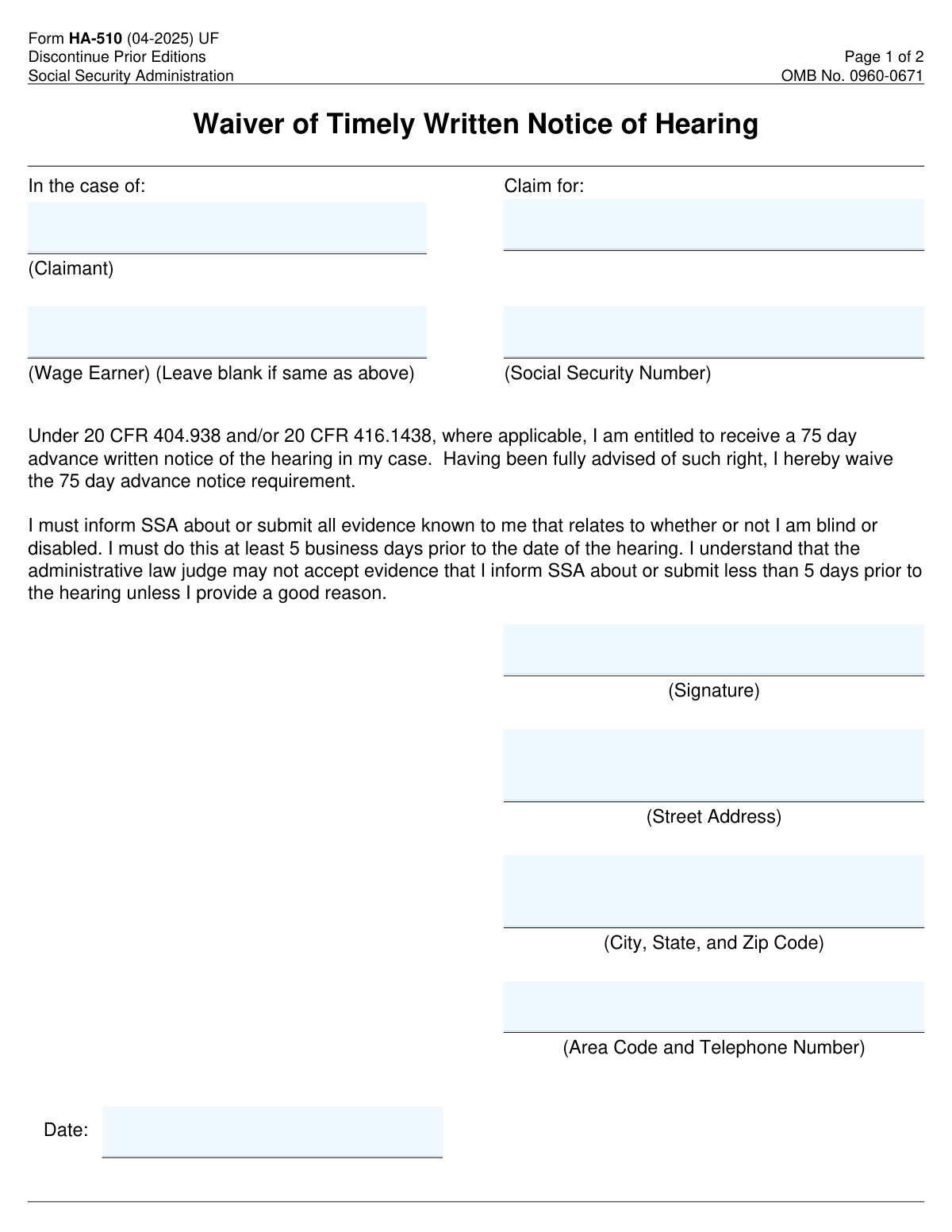
Yes! You can use AI to fill out Form HA-510, Waiver of Timely Notice
Form HA-510, Waiver of Timely Written Notice of Hearing, allows claimants to waive their right to a 75-day advance notice of a hearing. This form is important as it ensures that the hearing process can proceed without delay, even if the claimant chooses to forgo the advance notice.
Our AI automatically handles information lookup, data retrieval, formatting, and form filling.
It takes less than a minute to fill out Form HA-510 using our AI form filling.
Securely upload your data. Information is encrypted in transit and deleted immediately after the form is filled out.
Form specifications
| Form name: | Form HA-510, Waiver of Timely Notice |
| Number of fields: | 11 |
| Number of pages: | 2 |
| Official download URL: | https://www.ssa.gov/forms/ha-510.pdf |
| Language: | English |
Instafill Demo: filling out a legal form in seconds
How to Fill Out Form HA-510 Online for Free in 2025
Are you looking to fill out a FORM HA-510 form online quickly and accurately? Instafill.ai offers the #1 AI-powered PDF filling software of 2025, allowing you to complete your FORM HA-510 form in just 37 seconds or less.
Follow these steps to fill out your FORM HA-510 form online using Instafill.ai:
- 1 Visit instafill.ai site and select Form HA-510.
- 2 Enter claimant's name and Social Security Number.
- 3 Provide wage earner's information if applicable.
- 4 Sign and date the form electronically.
- 5 Check for accuracy and submit the form.
Our AI-powered system ensures each field is filled out correctly, reducing errors and saving you time.
Why Choose Instafill.ai for Your Fillable Form HA-510 Form?
Speed
Complete your Form HA-510 in as little as 37 seconds.
Up-to-Date
Always use the latest 2025 Form HA-510 form version.
Cost-effective
No need to hire expensive lawyers.
Accuracy
Our AI performs 10 compliance checks to ensure your form is error-free.
Security
Your personal information is protected with bank-level encryption.
Frequently Asked Questions About Form Form HA-510
Form HA-510, also known as the Waiver of Timely Notice, is a document that allows individuals to waive their right to receive timely notice regarding certain actions or decisions that may affect their benefits or entitlements.
The Waiver of Timely Notice entails that the individual agrees to forgo the standard notification period that is typically required before certain actions are taken. This means that the individual may not receive the usual advance notice of changes or decisions that could impact their benefits.
Individuals who are receiving benefits or entitlements that require timely notice of changes or decisions may be eligible to use Form HA-510. This typically includes beneficiaries of social security or other government assistance programs.
By signing Form HA-510, you are waiving your right to receive the standard advance notice, which is usually 75 days, before certain actions are taken regarding your benefits. This means you may not be informed in advance about changes that could affect your eligibility or the amount of your benefits.
The 75-day advance written notice is significant because it provides individuals with a reasonable amount of time to prepare for any changes to their benefits or entitlements. By waiving this notice, individuals may face immediate changes without the opportunity to adjust or respond accordingly.
Form HA-510 requires specific information including your name, address, and the details of the hearing for which you are waiving timely notice. It is important to provide accurate and complete information to ensure proper processing of your waiver.
To complete Form HA-510, fill in your personal information as requested, including your name and address. Indicate your understanding of the waiver of timely notice and sign the form. Ensure that all sections are filled out clearly to avoid any delays.
You must submit any evidence that supports your case prior to the hearing. This may include documents, witness statements, or other relevant materials that you wish to present. Ensure that all evidence is submitted in accordance with the guidelines provided.
If you submit evidence less than 5 days before the hearing, it may not be considered by the hearing officer. It is crucial to adhere to the submission deadlines to ensure that your evidence is reviewed and taken into account during the hearing.
If you change your mind after waiving your notice, you should contact the appropriate office immediately to inform them of your decision. Depending on the circumstances, they may provide guidance on how to proceed or whether it is possible to reinstate your notice.
Your personal information submitted on Form HA-510 is protected under the Privacy Act of 1974. The Social Security Administration (SSA) implements strict security measures to safeguard your data from unauthorized access and disclosure. Additionally, the information is only used for the purposes outlined in the form and is not shared without your consent, except as required by law.
The information collected on Form HA-510 is used primarily to process your waiver request. Routine uses may include sharing information with other government agencies for the purpose of verifying eligibility for benefits or for law enforcement purposes, as permitted by law. The SSA ensures that any sharing of information is done in compliance with applicable privacy regulations.
The Social Security Administration uses the information you provide on Form HA-510 to evaluate your request for a waiver of timely notice. This information helps the SSA determine your eligibility for benefits and to ensure that your rights are protected in the process.
Yes, you can withdraw your waiver after submitting Form HA-510. However, it is important to do so in a timely manner and to communicate your decision clearly to the SSA. You may need to provide a written request to formally withdraw your waiver.
Failing to provide the required information on Form HA-510 may result in the denial of your waiver request. This could lead to delays in processing your benefits or the inability to receive benefits altogether. It is crucial to complete the form accurately and provide all necessary information to avoid any negative consequences.
You can find more information about the Privacy Act related to Form HA-510 by visiting the official website of the agency that administers the form. They typically provide resources and documentation regarding privacy policies and how they apply to the information collected through this form.
The time it takes to complete Form HA-510 can vary depending on the individual's circumstances and the complexity of the information required. On average, it may take approximately 30 minutes to an hour to gather the necessary information and fill out the form.
Yes, there is a deadline for submitting Form HA-510. It is important to check the specific guidelines provided with the form or on the agency's website to ensure that you submit it within the required timeframe to avoid any delays in processing.
If you have questions while filling out Form HA-510, you should contact the agency's customer service or support line for assistance. They can provide guidance on how to complete the form correctly and address any specific concerns you may have.
If you do not have all the required information when submitting Form HA-510, it is advisable to provide as much information as you can and indicate that some information is missing. You may also want to follow up with the agency to provide the missing information as soon as possible to avoid delays in processing your request.
You can contact the Social Security Administration (SSA) for assistance by calling their toll-free number at 1-800-772-1213. If you are hearing impaired, you can reach them through TTY at 1-800-325-0778. Additionally, you can visit your local SSA office or access their website at www.ssa.gov for more information and resources.
Compliance Form HA-510
Validation Checks by Instafill.ai
1
Verifies that the claimant's name is provided in the Claim Information section.
This validation check ensures that the claimant's name is accurately entered in the Claim Information section of the form. It confirms that the name is not left blank, which is crucial for identifying the individual making the claim. The check also verifies that the name is formatted correctly, adhering to standard naming conventions. By performing this validation, the software helps to prevent any potential issues related to misidentification or processing delays.
2
Confirms that the Social Security Number of the claimant is included and correctly formatted.
This validation check verifies that the Social Security Number (SSN) of the claimant is provided and adheres to the correct formatting standards. It ensures that the SSN is not only present but also follows the nine-digit structure typically used in the United States. By confirming the accuracy of the SSN, the software helps to prevent identity verification issues that could arise during the claims process. This check is essential for maintaining the integrity and security of the claimant's personal information.
3
Ensures that the wage earner's name is filled in only if it differs from the claimant's name.
This validation check ensures that the wage earner's name is only filled in if it is different from the claimant's name. It verifies that the form is completed accurately, preventing unnecessary confusion or errors in the claims process. By checking this condition, the software helps to streamline the information provided and ensures that only relevant details are included. This check is vital for maintaining clarity and accuracy in the documentation.
4
Checks that the waiver statement has been read and understood before signing the form.
This validation check confirms that the individual signing the form has read and understood the waiver statement. It ensures that the claimant is fully aware of the implications of waiving the timely notice requirement. By verifying this understanding, the software helps to protect the rights of the claimant and ensures that they are making an informed decision. This check is crucial for upholding the integrity of the waiver process.
5
Validates that the signature is present in the designated area to confirm the waiver of the notice requirement.
This validation check ensures that a signature is present in the designated area of the form, confirming the waiver of the notice requirement. It verifies that the claimant has officially acknowledged and accepted the terms outlined in the waiver statement. By checking for the presence of a signature, the software helps to prevent any processing delays that could occur due to incomplete documentation. This check is essential for finalizing the claims process and ensuring compliance with regulatory requirements.
6
Ensures that the street address, city, state, and zip code are accurately filled in the Contact Information section.
This validation check ensures that the street address, city, state, and zip code are accurately filled in the Contact Information section. It verifies that all components of the address are present and correctly formatted to avoid any miscommunication. The check confirms that the information aligns with postal standards, which is crucial for timely correspondence. By validating this information, the software helps to prevent delays in processing the waiver.
7
Confirms that the area code and telephone number are provided for SSA contact purposes.
This validation check confirms that the area code and telephone number are provided for SSA contact purposes. It ensures that the contact number is complete and follows the standard format, which is essential for effective communication. The check verifies that the number is not only present but also valid, allowing for quick outreach if necessary. This step is vital in maintaining a clear line of communication between the applicant and the SSA.
8
Verifies that the date of signing is included and correctly formatted.
This validation check verifies that the date of signing is included and correctly formatted. It ensures that the date adheres to the required format, which is important for legal documentation. The check confirms that the date is not only present but also reflects the actual signing date, preventing any discrepancies. By validating the signing date, the software helps to uphold the integrity of the waiver process.
9
Checks that all evidence related to the claim is submitted at least 5 business days before the hearing date.
This validation check checks that all evidence related to the claim is submitted at least 5 business days before the hearing date. It ensures that the submission timeline is adhered to, which is critical for the review process. The check verifies that the evidence is not only submitted but also received within the stipulated timeframe, allowing for adequate preparation. By enforcing this requirement, the software helps to facilitate a smoother hearing process.
10
Ensures that a valid reason is provided if evidence is submitted less than 5 days prior to the hearing.
This validation check ensures that a valid reason is provided if evidence is submitted less than 5 days prior to the hearing. It verifies that the explanation is clear and justifiable, which is necessary for the acceptance of late submissions. The check confirms that the reason aligns with the guidelines set forth by the SSA, maintaining the integrity of the process. By requiring this validation, the software helps to uphold the standards of evidence submission.
11
Confirms that the Privacy Act Statement has been reviewed to understand how personal information will be used.
This validation check ensures that the user has acknowledged the Privacy Act Statement, which outlines how their personal information will be utilized. It verifies that the individual understands the implications of sharing their data and the protections in place. By confirming this, the software promotes transparency and compliance with privacy regulations. This step is crucial for safeguarding the user's rights and ensuring informed consent.
12
Validates that the form is submitted to the correct SSA office as instructed.
This check verifies that the submission address for the form aligns with the instructions provided on the document. It ensures that the user is aware of the correct SSA office to which the form must be sent, preventing delays in processing. By validating this information, the software helps to streamline the submission process and enhances the likelihood of timely responses. This step is essential for ensuring that the form reaches the appropriate authorities without unnecessary complications.
13
Ensures that a copy of the completed form is retained for personal records.
This validation check emphasizes the importance of retaining a copy of the completed form for the user's personal records. It verifies that the user is aware of the need to keep documentation of their submission for future reference. By ensuring this step is followed, the software aids in maintaining a clear record of communications with the SSA. This practice is vital for accountability and for any potential follow-up regarding the waiver request.
14
Checks that no fields are left blank unless specified (e.g., wage earner's name if not applicable).
This validation check ensures that all required fields on the form are filled out appropriately, with exceptions only for specified fields that may not apply. It verifies that the user has provided all necessary information to avoid processing delays. By checking for completeness, the software helps to ensure that the form is submitted in a fully compliant manner. This step is crucial for preventing any potential issues that could arise from incomplete submissions.
15
Verifies that all information provided is consistent and does not contain discrepancies.
This validation check confirms that the information entered on the form is consistent and free from discrepancies. It ensures that all data aligns with any previously submitted information or known records. By verifying consistency, the software helps to prevent misunderstandings or complications during the processing of the waiver request. This step is essential for maintaining the integrity of the information provided and ensuring a smooth review process.
Common Mistakes in Completing Form HA-510
Omitting the claimant's name and Social Security Number (SSN) can lead to significant delays in processing the waiver. It is essential to ensure that this information is accurately filled out to avoid any confusion regarding the identity of the claimant. Double-checking the entered details against official documents can help prevent this mistake. Always ensure that the name and SSN match the records held by the relevant authority.
When a different wage earner is involved, failing to indicate their name can result in complications during the review process. It is crucial to provide complete and accurate information to ensure that all parties are correctly identified. To avoid this mistake, carefully read the instructions and include all relevant names as required. This will help streamline the process and prevent unnecessary delays.
Overlooking the implications of the waiver statement can lead to unintended consequences, such as forfeiting rights to appeal or contest decisions. It is important to fully understand what signing the waiver entails before proceeding. To avoid this mistake, take the time to read and comprehend the waiver statement thoroughly. Consulting with a legal advisor can also provide clarity on the implications involved.
Submitting evidence too close to the hearing date can result in the evidence being disregarded, which may negatively impact the outcome. It is vital to adhere to the timeline specified in the instructions to ensure that all evidence is considered. To avoid this mistake, plan ahead and gather all necessary documentation well in advance of the hearing date. Setting reminders for submission deadlines can also help keep the process on track.
Failing to sign the form in the designated area can render the submission invalid, leading to delays or rejection of the waiver. It is essential to ensure that all required signatures are provided where indicated. To avoid this mistake, review the form carefully before submission to confirm that all necessary signatures are present. Utilizing a checklist can be an effective way to ensure that all steps are completed correctly.
Failing to provide complete contact information can lead to delays in processing your waiver request. It is essential to include your current address, phone number, and email address to ensure that the Social Security Administration (SSA) can reach you if needed. To avoid this mistake, double-check that all contact fields are filled out accurately before submitting the form. Keeping your contact information updated is also crucial for any future correspondence.
Not including the date of your signature can result in the SSA being unable to process your waiver request in a timely manner. The date is important as it indicates when you submitted your request, which can affect the outcome. To prevent this error, always ensure that you date your signature clearly before submitting the form. A simple reminder to check for the date can save you from potential complications.
Neglecting to read the Privacy Act Statement can lead to misunderstandings about how your personal information will be used and protected. This statement outlines your rights and the SSA's responsibilities regarding your data. To avoid this mistake, take the time to read and understand the Privacy Act Statement before completing the form. Being informed about your rights can help you feel more secure in submitting your information.
Sending your waiver request to the incorrect SSA office can cause significant delays in processing your application. Each office has specific responsibilities, and submitting to the wrong one may result in your form being misplaced or not reviewed. To avoid this issue, verify the correct SSA office address for your submission by checking the instructions provided with the form. Ensuring you have the right address can streamline the process and help you receive a timely response.
Failing to retain a copy of your submitted form can lead to difficulties in tracking your request or providing proof of submission if needed. Keeping a record of your submission is essential for your personal documentation and can be helpful in case of any follow-up inquiries. To avoid this mistake, make a photocopy or digital scan of the completed form before sending it. This practice ensures you have a reference point for any future communications with the SSA.
Saved over 80 hours a year
“I was never sure if my IRS forms like W-9 were filled correctly. Now, I can complete the forms accurately without any external help.”
Kevin Martin Green
Your data stays secure with advanced protection from Instafill and our subprocessors
Robust compliance program
Transparent business model
You’re not the product. You always know where your data is and what it is processed for.
ISO 27001, HIPAA, and GDPR
Our subprocesses adhere to multiple compliance standards, including but not limited to ISO 27001, HIPAA, and GDPR.
Security & privacy by design
We consider security and privacy from the initial design phase of any new service or functionality. It’s not an afterthought, it’s built-in, including support for two-factor authentication (2FA) to further protect your account.
Fill out Form HA-510 with Instafill.ai
Worried about filling PDFs wrong? Instafill securely fills ha-510 forms, ensuring each field is accurate.