
Yes! You can use AI to fill out Form I-290B, Notice of Appeal or Motion
Don't type 85 fields by hand. Tell our AI about yourself, or upload a document you already have, and it fills every field in seconds. You check it, then download, print or sign.
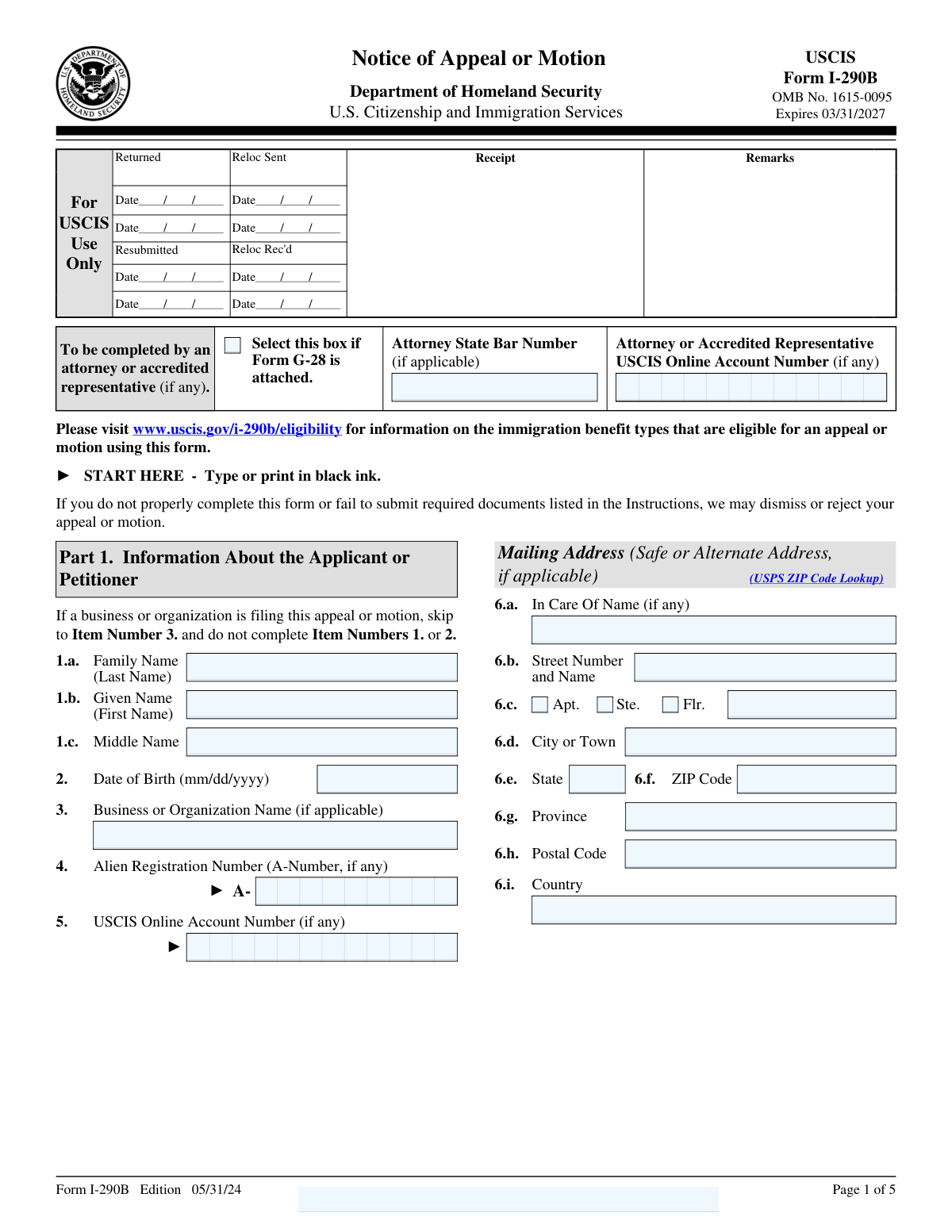
The AI does the filling. You just check it.
No typing into boxes, nothing to install.
What this form asks for
The AI fills all of it, from your answers or your documents.
The AI checks your answers before you download
15 checks built for this form, so a wrong date or a missing answer is caught before anyone else sees it.
This validation check ensures that the form is filled out using black ink, which is a requirement specified in the general instructions. It confirms that any other ink colors are not used, as this could lead to processing issues. By enforcing this rule, the software helps maintain the integrity and readability of the submitted form. This check is crucial for ensuring compliance with submission standards.
This validation check verifies that all sections of the form are filled out completely and accurately. It confirms that missing or incorrect information could lead to the dismissal or rejection of the appeal or motion. By ensuring thoroughness in the provided information, the software helps applicants avoid unnecessary delays or complications in their case. This check is vital for the successful processing of the appeal or motion.
This validation check ensures that if the applicant is an attorney or an accredited representative, the appropriate sections of the form are completed. It verifies that the specific information required for legal representatives is accurately provided. By enforcing this requirement, the software helps to ensure that the appeal or motion is properly represented and processed. This check is essential for maintaining the professional standards expected in legal submissions.
This validation check verifies that when the form is being filed on behalf of a business or organization, Part 1 is appropriately skipped and Part 2 is filled out. It confirms that the applicant understands the specific requirements for organizational filings, which differ from individual submissions. By ensuring compliance with this guideline, the software helps to streamline the processing of the appeal or motion. This check is important for ensuring that the form is completed correctly based on the applicant's status.
This validation check ensures that the applicant's family name, given name, and middle name are accurately entered in Part 1 of the form. It confirms that any discrepancies in the names could lead to identification issues during processing. By validating this information, the software helps to ensure that the applicant is correctly identified in the system. This check is crucial for maintaining accurate records and facilitating effective communication regarding the appeal or motion.
This validation check ensures that the mailing address provided on Form I-290B is complete and accurate. It verifies that all necessary components, such as the street number, city, state, ZIP code, and country, are included. By confirming the accuracy of the mailing address, it helps prevent any delays in communication or processing. This check is crucial for ensuring that the applicant receives all relevant correspondence regarding their appeal or motion.
And 9 more checks
- Confirms that if applicable, the alternate address is provided in the mailing address section.
- Verifies that the attorney's state bar number and USCIS online account number are included if the applicant has an attorney.
- Checks that the box is marked if Form G-28 is attached.
- Ensures that the Alien Registration Number (A-Number) and USCIS online account number are provided if applicable.
- Validates that the type of motion or appeal is clearly indicated in Part 2
- Confirms that the immigration form number, requested classification, and receipt number are accurately provided in Part 2
- Ensures that the date of the unfavorable decision is included in Part 2
- Verifies that a clear statement regarding the basis for the appeal or motion is provided in Part 3
- Checks that the applicant's daytime telephone number, mobile number, and email address are included in Part 4
Let AI fill out your Form I-290B
No typing. Every field filled in seconds, checked, ready to sign.
Common Mistakes in Completing Form I-290B
The ones the AI is built to catch.
Using ink colors other than black
Incomplete or inaccurate personal information
Failing to check the box for Form G-28 if applicable
Not providing the Alien Registration Number (A-Number)
Indicating both appeal and motion on the same form
Omitting the immigration form number related to the appeal
Not including the date of the unfavorable decision
Failing to provide a clear basis for the appeal or motion
Not signing and dating the form
Omitting contact information for the interpreter if applicable
Not certifying the accuracy of the information provided
Neglecting to review the form for completeness before submission
Failing to attach required documents as specified
Not providing additional information in Part 7 if needed
Not including the preparer's contact information if applicable
Frequently Asked Questions About Form I-290B
Is it really free for 7 days?
Can I fill other forms too?
How do I cancel?
How does the AI fill out Form I-290B?
What happens to my information?
How complex is Form I-290B to fill out?
What is Form I-290B used for?
What types of appeals or motions can be filed using Form I-290B?
Who should complete Form I-290B?
Can I file both an appeal and a motion on a single Form I-290B?
What should I do if I want to file an appeal with the Board of Immigration Appeals (BIA)?
What information is required in Part 1 of Form I-290B?
What is the significance of the attorney's state bar number on Form I-290B?
What should I include in the statement regarding the basis for my appeal or motion?
What is the difference between a motion to reopen and a motion to reconsider?
How do I provide additional evidence or a brief with my appeal or motion?
What happens if I do not properly complete Form I-290B?
What is the deadline for submitting additional evidence after filing an appeal?
What contact information do I need to provide in Part 4 of Form I-290B?
What is the purpose of the interpreter's information in Part 5?
What should I do if I need more space to provide additional information?
How do I certify the information provided in Form I-290B?
What is the importance of the receipt number in Part 2?
What should I do if I am filing on behalf of a business or organization?
How can I check the eligibility of my immigration benefit for an appeal or motion?
What are the consequences of waiving grounds of ineligibility in my appeal?
Get your Form I-290B filled out by AI
$0 today. Cancel before Nov 1 and you pay nothing.
Let AI fill out your Form I-290B
Your trial starts once a card is added. You pay nothing before Nov 1.
Our AI already knows this form, all 85 fields of it. Skip the typing: tell it about yourself, or upload what you have, and it fills the whole form in seconds.
- AI fills every field on all 5 pages, tables and checkboxes included
- No typing into boxes: answer a few questions, or upload a document you already have, an old copy of this form, a photo of a document
- The AI checks the answers; you review and change anything before you download
- Download the finished PDF, print it, or sign it online
- Encrypted, and never used to train AI
Cancel before Nov 1 and you pay nothing.
A card is needed to start the trial. Cancel in two clicks from your account.
Terms · Privacy