
Yes! You can use AI to fill out Form I-356, Request for Cancellation of Public Charge Bond
Don't type 217 fields by hand. Tell our AI about yourself, or upload a document you already have, and it fills every field in seconds. You check it, then download, print or sign.
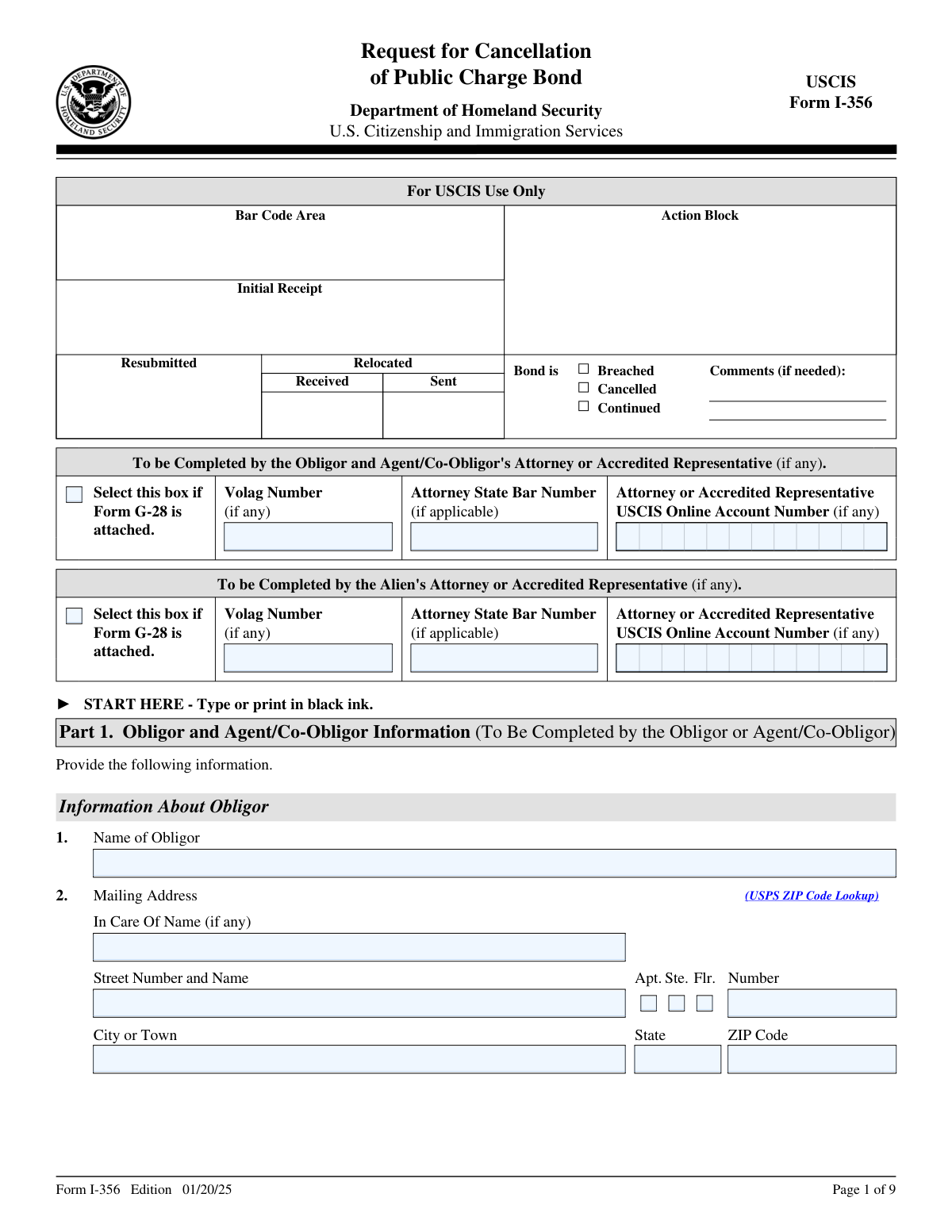
The AI does the filling. You just check it.
No typing into boxes, nothing to install.
What this form asks for
The AI fills all of it, from your answers or your documents.
The AI checks your answers before you download
15 checks built for this form, so a wrong date or a missing answer is caught before anyone else sees it.
This validation check ensures that the form is filled out using black ink, which is essential for clarity and legibility. It confirms that all entries are easily readable, preventing any misinterpretation of the information provided. By enforcing this requirement, the software helps to maintain a standard that facilitates efficient processing of the form. This check is crucial in avoiding delays that may arise from unclear submissions.
This validation check verifies that every section of the form is filled out accurately and completely. It confirms that missing or incorrect information is flagged, which helps to prevent any potential processing delays. By ensuring that all required fields are properly completed, the software enhances the likelihood of a smooth review process. This check is vital for maintaining the integrity of the application and expediting its handling.
This validation check ensures that the Obligor's name and Taxpayer Identification Number (TIN) are accurately entered on the form. It verifies that these critical identifiers match official records, which is essential for the processing of the bond cancellation request. By confirming the accuracy of this information, the software helps to prevent any issues that could arise from mismatched data. This check is important for maintaining compliance with regulatory requirements.
This validation check verifies that both the mailing and physical addresses of the Obligor are included and correctly filled out. It ensures that the addresses are complete and formatted properly, which is crucial for any correspondence related to the bond cancellation. By confirming the accuracy of these addresses, the software helps to prevent any misdelivery of important documents. This check is essential for ensuring effective communication throughout the processing of the request.
This validation check ensures that the Bond Receipt Number and Bond Amount are accurately entered on the form. It verifies that these details correspond to the official records associated with the bond, which is critical for the cancellation process. By validating this information, the software helps to prevent any discrepancies that could lead to complications or delays. This check is important for ensuring that the request is processed efficiently and correctly.
This validation check ensures that the date of bond approval is clearly specified on the form. It verifies that the date format is correct and that it falls within a reasonable range. By confirming this information, the software helps to prevent any potential delays in processing the request. Accurate date entry is crucial for maintaining the integrity of the bond cancellation process.
And 9 more checks
- Confirms that the Alien Registration Number (A-Number) is included if available.
- Verifies that the U.S. Social Security Number is provided if applicable.
- Checks that the current legal name of the alien is accurately filled in, including any other names used since birth.
- Ensures that the alien's date of birth, place of birth, and country of citizenship are correctly entered.
- Validates that both mailing and physical addresses for the alien are provided and accurate.
- Confirms that the reason for cancellation of the bond is indicated and supported by required documentation.
- Ensures that the alien or their executor's contact information is provided.
- Verifies that the form is signed and dated where indicated by the Obligor and the alien or their executor.
- Checks that any interpreter's information is included if applicable, along with their certification.
Let AI fill out your Form I-356
No typing. Every field filled in seconds, checked, ready to sign.
Common Mistakes in Completing Form I-356
The ones the AI is built to catch.
Using ink colors other than black for responses
Failing to provide accurate Taxpayer Identification Number
Omitting the Bond Receipt Number or Bond Amount
Not including the date of bond approval by DHS
Leaving out the alien's current legal name
Failing to provide the Alien Registration Number (A-Number)
Not including the alien's date and place of birth
Omitting mailing and physical addresses for the alien
Not indicating the reason for bond cancellation
Failing to provide required documentation for cancellation reason
Not signing and dating the form where required
Omitting contact information for the alien or executor
Not authorizing SSA to verify the alien's Social Security number
Failing to provide interpreter's information if applicable
Not including preparer's information if applicable
Neglecting to review the form for accuracy before submission
Submitting the form to the wrong USCIS address
Frequently Asked Questions About Form I-356
Is it really free for 7 days?
Can I fill other forms too?
How do I cancel?
How does the AI fill out Form I-356?
What happens to my information?
How complex is Form I-356 to fill out?
What is Form I-356 and what is its purpose?
Who should complete Form I-356?
What information is required from the Obligor on Form I-356?
What is the significance of the Taxpayer Identification Number (TIN) on Form I-356?
What are the reasons for requesting the cancellation of a public charge bond?
What documentation is needed to support a request for cancellation due to the alien's death?
How can I prove that the alien has permanently departed the United States?
What should I do if the alien has become a U.S. citizen?
What is the process for cancelling a bond after the fifth anniversary of becoming a lawful permanent resident?
What information must be provided about the alien for whom the bond was issued?
How do I certify the information provided in Form I-356?
What happens if the information provided in Form I-356 is found to be incorrect?
Is there a fee associated with submitting Form I-356?
How can I check the status of my Form I-356 after submission?
What should I do if I need to provide additional information beyond what is included in Form I-356?
Can an attorney or accredited representative submit Form I-356 on behalf of the Obligor?
What is the role of the interpreter in completing Form I-356?
What should I do if I have questions while filling out Form I-356?
How do I submit Form I-356 to USCIS?
What are the consequences of not cancelling a public charge bond when eligible?
Get your Form I-356 filled out by AI
$0 today. Cancel before Nov 2 and you pay nothing.
Let AI fill out your Form I-356
Your trial starts once a card is added. You pay nothing before Nov 2.
Our AI already knows this form, all 217 fields of it. Skip the typing: tell it about yourself, or upload what you have, and it fills the whole form in seconds.
- AI fills every field on all 9 pages, tables and checkboxes included
- No typing into boxes: answer a few questions, or upload a document you already have, an old copy of this form, a photo of a document
- The AI checks the answers; you review and change anything before you download
- Download the finished PDF, print it, or sign it online
- Encrypted, and never used to train AI
Cancel before Nov 2 and you pay nothing.
A card is needed to start the trial. Cancel in two clicks from your account.
Terms · Privacy