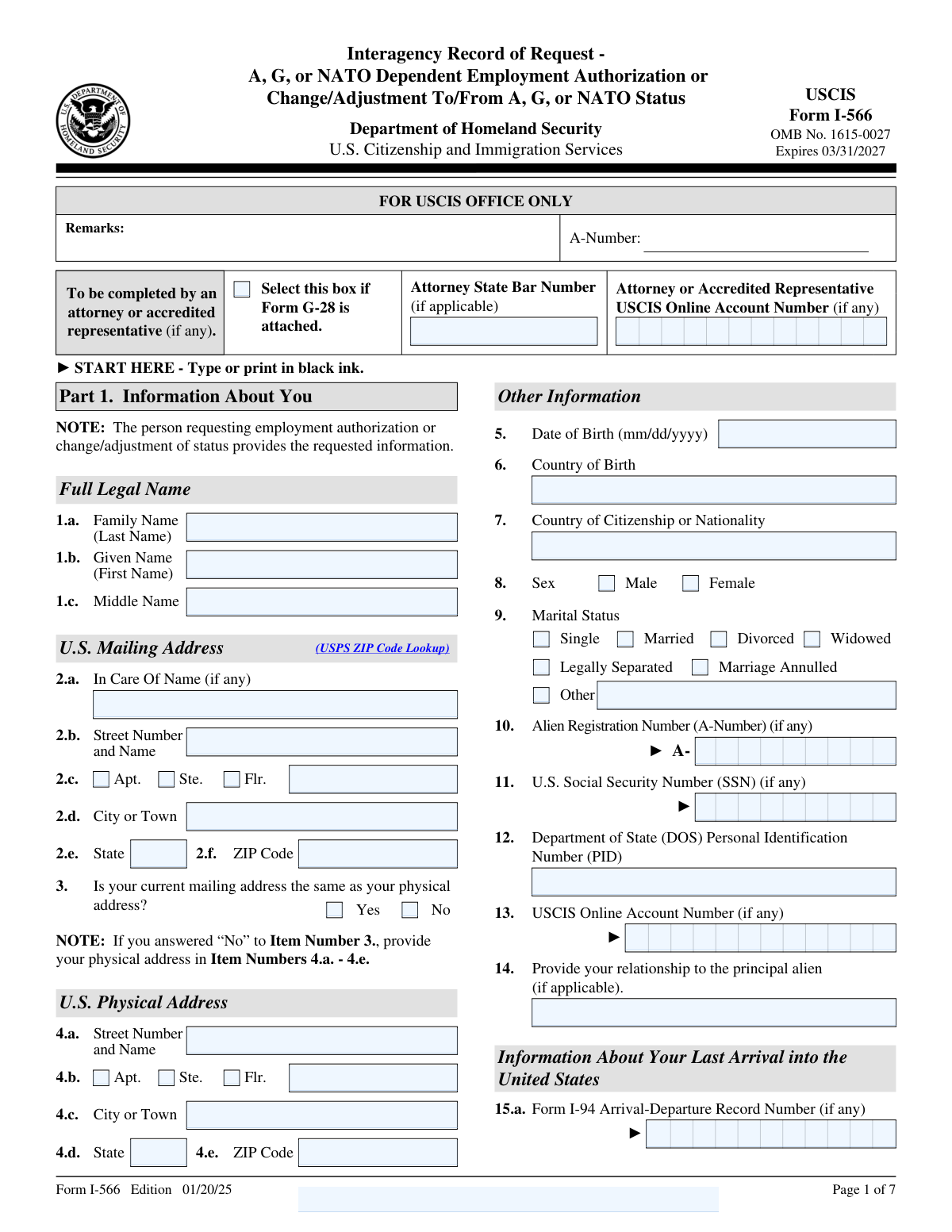
Fill out Form I-566, Interagency Record of Request with Instafill.ai
Worried about filling PDFs wrong? Instafill securely fills I-566 forms, ensuring each field is accurate.
#1 AI PDF Filling Software of 2025
3 out of 4 customers say they prepare their Form I-566 forms in 37 seconds or less
Secure platform for your PDF forms and personal information
| Form name: | Form I-566, Interagency Record of Request |
| Download form: | https://www.uscis.gov/sites/default/files/document/forms/i-566.pdf |
Instafill Demo: filling out a legal form in seconds
Compliance Form I-566
Validation Checks by Instafill.ai
1
Verifies that the form is completed using black ink, as required by the general instructions.
This validation check ensures that the form is filled out using black ink, adhering to the specified requirements outlined in the general instructions. It confirms that any other ink colors are flagged as non-compliant, which could lead to processing delays. By enforcing this rule, the software helps maintain uniformity and readability of the submitted form. This check is crucial for ensuring that the form meets the submission standards set by the authorities.
2
Ensures that all personal information, including full legal name, date of birth, and country of birth, is accurately filled out in Part 1.
This validation check verifies that all essential personal information is accurately entered in Part 1 of the form. It confirms that the full legal name, date of birth, and country of birth are provided without any discrepancies. By cross-referencing the input data, the software helps prevent errors that could lead to complications in processing the request. This check is vital for ensuring that the individual's identity is correctly established in the records.
3
Confirms that the date of birth is provided in the correct format (mm/dd/yyyy).
This validation check ensures that the date of birth is entered in the correct format, specifically mm/dd/yyyy. It verifies that any deviations from this format are flagged, preventing potential misunderstandings or misinterpretations of the date. By enforcing this format, the software helps maintain consistency across all submitted forms. This check is essential for accurate data processing and record-keeping.
4
Checks that the marital status and country of citizenship or nationality are indicated in Part 1.
This validation check confirms that the marital status and country of citizenship or nationality are clearly indicated in Part 1 of the form. It ensures that this critical information is not omitted, as it is necessary for the processing of the request. By validating these fields, the software helps to ensure that all relevant personal circumstances are taken into account. This check is important for compliance with immigration and nationality regulations.
5
Validates that the Alien Registration Number (A-Number), U.S. Social Security Number (SSN), and Department of State Personal Identification Number (PID) are included if applicable.
This validation check verifies that the Alien Registration Number (A-Number), U.S. Social Security Number (SSN), and Department of State Personal Identification Number (PID) are included when applicable. It ensures that these identifiers are provided to facilitate accurate tracking and processing of the individual's request. By checking for the presence of these numbers, the software helps to streamline the identification process. This check is crucial for individuals who have previously interacted with immigration services.
6
Ensures that the U.S. mailing address and physical address are completed and checked for accuracy.
This validation check ensures that both the U.S. mailing address and physical address fields are filled out completely. It verifies that the addresses provided are accurate and conform to standard formatting. The check also confirms that there are no discrepancies between the two addresses, which could lead to issues in communication. By validating these fields, the software helps to prevent delays in processing the request due to incorrect address information.
7
Verifies that the current immigration status and the date of last arrival into the United States are provided.
This validation check verifies that the applicant has provided their current immigration status, which is crucial for processing the request. It also ensures that the date of last arrival into the United States is accurately recorded. By confirming these details, the software helps to establish the applicant's eligibility for the requested action. This check is essential for maintaining compliance with immigration regulations and ensuring that all necessary information is available for review.
8
Confirms that if the applicant is not the principal alien, the principal alien's full legal name and physical address are included in Part 2.
This validation check confirms that if the applicant is not the principal alien, the required information about the principal alien is accurately provided in Part 2. It ensures that the full legal name and physical address of the principal alien are included, which is vital for identifying the correct individual associated with the request. By validating this information, the software helps to prevent any potential confusion or misidentification during the processing of the form. This check is crucial for maintaining the integrity of the application process.
9
Checks that the principal alien's date of duty end, job title, country of citizenship, and passport or travel document details are accurately filled out.
This validation check ensures that all relevant details regarding the principal alien are accurately filled out, including the date of duty end, job title, country of citizenship, and passport or travel document information. It verifies that these fields contain the correct and complete information necessary for processing the request. By confirming these details, the software helps to ensure that the application is compliant with immigration requirements. This check is essential for preventing any issues that may arise from incomplete or incorrect information.
10
Ensures that only one option is selected in Part 3 for the type of request (employment authorization or change/adjustment of status).
This validation check ensures that the applicant has selected only one option in Part 3 regarding the type of request being made. It verifies that either employment authorization or change/adjustment of status is chosen, preventing any ambiguity in the application. By confirming that only one option is selected, the software helps to streamline the processing of the request and avoid potential delays. This check is important for maintaining clarity in the applicant's intentions and ensuring that the correct procedures are followed.
11
Validates that the relationship to the principal alien is specified if requesting employment authorization.
This validation check ensures that the requestor clearly specifies their relationship to the principal alien when seeking employment authorization. It confirms that the necessary connection is documented, which is crucial for processing the request accurately. By verifying this information, the software helps prevent any potential delays or issues with the application. This check is essential for maintaining compliance with immigration regulations.
12
Confirms that the specific category of change is indicated if requesting a change/adjustment of status.
This validation check verifies that the requestor has indicated the specific category of change when applying for a change or adjustment of status. It ensures that the form is filled out correctly, which is vital for the appropriate processing of the request. By confirming this detail, the software helps streamline the review process and reduces the likelihood of errors. This check is important for aligning the request with the correct legal framework.
13
Checks that the requestor's contact information, including email and telephone numbers, is provided in Part 4.
This validation check ensures that the requestor has provided complete contact information, including both email and telephone numbers, in Part 4 of the form. It verifies that the necessary details are included, which facilitates communication between the requestor and the relevant authorities. By checking this information, the software helps to ensure that any follow-up or clarification can be conducted smoothly. This check is crucial for maintaining an open line of communication throughout the application process.
14
Verifies that the certification statement is read carefully and that the form is signed and dated by the requestor.
This validation check confirms that the requestor has read the certification statement carefully and has signed and dated the form appropriately. It ensures that the requestor acknowledges the information provided and agrees to the terms outlined in the certification. By verifying this step, the software helps to uphold the integrity of the application process and ensures compliance with legal requirements. This check is vital for validating the authenticity of the request.
15
Ensures that if applicable, the interpreter's information is provided and signed in Part 5, and the preparer's information is included in Part 6.
This validation check ensures that if an interpreter is involved, their information is provided and signed in Part 5 of the form. It also verifies that the preparer's information is included in Part 6, if applicable. By confirming these details, the software helps to maintain transparency and accountability in the application process. This check is important for ensuring that all parties involved in the preparation of the form are properly documented.
Common Mistakes in Completing Form I-566
Using ink colors other than black can lead to processing delays or rejection of the form. It is essential to use black ink to ensure that the information is clearly legible and meets the requirements set by the agency. To avoid this mistake, always check the instructions for the specific ink color required before filling out the form. Keeping a black pen handy when completing the form can help ensure compliance.
Providing a full legal name is crucial for identification purposes, and using nicknames can create confusion or mismatches in records. To prevent this error, always use the name as it appears on official documents, such as a passport or birth certificate. Double-check the spelling and ensure that all parts of the name, including middle names, are included. If you have changed your name, be sure to provide the name that is currently in use.
Using the wrong date format can lead to misunderstandings and processing issues. It is important to follow the specified format, typically MM/DD/YYYY, to ensure clarity. To avoid this mistake, familiarize yourself with the required format before filling out the form and double-check your entries. Using a date format that is consistent with other documents can also help maintain accuracy.
Not indicating marital status can lead to incomplete applications and delays in processing. It is important to provide this information as it may affect eligibility or processing of the request. To avoid this mistake, carefully read the section regarding marital status and ensure that you select the appropriate option. If you are unsure, consider consulting the instructions or seeking assistance to clarify your status.
Failing to provide an Alien Registration Number when required can result in processing delays or complications with your request. This number is essential for tracking and verifying your immigration status. To avoid this mistake, check if you have an Alien Registration Number and ensure it is included in the appropriate section of the form. If you do not have one, make sure to indicate that clearly to prevent confusion.
Providing inaccurate or incomplete U.S. mailing and physical addresses can lead to delays in processing your request. It is essential to ensure that both addresses are filled out correctly, including street numbers, names, and ZIP codes. To avoid this mistake, double-check the addresses against official documents and ensure they match the format required by the form. Additionally, consider using a reliable address verification tool to confirm the accuracy of the information provided.
Failing to specify the relationship to the principal alien can result in confusion and may lead to the rejection of your request. It is crucial to clearly indicate your relationship, as this information is necessary for the processing of the form. To prevent this error, carefully read the instructions regarding this section and provide the exact relationship as requested. If you are unsure, consult with an immigration attorney or a knowledgeable individual to ensure clarity.
Selecting multiple types of requests can complicate the processing of your form and may lead to delays or rejections. It is important to choose only one type of request that accurately reflects your situation. To avoid this mistake, review the options carefully and select the one that best applies to your circumstances. If you believe that more than one request is necessary, consider submitting separate forms for each request to ensure clarity and proper handling.
Neglecting to sign and date the certification section can result in the form being considered incomplete, which may delay processing. Signing and dating the form is a critical step that confirms the accuracy of the information provided. To avoid this oversight, make it a habit to review the entire form before submission, ensuring that all required signatures and dates are included. Setting a checklist for the final review can help ensure that no critical steps are missed.
If an interpreter is used during the process, failing to provide their information can lead to misunderstandings and complications in communication. It is essential to include the interpreter's details if applicable, as this information is necessary for accurate processing. To prevent this mistake, assess whether an interpreter was involved and ensure their information is clearly documented on the form. Keeping a record of all individuals involved in the process can help ensure that no important details are overlooked.
Failing to include the preparer's information can lead to delays in processing or questions about the validity of the form. It is essential to provide this information if someone else has assisted in completing the form. To avoid this mistake, ensure that the preparer's name, address, and contact information are clearly filled out in the designated section. Always double-check that this information is accurate and complete before submitting the form.
Omitting labels on additional sheets can result in confusion and misplacement of documents during processing. Each additional sheet should clearly indicate the applicant's name and A-Number to ensure that all information is correctly associated with the application. To prevent this issue, always write the required identifiers on every additional page you submit. This practice helps maintain organization and facilitates a smoother review process.
Filling out sections that are designated for official use can lead to unnecessary complications and may cause the form to be rejected. These sections are intended for the agency's internal processing and should remain blank. To avoid this mistake, carefully read the instructions for each part of the form and only complete the sections that are applicable to you. This attention to detail will help ensure that your submission is processed without issues.
Submitting a form without thorough review can result in errors that may delay processing or require resubmission. It is crucial to check for typos, missing information, and overall accuracy before sending the form. To mitigate this risk, take the time to read through the entire form after completion, and consider having someone else review it as well. This additional step can catch mistakes that you might overlook.
Not keeping copies of submitted forms can lead to difficulties in tracking your application status or providing proof of submission if needed. It is advisable to make copies of all documents submitted for your own records. To avoid this oversight, establish a routine of making copies immediately after completing the form. This practice ensures that you have a reference in case any issues arise during the processing of your application.
Saved over 80 hours a year
“I was never sure if my IRS forms like W-9 were filled correctly. Now, I can complete the forms accurately without any external help.”
Kevin Martin Green
Your data stays secure with advanced protection from Instafill and our subprocessors
Robust compliance program
Transparent business model
You’re not the product. You always know where your data is and what it is processed for.
ISO 27001, HIPAA, and GDPR
Our subprocesses adhere to multiple compliance standards, including but not limited to ISO 27001, HIPAA, and GDPR.
Security & privacy by design
We consider security and privacy from the initial design phase of any new service or functionality. It’s not an afterthought, it’s built-in, including support for two-factor authentication (2FA) to further protect your account.
Fill out Form I-566 with Instafill.ai
Worried about filling PDFs wrong? Instafill securely fills i-566 forms, ensuring each field is accurate.