
Yes! You can use AI to fill out Form I-600, Petition to Classify Orphan
Don't type 436 fields by hand. Tell our AI about yourself, or upload a document you already have, and it fills every field in seconds. You check it, then download, print or sign.
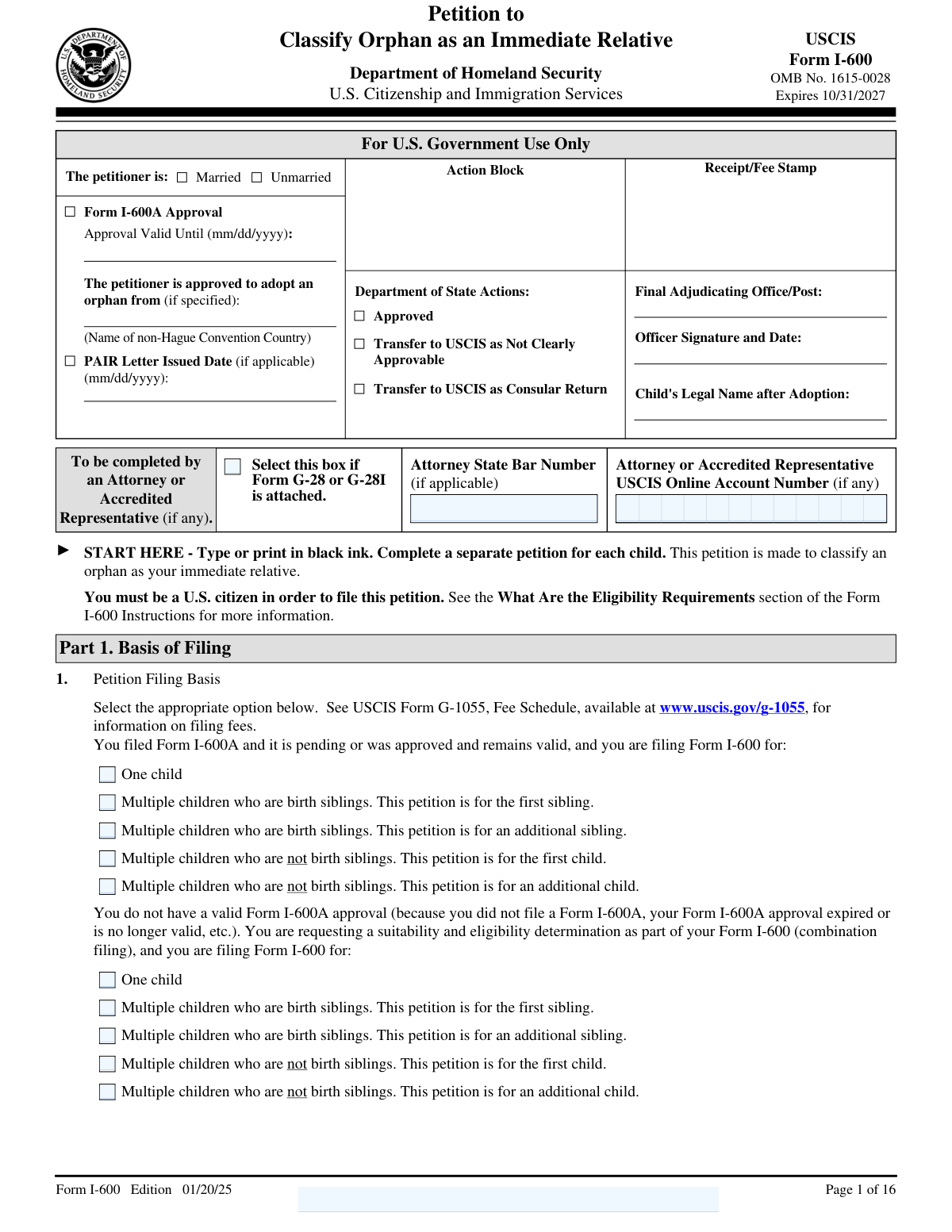
The AI does the filling. You just check it.
No typing into boxes, nothing to install.
What this form asks for
The AI fills all of it, from your answers or your documents.
The AI checks your answers before you download
15 checks built for this form, so a wrong date or a missing answer is caught before anyone else sees it.
This validation check ensures that the form is filled out using black ink, which is a requirement for the Form I-600. It confirms that the text is legible and meets the submission standards set by the authorities. By enforcing this rule, it helps prevent any issues that may arise from unclear or illegible entries. This check is crucial for maintaining the integrity of the submitted information.
This validation check verifies that the user has filed a separate Form I-600 for each child they intend to adopt. It confirms that the process is compliant with the regulations governing orphan petitions. By ensuring that each child has an individual petition, it helps streamline the review process and avoids potential delays. This check is essential for maintaining accurate records for each adoption case.
This validation check ensures that the petitioner is a U.S. citizen, which is a prerequisite for filing the Form I-600. It verifies the citizenship status to comply with legal requirements for adoption petitions. By confirming this information, it helps prevent unauthorized submissions and ensures that only eligible individuals can proceed with the adoption process. This check is vital for upholding the integrity of the petitioning process.
This validation check verifies that the marital status of the petitioner is clearly indicated as either Married or Unmarried in Part 1 of the form. It ensures that the information is complete and meets the requirements for processing the petition. By confirming this detail, it helps avoid confusion and ensures that the petition is evaluated correctly based on the petitioner's status. This check is important for maintaining accurate demographic information.
This validation check ensures that the petitioner has selected the correct filing basis on the Form I-600, which should align with their previous Form I-600A status. It verifies that the petitioner is following the correct procedural steps based on their prior application. By confirming this selection, it helps streamline the processing of the petition and ensures compliance with the established guidelines. This check is essential for maintaining the accuracy of the filing process.
This validation check ensures that the petitioner's family name, given name, and any other names used are accurately captured in the form. It verifies that there are no discrepancies or omissions in the names provided, which is crucial for identification purposes. The accuracy of this information is essential to prevent any potential issues during the processing of the petition. By confirming the correctness of the names, the software helps maintain the integrity of the application.
And 9 more checks
- Confirms that the petitioner's U.S. mailing address is filled out correctly.
- Verifies that any changes in marital status since filing Form I-600A are disclosed in Part 2.
- Checks that the petitioner's date of birth, place of birth, and citizenship acquisition details are provided.
- Ensures that all children under 18 years residing with the petitioner are listed.
- Validates that the orphan's legal name, current name, and any other names used are accurately filled in Part 3.
- Confirms that the orphan's date of birth, sex, and place of birth are provided.
- Ensures that the reason for the orphan classification and details about the orphan's parents are included.
- Checks that the home study status is indicated and details about the primary adoption service provider are provided.
- Verifies that all payments related to the adoption are listed in Part 5, including anticipated future payments.
Let AI fill out your Form I-600
No typing. Every field filled in seconds, checked, ready to sign.
Common Mistakes in Completing Form I-600
The ones the AI is built to catch.
Using ink colors other than black for responses
Filing for multiple children on a single petition
Not being a U.S. citizen when filing the petition
Failing to indicate marital status correctly
Incorrectly selecting the filing basis for the petition
Omitting family name or given name
Providing incorrect or incomplete contact information
Not updating marital status changes since last filing
Confusing mailing address with physical address
Missing date of birth or place of birth
Failing to disclose prior filings or adoptions
Providing incorrect orphan's legal name or details
Omitting orphan's date of birth or sex
Not indicating the reason for orphan classification
Failing to provide details about orphan's parents
Not attaching the home study when required
Omitting primary adoption service provider details
Failing to list all payments related to adoption
Not disclosing any inducements for orphan release
Incorrectly requesting exemption from Affidavit of Support
Failing to sign and date the petition
Not having spouse sign if married
Not indicating disability accommodations when needed
Not providing preparer's contact information if applicable
Omitting interpreter's contact information if used
Neglecting to use the additional information section properly
Frequently Asked Questions About Form I-600
Is it really free for 7 days?
Can I fill other forms too?
How do I cancel?
How does the AI fill out Form I-600?
What happens to my information?
How complex is Form I-600 to fill out?
What is Form I-600 and what is its purpose?
Who is eligible to file Form I-600?
What information is required in Part 1 of Form I-600?
How do I determine the basis for filing Form I-600?
What should I do if I have a change in marital status after filing Form I-600A?
What information do I need to provide about the orphan beneficiary?
What are the requirements for adopting an orphan from a non-Hague Convention country?
What is the difference between Form I-600 and Form I-600A?
What should I include in the additional information section of Form I-600?
How do I report prior adoptions or attempts to adopt on Form I-600?
What is the Duty of Disclosure in the context of Form I-600?
What are the implications of not disclosing information as required?
What is the process for submitting a home study with Form I-600?
What fees and expenses must be reported on Form I-600?
What is the Affidavit of Support and when is it required?
How can I request an exemption from submitting the Affidavit of Support?
What accommodations can be requested for individuals with disabilities?
What is the significance of the petitioner's certification on Form I-600?
What should I do if I need to provide additional information beyond the form's space?
How can I contact USCIS for further questions regarding Form I-600?
Get your Form I-600 filled out by AI
$0 today. Cancel before Nov 5 and you pay nothing.
Let AI fill out your Form I-600
Your trial starts once a card is added. You pay nothing before Nov 5.
Our AI already knows this form, all 436 fields of it. Skip the typing: tell it about yourself, or upload what you have, and it fills the whole form in seconds.
- AI fills every field on all 16 pages, tables and checkboxes included
- No typing into boxes: answer a few questions, or upload a document you already have, an old copy of this form, a photo of a document
- The AI checks the answers; you review and change anything before you download
- Download the finished PDF, print it, or sign it online
- Encrypted, and never used to train AI
Cancel before Nov 5 and you pay nothing.
A card is needed to start the trial. Cancel in two clicks from your account.
Terms · Privacy