Yes! You can use AI to fill out Integrated Assessment Tool (IAT) Offline Form 2506
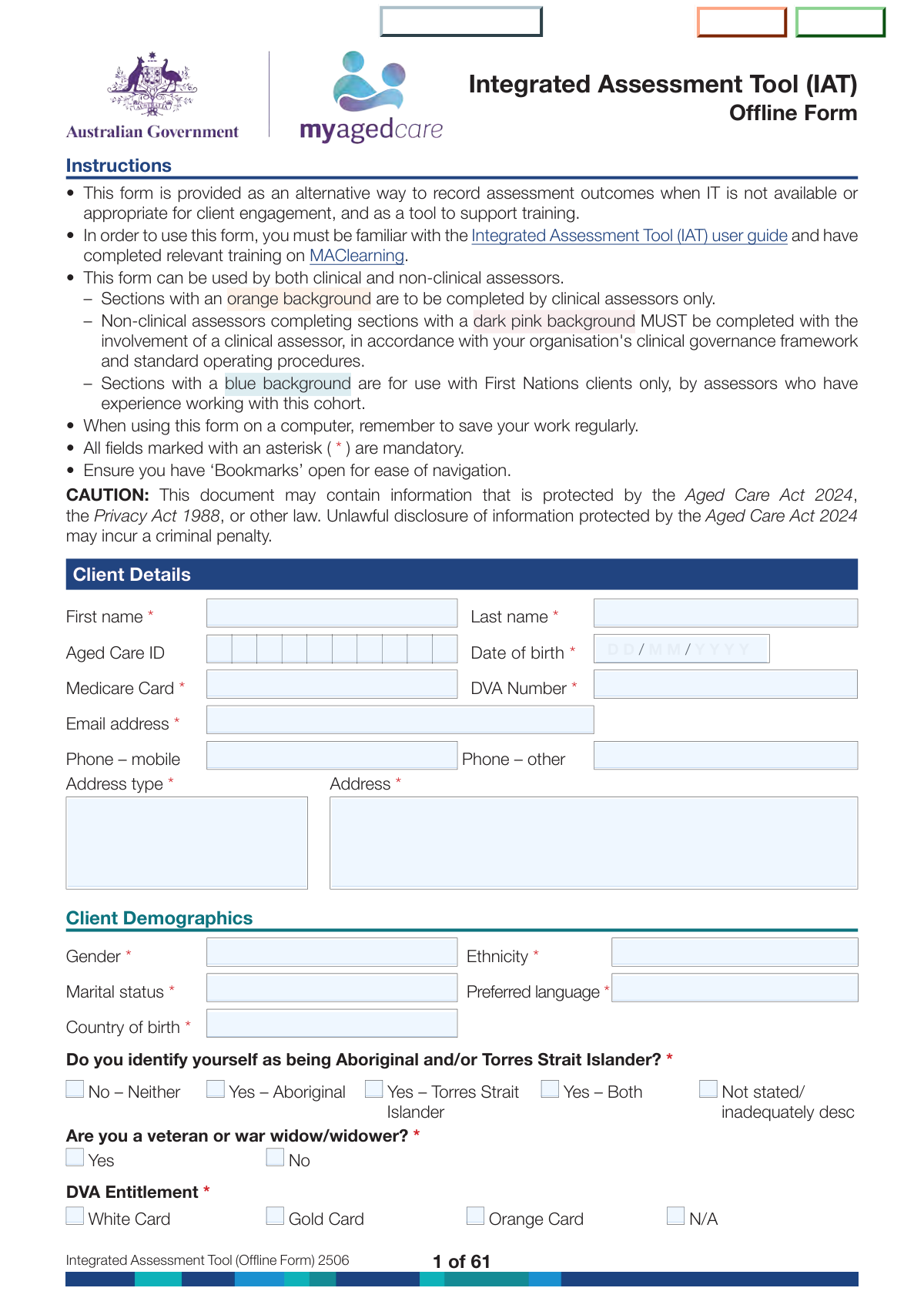
The Integrated Assessment Tool (IAT) Offline Form 2506 is a comprehensive aged care assessment document used by clinical and non-clinical assessors to capture client details, triage information, functional status, medical conditions, cognition, psychosocial factors, safety risks, and support considerations. It supports consistent decision-making about assessment urgency, service needs, and referrals, and includes validated screening tools (e.g., GPCog, GDS, RUIS/RFIS, DEMMI) and First Nations-specific tools (e.g., Good Spirit Good Life, KICA). Because it may contain protected information under the Aged Care Act 2024 and privacy laws, accurate completion and secure handling are essential. Today, this form can be filled out quickly and accurately using AI-powered services like Instafill.ai, which can also convert non-fillable PDF versions into interactive fillable forms.
Our AI automatically handles information lookup, data retrieval, formatting, and form filling.
It takes less than a minute to fill out IAT 2506 (Offline Form) using our AI form filling.
Securely upload your data. Information is encrypted in transit and deleted immediately after the form is filled out.
Form specifications
| Form name: | Integrated Assessment Tool (IAT) Offline Form 2506 |
| Number of pages: | 71 |
| Language: | English |
| Categories: | medical assessment forms |
Instafill Demo: filling out a legal form in seconds
How to Fill Out IAT 2506 (Offline Form) Online for Free in 2026
Are you looking to fill out a IAT 2506 (OFFLINE FORM) form online quickly and accurately? Instafill.ai offers the #1 AI-powered PDF filling software of 2026, allowing you to complete your IAT 2506 (OFFLINE FORM) form in just 37 seconds or less.
Follow these steps to fill out your IAT 2506 (OFFLINE FORM) form online using Instafill.ai:
- 1 Go to Instafill.ai and upload the Integrated Assessment Tool (IAT) Offline Form 2506 PDF (or select it from the form library).
- 2 Use AI extraction to import any existing client data (e.g., referral notes, prior assessments) and confirm mandatory identifiers such as name, Aged Care ID, date of birth, Medicare/DVA details, and contact information.
- 3 Complete Client Details and Demographics, including accommodation/living situation, communication needs (TIS/NRS), emergency contact, GP details, and current approvals/services.
- 4 Fill out the Triage section: consent confirmation, triage date, trigger for contact, duration of circumstances, current service access, and initial function/general health screening; then record urgency and triage supervision details.
- 5 Complete the Assessment sections by domain (function, medical/medications, physical/personal health and frailty, social supports, cognition/behaviour/psychological wellbeing, home and personal safety, and financial/legal), using Instafill.ai to guide conditional questions and required clinical-only fields.
- 6 If applicable, complete embedded validated tools (e.g., GPCog Step 1/2, GDS, RUIS/RFIS, DEMMI, GSGL, KICA) and add assessor notes/summaries where required character limits apply.
- 7 Run Instafill.ai validation to check required fields, consistency, and missing signatures/notes, then export the completed form for secure saving, printing, or submission according to your organisation’s governance procedures.
Our AI-powered system ensures each field is filled out correctly, reducing errors and saving you time.
Why Choose Instafill.ai for Your Fillable IAT 2506 (Offline Form) Form?
Speed
Complete your IAT 2506 (Offline Form) in as little as 37 seconds.
Up-to-Date
Always use the latest 2026 IAT 2506 (Offline Form) form version.
Cost-effective
No need to hire expensive lawyers.
Accuracy
Our AI performs 10 compliance checks to ensure your form is error-free.
Security
Your personal information is protected with bank-level encryption.
Frequently Asked Questions About Form IAT 2506 (Offline Form)
Itâs an offline version of the Integrated Assessment Tool (IAT) used to record assessment outcomes when IT systems arenât available or arenât appropriate for client engagement. It can also be used as a training support tool alongside the IAT user guide.
Both clinical and non-clinical assessors can use the form. However, sections with an orange background are for clinical assessors only, and dark pink sections must be completed by non-clinical assessors with clinical assessor involvement under your organisationâs clinical governance.
Sections with a blue background are for Aboriginal and/or Torres Strait Islander (First Nations) clients only. These sections should be used by assessors who have experience working with this cohort and who can administer the relevant validated tools appropriately.
Any field marked with an asterisk (*) is mandatory. If mandatory fields are missing, the assessment record may be incomplete and could delay triage decisions, referrals, or the ability to enter the information into the system later.
At minimum, be ready with the clientâs name, date of birth, contact details, address, and key identifiers such as Aged Care ID and Medicare number (and DVA number/entitlement if applicable). Youâll also typically need emergency contact and GP details.
Yesâtriage instructions state you must ensure the client has given informed consent before completing triage. Document information sources (client, carer, GP, interpreter, etc.) and record relevant assessor notes.
Indicate whether the client needs help to communicate, then select the type of difficulty (e.g., hearing, speech, cognitive, language). If an interpreter is needed, mark TIS required; if the client needs the National Relay Service, mark NRS required.
Choose the trigger that best matches why the client/representative is seeking assessment (e.g., falls, hospital discharge, ADL difficulties) and then select the timeframe (recent event, gradual increase, long-term disability, or other). Use the comments fields to add context, especially if you select âOther.â
For each activity, select the level of independence (e.g., without help/with some help/completely unable) and then document who helps and whether the need is being met. Use the âAny additional detailsâ fields to describe what support is provided, by whom, and for how long.
If the âImpact of health issues on normal activitiesâ is marked âModeratelyâ or âQuite a bit,â the form instructs you to complete the Advanced Medical Assessment. Non-clinical assessors must complete that section with clinical assessor involvement per governance requirements.
Yesâsome items are restricted, such as the question about recommending residential respite care and completing the DEMMI (De Morton Mobility Index), which must only be completed by trained clinical assessors. The form also flags other sections where non-clinical assessors must involve a clinical assessor.
Yes, the form allows information to be collected from carers, representatives, GPs, service providers, and other professionals. If the information is not from the client, record the personâs name, relationship, contact details, and ensure consent is obtained for this activity.
Complete the Support Considerations section by selecting the relevant risk indicators and documenting details in the provided text fields (within character limits). Because the form contains protected information under privacy and aged care legislation, store and share it only according to legal and organisational requirements.
YesâAI form-filling services (such as Instafill.ai) can help auto-fill fields accurately from your provided information, reducing manual typing and saving time. You should still review all entries for clinical accuracy, consent requirements, and governance rules.
Upload the PDF to Instafill.ai, provide the client/assessment details (or upload source notes), and let the AI map your information into the correct fields; then review and export the completed form. If your PDF is flat/non-fillable, Instafill.ai can convert it into an interactive fillable form before auto-filling.
Compliance IAT 2506 (Offline Form)
Validation Checks by Instafill.ai
1
Validates mandatory Client Identity fields are present (First Name, Last Name, Date of Birth, Medicare Card, Email, Address Type, Address, Demographics)
Checks that all fields marked with an asterisk in the Client Details and Client Demographics sections are completed (e.g., first/last name, DOB, Medicare card, email, address type/address, gender, marital status, country of birth, ethnicity, preferred language, and First Nations identity question). These are core identifiers used to match the client to the correct record and to support eligibility and service planning. If any are missing, the submission should be rejected or returned for completion with a clear list of missing mandatory fields.
2
Validates date fields use DD/MM/YYYY and are real calendar dates
Validates that all date inputs (e.g., Date of Birth, Date of triage, Date of Assessment, Informant Interview Date, Current Approval dates) match the required DD/MM/YYYY format and represent a valid date (e.g., not 31/02/2025). This prevents downstream parsing errors and incorrect sequencing of clinical/administrative events. If validation fails, the system should block submission and prompt the user to correct the specific date field(s).
3
Ensures Date of Birth is plausible and not in the future
Checks that the clientâs Date of Birth is not after today and is within a plausible human range (e.g., not older than 120 years unless explicitly allowed by policy). DOB is used for eligibility thresholds and risk stratification, so implausible values can lead to incorrect pathway decisions. If the DOB is invalid, the form should fail validation and require correction before proceeding.
4
Validates chronological consistency between Triage, Assessment, and related dates
Ensures Date of triage is not after Date of Assessment (first contact) and that informant interview dates (e.g., GPCog Step 2) are not after the assessment date unless the workflow explicitly allows post-assessment informant contact. Chronological integrity is important for auditability and clinical governance. If inconsistent, the system should flag the conflict and require either date correction or an override reason (if overrides are permitted).
5
Validates Medicare Card Number format (Australian Medicare rules)
Checks that the Medicare number is the correct length and character set (typically 10 digits, often displayed as 8-digit base + 1-digit issue + 1-digit individual reference; implementations vary) and optionally validates known structural rules if supported. Medicare is a key identifier and incorrect formatting can prevent verification and service access. If invalid, the system should reject the entry and display an example of the expected format.
6
Validates DVA fields consistency (Veteran status, DVA Entitlement, and DVA Number)
If Veteran Status is 'Yes', require a DVA Entitlement selection (White/Gold/Orange) and require a DVA Number in an acceptable format; if Veteran Status is 'No', DVA Entitlement should be 'N/A' and DVA Number should be blank (or explicitly marked not applicable per system design). This prevents contradictory veteran records and ensures correct funding/entitlement pathways. If inconsistent, the system should block submission and highlight the specific mismatched fields.
7
Validates email address format for Client, Emergency Contact, and GP
Checks that any provided email address conforms to a standard email pattern (local-part@domain) and does not contain invalid characters or whitespace; for mandatory email fields, also ensure non-empty. Email is used for communication and document delivery, so invalid addresses cause failed notifications and privacy risks (misdirected messages). If invalid, the system should require correction and optionally warn if the domain appears malformed.
8
Validates phone number formats and requires at least one contact number where appropriate
Validates that mobile/other phone numbers contain only permitted characters and match expected Australian numbering conventions (e.g., 10 digits for mobiles starting with 04, or include +61 with correct length). Where a phone is required (e.g., Carer Telephone is mandatory when carer details are captured), ensure it is present; for client contact, enforce at least one of mobile/other if business rules require reachable contact. If validation fails, the system should block submission and specify which phone field is invalid or missing.
9
Validates single-choice groups are mutually exclusive (radio behavior) where only one option is allowed
Ensures that fields presented as single-choice questions (e.g., Veteran Status Yes/No, admitted hospital inpatient Yes/No, many functional ability triads, smoking status options) have exactly one selection and do not allow multiple boxes to be checked simultaneously. This prevents ambiguous interpretation and scoring errors in assessment tools. If multiple or zero selections occur for a required single-choice group, the system should fail validation and prompt the user to select exactly one.
10
Validates Aboriginal and/or Torres Strait Islander identity selection is exactly one option
Checks that exactly one of the identity options is selected (NoâNeither, YesâAboriginal, YesâTorres Strait Islander, YesâBoth, Not stated/inadequately described). This field drives culturally specific pathways and tool availability (e.g., GSGL, KICA tools), so ambiguity can lead to inappropriate assessment. If invalid (none or multiple selected), the system should block submission and require a single selection.
11
Conditional requirement: 'Other' selections must include explanatory text within character limits
Whenever an 'Other' checkbox/option is selected (e.g., registration info source, trigger reason, circumstance duration, relationship types, support types, elder abuse type, accommodation/support helpers), the corresponding 'please specify' field must be non-empty and within the stated character limit (e.g., 100/250/500). This ensures the 'Other' choice is meaningful and auditable. If missing or too long, the system should reject submission and indicate the maximum allowed characters.
12
Enforces text field maximum lengths and blocks over-limit submissions
Validates that all free-text fields respect their stated limits (e.g., 100, 250, 300, 500, 1000, 1500 characters) and do not exceed them after trimming whitespace. Over-limit text can be truncated in storage, causing loss of clinically relevant information and audit issues. If exceeded, the system should prevent submission and show the current character count and limit.
13
Conditional requirement: Communication difficulties details must align with Yes/No and service needs
If 'client needs help to communicate' is 'Yes', require at least one 'Type of difficulty' selection and require explicit Yes/No selections for TIS and NRS; if 'No', then 'Type of difficulty' should be blank and TIS/NRS should default to 'No' (or be disallowed). This ensures appropriate accessibility supports are recorded and avoids contradictory entries. If inconsistent, the system should flag the section and require correction before submission.
14
Conditional requirement: Current aged care services description required when receiving services is 'Yes'
If 'Are you currently receiving any aged care services?' is 'Yes', require the 'What aged care services are you currently receiving?' text field to be completed (within 500 characters). This information is necessary to avoid duplication, coordinate care, and understand baseline supports. If missing, the system should block submission and prompt for a brief description of current services.
15
Validates carer section dependencies (Receiving Help = Yes requires carer details and support types)
If 'Is the client receiving help from a carer...' is 'Yes', require carer name, telephone, relationship selection (and 'Other relationship' text if applicable), co-residence selection, paid employment selection, and at least one 'Types of support provided' item. This ensures the care network is properly captured for risk and sustainability planning. If any required dependent fields are missing, the system should fail validation and identify the missing carer sub-fields.
16
Validates numeric ranges and logical totals for carer hours per day (0–24)
Checks that each dayâs 'Typical hours per day carer provides help' entry is numeric (integer or allowed decimal per design) and within 0â24 inclusive, and optionally flags improbable patterns (e.g., all days = 24) for review. Accurate hours are important for carer strain assessment and service planning. If out of range or non-numeric, the system should block submission and require correction of the specific day(s).
Common Mistakes in Completing IAT 2506 (Offline Form)
This form has many mandatory fields (marked with an asterisk), and people often miss them because the document is long and spread across many pages/sections. Missing required items like client name, DOB, Medicare, address type/address, or key triage dates can make the assessment record incomplete and delay triage, referrals, or service approvals. Before finalising, do a mandatory-field sweep section-by-section (Client Details, Emergency Contact, Triage, Assessment, etc.). AI-powered form filling tools like Instafill.ai can help by flagging missing mandatory fields and prompting completion before you submit or print.
Users frequently enter dates in the wrong format (the form expects DD/MM/YYYY) or mix up triage date vs assessment date vs hospital admission/discharge dates. Inconsistent timelines can affect urgency decisions, eligibility pathways (e.g., End of Life triage rules), and clinical interpretation of recent events like falls or hospitalisations. Always use DD/MM/YYYY and cross-check that the triage date is the triage event, and the assessment date is the first assessment contact date. Instafill.ai can automatically format dates correctly and validate that key dates are logically consistent.
A common error is typing incomplete Medicare numbers, adding spaces/extra characters, or entering a DVA number when the client is not a veteran (or leaving DVA blank when veteran status is 'Yes'). People also sometimes tick multiple DVA entitlement cards (White/Gold/Orange) or forget to select 'N/A' when not applicable. These mistakes can cause billing/eligibility issues and slow verification with external systems. Confirm veteran status first, then enter DVA number and select exactly one entitlement (or 'N/A'); keep Medicare/DVA formats consistent with the card. Instafill.ai can validate number patterns and prevent contradictory selections.
Many sections include an 'Other' checkbox with a required free-text explanation and strict character limits (e.g., 100/250/500/1500). Users often tick 'Other' but leave the explanation blank, or paste long notes that exceed the limit and get truncated, losing critical context. This can lead to unclear triggers for assessment, unclear risks, or incomplete documentation for governance review. Only select 'Other' when necessary, provide a concise specific description, and keep within the stated character limit. Instafill.ai can help by enforcing character limits and prompting for required 'Other' details when an 'Other' option is selected.
Because many items are presented as checkboxes, people sometimes tick more than one response for questions that are intended to be single-choice (e.g., urgency level, priority, many Yes/No items, some frequency scales). Conflicting selections make the record ambiguous and can trigger incorrect triage outcomes or require rework by supervisors. Treat Yes/No and scale questions as mutually exclusive unless the form explicitly says 'select all that apply.' Instafill.ai can reduce this by applying single-select logic and warning when mutually exclusive options are chosen together.
The form contains many conditional branches (e.g., if communication help = Yes, then type of difficulty and TIS/NRS; if falls = Yes, then counts and notes; if pain = Yes, then details; if 'Moderately/Quite a bit' impact, then Advanced Medical Assessment). People often answer the first question but miss the required follow-ups, especially when working offline or jumping between pages. Missing follow-ups can weaken clinical justification, risk assessment, and service planning. After any 'Yes', 'With some help', 'Completely unable', or higher-severity selection, immediately complete the linked detail fields and notes. Instafill.ai can guide users through conditional logic so required follow-ups arenât missed.
A frequent issue is selecting 'Without help' but then also indicating a helper, or selecting 'Completely unable' while marking 'Client does not require assistance' under 'Is the need being met.' These inconsistencies can distort the clientâs functional profile and lead to inappropriate service recommendations or funding decisions. When you choose a functional level, ensure the helper and need-met status align (e.g., if 'With some help', specify who helps and whether the need is met). Instafill.ai can automatically check for contradictions between functional level, helper selection, and need-met status.
Emergency Contact and GP sections are often partially completedâpeople enter a name but omit relationship to client, address type, or a reliable phone number. In urgent situations or when clarifying medications/diagnoses, missing contact details can delay care coordination and increase risk. Always provide at least one working phone number, the relationship to the client, and a complete address (including address type where required). Instafill.ai can standardise contact formats and ensure key contact fields are not left incomplete.
The triage section explicitly requires informed consent before completion and asks who provided registration/assessment information (client, representative, GP, interpreter, etc.). Users sometimes forget to record the source, or they select a non-client source but fail to add the required details (name, relationship, contact) and consent notes. This can create governance and privacy compliance issues and may invalidate parts of the assessment record. Always record the information source and, if itâs not the client, document the personâs details and confirm consent to collect/share information. Instafill.ai can prompt for provider details when a non-client source is selected.
The form uses colour-coded rules: orange sections are clinical-only, and dark pink sections require clinical involvement when completed by non-clinical assessors (e.g., Advanced Medical Assessment, GPCog Step 2, Extended Behaviour/Psychological assessments, continence scales, DEMMI). In offline use, these boundaries are easy to miss, leading to non-compliant assessments and potential clinical risk. Non-clinical assessors should stop at the boundary and involve a clinical assessor per governance/SOPs, documenting supervision where required (e.g., 'Triage supervised by'). Tools like Instafill.ai can help by highlighting role-restricted sections and preventing completion without the appropriate assessor role noted.
For Aboriginal and/or Torres Strait Islander clients, the form includes specific validated tools (e.g., Good Spirit Good Life Tool, KICA-COG variants) and notes about cultural appropriateness and assessor experience. Common mistakes include administering these tools to non-First Nations clients, skipping them when the client is First Nations and the tool is indicated, or not recording suitability decisions (Yes/No) before jumping to appendices. This can result in culturally unsafe practice and incomplete assessment evidence. Confirm the clientâs identity selection, then follow the formâs guidance on suitability and assessor capability before using the tool. Instafill.ai can help route users to the correct culturally-specific sections based on identity selections and ensure the prerequisite suitability questions are completed.
Saved over 80 hours a year
âI was never sure if my IRS forms like W-9 were filled correctly. Now, I can complete the forms accurately without any external help.â
Kevin Martin Green
Your data stays secure with advanced protection from Instafill and our subprocessors

Robust compliance program
Transparent business model
Youâre not the product. You always know where your data is and what it is processed for.
ISO 27001, HIPAA, and GDPR
Our subprocesses adhere to multiple compliance standards, including but not limited to ISO 27001, HIPAA, and GDPR.
Security & privacy by design
We consider security and privacy from the initial design phase of any new service or functionality. Itâs not an afterthought, itâs built-in, including support for two-factor authentication (2FA) to further protect your account.
Fill out IAT 2506 (Offline Form) with Instafill.ai
Worried about filling PDFs wrong? Instafill securely fills integrated-assessment-tool-iat-offline-form-2506-1 forms, ensuring each field is accurate.