
Yes! You can use AI to fill out Irrevocable Contribution Form and Letter of Instruction
Don't type 128 fields by hand. Tell our AI about yourself, or upload a document you already have, and it fills every field in seconds. You check it, then download, print or sign.
The AI does the filling. You just check it.
No typing into boxes, nothing to install.
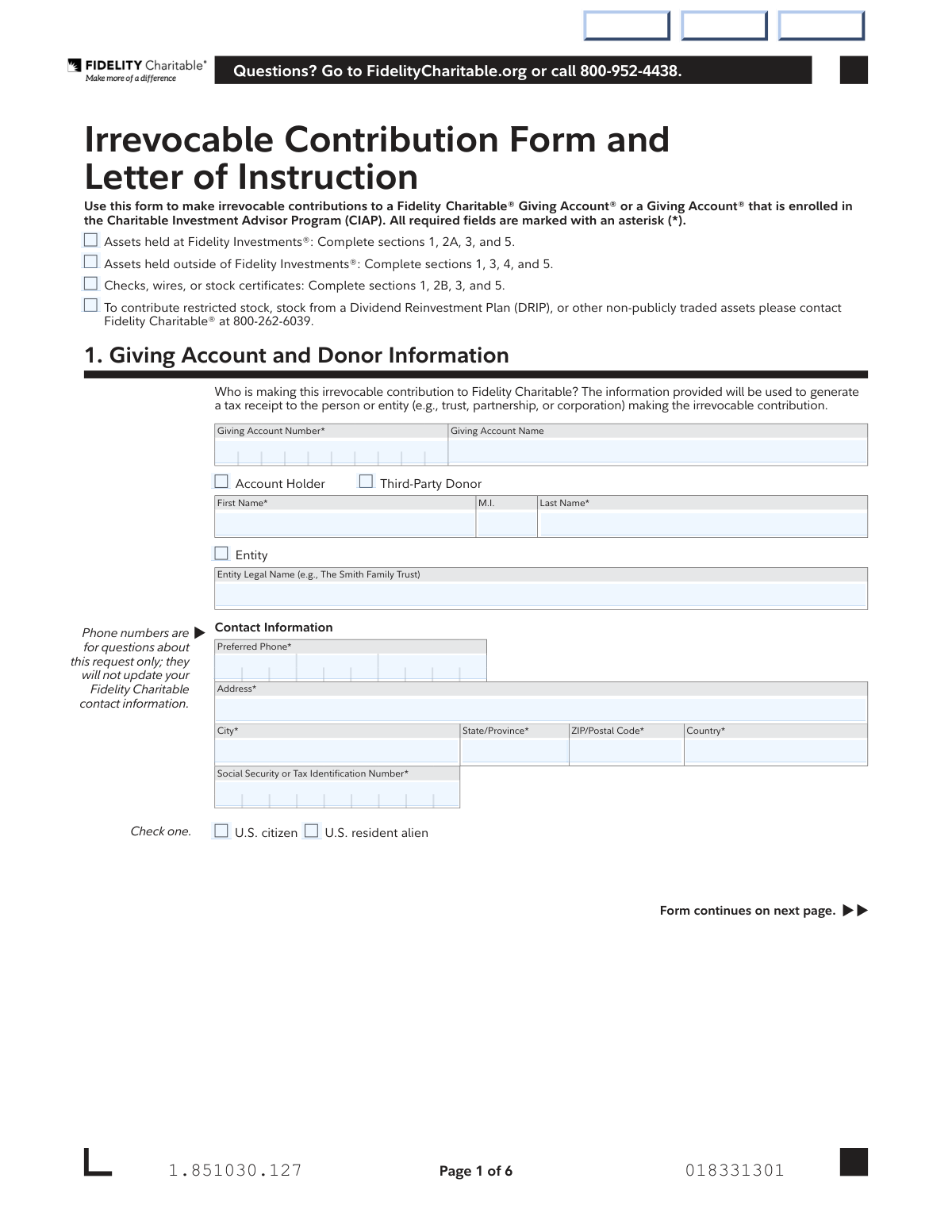
What this form asks for
The AI fills all of it, from your answers or your documents.
The AI checks your answers before you download
13 checks built for this form, so a wrong date or a missing answer is caught before anyone else sees it.
This check verifies that the user completes the correct sections of the form based on their initial selection of contribution type. For example, if 'Assets held at Fidelity Investments' is chosen, Sections 2A and 3 must be completed, whereas choosing 'Assets held outside of Fidelity Investments' requires Sections 3 and 4. This ensures data integrity and prevents the submission of an incomplete or logically flawed request, which would require manual follow-up.
This validation ensures that if the user opts to manually allocate their contribution in Section 3B, the sum of all specified percentages across all investment pools equals exactly 100%. This is critical for ensuring the full contribution is allocated according to the donor's wishes without ambiguity. A failure would result in an error message prompting the user to adjust the percentages until they sum to 100.
This check validates that in Section 1, if the 'Entity' checkbox is selected, the 'Entity Legal Name' field is filled, and the individual 'First Name' and 'Last Name' fields are disabled or ignored. Conversely, if 'Entity' is not checked, 'First Name' and 'Last Name' are required. This prevents conflicting donor information and ensures the tax receipt is generated for the correct legal person or entity.
This validation ensures the 'Social Security or Tax Identification Number' provided in Section 1 conforms to a valid SSN (9 digits) or TIN/EIN (9 digits) format. Correct formatting is essential for tax reporting and identity verification as required by anti-money laundering regulations. An invalid format would prevent form submission and prompt the user to re-enter the number correctly.
This check confirms that the 'Signature' and 'Date' fields in Section 5 are both completed by the donor or authorized party. The signature is a legal attestation and authorization for the irrevocable contribution, and the date establishes when the authorization was given. Submitting the form without a signature or date would render the request invalid and legally non-binding.
This validation verifies that all numerical fields for contributions, such as 'Cash Transfer Amount', 'Number of Shares', and 'Check Amount', contain a value greater than zero. A contribution of zero or a negative amount is not logical or permissible. This check prevents erroneous submissions that would fail during financial processing.
And 7 more checks
- Date Field Format and Plausibility
- Cross-Section Giving Account Number Consistency
- Mutual Fund Transfer Rule Enforcement
- Completeness of Required Asset Information
- Mutually Exclusive Investment Allocation Method
- Citizenship Status Selection Requirement
- Phone Number Format Validation
Let AI fill out your Fidelity Charitable Irrevocable Contribution Form
No typing. Every field filled in seconds, checked, ready to sign.
How to Fill Out Fidelity Charitable Irrevocable Contribution Form Online for Free in 2026
What the AI walks you through.
- Navigate to Instafill.ai and upload the Irrevocable Contribution Form or select it from the template library.
- Use the AI assistant to accurately fill in Section 1 with your Giving Account and Donor Information.
- Complete the relevant contribution section (2A, 2B, or 4) to specify the assets you are donating, whether they are from a Fidelity account, an external institution, or a check/wire.
- In Section 3, select how you want your contribution to be allocated among the available investment pools.
- Carefully review all the information you've entered to ensure its accuracy and completeness.
- Electronically sign and date the form in Section 5 to authorize the contribution.
- Download the completed form and follow the mailing or faxing instructions provided on the last page to submit it to Fidelity Charitable.
Common Mistakes in Completing Fidelity Charitable Irrevocable Contribution Form
The ones the AI is built to catch.
Investment Allocation Miscalculation
Incorrect Section Completion Based on Asset Source
Missing or Incorrect Giving Account Number
Ignoring Special Instructions for Mutual Fund Transfers
Incomplete Security Contribution Details
Forgetting Required Documentation or Guarantees
Invalid Signature or Incorrect Date Format
Attempting Prohibited Direct IRA Contributions
Using Fractional Shares for Stock Contributions
Omitting Memo Details for Checks and Wires
Frequently Asked Questions About Fidelity Charitable Irrevocable Contribution Form
Is it really free for 7 days?
Can I fill other forms too?
How do I cancel?
How does the AI fill out Fidelity Charitable Irrevocable Contribution Form?
What happens to my information?
How complex is Fidelity Charitable Irrevocable Contribution Form to fill out?
What is the purpose of the Fidelity Charitable Irrevocable Contribution Form?
Who needs to fill out this form?
What information do I need before I start filling out this form?
How do I contribute securities that are not held at a Fidelity account?
Can I contribute assets directly from my Fidelity IRA using this form?
What should I do if I want to contribute restricted stock?
What happens if I don't fill out the Investment Selection in Section 3?
What does 'irrevocable contribution' mean?
I'm making a donation to someone else's Giving Account. Where do I put my information?
How do I submit the completed form?
Do I need a Medallion Signature Guarantee?
Can AI tools help me fill out this form?
How can I use Instafill.ai to fill this form out online?
The PDF version of this form I have is not fillable. What can I do?
Get your Fidelity Charitable Irrevocable Contribution Form filled out by AI
$0 today. Cancel before Nov 1 and you pay nothing.
Other forms like this one
charitable forms: Contribute to a Charitable Gift Account, Form 8283, Noncash Charitable Contributions, Form 501A, Fantasy Contest Operator Personal Information Form (Commonwealth of Virginia, VDACS Office of Charitable & Regulatory Programs), Fidelity Charitable 144/145 Contribution Form, Fidelity Charitable Letter of Authorization, Transfer of Assets Out - Partial Account or Charitable Gift Transfers, Schwab Charitable Fund Transfer of Assets, Charles Schwab Charitable Gift Donation - Letter Of Authorization for DTC Transfer, Sample IRA Distribution Letter for a Qualified Charitable Distribution (QCD), Charles Schwab Charitable Gift Transfer Letter of Authorization, Make a contribution - Vanguard Charitable, IRA Distribution to Charitable Beneficiary, IRA Distribution to Charitable Beneficiary, Fidelity Charitable Contribution Form, Fidelity Charitable Irrevocable Contribution Form and Letter of Instruction, Request for a Qualified Charitable Distribution (QCD) from a Brokerage Individual Retirement Account (IRA), Request for qualified charitable distribution from individual retirement account, Request for a Charitable Distribution from an Individual Retirement Account (IRA), Merrill Lynch One-Time Qualified Charitable Distribution, Individual Retirement Account (IRA) — Qualified Charitable Distribution Form
Fidelity forms: Fidelity Funds Account Transfer of Assets Form, Fidelity Stock Plan Services (SPS) Transfer Request Form, How to Transfer Assets from Morgan Stanley to Fidelity Investments (Fidelity Stock Plan Services Guide), Fidelity Investments Transfer/Rollover/Exchange Form, Fidelity Investments Standing Transfer Instructions Form, Fidelity Charitable 144/145 Contribution Form, One-Time Withdrawal – IRA, Fidelity Investments, Fidelity Investments Transfer/Rollover Form, Fidelity Advisor 403(b) Distribution Request Form, Fidelity Advisor IRA Distribution Request for Automatic Rollover Accounts, Special Tax Notice: Your Rollover Options - Fidelity Investments, Fidelity Charitable Letter of Authorization, Fidelity Advisor Trading Authorization and Indemnification, Fidelity Investment-Only (Non-Prototype) Retirement Account Application, Fidelity NetBenefits Send a Document Form, Fidelity NetBenefits Auditor's Guide: An Overview of Fidelity's 2024 Plan Year Reporting Package, Fidelity NetBenefits Distribution - Recurring Payments, Fidelity Investments® Beneficiary Distribution Form, Fidelity Investments Distribution Form, Fidelity One-Time Withdrawal Form — Nonretirement
Fidelity Charitable forms: Fidelity Charitable 144/145 Contribution Form, Fidelity Charitable Letter of Authorization, Fidelity Charitable Contribution Form, Fidelity Charitable Irrevocable Contribution Form and Letter of Instruction, Fidelity Charitable Investment Advisor Program Application
charitable contribution forms: Fidelity Charitable 144/145 Contribution Form, Form 8283, Noncash Charitable Contributions, Make a contribution - Vanguard Charitable, Fidelity Charitable Contribution Form, Fidelity Charitable Irrevocable Contribution Form and Letter of Instruction
Let AI fill out your Fidelity Charitable Irrevocable Contribution Form
Your trial starts once a card is added. You pay nothing before Nov 1.
Our AI already knows this form, all 128 fields of it. Skip the typing: tell it about yourself, or upload what you have, and it fills the whole form in seconds.
- AI fills every field on all 5 pages, checkboxes included
- No typing into boxes: answer a few questions, or upload a document you already have, an old copy of this form, a photo of a document
- The AI checks the answers; you review and change anything before you download
- Download the finished PDF, print it, or sign it online
- Encrypted, and never used to train AI
Cancel before Nov 1 and you pay nothing.
A card is needed to start the trial. Cancel in two clicks from your account.
Terms · Privacy