
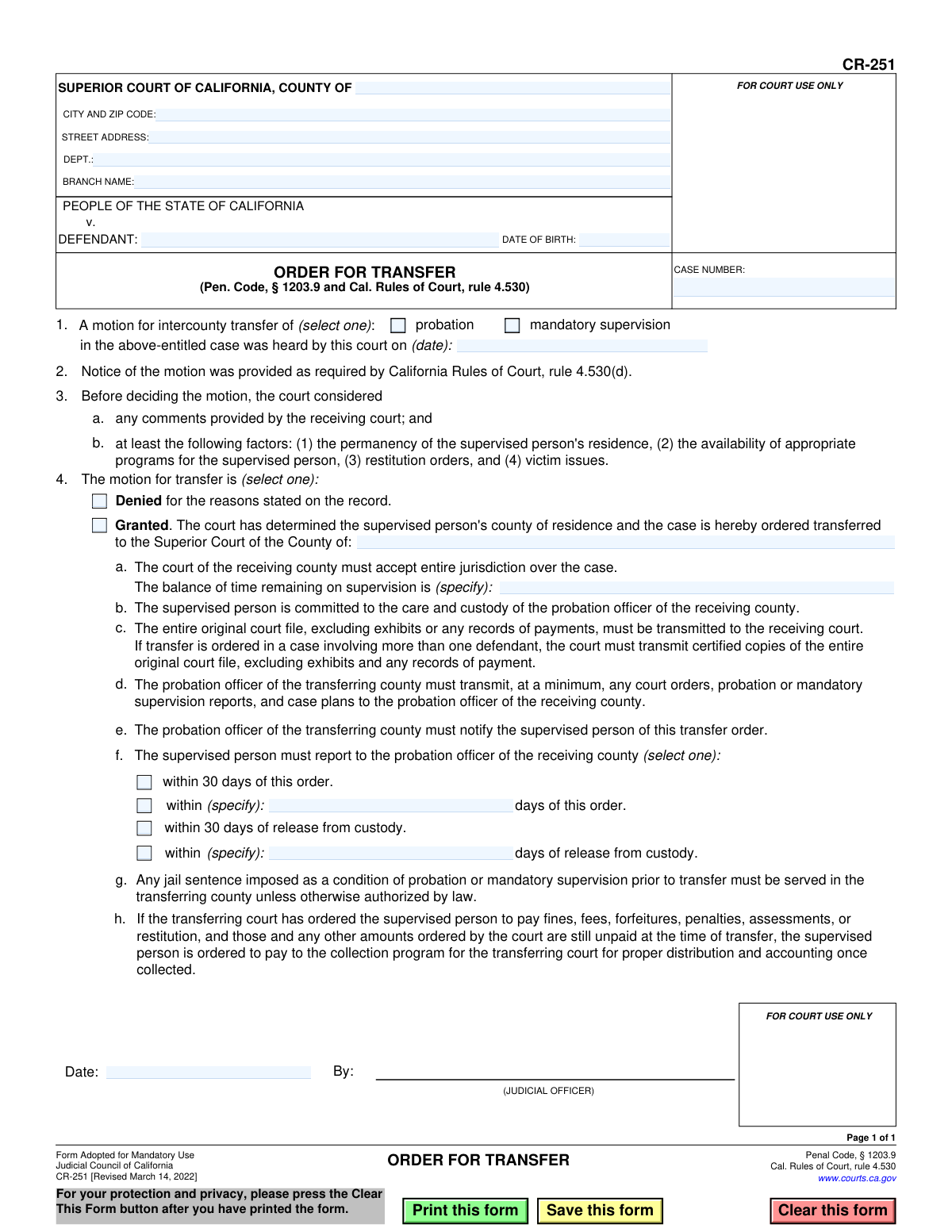
Yes! You can use AI to fill out Judicial Council of California Form CR-251, Order for Transfer
Don't type 27 fields by hand. Tell our AI about yourself, or upload a document you already have, and it fills every field in seconds. You check it, then download, print or sign.
The AI does the filling. You just check it.
No typing into boxes, nothing to install.
What this form asks for
The AI fills all of it, from your answers or your documents.
The AI checks your answers before you download
12 checks built for this form, so a wrong date or a missing answer is caught before anyone else sees it.
This check ensures the 'CASE NUMBER' field is not empty and conforms to the expected format for the jurisdiction. The case number is a critical unique identifier for the legal proceeding, and its absence or incorrect format would make the order impossible to file or track. If validation fails, the system should flag the field and prevent submission until a valid case number is entered.
Validates that the 'DATE OF BIRTH' field contains a complete and logical date that is in the past. This is crucial for correctly identifying the defendant and distinguishing them from others with similar names. An invalid or future date would indicate a data entry error. If the date is invalid, the form should not be processed, and the user should be prompted to correct the entry.
This check verifies that exactly one option, either 'probation' or 'mandatory supervision', is selected in section 1. The type of supervision being transferred is a fundamental detail of the order. Selecting zero or both options would create ambiguity and render the order legally unclear. A failed validation should highlight the selection area and require the user to choose one option.
Ensures that the hearing date in section 1 is provided and is a valid date that occurs on or before the current date. An order cannot be based on a hearing that has not yet happened. This check prevents logical impossibilities and ensures the document's timeline is coherent. If the date is missing or in the future, the submission should be blocked.
This validation confirms that exactly one of the two options in section 4, 'Denied' or 'Granted', is selected. The outcome of the motion is the core purpose of this form, and it must be unambiguous. If neither or both options are checked, the order has no legal effect, and the system must force the user to make a single, clear choice.
If the motion for transfer is 'Granted' (section 4), this check ensures the name of the receiving county is specified. Without this information, it is impossible to know where the case jurisdiction should be transferred. This field is conditionally mandatory to ensure a granted transfer is executable. Failure to provide the county name on a granted motion will halt processing.
And 6 more checks
- Logical County Transfer
- Conditional Requirement for Remaining Supervision Time
- Conditional Requirement for Reporting Deadline
- Conditional Numeric Value for Custom Reporting Days
- Signature Date Presence and Logic
- Transferring Court County Presence
Let AI fill out your CR-251
No typing. Every field filled in seconds, checked, ready to sign.
How to Fill Out CR-251 Online for Free in 2026
What the AI walks you through.
- Navigate to Instafill.ai and upload or select the CR-251, Order for Transfer form.
- Use the AI assistant to input the court, case number, and defendant's details in the header section.
- Indicate whether the transfer motion is for probation or mandatory supervision and specify the hearing date.
- Select whether the motion is granted or denied. If granted, provide the name of the receiving county and the remaining time on supervision.
- Specify the reporting instructions for the supervised person, including the deadline for them to report to the probation officer in the receiving county.
- Review all the auto-filled information for accuracy, including court considerations and payment instructions for fines or restitution.
- Once the form is completed by the court, the judicial officer will date and sign it to make the order official.
Common Mistakes in Completing CR-251
The ones the AI is built to catch.
Entering an Incorrect or Incomplete Case Number
Providing Incomplete Court Information
Mismatching Defendant's Name or Date of Birth
Failing to Specify the Type of Supervision for Transfer
Selecting Contradictory or No Decision on the Transfer Motion
Omitting the Balance of Remaining Supervision Time
Setting Ambiguous or Conflicting Reporting Deadlines
Using an Outdated Version of the Form
Making Manual Errors on a Non-Fillable PDF
Incorrectly Specifying the Receiving County
Frequently Asked Questions About CR-251
Is it really free for 7 days?
Can I fill other forms too?
How do I cancel?
How does the AI fill out CR-251?
What happens to my information?
How complex is CR-251 to fill out?
What is Form CR-251, Order for Transfer?
Who fills out this form?
Why would I receive a copy of this form?
What happens if the 'Granted' box is checked on my form?
How do I know when to report to the new probation officer?
What does it mean if the 'Denied' box is checked?
I still owe fines and restitution. Where do I send payments after my case is transferred?
What factors does the court consider before deciding on a transfer?
I have a jail sentence as a condition of my probation. If my case is transferred, where do I serve it?
Who is responsible for notifying me about the transfer order?
Can I use an AI tool to fill out Form CR-251?
How can I use Instafill.ai to prepare my transfer request paperwork?
What if the PDF for my transfer motion form is not fillable?
Get your CR-251 filled out by AI
$0 today. Cancel before Nov 1 and you pay nothing.
Other forms like this one
California court forms: Judicial Council of California Form SC-105, Request for Court Order and Answer (Small Claims), Judicial Council of California Form SC-120, Defendant’s Claim and ORDER to Go to Small Claims Court (Small Claims), Judicial Council of California Form SER-001, Request for Sheriff to Serve Court Papers, Judicial Council of California Form SER-001, Request for Sheriff to Serve Court Papers, Affidavit for Collection of Personal Property California Probate Code Section 13100, Form POS-040, Proof of Service—Civil, Declaration of Facts of Death (California Superior Court), declaration-of-marriage-for-court-proceeding-california-family-law, ADOPT-200, Adoption Request, ADOPT-200, Stepparent Adoption Request, ADOPT-210, Adoption Agreement, ADOPT-310, Contact After Adoption Agreement, Judicial Council of California Form ADOPT-200, Adoption Request, Form ADR-107, Mediation Attendance Sheet, Form ADR-110, Order Appointing Referee, Form ADR-109, Stipulation or Motion for Order Appointing Referee, Form ADR-102, Request for Trial De Novo After Judicial Arbitration, Form ADR-108, Referee's Report (Code Civ. Proc., §§ 638, 639), Form ADR-106, Petition to Confirm, Correct, or Vacate Contractual Arbitration Award, Form ADR-104, Rejection of Award and Request for Trial After Attorney-Client Fee Arbitration
Judicial Council forms: Judicial Council of California Form FL-300, Request for Order, Judicial Council of California Form FL-150, Income and Expense Declaration, Judicial Council of California Form SC-104, Proof of Service (Small Claims), Judicial Council of California Form SC-105, Request for Court Order and Answer (Small Claims), Judicial Council of California Form DE-111, Petition for Probate (Probate—Decedents Estates), Judicial Council of California Form SC-104, Proof of Service (Small Claims), Judicial Council of California Form SC-108, Request to Correct or Cancel Judgment and Answer (Small Claims), Judicial Council of California Form SC-120, Defendant’s Claim and ORDER to Go to Small Claims Court (Small Claims), Civil Case Cover Sheet (Judicial Council of California Form CM-010), Civil Case Cover Sheet (Judicial Council of California Form CM-010), Judicial Council of California Form TR-205, Request for Trial by Written Declaration (Trial by Written Declaration—Traffic), Judicial Council of California Form DE-120, Notice of Hearing—Decedent's Estate or Trust, Inventory and Appraisal Attachment (Judicial Council of California Form DE-161, GC-041), CLETS-001, Confidential Information for Law Enforcement (Judicial Council of California), Judicial Council of California Form SER-001, Request for Sheriff to Serve Court Papers, Judicial Council of California Form UD-105, Answer—Unlawful Detainer, CLETS-001, Confidential Information for Law Enforcement (Judicial Council of California), Judicial Council of California Form ADOPT-210, Adoption Agreement, Judicial Council of California Form DE-120, Notice of Hearing—Decedent's Estate or Trust, Inventory and Appraisal (Judicial Council of California) (Form DE-160/GC-040)
California judicial forms: Judicial Council of California Form FL-300, Request for Order, Judicial Council of California Form FL-150, Income and Expense Declaration, Judicial Council of California Form SC-104, Proof of Service (Small Claims), Judicial Council of California Form SC-105, Request for Court Order and Answer (Small Claims), Judicial Council of California Form DE-111, Petition for Probate (Probate—Decedents Estates), Judicial Council of California Form SC-104, Proof of Service (Small Claims), Judicial Council of California Form SC-108, Request to Correct or Cancel Judgment and Answer (Small Claims), Judicial Council of California Form SC-120, Defendant’s Claim and ORDER to Go to Small Claims Court (Small Claims), Civil Case Cover Sheet (Judicial Council of California Form CM-010), Civil Case Cover Sheet (Judicial Council of California Form CM-010), Judicial Council of California Form TR-205, Request for Trial by Written Declaration (Trial by Written Declaration—Traffic), Judicial Council of California Form DE-120, Notice of Hearing—Decedent's Estate or Trust, Inventory and Appraisal Attachment (Judicial Council of California Form DE-161, GC-041), CLETS-001, Confidential Information for Law Enforcement (Judicial Council of California), Judicial Council of California Form SER-001, Request for Sheriff to Serve Court Papers, Judicial Council of California Form UD-105, Answer—Unlawful Detainer, CLETS-001, Confidential Information for Law Enforcement (Judicial Council of California), Judicial Council of California Form ADOPT-210, Adoption Agreement, Judicial Council of California Form DE-120, Notice of Hearing—Decedent's Estate or Trust, Inventory and Appraisal (Judicial Council of California) (Form DE-160/GC-040)
Let AI fill out your CR-251
Your trial starts once a card is added. You pay nothing before Nov 1.
Our AI already knows this form, all 27 fields of it. Skip the typing: tell it about yourself, or upload what you have, and it fills the whole form in seconds.
- AI fills every field on the form, checkboxes included
- No typing into boxes: answer a few questions, or upload a document you already have, an old copy of this form, a photo of a document
- The AI checks the answers; you review and change anything before you download
- Download the finished PDF, print it, or sign it online
- Encrypted, and never used to train AI
Cancel before Nov 1 and you pay nothing.
A card is needed to start the trial. Cancel in two clicks from your account.
Terms · Privacy