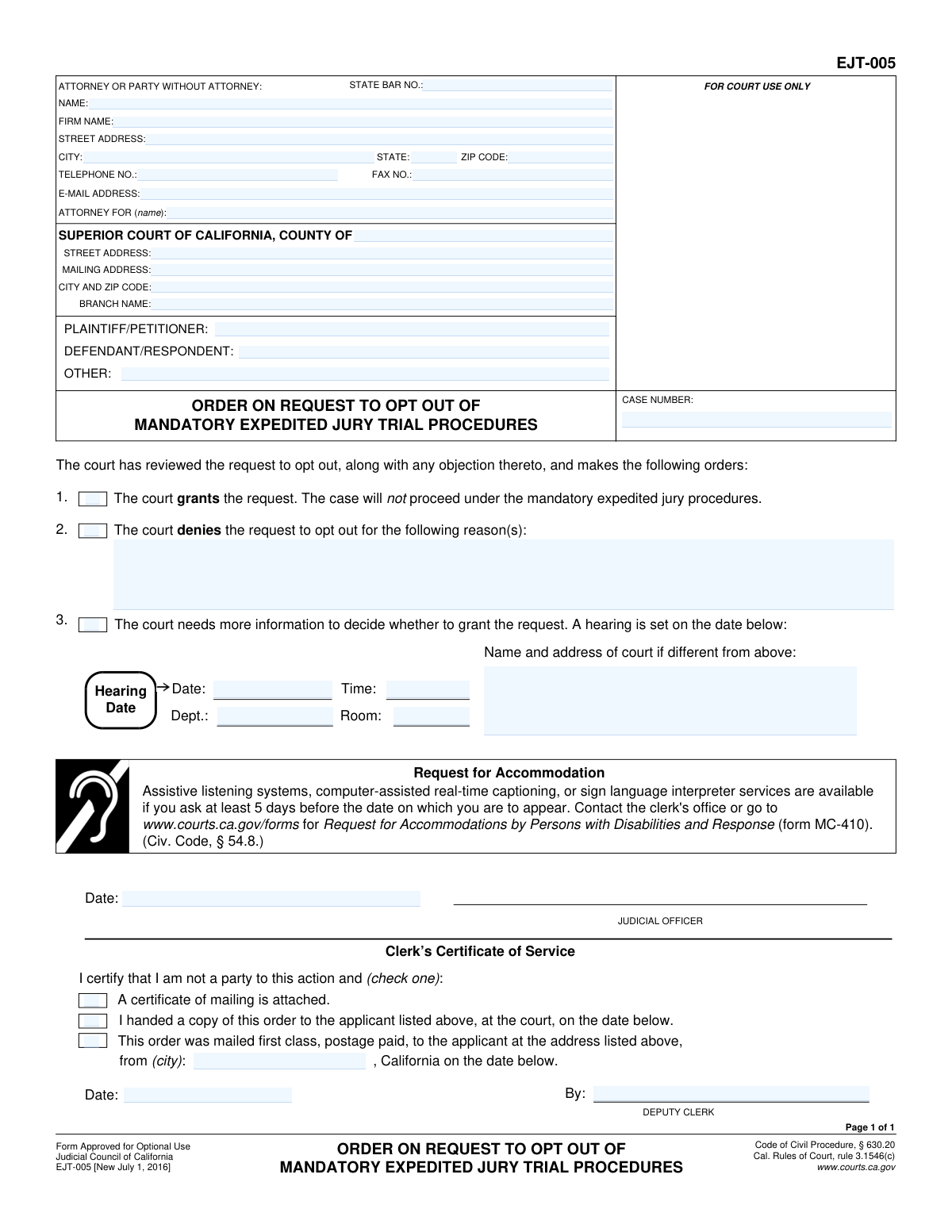
Yes! You can use AI to fill out Judicial Council of California, Form EJT-005, Order on Request to Opt Out of Mandatory Expedited Jury Trial Procedures
The EJT-005 is a judicial order issued by a California Superior Court in response to a party's request to be excluded from the state's expedited jury trial program. This document formalizes the court's decision, indicating whether the case will proceed under the faster trial rules or standard procedures. Today, this form can be filled out quickly and accurately using AI-powered services like Instafill.ai, which can also convert non-fillable PDF versions into interactive fillable forms.
EJT-005 is part of the
California court forms, California judicial forms and Judicial Council forms categories on Instafill.
Our AI automatically handles information lookup, data retrieval, formatting, and form filling.
It takes less than a minute to fill out EJT-005 using our AI form filling.
Securely upload your data. Information is encrypted in transit and deleted immediately after the form is filled out.
Form specifications
| Form name: | Judicial Council of California, Form EJT-005, Order on Request to Opt Out of Mandatory Expedited Jury Trial Procedures |
| Number of fields: | 36 |
| Number of pages: | 1 |
| Language: | English |
Instafill Demo: How to fill out PDF forms in seconds with AI
How to Fill Out EJT-005 Online for Free in 2026
Are you looking to fill out a EJT-005 form online quickly and accurately? Instafill.ai offers the #1 AI-powered PDF filling software of 2026, allowing you to complete your EJT-005 form in just 37 seconds or less.
Follow these steps to fill out your EJT-005 form online using Instafill.ai:
- 1 Navigate to Instafill.ai and upload or select Form EJT-005.
- 2 Use the AI tool to automatically populate the case caption, including the court, party names, and case number.
- 3 Enter the information for the attorney or party who submitted the request to opt out.
- 4 Indicate the court's ruling by checking the box to grant the request, deny the request (and state the reason), or set a new hearing.
- 5 If a new hearing is ordered, fill in the date, time, department, and location details.
- 6 Present the completed form to the judicial officer for review, dating, and signature.
- 7 Once signed, have the clerk complete the Certificate of Service section and use the platform to save, print, or e-file the final order.
Our AI-powered system ensures each field is filled out correctly, reducing errors and saving you time.
Why Choose Instafill.ai for Your Fillable EJT-005 Form?
Speed
Complete your EJT-005 in as little as 37 seconds.
Up-to-Date
Always use the latest 2026 EJT-005 form version.
Cost-effective
No need to hire expensive lawyers.
Accuracy
Our AI performs 10 compliance checks to ensure your form is error-free.
Security
Your personal information is protected with bank-level encryption.
Frequently Asked Questions About Form EJT-005
Form EJT-005, 'Order on Request to Opt Out of Mandatory Expedited Jury Trial Procedures,' is a court order that communicates a judge's decision on a party's request to be excluded from a faster, streamlined jury trial process.
This form is completed and signed by a judicial officer of the court, not by the plaintiff or defendant. It is an official order that the parties receive after a decision has been made.
You received this form because a party in your case submitted a request to opt out of the mandatory expedited jury trial procedures. This document is the court's official ruling on that request.
If the request is granted, your case will not proceed under the special rules for expedited jury trials. Instead, it will follow the standard, traditional trial procedures.
If the court denies the request, your case will remain in the mandatory expedited jury trial program. The form may include a brief explanation from the court for the denial.
You must attend the hearing at the date, time, and location specified on the form. The purpose of the hearing is for the court to gather more information before making a final decision.
These are special rules designed to make certain civil jury trials shorter and less expensive. They often involve smaller juries, shorter trial times, and different rules for presenting evidence.
No, you do not fill out any part of this form. It is a completed order from the court that you receive for your records and information.
The 'Clerk’s Certificate of Service' section at the bottom of the form indicates how the order was delivered. It will specify if it was handed to a party in court or mailed to their address on file.
Form MC-410 is a 'Request for Accommodations by Persons with Disabilities'. You would use it to ask the court for assistance, such as a sign language interpreter, for a hearing.
While this specific form is a court order you receive, AI-powered services like Instafill.ai can be very helpful for filling out other court forms you need to file. They can accurately auto-fill your case information, saving you time and reducing errors.
You can upload your court forms to the Instafill.ai platform, and its AI will automatically populate fields like your name, address, case number, and court information. This ensures consistency and accuracy across all your legal paperwork.
Services like Instafill.ai can convert flat, non-fillable PDFs into interactive forms that you can easily complete online. This makes it simple to fill out any form, regardless of its original format.
Compliance EJT-005
Validation Checks by Instafill.ai
1
Exclusive Order Selection
This check ensures that only one of the three primary order options (Grant, Deny, or Set Hearing) is selected. The court's order must be unambiguous; it can either grant the request, deny it, or schedule a hearing for more information, but not a combination of these. If more than one or none are selected, the form is logically inconsistent and cannot be processed.
2
Required Denial Reason
Validates that if the 'Denied' checkbox (item 2) is selected, the corresponding reason text field ('DeniedReason_ft') is filled out. It is a legal requirement to provide a reason for denying a request, ensuring transparency and providing a basis for any potential appeal. A failure to provide a reason would render the denial order incomplete and legally insufficient.
3
Complete Hearing Information
Ensures that if the 'A hearing is set' checkbox (item 3) is selected, the hearing date, time, and department fields are all populated. This information is critical for all parties to know when and where to appear for the hearing. Missing details would make the notice ineffective and could lead to missed appearances and further delays.
4
Valid Future Hearing Date
This validation confirms that the value entered in the 'Hearing Date' field ('HearingDate_dt') is a valid date that occurs in the future. A hearing cannot be scheduled for a past date, as this would be a logical and practical impossibility. An invalid or past date would prevent parties from being properly notified and attending the scheduled court event.
5
Case Number Presence and Format
Verifies that the 'CASE NUMBER' field is not empty and follows a standard format for the jurisdiction. The case number is the primary unique identifier for the legal action within the court system. Without a valid case number, the document cannot be correctly filed, docketed, or associated with the appropriate legal proceedings.
6
Exclusive Clerk Service Method Selection
Validates that exactly one method of service is checked in the 'Clerk’s Certificate of Service' section. The certificate must clearly state the single method used to serve the order (e.g., attached certificate, handed in person, or mailed). Selecting multiple or no options makes the certificate of service invalid and fails to prove proper notice was given.
7
Required Mailing City for Service
This check ensures that if the 'mailed first class' service method checkbox is selected, the city from which it was mailed ('MailedFromCity_ft') is specified. This detail is a required component of a proof of service by mail, adding to the legal validity of the notice. Omitting the city of mailing could be grounds to challenge the sufficiency of the service.
8
State Bar Number Format
Verifies that the 'STATE BAR NO.' field contains a numeric value if the filer is an attorney. State Bar numbers are unique identifiers for licensed attorneys and are typically composed of digits. This validation helps ensure that a valid attorney is associated with the filing and prevents data entry errors.
9
Email Address Format Validation
Checks that the value entered in the 'E-MAIL ADDRESS' field conforms to a standard email format (e.g., [email protected]). This is important for ensuring that electronic communications and service from the court or other parties can be successfully delivered. An invalid email address would lead to failed communication and potential delays in the case.
10
Minimum Party Representation
Ensures that at least one of the primary party fields, 'PLAINTIFF/PETITIONER' or 'DEFENDANT/RESPONDENT', is populated. A legal case must have at least two opposing sides, and this form must clearly identify them to be correctly associated with the case file. A form missing this basic information is incomplete and cannot be properly processed.
11
Valid Judicial Officer Signature Date
This check validates that the 'Date' field for the Judicial Officer's signature ('OrderSigDate') is a valid date that is not in the future. The signature date records the official date the order was made and cannot be post-dated. This ensures the chronological integrity of the court record and prevents logical inconsistencies.
12
Attorney/Party Contact Information Completeness
Validates that the name, street address, city, state, and ZIP code fields are all filled out for the attorney or party submitting the form. This complete address is essential for official mailings and notifications from the court and other parties. Incomplete contact information can lead to missed deadlines and procedural errors.
Common Mistakes in Completing EJT-005
Users often mistype the case number or use an incorrect format, which is essential for linking the document to the correct court file. This can happen due to a simple typo or referencing an old case number. An incorrect case number will lead to the document being rejected by the court clerk, causing significant delays in processing the order. Always double-check the case number against official court documents like the initial complaint or summons to ensure it is exact.
A party or their attorney may mistakenly check one of the boxes under items 1, 2, or 3, indicating whether the request is granted, denied, or set for hearing. This form is a proposed order for the judge to complete and sign; the filer's role is to prepare the caption, not make the ruling. Pre-selecting these boxes is improper and may result in the court rejecting the proposed order, requiring resubmission. The judicial officer is the only person authorized to complete this section.
Filers sometimes abbreviate party names (e.g., 'Corp.' instead of 'Corporation') or list them differently than on the initial complaint. Courts require party names to be listed precisely and consistently across all documents to maintain a clear record. Inconsistencies can lead to filing rejections or confusion, potentially delaying the case. Ensure the Plaintiff/Petitioner and Defendant/Respondent names match the originating court filings exactly.
A party or attorney might incorrectly sign or date the form in the spaces designated for the 'JUDICIAL OFFICER' or 'DEPUTY CLERK'. This mistake stems from misunderstanding that the form is a proposed order awaiting the court's action. Signing in these areas will invalidate the document, as only authorized court personnel can sign there. The filer should leave all sections below the main order text blank.
People frequently enter the wrong court address, confuse the street and mailing addresses, or omit the specific branch name. Each Superior Court system can have multiple branches, and sending a document to the wrong one causes delays or loss. To avoid this, verify the exact county, street address, and branch name for your specific case on the court's official website before filling out the form. AI-powered tools like Instafill.ai can help by auto-populating correct court information based on the case.
A party representing themselves (in 'pro per') may get confused about how to fill out the 'ATTORNEY OR PARTY WITHOUT ATTORNEY' section. They might leave it blank or incorrectly write 'Pro Per' in the name field. The correct procedure is to enter their own full name, address, and contact information in the spaces provided for the attorney. This ensures the court knows who is filing the document and how to contact them directly.
Attorneys filing the form sometimes forget to include their State Bar Number. This number is a required unique identifier for practicing attorneys in California and is used by the court to verify their standing. Omitting the bar number can lead to the filing being rejected pending correction, which delays the processing of the order. This simple oversight can be prevented by carefully reviewing all fields before submission.
The 'ATTORNEY FOR (name):' field is often left blank or filled in too vaguely (e.g., just 'Plaintiff'). This creates ambiguity, especially in cases with multiple plaintiffs or defendants. The form requires the full name of the specific party or parties the attorney is representing. Failing to do so can cause confusion for the court and opposing counsel. To prevent this, always state the full name of the client, such as 'John Smith, Plaintiff'.
Filers may omit their phone number, email address, or full street address, assuming the court already has it on file. However, each form must be complete on its own, as it may be separated from the main file. Missing contact information can prevent the court or other parties from communicating important updates, such as hearing dates or service of the signed order. Using a tool like Instafill.ai can help prevent this by saving contact profiles and ensuring all required fields are completed automatically.
Saved over 80 hours a year
“I was never sure if my IRS forms like W-9 were filled correctly. Now, I can complete the forms accurately without any external help.”
Kevin Martin Green
Your data stays secure with advanced protection from Instafill and our subprocessors

Robust compliance program
Transparent business model
You’re not the product. You always know where your data is and what it is processed for.
ISO 27001, HIPAA, and GDPR
Our subprocesses adhere to multiple compliance standards, including but not limited to ISO 27001, HIPAA, and GDPR.
Security & privacy by design
We consider security and privacy from the initial design phase of any new service or functionality. It’s not an afterthought, it’s built-in, including support for two-factor authentication (2FA) to further protect your account.
Fill out EJT-005 with Instafill.ai
Worried about filling PDFs wrong? Instafill securely fills judicial-council-of-california-form-ejt-005-order-on-request-to-opt-out-of-mandatory-expedited-jury-trial-procedures forms, ensuring each field is accurate.