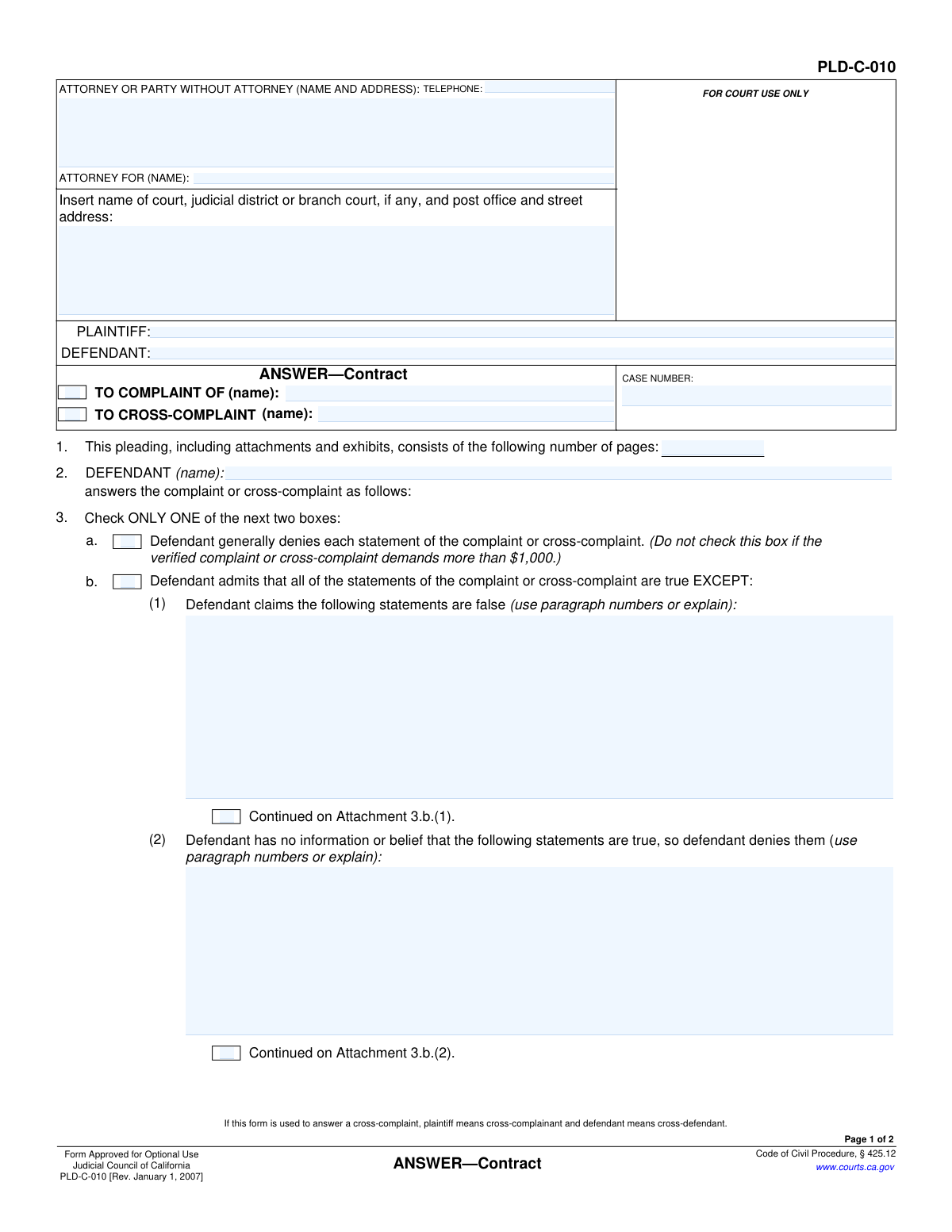
Yes! You can use AI to fill out Judicial Council of California Form PLD-C-010, Answer—Contract
Form PLD-C-010, Answer—Contract, is a legal document used in California Superior Courts for a defendant to formally respond to a lawsuit concerning a contract dispute. By filing this answer, the defendant can admit or deny the specific allegations made by the plaintiff and present their own affirmative defenses, which are reasons the plaintiff should not win. Today, this form can be filled out quickly and accurately using AI-powered services like Instafill.ai, which can also convert non-fillable PDF versions into interactive fillable forms.
PLD-C-010 is part of the
California court forms, California judicial forms and Judicial Council forms categories on Instafill.
Our AI automatically handles information lookup, data retrieval, formatting, and form filling.
It takes less than a minute to fill out PLD-C-010 using our AI form filling.
Securely upload your data. Information is encrypted in transit and deleted immediately after the form is filled out.
Form specifications
| Form name: | Judicial Council of California Form PLD-C-010, Answer—Contract |
| Number of fields: | 34 |
| Number of pages: | 1 |
| Language: | English |
Instafill Demo: How to fill out PDF forms in seconds with AI
How to Fill Out PLD-C-010 Online for Free in 2026
Are you looking to fill out a PLD-C-010 form online quickly and accurately? Instafill.ai offers the #1 AI-powered PDF filling software of 2026, allowing you to complete your PLD-C-010 form in just 37 seconds or less.
Follow these steps to fill out your PLD-C-010 form online using Instafill.ai:
- 1 Navigate to Instafill.ai and upload or select Form PLD-C-010, Answer—Contract.
- 2 Enter the court information, case number, and the names of the plaintiff and defendant in the header section.
- 3 Indicate whether you are answering a complaint or cross-complaint and name the party who filed it.
- 4 Choose to either generally deny all statements (if applicable) or specifically admit, deny, or state a lack of information for each allegation in the original complaint.
- 5 List all applicable affirmative defenses, which are legal reasons that would prevent the plaintiff from winning the case.
- 6 State your prayer for relief, typically requesting that the plaintiff take nothing and that you be awarded costs of the suit.
- 7 Review all entered information for accuracy, then sign and date the form before filing it with the court.
Our AI-powered system ensures each field is filled out correctly, reducing errors and saving you time.
Why Choose Instafill.ai for Your Fillable PLD-C-010 Form?
Speed
Complete your PLD-C-010 in as little as 37 seconds.
Up-to-Date
Always use the latest 2026 PLD-C-010 form version.
Cost-effective
No need to hire expensive lawyers.
Accuracy
Our AI performs 10 compliance checks to ensure your form is error-free.
Security
Your personal information is protected with bank-level encryption.
Frequently Asked Questions About Form PLD-C-010
This form is a legal document used in California courts for a defendant to formally respond to a lawsuit (a complaint or cross-complaint) that is based on a contract dispute.
Any person or business named as a defendant in a contract-related lawsuit must fill out and file this form to present their response and defenses to the court.
A general denial rejects all allegations in the complaint at once. A specific denial admits that some statements in the complaint are true but specifies which ones you claim are false or have no information about.
You can only use the general denial if the complaint you are answering is not a 'verified' complaint and the amount of money demanded is $1,000 or less.
Affirmative defenses are legal arguments that could defeat the plaintiff's claim, even if their allegations are true. Examples include the statute of limitations having expired or that the contract was invalid.
You will need the court case number, the exact names of the plaintiff and defendant, and a copy of the complaint or cross-complaint you are responding to.
This is where you tell the court what you want the outcome to be. Typically, a defendant asks that the plaintiff 'take nothing' from the lawsuit and that the defendant be awarded their court costs.
Yes, this form can be used to answer a cross-complaint. In that situation, the 'plaintiff' on the form refers to the cross-complainant, and the 'defendant' refers to you, the cross-defendant.
If you run out of room, check the box that says 'Continued on Attachment' and write the additional information on a separate sheet of paper, labeling it clearly as an attachment.
After completing the form, you must file the original with the court and 'serve' (formally deliver) a copy to the plaintiff or their attorney by the legal deadline.
Yes, services like Instafill.ai use AI to accurately auto-fill form fields from your case documents, which can save significant time and help prevent errors.
You can use a service like Instafill.ai to upload the PDF, fill it out interactively online, and then download the completed document for printing and filing with the court.
If you have a non-fillable or 'flat' PDF, you can upload it to a platform like Instafill.ai, which can convert it into an interactive, fillable form for you to complete online.
Yes, answering a lawsuit has significant legal consequences. It is strongly recommended that you consult with an attorney to understand your rights and ensure your response is correctly prepared.
Compliance PLD-C-010
Validation Checks by Instafill.ai
1
Exclusive Selection for General or Specific Denial
This check ensures that only one box is selected in section 3, either 3.a (general denial) or 3.b (specific denial). The form explicitly states to 'Check ONLY ONE of the next two boxes'. Selecting both would create a legally ambiguous and contradictory response, so the submission must be rejected until only one option is chosen.
2
Case Number Consistency Across Pages
Validates that the 'CASE NUMBER' entered on page 1 is identical to the 'CASE NUMBER' entered on page 2. This is critical for ensuring the document is correctly filed and associated with the proper case. A mismatch could lead to filing errors, delays, or the document being rejected by the court clerk.
3
Conditional Requirement for Specific Denials
If box 3.b is checked, this validation ensures that at least one of the sub-sections, 3.b.(1) or 3.b.(2), contains text explaining which statements are being denied. Checking 3.b without providing specifics makes the answer incomplete and non-responsive. The form will be considered invalid until the specific paragraphs or statements being denied are identified.
4
Required Filer Contact Information
Ensures that the 'ATTORNEY OR PARTY WITHOUT ATTORNEY (NAME AND ADDRESS)' field is not empty. This information is mandatory for the court and opposing party to identify and communicate with the filer. A failure to provide this information would make the document invalid and could result in it being rejected by the court.
5
Required Party Identification
This check verifies that both the 'PLAINTIFF' and 'DEFENDANT' fields in the case caption are filled out. These names are fundamental to identifying the parties involved in the lawsuit. Omitting this information would make it impossible to determine who the legal action involves, rendering the document useless for court purposes.
6
Valid Page Count
Validates that the number entered in section 1 for the total number of pages is a positive integer. This count is used by the court to ensure the entire document has been received and filed. An invalid or missing number could lead to the filing being flagged as incomplete.
7
Defendant Name Consistency
This check confirms that the defendant's name entered in the header ('DEFENDANT:') matches the name entered in section 2 ('DEFENDANT (name):'). This consistency is important for clarity and to avoid any ambiguity about who is filing the answer. A mismatch could raise questions about the identity of the responding party.
8
Conditional Requirement for 'Other' Prayer for Relief
If the checkbox for item 6.c ('other') is selected in the 'DEFENDANT PRAYS' section, this validation ensures the corresponding text field is filled out. Checking 'other' without specifying the relief sought makes the request meaningless. The form is incomplete until the specific 'other' relief is described.
9
Printed Name for Signature Requirement
Ensures that the 'Type or print name' field below the signature line is completed. A signature may be illegible, so the printed name is required to clearly identify the person signing the document. This is a standard requirement for legal documents to be considered valid and properly executed.
10
Telephone Number Format
Validates that the entry in the 'TELEPHONE' field follows a recognizable phone number format (e.g., (XXX) XXX-XXXX, XXX-XXX-XXXX). While not always strictly enforced for filing, a valid number is crucial for communication from the court or opposing counsel. This check helps prevent data entry errors and ensures contact information is usable.
11
Pleading Target Identification
This check ensures that a name is provided in either the 'TO COMPLAINT OF' field or the 'TO CROSS-COMPLAINT' field. It is essential to specify which pleading this answer is responding to. Failure to identify the target complaint or cross-complaint makes the answer ambiguous and could lead to it being disregarded.
12
Court Information Completeness
Verifies that the court name, judicial district, and address information is filled in. This information is essential for identifying the correct jurisdiction and venue where the case is being heard. An omission would result in a filing rejection as the document cannot be routed to the correct court.
13
General Denial Rule Warning
If box 3.a (general denial) is checked, this validation provides a warning to the user about the associated rule. The form notes that a general denial cannot be used if the complaint demands more than $1,000. This check serves as a helpful reminder of a critical procedural rule to prevent the user from filing an improper answer.
Common Mistakes in Completing PLD-C-010
Defendants often check box 3.a for a general denial without realizing the specific limitations. This box cannot be used if the complaint is 'verified' (sworn under penalty of perjury) or if the amount demanded exceeds $1,000. Incorrectly using a general denial can result in the court deeming all allegations in the complaint to be admitted, which can lead to an automatic judgment against the defendant. Always read the instructions carefully and review the complaint to see if it is verified before selecting this option.
In section 4, many individuals simply restate their denials or provide a narrative of events instead of listing legally recognized 'Affirmative Defenses' (e.g., Statute of Limitations, Waiver, Accord and Satisfaction). This is a critical error because any affirmative defense not included in the Answer may be considered waived, meaning you cannot raise it later in the case. To avoid this, research common affirmative defenses for contract disputes in your jurisdiction or consult with an attorney to ensure all applicable defenses are properly pleaded.
When specifically denying allegations in section 3.b, people often write a general statement or story instead of referencing the exact paragraph numbers from the complaint they are disputing. This ambiguity can weaken the Answer and may not be accepted by the court, potentially leading to those allegations being treated as admitted. To avoid this, carefully list the specific paragraph numbers of the statements you claim are false or that you deny for lack of information.
It is surprisingly common for a party or their attorney to print the completed form but forget to provide a physical signature in the designated space on page 2. An unsigned pleading is not valid and will be rejected by the court clerk, causing filing delays and potentially causing you to miss a critical response deadline. Always double-check for a signature before filing, and ensure the name is also typed or printed legibly below the signature line.
A simple typo in the Case Number field on page 1 or forgetting to repeat it on page 2 is a frequent mistake. This number is the primary identifier for your case file. An incorrect number can lead to the document being rejected, misfiled in another case, or significant delays in processing by the court clerk. Carefully copy the exact case number from the complaint, and ensure it is entered correctly on all pages of the document.
Parties often enter an incomplete or incorrect name for the court, or they get the judicial district or branch address wrong. This can happen due to confusion about the specific court handling the case. Filing a document with the wrong court information will lead to its rejection, forcing you to correct and refile, which could jeopardize your deadline to answer the complaint. You must copy the exact court information from the summons and complaint.
People frequently fill out the page count in section 1 before they have finished adding all necessary attachments and exhibits. This results in an incorrect total page count on the final document. An inaccurate count can confuse the court clerk, who may assume pages are missing, potentially delaying the processing of your filing. Always count the final number of pages, including all attachments, just before filing and enter that number in section 1.
Individuals representing themselves ('in pro per') sometimes get confused by the header section. They might incorrectly fill out the 'ATTORNEY FOR (NAME):' field with their own name, or leave their own contact information incomplete. This can cause confusion for the court and opposing counsel about who to contact. If you are representing yourself, you should enter your full name, address, and phone number in the top box and may write 'In Pro Per' in the 'ATTORNEY FOR' field.
In section 6.c ('DEFENDANT PRAYS... other (specify):'), many defendants leave this field blank, even when they may be entitled to additional relief. For example, if the contract at issue includes an attorney's fees clause, you should request attorney's fees here. Failing to request specific relief like attorney's fees in the prayer can make it more difficult or impossible to recover those costs later, even if you win the case. Consider what you are entitled to and specify it clearly.
Often, court forms are only available online as flat, non-fillable PDFs, leading users to print and fill them out by hand. This results in illegible handwriting, mistakes, and an unprofessional appearance that can be poorly received by the court. To avoid this, use a tool like Instafill.ai, which can convert any non-fillable PDF into an interactive, fillable form, allowing you to type your answers clearly and professionally. AI-powered tools can also help prevent many data entry errors by validating information as you type.
Saved over 80 hours a year
“I was never sure if my IRS forms like W-9 were filled correctly. Now, I can complete the forms accurately without any external help.”
Kevin Martin Green
Your data stays secure with advanced protection from Instafill and our subprocessors

Robust compliance program
Transparent business model
You’re not the product. You always know where your data is and what it is processed for.
ISO 27001, HIPAA, and GDPR
Our subprocesses adhere to multiple compliance standards, including but not limited to ISO 27001, HIPAA, and GDPR.
Security & privacy by design
We consider security and privacy from the initial design phase of any new service or functionality. It’s not an afterthought, it’s built-in, including support for two-factor authentication (2FA) to further protect your account.
Fill out PLD-C-010 with Instafill.ai
Worried about filling PDFs wrong? Instafill securely fills judicial-council-of-california-form-pld-c-010-answercontract forms, ensuring each field is accurate.