Yes! You can use AI to fill out Judicial Council of California, MC-410, Disability Accommodation Request
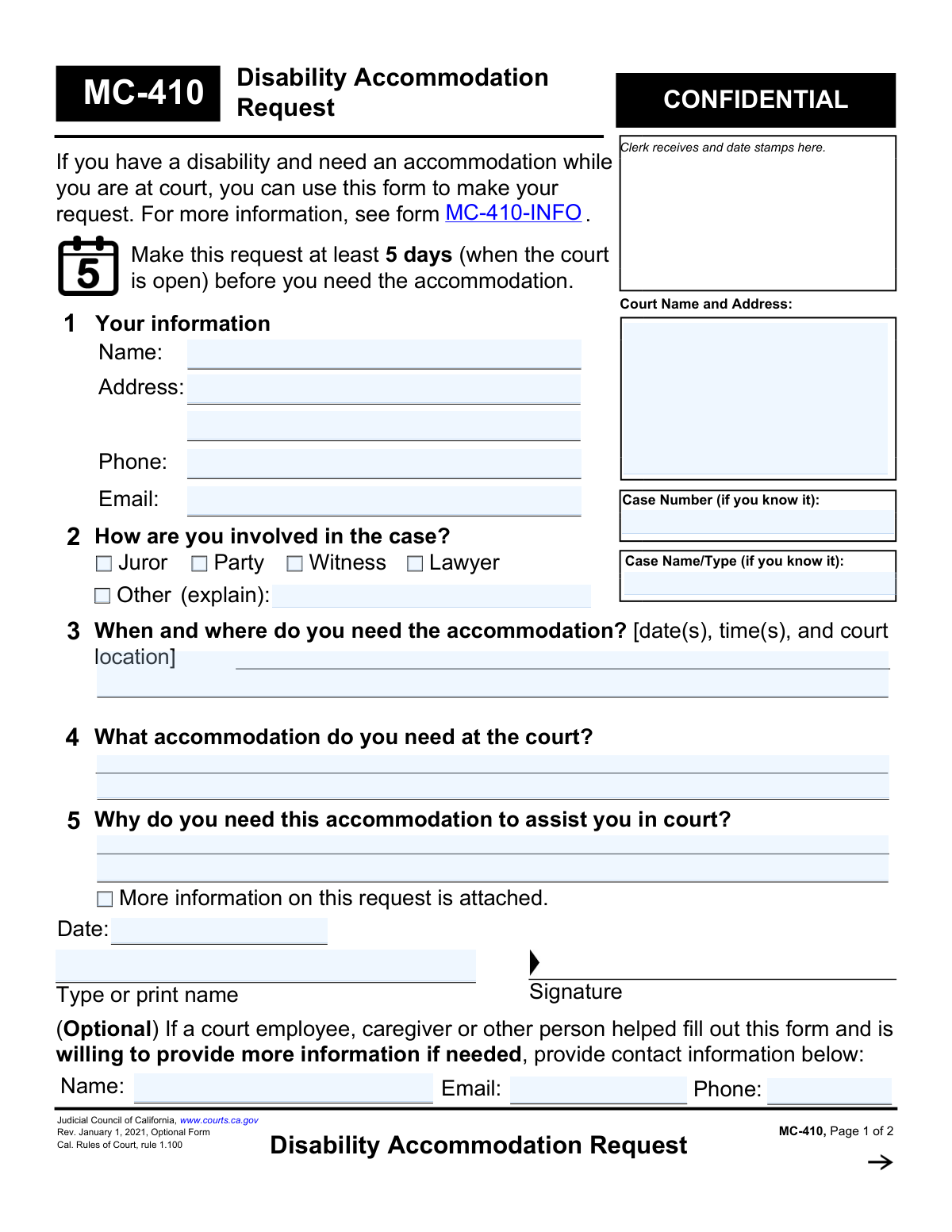
Form MC-410, Disability Accommodation Request, is a legal document used within the California court system for individuals with disabilities to request necessary accommodations. This ensures that all participants, including jurors, parties, witnesses, and lawyers, have equal access to court proceedings and services. Today, this form can be filled out quickly and accurately using AI-powered services like Instafill.ai, which can also convert non-fillable PDF versions into interactive fillable forms.
MC-410 is part of the
California court forms, California judicial forms and Judicial Council forms categories on Instafill.
Our AI automatically handles information lookup, data retrieval, formatting, and form filling.
It takes less than a minute to fill out MC-410 using our AI form filling.
Securely upload your data. Information is encrypted in transit and deleted immediately after the form is filled out.
Form specifications
| Form name: | Judicial Council of California, MC-410, Disability Accommodation Request |
| Number of fields: | 51 |
| Number of pages: | 1 |
| Language: | English |
Instafill Demo: How to fill out PDF forms in seconds with AI
How to Fill Out MC-410 Online for Free in 2026
Are you looking to fill out a MC-410 form online quickly and accurately? Instafill.ai offers the #1 AI-powered PDF filling software of 2026, allowing you to complete your MC-410 form in just 37 seconds or less.
Follow these steps to fill out your MC-410 form online using Instafill.ai:
- 1 Navigate to Instafill.ai and upload the MC-410 form or select it from their template library.
- 2 Use the AI assistant to accurately fill in your personal details, contact information, and any known case information like the case name and number.
- 3 Indicate your role in the court case by checking the appropriate box, such as Juror, Party, Witness, or Lawyer.
- 4 Clearly state when and where you need the accommodation, what specific accommodation you require, and the reason it is necessary for your participation.
- 5 If someone assisted you, provide their contact details in the optional section for follow-up if needed.
- 6 Carefully review all the information entered by the AI for accuracy, then electronically sign and date the form.
- 7 Download the completed, signed MC-410 form and submit it to the appropriate court at least five days before you need the accommodation.
Our AI-powered system ensures each field is filled out correctly, reducing errors and saving you time.
Why Choose Instafill.ai for Your Fillable MC-410 Form?
Speed
Complete your MC-410 in as little as 37 seconds.
Up-to-Date
Always use the latest 2026 MC-410 form version.
Cost-effective
No need to hire expensive lawyers.
Accuracy
Our AI performs 10 compliance checks to ensure your form is error-free.
Security
Your personal information is protected with bank-level encryption.
Frequently Asked Questions About Form MC-410
This form is used to request special assistance or adjustments from the court if you have a disability. It helps ensure you can fully participate in court proceedings in California.
Anyone involved in a court case who has a disability can use this form. This includes jurors, parties in a case, witnesses, lawyers, and other members of the public who need to be at court.
You should submit Form MC-410 at least five court business days before you need the accommodation. This allows the court sufficient time to process your request and make the necessary arrangements.
The form indicates that the case number and case name are only required 'if you know it.' If you do not have this information, you can leave those fields blank and still submit the form.
You can request any accommodation that will assist you in court due to your disability. This could include things like a sign language interpreter, assistive listening devices, or wheelchair accessibility; you must specify what you need in section 4.
The form does not require a doctor's note, but it does have a checkbox to indicate that more information is attached. Providing supporting documentation may help the court understand and approve your request.
Yes, the form is marked 'CONFIDENTIAL.' The personal and medical information you provide will be used by the court solely for the purpose of arranging your disability accommodation.
The court will review your request and either grant it, deny it, or offer an alternative accommodation. You will be notified of the court's decision by phone, mail, email, or in person.
If your request is denied, the court must provide a reason. The form states that you may be able to ask for a review of the decision and directs you to information on how to do so.
If your court date changes or the case is dismissed, you must contact the court to cancel the accommodation. The court's contact information for this purpose is provided on the second page of the form.
Yes, a caregiver, court employee, or another person can help you complete the form. There is an optional section to include their contact information in case the court needs more details.
Yes, services like Instafill.ai use AI to accurately auto-fill form fields, which can save you time and reduce errors. This is a convenient way to ensure all required information is entered correctly.
To fill out the form online, you can upload the MC-410 PDF to Instafill.ai. The platform's AI will make the form interactive, allowing you to type your information directly into the fields and then download the completed document.
If you have a non-fillable or 'flat' PDF, you can use a service like Instafill.ai to instantly convert it into a smart, fillable form. This allows you to easily type your information instead of printing and writing by hand.
Compliance MC-410
Validation Checks by Instafill.ai
1
Ensures Requester's Name is Provided
Validates that the 'Name' field in Section 1 is not empty. This is a mandatory field required to identify the individual making the accommodation request. If this field is left blank, the form cannot be processed, and the user will be prompted to enter their full name.
2
Requires At Least One Method of Contact
Checks that either the 'Phone' or 'Email' field in Section 1 is filled out. Providing a contact method is crucial for the court to communicate about the status of the request or to ask for clarifying information. A validation failure would inform the user that they must provide at least one form of contact.
3
Validates Phone Number Format
Ensures that the value entered in the 'Phone' field follows a standard North American phone number format (e.g., NNN-NNN-NNNN or (NNN) NNN-NNNN). Correct formatting is essential for ensuring the court can successfully contact the requester. An invalid format would trigger an error message asking the user to correct the number.
4
Validates Email Address Format
Verifies that the 'Email' address provided in Section 1 conforms to the standard '[email protected]' format. An accurate email address is necessary for electronic communication regarding the request. If the format is invalid, the system will reject the entry and prompt the user for a valid email address.
5
Ensures Role in Case is Selected
Validates that at least one checkbox (Juror, Party, Witness, Lawyer, or Other) is selected in Section 2. This information helps the court understand the requester's capacity and context within the legal proceedings. If no role is selected, the submission will be blocked until a selection is made.
6
Requires Explanation for 'Other' Role
Checks that if the 'Other' checkbox is selected in Section 2, the corresponding text field for explaining the role is not empty. This provides necessary context that is not covered by the standard options. A failure would prompt the user to either explain their role or select a different option.
7
Ensures Accommodation Date is Specified
Verifies that the field in Section 3, which asks for the date(s) and time(s) of the needed accommodation, is not left blank. This information is fundamental to the request, as the court needs to know when to prepare the accommodation. The form cannot be processed without this critical detail.
8
Verifies Minimum 5-Day Lead Time for Request
Ensures the date provided in Section 3 is at least five business days after the submission date, as instructed on the form. This lead time is critical for the court to have adequate time to review the request and arrange the necessary accommodation. A request with insufficient lead time would trigger a warning or error.
9
Validates Accommodation Date is in the Future
Checks that the date(s) entered in Section 3 are set for a future date and not a past date. A request for an accommodation cannot be fulfilled for an event that has already occurred. If a past date is entered, the user will be notified to enter a valid future date.
10
Requires Description of Needed Accommodation
Validates that the text field in Section 4, asking what accommodation is needed, is not empty. The court cannot act on a request without knowing the specific type of assistance required. A blank field will prevent submission and prompt the user to describe their needs.
11
Requires Justification for Accommodation
Verifies that the text field in Section 5, explaining why the accommodation is needed, is filled out. This justification helps the court understand the link between the disability and the requested assistance, which is necessary for evaluating the request. An empty field would result in an incomplete application.
12
Ensures Signature Date is Provided
Checks that the 'Date' field next to the signature line is completed. The signature date legally attests to when the form was completed and signed by the requester. A missing date would render the attestation incomplete and require the user to fill it in.
13
Ensures Printed Name is Provided for Signature
Validates that the 'Type or print name' field in the signature block is not empty. This field clarifies the identity of the signatory, especially if the signature itself is not legible. The form is considered incomplete without this printed name.
14
Cross-Validates Requester Name and Signature Name
Compares the name entered in Section 1 ('Your information') with the name entered in the signature block ('Type or print name'). These names should match to ensure the person signing the form is the same person making the request. A mismatch would trigger a warning to review the names for consistency.
15
Verifies Court-Use-Only Section is Not Filled
Ensures that fields on the second page reserved for court personnel (e.g., 'Your request is GRANTED/DENIED', 'Explain the reasons') are empty upon submission by the requester. This prevents the applicant from pre-filling the court's decision. If any of these fields contain data, a validation error should occur, instructing the user to clear them.
Common Mistakes in Completing MC-410
The form explicitly requires submission at least 5 court days before the accommodation is needed. People often overlook this deadline, which may not give the court sufficient time to arrange for resources like interpreters or specialized equipment. This can lead to the accommodation being unavailable, forcing a postponement or hindering the individual's ability to participate fully. To avoid this, submit the form as soon as the court date is known.
In Section 4, requesters may write general statements like 'I need help' instead of specifying the exact accommodation. The court cannot act on a vague request and will need to seek clarification, which delays the process, or may deny it outright. Be explicit and request a concrete solution, such as 'American Sign Language (ASL) interpreter,' 'wheelchair access to the witness stand,' or 'real-time captioning.'
Section 5 is critical as it links the disability to the need for assistance in a court setting. A common mistake is to omit this justification or only provide a diagnosis without explaining the functional limitation. This can lead to denial because the court cannot determine if the request meets legal requirements. Clearly describe how the disability impacts your ability to participate and how the requested accommodation will solve that specific problem.
Applicants, especially those unfamiliar with the court system, often leave the 'Case Number' and 'Case Name' fields blank. Without this information, the court clerk cannot link the request to the correct legal file, causing significant processing delays or even the loss of the form. To prevent this, accurately copy the information from the top of any existing court documents for the case.
The form repeats the 'Name' and 'Case Number' fields at the top of the second page, which people frequently overlook. If the pages become separated, the court's decision, which is documented on page 2, cannot be matched with the original request. Always ensure that header information is filled out on all pages of a multi-page form.
An unsigned or undated form is not legally valid and will be rejected by the court, halting the entire process. This simple oversight is a very common reason for rejection and can cause critical delays, jeopardizing the availability of an accommodation for a scheduled hearing. Always perform a final check to ensure the signature and date fields are completed before submission.
Section 3 requires the specific date(s), time(s), and court location, but people often provide ambiguous details like 'next week' or omit the courtroom number. This prevents court staff from scheduling resources effectively, meaning the accommodation may not be available at the correct time or place. Always provide the full date, start time, and specific courtroom or department number if known.
Simple typos in the phone number or email address in Section 1 are a frequent error. If the court has questions or needs to communicate its decision, incorrect contact details will prevent them from reaching the applicant, potentially leading to a denial. Using an AI-powered tool like Instafill.ai can help prevent these errors by auto-populating and validating contact information formats.
The form instructs applicants to contact the court if a hearing is delayed or dismissed, but this is often forgotten. This causes the court to waste time and money arranging for an accommodation (e.g., hiring an interpreter) that is no longer needed. Always remember to inform the court immediately if your scheduled appearance changes to avoid creating an administrative burden.
Saved over 80 hours a year
“I was never sure if my IRS forms like W-9 were filled correctly. Now, I can complete the forms accurately without any external help.”
Kevin Martin Green
Your data stays secure with advanced protection from Instafill and our subprocessors

Robust compliance program
Transparent business model
You’re not the product. You always know where your data is and what it is processed for.
ISO 27001, HIPAA, and GDPR
Our subprocesses adhere to multiple compliance standards, including but not limited to ISO 27001, HIPAA, and GDPR.
Security & privacy by design
We consider security and privacy from the initial design phase of any new service or functionality. It’s not an afterthought, it’s built-in, including support for two-factor authentication (2FA) to further protect your account.
Fill out MC-410 with Instafill.ai
Worried about filling PDFs wrong? Instafill securely fills judicial-council-of-california-mc-410-disability-accommodation-request forms, ensuring each field is accurate.