
Instafill.ai
7 days free
AI form filling · 540 fields · 17 pages · done in seconds

Yes! You can use AI to fill out Maine Uniform Application for Initial Appointment

Don't type 540 fields by hand. Tell our AI about yourself, or upload a document you already have, and it fills every field in seconds. You check it, then download, print or sign.
7 days free, then $19.99/month · Cancel anytime
AI fills it, no typingEncrypted, never used to train AICancel in two clicks
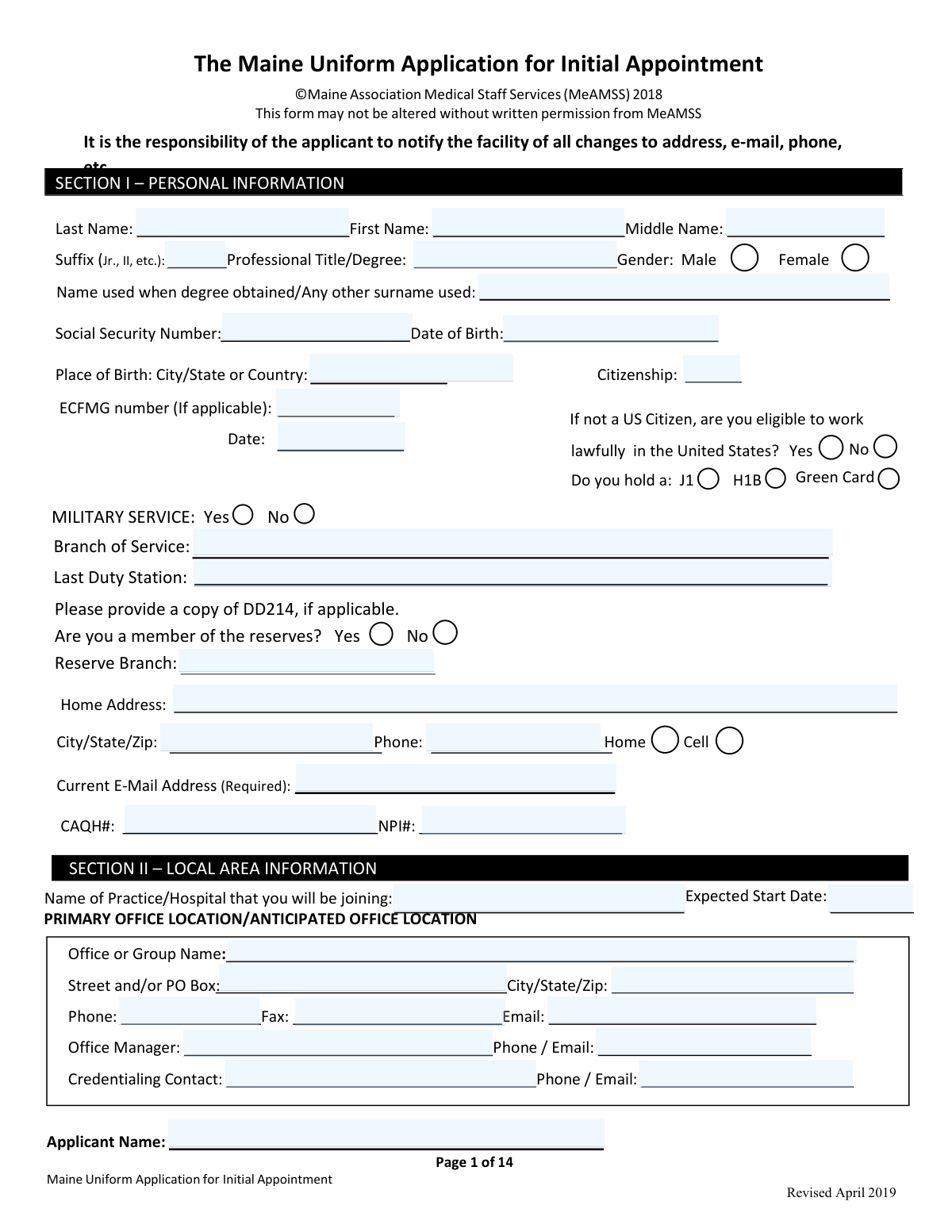
Maine Uniform Application for Initial Appointment, page 1
Very Complex · 87/100Form Complexity Index

The AI does the filling. You just check it.

No typing into boxes, nothing to install.

Tell the AI about youAnswer a few questions in plain words, or upload a document you already have. That is all the typing there is.
AI fills every field in secondsIt puts each answer in the right box on every page, tables and checkboxes included.
Check it and downloadReview every field, change anything, then download, print or sign the PDF.

What this form asks for

The AI fills all of it, from your answers or your documents.

The Maine Uniform Application for Initial Appointment is a statewide standardized provider credentialing application used by hospitals and other healthcare entities in Maine to process initial medical staff appointment and clinical privilege requests. It compiles key background information such as identity and demographics, education and postgraduate training, board certification, hospital affiliations, work history, licensure/DEA status, professional liability coverage, malpractice history, and professional references. The form is important because it supports primary-source verification and peer review, helps organizations assess clinical competence and professional conduct, and creates a consistent record for credentialing and privileging decisions across facilities.
Fillable fields540
Pages17
Sections105
Tables and lists10
Questions that depend on earlier answers23
Form Complexity IndexVery Complex, 87/100

The AI checks your answers before you download

16 checks built for this form, so a wrong date or a missing answer is caught before anyone else sees it.

Required Personal Identity Fields Completed (Section I)

Validates that all required personal identity fields are present: last name, first name, date of birth, current email address (explicitly required), and either SSN or an allowed alternative identifier if SSN is not provided per facility policy. This is essential to uniquely identify the applicant and prevent duplicate or mismatched credentialing records. If any required identity field is missing, the submission should be rejected as incomplete and routed back to the applicant for correction.

Date Fields Use Valid Formats and Logical Ranges

Checks that all dates (e.g., DOB, expected start date, education dates, training dates, license issue/expiration, DEA issue/expiration, malpractice incident/filing/closure dates) follow an accepted format (e.g., MM/DD/YYYY or Mo/Yr where specified) and represent real calendar dates. It also validates reasonable ranges (e.g., DOB not in the future; expected start date not unreasonably far in the past). If invalid or out-of-range dates are detected, the system should flag the specific field(s) and prevent submission until corrected.

SSN Format and Basic Plausibility Validation

Validates that the Social Security Number, if provided, matches an accepted SSN pattern (e.g., 9 digits with optional dashes) and is not an obviously invalid value (e.g., all zeros, repeated digits). This reduces downstream verification failures and helps ensure accurate background checks and payer enrollment matching. If SSN fails validation, the form should be blocked or the SSN field should be marked for correction depending on whether SSN is mandatory for the receiving organization.

Citizenship and Work Authorization Consistency (J1/H1B/Green Card)

Ensures that citizenship status and the work authorization question are answered consistently (e.g., if not a U.S. citizen, the 'eligible to work lawfully in the United States' field must be answered). If a visa type (J1 or H1B) or Green Card is indicated, the system should require the corresponding selection and prevent contradictory combinations (e.g., selecting both J1 and Green Card if the form intends them to be mutually exclusive). If inconsistent, the submission should be flagged for correction because it impacts eligibility to practice and onboarding timelines.

NPI and CAQH Identifier Format Validation

Validates that NPI is exactly 10 digits and passes the NPI Luhn check digit algorithm, and that CAQH number (if provided) matches expected numeric length/format used by CAQH. These identifiers are critical for payer enrollment, credentialing automation, and matching to external data sources. If validation fails, the system should prompt correction and optionally allow submission only if the facility permits missing CAQH/NPI at initial intake.

Phone/Fax/Email Format Validation Across All Contact Sections

Checks that phone and fax numbers across home, cell, office locations, office manager, credentialing contact, program directors, and references contain valid digits and acceptable punctuation, and include area code (and country code if non-U.S.). Validates that all email fields marked required (e.g., applicant email, reference emails) are syntactically valid and not blank. If any required contact field is invalid, the submission should be blocked because references and verification cannot be completed.

And 10 more checks
  • Education and Training Chronology Completeness (No 'Refer to CV')
  • Gap Detection and Mandatory Explanations (>60 Days)
  • Board Certification Status vs Dates vs 'Lifetime' Flag Consistency
  • Licensure Table Completeness and Maine License Eligibility Alignment
  • DEA Registration and Controlled Substance License Validation
  • Insurance Carrier History Completeness and Coverage Gap Explanations
  • Malpractice Questions Trigger Malpractice Claims/Suit History Form Requirements
  • References: Count, Role Constraints, and Required Contact Fields
  • Required Yes/No Questions Fully Answered with Conditional Explanations Attached
  • Applicant Signature and Date Presence and Currency

Let AI fill out your Maine Uniform Application (Initial Appointment)

No typing. Every field filled in seconds, checked, ready to sign.

7 days free, then $19.99/month · Cancel anytime

How to Fill Out Maine Uniform Application (Initial Appointment) Online for Free in 2026

What the AI walks you through.

  1. Confirm eligibility and gather required attachments (CV, licenses, DEA if applicable, board certificates, malpractice face sheet/COI, life support cards, name-change document if applicable, passport photo, and NP/PA supervision documents if applicable).
  2. Complete Section I (Personal Information) and office/practice details, including contact information, NPI/CAQH, and anticipated start date.
  3. Enter Section II local area information and all additional office locations with office manager and credentialing contact details.
  4. Fill out Sections III–IV (Education, Postgraduate Training, Specialty/Board Certification), listing items chronologically and providing explanations for any gaps greater than 60 days.
  5. Complete Sections V–VII (Hospital Affiliations, Work History/Professional Affiliations, Insurance Carriers) for the required lookback period, ensuring dates are complete and gaps are explained.
  6. Complete Section VIII (Licensing and DEA) and Section X required yes/no questions; add detailed explanations and supporting documents for any “Yes” answers, and complete the Malpractice Claims/Suit History page for each event (or indicate none).
  7. Provide Section IX references (four professional references meeting the stated criteria), then sign and date where required (including original signatures on the specified pages) and submit the full packet with all attachments.

Common Mistakes in Completing Maine Uniform Application (Initial Appointment)

The ones the AI is built to catch.

Leaving required Yes/No questions blank or marking both
Applicants often miss checkboxes or accidentally mark both “Yes” and “No,” especially in the Licensing, Malpractice, and Required Questions sections where the form states ALL QUESTIONS MUST BE ANSWERED. This creates an “incomplete application” and typically stops credentialing until clarified. To avoid delays, answer every Yes/No item, mark only one option, and do a final pass specifically for unanswered questions on Sections VIII, VII (malpractice questions), and X.
Using “See CV” instead of completing education/training fields
The form repeatedly instructs “DO NOT ‘REFER TO ATTACHED CV’” for Education, Board Certification, Hospital Affiliations, and Work History, but applicants still write “See CV” or leave fields empty. Credentialing staff must verify primary source details (dates, institutions, directors), and missing entries trigger follow-up requests and processing delays. Enter the full information directly on the form (institutions, addresses, dates, specialties, directors) even if you also attach a CV.
Not explaining gaps over 60 days in training, work history, affiliations, or coverage
Applicants frequently list timelines with missing months/years and forget the form’s rule that any gap greater than 60 days requires an explanation (training, hospital affiliations, work history, and insurance coverage). Unexplained gaps are a major red flag in credentialing and can lead to repeated queries or a pause in processing. Build a month/year chronology, identify any gap over 60 days, and provide a clear written explanation on Page 14 or a separate sheet (e.g., relocation, parental leave, illness, research, unemployment).
Providing incomplete license/DEA history (only current license listed)
In Section VIII the form requires ALL current and past licenses, but applicants often list only their current Maine license and omit other states, training licenses, or prior controlled substance registrations. This can cause verification mismatches when the facility checks national databases and prior jurisdictions. List every state/jurisdiction license ever held (including expired), include license numbers, issue/expiration dates, status, and complete the DEA/state controlled substance fields with accurate dates.
Answering “No” to adverse history questions when the threshold criteria require disclosure
Some applicants misunderstand the wording (e.g., “restricted,” “probationary,” “investigation,” “lapse,” “withdrawn application,” “not renewed”) and answer “No” even when an event occurred, especially if it was “voluntary” or “administrative.” Inconsistencies between the application and external checks can be treated as misrepresentation and may lead to denial of appointment or administrative relinquishment. Read each question literally, disclose any applicable event, and attach a concise explanation and supporting documents (orders, settlement, board letters) when you answer “Yes.”
Malpractice history not fully documented or missing the required Page 11 form
Applicants often answer “Yes” to malpractice questions but fail to complete a Malpractice Claims/Suit History form for each event, or they provide partial details (no case number, no status, no dates, no amounts). The checklist also requires that if there are NO claims, you must still indicate none on the Malpractice Claims/Suit History form and sign/date it. To avoid rework, complete Page 11 for every claim/suit/notice, include all requested dates and outcomes, and if none, write “No claims,” then sign and date.
Insurance carrier history missing carriers, limits, or coverage dates (and no explanation of gaps)
In Section VII, applicants frequently list only their current malpractice carrier and omit prior carriers for the last 10 years (or since internship), or they forget to include policy numbers, incident/aggregate limits, and month/year coverage dates. Credentialing teams must confirm continuous coverage and appropriate limits for requested privileges; missing data leads to follow-up and can delay start dates. Provide a chronological carrier list (current first), include policy number, limits, and exact Mo/Yr “From–To,” attach the face sheet, and explain any gap in coverage on a separate page.
References that do not meet the form’s eligibility rules
Common errors include listing relatives, spouses/partners, current classmates, business partners, or references who have not observed the applicant’s clinical work in the past 24 months. Applicants also forget the required role-based reference (current department chief if you hold privileges; program director if in training) and APPs sometimes omit the required MD/DO reference. Choose four qualified professional peers/supervisors who meet the 24-month observation requirement, ensure role requirements are satisfied, and avoid prohibited relationships.
Missing required reference contact details (email and fax) or incomplete addresses
The references section explicitly requires email (required) and fax (required), yet applicants often provide only a phone number or an incomplete address. Missing contact details prevent timely reference outreach and can stall credentialing until corrected. Before submission, verify each reference entry includes full name, degree, specialty, complete mailing address, phone, required fax number, and required email address.
Signatures not original, not dated, or dated incorrectly
The checklist states signatures on pages 11 and 14 must be original and have a current date, but applicants often submit typed signatures, scanned copies without original ink (when originals are required), or leave dates blank. This can invalidate attestations and force resubmission, delaying appointment and privileges. Sign in the required manner for the facility (original ink if required), date the signature with the current date, and confirm Page 11 (claims/no-claims) and Page 14 (required questions/attestation area) are properly executed.
Board certification and MOC details inconsistent or incomplete
Applicants sometimes list a specialty without the certifying board, certification number, certification/expiration dates, or they mark “Lifetime” incorrectly while also providing an expiration date. Others answer that they are pursuing certification but omit the board name and expected completion date, or fail to explain unsuccessful attempts as requested. Incomplete or inconsistent board data can trigger additional verification and questions about eligibility under the facility’s board certification timeframe rules. Enter the exact board name, certification number, dates, lifetime status accurately, and if not certified, provide the pursuing board and realistic expected completion date with an explanation if required.

Frequently Asked Questions About Maine Uniform Application (Initial Appointment)


Is it really free for 7 days?
Yes. You pay $0 today. Cancel before Oct 31 and you are never charged. Keep it, and it is $19.99 a month for 5 fills of your Maine Uniform Application (Initial Appointment).
Can I fill other forms too?
This plan is for your Maine Uniform Application (Initial Appointment): your own AI agent fills it as often as 5 times a month. To fill other forms and upload your own, choose a Professional plan from your account.
How do I cancel?
From your account, in two clicks, any time. No email, no call.
How does the AI fill out Maine Uniform Application (Initial Appointment)?
You answer a few questions in plain words, or upload a document you already have. The AI reads what you give it and puts each answer into the right field of Maine Uniform Application (Initial Appointment), on every page, in seconds. It checks the answers against the form's own rules, and you review and change anything before you download, print or sign.
What happens to my information?
It is encrypted in transit and at rest, and it is never used to train AI.
How complex is Maine Uniform Application (Initial Appointment) to fill out?
Maine Uniform Application (Initial Appointment) has a Form Complexity Index of 87 out of 100, in the very complex tier: 540 fillable fields across 17 pages. Instafill.ai's AI fills it in under a minute, with every field there for you to review before you download.
What is the purpose of the Northern Light Health Threshold Eligibility Criteria and the Maine Uniform Application for Initial Appointment?
They are used to determine whether you meet baseline eligibility requirements and to collect the information needed for credentialing, initial appointment, reappointment, and granting clinical privileges at a Maine healthcare facility.
Who needs to complete this application and meet the threshold criteria?
Any practitioner applying for initial appointment, reappointment, or clinical privileges (including physicians, dentists, podiatrists, advanced practice professionals, and allied health providers) must meet the threshold criteria and complete the required application materials.
Do I need an unrestricted Maine license to be eligible?
Yes. You must have a current, unrestricted Maine license that is not subject to restrictions, conditions, or probationary terms, and you must not have had a license in any jurisdiction denied, revoked, restricted, or suspended for more than 30 days.
What if I am currently under investigation by a licensing agency, government agency, or a healthcare facility?
You are not eligible if you are currently under investigation for reasons related to controlled substances, illegal drugs, fraud/abuse, violent acts, sexual misconduct, moral turpitude, or child/elder abuse.
Is DEA registration required for this application?
If applicable to your practice, you must have a current, unrestricted DEA registration and the appropriate state-controlled substance license, and you must not have had either denied, revoked, or suspended.
What documents should I attach to my application packet?
Common required attachments include a current CV, copies of all current healthcare licenses, malpractice insurance face sheet showing limits/expiration/your name, Maine DEA registration (if applicable), board certificates, life support cards (e.g., BLS/ACLS), a passport-sized photo, and name-change documentation if applicable.
Do the signatures have to be original, and do they need to be dated?
Yes. The checklist states that signatures on pages 11 and 14 must be original and must have a current date.
How do I complete the Malpractice Claims/Suit History section if I have never had a claim or suit?
You must still complete the Malpractice Claims/Suit History form by indicating there are no claims, then sign and date it at the bottom.
If I have had a malpractice claim or suit, what do I need to provide?
You must include essential facts about each event and complete a separate Malpractice Claims/Suit History form (page 11) for each claim/suit, including dates, allegations, status, and any settlement or judgment information.
Can I write “see attached CV” for education, training, specialty, or hospital affiliations?
No. Multiple sections (Education, Specialty/Board Certification, Hospital Affiliations, and Work History) specifically instruct you not to “refer to attached CV,” so you must enter the details directly on the form.
What if I have gaps in training, work history, hospital affiliations, or insurance coverage?
You must explain any gap greater than 60 days in training, work history, or hospital affiliations, and any gap in malpractice insurance coverage, using page 14 or a separate sheet of paper.
What are the board certification requirements to be eligible?
You must be board certified in your primary area of practice by an approved board, or be within five years of completing residency/fellowship (up to seven years for certain identified subspecialists) and achieve certification within the applicable timeframe, then maintain certification continuously.
What are the reference requirements, and who can I use as a reference?
You must provide four professional references who have personal knowledge of your clinical skills and performance within the past 24 months; they cannot be relatives, spouse/domestic partner, or current classmates, and if you currently hold privileges one reference must be your current department chief (or program director if in training).
Are there special reference rules for Advanced Practice Providers (APPs) such as NPs and PAs?
Yes. APPs must provide at least one MD/DO as a reference, and NPs under delegation and PAs must also submit the Registration of Physician Extender and a facility-specific Plan of Supervision for each position held (as required).
What happens if I answer “Yes” to any of the required questions about discipline, sanctions, criminal history, or ability to practice?
You must provide a complete written explanation and include copies of any relevant orders or settlements where applicable; for questions about ability to perform essential functions (29–30), the application will still be processed and the facility may contact you to discuss reasonable accommodations if you are otherwise qualified.
Encrypted in transit and at restNever used to train AIDelete your forms any time

Get your Maine Uniform Application (Initial Appointment) filled out by AI

$0 today. Cancel before Oct 31 and you pay nothing.

7 days free, then $19.99/month · Cancel anytime