
Instafill.ai
7 days free
AI form filling · 216 fields · 5 pages · done in seconds

Yes! You can use AI to fill out Maryland Heights Police Department Application Form (Updated 4/29/2022)

Don't type 216 fields by hand. Tell our AI about yourself, or upload a document you already have, and it fills every field in seconds. You check it, then download, print or sign.
7 days free, then $19.99/month · Cancel anytime
AI fills it, no typingEncrypted, never used to train AICancel in two clicks
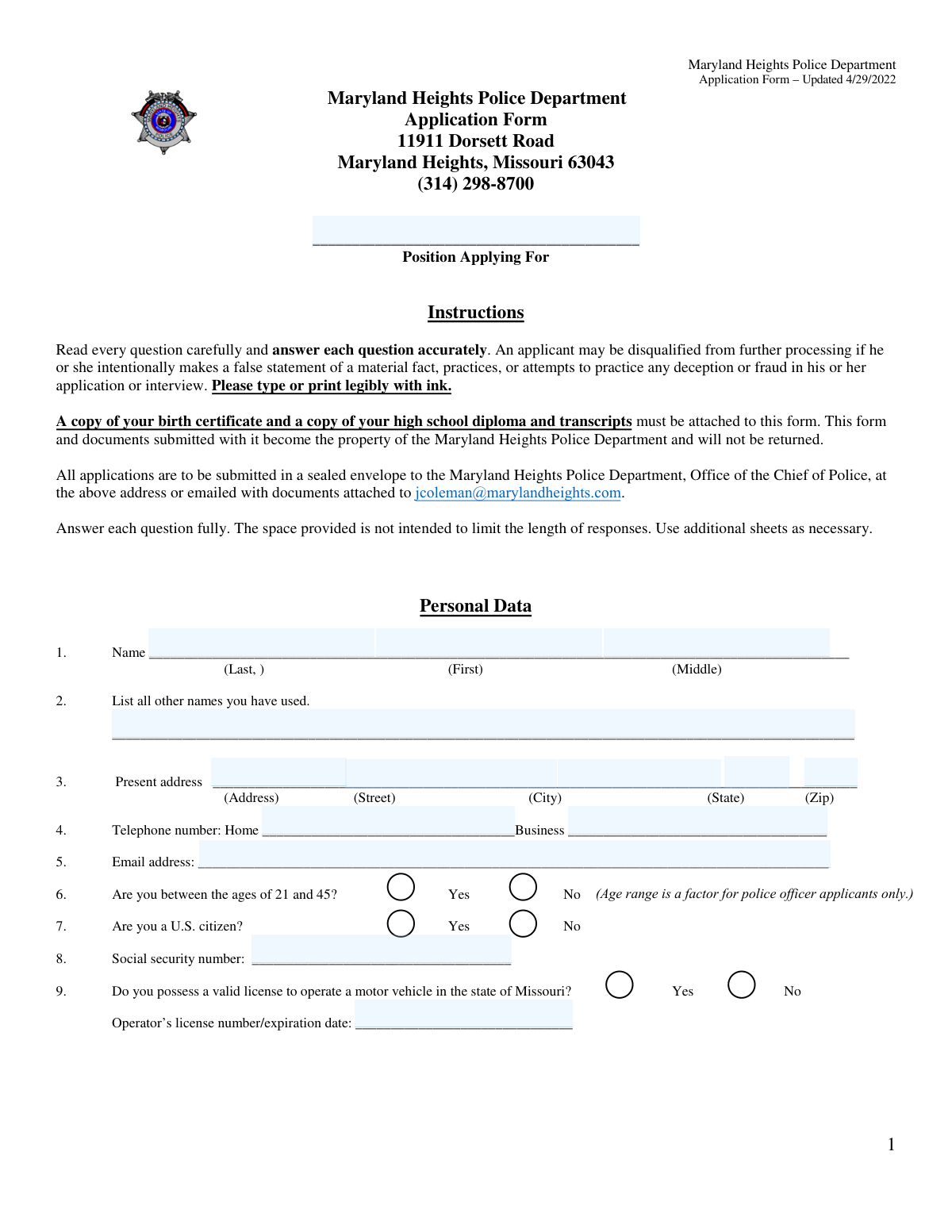
Maryland Heights Police Department Application Form (Updated 4/29/2022), page 1
Complex · 74/100Form Complexity Index

The AI does the filling. You just check it.

No typing into boxes, nothing to install.

Tell the AI about youAnswer a few questions in plain words, or upload a document you already have. That is all the typing there is.
AI fills every field in secondsIt puts each answer in the right box on every page, tables and checkboxes included.
Check it and downloadReview every field, change anything, then download, print or sign the PDF.

What this form asks for

The AI fills all of it, from your answers or your documents.

The Maryland Heights Police Department Application Form is an employment application that collects an applicant’s personal information, work history, arrest/conviction disclosures, address history, education, military service, and references for hiring consideration. It also includes required acknowledgments and instructions to attach supporting documents (such as a birth certificate, diploma/transcripts, and DD214 if applicable) and submit the packet to the department. Accurate and complete responses are important because false statements may disqualify an applicant from further processing. Today, this form can be filled out quickly and accurately using AI-powered services like Instafill.ai, which can also convert non-fillable PDF versions into interactive fillable forms.
Fillable fields216
Pages5
Sections41
Tables and lists1
Form Complexity IndexComplex, 74/100

The AI checks your answers before you download

16 checks built for this form, so a wrong date or a missing answer is caught before anyone else sees it.

Position Applying For is present and matches an allowed job title format

Validates that the applicant entered a non-empty position title (e.g., Patrol Officer, Records Clerk) and that it contains only reasonable characters (letters, spaces, hyphens) and is not excessively long. This is important for routing the application to the correct hiring process and ensuring downstream systems can categorize the application. If validation fails, the submission should be rejected or flagged for manual review with a prompt to correct the position field.

Applicant legal name fields are complete and properly formatted

Checks that Last Name and First Name are provided and do not contain invalid characters (e.g., numbers, emojis, or punctuation beyond hyphen/apostrophe), and that Middle Name is either blank, a single initial, or a valid name token (or 'N/A' if allowed). This ensures identity consistency across background checks and attached documents. If validation fails, the applicant must correct the name fields before the application can proceed.

Other Names Used is required when applicable and uses a consistent delimiter

Validates that the 'Other Names Used' field is either blank/"None" or contains a comma-separated list of names without unsupported characters. This is important for accurate records searches (criminal history, education, prior employment) that may be under prior legal names or aliases. If validation fails, the system should request clarification and prevent submission until the field is corrected.

Present address completeness and ZIP/state format validation

Ensures the present address includes house/building number, street name, city, state, and ZIP code, and validates state as a US state name/2-letter abbreviation and ZIP as 5 digits (or ZIP+4 if permitted). This is critical for residency verification, correspondence, and background investigation jurisdiction. If validation fails, the application should be blocked until a complete, properly formatted address is provided.

Telephone numbers are valid NANP format and at least one contact number is provided

Validates Home Telephone and Business Telephone as valid 10-digit US numbers (allowing common formatting like (314) 555-1212, 314-555-1212) and requires at least one of the two to be present. Reliable phone contact is necessary for scheduling interviews and follow-ups. If validation fails, the applicant should be prompted to enter a correct phone number and the submission should not be accepted.

Email address format validation and deliverability sanity checks

Checks that the email address is present and matches a standard email pattern ([email protected]), with no spaces and a valid top-level domain length. This reduces failed communications and ensures the department can contact the applicant electronically. If validation fails, the system should require correction and optionally warn if the domain appears malformed (e.g., missing dot).

And 10 more checks
  • Age eligibility response is selected and consistent with position type (if enforced)
  • U.S. citizenship response is selected (mutually exclusive) and required
  • Social Security Number format and basic plausibility validation
  • Missouri driver’s license dependency and expiration date validation
  • Employment history date format and chronological consistency
  • Employment history completeness for any populated job row
  • Discharge/asked to resign explanation required when Q10 is Yes
  • Criminal conviction details required when Q13 is Yes and row-level validation
  • Address history entries have complete fields and non-overlapping date ranges
  • References: exactly three non-relative references with minimum data and one professional

Let AI fill out your Maryland Heights PD Application Form

No typing. Every field filled in seconds, checked, ready to sign.

7 days free, then $19.99/month · Cancel anytime

How to Fill Out Maryland Heights PD Application Form Online for Free in 2026

What the AI walks you through.

  1. Go to Instafill.ai and upload the Maryland Heights Police Department Application Form PDF (or select it from the form library, if available).
  2. Enter or import your basic personal data (name, other names used, address, phone numbers, email, SSN) and answer the eligibility questions (age range, U.S. citizenship, Missouri driver’s license details).
  3. Use the AI form-filling prompts to complete your full employment history (A–E), including dates, employer contact details, supervisor, position, salary, and reasons for leaving, and answer the discharge/resignation and employer-contact permission questions.
  4. Complete the arrests/convictions section (if applicable) and provide your full address history with dates and locations.
  5. Fill in education history (schools attended, dates, years completed, degrees/diplomas), plus major/minor and credit hours if you attended college, and complete military service and reserve/guard questions if applicable.
  6. Add three references (including at least one professional reference), then review all entries for accuracy, sign and date the form electronically, and download the completed packet.
  7. Attach required supporting documents (birth certificate, high school diploma and transcripts, certified college transcript if applicable, DD214 if applicable) and submit as instructed (sealed envelope to the Chief of Police’s office or email to [email protected]).

Common Mistakes in Completing Maryland Heights PD Application Form

The ones the AI is built to catch.

Leaving the “Position Applying For” field blank or too vague
Applicants often skip this field or write something generic like “Police” instead of a specific job title (e.g., Patrol Officer, Records Clerk). This can delay routing to the correct hiring process or cause the application to be treated as incomplete. Use the exact position name from the job posting and avoid abbreviations unless the posting uses them. AI-powered tools like Instafill.ai can help ensure the position title matches the posting and is consistently formatted.
Name mismatches and missing “Other Names Used”
A common issue is entering a nickname, shortened name, or a name that doesn’t match official documents, or forgetting to list maiden names/prior legal names under “Other Names Used.” This can create background-check discrepancies and slow verification of education, employment, or criminal history records. Enter your name exactly as it appears on your ID and list all prior names separated by commas. Instafill.ai can help keep identity fields consistent across the form and flag missing alias/maiden-name entries.
Incomplete present address (missing apartment/unit, ZIP, or using a mailing address)
People frequently omit apartment/unit numbers, enter an outdated address, or mix a PO Box/mailing address with the “present address” request. Incomplete addresses can cause problems with residency verification, correspondence, and background investigation steps. Provide your full physical residence address (house number, street, unit, city, state, ZIP) and ensure it matches other documents you submit. Instafill.ai can standardize address formatting and validate ZIP/state combinations to reduce errors.
Phone and email formatting errors that make contact impossible
Applicants sometimes enter phone numbers without area codes, swap home/business numbers, or provide an email with typos (missing “@” or domain). The consequence is missed calls/emails for testing, interviews, or document follow-ups, which can look like non-responsiveness. Use a reliable email you check daily and provide 10-digit phone numbers (include extensions where needed). Instafill.ai can validate email/phone formats and catch common typos before submission.
Incorrect checkbox handling for eligibility questions (age, citizenship, Missouri license)
It’s common to accidentally mark both Yes and No, leave the boxes blank, or misunderstand the age note (the 21–45 range applies to police officer applicants only). Conflicting or missing answers can trigger disqualification screening or require clarification, delaying processing. Select exactly one option per question and read the note about which positions the age range applies to. Instafill.ai can enforce single-choice selection and highlight unanswered eligibility items.
Driver’s license details entered incorrectly or missing expiration date
Applicants often provide only the license number but not the expiration date, or they enter a non-Missouri license while answering “Yes” to having a Missouri license. This can create eligibility concerns and slow verification of driving qualifications. If you answer “Yes,” include both the full license number and expiration date in the requested combined format (e.g., “123456789 / MM/DD/YYYY”). Instafill.ai can format the entry correctly and prompt for the expiration date when “Yes” is selected.
Incomplete employment history and unaccounted gaps
Many applicants list only major full-time jobs and forget part-time work, seasonal jobs, or periods of unemployment, even though the form requires accounting for all time. Missing months/years or unexplained gaps can raise red flags during background checks and lead to follow-up requests. Provide month/year “From” and “To” for every job and explicitly list unemployment periods with dates. Instafill.ai can help build a continuous timeline and flag date gaps or missing supervisor/phone fields.
Vague or inconsistent “Reason for leaving” and discharge/resignation disclosures
Applicants sometimes write overly brief reasons (“personal,” “better opportunity”) that don’t align with records, or they answer “No” to being discharged/asked to resign but later imply termination in job history. Inconsistencies can be interpreted as deception and may disqualify candidates in law-enforcement hiring. Be truthful, specific, and consistent across all employment entries and Question 10’s explanation if applicable (include employer, approximate date, and circumstances). Instafill.ai can prompt for required details when “Yes” is selected and help keep answers consistent across sections.
Underreporting convictions or providing incomplete conviction details
A frequent mistake is answering “No” due to misunderstanding what counts as a conviction, or listing a conviction without the required details (date, charge, location, disposition, police agency). Missing or inaccurate information can cause background investigation conflicts and may be treated as falsification. If you answer “Yes,” provide complete entries for each incident and use additional sheets if needed. Instafill.ai can guide you to fill every required column and maintain consistent date/location formatting.
Not listing all prior addresses with full dates, county, and ZIP
Applicants often provide only a few addresses, omit military addresses, forget counties, or give partial date ranges (e.g., only years). Address history is critical for background checks, and missing details can delay record searches and verification. Start with your current address and list every residence with month/year ranges, full address, city, county, state, and ZIP; add sheets if necessary. Instafill.ai can help structure address history into complete, continuous date ranges and ensure required subfields (like county) aren’t skipped.
Missing required attachments (birth certificate, diploma/transcripts, DD214, certified college transcript)
Applicants commonly submit the form without the required supporting documents or attach unofficial/uncertified transcripts when a certified copy is requested. Missing attachments can result in the application being deemed incomplete and removed from consideration until corrected. Before submitting, verify you included: birth certificate copy, high school diploma and transcripts, certified college transcript (if applicable), and DD214/equivalent for military service. If the form is a flat non-fillable PDF, Instafill.ai can convert it into a fillable version and help track required attachments with submission checklists.
Reference section errors (relatives listed, not enough references, missing contact details, or not “known well” for 5 years)
People often list relatives, provide fewer than three references, omit email/phone, or choose references who haven’t known them well during the past five years (and forget that at least one must be professional). This can slow background processing when investigators can’t reach references or must request replacements. Select three non-relatives, include at least one professional reference, and provide complete contact info plus years known and occupation. Instafill.ai can validate that all reference fields are complete and remind you of the “non-relative” and “professional” requirements.

Frequently Asked Questions About Maryland Heights PD Application Form


Is it really free for 7 days?
Yes. You pay $0 today. Cancel before Nov 18 and you are never charged. Keep it, and it is $19.99 a month for 5 fills of your Maryland Heights PD Application Form.
Can I fill other forms too?
This plan is for your Maryland Heights PD Application Form: your own AI agent fills it as often as 5 times a month. To fill other forms and upload your own, choose a Professional plan from your account.
How do I cancel?
From your account, in two clicks, any time. No email, no call.
How does the AI fill out Maryland Heights PD Application Form?
You answer a few questions in plain words, or upload a document you already have. The AI reads what you give it and puts each answer into the right field of Maryland Heights PD Application Form, on every page, in seconds. It checks the answers against the form's own rules, and you review and change anything before you download, print or sign.
What happens to my information?
It is encrypted in transit and at rest, and it is never used to train AI.
How complex is Maryland Heights PD Application Form to fill out?
Maryland Heights PD Application Form has a Form Complexity Index of 74 out of 100, in the complex tier: 216 fillable fields across 5 pages. Instafill.ai's AI fills it in under a minute, with every field there for you to review before you download.
What is the Maryland Heights Police Department Application Form used for?
This form is used to apply for employment with the Maryland Heights Police Department (e.g., Patrol Officer or other department positions). It collects your personal data, work history, background information, education, military service, and references for hiring review.
Who needs to fill out this application?
Anyone seeking employment with the Maryland Heights Police Department should complete this form for the position they are applying for. Be sure to write the specific job title in the “Position Applying For” field.
What documents do I have to attach to my application?
You must attach a copy of your birth certificate and a copy of your high school diploma and transcripts. If you attended college or university, attach a certified copy of your college transcript, and if you served in the military, include a copy of your DD214 (or equivalent).
Will I get my application and documents back after I submit them?
No. The form states that the application and all documents submitted become the property of the Maryland Heights Police Department and will not be returned.
How do I submit the completed application?
You can submit it in a sealed envelope to the Maryland Heights Police Department, Office of the Chief of Police, 11911 Dorsett Road, Maryland Heights, MO 63043. You may also email the application with documents attached to [email protected].
Do I have to type the form, or can I handwrite it?
You may type or print legibly using ink. The key requirement is that every question is answered accurately and clearly.
What happens if I leave out information or provide false information?
The instructions warn that you may be disqualified from further processing if you intentionally make a false statement of a material fact or attempt deception or fraud. If you need more space, use additional sheets rather than leaving items incomplete.
How should I complete the employment history section if I have gaps or part-time jobs?
List your complete work history starting with your current job and working backward, including part-time employment. You must also list periods of unemployment so that all time is accounted for.
What should I do if I was discharged or asked to resign from a job?
Answer “Yes” to Question 10 and provide a brief explanation of the circumstances, including the employer and what happened. Provide honest, factual details and add an extra sheet if needed.
Can the department contact my current employer?
Question 11 asks whether the department may discuss your application with your present employer. If you select “No,” they should not contact your current employer based on that permission question.
Do I have to disclose convictions, and where do I list them?
Yes—Question 13 asks if you have ever been convicted of any crime, and if you answer “Yes,” you must provide details in Question 14. Include the date, charge, location, disposition, and police agency for each conviction.
How do I fill out the address history section?
Starting with your present address, list all addresses where you have lived, including military addresses if applicable. Include dates from/to, full address, city, county, state, and ZIP for each residence.
What references are required?
You must provide three references who are not relatives and who have known you well during the past five years. At least one reference must be professional in nature, and you should include their contact information, years known, and occupation.
Are there age, citizenship, or driver’s license requirements on this form?
The form asks whether you are between ages 21 and 45 (noted as a factor for police officer applicants only), whether you are a U.S. citizen, and whether you have a valid Missouri driver’s license. Answer each question and provide your operator’s license number and expiration date if applicable.
Can AI tools help me fill out this application accurately?
Yes. AI form-filling services like Instafill.ai can help auto-fill fields (such as contact info, employment history, and addresses) to save time and reduce errors, but you should still review everything for accuracy before signing and submitting.
How do I fill out this PDF online using Instafill.ai, and what if the PDF isn’t fillable?
Upload the PDF to Instafill.ai, provide your information (or connect a resume/profile), and the AI will map your details into the correct fields for review and download. If the PDF is flat/non-fillable, Instafill.ai can convert it into an interactive fillable form so you can complete it online more easily.
Encrypted in transit and at restNever used to train AIDelete your forms any time

Get your Maryland Heights PD Application Form filled out by AI

$0 today. Cancel before Nov 18 and you pay nothing.

7 days free, then $19.99/month · Cancel anytime