
Yes! You can use AI to fill out Form N-300, Application to File Declaration of Intention
Don't type 152 fields by hand. Tell our AI about yourself, or upload a document you already have, and it fills every field in seconds. You check it, then download, print or sign.
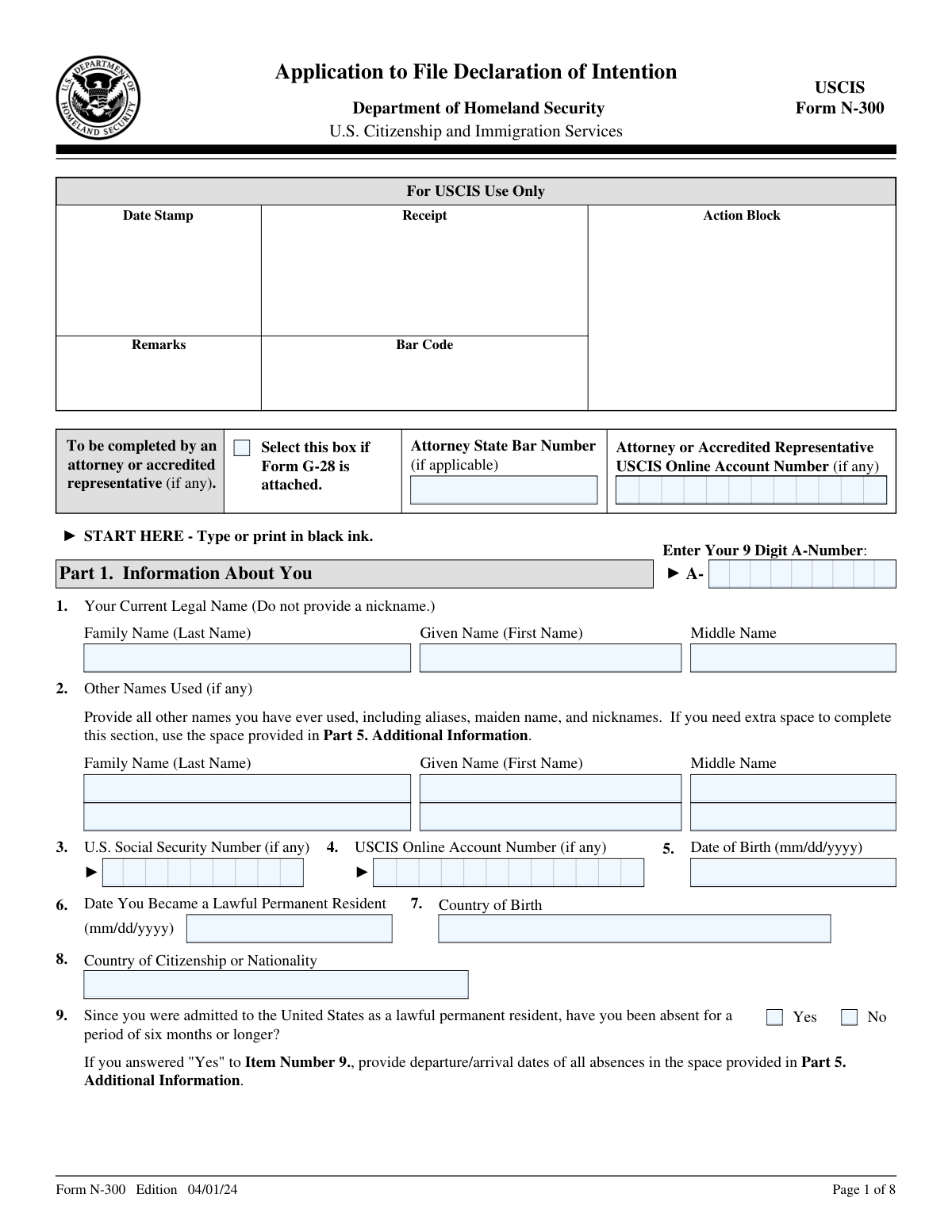
The AI does the filling. You just check it.
No typing into boxes, nothing to install.
What this form asks for
The AI fills all of it, from your answers or your documents.
The AI checks your answers before you download
15 checks built for this form, so a wrong date or a missing answer is caught before anyone else sees it.
The validation process ensures that the applicant meets the specific eligibility criteria required for the Application to File Declaration of Intention. It confirms that the applicant is indeed a lawful permanent resident of the United States. Additionally, it verifies that the applicant is over the age of 18, which is a mandatory requirement. The system also checks for proof of residency within the U.S. to establish the applicant's compliance with the residential stipulations.
This validation check confirms that the form is being accessed using the latest version of Adobe Reader. It ensures compatibility and functionality for viewing, printing, or completing the form, as older versions may not support all the features required. The system prompts the user to update their Adobe Reader if it detects an outdated version. This step is crucial to prevent any issues that might arise from incompatibility, such as incorrect form display or submission errors.
The validation process verifies that all entries on the form are completed in black ink, which is a standard requirement for official documents to ensure legibility and uniformity. It checks that the form is either typed or printed legibly, making sure that all information is clear and readable. This step is important to avoid any misunderstandings or misinterpretations of the information provided by the applicant. The system may prompt the user to make corrections if the text is not sufficiently legible.
The system checks that all questions on the form are answered completely and accurately. It ensures that for any non-applicable questions, the applicant has entered 'N/A', and for any items that require a numeric response but have a value of zero, 'None' is entered. This validation is crucial to maintain the integrity of the information provided and to avoid leaving any sections incomplete, which could lead to processing delays or rejections of the application.
This validation step validates that the applicant's current legal name is correctly provided in Part 1, Item 1 of the form, without the use of any nicknames or informal variations. It ensures that the name matches the applicant's legal documents, such as a green card or other identification. The system may cross-reference the provided name with official databases to confirm its accuracy. This is essential for the legal processing of the application and for maintaining accurate records.
This validation check ensures that the applicant has provided all other names they have used in the past, which may include aliases, maiden names, or any legal name changes. It is crucial to list all alternative names to maintain consistency in the applicant's identity records. The AI cross-references these names with other official documents to ensure accuracy and completeness. Any discrepancies or omissions are flagged for review to prevent potential issues with identity verification.
And 9 more checks
- Verifies the U.S. Social Security Number is included in Part 1, Item 3, if applicable.
- Ensures the USCIS Online Account Number is provided in Part 1, Item 4, if applicable.
- Checks that the Date of Birth is in the correct mm/dd/yyyy format in Part 1, Item 5.
- Validates the Date of Lawful Permanent Residence is in mm/dd/yyyy format in Part 1, Item 6.
- Confirms the Country of Birth and Country of Citizenship or Nationality are correctly listed in Part 1, Items 7 and 8.
- Verifies that any absence from the United States is accurately detailed in Part 1, Item 9.
- Ensures that the Mailing Address and Physical Address are complete and accurate in Part 1, Items 10 and 11.
- Checks that Part 2 is completed with the applicant's statement, contact information, and signature.
- Confirms that the Declaration of Intention in Part 6 is completed and reviewed for accuracy.
Let AI fill out your Form N-300
No typing. Every field filled in seconds, checked, ready to sign.
How to Fill Out Form N-300 Online for Free in 2026
What the AI walks you through.
- Visit instafill.ai site and select Form N-300.
- Enter your current legal name and personal details.
- Provide your contact information and mailing address.
- Complete the applicant's statement and declaration sections.
- Sign and date the form electronically.
- Check for accuracy and submit the form.
Common Mistakes in Completing Form N-300
The ones the AI is built to catch.
Failing to confirm eligibility before filing the form
Using an outdated version of Adobe Reader
Not filling out the form in black ink, typing or printing legibly
Leaving blank spaces or not answering all questions
Providing incorrect or incomplete information in Part 1, particularly Date of Birth and Country of Birth
Failure to Sign and Date the Form and Any Additional Sheets
Omitting a Mailing Address in Part 1, Item 10
Submitting Incomplete or Incorrect Evidence
Filing the Application at an Incorrect USCIS Location
Failure to Notify USCIS of Address Changes Within 10 Days
Failing to attend required interviews or appointments
Providing false information or documents
Ignoring the DHS Privacy Notice and associated documents
Frequently Asked Questions About Form N-300
Is it really free for 7 days?
Can I fill other forms too?
How do I cancel?
How does the AI fill out Form N-300?
What happens to my information?
How complex is Form N-300 to fill out?
What is the purpose of the Application to File Declaration of Intention form (N-300)?
Who should complete the Application to File Declaration of Intention form (N-300)?
What information is required in Part 1 of the Application to File Declaration of Intention form (N-300)?
What is the purpose of the Interpreter's Contact Information, Certification, and Signature section in the Application to File Declaration of Intention form (N-300)?
What is the purpose of the Preparer's Contact Information, Declaration, and Signature section in the Application to File Declaration of Intention form (N-300)?
What is the purpose of the Declaration of Intention section in the Application to File Declaration of Intention form (N-300)?
What documents should be submitted with the Application to File Declaration of Intention form (N-300)?
What is the penalty for providing false information on the Application to File Declaration of Intention form (N-300)?
How long does it take for the USCIS to process the Application to File Declaration of Intention form (N-300)?
Can the Application to File Declaration of Intention form (N-300) be filed electronically?
Get your Form N-300 filled out by AI
$0 today. Cancel before Nov 1 and you pay nothing.
Let AI fill out your Form N-300
Your trial starts once a card is added. You pay nothing before Nov 1.
Our AI already knows this form, all 152 fields of it. Skip the typing: tell it about yourself, or upload what you have, and it fills the whole form in seconds.
- AI fills every field on all 8 pages, checkboxes included
- No typing into boxes: answer a few questions, or upload a document you already have, an old copy of this form, a photo of a document
- The AI checks the answers; you review and change anything before you download
- Download the finished PDF, print it, or sign it online
- Encrypted, and never used to train AI
Cancel before Nov 1 and you pay nothing.
A card is needed to start the trial. Cancel in two clicks from your account.
Terms · Privacy