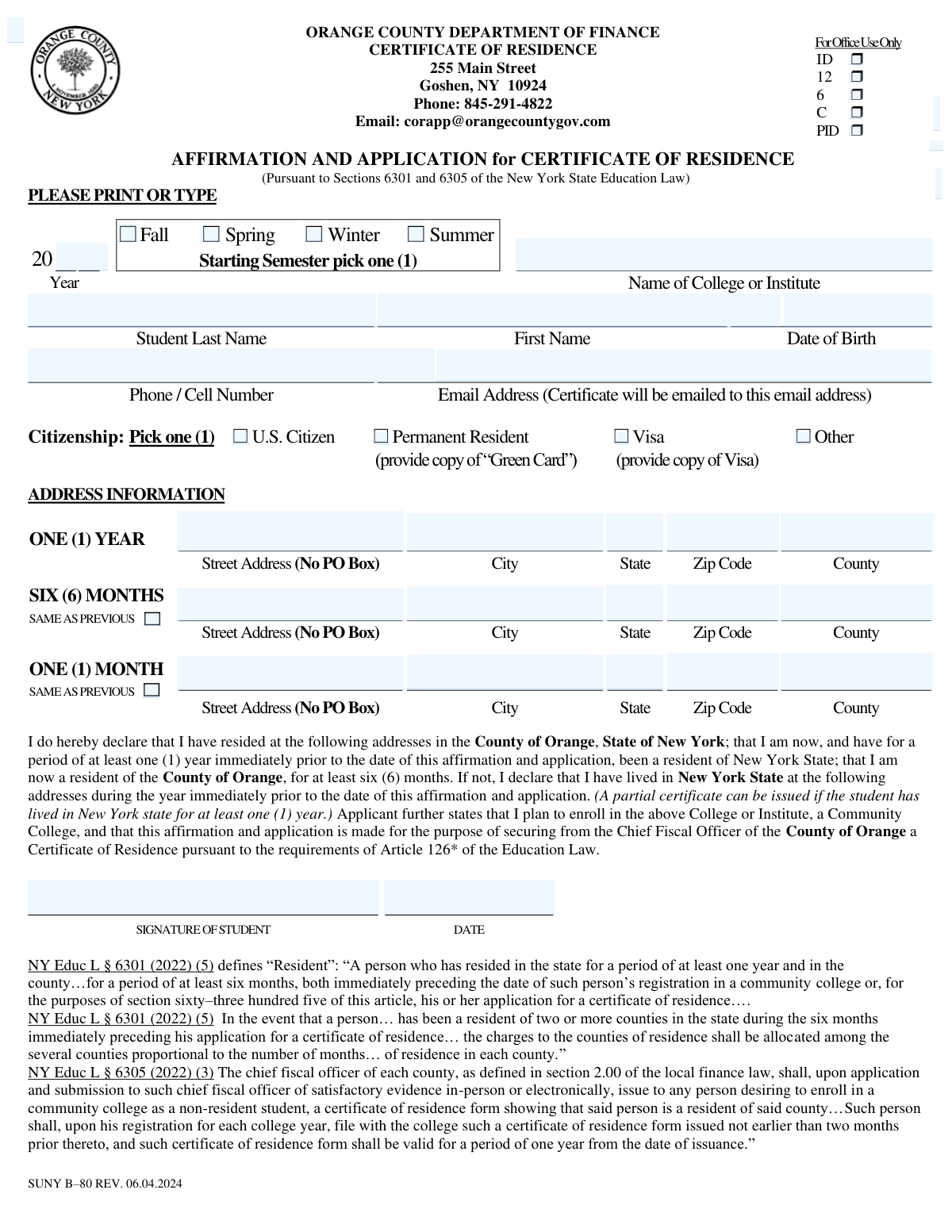
Yes! You can use AI to fill out Orange County Department of Finance Certificate of Residence (Affirmation and Application) — SUNY B-80 (Rev. 06.04.2024)

The Orange County Certificate of Residence (SUNY B-80) is an affirmation and application a student submits to the Orange County Chief Fiscal Officer/Department of Finance to obtain a Certificate of Residence required by NYS Education Law §§ 6301 and 6305. It documents the student’s residency history (generally at least 12 months in New York State and 6 months in Orange County) so the student can be charged resident tuition at a community college rather than non-resident rates. The form also ties to a documentation checklist requiring IDs and proof of residency for 12 months, 6 months, and 1 month prior to the application date. Today, this form can be filled out quickly and accurately using AI-powered services like Instafill.ai, which can also convert non-fillable PDF versions into interactive fillable forms.
Our AI automatically handles information lookup, data retrieval, formatting, and form filling.
It takes less than a minute to fill out SUNY B-80 using our AI form filling.
Securely upload your data. Information is encrypted in transit and deleted immediately after the form is filled out.

Form specifications

Form name: Orange County Department of Finance Certificate of Residence (Affirmation and Application) — SUNY B-80 (Rev. 06.04.2024)
Number of pages: 2
Language: English
Categories: education forms, Orange County forms, residency forms, SUNY forms
main-image

Instafill Demo: filling out a legal form in seconds

How to Fill Out SUNY B-80 Online for Free in 2026

Are you looking to fill out a SUNY B-80 form online quickly and accurately? Instafill.ai offers the #1 AI-powered PDF filling software of 2026, allowing you to complete your SUNY B-80 form in just 37 seconds or less.
Follow these steps to fill out your SUNY B-80 form online using Instafill.ai:
  1. 1 Go to Instafill.ai and upload the SUNY B-80 Orange County Certificate of Residence form (or select it from the form library).
  2. 2 Enter enrollment details: starting semester (Fall/Spring/Winter/Summer), year, and the name of the college or institute.
  3. 3 Fill in student identity and contact information: last name, first name, date of birth, phone/cell number, and email address (for certificate delivery).
  4. 4 Select citizenship status (U.S. Citizen, Permanent Resident, Visa, or Other) and attach required supporting documentation (e.g., Green Card or visa copy) if applicable.
  5. 5 Complete address history for the required periods (one year, six months, one month), using the “same as previous” options where applicable, ensuring no P.O. Boxes are used and county is included.
  6. 6 Review the affirmation statement for accuracy, then add the student signature and signature date using Instafill.ai’s e-sign or signature tools.
  7. 7 Use Instafill.ai to generate a submission-ready packet by checking the application checklist and organizing attachments (NYS IDs and one document each from Lists A, B, and C), then download/email the completed application for submission to Orange County Finance.

Our AI-powered system ensures each field is filled out correctly, reducing errors and saving you time.

Why Choose Instafill.ai for Your Fillable SUNY B-80 Form?

Speed

Complete your SUNY B-80 in as little as 37 seconds.

Up-to-Date

Always use the latest 2026 SUNY B-80 form version.

Cost-effective

No need to hire expensive lawyers.

Accuracy

Our AI performs 10 compliance checks to ensure your form is error-free.

Security

Your personal information is protected with bank-level encryption.

Frequently Asked Questions About Form SUNY B-80

This form is used to request a Certificate of Residence from the Orange County Department of Finance so you can be billed at the correct (resident) tuition rate at a New York community college. If you don’t submit a valid certificate to your college, you may be charged non-resident tuition.

Students who plan to enroll in a community college and need Orange County to certify their residency should complete it. The student must sign the application, even if a parent/guardian provides supporting documents.

Generally, you must have lived in New York State for at least 1 year and in Orange County for at least 6 months immediately before applying/registration. If you lived in multiple NY counties during the last 6 months, costs may be allocated by months in each county.

Yes— the form notes that a partial certificate can be issued if you have lived in New York State for at least one (1) year. Contact the Certificate of Residence Program for guidance on your specific situation.

You must list your physical street address history (no P.O. Boxes) for the 1-year, 6-month, and 1-month periods. If the 6-month or 1-month address is the same as the prior line, you can check ā€œSAME AS PREVIOUSā€ instead of re-entering it.

You must submit: (1) a signed application, (2) a copy of the student’s NYS ID and the parent/legal guardian’s NYS ID if applicable, and (3) one document from List A, one from List B, and one from List C. These documents prove NYS residency (12 months) and Orange County residency (6 months and 1 month).

List A (12 months NYS): utility/cable bill, NYS income tax return (IT-201 or IT-150), property tax paid, or NYS vehicle registration dated 12 months prior. List B (6 months Orange County) and List C (1 month Orange County) include items like utility/cable bills, mortgage statements, auto/home insurance bills, or bank/credit card statements dated for those timeframes.

If you are financially dependent and under 24, you must submit documents in the parent/legal guardian’s name, and you must live with that parent/guardian. If you claim financial independence, you must provide proof of independence as required by NY Education Law.

The form instructs you to contact the Certificate of Residence Program for further instructions in that situation. This helps the office confirm the relationship and residency documentation correctly.

Select one status: U.S. Citizen, Permanent Resident, Visa, or Other. If you select Permanent Resident, include a copy of your Green Card; if you select Visa, include a copy of your visa.

Applications are accepted by email, postal service, or in person through the Orange County Department of Finance. The form lists contact details (Phone: 845-291-4822; Email: [email protected]) and office hours Monday–Friday, 9:00 AM–4:45 PM.

Certificates are emailed to students about 7–10 business days after the Finance Department receives all required documentation. Incomplete applications are not processed until all required paperwork is received.

Certificates are issued from 60 days prior to registration up to 30 days after the beginning of each semester. A certificate is valid for one year from the date of issuance, and it must be issued no earlier than two months prior to the time you file it with the college for that year.

Yes—once you receive the certificate by email, you are responsible for providing a copy to your college(s) within ten (10) days of issuance. Keep an eye on your email and confirm you received it.

Yes—AI tools can help reduce errors and save time; services like Instafill.ai can auto-fill form fields accurately using the information you provide. If your PDF is flat/non-fillable, Instafill.ai can convert it into an interactive fillable form and then help you complete it online.

Compliance SUNY B-80
Validation Checks by Instafill.ai

1
Ensures exactly one Starting Semester is selected
Validates that the applicant selects one and only one checkbox among Fall, Spring, Winter, and Summer. This prevents ambiguity about the intended enrollment term, which affects certificate timing rules (issued 60 days prior to registration and valid for one year). If none or multiple are selected, the submission should be rejected or routed back for correction before processing.
2
Validates Starting Semester Year is present and a plausible 4-digit year
Checks that the Year field is completed and formatted as a 4-digit year (e.g., 2026) within an acceptable range (e.g., current year ± a configurable window). The year is required to determine whether the certificate issuance window and residency documentation dates align with the intended enrollment period. If invalid or missing, the application should be marked incomplete and not processed.
3
Requires College/Institute Name and blocks placeholder/blank values
Ensures the Name of College or Institute is provided and is not an empty string, initials-only, or a generic placeholder (e.g., 'SUNY', 'TBD'). The certificate is issued for the purpose of enrolling in a community college, and the destination institution is needed for correct issuance and recordkeeping. If missing or clearly non-specific, the application should be returned for completion.
4
Validates Student Name fields are complete and contain only valid characters
Checks that Student First Name and Student Last Name are both present and contain reasonable name characters (letters, spaces, hyphens, apostrophes) while rejecting numeric-only or symbol-heavy entries. Accurate names are essential for matching IDs and residency documents and for issuing the certificate correctly. If validation fails, the submission should be flagged for correction to avoid mismatches and processing delays.
5
Validates Date of Birth format and plausibility
Ensures Date of Birth is provided in an accepted date format and represents a real calendar date. Also checks plausibility (e.g., not in the future and not indicating an implausible age such as under 10 or over 120). If invalid, the application should be rejected as incomplete/incorrect because DOB is a key identifier for verification.
6
Validates Phone/Cell Number format and minimum completeness
Checks that the phone number is present and matches an acceptable US phone format (10 digits, allowing separators and optional country code +1). A valid phone number is important for resolving documentation issues and preventing processing delays. If invalid or missing, the application should be flagged as incomplete and require correction.
7
Validates Email Address format and deliverability constraints
Ensures the email address is present, syntactically valid (local@domain), and does not contain obvious typos (e.g., missing TLD) or disallowed characters. Because the certificate will be emailed to this address, an invalid email can prevent delivery and create compliance issues with issuance timelines. If validation fails, the system should block submission or require the applicant to correct the email.
8
Ensures exactly one Citizenship status is selected and enforces required supporting document for non-citizens
Validates that exactly one option is selected among U.S. Citizen, Permanent Resident, Visa, and Other. If Permanent Resident is selected, the submission must include a Green Card copy; if Visa is selected, a visa copy must be included (and if 'Other' is selected, the system should require a clarifying text/attachment if supported). If these conditions are not met, the application should be marked incomplete and not processed until documentation is provided.
9
Validates One (1) Year address is complete and disallows P.O. Boxes
Checks that the One (1) Year Street Address, City, State, Zip Code, and County are all provided and that the street address is not a P.O. Box (e.g., contains 'PO Box', 'P.O. Box', or similar patterns). The form explicitly states PO Box is not acceptable, and the one-year address supports NYS residency determination. If incomplete or a PO Box is detected, the application should be rejected or returned for correction.
10
Validates Six (6) Months address logic with 'SAME AS PREVIOUS' toggle
If 'Six (6) Months - SAME AS PREVIOUS' is checked, the system should ensure the six-month address fields are blank/ignored and that the one-year address exists to inherit from. If it is not checked, then all six-month address components must be present and must also disallow P.O. Boxes. If the toggle and fields conflict (e.g., checked but fields filled, or unchecked but fields missing), the submission should be flagged for correction.
11
Validates One (1) Month address logic with 'Same as Previous' toggle
If 'One (1) Month - Same as Previous' is checked, the one-month address fields should be blank/ignored and the system should inherit from the prior address (six-month if provided, otherwise one-year). If it is not checked, all one-month address components must be present and must not be a P.O. Box. Conflicts between the toggle and entered data should cause the application to be marked incomplete until resolved.
12
Validates State and ZIP code formats and cross-checks for New York residency claims
Ensures State values are valid US states (preferably two-letter abbreviations) and ZIP codes are 5-digit or ZIP+4 formats. Additionally, because the applicant attests to NYS residency for at least one year, the system should flag cases where the One (1) Year state is not NY (or where the address history contradicts the attestation) for manual review. If formats are invalid, block submission; if residency contradictions exist, route to review rather than auto-approve.
13
Validates County field consistency with Orange County requirement for 6-month residency
Checks that the county listed for the six-month period (or inherited address) is 'Orange' (or 'Orange County') to support the requirement of Orange County residency for at least six months. If the six-month county is not Orange, the system should either require additional address history/allocations (per the law excerpt) or flag the application for special handling rather than standard issuance. If the county field is missing, the application should be treated as incomplete.
14
Requires Student Signature and validates Signature Date format and presence
Ensures the Student Signature field is completed (e.g., non-empty e-signature capture or typed signature per system rules) and that the Signature Date is present and a valid date. The signature is the applicant’s certification of residency statements and is required for a valid application. If either is missing or the date is invalid, the application must be rejected as unsigned/incomplete.
15
Checks Signature Date is not in the future and aligns with certificate issuance timing rules
Validates that the signature date is not later than the submission date and not in the future. Optionally, it should flag cases where the signature date is too far from the intended semester (e.g., outside the 'issued not earlier than two months prior' guidance) for staff review, since timing affects certificate validity. If the date is in the future or malformed, block submission; if timing is questionable, route to manual review.
16
Validates required submission checklist items and supporting document presence
Ensures the applicant (or staff intake workflow) confirms the Signed Application, NYS ID copy (student and parent/legal guardian if applicable), and one document each from Lists A, B, and C. The checklist should be backed by actual attachment presence and type/date verification where possible, not just checked boxes. If any required item is unchecked or missing attachments, the application should be marked incomplete and not processed until all required documentation is received.

Common Mistakes in Completing SUNY B-80

Selecting multiple (or no) starting semester checkboxes

Applicants often check more than one semester (or forget to check any) because the layout looks like a general term list rather than a ā€œpick oneā€ question. This can delay processing because the office can’t tell which registration window and certificate timing rules apply. Check exactly one box (Fall/Spring/Winter/Summer) and make sure the Year field next to it is filled in. AI-powered tools like Instafill.ai can enforce single-select logic and flag missing term/year before submission.

Leaving the Year blank or entering the wrong year for the starting semester

People frequently enter the current year by habit, or leave the year empty, especially when applying months ahead of registration. An incorrect year can cause the certificate to be issued outside the valid window (issued not earlier than two months prior) or not match the college’s expected term. Use the year of the semester you will actually start (e.g., Spring 2026) and double-check against your college registration date. Instafill.ai can validate the year format and cross-check it against the selected semester.

Using a P.O. Box or incomplete street address (missing apartment/unit)

Despite the form stating ā€œNo PO Box,ā€ applicants still enter a P.O. Box or omit unit numbers because they copy a mailing address instead of a physical residence. This can lead to rejection or requests for clarification since residency must be tied to a physical location. Provide a full physical street address including apartment/unit, and ensure it matches your supporting documents. Instafill.ai can detect P.O. Box patterns and prompt for a valid street address.

Misunderstanding the 1-year / 6-month / 1-month address sections

Applicants often think these are optional or only for people who moved, and they leave rows blank without checking ā€œSAME AS PREVIOUS.ā€ Missing address history makes it hard to confirm NYS residency for 12 months and Orange County residency for 6 months and 1 month, which can stall or deny issuance. If your address is unchanged, check the ā€œSAME AS PREVIOUSā€ boxes; if you moved, complete each row fully with the correct address for that time period. Instafill.ai can guide you through conditional fields so you don’t leave required address rows incomplete.

Entering the wrong county (or leaving county blank)

Many people put ā€œOrange Countyā€ everywhere automatically, or they leave the county field empty because they assume the ZIP code is enough. If any address is outside Orange County during the relevant period, the county allocation rules may apply, and incorrect county entries can cause delays or incorrect billing. Look up the correct county for each address (especially if you lived near county borders) and enter it consistently with your documents. Instafill.ai can auto-derive county from address/ZIP and flag mismatches.

Name and DOB not matching official ID or college records

Applicants sometimes use nicknames, omit hyphens/suffixes, or enter a DOB in the wrong format, especially when typing quickly. Mismatches can trigger manual verification, slow processing, or cause the certificate to be unusable when the college compares it to admissions records. Enter your legal name exactly as shown on your NYS ID and use a clear date format (e.g., MM/DD/YYYY) consistently. Instafill.ai can standardize name formatting and validate date entries to reduce errors.

Providing an email address that is mistyped, inactive, or not checked

Because the certificate is emailed, a single typo (missing character, wrong domain) or using an old school email can mean you never receive the certificate. This leads to missed deadlines and potential non-resident tuition charges if the college doesn’t get the certificate in time. Use an email you actively monitor, type it carefully, and consider sending from/adding the county email to safe senders. Instafill.ai can validate email formatting and prompt you to confirm high-risk typos.

Not choosing exactly one citizenship status or forgetting required copies (Green Card/Visa)

Applicants sometimes check multiple citizenship boxes or select Permanent Resident/Visa but forget to include the required copy of the Green Card or Visa. Missing or conflicting citizenship information can pause processing while staff request clarification or documents. Check only one status and attach the required proof if you select Permanent Resident or Visa; if ā€œOther,ā€ be prepared to provide supporting documentation if requested. Instafill.ai can enforce single-choice selection and generate a document checklist based on the selected status.

Submitting the wrong residency documents (not one each from List A, B, and C or wrong dates)

A very common error is attaching documents that don’t match the required timeframes (12 months prior for List A, 6 months prior for List B, 1 month prior for List C) or submitting multiple from one list but none from another. This results in an ā€œincomplete applicationā€ and delays because the office will not process until all required paperwork is received. Pick exactly one acceptable document from each list and ensure the statement/bill date aligns with the required period relative to your application date. Instafill.ai can help by labeling uploads by list, checking date ranges, and warning when a document doesn’t meet the timeframe.

Dependent students under 24 submitting documents in the student’s name instead of the parent/guardian’s

Students under 24 who are financially dependent often submit utility bills or statements in their own name, not realizing the form requires dependent students to submit documents under the parent/legal guardian’s name (and the student must reside with them). This can cause denial or a request for resubmission, especially when the parent/guardian name differs from the student’s last name. Confirm whether you are considered financially dependent and submit the required documents in the correct person’s name; contact the program if last names differ. Instafill.ai can ask dependency questions up front and tailor the document requirements accordingly.

Missing signature and signature date (or using a typed name where a signature is required)

Applicants frequently forget to sign/date after focusing on the address and document requirements, or they type their name on a printed form without an acceptable signature. An unsigned application is considered incomplete and will not be processed, delaying certificate issuance. Sign with your usual legal signature and date it the same day you submit (unless instructed otherwise). Instafill.ai can flag missing signature/date fields and, if the form is a flat non-fillable PDF, can convert it into a fillable version to reduce missed fields.
Saved over 80 hours a year

ā€œI was never sure if my IRS forms like W-9 were filled correctly. Now, I can complete the forms accurately without any external help.ā€

Kevin Martin Green

Your data stays secure with advanced protection from Instafill and our subprocessors

Robust compliance program

Transparent business model

You’re not the product. You always know where your data is and what it is processed for.

ISO 27001, HIPAA, and GDPR

Our subprocesses adhere to multiple compliance standards, including but not limited to ISO 27001, HIPAA, and GDPR.

Security & privacy by design

We consider security and privacy from the initial design phase of any new service or functionality. It’s not an afterthought, it’s built-in, including support for two-factor authentication (2FA) to further protect your account.

Fill out SUNY B-80 with Instafill.ai

Worried about filling PDFs wrong? Instafill securely fills orange-county-department-of-finance-certificate-of-residence-affirmation-and-application-suny-b-80-rev-06042024 forms, ensuring each field is accurate.