Yes! You can use AI to fill out Out-of-Network Pre-Authorization and Exception Request Form
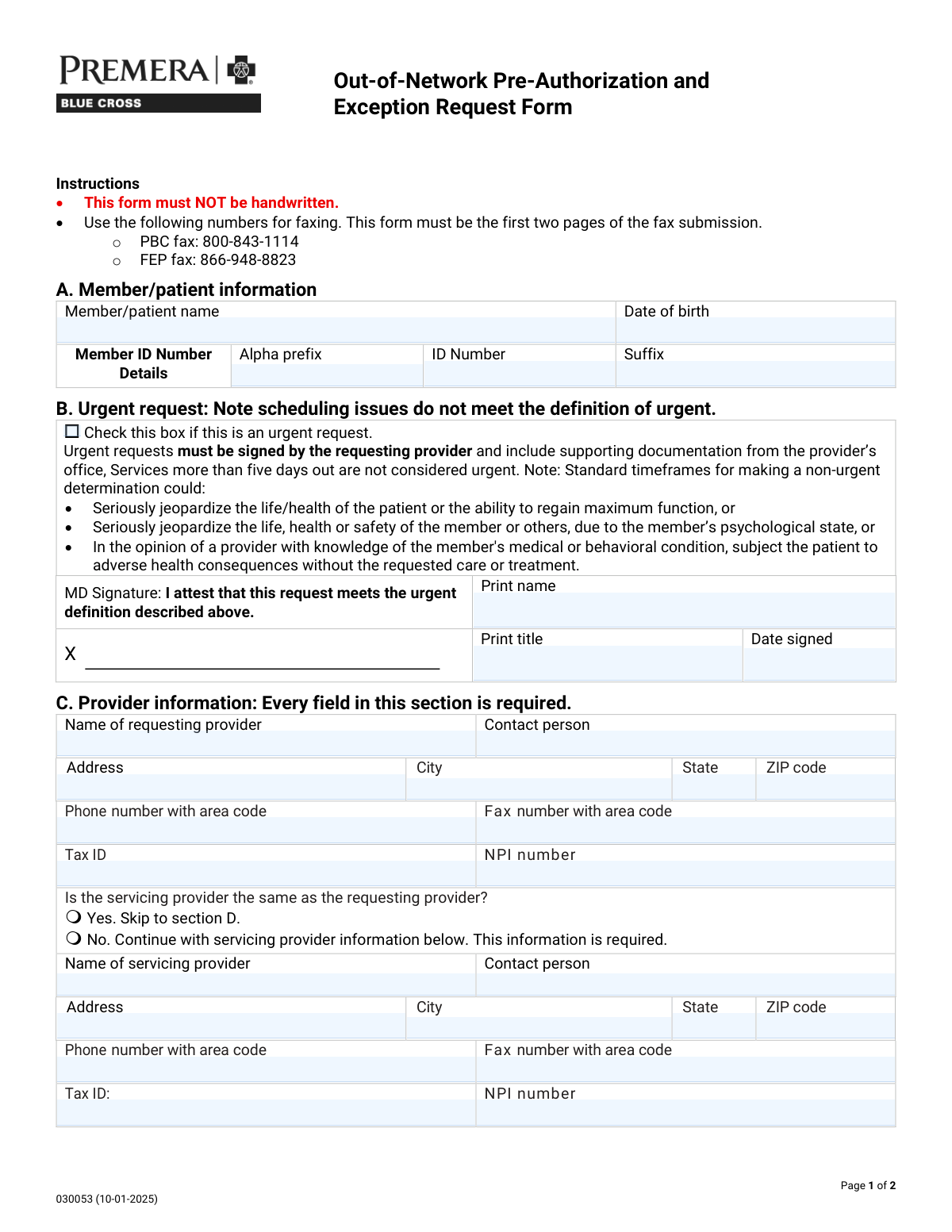
The Out-of-Network Pre-Authorization and Exception Request Form is a health plan utilization-management document used to request prior authorization and/or an exception (such as Transition of Care, Continuity and Coordination of Care, Benefit Level Exception, or a Single Case Agreement) for services delivered by an out-of-network provider or facility. It captures member details, requesting/servicing provider information, facility type and identifiers (Tax ID/NPI), and the clinical/administrative justification with procedure (CPT), modifier, units, and ICD diagnosis codes. It is important because incomplete or unsupported requests can delay determinations and may affect coverage or payment for out-of-network services, and urgent requests require a provider attestation meeting specific criteria. Today, this form can be filled out quickly and accurately using AI-powered services like Instafill.ai, which can also convert non-fillable PDF versions into interactive fillable forms.
Our AI automatically handles information lookup, data retrieval, formatting, and form filling.
It takes less than a minute to fill out Out-of-Network Pre-Auth & Exception Request (030053) using our AI form filling.
Securely upload your data. Information is encrypted in transit and deleted immediately after the form is filled out.
Form specifications
| Form name: | Out-of-Network Pre-Authorization and Exception Request Form |
| Number of pages: | 2 |
| Language: | English |
| Categories: | insurance forms, prior authorization forms, medical authorization forms, health insurance forms, authorization forms |
Instafill Demo: filling out a legal form in seconds
How to Fill Out Out-of-Network Pre-Auth & Exception Request (030053) Online for Free in 2026
Are you looking to fill out a OUT-OF-NETWORK PRE-AUTH & EXCEPTION REQUEST (030053) form online quickly and accurately? Instafill.ai offers the #1 AI-powered PDF filling software of 2026, allowing you to complete your OUT-OF-NETWORK PRE-AUTH & EXCEPTION REQUEST (030053) form in just 37 seconds or less.
Follow these steps to fill out your OUT-OF-NETWORK PRE-AUTH & EXCEPTION REQUEST (030053) form online using Instafill.ai:
- 1 Go to Instafill.ai and upload the Out-of-Network Pre-Authorization and Exception Request Form (or search/select it from the form library).
- 2 Let the AI detect and map all fields, then enter member/patient information (name, date of birth, and member ID alpha prefix/number/suffix).
- 3 Indicate whether the request is urgent; if urgent, complete the provider attestation section (printed name, title, and date signed) and prepare supporting documentation.
- 4 Complete requesting provider details (provider name, contact person, address, phone/fax, Tax ID, and NPI) and specify whether the servicing provider is the same; if not, enter servicing provider information.
- 5 Select the facility type (e.g., inpatient, outpatient, ASC, LLOC, home/office/other) and fill in facility identifiers and contact details (name, address, phone/fax, Tax ID, NPI).
- 6 Choose the reason/request type (Transition of Care, Continuity/Coordination, Benefit Level Exception/BLE extension, Single Case Agreement/SCA extension), then enter CPT/procedure codes, modifiers, units, ICD diagnosis codes, and a detailed justification for why the out-of-network provider is required; attach supporting medical records as needed.
- 7 Review for completeness (required fields, signatures/attestation, and attachments), then download the finalized packet and submit it per the form instructions (ensuring the first two pages are first in the fax submission).
Our AI-powered system ensures each field is filled out correctly, reducing errors and saving you time.
Why Choose Instafill.ai for Your Fillable Out-of-Network Pre-Auth & Exception Request (030053) Form?
Speed
Complete your Out-of-Network Pre-Auth & Exception Request (030053) in as little as 37 seconds.
Up-to-Date
Always use the latest 2026 Out-of-Network Pre-Auth & Exception Request (030053) form version.
Cost-effective
No need to hire expensive lawyers.
Accuracy
Our AI performs 10 compliance checks to ensure your form is error-free.
Security
Your personal information is protected with bank-level encryption.
Frequently Asked Questions About Form Out-of-Network Pre-Auth & Exception Request (030053)
This form is used to request approval for services from an out-of-network provider or facility, or to request an exception (such as a Benefit Level Exception or Single Case Agreement). It helps the plan review medical necessity and why in-network options may not be appropriate.
It is typically completed and submitted by the requesting provider (or their office) because it requires provider details, clinical documentation, and sometimes an urgent attestation signature. Patients can help by providing member ID details and history, but the provider should finalize and send it.
No. The instructions state the form must NOT be handwritten, so it should be typed or completed electronically before faxing.
Fax the first two pages as the first pages of your fax submission. Use PBC fax: 800-843-1114 or FEP fax: 866-948-8823, depending on the memberâs plan.
You must provide the member/patient name, date of birth, and the full member ID broken into alpha prefix, ID number, and suffix. Enter each part exactly as it appears on the member ID card.
Urgent requests are only for situations where standard timeframes could seriously jeopardize the patientâs life/health, ability to regain maximum function, or safety (including behavioral health risks). Scheduling issues do not qualify, and services more than five days out are not considered urgent.
The urgent request must be signed by the requesting provider and include supporting documentation from the providerâs office. The provider must print their name and title and include the date signed in the urgent attestation area.
Yes. The form states every field in Section C is required, including provider name, contact person, address, phone/fax, Tax ID, and NPI.
Select âNoâ in Section C and complete the servicing provider information below (name, contact, address, phone/fax, Tax ID, and NPI). This servicing provider information is required when they are not the same.
Select the facility type (e.g., inpatient hospital, outpatient hospital, ambulatory surgical center, LLOC options like SNF/LTAC/RTC, home, office, or other) and then fill in the facilityâs name, contact, address, phone/fax, and the required Tax ID and NPI.
You must check the box that matches what youâre requesting: Transition of Care, Continuity and Coordination of Care, Benefit Level Exception (or extension), or Single Case Agreement (or extension). Choose the option that best fits the reason you need out-of-network services and include supporting details.
You must attach supporting medical records and include presenting symptoms and previous treatment. The form also asks for procedure/CPT codes, modifiers, units, ICD diagnosis codes, and a detailed explanation of why only this out-of-network provider can provide the service.
Yes. The form notes that billed charges for SCAs must be over $1000 to be considered.
No, unless specifically requested elsewhere in the document. The form explicitly says not to send DNA or other genetic samples or genetic test results/analysis unless specifically requested.
Yes. Tools like Instafill.ai can use AI to auto-fill form fields accurately from the information you provide, saving time and reducing errors. You typically upload the PDF to Instafill.ai, answer a guided set of questions (member, provider, facility, codes, and rationale), and then download a completed, typed form ready to fax.
If the PDF is flat/non-fillable, Instafill.ai can convert it into an interactive fillable form so you can type into the fields. After conversion, you can auto-fill and export a clean, non-handwritten version for submission.
Compliance Out-of-Network Pre-Auth & Exception Request (030053)
Validation Checks by Instafill.ai
1
Ensures Member/Patient Name is present and appears to be a full legal name
Validates that the Member/Patient Name field is not blank and contains at least two alphabetic name components (e.g., first and last name), not just initials or placeholder text (e.g., 'N/A', 'Unknown'). This is important for accurately matching the request to the correct member record and avoiding misrouting or duplicate cases. If validation fails, the submission should be rejected or routed to manual review with a request for corrected member identification.
2
Validates Date of Birth format and plausibility
Checks that Date of Birth is provided in an accepted date format (e.g., MM/DD/YYYY) and represents a real calendar date. Also validates plausibility (e.g., not in the future and not unreasonably old such as >120 years). This prevents eligibility mismatches and downstream system errors caused by invalid dates. If validation fails, the form should be flagged as incomplete and returned for correction.
3
Validates Member ID components (alpha prefix, numeric ID, suffix) and allowed character rules
Ensures the Member ID Alpha Prefix contains only letters (commonly 1â3 characters), the Member ID Number contains only digits with an expected length range, and the Suffix (if used) matches allowed alphanumeric patterns. This is critical for correct member lookup and to prevent failed eligibility queries due to formatting issues. If validation fails, the submission should be stopped and the submitter prompted to correct the ID fields.
4
Urgent request attestation completeness when Urgent is selected
If the Urgent Request box is checked, validates that Attestation Print Name, Attestation Print Title, and Attestation Date Signed are all present. The form states urgent requests must be signed by the requesting provider and include supporting documentation, so missing attestation elements undermine compliance and processing timelines. If validation fails, the request should be treated as non-urgent or rejected until the attestation fields are completed.
5
Validates Attestation Date Signed format and not in the future
Checks that the Attestation Date Signed is a valid date in the accepted format and is not later than the submission date. This ensures the attestation is contemporaneous and defensible for audit and regulatory requirements. If validation fails, the submission should be flagged for correction or manual verification before being processed as urgent.
6
Requesting provider section completeness (all fields required)
Validates that every field in the Requesting Provider Information section is populated: provider name, contact person, address, city, state, ZIP, phone, fax, tax ID, and NPI. The form explicitly states every field in this section is required, and missing data prevents outreach, credential checks, and proper case setup. If validation fails, the submission should be rejected as incomplete and returned for missing provider details.
7
Validates US State field uses a valid 2-letter abbreviation
Checks that State fields (requesting provider, servicing provider, and facility) are valid USPS two-letter abbreviations (e.g., 'CA', 'NY') and not free-text state names or invalid codes. Standardized state codes improve address validation, routing, and network/benefit rule application. If validation fails, the system should prompt for correction and prevent submission until a valid code is provided.
8
Validates ZIP code format (5-digit or ZIP+4) across provider and facility addresses
Ensures ZIP codes are either 5 digits (#####) or ZIP+4 (#####-####) and contain no letters. Correct ZIP formatting supports address normalization, regional routing, and reduces mail/fax follow-up failures. If validation fails, the submission should be flagged and the user required to correct the ZIP code.
9
Validates phone and fax number formats (10-digit NANP) and disallows obvious placeholders
Checks that phone and fax numbers include a valid 10-digit North American Numbering Plan structure (optionally with separators) and are not placeholders like '0000000000' or repeated digits. Accurate contact numbers are essential for time-sensitive authorization follow-up and documentation requests. If validation fails, the system should block submission or route to manual review depending on business rules.
10
Validates Tax ID (EIN) format for requesting/servicing provider and facility
Ensures Tax ID values are present where required and match expected EIN formatting (9 digits, optionally displayed as ##-#######), and are not all zeros. Tax IDs are used for contracting, payment, and entity identification, and invalid values can cause claim/payment setup failures. If validation fails, the submission should be rejected or held until corrected.
11
Validates NPI format and checksum for requesting/servicing provider and facility
Checks that NPI numbers are exactly 10 digits and pass the NPI Luhn check-digit validation. NPIs are critical identifiers for provider/facility verification and downstream authorization and claims workflows. If validation fails, the system should prevent submission or require correction before proceeding.
12
Servicing provider conditional requirement based on 'same as requesting provider' selection
Validates that exactly one option is selected for whether the servicing provider is the same as the requesting provider (Yes/No). If 'No' is selected, all servicing provider fields must be completed; if 'Yes' is selected, servicing provider fields should be empty or ignored to avoid conflicting data. This prevents ambiguity about who will render services and ensures correct authorization entity mapping. If validation fails, the submission should be blocked until the selection and dependent fields are consistent.
13
Facility type selection consistency (single primary type and required 'Other' specification)
Validates that a facility type is selected and that mutually exclusive primary facility types are not selected simultaneously (e.g., Inpatient hospital and Office). If 'Other' is selected, the Other Facility Type text must be provided and non-trivial (not 'N/A'). Correct facility classification drives benefit rules, level-of-care logic, and routing. If validation fails, the system should require correction before accepting the submission.
14
Facility details completeness and required identifiers (Tax ID and NPI required)
Checks that Facility Name, contact, address, city, state, ZIP, phone, and fax are present, and specifically enforces that Facility Tax ID and Facility NPI are provided (marked required on the form). Missing facility identifiers can prevent verification and cause authorization to be issued to the wrong entity. If validation fails, the submission should be rejected as incomplete.
15
Prior visit and emergency follow-up date dependency validation
If 'Has the patient seen this provider in the past?' is 'Yes', validates that the 'last visit' date is provided and is a valid past date. If 'follow-up to an emergency' is 'Yes', validates that the corresponding 'last visit' date is provided and is a valid past date as well. These dates support medical necessity context and may affect transition-of-care/continuity determinations. If validation fails, the system should prompt for the missing/invalid date and hold the request.
16
Request type selection and SCA email requirement when applicable
Validates that at least one request type is selected (Transition of Care, Continuity/Coordination, Benefit Level Exception, BLE Extension, SCA, SCA Extension). If SCA or SCA Extension is selected, ensures the SCA contact email address is provided and matches a standard email format (local@domain). This is important because SCA processing typically requires negotiation/communication and missing contact info delays turnaround. If validation fails, the submission should be blocked or routed to manual follow-up with the requester.
17
Procedure/CPT, modifier, units, and ICD-10 code format validation
Checks that each provided CPT/procedure code matches expected formats (typically 5 digits for CPT, or valid HCPCS patterns if allowed), modifiers are limited to allowed values listed (LT/RT/NU/RR) when present, units are positive integers, and ICD diagnosis codes match ICD-10 formatting (e.g., letter + 2 digits with optional decimal and additional characters). Accurate coding is essential for medical review, benefit application, and authorization scope. If validation fails, the system should flag the specific line item(s) and require correction before clinical review.
Common Mistakes in Completing Out-of-Network Pre-Auth & Exception Request (030053)
This form explicitly states it must NOT be handwritten, but people still print and handwrite out of habit or due to lack of fillable fields. Handwritten submissions are often rejected, delayed, or misread during intake, which can push back authorization decisions. Always type directly into the form (or a fillable version) and ensure the final output is clean and legible. If the PDF is flat/non-fillable, Instafill.ai can convert it into a fillable version and help ensure typed, properly formatted entries.
Submitters often fax only the clinical notes or only page 2, forgetting the instruction that the first two pages must be the first pages of the fax submission. Others send to the wrong fax line (PBC vs FEP), which can route the request incorrectly and cause significant delays. Always confirm the memberâs plan type and use the correct fax number, and place pages 1â2 at the very front of the fax packet. Using an AI-assisted workflow like Instafill.ai can help assemble the packet in the correct order and reduce routing errors.
A very common error is entering the entire ID into one field, swapping the alpha prefix and numeric portion, or leaving the suffix blank when it exists. This causes member lookup failures, mismatched eligibility, and delays while the plan requests corrections. Copy the ID exactly as it appears on the member card and split it into alpha prefix, ID number, and suffix as required. Instafill.ai can help validate the expected format and prevent transposed or incomplete ID entries.
People frequently use inconsistent date formats (MM/DD/YY vs MM/DD/YYYY) or accidentally enter the subscriberâs DOB instead of the patientâs. Even small DOB mismatches can prevent the payer from locating the correct member record and can trigger rework requests. Use a consistent, unambiguous format (typically MM/DD/YYYY unless otherwise specified) and confirm the DOB matches the patient on the insurance record. AI-powered tools like Instafill.ai can standardize date formatting and cross-check for common mismatches.
Submitters often check âurgentâ due to scheduling pressure, but the form clearly states scheduling issues do not qualify and services more than five days out are not considered urgent. Misuse of urgent status can lead to denial of the urgent designation, processing delays, or requests for additional documentation. Only mark urgent when the clinical criteria listed are met and include the required supporting documentation from the providerâs office. Instafill.ai can prompt for the required urgent criteria and ensure the attestation fields and documentation checklist are complete.
When urgent is selected, the form requires the requesting providerâs signature attestation plus printed name, title, and date signedâthese are often left blank or partially completed. Incomplete attestation can cause the request to be treated as standard/non-urgent or pended for corrections. Ensure all attestation fields are completed by the appropriate provider and the date signed is included. Instafill.ai can flag missing required fields when âurgentâ is checked and prevent submission until the attestation is complete.
Section C states every field is required, but submissions commonly omit Tax ID, NPI, fax number, or a contact person. Missing identifiers prevent the payer from verifying provider credentials and can delay contracting, SCA review, or authorization processing. Complete every field for the requesting provider and double-check that phone/fax include area codes. Instafill.ai can auto-populate provider demographics from saved profiles and validate that required identifiers are present.
People often check âYes, same providerâ but still fill servicing fields inconsistently, or check âNoâ and then forget to complete the servicing provider section. This creates conflicting information about who will render services, which can lead to authorization issued to the wrong entity or a request for clarification. Choose the correct option and follow the instruction: if âYes,â skip; if âNo,â complete all servicing provider fields. Instafill.ai can enforce conditional logic so the correct sections appear and required fields are completed based on the selection.
Facility section errors include selecting multiple facility types, failing to choose a required sub-type under inpatient hospital (e.g., medical vs surgical), or selecting âOtherâ without specifying what it is. Ambiguity about the site of service can affect medical necessity review, benefit application, and network exception evaluation. Select the single best matching facility type and complete any applicable sub-category, and specify âOtherâ clearly when used. Instafill.ai can guide users to make consistent selections and require the âOtherâ description when that option is chosen.
The facility Tax ID and NPI are marked required, but many submissions either leave them blank or mistakenly enter the requesting providerâs Tax ID/NPI instead of the facilityâs. This can cause claims/payment issues later and can delay authorization if the payer cannot validate the facility. Confirm the facilityâs legal name, Tax ID, and NPI from the facilityâs credentialing/registration information and enter them in the facility section. Instafill.ai can store separate profiles for provider vs facility to prevent mixing identifiers.
Submitters often forget to check a request type (Transition of Care, Continuity, BLE, SCA, etc.), request an SCA without meeting the noted billed-charge threshold (over $1000), or omit the required email contact for SCA. Another frequent issue is providing a vague explanation (e.g., âspecialist neededâ) without detailing why only this out-of-network provider can deliver the service, which leads to pends or denials. Select the correct request type(s), include the SCA email when applicable, and write a specific justification (unique expertise, lack of in-network availability within reasonable distance/time, continuity needs, prior failed treatments, etc.). Instafill.ai can prompt for missing SCA-specific fields and help structure the justification so it addresses typical payer review criteria.
Saved over 80 hours a year
âI was never sure if my IRS forms like W-9 were filled correctly. Now, I can complete the forms accurately without any external help.â
Kevin Martin Green
Your data stays secure with advanced protection from Instafill and our subprocessors

Robust compliance program
Transparent business model
Youâre not the product. You always know where your data is and what it is processed for.
ISO 27001, HIPAA, and GDPR
Our subprocesses adhere to multiple compliance standards, including but not limited to ISO 27001, HIPAA, and GDPR.
Security & privacy by design
We consider security and privacy from the initial design phase of any new service or functionality. Itâs not an afterthought, itâs built-in, including support for two-factor authentication (2FA) to further protect your account.
Fill out Out-of-Network Pre-Auth & Exception Request (030053) with Instafill.ai
Worried about filling PDFs wrong? Instafill securely fills out-of-network-pre-authorization-and-exception-request-form-1 forms, ensuring each field is accurate.