Yes! You can use AI to fill out Outgoing International Bank Wire — FOREX Wire

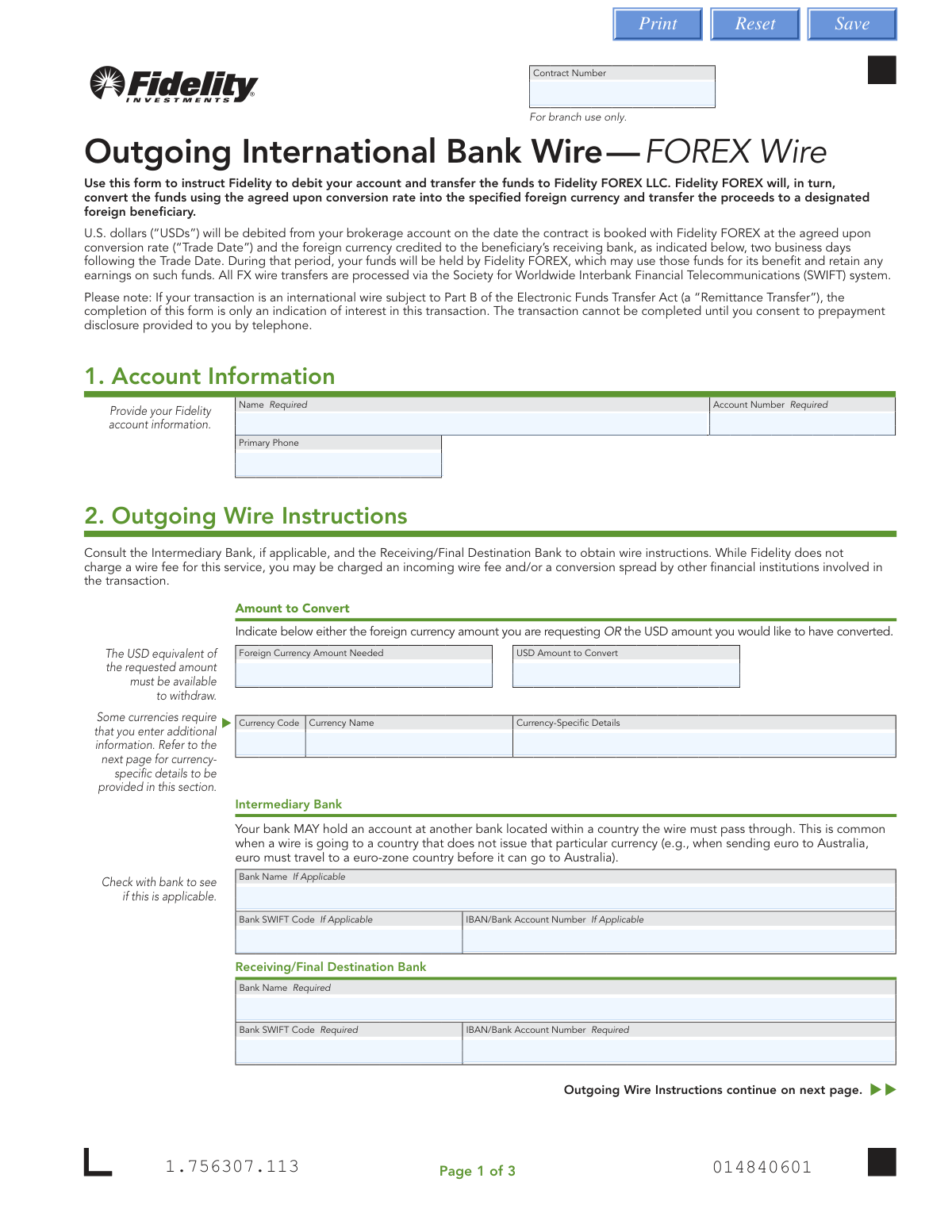
This form is an authorization for Fidelity to debit a brokerage account, convert the funds from U.S. dollars to a specified foreign currency via Fidelity FOREX LLC, and transfer the proceeds to a designated international beneficiary. It is a crucial document for initiating secure cross-border financial transactions that require currency conversion. Today, this form can be filled out quickly and accurately using AI-powered services like Instafill.ai, which can also convert non-fillable PDF versions into interactive fillable forms.
Our AI automatically handles information lookup, data retrieval, formatting, and form filling.
It takes less than a minute to fill out Fidelity FOREX Wire using our AI form filling.
Securely upload your data. Information is encrypted in transit and deleted immediately after the form is filled out.

Form specifications

Form name: Outgoing International Bank Wire — FOREX Wire
Number of pages: 1
Language: English
main-image

Instafill Demo: How to fill out PDF forms in seconds with AI

How to Fill Out Fidelity FOREX Wire Online for Free in 2026

Are you looking to fill out a FIDELITY FOREX WIRE form online quickly and accurately? Instafill.ai offers the #1 AI-powered PDF filling software of 2026, allowing you to complete your FIDELITY FOREX WIRE form in just 37 seconds or less.
Follow these steps to fill out your FIDELITY FOREX WIRE form online using Instafill.ai:
  1. 1 Navigate to Instafill.ai and upload or select the Fidelity Outgoing International Bank Wire form.
  2. 2 Provide your Fidelity account information, such as your name and account number, in Section 1.
  3. 3 In Section 2, specify the wire instructions, including the amount to be converted (either in USD or the foreign currency) and any currency-specific details.
  4. 4 Enter the details for the Intermediary Bank (if applicable) and the Receiving/Final Destination Bank, including bank names, SWIFT codes, and account numbers.
  5. 5 Provide the complete information for the beneficiary, including their name, account number, and full address.
  6. 6 Review all the information auto-filled by the AI for accuracy, ensuring all bank details and amounts are correct.
  7. 7 Digitally sign and date the form before downloading and submitting it to Fidelity according to the instructions provided on the document.

Our AI-powered system ensures each field is filled out correctly, reducing errors and saving you time.

Why Choose Instafill.ai for Your Fillable Fidelity FOREX Wire Form?

Speed

Complete your Fidelity FOREX Wire in as little as 37 seconds.

Up-to-Date

Always use the latest 2026 Fidelity FOREX Wire form version.

Cost-effective

No need to hire expensive lawyers.

Accuracy

Our AI performs 10 compliance checks to ensure your form is error-free.

Security

Your personal information is protected with bank-level encryption.

Frequently Asked Questions About Form Fidelity FOREX Wire

This form is used to instruct Fidelity to send money from your brokerage account to a recipient in a foreign country, which involves converting your U.S. dollars into a foreign currency for the transfer.

Any Fidelity account holder who wishes to send an international wire that requires currency conversion from U.S. dollars to a foreign currency must complete this form.

Your Fidelity account is debited on the 'Trade Date,' and the foreign currency is typically credited to the beneficiary’s receiving bank two business days following that date.

While Fidelity does not charge a wire fee for this service, you may be charged separate fees by the intermediary or final receiving bank involved in the transaction.

You must have the beneficiary's full name, street address, and account number, along with their bank's name, SWIFT code, and IBAN or bank account number.

An Intermediary Bank is a third bank used to process the wire, which may be necessary for certain transfers. You should check with the recipient's bank to see if this information is required.

For certain currencies like the British Pound (GBP) or Mexican Peso (MXN), you must provide an additional code like a Sort Code or CLABE number. The form lists these specific requirements on page 2.

You only need to fill in one. Enter the 'Foreign Currency Amount' if the recipient needs to receive an exact amount in their currency, or enter the 'USD Amount' if you want to send a specific amount of U.S. dollars to be converted.

A Medallion signature guarantee is a special stamp that verifies your identity and signature to protect against fraud. It is required unless you sign the form in person at a Fidelity Investor Center.

You can obtain a Medallion signature guarantee from most banks, credit unions, and other financial institutions. A notary stamp is not a valid substitute.

After completing and signing the form (with a Medallion guarantee if required), you must mail the physical copy to Fidelity using the regular or overnight mail addresses provided on page 3.

Yes, services like Instafill.ai use AI to accurately auto-fill form fields, which can save you time and help prevent errors on complex forms like this one.

You can use a service like Instafill.ai to easily fill out the form online. Simply upload the PDF, and the tool will allow you to type your information directly into the fields before you print it for the required signature.

If you have a flat, non-fillable PDF, you can upload it to a service like Instafill.ai. It can convert the document into an interactive, fillable form for you to complete on your computer.

Compliance Fidelity FOREX Wire
Validation Checks by Instafill.ai

1
Fidelity Account Number Validation
Ensures the 'Account Number' field in the Account Information section is not empty and conforms to the expected format for a Fidelity brokerage account. This is critical for identifying the correct source of funds for the transaction. Failure to provide a valid account number will prevent the system from locating the account to debit and will halt the process.
2
Exclusive Amount Specification
Validates that exactly one of the two amount fields, 'Foreign Currency Amount Needed' or 'USD Amount to Convert', is filled, but not both. This logic prevents ambiguity in the transaction amount and ensures the wire instructions are clear and executable. If both or neither are filled, the form submission will be rejected for clarification.
3
Currency Code Format
Checks that the 'Currency Code' field contains a valid 3-letter ISO 4217 currency code (e.g., EUR, JPY, AUD). This is essential for the FOREX conversion and SWIFT messaging system to correctly process the transaction. An invalid or unrecognized code would cause the entire wire transfer to fail.
4
Conditional Currency-Specific Detail Validation
Verifies that if a currency requiring additional details (like AUD, CAD, MXN, etc.) is selected, the 'Currency-Specific Details' field is populated with data in the correct format. For example, it checks for an 18-digit CLABE number for MXN wires or a 6-digit BSB code for AUD. Missing or malformed data can lead to the wire being rejected by the receiving or intermediary bank.
5
Receiving Bank SWIFT Code Validity
Ensures the 'Bank SWIFT Code' for the Receiving/Final Destination Bank is a valid 8 or 11-character alphanumeric SWIFT/BIC code. This code is the primary identifier for the destination bank in the global SWIFT network. An incorrect SWIFT code will result in the wire being misdirected or rejected, causing significant delays and potential fees.
6
Receiving Bank Account Number Presence
Confirms that the 'IBAN/Bank Account Number' field for the Receiving/Final Destination Bank is not empty, as it is a required field. This is the specific account where the funds will be credited. Without this number, the receiving bank will not know where to deposit the money, and the funds will likely be returned after a delay.
7
Beneficiary Name Requirement
Validates that the 'Beneficiary Name' field is completed, as it is marked as required. The name must match the name on the destination bank account to prevent rejection of the wire transfer. This is a key anti-fraud and compliance measure for financial institutions, and a mismatch will cause the transaction to fail.
8
Beneficiary Full Address Completeness
Checks that all components of the beneficiary's physical address (Street Address, City, State/Province, ZIP/Postal Code, and Country) are filled out, as they are all marked as required. International banking regulations often require a complete physical address for the beneficiary for compliance and anti-money laundering (AML) purposes. An incomplete address can cause the transaction to be flagged and delayed.
9
Destination Country and Bank Consistency
Performs a logical check to ensure the 'Destination Country' field matches the country indicated by the Receiving Bank's SWIFT code (characters 5 and 6 of the code). This cross-reference helps catch data entry errors where the bank and its location are mismatched. A discrepancy can lead to processing errors or rejection by the banking system.
10
Signature Date Presence and Format
Verifies that the signature 'DATE' field is filled and adheres to the required MM/DD/YYYY format. The date is a legal requirement that establishes when the authorization was given by the account owner. An improperly formatted or missing date can render the authorization form invalid and unprocessable.
11
Signature Date Logical Validity
Ensures the signature 'DATE' is not a future date. A post-dated authorization is not valid for immediate processing and could indicate an error or fraudulent intent. The transaction should only be processed if the date is the current day or a recent past day, otherwise it must be rejected.
12
Intermediary Bank Data Integrity
Checks that if any information is entered for the Intermediary Bank (e.g., Bank Name), then the corresponding 'Bank SWIFT Code' or 'IBAN/Bank Account Number' is also provided. Partial information is unusable and can cause routing failures if the intermediary bank is necessary for the transaction. This check ensures that if an intermediary route is specified, it is specified completely.

Common Mistakes in Completing Fidelity FOREX Wire

Missing or Incorrect Medallion Signature Guarantee

Users often misunderstand the requirement for a Medallion signature guarantee, confusing it with a more common notary stamp or forgetting it entirely. The form explicitly states a notary is not acceptable, and its absence (unless signed at a Fidelity Investor Center) will lead to immediate rejection. This mistake requires the sender to restart the entire process, causing significant delays in a time-sensitive transaction.

Omitting Required Currency-Specific Details

The form requires additional codes for certain currencies (e.g., Sort Code for GBP, CLABE for MXN), but the list of these codes is on page 2, separate from the input field on page 1. Users frequently overlook this requirement, leaving the 'Currency-Specific Details' field blank. This omission will cause the wire to be rejected by the receiving bank, resulting in delays and potential currency conversion loss or fees upon return.

Incorrectly Handling Intermediary Bank Information

Senders are often unsure whether an intermediary bank is needed for their specific transaction and may leave the section blank to avoid complexity. However, for many international transfers, this information is critical for the funds to be routed correctly. Omitting necessary intermediary bank details can cause the wire to fail, be delayed, or incur unexpected fees from correspondent banks.

Entering Incorrect SWIFT/BIC or IBAN Codes

SWIFT codes and IBANs are long, complex alphanumeric strings that are highly susceptible to typos. A single incorrect character can cause the transfer to be rejected or, in a worst-case scenario, sent to the wrong account, making recovery difficult. To avoid this, users should copy and paste the codes if possible and double-check every character. AI-powered form filling tools like Instafill.ai can help prevent these errors by validating the format of these codes.

Mismatch Between Beneficiary Name and Bank Account Name

The name entered in the 'Beneficiary Name' field must exactly match the legal name on the destination bank account, including middle initials or suffixes. Senders often use a nickname or an abbreviated version, which causes an automatic rejection by the receiving bank's compliance systems. This requires the form to be corrected and resubmitted, delaying the payment.

Providing an Incomplete Beneficiary Address

All fields in the beneficiary address section are marked as required for international compliance and anti-money laundering (AML) checks. Senders sometimes assume the bank details are sufficient and leave out information like a postal code or province. An incomplete address is a red flag that can cause the transaction to be held for manual review or rejected entirely.

Filling Out Both USD and Foreign Currency Amount Fields

The form instructs the user to specify EITHER the foreign currency amount OR the USD amount to be converted, but not both. In a rush, people may fill in both fields, creating ambiguity for the processor. This invalidates the instruction and requires Fidelity to contact the sender for clarification, delaying the trade and transfer.

Forgetting to Sign and Date the Form

A missing signature or date is one of the most common and basic errors, rendering the entire form legally invalid. Users often focus on the complex financial details and simply forget to complete the final authorization step on page 3 before mailing the document. This results in an automatic rejection and requires the form to be sent again.

Illegible Handwriting on a Printed Form

Since this is a non-fillable PDF, it must be printed and completed by hand. Poor or rushed handwriting can make critical account numbers, SWIFT codes, and names unreadable to the data entry personnel at Fidelity. This can lead to processing errors, rejected transfers, or funds being sent to the wrong destination. To prevent this, it's best to use a service like Instafill.ai that can convert the flat PDF into a digitally fillable version, ensuring all entries are clear and legible.

Confusing Destination Country and Beneficiary's Country of Residence

The form asks for both the 'Destination Country' (where the bank account is located) and the 'Country' as part of the beneficiary's address. While often the same, they can be different, and confusing them can raise flags during compliance checks. For example, a beneficiary might reside in France but be receiving funds into a bank account in Luxembourg. Entering the wrong country in the 'Destination Country' field can cause routing errors.
Saved over 80 hours a year

“I was never sure if my IRS forms like W-9 were filled correctly. Now, I can complete the forms accurately without any external help.”

Kevin Martin Green

Your data stays secure with advanced protection from Instafill and our subprocessors

Robust compliance program

Transparent business model

You’re not the product. You always know where your data is and what it is processed for.

ISO 27001, HIPAA, and GDPR

Our subprocesses adhere to multiple compliance standards, including but not limited to ISO 27001, HIPAA, and GDPR.

Security & privacy by design

We consider security and privacy from the initial design phase of any new service or functionality. It’s not an afterthought, it’s built-in, including support for two-factor authentication (2FA) to further protect your account.

Fill out Fidelity FOREX Wire with Instafill.ai

Worried about filling PDFs wrong? Instafill securely fills outgoing-international-bank-wire-forex-wire forms, ensuring each field is accurate.