Yes! You can use AI to fill out Personal Information Change Request (401K Plan)
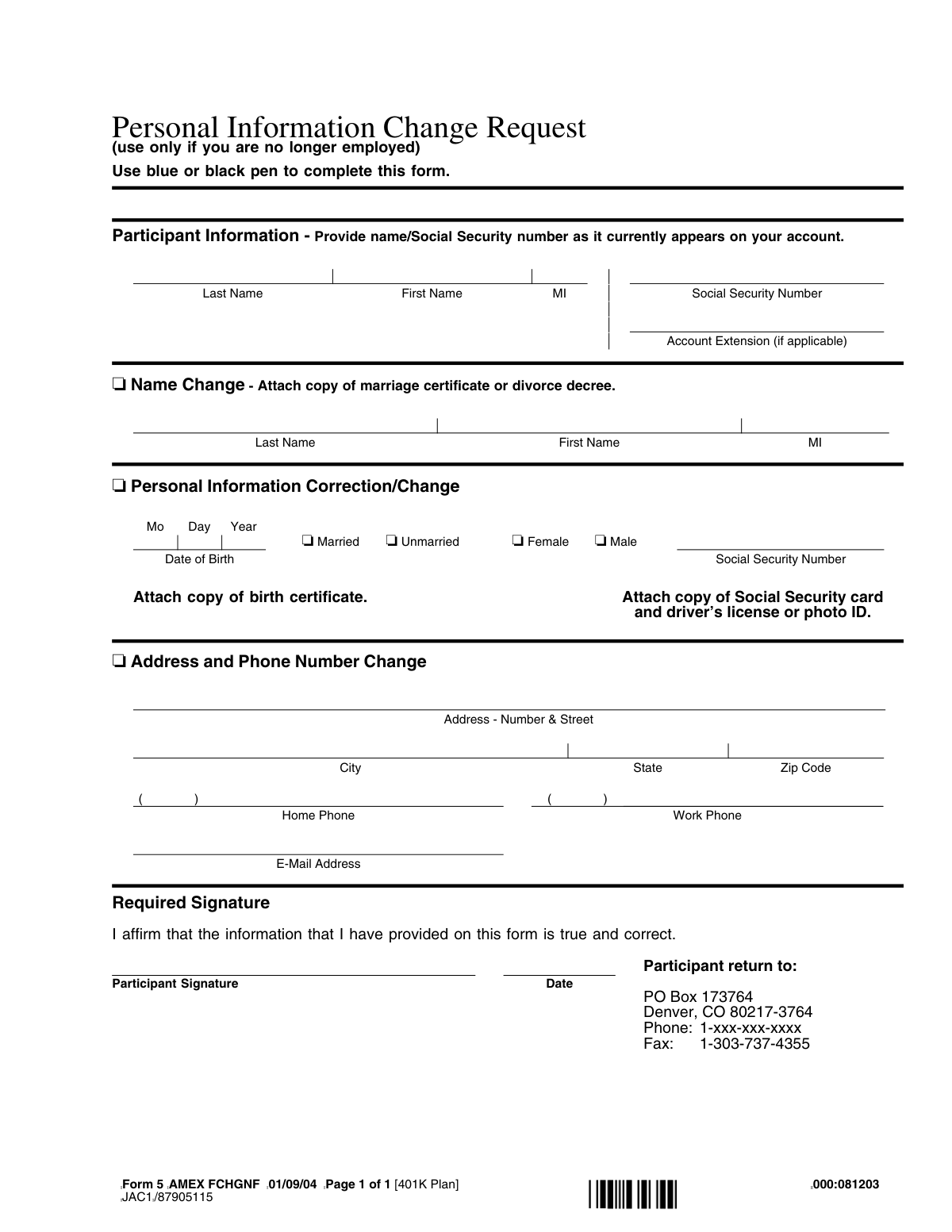
This form, identified as Form 5, is a Personal Information Change Request for a 401K plan, intended for use by former employees. It allows participants to officially report changes to their name, Social Security number, date of birth, address, and marital status to the plan administrator. Keeping this information current is essential for accurate record-keeping and receiving important plan communications. Today, this form can be filled out quickly and accurately using AI-powered services like Instafill.ai, which can also convert non-fillable PDF versions into interactive fillable forms.
Rather not fill this in by hand? Instafill is an online form filler that completes PDF forms automatically — upload the blank form, answer a few questions, and the AI fills every field.
Form specifications
| Form name: | Personal Information Change Request (401K Plan) |
| Number of pages: | 1 |
| Language: | English |
Our AI automatically handles information lookup, data retrieval, formatting, and form filling.
It takes less than a minute to fill out Form 5 using our AI form filling.
Securely upload your data. Information is encrypted in transit and deleted immediately after the form is filled out.
Instafill Demo: How to fill out PDF forms in seconds with AI
How to Fill Out Form 5 Online for Free in 2026
Are you looking to fill out a FORM 5 form online quickly and accurately? Instafill.ai offers the #1 AI-powered PDF filling software of 2026, allowing you to complete your FORM 5 form in just 37 seconds or less.
Follow these steps to fill out your FORM 5 form online using Instafill.ai:
- 1 Navigate to Instafill.ai and upload or select the Personal Information Change Request form.
- 2 Provide your current participant information, including your full name and Social Security number as they appear on your account.
- 3 Indicate the type of change you are requesting by checking the appropriate box (e.g., Name Change, Personal Information Correction, Address Change).
- 4 Enter the new or corrected information in the designated fields, such as your new last name, address, or date of birth.
- 5 Use the platform's tools to securely attach digital copies of required supporting documents, like a driver's license, Social Security card, or marriage certificate.
- 6 Review all entered information for accuracy, then digitally sign and date the form to affirm that the details are true and correct.
- 7 Download the completed form and attachments to print and mail or fax to the plan administrator's address listed on the form.
Our AI-powered system ensures each field is filled out correctly, reducing errors and saving you time.
Why Choose Instafill.ai for Your Fillable Form 5 Form?
Speed
Complete your Form 5 in as little as 37 seconds.
Up-to-Date
Always use the latest 2026 Form 5 form version.
Cost-effective
No need to hire expensive lawyers.
Accuracy
Our AI performs 10 compliance checks to ensure your form is error-free.
Security
Your personal information is protected with bank-level encryption.
Frequently Asked Questions About Form 5
This form is used by former employees to update personal information, such as name, address, or Social Security number, associated with their 401k plan account.
This form is specifically for individuals who are no longer employed by the company but need to update their 401k account details. Current employees should contact their HR department for the correct procedure.
For a name change, you must complete the 'Name Change' section and attach a copy of your marriage certificate or divorce decree as legal proof.
To correct your Social Security Number, you must fill out the 'Personal Information Correction/Change' section and attach a copy of your Social Security card and your driver's license or another photo ID.
No, the form does not require you to attach any documents for an address or phone number change. You only need to complete that section and sign the form.
You can mail the signed form and any required documents to PO Box 173764, Denver, CO 80217-3764. Alternatively, you can fax it to 1-303-737-4355.
In this section, you must provide your name and Social Security number exactly as they currently appear on your 401k account to ensure the changes are applied correctly.
Yes, you must sign and date the form in the 'Required Signature' section. An unsigned form will not be processed.
The instructions specify that you must use a blue or black ink pen to complete the form to ensure it is legible for processing.
If you do not have a driver's license, the form allows you to submit another form of government-issued photo ID instead.
Yes, services like Instafill.ai use AI to accurately auto-fill form fields from your saved profile, which can save you time and help prevent errors.
To fill this form out online, upload the PDF to the Instafill.ai platform. Their AI will help you complete the fields, and then you can print the completed form for signature and submission.
If your PDF is not fillable, you can use a service like Instafill.ai. Their technology can convert flat, non-fillable PDFs into interactive forms that you can easily complete on your computer.
Compliance Form 5
Validation Checks by Instafill.ai
1
Participant Account Match
Verifies that the combination of Last Name, First Name, and Social Security Number in the 'Participant Information' section corresponds to an existing account. This is the most critical check to ensure changes are applied to the correct individual's 401k plan. If no match is found, the form cannot be processed and must be rejected.
2
SSN Format Validation
Ensures the Social Security Number in both the current information and the change request sections follows the standard 9-digit format (XXX-XX-XXXX or XXXXXXXXX). An invalid SSN format prevents account lookup and indicates a critical data error. Submissions with malformed SSNs must be returned to the participant for correction.
3
Mandatory Change Selection
Validates that at least one of the main checkboxes ('Name Change', 'Personal Information Correction/Change', or 'Address and Phone Number Change') is selected. A form submitted without a selected change category has no actionable request. Such submissions are considered incomplete and must be rejected.
4
Signature Presence
Confirms that the 'Participant Signature' field is not blank. A signature provides legal authorization for the requested changes and affirms the correctness of the information. A missing signature invalidates the entire request, and the form must be returned to the participant to be signed.
5
Signature Date Validity
Checks that the date next to the signature is a complete, valid date, is not in the future, and is reasonably current. This date establishes when the participant affirmed the information. An invalid, future, or very old date can create legal and administrative issues, requiring the form to be rejected and re-signed.
6
Date of Birth Format and Plausibility
Validates that the 'Date of Birth' is in a valid MM/DD/YYYY format and represents a plausible age for a 401k plan holder (e.g., not in the future, and the person is over 18). This prevents data entry errors that could impact retirement calculations, distributions, and compliance. An implausible date requires manual review or rejection.
7
Name Change Data Presence
If the 'Name Change' checkbox is selected, this validation ensures that at least one of the new name fields (Last Name, First Name) is filled out. It also verifies the new name is different from the current name on record. This prevents processing an empty or redundant change request, and failure would require clarification from the participant.
8
Name Change Document Requirement
Flags the submission as requiring an attached copy of a marriage certificate or divorce decree if the 'Name Change' checkbox is selected. This is a processing rule to ensure the legal name change is properly documented as required by plan rules. If the document is missing, the name change request is put on hold.
9
SSN Change Document Requirement
If a new Social Security Number is provided, this validation flags the submission as requiring a copy of the Social Security card and a driver's license or photo ID. Changing an SSN is a highly sensitive action with significant financial and identity implications, requiring strict verification. The change is blocked until the required documents are received and verified.
10
Address Component Completeness
If the 'Address and Phone Number Change' box is checked and any part of the physical address is entered, this check ensures that the Street, City, State, and Zip Code fields are all present. A partial address is unusable for mailings of sensitive financial documents. Incomplete address changes must be rejected for completion.
11
ZIP Code and State Consistency
Validates that the provided ZIP Code is a valid format (5-digit or ZIP+4) and corresponds to the provided State. This check prevents mail from being misdirected due to typos and ensures data accuracy for tax reporting. A mismatch should trigger a correction request or be flagged for manual review.
12
Phone Number Format
Checks that the Home Phone and Work Phone numbers, if provided, adhere to a standard 10-digit format, allowing for common variations like parentheses and hyphens. Correctly formatted numbers are essential for system compatibility and ensuring the participant can be contacted. Malformed numbers should be flagged for correction.
13
Email Address Syntax
Validates that the E-Mail Address, if provided, follows the standard '[email protected]' format. This is important for ensuring the reliability of electronic communications and preventing system errors when sending notifications. An invalid email format should be rejected or flagged for user correction.
Common Mistakes in Completing Form 5
A critical mistake is overlooking the instruction '(use only if you are no longer employed)'. Current employees often have a different process for changing personal information, usually through an online portal or HR department. Submitting this form while still employed will result in its rejection and a delay in updating your information. Always confirm your employment status and use the correct procedure.
The form requires different legal documents depending on the change requested, such as a marriage certificate for a name change or a birth certificate for a DOB correction. Users often forget to attach these copies, leading to an incomplete submission. This halts the process until the documents are received, causing significant delays. To avoid this, create a checklist of required attachments before sending the form.
The top 'Participant Information' section is for identifying your account and must be filled with the name and Social Security number *currently* on file. A common error is entering the new information (e.g., a new last name) in this section. This causes the system to fail to locate your account, leading to the request being rejected. Always use your existing account information for identification.
Forgetting to sign and date the form is one of the most frequent and critical errors. The signature legally affirms that the provided information is true and correct, and an unsigned form is invalid. This oversight results in immediate rejection and requires you to resubmit the entire form. Always perform a final review, specifically checking the signature and date fields before mailing.
Since this form must be completed with a pen, poor or unclear handwriting can make names, addresses, and numbers impossible to read correctly. This can lead to critical data entry errors on the processor's end or cause the form to be returned as unreadable. To prevent this, print clearly in block letters. Since this is a flat PDF, a tool like Instafill.ai can make it fillable, allowing you to type your information for perfect clarity.
Users sometimes fill out the new information, such as a new address, but forget to check the corresponding box (e.g., 'Address and Phone Number Change'). This omission can cause the processor to overlook the change or be unsure which information to update. To prevent this, ensure you mark the checkbox for every section you complete to clearly indicate your request.
The Social Security Number (SSN) is the primary identifier for the account. A single transposed digit or an incomplete number will prevent your account from being found or correctly updated. This mistake often happens due to haste. Carefully double-check the SSN against your Social Security card to ensure complete accuracy before submitting.
When changing an address, people often forget to include an apartment or suite number, or they use a non-standard ZIP code. This can result in important financial documents, like tax forms or statements, being returned as undeliverable. Always provide your full, USPS-compliant address. AI form-filling tools like Instafill.ai can help by validating and standardizing addresses automatically.
The form explicitly states to 'Use blue or black pen'. This instruction exists because scanning and imaging systems are optimized for these colors. Using a different color, like red or green, may cause the information to not appear on the scanned image, rendering the form incomplete and leading to its rejection. Adhering to this simple instruction is crucial for successful processing.
This form's version is dated '01/09/04', which is quite old. Financial institutions frequently update forms for new regulations or processes. Submitting an outdated version found in old files or through an unofficial source may lead to rejection because it might be missing required information. Always ensure you have the most current version by downloading it directly from the plan administrator's official website.
Saved over 80 hours a year
“I was never sure if my IRS forms like W-9 were filled correctly. Now, I can complete the forms accurately without any external help.”
Kevin Martin Green
Your data stays secure with advanced protection from Instafill and our subprocessors




Robust compliance program
Transparent business model
You’re not the product. You always know where your data is and what it is processed for.
ISO 27001, HIPAA, and GDPR
Our subprocesses adhere to multiple compliance standards, including but not limited to ISO 27001, HIPAA, and GDPR.
Security & privacy by design
We consider security and privacy from the initial design phase of any new service or functionality. It’s not an afterthought, it’s built-in, including support for two-factor authentication (2FA) to further protect your account.
Fill out Form 5 with Instafill.ai
Worried about filling PDFs wrong? Instafill securely fills personal-information-change-request-401k-plan forms, ensuring each field is accurate.
