
Yes! You can use AI to fill out Form Order to Show Cause, Application in Support
Don't type 57 fields by hand. Tell our AI about yourself, or upload a document you already have, and it fills every field in seconds. You check it, then download, print or sign.
The AI does the filling. You just check it.
No typing into boxes, nothing to install.
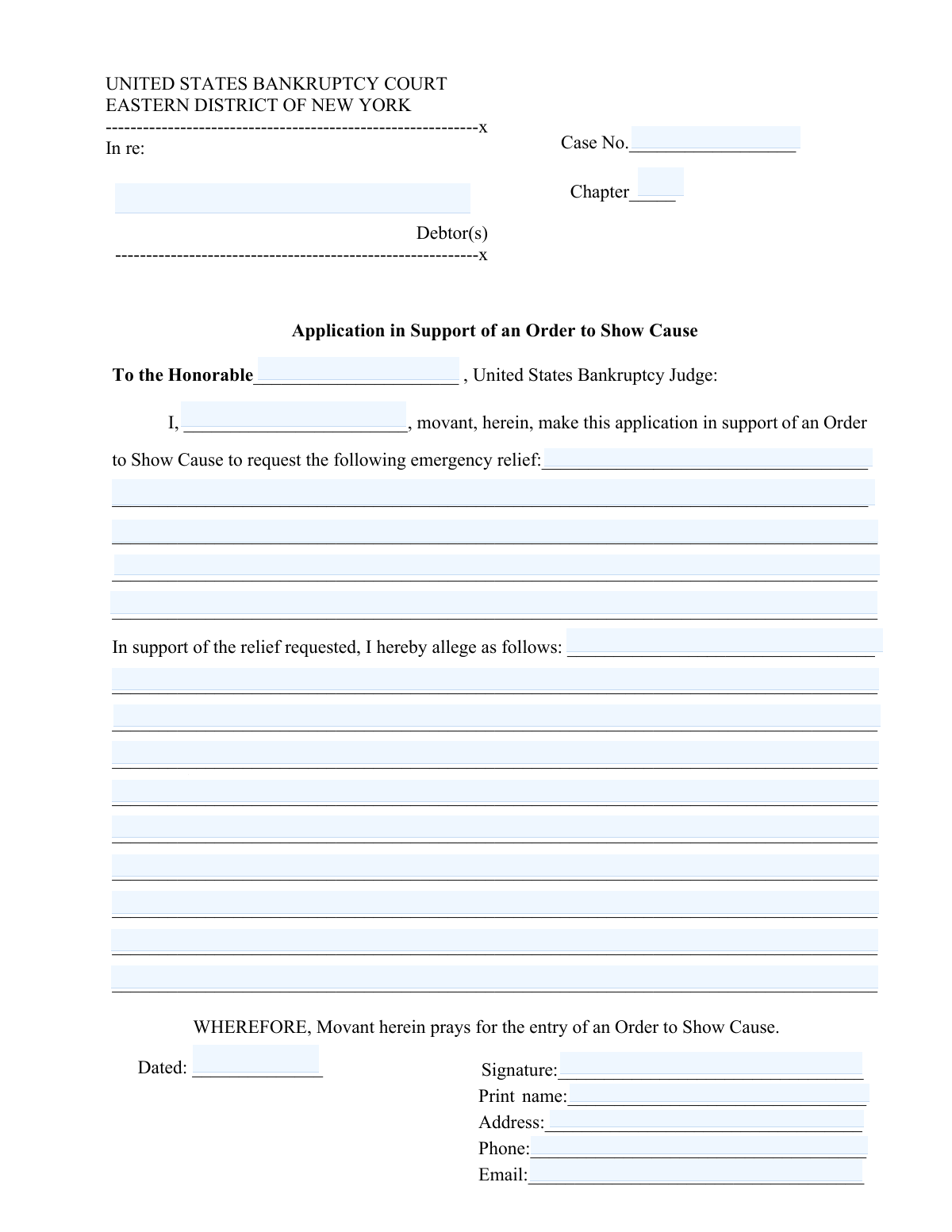
What this form asks for
The AI fills all of it, from your answers or your documents.
The AI checks your answers before you download
11 checks built for this form, so a wrong date or a missing answer is caught before anyone else sees it.
Ensures that the 'Case No.' and 'Chapter' fields at the top of the form are accurately entered. This validation is crucial for identifying the specific case and its chapter in the bankruptcy proceedings. It confirms that the case number follows the required format and the chapter is correctly specified. This step is essential for maintaining the integrity and traceability of the case file.
Confirms that the application is correctly addressed to the 'Honorable [United States Bankruptcy Judge]' with the judge's name accurately filled in. This validation ensures that the document is directed to the appropriate judicial authority. It verifies the correctness of the judge's title and name to avoid any misdirection. Proper addressing is fundamental for the document's formal acceptance and processing.
Ensures that the movant's name is properly filled in and the emergency relief requested is clearly described. This check validates the identity of the movant and the specificity of the relief sought. It confirms that the description of emergency relief is detailed enough to understand the urgency and nature of the request. Clarity and completeness in this section are vital for the judge's assessment of the application.
Validates that the section 'In support of the relief requested' contains detailed reasons and facts supporting the request for emergency relief. This ensures that the application provides a comprehensive justification for the relief sought. It checks for the presence of factual bases and logical arguments that substantiate the emergency nature of the request. Detailed support is critical for the judge's decision-making process.
Checks that the application is signed at the bottom of the page by the movant. This validation confirms the authenticity and commitment of the movant to the contents of the application. It ensures that the signature is present and corresponds to the movant's name provided in the document. A valid signature is a legal requirement for the document's submission and consideration.
Ensures that the 'RETURN DATE' is accurately filled in, reflecting the correct date the order is to be returned. This check is crucial for maintaining the timeline of legal proceedings. It verifies that the date format complies with the court's requirements. Missing or incorrect dates could delay the legal process.
And 5 more checks
- ORDER TO SHOW CAUSE
- Deadline for serving
- Deadline for filing objections
- Judge's date and signature
- CERTIFICATE OF SERVICE
Let AI fill out your Order to Show Cause
No typing. Every field filled in seconds, checked, ready to sign.
How to Fill Out Order to Show Cause Online for Free in 2026
What the AI walks you through.
- Visit instafill.ai site and select Order to Show Cause
- Enter Case No. and Chapter
- Fill in movant's name and requested relief
- Detail reasons for the relief sought
- Sign and date the form electronically
- Check for accuracy and submit form
Common Mistakes in Completing Order to Show Cause
The ones the AI is built to catch.
Incorrect or missing 'Case No.' and 'Chapter'
Not addressing the judge correctly as 'Honorable [Judge's Name]'
Missing or unclear description of emergency relief requested
Insufficient detail in 'In support of the relief requested' section
Missing signature on the application
Incorrect or missing 'RETURN DATE'
Incomplete 'ORDER TO SHOW CAUSE' section details
Missing deadline for serving the Order to Show Cause
Not listing all parties to be served
Incorrect or missing trustee's and United States Trustee's addresses
Missing deadline for filing objections
Not mentioning 'Chambers Copy' requirement
Incomplete 'CERTIFICATE OF SERVICE' details
Missing signature and date on the certificate of service
Frequently Asked Questions About Order to Show Cause
Is it really free for 7 days?
Can I fill other forms too?
How do I cancel?
How does the AI fill out Order to Show Cause?
What happens to my information?
How complex is Order to Show Cause to fill out?
What is the purpose of the 'Form Order to Show Cause, Application in Support'?
How do I fill out the 'Case No.' and 'Chapter' sections in the form?
What information should be included in the 'Application in Support of an Order to Show Cause' section?
How should the emergency relief requested be described in the form?
What are the requirements for the 'In support of the relief requested, I hereby allege as follows' section?
What is the significance of the 'RETURN DATE' in the form?
How is the 'ORDER TO SHOW CAUSE' section of the form completed?
What are the instructions for serving the Order to Show Cause and the application?
How should objections to the relief requested be submitted?
What is the process for adjourning the hearing scheduled in the form?
What details are required in the 'CERTIFICATE OF SERVICE' section?
Who should be served with the Order to Show Cause and the application?
What is the deadline for serving the Order to Show Cause and the application?
How should the 'Chambers Copy' be marked and submitted?
What is the role of the United States Trustee in this process?
Can the hearing date be changed, and if so, how?
What are the consequences of not serving the Order to Show Cause and the application by the specified deadline?
How should the movant's signature be affixed to the form?
What is the importance of specifying the name and mailing address of each party served in the 'CERTIFICATE OF SERVICE'?
Where can I find the United States Bankruptcy Court located at for serving the documents?
Get your Order to Show Cause filled out by AI
$0 today. Cancel before Nov 1 and you pay nothing.
Let AI fill out your Order to Show Cause
Your trial starts once a card is added. You pay nothing before Nov 1.
Our AI already knows this form, all 57 fields of it. Skip the typing: tell it about yourself, or upload what you have, and it fills the whole form in seconds.
- AI fills every field on all 3 pages, checkboxes included
- No typing into boxes: answer a few questions, or upload a document you already have, an old copy of this form, a photo of a document
- The AI checks the answers; you review and change anything before you download
- Download the finished PDF, print it, or sign it online
- Encrypted, and never used to train AI
Cancel before Nov 1 and you pay nothing.
A card is needed to start the trial. Cancel in two clicks from your account.
Terms · Privacy