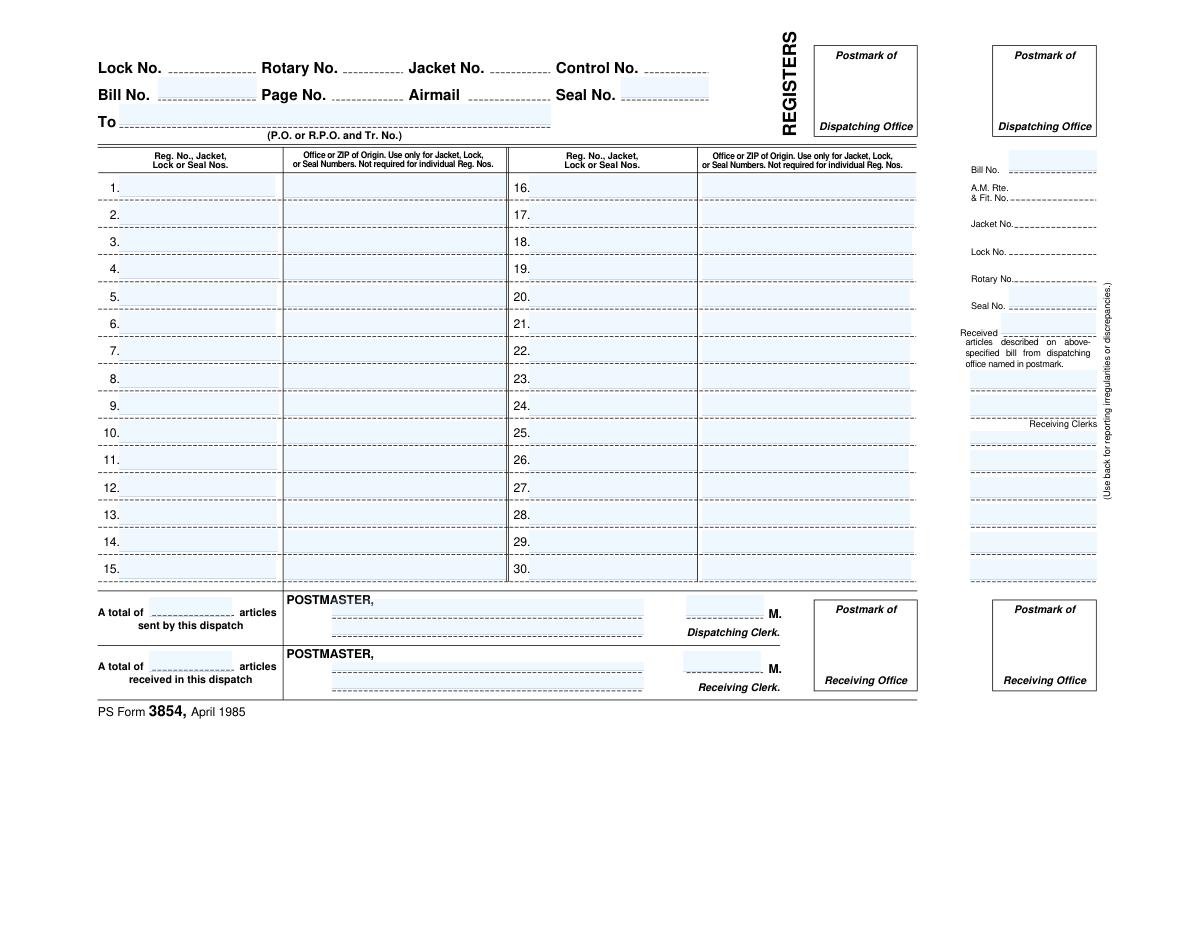
Yes! You can use AI to fill out PS Form 3854, Registers

PS Form 3854, titled "Registers," is a U.S. Postal Service accountability form used to record registered mail articles sent in a dispatch and to acknowledge receipt by the receiving office. It captures key tracking/accountability identifiers (e.g., bill number, route, jacket/lock/rotary/seal numbers, and registered article numbers) along with postmarks and clerk signatures. The form is important because it creates an official chain-of-custody record for high-security mail and provides a place to report irregularities or discrepancies (noted on the back).
Our AI automatically handles information lookup, data retrieval, formatting, and form filling.
It takes less than a minute to fill out PS Form 3854 using our AI form filling.
Securely upload your data. Information is encrypted in transit and deleted immediately after the form is filled out.

Form specifications

Form name: PS Form 3854, Registers
Number of pages: 1
Filled form examples: Form PS Form 3854 Examples
Language: English
main-image

Instafill Demo: filling out a legal form in seconds

How to Fill Out PS Form 3854 Online for Free in 2026

Are you looking to fill out a PS FORM 3854 form online quickly and accurately? Instafill.ai offers the #1 AI-powered PDF filling software of 2026, allowing you to complete your PS FORM 3854 form in just 37 seconds or less.
Follow these steps to fill out your PS FORM 3854 form online using Instafill.ai:
  1. 1 Enter dispatch/container identifiers at the top (e.g., Bill No., A.M. Route & Flight No., Jacket No., Lock No., Rotary No., Seal No., and whether Airmail applies).
  2. 2 Record the origin information where required (Office or ZIP of Origin) for jacket/lock/seal numbers, if applicable.
  3. 3 List each registered article number in the numbered register lines (e.g., 1–30), including any associated jacket/lock/seal numbers as needed.
  4. 4 Apply or capture the postmarks for the dispatching office and the receiving office in the designated postmark areas.
  5. 5 Complete the totals section by entering the total number of articles sent by the dispatch and the total number of articles received in the dispatch.
  6. 6 Add required signatures and initials for accountability (Dispatching Clerk and Receiving Clerk) and confirm receipt language on the form.
  7. 7 If there are issues, use the back of the form to report irregularities or discrepancies and reference them to the related dispatch/bill details.

Our AI-powered system ensures each field is filled out correctly, reducing errors and saving you time.

Why Choose Instafill.ai for Your Fillable PS Form 3854 Form?

Speed

Complete your PS Form 3854 in as little as 37 seconds.

Up-to-Date

Always use the latest 2026 PS Form 3854 form version.

Cost-effective

No need to hire expensive lawyers.

Accuracy

Our AI performs 10 compliance checks to ensure your form is error-free.

Security

Your personal information is protected with bank-level encryption.

Frequently Asked Questions About Form PS Form 3854

PS Form 3854 is a register/bill used to document the dispatch and receipt of registered mail articles between postal offices. It provides an official record of what was sent, what was received, and which offices handled the dispatch.

Postal employees handling registered mail dispatches and receipts complete this form. Typically, a dispatching clerk prepares the dispatch information and a receiving clerk verifies and signs for the items received.

The form includes fields such as Bill No., route/flight number (A.M. Rte. & Flt. No.), and identifiers like Jacket No., Lock No., Rotary No., and Seal No. These help match the physical container and the paperwork to the same dispatch.

No. The form states that Office or ZIP of Origin is used only for Jacket, Lock, or Seal Numbers and is not required for individual registered numbers.

List each item under the lines labeled “Reg. No., Jacket, Lock or Seal Nos.” using the numbered entries (e.g., 1–15 and 16–30). Each line is intended for one registered article number or a container identifier, depending on what is being documented.

If the dispatch exceeds the available lines, additional pages or continuation documentation are typically used per local postal procedures. Ensure totals reflect all pages and that each page is clearly associated with the same Bill No. and dispatch identifiers.

The form has areas for the postmark of the dispatching office and the postmark of the receiving office. These are applied by the respective offices to document when and where the dispatch was sent and received.

It is the receiving office’s acknowledgment that the articles listed on the bill were received from the dispatching office named in the postmark. The receiving clerk signs to confirm receipt (and to note any issues separately if needed).

Both the dispatching clerk and the receiving clerk sign in the designated signature areas. The signatures certify that the dispatch was sent as listed and that the receiving office verified what was received.

Count the number of registered articles listed for the dispatch and enter the total sent on the dispatch side and the total received on the receiving side. If there is a mismatch, record the discrepancy and report details on the back as instructed.

Use the back of the form to report irregularities or discrepancies, as the form instructs. Include clear details (what is missing or incorrect, identifiers like Bill No./Seal No., and any relevant observations) and follow local reporting procedures.

These numbers identify the physical security container or closure used for the registered dispatch (such as a jacket or sealed container). Recording them helps maintain chain-of-custody and supports investigation if a discrepancy occurs.

It indicates the dispatch is associated with air transportation or an airmail handling category. If applicable, ensure the route/flight information and related dispatch identifiers are completed consistently.

Generally, no. This is an internal postal register/dispatch receipt form used by postal employees to track registered mail dispatches between offices.

Compliance PS Form 3854
Validation Checks by Instafill.ai

1
Bill Number Presence and Format Validation
Validates that a Bill No. is provided and matches the expected format for the organization (e.g., numeric-only or alphanumeric with a defined length). The Bill No. is the primary identifier tying the dispatch and receipt records together, so missing or malformed values prevent reconciliation. If validation fails, the submission should be rejected or routed to exception handling for manual correction.
2
Dispatching Office Postmark Required and Legible Date/Time Format
Checks that the 'Postmark of Dispatching Office' field is present and includes a valid date/time in an accepted format (e.g., MM/DD/YYYY and optional HH:MM). Postmarks establish chain-of-custody timing and are critical for audits and discrepancy investigations. If the postmark is missing or not parseable as a real date/time, the record should be flagged as incomplete and not finalized.
3
Receiving Office Postmark Required and Chronological Consistency
Ensures the 'Postmark of Receiving Office' is present and is a valid date/time, and that it is not earlier than the dispatching postmark. This prevents impossible timelines and helps detect data entry errors or misapplied postmarks. If the receiving postmark precedes dispatch, the system should block submission or require supervisor override with a reason.
4
Receiving Office Identifier (Office/ZIP) Format Validation
Validates that any 'Receiving Office' identifier (office name/code and/or ZIP) conforms to expected patterns (e.g., 5-digit ZIP or ZIP+4). Correct office identification is necessary for routing accountability and for matching to facility master data. If the office/ZIP is invalid, the system should prompt for correction or require selection from a controlled list.
5
Origin Office/ZIP Conditional Requirement for Jacket/Lock/Seal Entries
Enforces the rule stated on the form: 'Office or ZIP of Origin' is required when entering Jacket, Lock, or Seal numbers, but not required for individual Registered Numbers. This prevents incomplete tracking for container-level identifiers while avoiding unnecessary data entry for individual items. If a Jacket/Lock/Seal number is present without an origin office/ZIP, the submission should fail validation for that line.
6
Registered Article Identifier Format and Uniqueness (Reg. No.)
Checks that each 'Reg. No.' entered matches the expected registered mail identifier format (e.g., allowed characters, length, optional prefix/suffix rules) and that no duplicates appear within the same bill. Duplicate or malformed registration numbers can cause double-counting and misattribution of custody. If duplicates or invalid formats are detected, the system should reject the affected entries and require correction.
7
Jacket Number Format and Mutual Exclusivity with Individual Reg. No. (Per Line)
Validates that Jacket No. values follow the expected format and that a single line item does not simultaneously represent both a Jacket and an individual Reg. No. unless explicitly allowed by business rules. Mixing container and item identifiers on the same line can break downstream counting and reconciliation logic. If both are populated improperly, the system should require the user to split the entry into separate lines or choose the correct identifier type.
8
Lock Number Format Validation and Cross-Field Dependency
Ensures Lock No. is in the correct format (e.g., numeric-only, fixed length) and, when present, that it is associated with a corresponding container identifier (e.g., Jacket No. or Seal No.) if required by process. Lock numbers are security controls and must be traceable to the container they secure. If a lock number is present without required related fields, the record should be flagged for correction.
9
Seal Number Format Validation and Uniqueness Within Bill
Validates that Seal No. matches the expected seal identifier format and is not repeated within the same Bill No. unless explicitly permitted. Seal numbers are used to detect tampering and must uniquely identify a sealed dispatch. If a seal number is invalid or duplicated, the system should block submission and require verification.
10
Rotary Number and Control Number Format Validation
Checks that Rotary No. and Control No. (if used) conform to defined formats (e.g., numeric-only, specific length) and are not populated with free-text. These fields often map to equipment, routing, or internal control references and must be machine-readable for reporting. If invalid characters or lengths are detected, the system should prompt for correction and prevent finalization.
11
Airmail Indicator Validation (Allowed Values Only)
Validates that the Airmail field is either blank or set to an allowed value (e.g., checkbox true/false, 'Y/N'), and not arbitrary text. Airmail status affects handling and routing priority, so inconsistent values can cause operational errors. If the value is outside the allowed set, the system should reject the field and require a valid selection.
12
Page Number Presence and Numeric Range Validation
Ensures Page No. is present when the form is part of a multi-page bill and that it is a positive integer within a reasonable range. Page numbering is required to confirm completeness of the dispatch documentation and prevent missing pages. If page number is missing or non-numeric, the system should flag the submission as incomplete.
13
Line Item Count vs. Declared Totals Consistency
Validates that the 'A total of ___ articles sent by this dispatch' and 'A total of ___ articles received in this dispatch' fields are present (when required) and match the number of populated line items (or the sum of items represented by containers, per business rules). Totals are used for quick reconciliation and discrepancy detection. If totals do not match computed counts, the system should require correction or capture a discrepancy reason.
14
Sent vs. Received Totals Logical Consistency and Discrepancy Handling
Checks that received totals are not greater than sent totals unless an explicit discrepancy/irregularity report is attached (as indicated by 'Use back for reporting irregularities or discrepancies'). This prevents silent acceptance of impossible counts and enforces proper exception documentation. If received exceeds sent without a discrepancy note, the system should block submission or require an irregularity report reference.
15
Clerk Signatures/Identifiers Required for Dispatching and Receiving
Validates that both the Dispatching Clerk and Receiving Clerk fields are completed with acceptable identifiers (e.g., full name, employee ID, or authenticated user signature) and not left blank. These attestations establish accountability for custody transfer and are essential for audits. If either clerk identifier is missing, the system should prevent final submission and request completion.

Common Mistakes in Completing PS Form 3854

Mixing up Bill No. with Control/Rotary/Jacket/Lock/Seal numbers

People often treat all the numbered fields as interchangeable and enter the same identifier in multiple places or put the wrong number in the wrong box. This causes tracking and reconciliation problems because each number refers to a different container/control element of the dispatch. To avoid this, confirm what you are documenting (the bill itself vs. the container or security device) and enter each identifier only in its labeled field.

Filling “Office or ZIP of Origin” for individual Registered article numbers

The form explicitly says the Office/ZIP of Origin is used only for Jacket, Lock, or Seal numbers and is not required for individual Reg. Nos., but many users still try to complete it for every line. This adds clutter and can introduce conflicting origin data that makes audits harder. Only complete Office/ZIP of Origin when you are listing Jacket/Lock/Seal numbers; leave it blank for individual registered article entries.

Leaving “Office or ZIP of Origin” blank when listing Jacket/Lock/Seal numbers

The opposite mistake is also common: users list a Jacket/Lock/Seal number but omit the required origin office/ZIP because they assume it’s optional everywhere. Missing origin information can prevent verification of where the container/security device was issued and slows discrepancy resolution. When you enter a Jacket, Lock, or Seal number, always include the corresponding Office or ZIP of Origin in the adjacent field.

Incorrect or inconsistent Registered Number formatting

Registered article numbers are frequently written with missing digits, transposed digits, or inconsistent use of prefixes/suffixes (e.g., omitting leading characters or mixing letter/number order). This can make an article untraceable or appear as a mismatch between dispatch and receipt. Copy the number exactly as shown on the registered label, double-check each character, and keep the same format across all entries.

Skipping line numbers or writing entries outside the 1–30 grid

Because the form shows a fixed sequence (1–15 and 16–30), people sometimes write between lines, skip numbers, or continue entries in margins when they run out of space. This makes it unclear which items were actually included and can lead to missed counts during verification. Use one entry per numbered line, keep entries aligned with the correct line number, and if more space is needed, follow the proper continuation procedure rather than squeezing text into blank areas.

Confusing dispatching vs. receiving postmarks

The form has separate areas for “Postmark of Dispatching Office” and “Postmark of Receiving Office,” but users sometimes stamp the wrong area or apply only one postmark. Incorrect postmark placement can invalidate timing/chain-of-custody evidence and complicate investigations of delays or losses. Ensure the dispatching office stamps only the dispatching postmark area and the receiving office stamps only the receiving postmark area, in the correct locations.

Missing clerk signatures/initials and ‘A.M.’ time notations

Fields for Dispatching Clerk, Receiving Clerk, and “M.” (often used for initials/time notation) are frequently left blank, especially during busy handoffs. Missing authentication can make the transfer non-verifiable and may trigger compliance issues or require rework. Always complete the clerk signature/initial fields at the time of handoff and include the required time/notation exactly as your procedure specifies.

Incorrect totals for ‘sent’ vs. ‘received’ articles

Users often miscount the number of articles listed, copy the same total into both “sent by this dispatch” and “received in this dispatch,” or forget to update totals after corrections. Incorrect totals create immediate discrepancies and can force time-consuming recounts or discrepancy reports. Count the listed entries carefully, ensure the dispatch total matches what was sent, and independently verify the received total against the physical contents before finalizing.

Misusing the “Airmail” indicator

The “Airmail” marking is sometimes checked/marked by default or ignored even when applicable, because users assume it’s informational only. This can lead to improper routing expectations and confusion when reconciling transit times. Mark the Airmail field only when the dispatch is actually designated for airmail handling, and leave it blank otherwise.

Not using the back of the form to report irregularities/discrepancies

The form instructs users to use the back for reporting irregularities or discrepancies, but many people instead write brief notes in the margins or omit documentation entirely. This results in incomplete records and makes it harder to resolve missing/damaged items or seal issues. When anything is off (missing article, broken seal, number mismatch), document it fully on the back as directed and reference it clearly from the front if needed.
Saved over 80 hours a year

“I was never sure if my IRS forms like W-9 were filled correctly. Now, I can complete the forms accurately without any external help.”

Kevin Martin Green

Your data stays secure with advanced protection from Instafill and our subprocessors

Robust compliance program

Transparent business model

You’re not the product. You always know where your data is and what it is processed for.

ISO 27001, HIPAA, and GDPR

Our subprocesses adhere to multiple compliance standards, including but not limited to ISO 27001, HIPAA, and GDPR.

Security & privacy by design

We consider security and privacy from the initial design phase of any new service or functionality. It’s not an afterthought, it’s built-in, including support for two-factor authentication (2FA) to further protect your account.

Fill out PS Form 3854 with Instafill.ai

Worried about filling PDFs wrong? Instafill securely fills ps-form-3854-registers forms, ensuring each field is accurate.