Yes! You can use AI to fill out Retirement Beneficiary Form
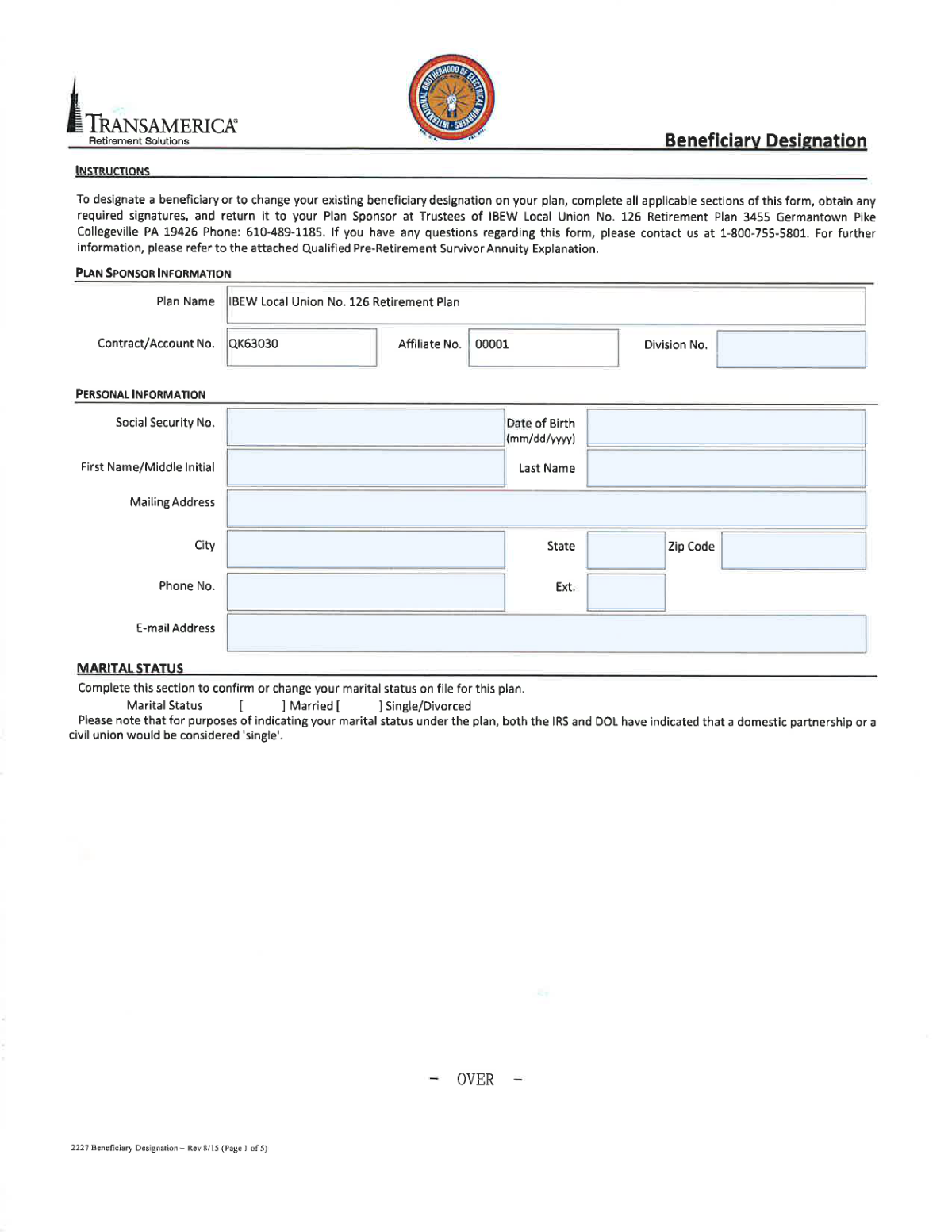
This form is a legal document that allows a retirement plan participant to name the person(s), trust, or estate that will inherit the account's assets. It is crucial for ensuring your assets are distributed according to your wishes and can help your heirs avoid a lengthy probate process. Today, this form can be filled out quickly and accurately using AI-powered services like Instafill.ai, which can also convert non-fillable PDF versions into interactive fillable forms.
Rather not fill this in by hand? Instafill is an online form filler that completes PDF forms automatically — upload the blank form, answer a few questions, and the AI fills every field.
Form specifications
| Form name: | Retirement Beneficiary Form |
| Number of pages: | 1 |
| Language: | English |
Our AI automatically handles information lookup, data retrieval, formatting, and form filling.
It takes less than a minute to fill out Retirement Beneficiary Form using our AI form filling.
Securely upload your data. Information is encrypted in transit and deleted immediately after the form is filled out.
Instafill Demo: How to fill out PDF forms in seconds with AI
How to Fill Out Retirement Beneficiary Form Online for Free in 2026
Are you looking to fill out a RETIREMENT BENEFICIARY FORM form online quickly and accurately? Instafill.ai offers the #1 AI-powered PDF filling software of 2026, allowing you to complete your RETIREMENT BENEFICIARY FORM form in just 37 seconds or less.
Follow these steps to fill out your RETIREMENT BENEFICIARY FORM form online using Instafill.ai:
- 1 Navigate to Instafill.ai and upload or select the Retirement Beneficiary Form.
- 2 Enter your personal information, such as your full name, Social Security Number (SSN), and contact details.
- 3 Designate your primary and contingent beneficiaries by providing their full names, SSNs, dates of birth, and relationship to you.
- 4 Specify the percentage share of benefits for each beneficiary, ensuring the total adds up to 100%.
- 5 If naming a trust as a beneficiary, provide the full name of the trust, the date it was established, and the trustee's information.
- 6 Carefully review all the information for accuracy, then sign and date the form electronically.
- 7 Download the completed form and submit it to your plan sponsor or human resources department as instructed.
Our AI-powered system ensures each field is filled out correctly, reducing errors and saving you time.
Why Choose Instafill.ai for Your Fillable Retirement Beneficiary Form Form?
Speed
Complete your Retirement Beneficiary Form in as little as 37 seconds.
Up-to-Date
Always use the latest 2026 Retirement Beneficiary Form form version.
Cost-effective
No need to hire expensive lawyers.
Accuracy
Our AI performs 10 compliance checks to ensure your form is error-free.
Security
Your personal information is protected with bank-level encryption.
Frequently Asked Questions About Retirement Beneficiary Form
This form allows you to officially designate the person(s), trust, or estate that will receive your retirement plan assets after your death. Keeping this information current is essential to ensure your benefits are distributed according to your wishes.
Any individual who is a participant in a retirement plan should fill out this form to name their beneficiaries. You should also use this form to update your beneficiaries after major life events like marriage, divorce, or the birth of a child.
This means the percentages you assign to all your primary beneficiaries must add up to exactly 100%. For example, if you have two beneficiaries, you could assign 50% to each, or 75% to one and 25% to the other.
Yes, you can designate a trust to be your beneficiary. You will need to provide the full name of the trust, the date it was created, the trustee's name, and the trust's Tax ID number in the appropriate sections.
If you are married and are not naming your spouse as the sole primary beneficiary (for 100% of the benefits), their notarized signature is typically required. This serves as their legal consent to waive their rights to a portion of the retirement assets.
For each individual beneficiary, you will need their full legal name, Social Security Number (SSN), date of birth, relationship to you, and current mailing address. Having this information ready will help you complete the form correctly.
A primary beneficiary is your first choice to receive the benefits. A contingent (or secondary) beneficiary will only receive the benefits if all of the primary beneficiaries are no longer living at the time of your death.
An SSN is crucial for verifying the beneficiary's identity and ensuring a smooth transfer of assets. You should make every effort to obtain it; if you cannot, contact your plan administrator for guidance on how to proceed.
Notarization is generally required for the spousal consent section. If your spouse is signing to waive their rights to the benefits, their signature must be witnessed and certified by a notary public.
After you have completed and signed the form (and had it notarized, if necessary), you should submit it to your company's Human Resources department or directly to your retirement plan's administrator.
Yes, services like Instafill.ai use AI to help you accurately auto-fill form fields with your personal information, saving you time and helping to prevent common errors.
To fill this form online, you can upload the PDF to Instafill.ai. The platform will make the fields interactive, allowing you to type in your information or use the AI-powered auto-fill feature to complete it quickly.
If you have a non-fillable or 'flat' PDF, you can use a service like Instafill.ai. Simply upload the document, and their technology will automatically convert it into an interactive, fillable form that you can complete on your computer.
Compliance Retirement Beneficiary Form
Validation Checks by Instafill.ai
1
Total Share of Benefits Summation
This check verifies that the sum of all 'Share of Benefits' percentages for each beneficiary type (e.g., Primary, Contingent) equals exactly 100%. It is critical for ensuring the participant's assets are fully allocated as intended. If the total is not 100%, the form is considered invalid and will be rejected, as it would create ambiguity in distributing the funds.
2
SSN and Tax ID Format Validation
This validation ensures that all Social Security Number (SSN) fields adhere to the 9-digit format (XXX-XX-XXXX or XXXXXXXXX) and all Tax ID (EIN) fields for trusts follow the 9-digit format (XX-XXXXXXX). Correct identification numbers are legally required for tax reporting and identity verification. An incorrectly formatted number will cause processing failure and requires correction by the participant.
3
Conditional Beneficiary Information
This check enforces that the correct set of fields is completed based on the beneficiary type. If the beneficiary is an individual, 'First Name', 'Last Name', and 'SSN' are mandatory. If the beneficiary is a trust or estate, 'Name of Trust', 'Trustee', and 'Tax ID' are mandatory. This prevents incomplete or contradictory entries and ensures the beneficiary can be legally identified and contacted.
4
Participant Information Completeness
Verifies that the core identifying information for the plan participant, including 'First Name', 'Last Name', and 'Social Security Number', is present and complete. This is the most fundamental check, as it links the beneficiary designations to the correct retirement account. A form missing this information cannot be processed and is immediately rejected.
5
Beneficiary Row Integrity
For any beneficiary row that has a 'Share of Benefits' percentage entered, this check ensures all other required fields for that beneficiary (e.g., Name, SSN/Tax ID, Relationship, Date of Birth) are also filled out. This prevents partial, unusable entries that would complicate or halt the payout process. An incomplete row will flag the form for review and correction.
6
Date of Birth Validity
This validation confirms that all 'Date of Birth' fields are in a valid date format (e.g., MM/DD/YYYY) and represent a plausible date that is not in the future. This data is essential for verifying a beneficiary's identity and for certain age-related distribution rules. An invalid or future date will cause the form to be flagged as an error.
7
Beneficiary Designation Requirement
Ensures that every listed beneficiary is assigned a designation, such as 'Primary' or 'Contingent'. This hierarchy is legally critical to determine who receives the benefits and in what order. A form with a beneficiary who has a share percentage but no designation is ambiguous and will be rejected.
8
Address and Zip Code Consistency
This check validates that the 'Zip Code' entered in any address block corresponds to the provided 'City' and 'State'. This improves data quality and ensures that any physical mail sent to the participant or beneficiaries will be deliverable. A mismatch will trigger a warning to review the address for typos.
9
Relationship Field Completion
Verifies that the 'Relationship' field (e.g., Spouse, Child, Parent) is filled out for every individual beneficiary. This information is often required for administrative processing, identity verification, and may be relevant for legal or tax purposes. A missing relationship may delay processing until the information is provided.
10
Effective Date Plausibility
This check ensures the 'Effective Date' of the form is a valid date and is not in the past relative to the date of submission. This date clarifies exactly when the new beneficiary designations supersede any previous ones. An invalid or past date creates legal ambiguity and will require correction before the form can be accepted.
11
Email Address Format
Validates that the participant's 'Email' field contains a properly formatted email address (e.g., [email protected]). This is important for ensuring the plan administrator has a valid method for digital communication regarding the account. An invalid format will trigger a warning, as it may prevent the participant from receiving important notices.
12
Phone Number Format
This check ensures the 'Phone #' field contains a valid 10-digit number, potentially with an extension. A valid phone number is crucial for allowing the plan administrator to contact the participant directly if there are questions or issues with the form. An invalid number would be flagged for correction.
Common Mistakes in Completing Retirement Beneficiary Form
A frequent error is assigning percentage shares to beneficiaries that do not total exactly 100%. This often happens due to simple math errors or forgetting to adjust percentages after adding or removing a beneficiary. An incorrect total will lead to the form's rejection, delaying the processing of your designation and leaving your asset distribution to default rules until corrected.
Users often leave critical beneficiary information blank, such as the Social Security Number (SSN) or Date of Birth (DOB). This typically occurs when the filer doesn't have the information readily available. Missing data makes it difficult or impossible for the plan administrator to locate and verify the beneficiary, causing significant delays and potential legal challenges for your heirs.
People may enter a nickname (e.g., 'Mike') or a relationship (e.g., 'My Wife') instead of the beneficiary's full legal name. This creates ambiguity and can force your loved ones into a lengthy legal process to prove their identity. Always use the complete legal name as it appears on official government documents like a birth certificate or passport to ensure a smooth transfer of assets.
When naming a trust as a beneficiary, filers often just write the trust's name in the standard beneficiary name field. However, forms require specific details in separate fields, such as the full name of the trust, the date it was created, the trustee's name, and the trust's Tax Identification Number (TIN). Failure to provide this complete information can invalidate the designation, forcing the assets through probate.
Transposing digits or entering an incorrect Social Security Number (SSN) for an individual or Tax ID Number (TIN) for a trust is a very common data entry error. This mistake can lead to the misidentification of a beneficiary, significant processing delays, and potential tax reporting complications. To avoid this, carefully double-check each number before submission; AI-powered tools like Instafill.ai can also help by validating the format of these numbers.
Beneficiary forms are legal documents that are invalid without the required signatures and, if applicable, notarization. Filers may sign in the wrong place or forget to have the document notarized as instructed. An improperly executed form will be rejected, meaning your previous beneficiary designation (or none at all) remains in effect.
For many retirement plans (like 401(k)s), federal or state law requires your spouse's written and notarized consent if you name someone else as a primary beneficiary. Many people are unaware of this and fail to obtain the necessary signature, which is why a 'Spouse' signature line is often present. This oversight can allow your spouse to legally claim the assets, overriding your stated intentions.
A beneficiary form is a 'living document' that should be reviewed periodically. A common mistake is forgetting to update it after major life events such as a marriage, divorce, the birth of a child, or the death of a previously named beneficiary. An outdated form can result in assets going to an ex-spouse or the estate of a deceased beneficiary, causing family disputes and legal battles.
Filers may provide a partial address, forgetting a suite or apartment number, or list an old address for a beneficiary. While this may not invalidate the form, it creates significant hurdles for the plan administrator when they need to contact the beneficiary. To prevent delays, confirm the full, current mailing address for every person or entity listed.
Entering dates for 'Date of Birth' or 'Effective Date' in an ambiguous format (e.g., 01-02-2023) can cause confusion between MM/DD/YYYY and DD/MM/YYYY. This can lead to data entry errors by the plan administrator and slow down processing. To prevent this, always use the four-digit year (YYYY) and clarify the format if unsure. Advanced form-filling tools like Instafill.ai can automatically standardize dates to the required format, preventing such errors, and can even make flat PDFs fillable.
Saved over 80 hours a year
“I was never sure if my IRS forms like W-9 were filled correctly. Now, I can complete the forms accurately without any external help.”
Kevin Martin Green
Your data stays secure with advanced protection from Instafill and our subprocessors




Robust compliance program
Transparent business model
You’re not the product. You always know where your data is and what it is processed for.
ISO 27001, HIPAA, and GDPR
Our subprocesses adhere to multiple compliance standards, including but not limited to ISO 27001, HIPAA, and GDPR.
Security & privacy by design
We consider security and privacy from the initial design phase of any new service or functionality. It’s not an afterthought, it’s built-in, including support for two-factor authentication (2FA) to further protect your account.
Fill out Retirement Beneficiary Form with Instafill.ai
Worried about filling PDFs wrong? Instafill securely fills retirement-beneficiary-form forms, ensuring each field is accurate.
