Yes! You can use AI to fill out Risk Assessment Form
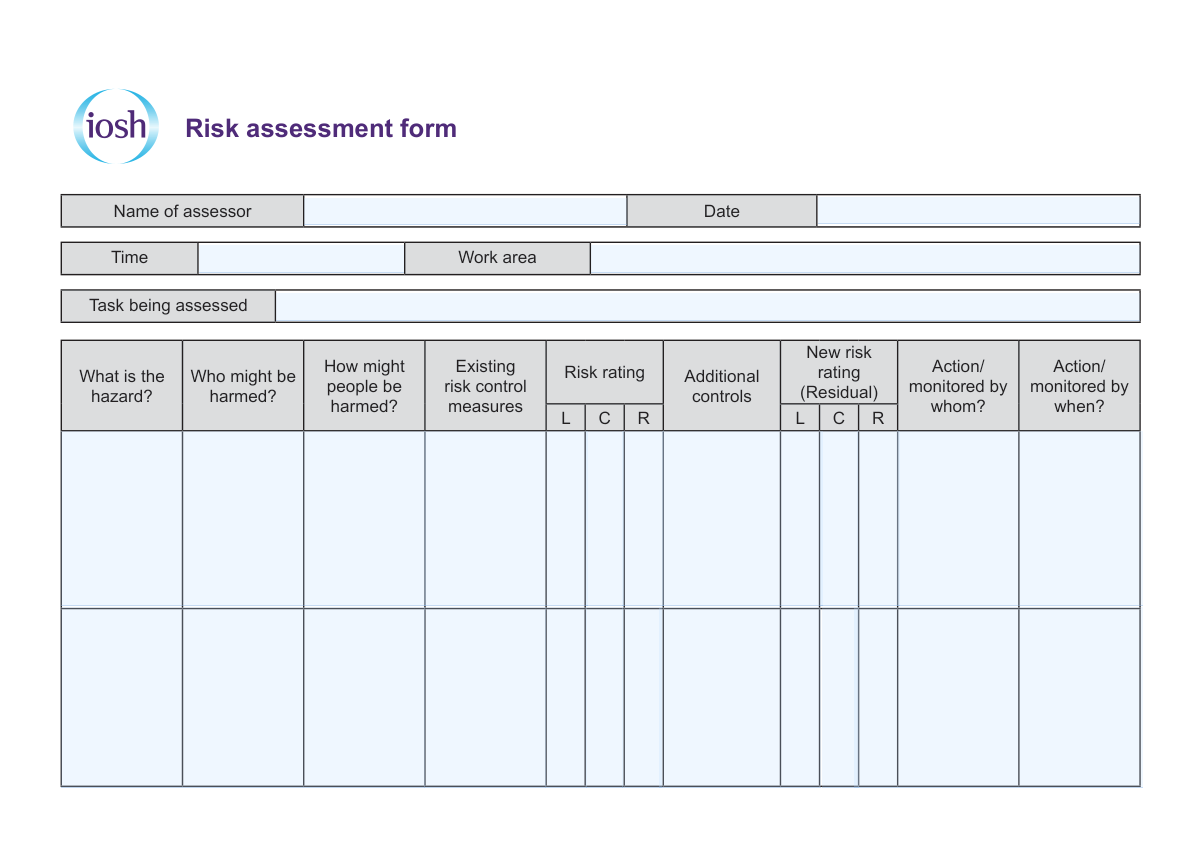
A Risk Assessment Form is a workplace safety document used to systematically record hazards associated with a specific task or work area and assess the level of risk. It captures who could be harmed, the potential harm, and the control measures already in place, then identifies additional controls needed to reduce risk. The form also assigns responsibility and deadlines for actions and includes review and sign-off details to support ongoing compliance and monitoring.
Our AI automatically handles information lookup, data retrieval, formatting, and form filling.
It takes less than a minute to fill out Risk Assessment using our AI form filling.
Securely upload your data. Information is encrypted in transit and deleted immediately after the form is filled out.
Form specifications
| Form name: | Risk Assessment Form |
| Number of pages: | 2 |
| Filled form examples: | Form Risk Assessment Examples |
| Language: | English |
Instafill Demo: filling out a legal form in seconds
How to Fill Out Risk Assessment Online for Free in 2026
Are you looking to fill out a RISK ASSESSMENT form online quickly and accurately? Instafill.ai offers the #1 AI-powered PDF filling software of 2026, allowing you to complete your RISK ASSESSMENT form in just 37 seconds or less.
Follow these steps to fill out your RISK ASSESSMENT form online using Instafill.ai:
- 1 Enter the assessor’s name, the date, time, work area, and the specific task being assessed.
- 2 List each hazard associated with the task (e.g., equipment, substances, environment, manual handling).
- 3 Identify who might be harmed (e.g., employees, contractors, visitors) and describe how they might be harmed.
- 4 Document existing risk control measures currently in place and select/enter the current risk rating (e.g., likelihood/consequence).
- 5 Specify additional controls required to further reduce the risk and calculate the new (residual) risk rating after controls.
- 6 Assign each action to a responsible person (“action/monitored by whom”) and set a target date (“action/monitored by when”).
- 7 Complete the review date, obtain the signature, and record the training provider name if applicable.
Our AI-powered system ensures each field is filled out correctly, reducing errors and saving you time.
Why Choose Instafill.ai for Your Fillable Risk Assessment Form?
Speed
Complete your Risk Assessment in as little as 37 seconds.
Up-to-Date
Always use the latest 2026 Risk Assessment form version.
Cost-effective
No need to hire expensive lawyers.
Accuracy
Our AI performs 10 compliance checks to ensure your form is error-free.
Security
Your personal information is protected with bank-level encryption.
Frequently Asked Questions About Form Risk Assessment
This form is used to identify hazards related to a specific task and work area, assess the level of risk, and document the control measures needed to reduce that risk to an acceptable level.
It should be completed by the assessor (the person responsible for evaluating the task and hazards), typically a supervisor, manager, safety officer, or trained staff member.
Complete a new assessment when introducing a new task, changing equipment or processes, moving to a new work area, or after an incident/near miss that suggests risks have changed.
You should enter the name of the assessor, date, time, work area, and the task being assessed so the assessment is clearly linked to a specific activity and location.
List the source of potential harm (e.g., slippery floor, manual lifting, chemicals, moving machinery) and be specific about what could cause injury or damage.
Include anyone who could be affected, such as employees, contractors, visitors, trainees, members of the public, or specific groups like new workers or pregnant workers if relevant.
Describe the type of harm and how it could happen (e.g., slips leading to sprains, exposure causing burns, lifting causing back strain), including likely injury/illness outcomes.
These are controls already in place, such as training, PPE, guarding, signage, safe work procedures, supervision, maintenance schedules, or ventilation.
Record the initial risk rating based on current controls, then record the residual (new) risk rating after adding any additional controls. Use your organization’s risk matrix or rating method for consistency.
List extra steps needed to further reduce risk, such as engineering changes, updated procedures, additional training, improved supervision, or new equipment/PPE.
These fields assign responsibility and a deadline for implementing and checking the additional controls, ensuring actions are completed and followed up.
The review date indicates when the assessment should be checked and updated. Review it regularly and whenever there are changes to the task, work area, staffing, or after an incident.
The assessor (and any required approver per your workplace process) should sign. The signature confirms the assessment was completed, controls were considered, and actions were assigned.
If training is part of the controls, enter the name of the training provider (internal department or external provider) responsible for delivering the relevant training.
List each hazard on a separate line/row with its own affected persons, harm description, controls, risk ratings, and actions so each risk is assessed and managed clearly.
Compliance Risk Assessment
Validation Checks by Instafill.ai
1
Assessor Name is Present and Uses Valid Person-Name Characters
Validates that the 'Name of assessor' field is completed and contains a plausible personal name (letters, spaces, hyphens, apostrophes) rather than numbers or symbols. This is important for accountability and auditability of the risk assessment. If validation fails, the submission should be rejected or flagged for correction because the assessor cannot be reliably identified.
2
Assessment Date is Present and in a Valid Date Format
Checks that the 'Date' field is provided and matches an accepted date format (e.g., YYYY-MM-DD or DD/MM/YYYY) and represents a real calendar date. A valid date is required to establish when the assessment was performed and to support compliance and review scheduling. If invalid or missing, the form should not be accepted because the assessment timing cannot be verified.
3
Assessment Time is Present and in Valid 24-Hour or AM/PM Format
Ensures the 'Time' field is completed and follows a consistent time format (e.g., HH:MM in 24-hour time or HH:MM AM/PM) with valid ranges. Time can be important for incident correlation, shift-based risk controls, and traceability. If the time is missing or malformed, the system should prompt for correction or flag the record as incomplete.
4
Work Area is Provided and Not Generic Placeholder Text
Validates that 'Work area' is filled in with a specific location/area (e.g., 'Warehouse Bay 3', 'Kitchen prep area') and is not left blank or entered as vague text like 'N/A' or 'same as usual'. Work area specificity is necessary to apply controls correctly and to support targeted follow-up actions. If it fails, the form should be returned for clarification to avoid misapplied controls.
5
Task Being Assessed is Completed and Describes an Activity
Checks that 'Task being assessed' is present and contains a meaningful description of the activity (not just a single word like 'work' or 'task'). The task definition anchors the hazard identification and control measures to a specific process. If missing or too vague, the assessment should be flagged because hazards and controls cannot be reliably interpreted.
6
Hazard Description is Present for Each Risk Row
Ensures each hazard entry under 'What is the hazard?' is completed for every row that contains any other risk information (e.g., risk rating, controls, actions). This prevents orphaned controls or ratings that are not tied to a defined hazard. If a row has ratings/actions but no hazard, the system should require completion or remove the row.
7
At-Risk Group ('Who might be harmed?') is Completed and Plausible
Validates that 'Who might be harmed?' is filled with a relevant group (e.g., employees, contractors, visitors, public) and not left blank when a hazard is listed. Identifying affected parties is essential for selecting appropriate controls and training requirements. If missing, the form should be flagged because the risk may be underestimated or controls may not cover all exposed groups.
8
Harm Mechanism ('How might people be harmed?') is Completed and Specific
Checks that the harm description explains the mechanism of injury/illness (e.g., 'slip leading to fall', 'inhalation of fumes') rather than repeating the hazard title. This improves clarity and supports correct control selection and communication. If the field is empty or non-specific, the submission should be returned for elaboration.
9
Existing Risk Control Measures are Provided When a Hazard is Listed
Ensures 'Existing risk control measures' is completed for each identified hazard, or explicitly states 'none' where appropriate. This is important to document current safeguards and to justify the initial risk rating. If missing, the system should flag the entry because the baseline risk cannot be evaluated consistently.
10
Risk Rating Fields Use Allowed Codes and Correct Structure (L/C/R)
Validates that 'Risk rating' and 'New risk rating (Residual)' follow the expected coding scheme shown on the form (e.g., L, C, R components) and only contain permitted values (such as Low/Medium/High or numeric scales, depending on configuration). This prevents free-text or inconsistent ratings that break reporting and comparisons. If invalid, the system should reject the rating and require selection from allowed values.
11
Residual Risk Rating is Not Higher Than Initial Risk Rating Without Justification
Checks logical consistency between 'Risk rating' and 'New risk rating (Residual)' so that residual risk is typically equal to or lower than the initial risk after controls are applied. If the residual rating is higher, the form should require an explanation (e.g., controls removed, new exposure identified) or flag for review. This prevents contradictory assessments and supports credible risk reduction tracking.
12
Additional Controls Required When Residual Risk Remains Above Acceptable Threshold
Validates that if the residual risk rating remains above a configured acceptable level, 'Additional controls' must be populated with actionable measures. This ensures the form drives risk reduction rather than merely documenting hazards. If the threshold is exceeded and no additional controls are listed, the submission should be blocked or escalated for management review.
13
Action Owner ('Action/monitored by whom?') is Present When Additional Controls Are Listed
Ensures that whenever 'Additional controls' contains an action, the 'Action/monitored by whom?' field is completed with a responsible person/role (not blank or 'TBD'). Assigning ownership is critical for follow-through and audit trails. If missing, the system should flag the action as incomplete and prevent closure of the assessment.
14
Action Due Date ('Action/monitored by when?') is Valid and Not in the Past
Checks that the 'Action/monitored by when?' field is a valid date and, for new actions, is not earlier than the assessment date (and not unreasonably far in the future if policy limits apply). Due dates are necessary for tracking and compliance with corrective action timelines. If invalid or in the past, the system should require correction or a documented reason.
15
Review Date is Present, Valid, and On/After Assessment Date
Validates that 'Review date' is completed, uses a valid date format, and is not earlier than the original assessment date. Review scheduling is a core control to ensure the assessment remains current as conditions change. If missing or inconsistent, the form should be flagged because it cannot be managed through its lifecycle.
16
Signature is Present and Matches Assessor/Authorized Signatory Rules
Ensures the 'Signature' field is completed (e.g., captured as e-signature, typed name with attestation, or uploaded signature) and, where required, corresponds to the assessor or an authorized approver. Sign-off is important for legal defensibility and confirming the assessment has been reviewed and approved. If absent or mismatched, the submission should be rejected or routed for proper authorization.
17
Training Provider Name is Completed When Training is Referenced or Required
Validates that 'Training Provider name' is provided when the assessment indicates training as an existing or additional control, or when policy requires training documentation for certain hazards. This supports verification that training is sourced appropriately and can be audited. If training is implied but the provider is missing, the system should prompt for completion or flag the record for follow-up.
Common Mistakes in Completing Risk Assessment
People often jump straight to the hazard table and forget the header fields (Name of assessor, Date, Time). Missing these details makes the assessment hard to validate, audit, or trace back to the person responsible, and it can invalidate the record for compliance purposes. Always complete these fields first and use a consistent date format (e.g., DD/MM/YYYY) and a clear time (24-hour or AM/PM) that matches your site standard.
A common error is writing broad locations like “site,” “warehouse,” or “outside” without specifying the exact work area. This causes confusion about where controls apply and makes it difficult for others to verify conditions or replicate the assessment. Use precise identifiers such as building/room, line/zone, or specific area names used on site maps (e.g., “Warehouse A – loading bay 2”).
Many entries list a task as a single word (e.g., “lifting,” “cleaning”) rather than the specific activity being assessed. Overly broad tasks lead to missed hazards and controls because the risks differ by method, equipment, and environment. Write the task as a clear activity statement including what is being done, with what, and under what conditions (e.g., “Manual handling of 25kg boxes from pallet to racking using step platform”).
People often write injuries or outcomes (e.g., “back injury,” “cuts”) in the “What is the hazard?” column instead of the hazard source (e.g., “manual handling,” “unguarded blade”). This muddles the logic of the assessment and makes it harder to select effective controls. Enter the hazard as the source of harm, then use “How might people be harmed?” to describe the injury mechanism and potential outcomes.
A frequent mistake is listing only employees and forgetting contractors, visitors, trainees, cleaners, or members of the public. This can result in missing controls like signage, segregation, supervision, or induction requirements. Think through everyone who could be exposed in or near the work area, including people who enter intermittently or during non-routine times.
In the “How might people be harmed?” field, many people write vague phrases like “could get hurt” or “injury possible.” This reduces the usefulness of the assessment because it doesn’t clarify how exposure occurs or what severity is plausible. Describe the mechanism and likely injury types (e.g., “slip on wet floor leading to fall and sprain/fracture,” “inhalation of fumes causing respiratory irritation”).
People sometimes copy standard controls (e.g., “PPE worn,” “training provided”) without confirming they exist, are current, or are consistently followed. This creates a false sense of safety and can lead to incidents and audit findings when controls can’t be evidenced. Only record existing controls that are implemented and verifiable (e.g., documented training date, inspection records, installed guarding, written SOP in use).
The form shows L/C/R (often Likelihood, Consequence, Risk), and a common error is entering only one value, mixing scales, or not calculating the overall risk rating consistently. Inconsistent ratings make it hard to prioritize actions and compare risks across tasks. Follow your organization’s risk matrix: enter Likelihood and Consequence using the defined scale, then calculate/record the resulting Risk rating for both current and residual risk.
Additional controls are often written as broad intentions like “be careful,” “use PPE,” or “improve training,” which don’t specify what will change. This leads to no real risk reduction and makes follow-up impossible. Write controls as specific actions with clear deliverables (e.g., “install anti-slip matting at entrance,” “fit interlocked guard,” “update SOP and brief all operators with sign-off”).
Many forms keep the same risk rating before and after controls, or they fill in the residual rating without considering how the new controls change likelihood or consequence. This undermines the purpose of the assessment and can hide whether controls are effective. Re-rate the risk after the additional controls are implemented, using the same matrix, and ensure the residual rating logically reflects the control impact.
The “Action/monitored by whom?” and “Action/monitored by when?” fields are frequently left blank or filled with roles like “management” without a named owner or a specific date. Without clear accountability and timelines, actions stall and risks remain unmanaged. Assign a responsible person (name or defined role with a named incumbent) and a realistic due date, then ensure it aligns with the risk priority.
The bottom fields (Review date, Signature, Training Provider name) are commonly overlooked, especially when the form is duplicated or spans multiple sections. Missing sign-off and review scheduling can make the assessment non-compliant and increases the chance it won’t be revisited after changes or incidents. Always complete the review date based on your policy, obtain the required signature(s), and record the training provider name where training is part of the control strategy.
Saved over 80 hours a year
“I was never sure if my IRS forms like W-9 were filled correctly. Now, I can complete the forms accurately without any external help.”
Kevin Martin Green
Your data stays secure with advanced protection from Instafill and our subprocessors
Robust compliance program
Transparent business model
You’re not the product. You always know where your data is and what it is processed for.
ISO 27001, HIPAA, and GDPR
Our subprocesses adhere to multiple compliance standards, including but not limited to ISO 27001, HIPAA, and GDPR.
Security & privacy by design
We consider security and privacy from the initial design phase of any new service or functionality. It’s not an afterthought, it’s built-in, including support for two-factor authentication (2FA) to further protect your account.
Fill out Risk Assessment with Instafill.ai
Worried about filling PDFs wrong? Instafill securely fills risk-assessment-form forms, ensuring each field is accurate.