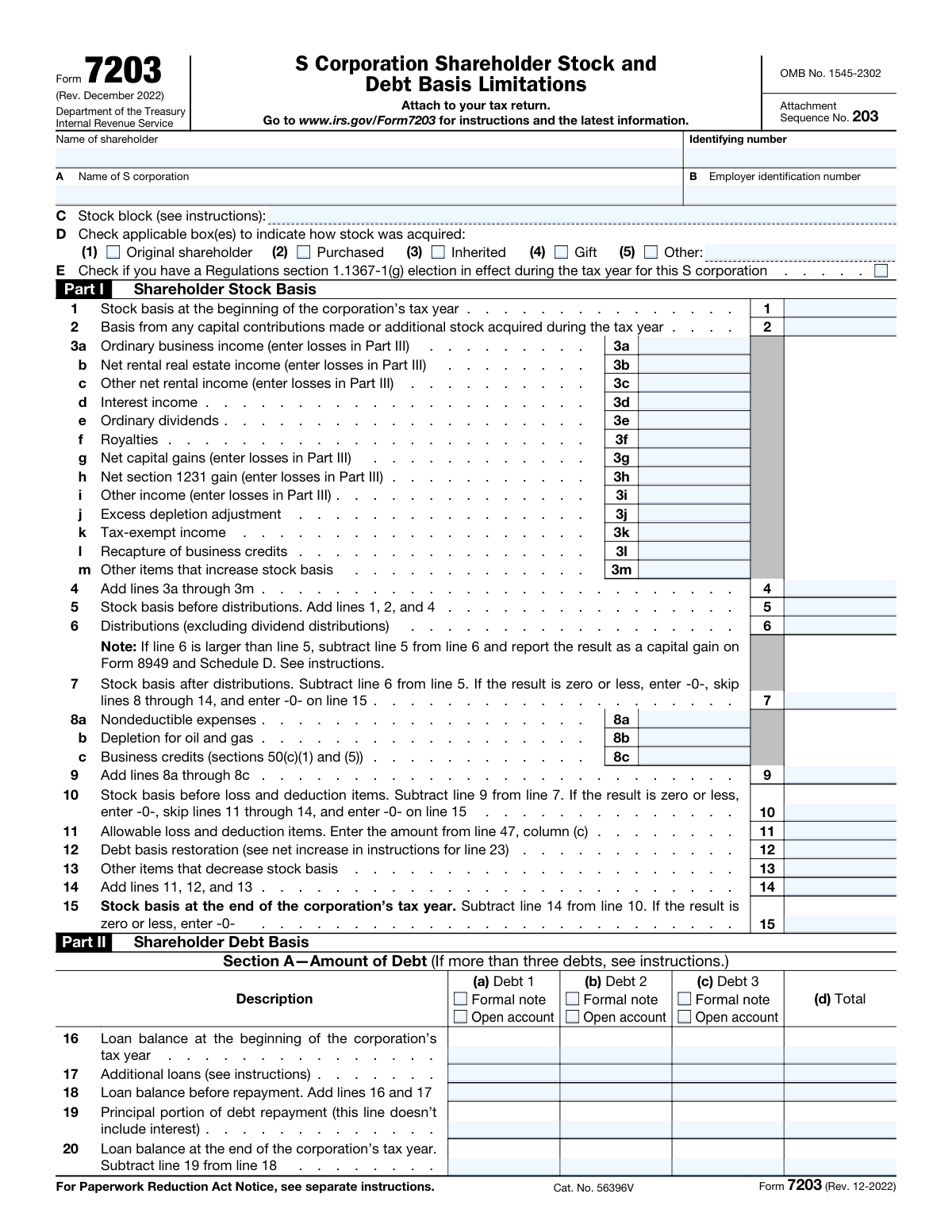
Yes! You can use AI to fill out Schedule E (Form 1120-S), Shareholder’s Stock and Debt Basis Limitations

Schedule E (Form 1120-S), Shareholder’s Stock and Debt Basis Limitations, is an IRS schedule that helps an S corporation shareholder compute and document their stock basis and debt basis for the year, and apply the basis limitation rules to losses, deductions, and certain other items. It is important because basis determines whether losses and deductions can be claimed currently, must be limited, or carried forward, and it supports the shareholder’s tax reporting and audit trail. The schedule also tracks debt activity (loans, repayments, and resulting basis changes) and allocates allowable losses between stock basis and debt basis. Today, this form can be filled out quickly and accurately using AI-powered services like Instafill.ai, which can also convert non-fillable PDF versions into interactive fillable forms.
Our AI automatically handles information lookup, data retrieval, formatting, and form filling.
It takes less than a minute to fill out Schedule E (Form 1120-S) using our AI form filling.
Securely upload your data. Information is encrypted in transit and deleted immediately after the form is filled out.

Form specifications

Form name: Schedule E (Form 1120-S), Shareholder’s Stock and Debt Basis Limitations
Number of pages: 2
Filled form examples: Form Schedule E (Form 1120-S) Examples
Language: English
Categories: corporate tax forms, business tax forms, tax forms, IRS forms
main-image

Instafill Demo: filling out a legal form in seconds

How to Fill Out Schedule E (Form 1120-S) Online for Free in 2026

Are you looking to fill out a SCHEDULE E (FORM 1120-S) form online quickly and accurately? Instafill.ai offers the #1 AI-powered PDF filling software of 2026, allowing you to complete your SCHEDULE E (FORM 1120-S) form in just 37 seconds or less.
Follow these steps to fill out your SCHEDULE E (FORM 1120-S) form online using Instafill.ai:
  1. 1 Go to Instafill.ai and upload the Schedule E (Form 1120-S) PDF (or select it from the form library) to start an AI-guided fill session.
  2. 2 Enter shareholder and S corporation identification details (shareholder name/SSN or ITIN, S corporation name/EIN, and any stock block identifier) and indicate the stock acquisition method and any applicable elections (e.g., Reg. §1.1367-1(g)).
  3. 3 Complete Part I (Shareholder Stock Basis) by importing or entering beginning stock basis, capital contributions/additional stock, income items that increase basis, distributions, and items that decrease basis to calculate ending stock basis.
  4. 4 Complete Part II (Shareholder Debt Basis) by identifying each debt as a formal note or open account and entering beginning balances, additional loans, repayments, and ending balances; let the AI compute debt basis restoration and related totals.
  5. 5 Fill Part III (Allowable Loss and Deduction Items) by entering current-year losses/deductions and prior-year carryovers, then use the AI to apply stock and debt basis limitations to determine allowable amounts and carryovers to next year.
  6. 6 Review AI-calculated totals and cross-check key roll-forwards (beginning-to-ending basis, column totals, and any reportable gain on debt repayment), then generate a final, validated copy for filing/recordkeeping.

Our AI-powered system ensures each field is filled out correctly, reducing errors and saving you time.

Why Choose Instafill.ai for Your Fillable Schedule E (Form 1120-S) Form?

Speed

Complete your Schedule E (Form 1120-S) in as little as 37 seconds.

Up-to-Date

Always use the latest 2026 Schedule E (Form 1120-S) form version.

Cost-effective

No need to hire expensive lawyers.

Accuracy

Our AI performs 10 compliance checks to ensure your form is error-free.

Security

Your personal information is protected with bank-level encryption.

Frequently Asked Questions About Form Schedule E (Form 1120-S)

This form is used to track an S corporation shareholder’s stock basis and debt basis for the tax year. Basis determines how much loss and deduction you can claim and whether distributions or debt repayments may be taxable.

Shareholders of an S corporation generally complete it when they need to compute or support their basis, especially if they have losses/deductions, distributions, loans to the corporation, or carryovers. It’s commonly prepared with your individual tax return using information from the S corporation’s Schedule K-1.

You’ll need the shareholder’s name and identifying number (SSN/ITIN), the S corporation’s legal name and EIN, and the stock block identifier (if applicable). You’ll also need prior-year basis records plus current-year K-1 items, distributions, and any loan activity between you and the corporation.

Enter them in the “Shareholder and S Corporation Identification” section: shareholder name, shareholder identifying number, S corporation name, and the corporation’s EIN. Make sure these match the tax return and the K-1 to avoid mismatches.

A stock block identifier is a label used to distinguish different blocks of shares (for example, shares acquired at different times or by different methods). If you only have one block of S corporation stock, you may not need a special identifier, but follow the form instructions if multiple blocks apply.

Check the box that best describes how you acquired the shares. If none apply, select “Other” and provide a short description (for example, “transfer from related party” or “reorganization”) on the “Other—stock acquisition method” line.

Check this box only if that specific election was in effect for the S corporation during the tax year. If you’re unsure, confirm with the S corporation’s tax preparer or review the corporation’s tax records/elections for the year.

Start with beginning stock basis (Line 1), add capital contributions/additional stock (Line 2), then add all income and other increases (Lines 3a–3m, totaled on Line 4). Compute basis before distributions (Line 5), subtract non-dividend distributions (Line 6), and continue only if Line 7 is greater than zero.

If Line 7 is zero or less, enter “-0-” as instructed and skip Lines 8–14 in Part I. This typically means you don’t have remaining stock basis to absorb additional reductions like nondeductible expenses or losses in that section.

Income items generally increase stock basis in Part I (Lines 3a–3m), while losses and deductions are handled in the later loss limitation section (Lines 35–47) and may also affect debt basis calculations. If an item is a loss, follow the form’s direction to report it in the loss section rather than as income in Part I.

Mark “Formal note” if the debt is evidenced by a written obligation such as a promissory or installment note. Mark “Open account” if it’s an informal running balance (often used for frequent advances/repayments) rather than a formal note.

Line 16 is the beginning loan balance, Line 17 is additional loans during the year, Line 18 is the balance before repayment (Line 16 + Line 17), Line 19 is principal repaid (exclude interest), and Line 20 is the ending loan balance. Use your loan records and the corporation’s books to support these figures.

Line 26 calculates the portion of principal repayment that is nontaxable based on the ratio of debt basis to the loan balance before repayment. Line 34 generally reflects any taxable gain when repayments exceed the nontaxable amount (repayment minus nontaxable repayment).

Column (a) is current-year losses/deductions, column (b) is prior-year carryover brought forward, columns (c) and (d) show the allowable amounts limited by stock basis and debt basis, and column (e) is the amount carried to the next year. Line 47 totals each column across Lines 35–46.

Yes—AI tools like Instafill.ai can help auto-fill form fields accurately and save time by pulling values from your provided documents (such as K-1s and basis schedules). To use it, upload the PDF to Instafill.ai, add your supporting documents, review the suggested entries for each line/column, and then export the completed form.

If the PDF is flat/non-fillable, Instafill.ai can convert it into an interactive fillable form so you can type directly into the fields. After conversion, you can auto-fill and edit entries before downloading the finalized PDF.

Compliance Schedule E (Form 1120-S)
Validation Checks by Instafill.ai

1
Shareholder Name Required and Properly Formatted
Validates that the Shareholder name field is present and contains a plausible full legal name (not blank, not only initials, not only numbers/symbols). This is important because the shareholder identity must match IRS and tax return records to avoid mismatches and processing delays. If validation fails, the submission should be rejected or flagged for correction with a message requesting the full legal name as it will appear on the tax return.
2
Shareholder Identifying Number Format (SSN/ITIN) and Completeness
Checks that the shareholder identifying number is provided and matches an acceptable SSN or ITIN pattern (9 digits; allow hyphens/spaces but normalize to digits). This prevents invalid taxpayer identifiers that can cause IRS rejection or inability to match the shareholder to filed returns. If the value is missing or not 9 digits after normalization, the form should fail validation and require correction.
3
S Corporation Name Required and Not Identical to Shareholder Name
Ensures the S corporation name is provided and is not the same string as the shareholder name (after trimming and case normalization), which often indicates the fields were swapped or duplicated. Correct entity identification is critical for associating basis computations with the correct corporation. If validation fails, the submission should be flagged and the user prompted to confirm the legal S corporation name.
4
Employer Identification Number (EIN) Format Validation
Validates that the EIN is present and conforms to EIN formatting rules (9 digits; commonly displayed as XX-XXXXXXX; normalize to digits). This is important because EIN is the primary identifier for the S corporation and is used for cross-referencing K-1 and corporate filings. If the EIN is missing or not 9 digits after normalization, the submission should be rejected until corrected.
5
Stock Block Identifier Required and Constrained to Allowed Characters
Checks that the stock block identifier is provided and contains only allowed characters (e.g., letters, numbers, hyphen, underscore) and is within a reasonable length limit (such as 1–30 characters). This prevents downstream mapping issues when multiple stock blocks exist and avoids injection/encoding problems in storage and reporting. If validation fails, the system should request a valid identifier consistent with the form instructions.
6
Stock Acquisition Method Selection (At Least One, and 'Other' Requires Text)
Validates that at least one acquisition method checkbox is selected (Original shareholder, Purchased, Inherited, Gift, or Other). If 'Other' is selected, the 'D(5) Other — stock acquisition method' text must be non-empty and sufficiently descriptive (e.g., minimum 3 characters). If no method is selected or 'Other' lacks a description, the submission should fail because acquisition method can affect basis and audit support.
7
Mutual Exclusivity for Debt Type per Debt (Formal Note vs Open Account)
For each debt (Debt 1–Debt 3), ensures the user does not check both 'Formal note' and 'Open account' simultaneously, and that if any debt amounts are entered for that debt, exactly one type is selected. This is important because the debt characterization affects substantiation and how the debt is tracked. If validation fails, the system should block submission and require the user to select only one debt type (or clear the debt amounts).
8
Conditional Required Fields for Debt Columns When Debt Is Indicated
If a debt is indicated (either Formal note or Open account is checked), validates that the key numeric fields for that debt are present where required for the computation flow (e.g., beginning balance line 16, additional loans line 17, principal repayment line 19, ending balance line 20, and beginning debt basis line 21). This prevents incomplete debt schedules that would make later calculated lines (18, 24–34) unreliable. If required fields are missing, the submission should be flagged and the user prompted to complete the debt column or remove the debt selection.
9
Numeric Field Format and Precision for All Amount Lines
Validates that all monetary and ratio fields accept only numeric input (optionally with commas and a leading minus where allowed), and enforces a consistent precision rule (e.g., dollars as whole numbers or up to 2 decimals; ratios like line 25 up to 6 decimals). This is important to prevent parsing errors and rounding inconsistencies in calculations and exports. If validation fails, the system should reject the field entry and request a properly formatted number.
10
Non-Negative Constraints for Basis and Distribution/Repayment Inputs
Ensures fields that should not be negative are non-negative (e.g., stock basis lines 1, 2, 6, 8a–8c, 11–13; debt balances lines 16–20; repayments line 19; debt basis lines 21–24, 26–34). Negative values in these fields typically indicate sign errors (losses belong in Part III, not income lines; repayments and balances should not be negative). If a prohibited negative value is detected, the submission should be blocked and the user instructed to correct the sign or move the amount to the appropriate loss section.
11
Part I Arithmetic Integrity (Lines 4, 5, 7, 9, 10, 14, 15)
Recomputes and validates the required totals: line 4 = sum(3a–3m), line 5 = line 1 + line 2 + line 4, line 7 = line 5 − line 6 (but if <= 0 must be entered as 0), line 9 = sum(8a–8c), line 10 = line 7 − line 9 (if <= 0 must be 0), line 14 = line 11 + line 12 + line 13, and line 15 = line 10 − line 14 (if <= 0 must be 0). This is critical because basis computations are formula-driven and must reconcile to avoid incorrect allowable loss calculations. If any computed value does not match the entered value within a defined tolerance (e.g., $1 or exact match depending on rounding policy), the system should flag the discrepancy and require correction or auto-calculate and lock the total fields.
12
Part I Skip-Logic Enforcement When Basis Hits Zero
If line 7 is zero (or less), validates that lines 8a–14 are blank/zero as instructed, and that line 15 is zero. Similarly, if line 10 is zero (or less), validates that lines 11–14 are blank/zero and line 15 is zero. This prevents users from entering reductions when there is no remaining basis, which would create negative basis or inconsistent results. If validation fails, the system should prompt the user to clear the disallowed lines or correct the upstream basis amounts.
13
Debt Schedule Arithmetic Integrity (Lines 16–20 Totals and Per-Debt Line 18)
Validates that for each debt, line 18 equals line 16 + line 17, and that the Total column for lines 16–20 equals the sum of Debts 1–3 for the same line. This ensures the debt rollforward is internally consistent and supports later debt basis computations. If any total or per-debt rollforward does not reconcile, the submission should be flagged and the user required to correct the inconsistent entries.
14
Debt Basis Computation Integrity (Lines 24–34, Including Division Rules)
Checks that line 24 equals line 21 + line 22 + line 23 for each debt and total, and that line 25 equals line 24 Ă· line 18 with safeguards against division by zero (if line 18 is zero, line 25 must be blank/zero and downstream lines 26–34 must follow the form’s logic). Also validates line 26 = line 25 × line 19, line 27 = line 24 − line 26, line 29 = line 27 − line 28 (floored at zero), line 31 reflects line 29 minus allowable loss (line 30) as applicable, and line 34 = line 32 − line 33. These checks are essential because small errors propagate into taxable gain and allowable loss determinations. If validation fails, the system should either auto-calculate dependent lines or block submission until the user corrects the inconsistent values.
15
Loss Section Column Consistency (Lines 35–46 and Line 47 Totals)
Validates that for each line 35–46, the allowable amounts in columns (c) and (d) do not exceed the sum of current-year plus carryover amounts (columns (a) + (b)), and that carryover to next year (column (e)) is consistent with the remaining disallowed amount (typically (a) + (b) − (c) − (d), subject to form-specific rules). Also validates that line 47 for each column equals the sum of lines 35–46 in that column. This is important to prevent overstating allowable losses or understating carryovers, which can materially affect taxable income. If validation fails, the system should flag the specific line/column mismatch and require correction before acceptance.

Common Mistakes in Completing Schedule E (Form 1120-S)

Using a nickname or mismatched legal name for the shareholder or S corporation

People often enter a shortened name (e.g., “Bob Smith”) or a DBA instead of the exact legal name that appears on IRS records and the tax return. This can cause matching issues with the IRS and inconsistencies with the K-1/1120-S records, leading to processing delays or notices. Always use the shareholder’s full legal name and the S corporation’s legal name exactly as shown on prior-year filings and IRS correspondence. AI-powered tools like Instafill.ai can help standardize names and flag mismatches before submission.

Entering the wrong identifying number (SSN/ITIN) or formatting it incorrectly

A common error is transposing digits, using an EIN where an SSN/ITIN is required, or leaving out leading zeros. Incorrect taxpayer identification numbers can trigger IRS validation failures, delays, or misapplied basis/loss limitations to the wrong taxpayer. Verify the number against official documents (SSA card, ITIN letter) and enter it in the expected format without extra characters unless the form specifies otherwise. Instafill.ai can validate ID number patterns and reduce typos during entry.

Mixing up the S corporation EIN with another entity’s EIN (or the shareholder’s SSN)

Filers sometimes copy an EIN from payroll, a related partnership/LLC, or even the shareholder’s SSN/ITIN into the corporation EIN field. This can break cross-references to the correct 1120-S and create reconciliation problems when the IRS matches entity data. Confirm the EIN from the S corporation’s CP 575/147C letter or prior-year 1120-S header and keep it consistent across all schedules. Instafill.ai can auto-check EIN formatting and help ensure the EIN aligns with the entity name you entered.

Leaving the stock block identifier blank or using an unclear designation

Because “stock block identifier” is not a familiar concept, many people skip it or enter vague text like “common” without following the instructions. This can make it difficult to track basis separately when there are multiple acquisition lots, different classes, or partial dispositions, increasing the risk of incorrect basis and loss limitation calculations. Use a clear, consistent identifier (e.g., “Block A – 2019 issuance,” “Block B – 2023 purchase”) that matches your records and the form instructions. Instafill.ai can prompt for a consistent naming convention and prevent accidental omissions.

Checking multiple stock acquisition method boxes (or the wrong one) without explanation

People often check more than one acquisition method (e.g., “Purchased” and “Gift”) or select “Other” when a listed option applies, especially when shares were acquired in stages. Incorrect acquisition method selection can complicate basis support, holding period determinations, and audit documentation. Choose the method that applies to the specific stock block being reported, and if multiple methods exist, separate them by stock block identifier or follow the instructions for reporting. If “Other” is selected, provide a concise, specific description on the “Other—stock acquisition method” line.

Selecting 'Other' but not completing the required 'Other—stock acquisition method' description

A frequent omission is checking “Other” and leaving the description line blank, or writing something too generic like “transfer.” This creates an incomplete record and can lead to follow-up questions or difficulty substantiating basis and ownership history. If you check “Other,” always enter a short, specific description (e.g., “transfer from related party,” “reorganization under §368,” “conversion from LLC”). Instafill.ai can enforce conditional logic so the description is required when “Other” is selected.

Misplacing income vs. loss items between Part I (increases) and Part III (losses)

The form explicitly notes that certain lines in Part I are for income and that losses should be entered elsewhere, but filers still enter negative numbers on income lines (e.g., 3a, 3b, 3g, 3h) instead of reporting losses in the loss section. This can invert basis calculations, produce incorrect totals on lines 4–15, and lead to overstated or understated allowable losses. Follow the instruction cues: report income on Part I lines 3a–3m and route losses to the designated loss lines/columns. Instafill.ai can detect negative entries in income-only fields and redirect them appropriately.

Arithmetic and carryforward errors on calculated lines (Lines 4, 5, 7, 9, 10, 14, 15)

Because many lines are sums or differences of prior lines, manual entry often results in simple math mistakes or forgetting to update totals after changing an input. These errors cascade through the basis computation and can incorrectly limit distributions, deductions, and carryovers. Recalculate each dependent line after any change and confirm that totals match the required formulas (e.g., Line 4 = 3a–3m; Line 7 = 5–6; Line 15 = 10–14). Instafill.ai can automatically compute and validate these totals to prevent cascading math errors.

Ignoring 'skip lines if zero' rules and entering amounts when basis is -0-

Many filers continue filling lines 8–14 even when Line 7 is zero or less, or fill lines 11–14 when Line 10 is zero or less, despite the form’s instructions to stop. This can create internally inconsistent results (e.g., negative basis where the form expects -0-) and may overstate allowable deductions. If the form instructs you to enter “-0-” and skip subsequent lines, follow that flow and move to the next applicable section. Instafill.ai can apply these conditional rules so fields are disabled or flagged when they should be skipped.

Misclassifying debt as 'formal note' vs. 'open account' (or checking neither/both)

People often misunderstand the difference between a documented promissory note and an informal running balance, leading them to check the wrong box, check both, or check neither. Misclassification can affect how debt basis is tracked and substantiated, and it can raise documentation issues if the IRS requests support. Confirm whether there is a written obligation (note terms, interest, maturity) versus an open account arrangement, and select exactly one type per debt entry. Instafill.ai can guide the selection with prompts and ensure one-and-only-one choice is made per debt.

Including interest in principal repayment (Line 19) or using netted repayment figures

A common mistake is entering total payments (principal + interest) on the principal repayment line, or netting borrowings and repayments instead of reporting them separately on Lines 17 and 19. This distorts ending loan balances (Line 20) and downstream nontaxable repayment and gain calculations (Lines 26–34). Use statements or amortization schedules to separate principal from interest and report gross additional loans and gross principal repayments in the correct lines. Instafill.ai can help by validating that ending balances reconcile (beginning + loans − principal repayments = ending).

Column/line cross-reference mistakes in the debt basis computations (Lines 21–34 and totals)

Because the debt section requires repeated references (e.g., Line 22 must match Line 17; Line 32 must match Line 19; totals must equal the sum of Debts 1–3), filers frequently copy the wrong column, forget to update totals, or divide/multiply using the wrong line (e.g., Line 25 and Line 26). These errors can incorrectly compute nontaxable repayments and reportable gain, potentially causing underreported income or incorrect basis carryforward. Carefully follow each formula and reconcile each debt column to the total column at every step. Instafill.ai can automatically map cross-references and flag when a column total doesn’t equal the sum of the individual debts.
Saved over 80 hours a year

“I was never sure if my IRS forms like W-9 were filled correctly. Now, I can complete the forms accurately without any external help.”

Kevin Martin Green

Your data stays secure with advanced protection from Instafill and our subprocessors

Robust compliance program

Transparent business model

You’re not the product. You always know where your data is and what it is processed for.

ISO 27001, HIPAA, and GDPR

Our subprocesses adhere to multiple compliance standards, including but not limited to ISO 27001, HIPAA, and GDPR.

Security & privacy by design

We consider security and privacy from the initial design phase of any new service or functionality. It’s not an afterthought, it’s built-in, including support for two-factor authentication (2FA) to further protect your account.

Fill out Schedule E (Form 1120-S) with Instafill.ai

Worried about filling PDFs wrong? Instafill securely fills schedule-e-form-1120-s-shareholders-stock-and-debt-basis-limitations forms, ensuring each field is accurate.