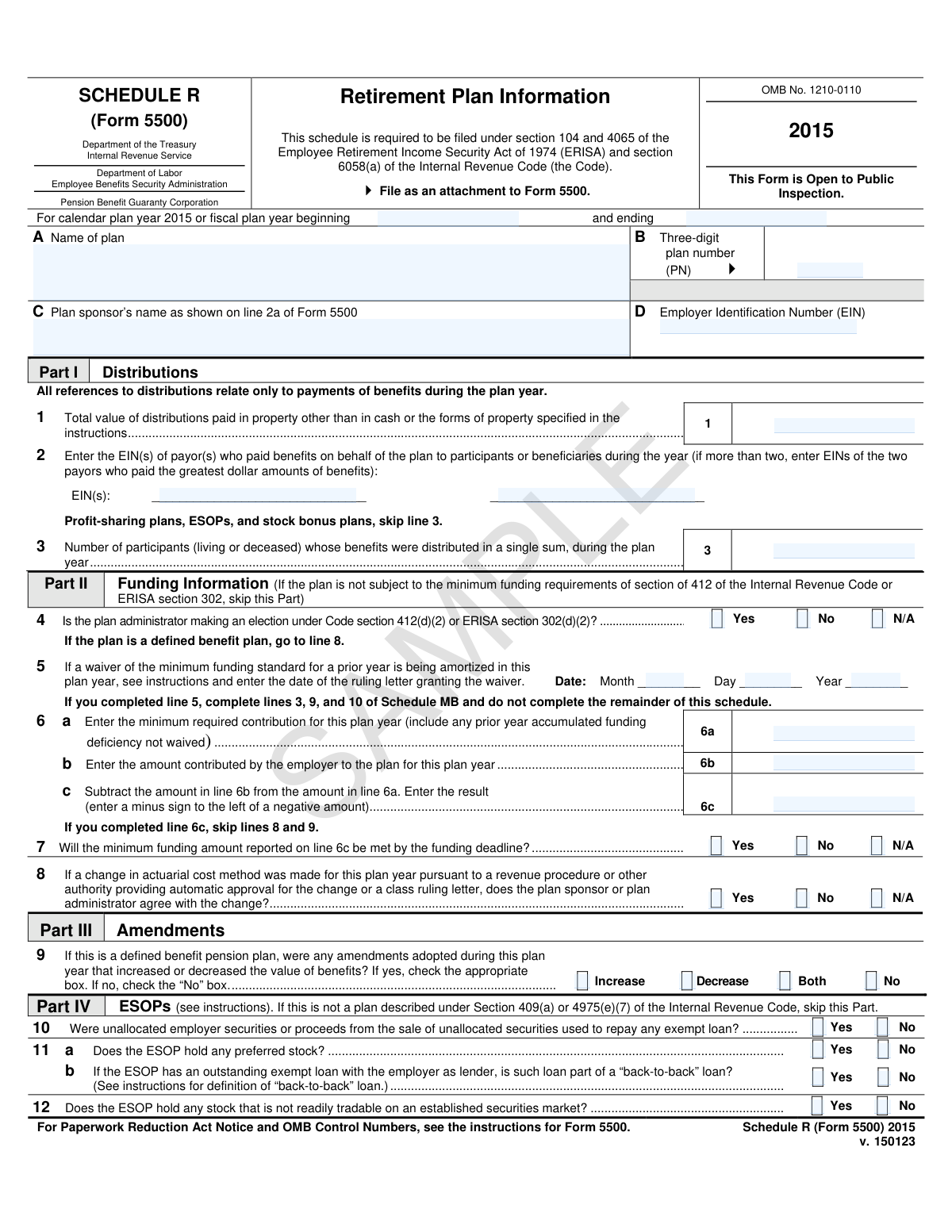
Yes! You can use AI to fill out Schedule R (Form 5500), Retirement Plan Information

Schedule R (Form 5500), Retirement Plan Information, is a mandatory schedule filed with Form 5500 under the Employee Retirement Income Security Act (ERISA) and the Internal Revenue Code. It is used by pension benefit plans to report specific information regarding plan distributions, funding status, amendments, and other details to the Department of Labor, IRS, and Pension Benefit Guaranty Corporation. Today, this form can be filled out quickly and accurately using AI-powered services like Instafill.ai, which can also convert non-fillable PDF versions into interactive fillable forms.
Our AI automatically handles information lookup, data retrieval, formatting, and form filling.
It takes less than a minute to fill out Schedule R (Form 5500) using our AI form filling.
Securely upload your data. Information is encrypted in transit and deleted immediately after the form is filled out.

Form specifications

Form name: Schedule R (Form 5500), Retirement Plan Information
Number of pages: 1
Language: English
main-image

Instafill Demo: How to fill out PDF forms in seconds with AI

How to Fill Out Schedule R (Form 5500) Online for Free in 2026

Are you looking to fill out a SCHEDULE R (FORM 5500) form online quickly and accurately? Instafill.ai offers the #1 AI-powered PDF filling software of 2026, allowing you to complete your SCHEDULE R (FORM 5500) form in just 37 seconds or less.
Follow these steps to fill out your SCHEDULE R (FORM 5500) form online using Instafill.ai:
  1. 1 Navigate to Instafill.ai and upload your Schedule R (Form 5500) or select it from their template library.
  2. 2 Provide the basic plan identification information, including the plan name, plan number, and sponsor's details in the header section.
  3. 3 Complete Part I (Distributions) and Part II (Funding Information) by entering details about benefit payments and minimum funding requirements, letting the AI guide you through the calculations.
  4. 4 Answer the questions in Part III (Amendments), Part IV (ESOPs), and Part V (Multiemployer Defined Benefit Pension Plans) as applicable to your plan.
  5. 5 Fill out the remaining sections, including Part VI for additional defined benefit plan information and Part VII for IRS compliance questions.
  6. 6 Review all the information populated by the AI for accuracy, making any necessary edits to ensure compliance.
  7. 7 Securely download, print, or electronically file the completed Schedule R along with your main Form 5500.

Our AI-powered system ensures each field is filled out correctly, reducing errors and saving you time.

Why Choose Instafill.ai for Your Fillable Schedule R (Form 5500) Form?

Speed

Complete your Schedule R (Form 5500) in as little as 37 seconds.

Up-to-Date

Always use the latest 2026 Schedule R (Form 5500) form version.

Cost-effective

No need to hire expensive lawyers.

Accuracy

Our AI performs 10 compliance checks to ensure your form is error-free.

Security

Your personal information is protected with bank-level encryption.

Frequently Asked Questions About Form Schedule R (Form 5500)

Schedule R is an attachment to the Form 5500 annual return/report, used to provide detailed information about a retirement plan's distributions, funding status, amendments, and other compliance details as required by ERISA and the Internal Revenue Code.

Administrators of pension benefit plans, such as defined benefit plans and certain defined contribution plans, that are required to file Form 5500 must also file Schedule R. Specific instructions on the form indicate which parts may be skipped depending on the plan type.

Schedule R is not a standalone form; it must be filed electronically as an attachment to your plan's annual Form 5500. The entire filing is submitted through the Department of Labor's EFAST2 system.

No, the form instructions state that if your plan is not subject to the minimum funding requirements, such as a profit-sharing plan, you should skip Part II. Always refer to the latest form instructions for confirmation.

Part V is only for multiemployer defined benefit pension plans and requires detailed information about each employer that contributed more than 5% of the total contributions for the plan year. This includes the employer's name, EIN, contribution amount, and collective bargaining agreement details.

An ESOP is an Employee Stock Ownership Plan. Part IV asks for specific details if your plan is an ESOP, such as whether it holds preferred stock, has certain types of loans, or holds stock that is not readily tradable on an established market.

The plan name and three-digit plan number should be identical to the information provided on line 1a and 1b of your main Form 5500. This information is established in your official plan documents.

No, the form is explicitly marked as 'Open to Public Inspection.' The information submitted as part of the Form 5500 filing is publicly available data.

You must report this in Part III, 'Amendments.' You will need to check the appropriate box to indicate if the amendments adopted during the plan year resulted in an increase, decrease, or both in the value of benefits.

Part VII gathers information to verify the plan's compliance with IRS regulations. It includes questions about 401(k) nondiscrimination testing, coverage requirements, and whether the plan has been timely amended for all required tax law changes.

Yes, modern services like Instafill.ai use AI to help you accurately auto-fill form fields from your saved information, which can save time and help prevent common errors.

You can use a service like Instafill.ai to upload your Schedule R PDF and convert it into an interactive online form. This allows you to easily type in your information, save your progress, and download the completed document.

If you have a non-fillable or 'flat' PDF, tools like Instafill.ai can help. The platform can convert any PDF into a smart, fillable form that you can complete and manage digitally.

Compliance Schedule R (Form 5500)
Validation Checks by Instafill.ai

1
Validates Employer Identification Number (EIN) Format
This check ensures that the Employer Identification Number (EIN) entered in field D and for payors in line 2 consists of exactly nine digits. This is critical for correctly identifying the plan sponsor and any paying agents with the IRS and DOL. A failure in this validation would prevent the form from being correctly cross-referenced and could lead to processing rejection.
2
Ensures Three-Digit Plan Number Format
This validation confirms that the Plan Number (PN) in field B is a three-digit number (e.g., 001, 042, 315). Each plan sponsored by an employer must have a unique three-digit identifier. An incorrect format can lead to misidentification of the plan, causing data to be associated with the wrong retirement plan.
3
Verifies Plan Year Period
This check validates that the 'planYearBeginDate' and 'planYearEndDate' define a logical and valid time period, typically a full year. It ensures the end date is after the begin date and that the duration is reasonable for a fiscal plan year. An invalid period would make all time-sensitive financial data on the form meaningless and lead to rejection.
4
Verifies Funding Deficiency Calculation (Line 6c)
This check ensures the mathematical accuracy of the funding deficiency amount on line 6c. The value must be the result of subtracting the amount contributed (line 6b) from the minimum required contribution (line 6a). This calculation is fundamental to assessing the plan's funding status, and an error could misrepresent a funding surplus or shortfall, triggering incorrect regulatory scrutiny.
5
Ensures Mutually Exclusive Selection for Plan Amendments (Line 9)
This validation confirms that only one option is selected in the checkboxes for line 9 regarding plan amendments. A user cannot select 'No' along with 'Increase,' 'Decrease,' or 'Both.' This prevents contradictory data entry, ensuring a clear and unambiguous statement about whether and how plan benefits were amended during the year.
6
Validates Conditional 'Other' Specification in Part V (Line 13e)
This check ensures that if the 'Other' checkbox is selected for the 'Base unit measure' in line 13e(2), the corresponding text field specifying the measure is not empty. This rule enforces completeness for user-specified categories, preventing ambiguous data. Failure to provide the specification makes the contribution rate information incomplete and unusable.
7
Verifies Asset Allocation Percentage Sum (Line 19a)
This validation confirms that the sum of the percentages for Stock, Investment-Grade Debt, High-Yield Debt, Real Estate, and Other assets in line 19a equals 100%. This is a critical integrity check to ensure the reported asset allocation is complete and accurate. A sum other than 100% indicates a reporting error and would invalidate the entire asset allocation breakdown.
8
Validates Conditional 'Other' Specification for Duration Measure (Line 19c)
This check ensures that if the 'Other' checkbox is selected for the duration measure in line 19c, the corresponding text field ('penOtherDurationTypeText') is filled out. This prevents incomplete data when a non-standard measure is used. Without this specification, the duration information provided in line 19b is not properly defined and cannot be interpreted correctly.
9
Enforces Conditional Logic for 401(k) Details (Line 20b)
This validation ensures that question 20b, regarding how the plan satisfies nondiscrimination requirements, is only answered if the answer to question 20a ('Is the plan a 401(k) plan?') is 'Yes'. If the plan is not a 401(k), these subsequent fields must be left blank. This prevents irrelevant and potentially confusing information from being submitted.
10
Enforces Conditional Logic for ADP/ACP Testing (Line 20c)
This check validates that question 20c is only answered if the 'ADP/ACP test' method is selected in question 20b. Answering question 20c is irrelevant if the plan uses a design-based safe harbor method. This rule ensures the logical flow of the form is followed and prevents superfluous data entry.
11
Validates Date of Funding Waiver (Line 5)
This check ensures that if a date is entered in line 5 for a ruling letter, it is a valid calendar date (e.g., MM is 01-12, DD is 01-31). This prevents the entry of impossible dates, which would be invalid for legal and record-keeping purposes. An invalid date would require correction before the filing can be accepted.
12
Validates Withdrawal Liability Logic (Line 16b)
This check ensures that the aggregate withdrawal liability amount in line 16b is greater than zero only if the number of employers who withdrew in line 16a is also greater than zero. It is logically impossible to have a liability amount if no employers have withdrawn. This prevents data entry errors and ensures the financial data is consistent with the reported events.
13
Ensures Completeness of Header Information
This validation verifies that the essential plan and sponsor identification fields (A: Plan Name, C: Plan Sponsor's Name, D: Employer Identification Number) are not empty. These fields are fundamental for identifying the filing entity and the specific plan. Missing information in this section would make the entire form unprocessable and lead to immediate rejection.
14
Verifies Date of Last Plan Amendment (Line 22b)
This check validates that if the plan was timely amended (line 22a is 'Yes'), a valid date is provided in line 22b. The date must be a legitimate calendar date and should logically precede the form's filing date. This ensures that claims of compliance are substantiated with required details, and failure to provide a valid date may call the compliance statement into question.

Common Mistakes in Completing Schedule R (Form 5500)

Inconsistent Plan and Sponsor Information

Filers often enter a Plan Name (Line A), Sponsor Name (Line C), or EIN (Line D) that does not exactly match the information provided on the main Form 5500. This discrepancy occurs due to typos or using slightly different legal names. Such inconsistencies can lead to filing rejections, processing delays, and difficulty in matching the schedule to the correct plan filing with the DOL and IRS.

Incorrect Plan Number Format

The Plan Number (PN) in field B must be a unique three-digit number (001-999) assigned by the plan sponsor. A common error is entering a number with fewer than three digits (e.g., '1' instead of '001') or using an internal identifier that is not the official PN. This can cause the filing to be flagged as erroneous, as the system cannot correctly associate the schedule with the specific plan.

Calculation Error in Funding Deficiency

On Line 6c, filers must subtract the amount contributed (6b) from the minimum required contribution (6a). Simple arithmetic errors, especially when dealing with large numbers or negative values (a surplus), are frequent. An incorrect calculation can misrepresent the plan's funding status, potentially triggering unnecessary regulatory scrutiny or masking a serious funding shortfall.

Contradictory Answers on Funding Status

A frequent mistake is indicating a funding deficiency on Line 6c (a positive amount) while also checking 'Yes' on Line 7, which states the minimum funding amount will be met. This contradiction suggests a misunderstanding of the questions or the plan's financial status. It results in a logically inconsistent filing that will be rejected or require clarification, delaying the acceptance of the annual report.

Forgetting Required Attachments

Several sections, such as Part V for multiemployer plans (Line 13) and Part VI for mergers (Line 17), require attachments if certain conditions are met. Filers often check the box indicating a condition applies but forget to include the corresponding supplemental document with their submission. An incomplete filing can be rejected and may lead to penalties for failing to file a complete report by the deadline.

Incomplete Multiemployer Plan Data

In Part V, Line 13, filers must list every employer contributing more than 5% of total contributions. Common mistakes include miscalculating the 5% threshold, omitting qualifying employers, or failing to provide an attachment when multiple contribution rates apply. This incomplete data hinders the PBGC's ability to assess plan health and potential liabilities, making the filing deficient.

Asset Allocation Percentages Not Totaling 100%

On Line 19a, the percentages for different asset classes (Stock, Debt, Real Estate, etc.) must sum to exactly 100%. Due to rounding or data entry errors, the total often comes out to 99.9% or 100.1%, which will cause an electronic filing to fail validation. To avoid this, filers should carefully check their math and adjust one category slightly to ensure the total is precisely 100%.

Incorrect or Missing IRS Compliance Dates/Codes

In Part VII, Line 22 requires specific dates and codes related to plan amendments and IRS determination letters. Filers may enter an incorrect date for the last amendment, use an outdated tax law code, or confuse the fields for pre-approved vs. individually-designed plans. These errors can call the plan's qualified status into question and may trigger an IRS audit.

Missing Third-Party Payor EINs

Line 2 requires the EIN(s) of the payor(s) who distributed benefits on behalf of the plan. Filers often overlook this field, especially when distributions are handled by a separate trust company, custodian, or insurance company. Failure to provide this information results in an incomplete report and can cause issues with tracking and verifying distributions.

Skipping Applicable Sections Entirely

The form has specific parts for different plan types, such as Part II for defined benefit plans and Part IV for ESOPs. A common error is for a filer to mistakenly skip a required section, believing it does not apply to them. This results in a materially incomplete filing, which is treated as a failure to file and can incur significant daily penalties until a complete form is submitted.
Saved over 80 hours a year

“I was never sure if my IRS forms like W-9 were filled correctly. Now, I can complete the forms accurately without any external help.”

Kevin Martin Green

Your data stays secure with advanced protection from Instafill and our subprocessors

Robust compliance program

Transparent business model

You’re not the product. You always know where your data is and what it is processed for.

ISO 27001, HIPAA, and GDPR

Our subprocesses adhere to multiple compliance standards, including but not limited to ISO 27001, HIPAA, and GDPR.

Security & privacy by design

We consider security and privacy from the initial design phase of any new service or functionality. It’s not an afterthought, it’s built-in, including support for two-factor authentication (2FA) to further protect your account.

Fill out Schedule R (Form 5500) with Instafill.ai

Worried about filling PDFs wrong? Instafill securely fills schedule-r-form-5500-retirement-plan-information forms, ensuring each field is accurate.