
Instafill.ai
7 days free
AI form filling · 146 fields · 7 pages · done in seconds

Yes! You can use AI to fill out Selbstauskunft Geschäftlich (FYRST - Deutsche Bank AG)

Don't type 146 fields by hand. Tell our AI about yourself, or upload a document you already have, and it fills every field in seconds. You check it, then download, print or sign.
7 days free, then $19.99/month · Cancel anytime
AI fills it, no typingEncrypted, never used to train AICancel in two clicks
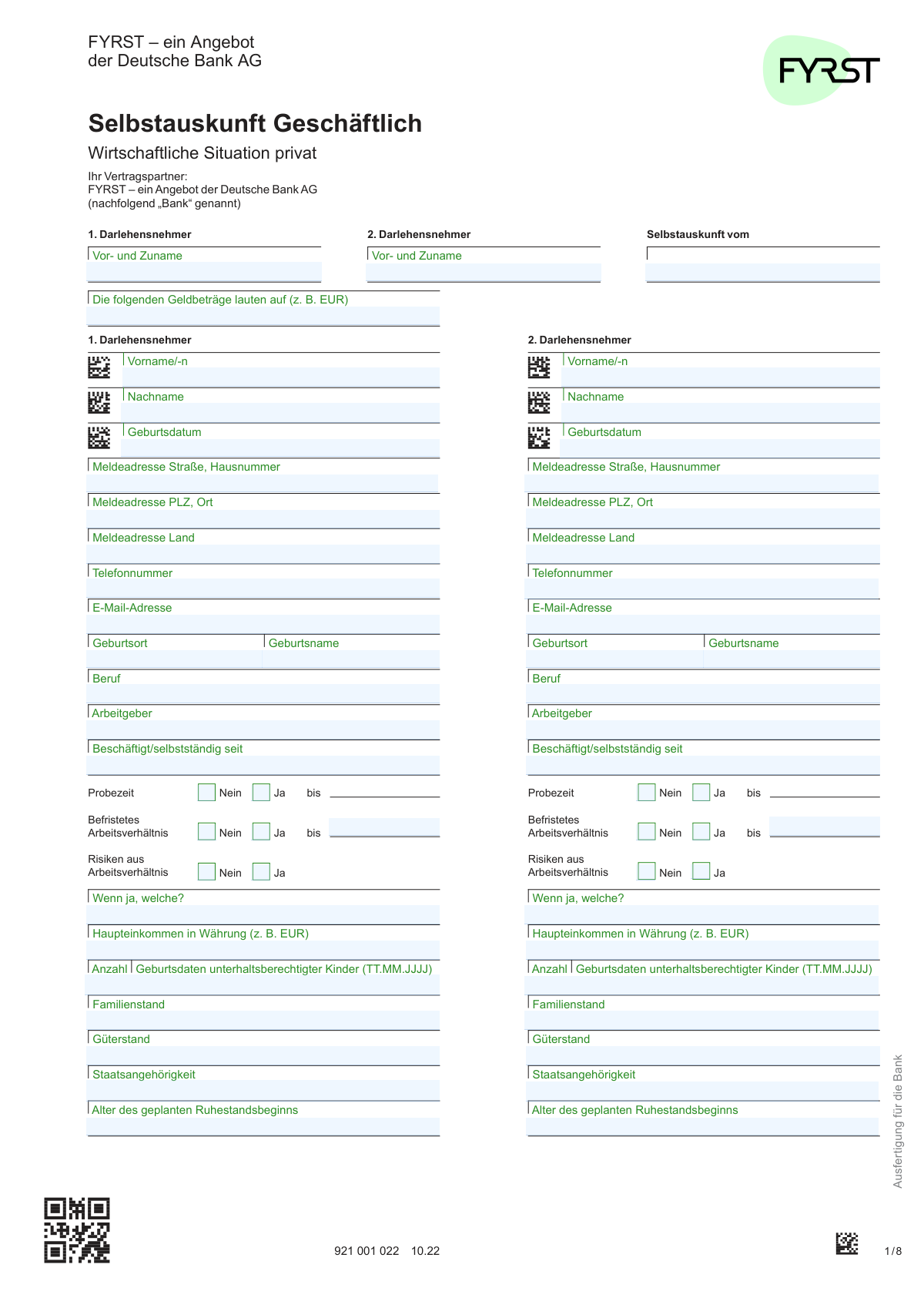
Selbstauskunft Geschäftlich (FYRST - Deutsche Bank AG), page 1
Complex · 70/100Form Complexity Index

The AI does the filling. You just check it.

No typing into boxes, nothing to install.

Tell the AI about youAnswer a few questions in plain words, or upload a document you already have. That is all the typing there is.
AI fills every field in secondsIt puts each answer in the right box on every page, tables and checkboxes included.
Check it and downloadReview every field, change anything, then download, print or sign the PDF.

What this form asks for

The AI fills all of it, from your answers or your documents.

The Selbstauskunft Geschäftlich is a detailed financial self-disclosure form required by FYRST (an offering of Deutsche Bank AG) from business clients applying for loans. It is used to gather comprehensive information about the private and business financial situations of the borrowers, including assets, liabilities, income, and expenses, to assess creditworthiness. Today, this form can be filled out quickly and accurately using AI-powered services like Instafill.ai, which can also convert non-fillable PDF versions into interactive fillable forms.
Fillable fields146
Pages7
Sections63
Tables and lists2
Questions that depend on earlier answers24
Form Complexity IndexComplex, 70/100

The AI checks your answers before you download

15 checks built for this form, so a wrong date or a missing answer is caught before anyone else sees it.

Borrower Minimum Age Verification

This check validates that the date entered in the 'Geburtsdatum' (Date of Birth) field for each borrower corresponds to an age of 18 years or older. This is crucial for ensuring the applicant has the legal capacity to enter into a loan agreement. If the applicant is underage, the submission must be rejected as they are not legally eligible for a loan.

Conditional Probationary Period Date

This validation ensures that if the 'Probezeit - Ja' (Probationary Period - Yes) checkbox is selected for a borrower, the corresponding 'bis' (until) date field is mandatory and contains a valid future date. This information is critical for assessing employment stability and income risk. A failure to provide this date when required will result in a validation error, preventing form submission until the information is correctly supplied.

Conditional Fixed-Term Employment Date

This check verifies that if a borrower's employment is marked as 'Befristetes Arbeitsverhältnis - Ja' (Fixed-Term Employment - Yes), the associated 'bis' (until) date field is populated with a valid date. The contract end date is essential for the bank to evaluate the long-term sustainability of the borrower's income. If the 'Yes' box is checked but the date is missing, the form is considered incomplete.

Conditional Employment Risk Explanation

This validation ensures that if the 'Risiken aus Arbeitsverhältnis - Ja' (Risks from Employment - Yes) checkbox is ticked, the accompanying text field explaining the nature of these risks is not left empty. This detail is vital for the bank's risk assessment process to understand potential income volatility. An empty explanation field will trigger an error, requiring the user to provide the necessary details.

Retirement Age Logical Consistency

This check confirms that the 'Alter des geplanten Ruhestandsbeginns' (Planned Retirement Start Age) is a number greater than the borrower's current age, as calculated from their date of birth. This ensures the provided data is logical and can be used for financial planning and risk modeling over the loan's term. An entry that is less than or equal to the current age will be flagged as an error.

German Postal Code (PLZ) Format

This validation verifies that the 'PLZ' (Postal Code) field for each borrower's address contains exactly five numeric digits. Correct postal codes are essential for address verification, communication, and meeting regulatory requirements like SCHUFA inquiries. An invalid format will prevent submission and prompt the user for correction.

And 9 more checks
  • Monetary Field Numeric Validation
  • Business Financials Conditional Requirement
  • Company Founding Year Validity
  • Dependent Children Data Integrity
  • Signature Date Presence and Validity
  • Second Borrower Completeness Check
  • Income vs. Expense Plausibility Check
  • Conditional Tax Advisor Information Requirement
  • Email Address Format Validation

Let AI fill out your 921 001 022 10.22

No typing. Every field filled in seconds, checked, ready to sign.

7 days free, then $19.99/month · Cancel anytime

How to Fill Out 921 001 022 10.22 Online for Free in 2026

What the AI walks you through.

  1. Navigate to Instafill.ai and upload or select the 'Selbstauskunft Geschäftlich' form.
  2. Use the AI assistant to provide personal details for up to two borrowers (Darlehensnehmer), including name, address, date of birth, and employment information.
  3. Detail your private financial situation by entering information on assets (Vermögen), liabilities (Fremdkapital), annual income (Einkommenssituation), and annual expenses (Ausgaben p.a. privat).
  4. Enter comprehensive details about your business, including company information, assets, liabilities, and a summary of economic development (revenue, profit, etc.).
  5. Disclose information about existing banking relationships and provide details of your tax advisor, if applicable.
  6. Carefully review all the information auto-filled by the AI for accuracy, read the consent declarations (Einwilligungserklärungen), and then e-sign the document to complete the process.

Common Mistakes in Completing 921 001 022 10.22

The ones the AI is built to catch.

Incorrectly Reporting Annual Gross Income
Applicants often confuse gross and net income or include non-guaranteed payments like overtime or voluntary bonuses, which the form's instructions on page 4 explicitly exclude. This error leads to an inaccurate assessment of repayment capacity and causes delays or rejection when income documents don't match the application. To avoid this, carefully review the definitions on page 4 and use your official annual salary statement. AI-powered tools like Instafill.ai can also help by cross-referencing uploaded pay stubs to ensure the correct gross figures are entered.
Misstating Asset Values or Pledged Status
A frequent mistake is entering incorrect values for assets, such as the face value of a life insurance policy instead of its current surrender value ('Rückkaufswert'). Applicants also forget to separate assets that are already pledged as security for other loans. This misrepresents the applicant's unencumbered net worth, which can lead to the loan application being rejected during verification. To prevent this, refer to recent statements for accurate values and carefully follow the form's instructions on page 4.
Omitting End Dates for Probationary or Fixed-Term Employment
When indicating a probationary period ('Probezeit') or a fixed-term contract ('Befristetes Arbeitsverhältnis'), applicants must also provide the corresponding end date. Many people check the 'Ja' box but fail to fill in the 'bis' (until) date field. This omission creates uncertainty for the bank regarding future income stability and will halt the approval process until the information is provided. Always double-check that if you select 'Ja' for either of these, you also enter the specific end date.
Incomplete Information on Dependent Children
The form requires both the number of dependent children and their specific birthdates ('Anzahl Geburtsdaten unterhaltsberechtigter Kinder'). A common mistake is to only state the number of children while omitting their dates of birth in the required TT.MM.JJJJ format. This information is essential for the bank to accurately calculate living expense allowances and determine the applicant's financial obligations, and missing data will trigger a follow-up request.
Lumping Private Expenses Instead of Itemizing
The form requires a detailed breakdown of annual private expenses across categories like rent, utilities, and vehicle costs. Applicants often estimate a single large figure for 'Lebensunterhalt' (Living Expenses) and neglect to fill out the other specific fields. This prevents the bank from getting a clear, verifiable picture of the applicant's fixed costs, which can lead to an inaccurate assessment of their disposable income. Use the detailed guide on page 4 to correctly categorize and list all major annual expenses separately.
Mixing Private and Business Finances
The form has distinct sections for private and business financial disclosure, which is a common point of confusion for self-employed applicants. Listing business assets (like company equipment) in the private section, or personal debts in the business section, creates an inaccurate financial profile. This makes it difficult for the bank to assess personal repayment capacity separately from business performance. Carefully separate all assets, liabilities, and income into the correct 'privat' or 'geschäftlich' sections.
Submitting an Illegible Handwritten Form
This document is often distributed as a non-fillable PDF, forcing applicants to fill it out by hand, which can result in illegible entries. Misinterpreting a '1' as a '7' in an income field can drastically alter the credit assessment and lead to significant processing delays or incorrect decisions. To avoid this, use an AI-powered tool like Instafill.ai, which can convert flat PDFs into digitally fillable forms, ensuring all entries are clear, legible, and accurate.
Missing Signatures or Dates on Consent Pages
This multi-page application requires signatures and dates in several locations, particularly on the consent and declaration page (page 7). Applicants, especially when there are two borrowers, often overlook one of the signature or date fields. A missing signature invalidates the crucial consent for data processing and SCHUFA inquiries, immediately halting the application. It is vital to review every page before submission and ensure all required signature and date fields are completed.
Incorrectly Filling Out Conditional Business Financials
Page 5 contains a financial section marked 'NUR AUSZUFÜLLEN, FALLS KEINE BILANZ VORLIEGT' (Only fill out if no balance sheet is available). Applicants who are submitting a balance sheet often fill this out anyway, creating redundant information. Conversely, those without a balance sheet sometimes overlook this crucial section. Both errors delay processing, as the bank must clarify which data to use.
Omitting or Guessing the Matrimonial Property Regime
The form asks for the 'Güterstand' (matrimonial property regime), a legal detail many applicants are unsure of and often leave blank. This information is legally significant for assessing liability and ownership of assets and debts within a marriage. An incorrect or missing entry requires clarification from the bank, delaying the loan decision. Applicants should confirm their status (e.g., 'Zugewinngemeinschaft' is the default in Germany) before filling out the form.

Frequently Asked Questions About 921 001 022 10.22


Is it really free for 7 days?
Yes. You pay $0 today. Cancel before Nov 5 and you are never charged. Keep it, and it is $19.99 a month for 5 fills of your 921 001 022 10.22.
Can I fill other forms too?
This plan is for your 921 001 022 10.22: your own AI agent fills it as often as 5 times a month. To fill other forms and upload your own, choose a Professional plan from your account.
How do I cancel?
From your account, in two clicks, any time. No email, no call.
How does the AI fill out 921 001 022 10.22?
You answer a few questions in plain words, or upload a document you already have. The AI reads what you give it and puts each answer into the right field of 921 001 022 10.22, on every page, in seconds. It checks the answers against the form's own rules, and you review and change anything before you download, print or sign.
What happens to my information?
It is encrypted in transit and at rest, and it is never used to train AI.
How complex is 921 001 022 10.22 to fill out?
921 001 022 10.22 has a Form Complexity Index of 70 out of 100, in the complex tier: 146 fillable fields across 7 pages. Instafill.ai's AI fills it in under a minute, with every field there for you to review before you download.
What is the purpose of this 'Selbstauskunft Geschäftlich' form?
This form is a self-disclosure statement used by FYRST (Deutsche Bank AG) to assess your creditworthiness for a business loan. It collects detailed information about both your private and business financial situations to support your application.
Who needs to fill out this form?
This form must be completed by the business owner(s) or entrepreneur(s) applying for a loan, referred to as 'Darlehensnehmer' (borrower). If there are two applicants for the loan, both must provide their information in the designated sections.
I am applying for the loan by myself. Do I need to fill out the section for the '2. Darlehensnehmer'?
No, if you are the sole applicant for the loan, you only need to complete the sections for the '1. Darlehensnehmer'. The sections for the second borrower can be left blank.
What is the difference between 'Wirtschaftliche Situation privat' and 'Wirtschaftliche Situation geschäftlich'?
The 'Wirtschaftliche Situation privat' section details your personal assets, income, and expenses. The 'Wirtschaftliche Situation geschäftlich' section is for your business's financial details, including company information, assets, liabilities, and performance metrics.
My business does not prepare a formal balance sheet ('Bilanz'). How do I complete the business section?
The form provides a specific section titled 'NUR AUSZUFĂśLLEN, FALLS KEINE BILANZ VORLIEGT' (Only to be completed if no balance sheet is available). You must fill out this detailed breakdown of your business's assets and liabilities instead.
What kind of documents should I have ready to fill out this form?
You should have personal identification, recent pay stubs or income statements, tax returns, and details of existing loans or assets. For the business part, you'll need your business registration, financial statements (like a P&L), and details of existing business loans.
What does the 'Einwilligungserklärungen' section on page 7 mean?
This section contains your consent for the bank to perform necessary checks for your loan application. By signing, you agree to data exchange with partners, allow the bank to obtain information from public registers, and authorize a credit check with SCHUFA.
Why does the bank need to make a SCHUFA inquiry?
The bank performs a SCHUFA inquiry as part of its standard creditworthiness assessment ('Bonitätsprüfung'). This helps the bank evaluate the risk associated with lending and is a mandatory step in the loan approval process.
What should I enter for 'Güterstand' (matrimonial property regime)?
'GĂĽterstand' refers to your legal property arrangement within a marriage, such as 'Zugewinngemeinschaft' (community of accrued gains) or 'GĂĽtertrennung' (separation of property). You should enter the regime that applies to you; 'Zugewinngemeinschaft' is the default in Germany if no other agreement was made.
Where do I submit the completed form?
This form is marked 'Ausfertigung fĂĽr die Bank' (Copy for the Bank). You should submit it directly to your contact person at FYRST or Deutsche Bank AG as instructed during your application process.
Can I use an AI tool to help me fill out this form?
Yes, AI-powered services like Instafill.ai can help you fill out this form more quickly and accurately. These tools can extract information from your documents and auto-fill the corresponding fields, saving you time and reducing errors.
How can I use Instafill.ai to complete this form online?
Simply upload the 'Selbstauskunft' PDF to the Instafill.ai platform. The AI will identify the fields, and you can then connect your data sources or fill in the information interactively to have the form completed automatically.
The PDF version of the form I have is not fillable. What can I do?
Services like Instafill.ai can convert flat, non-fillable PDFs into interactive, fillable forms. Just upload the file, and the platform will make all the fields editable online, so you don't have to print and fill it by hand.
Encrypted in transit and at restNever used to train AIDelete your forms any time

Get your 921 001 022 10.22 filled out by AI

$0 today. Cancel before Nov 5 and you pay nothing.

7 days free, then $19.99/month · Cancel anytime