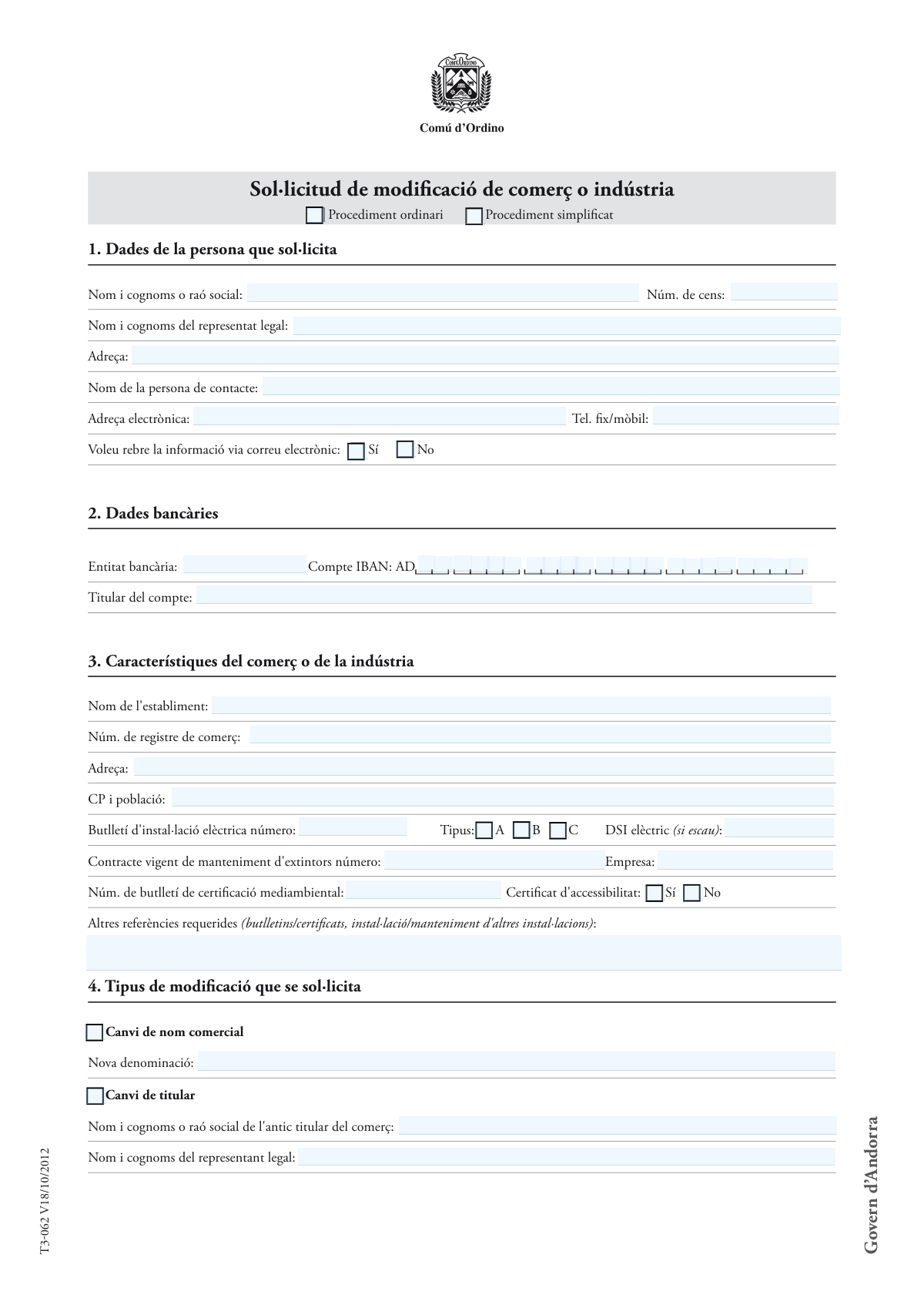
Yes! You can use AI to fill out Sol·licitud de modificació de comerç o indústria (T3-062) / Sol·licitud d’Ordre de domiciliació bancària (T3-300 bis) / Formulari d’inscripció al Cens públic de la Cambra de Comerç, Indústria i Serveis d’Andorra
Aquest contingut agrupa tres formularis oficials relacionats amb l’activitat comercial a Andorra: (1) la Sol·licitud de modificació de comerç o indústria (T3-062) per comunicar canvis com el nom comercial, el titular, l’activitat (codi CAEA), l’adreça o la superfície; (2) la Sol·licitud d’Ordre de domiciliació bancària (T3-300 bis) per autoritzar càrrecs SEPA al compte del deutor; i (3) el formulari d’inscripció/actualització al Cens públic de la Cambra de Comerç, Indústria i Serveis d’Andorra. Són importants perquè permeten mantenir actualitzats els registres administratius, acreditar el compliment de requisits tècnics (especialment en procediment simplificat amb declaració responsable) i establir correctament la forma de pagament i les dades censals de l’activitat.
Our AI automatically handles information lookup, data retrieval, formatting, and form filling.
It takes less than a minute to fill out T3-062 / T3-300 bis / Cens públic CCIS using our AI form filling.
Securely upload your data. Information is encrypted in transit and deleted immediately after the form is filled out.
Form specifications
| Form name: | Sol·licitud de modificació de comerç o indústria (T3-062) / Sol·licitud d’Ordre de domiciliació bancària (T3-300 bis) / Formulari d’inscripció al Cens públic de la Cambra de Comerç, Indústria i Serveis d’Andorra |
| Number of pages: | 5 |
| Language: | English |
Instafill Demo: filling out a legal form in seconds
How to Fill Out T3-062 / T3-300 bis / Cens públic CCIS Online for Free in 2026
Are you looking to fill out a T3-062 / T3-300 BIS / CENS PÚBLIC CCIS form online quickly and accurately? Instafill.ai offers the #1 AI-powered PDF filling software of 2026, allowing you to complete your T3-062 / T3-300 BIS / CENS PÚBLIC CCIS form in just 37 seconds or less.
Follow these steps to fill out your T3-062 / T3-300 BIS / CENS PÚBLIC CCIS form online using Instafill.ai:
- 1 Selecciona quin tràmit necessites completar: modificació de comerç/indústria (T3-062), domiciliació bancària (T3-300 bis) i/o inscripció al Cens públic de la Cambra (CCIS).
- 2 Omple les dades d’identificació del sol·licitant (persona física o societat): nom/raó social, núm. de cens, adreça, contacte, correu electrònic, telèfon i preferència de notificació per email.
- 3 Completa les dades de l’establiment i del comerç/indústria: nom de l’establiment, núm. de registre, adreça, CP/població, superfícies, aforament, rètols, i referències tècniques (butlletí elèctric, manteniment d’extintors, certificació mediambiental, accessibilitat, etc.).
- 4 Indica el tipus de modificació sol·licitada (canvi de nom comercial, canvi de titular, modificació d’activitats amb codi CAEA, canvi d’adreça o superfície, altres) i, si escau, les dades de l’antic titular i/o de la persona propietària del nou local.
- 5 Si uses el procediment simplificat, llegeix i accepta la declaració responsable confirmant que disposes dels informes i certificats exigits (inclosa la fitxa tècnica associada) i prepara’ls per adjuntar-los si es requereixen.
- 6 Per a la domiciliació bancària (T3-300 bis), omple les dades del creditor (Comú d’Ordino), la referència/concepte, el tipus de pagament (únic o recurrent) i les dades del deutor (identificació, adreça, email, BIC i IBAN), i adjunta la còpia de la targeta d’identificació bancària.
- 7 Revisa la llista de documentació general a adjuntar (targeta de comerç, contracte de lloguer/escriptura i plànol, reserva de nom, testament si escau, full del cens, sol·licituds d’obres/rètols, certificats ambientals/accessibilitat) i signa amb data totes les parts requerides (sol·licitant, antic titular si canvi de titular, propietari/ària del local).
Our AI-powered system ensures each field is filled out correctly, reducing errors and saving you time.
Why Choose Instafill.ai for Your Fillable T3-062 / T3-300 bis / Cens públic CCIS Form?
Speed
Complete your T3-062 / T3-300 bis / Cens públic CCIS in as little as 37 seconds.
Up-to-Date
Always use the latest 2026 T3-062 / T3-300 bis / Cens públic CCIS form version.
Cost-effective
No need to hire expensive lawyers.
Accuracy
Our AI performs 10 compliance checks to ensure your form is error-free.
Security
Your personal information is protected with bank-level encryption.
Frequently Asked Questions About Form T3-062 / T3-300 bis / Cens públic CCIS
Serveix per comunicar i tramitar canvis d’un comerç o indústria (p. ex. canvi de nom comercial, canvi de titular, canvi d’activitats, canvi d’adreça o de superfície) davant l’administració corresponent. També recull dades tècniques del local i la documentació justificativa necessària.
L’ha d’omplir la persona física o jurídica titular que demana la modificació, o el seu representant. Cal indicar les dades de contacte i, si escau, el número de cens i el representant legal.
És el número de cens/inscripció associat a l’activitat o a l’empresa (segons el registre/cens aplicable). Si ja esteu inscrits, normalment s’ha d’indicar per identificar correctament l’expedient.
Sí. A l’apartat 1 podeu marcar “Sí” o “No” a “Voleu rebre la informació via correu electrònic” i indicar una adreça electrònica vàlida.
Heu d’indicar l’entitat bancària, l’IBAN (format Andorra: comença per “AD”) i el titular del compte. Si també presenteu l’“Ordre de domiciliació bancària”, caldrà completar-la i aportar la còpia de la targeta d’identificació bancària.
El procediment simplificat requereix una “declaració responsable” (apartat 6) on declareu que disposeu dels informes i certificats tècnics exigits (inclosa la fitxa tècnica V1FT001). Si no podeu fer aquesta declaració o el cas ho requereix, s’ha de tramitar per procediment ordinari.
Només quan la sol·licitud s’acull al “procediment simplificat”. En signar, declareu sota responsabilitat que ja disposeu dels informes i certificats que acrediten el compliment de la normativa vigent.
Entre d’altres, s’indica: original de la targeta de comerç (o declaració de pèrdua), full del Cens de la Cambra de Comerç, i documents específics segons el canvi (p. ex. contracte de lloguer/escriptura i plànol per canvi d’adreça o superfície; certificat de reserva de nom per canvi de nom/activitats/titular). Alguns annexos són “si escau” (obres menors, rètols, declaració ambiental, certificat d’accessibilitat).
Cal aportar una certificació de la junta de la societat que facultin la persona sol·licitant a signar, si no és un càrrec representatiu o no té poders inscrits al Registre de Societats. Això acredita que qui signa està autoritzat.
S’ha d’adjuntar una fotocòpia del contracte de lloguer o l’escriptura de propietat i un plànol o croquis. A més, al formulari s’han d’indicar les noves dades d’adreça i/o les superfícies (total, atenció al públic, magatzem, aparcament) i l’aforament.
El formulari indica que cal aportar certificat d’accessibilitat per a locals més grans de 50 m² (si escau). A l’apartat 3 també podeu marcar si disposeu de certificat d’accessibilitat (Sí/No).
Heu d’indicar com quedaran les activitats a partir d’ara (activitat principal i secundàries) i el codi CAEA corresponent a les activitats aplicades. Això serveix per classificar correctament l’activitat econòmica.
A l’apartat 7 s’indica que, en cas de modificació de titular, ha de signar també l’antic titular (a més de la persona sol·licitant). Si hi ha canvi de local, també pot ser necessària la signatura de la/les persona/es propietària/àries del local.
El llistat de documentació indica que, en cas de canvi de nom per defunció, cal aportar el testament o un certificat notarial. Això justifica legalment la successió o el dret a fer el canvi.
Per tràmits del Comú d’Ordino, el text indica el correu [email protected] o el Servei de Tràmits (La placeta, núm. 1, Ordino). Per dades del Cens de la Cambra de Comerç, podeu contactar el Delegat de Protecció de Dades a [email protected] i, si cal, l’APDA.
Compliance T3-062 / T3-300 bis / Cens públic CCIS
Validation Checks by Instafill.ai
1
Required applicant identity fields completed (individual vs. company)
Validates that the applicant’s “Nom i cognoms o raó social” is provided and that the “Núm. de cens” is present when the applicant is a business entity. If a legal representative is indicated, the representative name must also be completed. This is essential to uniquely identify the requester and establish signing authority; if missing, the submission should be rejected as incomplete and routed back for correction.
2
Census number (Núm. de cens) format and character validation
Checks that the census number contains only allowed characters (typically digits and possibly letters per local rules) and meets expected length constraints. It also ensures the field is not populated with placeholders or spacing artifacts from the PDF layout. If the format is invalid, the system should flag the field and prevent submission because downstream registry matching and billing references may fail.
3
Email address format validation (all email fields)
Validates that all provided email addresses (applicant contact, local owner contact, debtor email, establishment email) follow a standard email pattern (local-part@domain) and do not contain spaces or invalid characters. This matters because the form explicitly offers email communication and uses email for legal/privacy contact points. If validation fails, the user should be prompted to correct the email or select non-email delivery where applicable.
4
Phone number validation (Tel. fix/mòbil and Telèfon)
Ensures phone numbers contain only digits and permitted separators (+, spaces, hyphens) and meet plausible length rules for Andorra/international numbers. It should also prevent alphabetic characters and obvious placeholders (e.g., '0000'). If invalid, the system should block submission or require correction because phone contact is often required for clarifications and compliance follow-up.
5
Communication preference consistency (email delivery Yes/No vs. email presence)
If “Voleu rebre la informació via correu electrònic” is marked “Sí”, the applicant email must be present and valid; if marked “No”, email may be optional but must still be valid if provided. This prevents contradictory preferences that could cause missed notifications. If inconsistent, the system should require either a valid email or a corrected preference selection.
6
IBAN format validation for Andorran accounts (AD prefix and length)
Validates that the IBAN begins with 'AD' and matches the expected IBAN length and checksum rules for Andorra, ignoring spaces used for grouping on the form. This is critical for direct debit and refunds/charges to succeed without bank rejection. If the IBAN fails validation, the submission should be blocked and the user asked to re-enter the account number.
7
BIC/SWIFT code format validation (8 or 11 characters)
Checks that the Swift BIC is either 8 or 11 characters, uppercase alphanumeric, and matches the standard structure (bank code, country code, location, optional branch). The form explicitly notes the 8/11 character requirement, and incorrect BICs can prevent cross-bank processing. If invalid, the system should flag the field and require correction before accepting the direct debit mandate.
8
Account holder and debtor identity alignment for direct debit
Validates that the “Titular del compte” (account holder) and the “Dades del deutor” (debtor name/raó social) are provided and logically consistent, or that a clear third-party payer scenario is indicated (if supported). This reduces disputes and failed mandates due to mismatched payer identity. If the names are missing or contradictory, the system should require clarification or supporting documentation before proceeding.
9
Modification type selection and dependent fields completeness
Ensures at least one modification type is selected (e.g., change of trade name, change of holder, activity modification, address change, surface change, others) and that each selected option has its required dependent fields completed. For example, “Canvi de nom comercial” requires “Nova denominació,” and “Canvi de titular” requires the old holder’s name and (if applicable) representative details. If dependencies are not met, the submission should be rejected as incomplete to avoid ambiguous registry updates.
10
Procedure selection consistency (ordinari vs. simplificat) and declaration requirement
Validates that exactly one procedure is selected (ordinary or simplified) and that the “Declaració responsable” section is completed (including signature) only when the simplified procedure is chosen. This is important because the simplified route relies on self-declaration of compliance and has different legal handling. If the procedure is missing/dual-selected or the declaration is missing when required, the system should block submission.
11
Activity modification details and CAEA code validation
When “Modificació d'activitats” is selected, checks that an “Activitat principal” is provided and that any CAEA codes entered follow the expected numeric/structured format and are not empty placeholders. It should also ensure secondary activities are not identical duplicates of the principal activity unless explicitly allowed. If invalid or missing, the system should require correction because activity codes drive regulatory classification and fees.
12
Address and postal code (CP) validation for establishment and changes
Validates that address fields are present where required (establishment address, new address for “Canvi d'adreça,” debtor address) and that CP (postal code) matches Andorra’s format (e.g., AD### or 3 digits depending on system standardization) and includes a population/city value. Correct addressing is essential for inspections, legal notices, and registry accuracy. If invalid, the system should flag the address block and prevent submission until corrected.
13
Surface area and signage measurements numeric validation and logical totals
Checks that all area fields (m2) and linear measurements (ml) are numeric, non-negative, and within reasonable bounds, and that sub-areas (public attention, warehouse, parking) do not exceed the “Superfície total.” It also validates that signage areas (rètols frontals, volada) are provided in m2 and awnings/vitrines in ml when those elements are declared. If totals are inconsistent or values are non-numeric, the system should require correction to avoid permitting and safety compliance errors.
14
Accessibility certificate requirement based on surface threshold
Validates that if the establishment surface is greater than 50 m2, the “Certificat d'accessibilitat” is marked “Sí” and the corresponding document is attached (as indicated in the documentation list). This is important to enforce accessibility compliance and prevent incomplete legal filings. If the surface exceeds the threshold and the certificate is missing/marked “No,” the system should block submission or route to an exception workflow.
15
Works indicator (S'efectuaran obres) triggers required attachments
If “S'efectuaran obres” is marked “Sí,” validates that the “Sol·licitud d'obres menors” attachment is included (where applicable) and that related installation references are not left blank when required by the chosen modification. This ensures construction/alteration activities are properly authorized and traceable. If works are indicated without the required documentation, the submission should be rejected pending attachments.
16
Signature and date completeness across relevant parties
Validates that the place/date fields are completed and that required signatures are present based on the modification type: applicant signature always, old holder signature when “Canvi de titular” is selected, and local owner signature when a new premises/owner section is applicable. This is critical for legal enforceability and consent, especially for ownership/holder changes and direct debit mandates. If any required signature/date is missing, the system should mark the submission as invalid and request re-signing.
Common Mistakes in Completing T3-062 / T3-300 bis / Cens públic CCIS
People often enter the same person in all three fields (sol·licitant, representant legal, persona de contacte) or leave the representative blank when the applicant is a company. This creates inconsistencies with who is legally authorized to sign and receive notifications, which can delay acceptance or trigger requests for clarification. To avoid it, fill in the applicant as the legal entity/person requesting the change, the legal representative only if applicable (with the correct name), and the contact person as the operational point of contact (can be different).
A very common error is leaving the “Núm. de cens” and/or “Núm. de registre de comerç” empty, or entering an internal reference instead of the official number. These identifiers are used to match the request to the correct business record; wrong numbers can cause the file to be misrouted or rejected as unverifiable. Always copy the exact official numbers from prior registrations/cards and double-check digits and formatting before submitting.
Applicants frequently tick the wrong procedure or tick both “Procediment ordinari” and “Procediment simplificat,” especially when they assume “simplified” is always allowed. Choosing incorrectly can invalidate the declaration responsible section or lead to missing required technical documents for the chosen route. Read the eligibility rules for the simplified procedure and tick only one option; if simplified is chosen, ensure you truly have all required reports/certificates referenced (e.g., fitxa tècnica V1FT001).
People tick a modification (e.g., change of name, change of holder, change of address/surface, activity modification) but forget to fill the corresponding fields like “Nova denominació,” old holder details, new address, or surface breakdown. This happens because the form groups many scenarios together and users overlook the conditional sections. To avoid delays, treat each ticked modification as a mini-checklist and complete every field directly under that option.
For “Modificació d'activitats,” applicants often write a generic description (e.g., “retail”) and omit the CAEA code(s), or they list activities that don’t match the final intended operation. Missing/incorrect CAEA codes can lead to classification errors, wrong fees/requirements, or a request to resubmit. Use the official CAEA list, specify one clear “Activitat principal,” list secondary activities separately, and ensure the codes match the exact activities that will remain after the change.
Bank details are frequently entered with missing characters, spaces in the wrong places, or an IBAN that doesn’t start with “AD,” and the “Titular del compte” is sometimes different from the debtor/holder without explanation. This causes failed direct debit setup or payment rejections. Enter the full Andorran IBAN exactly as issued (including the AD prefix), provide the SWIFT/BIC with 8 or 11 characters when requested, and ensure the account holder name matches the debtor/authorized payer (or attach authorization if different).
Applicants often omit or guess the numbers for the electrical installation bulletin, fire extinguisher maintenance contract, environmental certification bulletin, or DSI electric reference. These references are used to verify compliance; missing or outdated numbers can trigger a request for additional documentation or an inspection. Copy the exact bulletin/contract numbers from the latest valid certificates and include the maintenance company name where requested.
A common issue is mixing units (entering m2 where ml is required for tendals/vitrines, or vice versa) and providing surface breakdowns that don’t add up to “Superfície total.” Inconsistent measurements can lead to recalculation requests, delays, or incorrect assessment of requirements (e.g., accessibility, occupancy). Use m² for areas, ml for linear elements, keep decimals consistent, and verify that public area + storage + parking (if applicable) aligns with the total.
People often tick “No” to works to simplify the process, or they tick “Sí” but forget to attach the “Sol·licitud d'obres menors” and related plans/croquis. If works are actually planned, incorrect disclosure can cause compliance issues later and may stop the modification from being processed. Answer truthfully and, if works are planned, attach the minor works request and any required plans or supporting documents.
Submissions are frequently missing one of the required signatures: the applicant, the old holder (for change of holder), and/or the owner(s) of the new premises, and the “Lloc i data” is often left blank. Missing signatures invalidate the request and typically result in a return for completion. Before submitting, confirm which scenario applies and collect every required signature, writing the location and full date in the format requested.
Applicants commonly omit key attachments such as the original trade card (or loss declaration), lease/property deed and plan for address/surface changes, name reservation certificate for name/activity/holder changes, or the Chamber of Commerce census sheet. Missing documents are one of the main reasons files are put on hold. Use the “Documentació general que s'ha d'adjuntar” list as a checklist, attach legible copies where allowed, and ensure the document matches the specific modification selected.
Saved over 80 hours a year
“I was never sure if my IRS forms like W-9 were filled correctly. Now, I can complete the forms accurately without any external help.”
Kevin Martin Green
Your data stays secure with advanced protection from Instafill and our subprocessors
Robust compliance program
Transparent business model
You’re not the product. You always know where your data is and what it is processed for.
ISO 27001, HIPAA, and GDPR
Our subprocesses adhere to multiple compliance standards, including but not limited to ISO 27001, HIPAA, and GDPR.
Security & privacy by design
We consider security and privacy from the initial design phase of any new service or functionality. It’s not an afterthought, it’s built-in, including support for two-factor authentication (2FA) to further protect your account.
Fill out T3-062 / T3-300 bis / Cens públic CCIS with Instafill.ai
Worried about filling PDFs wrong? Instafill securely fills sollicitud-de-modificaci-de-comer-o-indstria-t3-06 forms, ensuring each field is accurate.