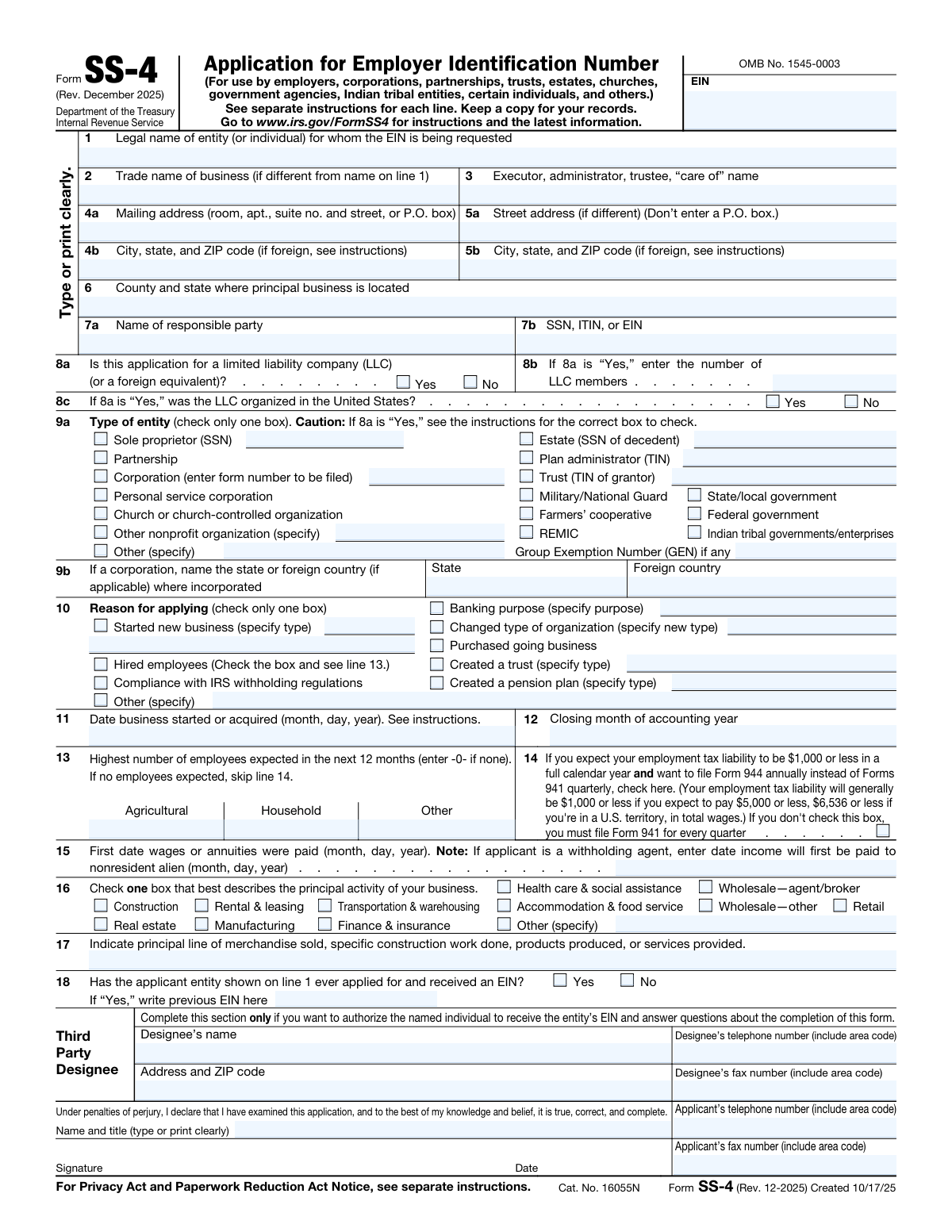
Yes! You can use AI to fill out Form SS-4, Application for EIN

Form SS-4, Application for Employer Identification Number, is used to obtain an EIN for various entities such as businesses and trusts. This number is crucial for tax reporting and compliance with IRS regulations.
Our AI automatically handles information lookup, data retrieval, formatting, and form filling.
It takes less than a minute to fill out Form SS-4 using our AI form filling.
Securely upload your data. Information is encrypted in transit and deleted immediately after the form is filled out.

Form specifications

Form name: Form SS-4, Application for EIN
Number of fields: 89
Number of pages: 2
Official download URL: https://www.irs.gov/pub/irs-pdf/fss4.pdf
Language: English
main-image

Instafill Demo: filling out a legal form in seconds

How to Fill Out Form SS-4 Online for Free in 2025

Are you looking to fill out a FORM SS-4 form online quickly and accurately? Instafill.ai offers the #1 AI-powered PDF filling software of 2025, allowing you to complete your FORM SS-4 form in just 37 seconds or less.
Follow these steps to fill out your FORM SS-4 form online using Instafill.ai:
  1. 1 Visit instafill.ai site and select Form SS-4.
  2. 2 Enter legal name and trade name.
  3. 3 Provide mailing and street address.
  4. 4 Fill in responsible party's details.
  5. 5 Select entity type and reason for applying.
  6. 6 Sign and date the form electronically.
  7. 7 Check for accuracy and submit form.

Our AI-powered system ensures each field is filled out correctly, reducing errors and saving you time.

Why Choose Instafill.ai for Your Fillable Form SS-4 Form?

Speed

Complete your Form SS-4 in as little as 37 seconds.

Up-to-Date

Always use the latest 2025 Form SS-4 form version.

Cost-effective

No need to hire expensive lawyers.

Accuracy

Our AI performs 10 compliance checks to ensure your form is error-free.

Security

Your personal information is protected with bank-level encryption.

Frequently Asked Questions About Form Form SS-4

Form SS-4 is used to apply for an Employer Identification Number (EIN), which is a unique nine-digit number assigned by the IRS to businesses for tax purposes.

Any business entity, including sole proprietors, partnerships, corporations, and non-profit organizations, that needs an EIN for tax reporting or other business purposes must file Form SS-4.

Form SS-4 requires information such as the legal name of the entity, the type of entity, the reason for applying for an EIN, the principal business activity, and the name and Social Security number of the responsible party.

You need an EIN if you have employees, operate a business as a corporation or partnership, file certain tax returns, or meet other specific criteria set by the IRS. If you are unsure, you can refer to the IRS guidelines or consult a tax professional.

If your entity has previously applied for an EIN, you should not apply for a new one. Instead, you can use the existing EIN for tax purposes. If you cannot locate your EIN, you can retrieve it by checking previous tax returns or contacting the IRS.

A sole proprietor is an individual who owns and operates a business without forming a separate legal entity, meaning the business income is reported on the owner's personal tax return. In contrast, a corporation is a separate legal entity that provides limited liability protection to its owners (shareholders) and is subject to different tax regulations. When completing Form SS-4, the distinction affects how you classify your business structure and the tax implications associated with it.

The responsible party's Social Security Number (SSN), Individual Taxpayer Identification Number (ITIN), or Employer Identification Number (EIN) is crucial as it identifies the individual or entity responsible for the business's tax obligations. This information is used by the IRS to track the business's tax filings and compliance. It is important to provide accurate information to avoid issues with tax reporting and to ensure proper identification of the business.

To complete the mailing address section on Form SS-4, you should provide the complete address where you would like to receive correspondence from the IRS. This includes the street address, city, state, and ZIP code. If the mailing address is different from the business location, ensure that you clearly indicate the correct mailing address to avoid any delays in receiving important documents or notices from the IRS.

If your business is a limited liability company (LLC), you should indicate this on Form SS-4 by selecting the appropriate classification for your LLC. Depending on how your LLC is taxed (as a sole proprietorship, partnership, or corporation), you will need to provide the relevant information in the designated sections of the form. It is important to accurately reflect your LLC's structure to ensure proper tax treatment.

The reasons for applying for an Employer Identification Number (EIN) listed on Form SS-4 include starting a new business, hiring employees, opening a business bank account, and establishing a business credit profile. An EIN is also required for certain tax filings and to comply with federal regulations. Understanding the reasons for obtaining an EIN can help you determine if it is necessary for your business operations.

The closing month of the accounting year is the month in which your business's financial year ends. It is important because it determines the period for which you will report your income and expenses to the IRS. This month helps in establishing your tax reporting schedule and can affect your tax obligations.

To report the highest number of employees expected in the next 12 months, you should provide an estimate of the maximum number of employees you anticipate having at any point during the year. This includes full-time, part-time, and seasonal employees. This information helps the IRS determine your employment tax obligations.

Checking the box for employment tax liability on Form SS-4 indicates that you expect to have employees and will be responsible for withholding and paying employment taxes. This includes Social Security, Medicare, and federal income tax withholding. It is a declaration of your intent to comply with employment tax regulations.

The principal activity of your business refers to the main purpose or function of your business operations. To describe it, you should provide a brief and clear statement that outlines what your business does, including the products or services you offer. This helps the IRS categorize your business for tax purposes.

If you expect to have no employees, you should indicate this on Form SS-4 by stating that you do not anticipate hiring any employees in the near future. You can leave the section regarding the number of employees blank or write '0'. This informs the IRS that you will not have employment tax obligations related to employees.

To authorize a third-party designee on Form SS-4, you need to complete the section designated for third-party designees. This typically involves providing the name, phone number, and address of the designee, as well as checking the appropriate box to indicate that you are authorizing them to discuss your application with the IRS.

Providing false information on Form SS-4 can result in penalties, including fines and potential criminal charges. The IRS takes the accuracy of information seriously, and any intentional misrepresentation can lead to severe consequences, including the denial of your application for an Employer Identification Number (EIN).

Instructions for completing each line of Form SS-4 can be found in the official IRS instructions document for Form SS-4. This document provides detailed guidance on what information is required for each section of the form, ensuring that applicants can accurately complete their application.

Keeping a copy of Form SS-4 for your records is important because it serves as proof of your application for an Employer Identification Number (EIN). This documentation can be useful for future reference, especially when dealing with the IRS or for business purposes, such as opening bank accounts or filing taxes.

The latest information regarding Form SS-4 can be found on the official IRS website. The IRS regularly updates its forms and instructions, so it is advisable to check their website for the most current version of the form and any related guidance.

Compliance Form SS-4
Validation Checks by Instafill.ai

1
Verifies that the legal name entered in line 1 matches the official documents and is spelled correctly.
This validation check ensures that the legal name provided in line 1 of Form SS-4 is consistent with the official documents of the entity. It confirms that there are no spelling errors or discrepancies that could lead to issues with the application. By cross-referencing the name against recognized databases, it verifies the authenticity of the name. This step is crucial for maintaining the integrity of the application process.
2
Ensures that the trade name provided in line 2 is accurate if the business operates under a different name.
This validation check verifies that the trade name entered in line 2 accurately reflects the name under which the business operates. It ensures that the trade name is not misleading and is properly registered if required. By checking against existing trade name databases, it confirms that the name is unique and does not infringe on other businesses. This helps to prevent potential legal issues and ensures clarity in business identification.
3
Confirms that the executor, administrator, or trustee name in line 3 is filled out correctly if applicable.
This validation check ensures that if line 3 is applicable, the name of the executor, administrator, or trustee is accurately filled out. It verifies that the name is spelled correctly and matches any official documentation related to the entity's formation or management. This step is essential for establishing the authority of the individual listed and ensuring that the application is processed without delays. It helps to maintain compliance with legal requirements.
4
Checks that the mailing address in line 4a and 4b is complete, including room, apartment, suite number, and street or P.O. box.
This validation check ensures that the mailing address provided in lines 4a and 4b is complete and formatted correctly. It verifies that all necessary components, such as room, apartment, suite numbers, and street or P.O. box details, are included. By confirming the completeness of the address, it helps to prevent any issues with mail delivery or communication from the IRS. This step is vital for ensuring that the business receives important correspondence in a timely manner.
5
Validates that the street address in line 5a is provided if it differs from the mailing address, along with the corresponding city, state, and ZIP code in line 5b.
This validation check confirms that if the street address in line 5a differs from the mailing address, it is accurately provided along with the corresponding city, state, and ZIP code in line 5b. It ensures that all address information is complete and correctly formatted to avoid any confusion. By validating this information, it helps to ensure that the IRS can reach the business without any issues. This step is crucial for maintaining accurate records and facilitating effective communication.
6
County and State Validation
This validation check ensures that the county and state where the principal business is located are correctly indicated in line 6. It verifies that the information provided matches the official records for the business location. The AI software cross-references the entered data with known geographical databases to confirm accuracy. Any discrepancies will prompt a notification for the user to correct the information before submission.
7
Responsible Party Verification
This check verifies that the responsible party's name in line 7a and their SSN, ITIN, or EIN in line 7b are accurately entered. The AI software confirms that the name matches the identification number provided, ensuring that they correspond to the same individual or entity. It also checks for proper formatting of the SSN, ITIN, or EIN to prevent errors. If any inconsistencies are found, the user will be alerted to make necessary corrections.
8
LLC Information Confirmation
This validation confirms that the LLC information in lines 8a, 8b, and 8c is completed correctly if applicable. The AI software checks that all required fields are filled out and that the information aligns with the entity's registration details. It ensures that the structure of the LLC is accurately represented, which is crucial for tax and legal purposes. Any missing or incorrect information will trigger a prompt for the user to review and amend the entries.
9
Entity Type Check
This check verifies that the type of entity is accurately indicated in line 9a and that the state or foreign country of incorporation is provided in line 9b if applicable. The AI software ensures that the selected entity type corresponds with the information provided in other sections of the form. It cross-references the entity type with the appropriate legal definitions to confirm compliance. If the entity type is not properly indicated, the user will receive a notification to rectify the selection.
10
Reason for Applying Validation
This validation ensures that only one box is checked in line 10 that best describes the reason for applying for an EIN. The AI software checks for multiple selections and prompts the user to choose only one option to maintain clarity and compliance. It verifies that the selected reason aligns with the overall application context. If multiple boxes are checked, the user will be alerted to make the necessary adjustments before proceeding.
11
Validates that the business start date in line 11 is entered in the correct format.
This validation check ensures that the business start date provided in line 11 adheres to the required date format. It verifies that the date is entered in a recognizable format, such as MM/DD/YYYY. If the date is not formatted correctly, the software will flag this for correction. This helps to prevent any processing delays due to incorrect date entries.
12
Confirms that the closing month of the accounting year in line 12 is indicated.
This check confirms that the applicant has indicated the closing month of their accounting year in line 12. It verifies that a valid month is selected from the provided options, ensuring that the information is complete. If this line is left blank or contains an invalid entry, the software will prompt the user to provide the necessary information. This is crucial for accurate tax reporting and compliance.
13
Checks that the highest number of employees expected in the next 12 months is provided in line 13, and that line 14 is skipped if none are expected.
This validation ensures that the applicant has entered the highest number of employees expected in the next 12 months in line 13. It verifies that this number is a non-negative integer and prompts the user if the field is left blank. Additionally, it checks that line 14 is appropriately skipped if the applicant indicates that no employees are expected. This helps to maintain clarity and accuracy in the application.
14
Verifies that the employment tax liability box in line 14 is checked if applicable.
This check verifies that the employment tax liability box in line 14 is checked if the applicant has indicated that they expect to have employees. It ensures that the user understands the implications of their employment status and confirms that they are aware of their tax obligations. If the box is not checked when it should be, the software will alert the user to review their entries. This is essential for compliance with tax regulations.
15
Ensures that the first date wages or annuities were paid is accurately entered in line 15.
This validation ensures that the first date on which wages or annuities were paid is accurately entered in line 15. It checks that the date is formatted correctly and is a valid date. If the entry is incorrect or missing, the software will prompt the user to provide the necessary information. This is important for establishing the timeline of employment and tax responsibilities.
16
Line 16 Principal Activity Check
This validation check ensures that one box is checked in line 16, which best describes the principal activity of the business. It verifies that the applicant has accurately identified the nature of their business operations. By confirming this selection, the software helps to categorize the business correctly for tax purposes. This step is crucial for compliance with IRS regulations.
17
Line 17 Description Completeness Check
The validation process validates that the description of the principal line of merchandise sold, construction work done, products produced, or services provided in line 17 is complete. It checks for clarity and comprehensiveness in the provided information. This ensures that the IRS has a clear understanding of the business's activities, which is essential for proper classification. A complete description aids in avoiding potential issues during processing.
18
Line 18 Previous EIN Check
This check verifies that the previous EIN question in line 18 is answered correctly and that the previous EIN is provided if applicable. It ensures that any existing EINs are accurately reported, which is vital for maintaining the integrity of the business's tax records. By confirming this information, the software helps to prevent duplication of EINs and potential confusion with the IRS. This step is essential for ensuring a smooth application process.
19
Third Party Designee Information Check
The validation process ensures that the third party designee information is completed if applicable, including name, telephone number, address, and fax number. This check confirms that all necessary details are provided for any designated third party who may act on behalf of the applicant. By verifying this information, the software helps to facilitate communication between the IRS and the designee. This step is important for ensuring that the application can be processed without delays.
20
Line 20 Declaration Check
This validation check confirms that the declaration in line 20 is signed and dated, and that the applicant's name, title, and telephone number are provided. It ensures that the application is officially endorsed by the applicant, which is a requirement for processing. By verifying the presence of this information, the software helps to uphold the integrity of the application. This step is crucial for compliance with IRS submission standards.
21
Reminds to keep a copy of the completed form for record-keeping purposes.
This validation check ensures that users are aware of the importance of maintaining a copy of the completed Form SS-4 for their records. It confirms that having a copy can be crucial for future reference, especially when dealing with the IRS or other financial institutions. The check verifies that users understand the necessity of retaining documentation to support their application for an Employer Identification Number (EIN). By reminding users to keep a copy, it helps prevent potential issues that may arise from lost or misplaced forms.

Common Mistakes in Completing Form SS-4

Incorrect spelling of legal name in line 1

Spelling errors in the legal name can lead to significant delays in processing your EIN application. It is crucial to ensure that the name matches exactly with the legal documents of the entity. To avoid this mistake, double-check the spelling against official documents before submission. Additionally, consider having a second person review the name for accuracy.

Missing trade name in line 2 when applicable

Failing to include a trade name can result in confusion regarding the business identity. If your business operates under a different name, it is essential to provide this information to ensure proper recognition. To prevent this oversight, clearly identify if a trade name is used and include it in the application. Review your business branding materials to confirm the correct trade name.

Omitting executor/trustee name in line 3 if needed

Not including the name of the executor or trustee when required can lead to complications in the application process. This information is vital for entities like estates or trusts, where the responsible party must be identified. To avoid this mistake, assess whether your entity falls under these categories and include the necessary names accordingly. Consulting with a legal advisor can also help clarify if this information is needed.

Incomplete mailing address in line 4a or 4b

An incomplete mailing address can hinder communication from the IRS, potentially delaying your EIN issuance. It is important to provide a full and accurate mailing address to ensure that all correspondence reaches you promptly. To avoid this issue, verify that all components of your address are included, such as apartment numbers or suite designations. Cross-check your address with official documents to ensure accuracy.

Not providing street address in line 5a when different

Neglecting to provide a street address when it differs from the mailing address can create confusion and may result in processing delays. The IRS requires a physical address for the business, which is distinct from the mailing address. To prevent this mistake, clearly indicate both addresses and ensure they are accurate. If your business operates from a different location, make sure to provide that information explicitly.

Failing to indicate county and state in line 6

Omitting the county and state information in line 6 can lead to processing delays or rejection of the application. It is essential to provide complete and accurate location details to ensure that the IRS can properly identify your business. To avoid this mistake, double-check that you have included both the county and state in the designated fields. Additionally, refer to official state resources if you are unsure about the correct county name.

Incorrect SSN, ITIN, or EIN in line 7b

Providing an incorrect Social Security Number (SSN), Individual Taxpayer Identification Number (ITIN), or Employer Identification Number (EIN) in line 7b can result in significant issues, including delays in obtaining your EIN. To prevent this error, verify that the number you are entering matches the official documents and is formatted correctly. It is advisable to cross-reference the number with your tax documents before submission to ensure accuracy.

Not answering LLC questions in line 8 correctly

Incorrectly answering the LLC questions in line 8 can lead to misunderstandings about your business structure, which may affect your tax obligations. It is crucial to read each question carefully and provide accurate information regarding your LLC's structure and ownership. To avoid confusion, consider consulting with a tax professional or legal advisor if you are uncertain about how to answer these questions. This will help ensure that your application reflects the true nature of your business.

Incorrect entity type checked in line 9a

Selecting the wrong entity type in line 9a can cause complications in the processing of your EIN application and may lead to incorrect tax classifications. It is important to thoroughly review the definitions of each entity type before making your selection. To minimize the risk of error, take the time to understand the differences between entity types and consult with a tax professional if needed. This will help ensure that your application is processed smoothly and accurately.

Multiple reasons checked in line 10

Checking multiple reasons in line 10 can create confusion and may result in delays or rejection of your application. The IRS requires a clear and concise reason for applying for an EIN, and selecting more than one can complicate the review process. To avoid this mistake, carefully consider your primary reason for applying and select only that option. If you have additional reasons, you may provide them in a separate communication to the IRS.

Incorrect business start date in line 11

Providing an incorrect business start date can lead to complications with your EIN application and may affect your tax obligations. It is crucial to ensure that the date accurately reflects when your business officially began operations. To avoid this mistake, double-check your records and confirm the start date with any relevant documentation, such as business licenses or incorporation papers.

Missing closing month in line 12

Failing to include the closing month can result in delays or rejections of your EIN application. This information is essential for the IRS to understand your business's accounting period. To prevent this error, carefully review the instructions for line 12 and ensure that you provide the correct closing month based on your fiscal year or calendar year.

Incorrect employee estimate in line 13

An inaccurate estimate of the number of employees can lead to issues with tax reporting and compliance. It is important to provide a realistic estimate based on your business plan and expected hiring timeline. To avoid this mistake, consider consulting with your business partners or reviewing your hiring strategy to ensure that your estimate is as accurate as possible.

Not checking box in line 14 when applicable

Neglecting to check the appropriate box in line 14 can result in your application being processed incorrectly or delayed. This line is crucial for indicating whether you are applying for an EIN for a specific reason, such as starting a new business or hiring employees. To avoid this oversight, take the time to read the instructions carefully and ensure that you check the box that applies to your situation.

Missing wages paid date in line 15

Omitting the date when wages were first paid can lead to confusion regarding your business's payroll obligations. This information is vital for the IRS to determine your tax responsibilities. To prevent this mistake, keep accurate records of your payroll activities and ensure that you include the correct date in line 15, reflecting when you began paying employees.

Incorrect principal activity checked in line 16

Selecting the wrong principal activity can lead to complications in tax reporting and compliance. It is essential to carefully review the list of activities and choose the one that most accurately reflects your business operations. To avoid this mistake, take the time to understand the definitions of each activity and consider consulting with a tax professional if you are unsure. Ensuring accuracy in this section will help streamline your EIN application process.

Vague description in line 17 for merchandise/services

Providing a vague or unclear description of your merchandise or services can result in delays or issues with your EIN application. It is important to be specific and detailed in this section to give a clear understanding of your business activities. To avoid this mistake, think about the primary products or services you offer and describe them in a straightforward manner. This clarity will assist the IRS in processing your application more efficiently.

Not answering previous EIN question in line 18

Failing to answer the question regarding whether you previously applied for an EIN can lead to confusion and potential rejection of your application. This question is crucial for the IRS to track EIN assignments accurately. To prevent this oversight, carefully read each question and ensure that you provide a complete response. If you have applied for an EIN before, include that information to avoid complications.

Incomplete third party designee information in line 19

Leaving out necessary information for a third-party designee can hinder the processing of your EIN application. This section is important if you want someone else to handle your application on your behalf. To avoid this mistake, ensure that you fill in all required fields, including the designee's name, phone number, and address. Providing complete information will facilitate communication and help ensure that your application is processed smoothly.

Missing signature or date in declaration section

Omitting your signature or the date in the declaration section can result in your application being deemed incomplete. This section is critical as it verifies the authenticity of the information provided. To avoid this mistake, double-check that you have signed and dated the form before submission. Taking this simple step can prevent unnecessary delays in obtaining your EIN.

Not keeping a copy of the completed form

Failing to retain a copy of the completed Form SS-4 can lead to difficulties in future reference or verification of the Employer Identification Number (EIN) assigned. It is essential to keep a record of all submitted forms for your personal and business records. This practice not only helps in tracking your application status but also serves as proof of your EIN for tax purposes. To avoid this mistake, make it a habit to create a digital or physical copy of the form before submission and store it in a secure location.
Saved over 80 hours a year

“I was never sure if my IRS forms like W-9 were filled correctly. Now, I can complete the forms accurately without any external help.”

Kevin Martin Green

Your data stays secure with advanced protection from Instafill and our subprocessors

Robust compliance program

Transparent business model

You’re not the product. You always know where your data is and what it is processed for.

ISO 27001, HIPAA, and GDPR

Our subprocesses adhere to multiple compliance standards, including but not limited to ISO 27001, HIPAA, and GDPR.

Security & privacy by design

We consider security and privacy from the initial design phase of any new service or functionality. It’s not an afterthought, it’s built-in, including support for two-factor authentication (2FA) to further protect your account.

Fill out Form SS-4 with Instafill.ai

Worried about filling PDFs wrong? Instafill securely fills ss4 forms, ensuring each field is accurate.