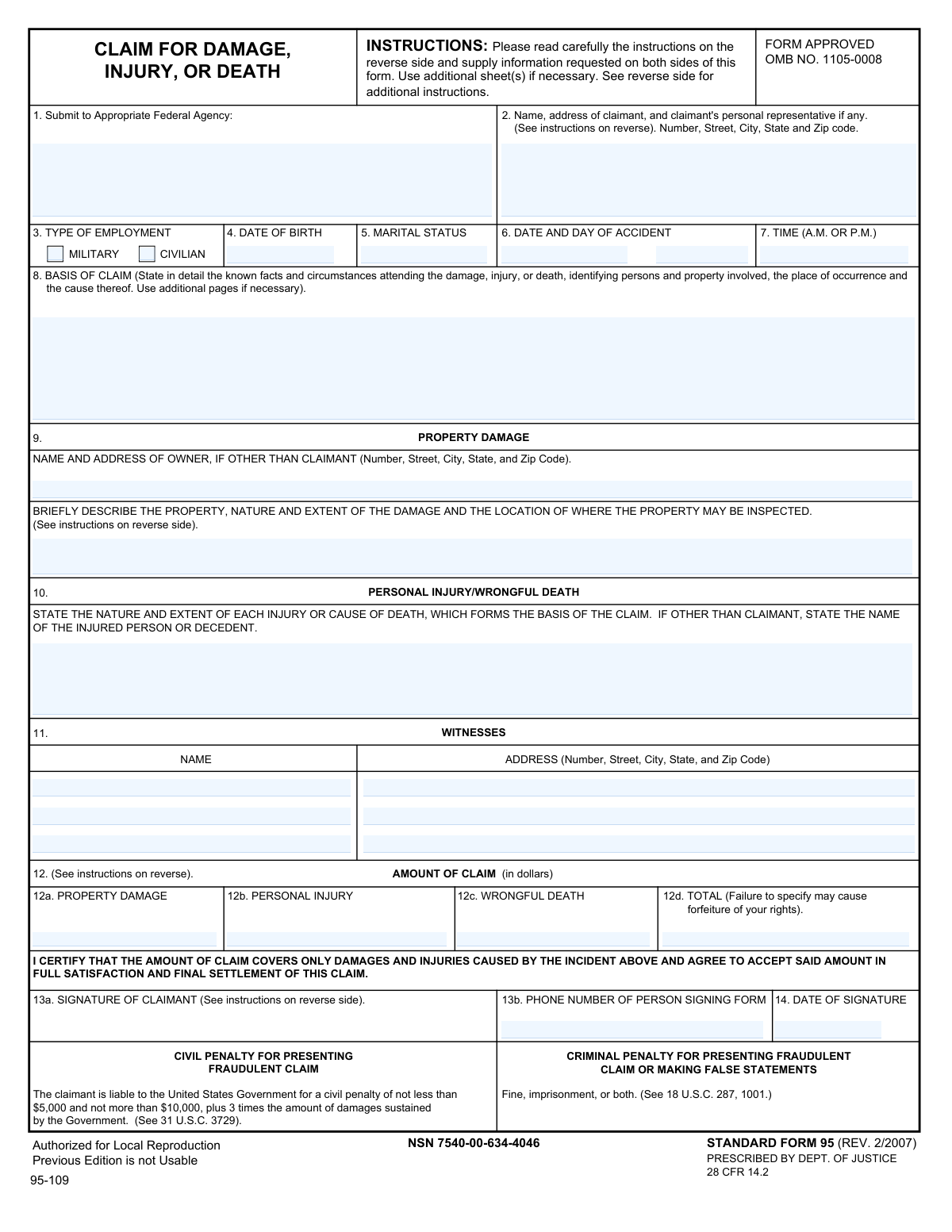
Yes! You can use AI to fill out Standard Form 95 (Rev. 2/2007), Claim for Damage, Injury, or Death
Standard Form 95 (SF 95) is the U.S. Department of Justiceâprescribed form used to file an administrative tort claim with the appropriate federal agency when you allege that a federal employeeâs actions caused property damage, personal injury, or death. It captures the incident details, witnesses, claimed dollar amounts, and insurance information needed for the agency to evaluate and potentially settle the claim. A key requirement is stating a specific dollar amount (âsum certainâ) within the applicable deadline (generally two years), because missing or incomplete information can invalidate the claim. Today, SF 95 can be filled out quickly and accurately using AI-powered services like Instafill.ai, which can also convert non-fillable PDF versions into interactive fillable forms.
Our AI automatically handles information lookup, data retrieval, formatting, and form filling.
It takes less than a minute to fill out SF 95 using our AI form filling.
Securely upload your data. Information is encrypted in transit and deleted immediately after the form is filled out.
Form specifications
| Form name: | Standard Form 95 (Rev. 2/2007), Claim for Damage, Injury, or Death |
| Number of pages: | 2 |
| Language: | English |
| Categories: | federal government forms, GSA forms, legal claim forms, tort claim forms, VA claim forms |
Instafill Demo: filling out a legal form in seconds
How to Fill Out SF 95 Online for Free in 2026
Are you looking to fill out a SF 95 form online quickly and accurately? Instafill.ai offers the #1 AI-powered PDF filling software of 2026, allowing you to complete your SF 95 form in just 37 seconds or less.
Follow these steps to fill out your SF 95 form online using Instafill.ai:
- 1 Go to Instafill.ai and upload the SF 95 PDF (or select “Standard Form 95 (SF 95)” from the form library).
- 2 Let the AI detect and map the form fields, then confirm the form version and the agency you are submitting to (Item 1).
- 3 Enter claimant details (name/address, representative if any), employment type (military/civilian), date of birth, and marital status (Items 2–5).
- 4 Provide incident specifics: date/day/time and a detailed “Basis of Claim” narrative describing what happened, where, who/what was involved, and the cause (Items 6–8).
- 5 Complete the applicable damage sections: property damage details (owner, description, inspection location) and/or personal injury/wrongful death description; add witnesses and their addresses as needed (Items 9–11).
- 6 Enter the “Amount of Claim” in dollars for each category and the total (Items 12a–12d), ensuring a clear sum certain, then complete insurance questions (Items 15–19) with insurer details and claim status if applicable.
- 7 Review for completeness, attach supporting documentation as needed (estimates, medical reports/bills, proof of authority for representatives), then e-sign, add phone number and date, and download/submit to the appropriate federal agency per the instructions.
Our AI-powered system ensures each field is filled out correctly, reducing errors and saving you time.
Why Choose Instafill.ai for Your Fillable SF 95 Form?
Speed
Complete your SF 95 in as little as 37 seconds.
Up-to-Date
Always use the latest 2026 SF 95 form version.
Cost-effective
No need to hire expensive lawyers.
Accuracy
Our AI performs 10 compliance checks to ensure your form is error-free.
Security
Your personal information is protected with bank-level encryption.
Frequently Asked Questions About Form SF 95
SF-95 is used to present a claim to the U.S. Government for money damages due to property damage, personal injury, or death caused by a federal employee or agency (Federal Tort Claims Act). It provides the required details and a âsum certainâ dollar amount for your claim.
Anyone seeking compensation from the federal government for damage, injury, or death allegedly caused by a federal employee acting within the scope of employment should submit SF-95 (or equivalent written notice). If there are multiple claimants, each claimant must submit a separate form.
Submit the form directly to the federal agency whose employee(s) was involved in the incident. If more than one agency may be involved, list each agency and submit to the best-identified responsible agency per the instructions.
Your claim must be received by the appropriate federal agency within two years after the claim accrues. It is considered âpresentedâ when the agency receives itânot when you mail it.
âSum certainâ means you must state a specific dollar amount for each category (property damage, personal injury, wrongful death) and the total. If you fail to specify a sum certain, your claim can be invalid and you may forfeit your rights.
Provide a detailed narrative of what happened, including who was involved, what property was damaged, where and when it occurred, and the cause. If you need more space, attach additional pages and reference them in Item 8.
Include a written report from the attending physician describing the injury, treatment, prognosis, any permanent disability, and hospitalization/incapacitation period, plus itemized medical/hospital/burial bills actually incurred. These documents help substantiate the amount claimed.
If the property can be repaired, provide at least two itemized, signed repair estimates from reliable, disinterested businesses (or itemized paid receipts). If it is not economically repairable or is lost/destroyed, provide original cost, purchase date, and before/after value statements from competent disinterested persons (preferably dealers), certified as just and correct.
List the ownerâs name and full address in Item 9 if the owner is different from the claimant. Also describe the property, the damage, and where the property can be inspected.
If there were witnesses, list their names and full addresses to help the agency investigate. If there are no witnesses, follow the form instructions and enter âNONEâ where applicable.
Yes, a duly authorized agent or legal representative may file, but the claim must be presented in the claimantâs name. If a representative signs, include their title/legal capacity and attach evidence of their authority (e.g., power of attorney, executor/administrator documentation).
Answer whether you carry accident insurance and/or liability/property damage insurance, and whether you filed a claim with your insurer, including deductible and insurer actions if applicable. This information is important for subrogation and coordinating how claims are handled.
The instructions say to complete all items and insert âNONEâ where applicable; missing information can delay review or make the claim invalid. Not providing a sum certain amount is a common error that can invalidate the claim.
Yesâfraudulent claims can result in civil penalties (at least $5,000 up to $10,000 plus triple damages) and criminal penalties including fines and imprisonment. Only submit accurate information and documentation.
YesâAI tools can help organize your incident details and auto-fill form fields; services like Instafill.ai use AI to fill PDFs accurately and save time. Typically you upload the SF-95 PDF to Instafill.ai, provide your incident details and amounts, review the populated fields for accuracy, then download and sign before submitting to the appropriate federal agency.
If the PDF isnât fillable, you can still complete it by printing and handwriting, or use a tool that converts it into a fillable form. Instafill.ai can convert flat non-fillable PDFs into interactive fillable forms so you can type directly into the fields.
Compliance SF 95
Validation Checks by Instafill.ai
1
Appropriate Federal Agency is provided and is a plausible agency/office name
Validates that Item 1 (Submit to Appropriate Federal Agency) is not blank and contains a meaningful agency/office identifier (not placeholders like âN/Aâ, âunknownâ, or only a city/state). This is critical because FTCA claims must be presented to the correct federal agency to be considered properly received and processed. If validation fails, the submission should be flagged as incomplete and routed for correction before acceptance.
2
Claimant full name and complete mailing address are present and structured
Checks that the claimantâs name and address include, at minimum, a full name plus street address, city, state, and ZIP code, and that the state is a valid US state/territory abbreviation and ZIP is 5 digits (or ZIP+4). A complete mailing address is required for correspondence, service, and claim administration. If missing or malformed, the form should be rejected for completion or placed in an exception queue.
3
Employment type selection is mutually exclusive and not empty
Ensures exactly one of âMilitaryâ or âCivilianâ is selected for Type of Employment, and that both are not checked simultaneously. This prevents ambiguous classification that can affect routing, investigation, and applicable procedures. If both or neither are selected, the submission should be marked invalid and require claimant clarification.
4
Claimant date of birth is a valid date and indicates a plausible age
Validates that Date of Birth is a real calendar date (MM/DD/YYYY or accepted format) and is not in the future; optionally flags implausible ages (e.g., under 0 or over 120). DOB is used for identity verification and to distinguish claimant from similarly named individuals. If invalid, the system should block submission or request correction.
5
Accident date is a valid date and not after signature date
Checks that the Date of Accident is a valid calendar date and is not later than the Date of Signature. This logical consistency is important because a claim cannot be signed before the incident occurs, and incorrect dates can affect timeliness and jurisdiction. If the accident date is invalid or after the signature date, the submission should be flagged for correction.
6
Accident day-of-week matches the accident date
Validates that the entered day of week (e.g., Monday) corresponds to the provided accident date. This cross-check helps detect data entry errors that can complicate investigations and record matching. If the day does not match the date, the system should prompt for correction or mark the field as inconsistent.
7
Accident time format and AM/PM indicator are valid
Ensures the time of accident is in a valid time format (e.g., HH:MM) and includes a clear A.M./P.M. designation (or 24-hour time if allowed by the system). Accurate time is often essential for incident reconstruction and matching to agency logs. If time is missing or malformed, the submission should be flagged as incomplete.
8
Basis of Claim narrative meets minimum completeness requirements
Checks that the Basis of Claim contains a substantive narrative (not blank and not only a few characters) and includes key elements such as what happened, where, when, and the cause (as prompted by the form). This narrative is central to evaluating liability and scope of the claim. If too short or missing, the system should require additional detail or attach supplemental pages before acceptance.
9
Amount fields are valid currency, non-negative, and sum correctly to total
Validates that 12a, 12b, and 12c (if provided) are numeric currency amounts (no letters, no negative values, reasonable decimal precision) and that 12d equals the sum of 12aâ12c. The form warns that failure to specify a sum certain may invalidate the claim, so arithmetic and presence checks are critical. If totals do not match or values are invalid, the submission should be blocked until corrected.
10
At least one claim category amount is provided (sum certain requirement)
Ensures that at least one of 12a (Property Damage), 12b (Personal Injury), or 12c (Wrongful Death) is completed with a positive amount, and that 12d (Total) is present when any category is claimed. FTCA presentment requires a âsum certain,â and missing amounts can render the claim invalid. If no category amount is provided, the system should reject the submission as not properly presented.
11
Conditional property damage details required when property damage is claimed
If 12a (Property Damage) is filled, validates that the Property Description/Damage/Inspection Location field is completed and that Owner Name/Address is completed when the owner is other than the claimant (or explicitly marked as same/none per instructions). These details are needed to inspect property, verify ownership, and evaluate damages. If missing, the submission should be flagged as incomplete and require the missing property details.
12
Conditional injury/death description required when personal injury or wrongful death is claimed
If 12b or 12c is filled, checks that the Personal Injury/Wrongful Death Description is completed and includes the injured person/decedent name when different from the claimant. This information is necessary to establish who was harmed and the nature/extent of harm supporting the claimed amount. If absent, the system should require completion before the claim can proceed.
13
Witness entries are internally complete (name required before address; address required if name present)
Validates that for each witness slot, a witness name is not provided without a corresponding address, and that an address is not provided without a name. Witness information supports investigation and corroboration, and partial entries reduce usability. If a witness name is entered without an address (or vice versa), the system should prompt for completion or allow removal of the partial witness entry.
14
Signature presence and signer phone number format validation
Ensures the claimant (or authorized signer) signature field is present (captured as e-signature or typed signature per system rules) and that the phone number includes a valid format with area code (e.g., 10 digits, allowing standard punctuation). A valid signature is required for an executed claim, and a working phone number is essential for follow-up. If missing/invalid, the submission should be rejected as not executed or not contactable.
15
Signature date is valid and not in the future
Validates that the Date of Signature is a real date and not later than the current date (allowing limited clock-skew if needed). This supports auditability and timeliness determinations. If the signature date is invalid or in the future, the system should flag the submission for correction.
16
Insurance section Yes/No selections are mutually exclusive and trigger required insurer details
Checks that for Question 15 and Question 19, only one of Yes/No is selected, and if Yes is selected, the insurer name/address (and policy number for accident insurance) is provided in a minimally complete format. Also validates that if Question 16 is Yes, the claim details and insurer action fields are completed, and if deductible is indicated, a numeric deductible amount is provided. If these dependencies are not met, the submission should be flagged as incomplete because insurance/subrogation handling may be impaired.
Common Mistakes in Completing SF 95
People often send SF-95 to the agency they think is âin chargeâ (or to DOJ) instead of the specific federal agency whose employee(s) were involved. This can delay processing and may jeopardize the claim because the claim is only âpresentedâ when the correct agency receives it (not when itâs mailed). Verify the involved agency and include the full agency name and any office/unit details; AI tools like Instafill.ai can prompt for the correct agency and reduce misrouting by validating required routing details.
The instructions require completing all items and inserting âNONEâ when something doesnât apply, but many claimants leave fields empty (especially witnesses, insurance, or property owner sections). Blank fields can be interpreted as incomplete execution and trigger follow-ups or delays. To avoid this, explicitly enter âNONEâ for non-applicable items and ensure conditional sections are either completed or clearly marked; Instafill.ai can flag missing required responses and auto-fill âNONEâ where appropriate.
A very common error is writing âTBD,â âunknown,â âsee attached,â or providing ranges instead of exact dollar amounts in 12aâ12d. The form warns that failure to specify a sum certain can render the claim invalid and may result in forfeiture of rights. Always enter specific dollar figures for each applicable category (property damage, personal injury, wrongful death) and a matching total; Instafill.ai can enforce numeric formatting and prevent non-numeric entries.
Claimants frequently miscalculate the total, forget to include one category, or enter a total while leaving category lines blank. Inconsistencies can cause processing delays, requests for clarification, or disputes about what is being claimed. Re-check arithmetic and ensure 12d equals 12a + 12b + 12c exactly; Instafill.ai can automatically compute totals and validate that the numbers reconcile.
People often put medical bills under property damage, vehicle repair under personal injury, or check/complete the wrong narrative section (Items 9 vs. 10). This creates confusion about what damages are being sought and can slow adjudication or lead to incomplete evaluation. Separate each type of loss into the correct line item and complete the corresponding description fields; Instafill.ai can guide users through category-specific prompts and ensure the right sections are completed.
Many narratives are too short (e.g., âGovernment vehicle hit meâ) and omit key facts like exact location, sequence of events, involved persons/property, and the cause. Missing details often lead to follow-up requests, longer investigations, and delays in resolution. Provide a clear, chronological account including who/what/where/when/how, and attach additional pages if needed; Instafill.ai can structure the narrative with required prompts and ensure critical details arenât skipped.
Common mistakes include missing the day of week, entering an ambiguous time without A.M./P.M., or using inconsistent dates across attachments. Inaccurate timing can complicate verification (police reports, incident logs, duty rosters) and may undermine credibility. Enter the full date, the day of the week, and a specific time clearly marked A.M. or P.M.; Instafill.ai can standardize date/time formats and flag missing A.M./P.M.
Claimants often omit apartment/unit numbers, ZIP+4, or provide a temporary address without clarifying, and representatives sometimes fail to list themselves properly. This leads to returned mail, missed deadlines for requests, and delays in communication. Provide a complete deliverable mailing address and, if a representative is involved, list both claimant and representative clearly; Instafill.ai can validate address completeness and formatting.
Forms are frequently submitted unsigned, undated, or signed by someone other than the claimant without indicating legal capacity or attaching evidence of authority (e.g., power of attorney, executor documentation). This can make the claim not âexecutedâ and therefore not properly presented, risking invalidation or major delays. Ensure the correct person signs, include title/capacity if not the claimant, attach authority documentation, and date the signature; Instafill.ai can flag missing signature fields and remind users about representative documentation requirements.
People often check âYesâ but fail to provide insurer name/address/policy number, or they answer inconsistently across accident insurance vs. liability/property coverage. Others write âpendingâ for insurer action without providing claim number, dates, or what the insurer proposed, which the form explicitly asks the claimant to ascertain. Complete the conditional details whenever âYesâ is selected and provide concrete insurer action information (claim number, adjuster, decision, next steps); Instafill.ai can enforce conditional logic so required insurer details appear and are completed when âYesâ is chosen.
A common omission is failing to state where the damaged property can be inspected or not listing the owner when the owner is different from the claimant (e.g., leased vehicle, employer-owned equipment). This can delay verification, appraisal, and settlement discussions. Include a brief but specific description of the property, the damage, and a precise inspection address/contact, and list the ownerâs full name/address if not the claimant; Instafill.ai can prompt for inspection location and ensure owner fields are completed when property damage is claimed.
Saved over 80 hours a year
âI was never sure if my IRS forms like W-9 were filled correctly. Now, I can complete the forms accurately without any external help.â
Kevin Martin Green
Your data stays secure with advanced protection from Instafill and our subprocessors

Robust compliance program
Transparent business model
Youâre not the product. You always know where your data is and what it is processed for.
ISO 27001, HIPAA, and GDPR
Our subprocesses adhere to multiple compliance standards, including but not limited to ISO 27001, HIPAA, and GDPR.
Security & privacy by design
We consider security and privacy from the initial design phase of any new service or functionality. Itâs not an afterthought, itâs built-in, including support for two-factor authentication (2FA) to further protect your account.
Fill out SF 95 with Instafill.ai
Worried about filling PDFs wrong? Instafill securely fills standard-form-95-rev-22007-claim-for-damage-injury-or-death forms, ensuring each field is accurate.