Yes! You can use AI to fill out Standard Form 95 (Rev. 2/2007), Claim for Damage, Injury, or Death
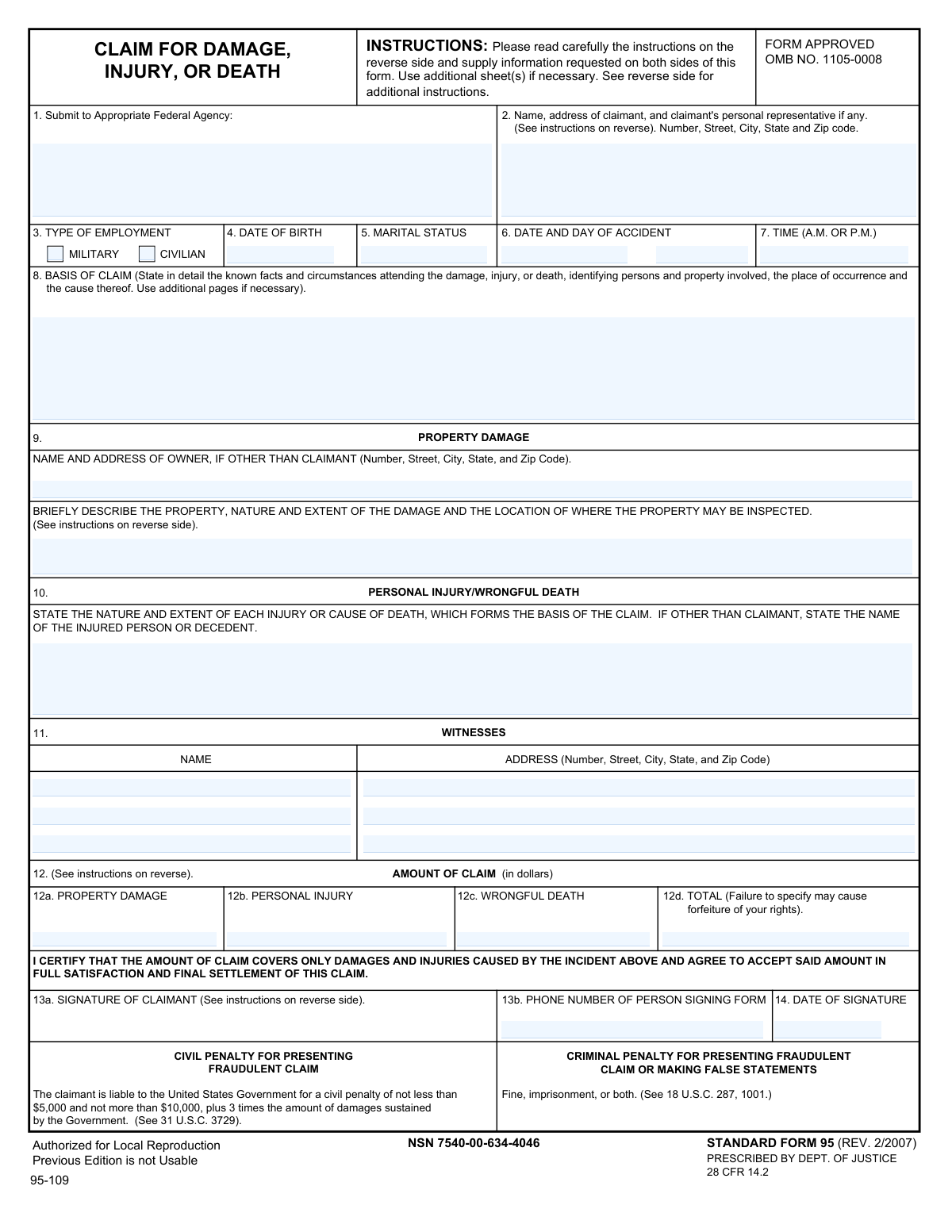
Standard Form 95 (SF 95) is the U.S. Department of Justiceâprescribed form used to file a âsum certainâ money-damages claim with the appropriate federal agency when harm is alleged to have been caused by a federal employee or agency activity (Federal Tort Claims Act; 28 CFR 14.2). It captures the incident details, witnesses, insurance information, and the exact dollar amounts claimed for property damage, personal injury, and/or wrongful deathâmissing or incomplete amounts can invalidate the claim or risk forfeiture of rights. The form is important because it is the standard mechanism many agencies require to properly âpresentâ a claim within the two-year deadline. Today, this form can be filled out quickly and accurately using AI-powered services like Instafill.ai, which can also convert non-fillable PDF versions into interactive fillable forms.
Our AI automatically handles information lookup, data retrieval, formatting, and form filling.
It takes less than a minute to fill out SF 95 using our AI form filling.
Securely upload your data. Information is encrypted in transit and deleted immediately after the form is filled out.
Form specifications
| Form name: | Standard Form 95 (Rev. 2/2007), Claim for Damage, Injury, or Death |
| Number of pages: | 2 |
| Language: | English |
| Categories: | federal government forms, GSA forms, legal claim forms, tort claim forms |
Instafill Demo: filling out a legal form in seconds
How to Fill Out SF 95 Online for Free in 2026
Are you looking to fill out a SF 95 form online quickly and accurately? Instafill.ai offers the #1 AI-powered PDF filling software of 2026, allowing you to complete your SF 95 form in just 37 seconds or less.
Follow these steps to fill out your SF 95 form online using Instafill.ai:
- 1 Go to Instafill.ai and upload Standard Form 95 (SF 95) or select it from the form library.
- 2 Enter claimant details (name, address, representative if any), type of employment (military/civilian), date of birth, and marital status.
- 3 Provide incident information (date/day/time, location, and a detailed basis of claim describing facts, involved persons/property, and cause).
- 4 Complete damage sections: property damage owner info and description/inspection location, and/or personal injury/wrongful death nature and extent (including injured person/decedent if not the claimant).
- 5 Add witness names and addresses and attach or upload supporting documentation (estimates, receipts, medical reports/bills) as applicable.
- 6 Enter the required “sum certain” amounts for property damage, personal injury, and/or wrongful death and confirm the total claim amount.
- 7 Review for completeness, then e-sign (signature, phone number, date) and download/submit the completed SF 95 to the appropriate federal agency listed in Item 1.
Our AI-powered system ensures each field is filled out correctly, reducing errors and saving you time.
Why Choose Instafill.ai for Your Fillable SF 95 Form?
Speed
Complete your SF 95 in as little as 37 seconds.
Up-to-Date
Always use the latest 2026 SF 95 form version.
Cost-effective
No need to hire expensive lawyers.
Accuracy
Our AI performs 10 compliance checks to ensure your form is error-free.
Security
Your personal information is protected with bank-level encryption.
Frequently Asked Questions About Form SF 95
SF-95 is used to present a claim to the U.S. Government for money damages due to property damage, personal injury, or death caused by a federal employee or agency (Federal Tort Claims Act). It provides the agency the details and the exact dollar amount you are claiming.
Anyone seeking compensation from the United States for damage, injury, or death allegedly caused by a federal employee acting within the scope of employment should submit SF-95 (or equivalent written notice). If there are multiple claimants, each claimant must submit a separate form.
Submit SF-95 to the âappropriate Federal agencyâ whose employee(s) was involved in the incident. If more than one agency may be involved, list each agency and submit to the best-identified responsible agency based on the incident.
The claim must be received by the appropriate federal agency within two years after the claim accrues. It is considered filed when the agency receives it, not when you mail it.
Provide a detailed narrative of what happened, including the place of occurrence, cause, and the people and property involved. If you need more space, attach additional pages and reference them in Item 8.
Yesâcomplete all items and write âNONEâ where something does not apply. Leaving required sections incomplete can make the claim invalid.
âSum certainâ means you must state a specific dollar amount for each category you are claiming (property damage, personal injury, wrongful death) and the total. Failure to specify a definite amount may render your claim invalid and may forfeit your rights.
Enter separate amounts in 12a (property damage) and 12b (personal injury), and then add them in 12d (total). If wrongful death applies, use 12c and include it in the total as well.
You should submit a written report from the attending physician describing the injury, treatment, prognosis, any permanent disability, and hospitalization/incapacitation period, plus itemized medical/hospital (or burial) bills actually incurred. These documents help substantiate the amount claimed.
If the property can be repaired, provide at least two itemized, signed repair estimates (or itemized, signed receipts if already paid). If the property is not economically repairable or is lost/destroyed, provide statements of original cost, purchase date, and value before/after the incident from disinterested competent persons (preferably dealers/officials).
List the ownerâs name and full address in Item 9 and describe the property, the damage, and where it can be inspected. This helps the agency verify ownership and evaluate the damage.
If there were witnesses, list their names and full addresses to support your account of the incident. If there are no witnesses, write âNONEâ in the witness section.
Yes, a duly authorized agent or legal representative may file, but the claim must be presented in the claimantâs name. If signed by a representative, include their title/legal capacity and attach evidence of express authority to act for the claimant.
Submitting a fraudulent claim can lead to significant civil penalties (including $5,000 to $10,000 plus triple damages) and criminal penalties such as fines and imprisonment. Only include truthful, supportable information and amounts.
YesâAI tools like Instafill.ai can help auto-fill form fields accurately and save time by extracting details from your information and placing them into the correct SF-95 fields. Typically, you upload the PDF to Instafill.ai, provide your incident details and supporting info, review the populated fields (especially Item 8 and Item 12 âsum certainâ), and then download the completed form for signing and submission to the appropriate agency.
If the PDF isnât fillable, you can still complete it by printing and writing legibly, or use a tool like Instafill.ai to convert a flat non-fillable PDF into an interactive fillable form. After conversion, you can auto-fill and edit fields before signing.
Compliance SF 95
Validation Checks by Instafill.ai
1
Appropriate Federal Agency Provided (Item 1) and Not Placeholder Text
Validates that the 'Federal Agency to Submit To' field is present and contains a specific agency name (e.g., 'Department of the Army, Fort X Claims Office') rather than being blank, 'N/A', or generic text like 'Federal Government'. This is critical because SF-95 must be presented to the correct agency for the claim to be deemed properly filed. If validation fails, the submission should be rejected or routed to a manual review queue with a prompt to identify the correct agency.
2
Claimant Name and Mailing Address Completeness and Structure (Item 2)
Checks that claimant information includes a full name and a complete deliverable U.S. mailing address with street, city, state, and ZIP (and personal representative details if provided). This ensures the agency can identify the claimant and send correspondence, requests for evidence, or determinations. If incomplete or malformed, the form should be flagged as incomplete and returned for correction.
3
Type of Employment Selection is Exclusive (Military vs Civilian) (Item 3)
Ensures exactly one of 'Military' or 'Civilian' is selected, and prevents both being checked or neither being checked. This classification can affect internal routing and evaluation of the claim. If the selection is invalid, the system should require the user to choose one option before submission.
4
Date of Birth Format and Plausibility (Item 4)
Validates that Date of Birth is a real calendar date in an accepted format (e.g., MM/DD/YYYY) and is not in the future or implausible (e.g., older than 120 years). DOB is used for identity verification and to distinguish claimants with similar names. If invalid, the submission should be blocked until corrected.
5
Marital Status Value is Present and Within Allowed Set (Item 5)
Checks that marital status is provided and matches an allowed set (e.g., Single, Married, Divorced, Widowed, Separated) rather than free-form ambiguous entries. Consistent values support downstream reporting and may be relevant to wrongful death or representative claims. If invalid or missing, the system should prompt for a valid selection/value.
6
Accident Date Components Form a Valid Date and Are Complete (Item 6)
Validates that accident month/year and day are both provided and combine into a valid calendar date (e.g., no February 30). This date is essential for timeliness and for correlating the incident with agency records. If the date is incomplete or invalid, the form should be rejected as incomplete.
7
Accident Time Format and AM/PM Requirement (Item 7)
Ensures the accident time is provided in a valid time format (e.g., HH:MM) and includes a clear AM/PM indicator when using 12-hour time. Accurate time helps match the incident to logs, reports, and witness statements. If time is missing or ambiguous (e.g., '7' with no AM/PM), the system should require clarification.
8
Two-Year Presentment Window Warning/Flag Based on Accident Date
Compares the accident date to the submission/received date to determine whether the claim appears to be outside the two-year presentment period referenced in the instructions. While the system may not be the legal decision-maker, flagging likely late claims prevents silent acceptance of potentially invalid filings. If outside two years, the submission should be allowed only with an explicit late-claim acknowledgment and routed to manual/legal review.
9
Basis of Claim Narrative Minimum Content and Specificity (Item 8)
Validates that the 'Basis of Claim' narrative is not empty and includes key elements: place of occurrence, cause, and identification of involved persons/property (at least minimally). This narrative is required to evaluate liability and damages and to investigate the incident. If too short or missing required elements, the system should prompt for additional detail or attach supplemental pages.
10
Property Damage Section Conditional Completeness (Item 9)
If any property damage amount is claimed (Item 12a > 0) or property damage is described, validates that the property description, nature/extent of damage, and inspection location are provided. If the owner is other than the claimant, the owner's name and full address must be completed. If these conditions are not met, the system should flag the submission as incomplete because damages cannot be evaluated or inspected.
11
Personal Injury/Wrongful Death Section Conditional Completeness (Item 10)
If personal injury (12b) or wrongful death (12c) is claimed, validates that the nature and extent of each injury or cause of death is described, and that the injured person/decedent name is provided when different from the claimant. This is necessary to establish who was harmed and what damages are being asserted. If missing, the system should require completion before accepting the claim amounts.
12
Witness Entries Are Internally Consistent (Item 11)
Checks that for each witness listed, a name is not provided without an address and vice versa, and that addresses include city/state/ZIP when present. Witness information supports investigation and corroboration of facts. If partial witness records exist, the system should prompt to complete or remove the witness entry to avoid unusable contact data.
13
Claim Amounts Are Numeric, Non-Negative, and Use Valid Currency Precision (Item 12a-12d)
Validates that all entered claim amounts are numeric dollar values, non-negative, and conform to currency rules (e.g., max two decimal places, no currency symbols if disallowed). This prevents parsing errors and ensures the amounts can be processed and summed reliably. If invalid, the system should block submission and highlight the offending fields.
14
Total Claim Amount Equals Sum of Components and Is a 'Sum Certain' (Item 12d)
Ensures the total claim amount (12d) is present and exactly equals 12a + 12b + 12c, and is not blank, 'TBD', or otherwise indeterminate. The instructions state failure to specify a sum certain may render the claim invalid and may forfeit rights. If the total is missing or inconsistent, the system should prevent submission until corrected.
15
Signature, Signer Phone, and Signature Date Completeness and Validity (Items 13a, 13b, 14)
Validates that the claimant (or authorized representative) signature is present, the phone number is in a valid format (e.g., 10-digit US number with optional country code), and the signature date is a valid date. These fields are required to treat the form as executed and to contact the signer for follow-up. If any are missing/invalid, the submission should be rejected as not properly executed.
16
Insurance Yes/No Logic and Dependent Fields (Items 15-19)
Ensures each insurance question has a single clear Yes/No selection (not both, not neither) and enforces dependent details: if accident insurance is 'Yes', require insurer name/address and policy number; if claim filed is 'Yes', require full-coverage/deductible details and insurer action; if deductible applies, require deductible amount; if public liability/property damage insurance is 'Yes', require carrier name/address. This information is essential for subrogation and coordination with insurers. If dependencies are not satisfied, the system should flag the submission and require completion of the relevant insurance details.
Common Mistakes in Completing SF 95
People often send Standard Form 95 to the agency they think is âin chargeâ (or to DOJ/OMB addresses listed in notices) instead of the specific federal agency whose employee(s) were involved. This can delay processing and may jeopardize timeliness because a claim is considered âpresentedâ only when the correct agency receives it (not when itâs mailed). To avoid this, identify the employing/operating agency connected to the incident and confirm the correct claims office address before sending; AI-powered tools like Instafill.ai can help ensure the agency field is completed consistently and can flag missing routing details.
The instructions explicitly say to complete all items and insert âNONEâ where applicable, but many claimants leave sections blank (e.g., witnesses, property owner, insurance questions). Blank fields can be interpreted as incomplete, triggering follow-ups, delays, or an âinvalidâ submission if key elements are missing. To avoid this, review every item on both sides and enter âNONEâ for non-applicable sections; Instafill.ai can automatically detect unanswered required fields and prompt you to complete them correctly.
A very common error is writing âTBD,â âunknown,â âsee attached,â or leaving one of the amount lines empty, especially when medical treatment is ongoing. The form and regulations warn that failure to specify a sum certain can render the claim invalid and may result in forfeiture of rights. To avoid this, enter specific dollar amounts for 12a/12b/12c as applicable and ensure 12d equals the total; Instafill.ai can validate that totals are numeric and consistent across the amount fields.
Claimants frequently enter amounts that donât add up (e.g., total doesnât equal property + injury + death) or accidentally double-count the same damages in multiple categories. Inconsistencies can cause processing delays, requests for clarification, or disputes about what is being claimed. To avoid this, calculate each category once, keep supporting worksheets, and confirm 12d matches the sum of the applicable lines; Instafill.ai can automatically compute and cross-check totals to prevent arithmetic mistakes.
Many people provide a short statement like âcar accident on baseâ without identifying the place of occurrence, involved persons/property, sequence of events, and the cause. A vague narrative makes it difficult for the agency to investigate and can lead to delays or denial due to lack of substantiation. To avoid this, include who/what/when/where/how, identify federal employee involvement if known, and attach additional pages if needed; Instafill.ai can help structure the narrative and ensure key elements (location, cause, parties) arenât omitted.
People often omit the day of the week, forget to mark A.M./P.M., or provide an ambiguous time (e.g., â7:30â without A.M./P.M.) and partial dates (month/year only). Ambiguity can complicate incident matching, investigation, and credibility of the timeline. To avoid this, enter the full date (month/day/year), include the day of the week if requested, and clearly specify the time with A.M. or P.M.; Instafill.ai can standardize date/time formats and flag missing components.
When an attorney, parent/guardian, executor, or other representative signs, claimants often fail to list the claimantâs information properly or omit proof of authority and the signerâs legal capacity/title. This can cause the agency to treat the claim as not properly executed, leading to delays or rejection until authority documentation is provided. To avoid this, ensure the claim is presented in the claimantâs name, list the representative in Item 2 if applicable, and attach evidence of authority (e.g., letter of representation, guardianship papers); Instafill.ai can prompt for representative details and help keep claimant/representative fields consistent.
The form repeatedly requires full addresses (number, street, city, state, ZIP) for the claimant, property owner, witnesses, and insurers, but people often provide partial information or a P.O. Box only. Missing address elements can prevent timely correspondence, verification, or inspection coordination. To avoid this, provide complete mailing addresses everywhere requested and include unit numbers and ZIP+4 if available; Instafill.ai can validate address completeness and formatting to reduce returned mail and follow-ups.
Claimants frequently forget to list the property owner when itâs not the claimant (e.g., leased vehicle, employer-owned equipment) or provide a generic description without stating the extent of damage and where the property can be inspected. This can delay evaluation and may weaken the claim if the agency cannot verify damage or ownership. To avoid this, identify the legal owner, describe the item (make/model/serial if relevant), detail the damage, and provide a specific inspection location and contact; Instafill.ai can guide completion and ensure the required sub-elements are included.
People often list injuries in broad terms (e.g., âback painâ) without describing extent, treatment, prognosis, disability, or hospitalization, and they fail to attach itemized bills or physician reports referenced in the instructions. Lack of medical detail and substantiation can lead to requests for more information, delays, or reduced settlement value. To avoid this, describe each injury clearly and attach physician reports and itemized medical/burial expenses as applicable; Instafill.ai can help ensure the injury narrative is complete and that required attachments are not overlooked.
A common mistake is checking âYesâ but not providing the insurer name/address/policy number, or giving conflicting answers (e.g., saying no claim filed but describing deductible actions). Because subrogation and coordination depend on accurate insurance information, inconsistencies can slow adjudication and trigger additional verification. To avoid this, answer each insurance question consistently, include full carrier contact details and policy numbers when âYesâ is selected, and clearly state deductible amounts and insurer actions; Instafill.ai can enforce conditional logic (requiring details when âYesâ is checked) and format insurer information correctly.
Saved over 80 hours a year
âI was never sure if my IRS forms like W-9 were filled correctly. Now, I can complete the forms accurately without any external help.â
Kevin Martin Green
Your data stays secure with advanced protection from Instafill and our subprocessors

Robust compliance program
Transparent business model
Youâre not the product. You always know where your data is and what it is processed for.
ISO 27001, HIPAA, and GDPR
Our subprocesses adhere to multiple compliance standards, including but not limited to ISO 27001, HIPAA, and GDPR.
Security & privacy by design
We consider security and privacy from the initial design phase of any new service or functionality. Itâs not an afterthought, itâs built-in, including support for two-factor authentication (2FA) to further protect your account.
Fill out SF 95 with Instafill.ai
Worried about filling PDFs wrong? Instafill securely fills standard-form-95-rev-22007-claim-for-damage-injury-or-death-1 forms, ensuring each field is accurate.