Yes! You can use AI to fill out Standard Right-to-Know Law Request Form

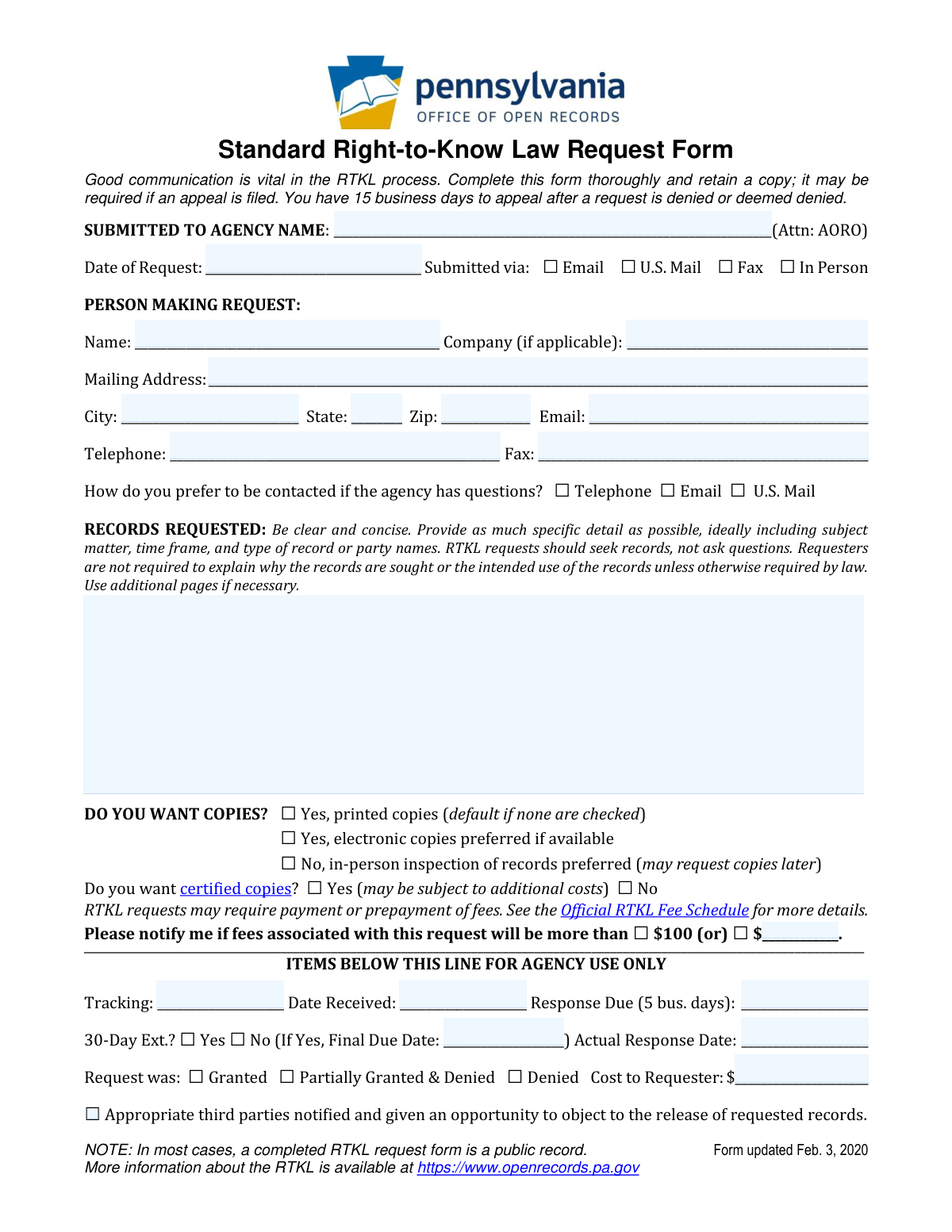
The Standard Right-to-Know Law Request Form is a Pennsylvania public records request form used to formally request access to agency records under the RTKL. It captures the requester’s contact information, the agency receiving the request, and a clear description of the records being requested, including preferred format (paper, electronic, or inspection). Completing the form thoroughly helps the agency locate responsive records and supports the requester if an appeal is needed after a denial or deemed denial. The form also documents fee preferences and provides agency-only tracking fields for statutory response deadlines.
Our AI automatically handles information lookup, data retrieval, formatting, and form filling.
It takes less than a minute to fill out RTKL Request Form using our AI form filling.
Securely upload your data. Information is encrypted in transit and deleted immediately after the form is filled out.

Form specifications

Form name: Standard Right-to-Know Law Request Form
Number of pages: 1
Filled form examples: Form RTKL Request Form Examples
Language: English
Categories: public records forms, government request forms, Pennsylvania government forms, open records forms
main-image

Instafill Demo: filling out a legal form in seconds

How to Fill Out RTKL Request Form Online for Free in 2026

Are you looking to fill out a RTKL REQUEST FORM form online quickly and accurately? Instafill.ai offers the #1 AI-powered PDF filling software of 2026, allowing you to complete your RTKL REQUEST FORM form in just 37 seconds or less.
Follow these steps to fill out your RTKL REQUEST FORM form online using Instafill.ai:
  1. 1 Enter the agency name you are submitting the request to (Attn: Agency Open Records Officer/AORO) and provide the date of the request and submission method (email, mail, fax, or in person).
  2. 2 Fill in requester details: name, company (if applicable), mailing address, city/state/ZIP, email, telephone, and fax (if any).
  3. 3 Select your preferred method of contact for agency questions (telephone, email, or U.S. mail).
  4. 4 Describe the records requested clearly and concisely, including subject matter, relevant dates/time frame, record types, and any party names; add additional pages if needed.
  5. 5 Choose how you want access to the records: printed copies, electronic copies (preferred if available), or in-person inspection; indicate whether you want certified copies.
  6. 6 Set a fee notification threshold (e.g., notify if fees exceed $100 or another amount) and review that fees or prepayment may be required under the RTKL fee schedule.
  7. 7 Review the completed form for completeness, keep a copy for your records, and submit it to the agency via your selected method.

Our AI-powered system ensures each field is filled out correctly, reducing errors and saving you time.

Why Choose Instafill.ai for Your Fillable RTKL Request Form Form?

Speed

Complete your RTKL Request Form in as little as 37 seconds.

Up-to-Date

Always use the latest 2026 RTKL Request Form form version.

Cost-effective

No need to hire expensive lawyers.

Accuracy

Our AI performs 10 compliance checks to ensure your form is error-free.

Security

Your personal information is protected with bank-level encryption.

Frequently Asked Questions About Form RTKL Request Form

This form is used to request public records from a Pennsylvania agency under the Right-to-Know Law. It helps you clearly describe the records you want and provides the agency the information needed to respond.

Anyone seeking records from a Pennsylvania agency can use this form, including individuals and companies. You do not need to explain why you want the records unless a law specifically requires it.

Submit it to the agency listed on the form under “SUBMITTED TO AGENCY NAME (Attn: AORO).” AORO refers to the agency’s Open Records Officer who handles RTKL requests.

You can submit the form by Email, U.S. Mail, Fax, or In Person by checking the appropriate box and sending it through that method. Keep a copy of what you submitted for your records.

You should provide your name, mailing address, and at least one way to contact you (such as email or telephone). The form also asks your preferred method of contact if the agency has questions.

No—“Company (if applicable)” is optional and only needed if you are making the request on behalf of a business or organization. Individuals can leave it blank.

Be clear and specific by including the subject matter, relevant dates/time frame, type of record, and any party names if known. The form notes that RTKL requests should seek records rather than ask general questions.

Yes, the form explicitly allows you to use additional pages if necessary. Make sure the extra pages clearly reference the same request and agency.

You can choose printed copies, electronic copies (preferred if available), or in-person inspection. If you select inspection, you may request copies later.

Printed copies are the default if none of the copy/inspection options are checked. If you prefer electronic copies or inspection, it’s best to check the appropriate box.

Certified copies are officially certified by the agency and may be useful for legal or formal purposes. The form notes they may be subject to additional costs, so request them only if you need certification.

Possibly—RTKL requests may require payment or prepayment of fees depending on what you request (such as copying or certification). The form directs you to the Official RTKL Fee Schedule for details.

Use the line that says “Please notify me if fees associated with this request will be more than
” and check $100 or write in your own dollar amount. This helps you avoid unexpected charges.

The agency tracks a response due date and may take a 30-day extension in certain situations, which will change the final due date. The agency-use section includes fields for the initial due date, whether an extension was taken, and the final due date.

The form states you have 15 business days to appeal after a request is denied or deemed denied. Keeping a copy of your completed form is important because it may be needed for an appeal.

Compliance RTKL Request Form
Validation Checks by Instafill.ai

1
Ensures the Agency Name (Submitted To) is provided and not left blank
Validates that the 'SUBMITTED TO AGENCY NAME' field contains a non-empty value (not just whitespace or underscores). This is essential because the request must be directed to a specific agency for proper routing and legal processing. If missing, the submission should be rejected or flagged as incomplete and the requester prompted to supply the agency name.
2
Validates Date of Request is present and in an acceptable date format
Checks that 'Date of Request' is provided and matches an allowed format (e.g., MM/DD/YYYY or YYYY-MM-DD) and represents a real calendar date. The date is important for tracking statutory timelines and appeal windows. If invalid or missing, the system should block submission or require correction before acceptance.
3
Validates exactly one submission method is selected (Email, U.S. Mail, Fax, In Person)
Ensures the 'Submitted via' section has one and only one checkbox selected. This prevents ambiguity about how the request was delivered and how confirmations/records should be tracked. If none or multiple are selected, the form should be flagged and the requester required to choose a single method.
4
Ensures Requester Name is provided and meets minimum completeness rules
Validates that the 'Name' field under 'PERSON MAKING REQUEST' is not blank and contains at least a first and last name (or a clearly identifiable single legal name for an entity). This is important for identification, correspondence, and potential appeals. If the name is missing or clearly incomplete, the submission should be rejected or returned for completion.
5
Validates Mailing Address fields are complete (street, city, state, zip)
Checks that the mailing address includes a street address (or PO Box), city, state, and ZIP code, and that none of these required components are empty. A complete address is necessary when the requester prefers U.S. Mail contact or when the agency must send official notices. If incomplete, the system should require missing components or prompt the requester to select a different contact method with valid details.
6
Validates State is a valid US state/territory abbreviation
Ensures the 'State' field is exactly two letters and matches an allowed list (e.g., PA, NJ, etc.). This reduces delivery errors and standardizes address data for agency systems. If the value is not recognized, the form should be flagged and the requester asked to correct it.
7
Validates ZIP code format (5-digit or ZIP+4)
Checks that ZIP is either 5 digits (e.g., 17101) or ZIP+4 (e.g., 17101-1234) and contains only digits and an optional hyphen. Correct ZIP formatting improves mail deliverability and data quality. If invalid, the system should prevent submission until corrected.
8
Validates Email address format when provided or when Email is selected as contact preference
Ensures the email field matches a standard email pattern (local@domain) and is not obviously malformed (missing '@', invalid domain, etc.). If the requester selects Email as the preferred contact method, email becomes required and must be valid to avoid failed communications. If validation fails, the system should require a corrected email or a different contact preference.
9
Validates Telephone number format and requiredness when Telephone is selected as contact preference
Checks that the telephone number contains a valid format (e.g., 10 digits with optional separators, and optional country code) and is not too short/long. If 'Telephone' is selected as the preferred contact method, a valid phone number must be present to allow timely clarification questions. If invalid or missing under that preference, the submission should be blocked or the user prompted to update contact preference.
10
Validates Fax number format when provided or when submission method is Fax
Ensures the fax number, if entered, follows a valid phone-number-like format and contains sufficient digits. If the request is marked as submitted via Fax, a fax number may be required for confirmation or follow-up depending on agency workflow. If the fax number is required by the workflow and invalid/missing, the system should flag the submission for correction.
11
Ensures exactly one contact preference is selected (Telephone, Email, U.S. Mail)
Validates that the 'How do you prefer to be contacted' section has one and only one checkbox selected. This prevents conflicting instructions and ensures the agency uses the correct channel for questions. If none or multiple are selected, the system should require the requester to choose a single preference.
12
Ensures Records Requested narrative is present and not a question-only request
Checks that the 'RECORDS REQUESTED' section contains substantive text describing records sought (not empty, not only punctuation/underscores). It should also flag requests that are phrased purely as questions (e.g., 'Why did you
?') without identifying records, since RTKL requests must seek records. If missing or clearly non-compliant, the system should prompt the requester to revise the description before submission.
13
Validates Copies/Inspection selection logic and applies default if none selected
Ensures that the 'DO YOU WANT COPIES?' options are logically consistent: either one option is selected, or if none are selected the system explicitly applies the stated default ('Yes, printed copies'). This avoids ambiguity about fulfillment method and cost expectations. If multiple conflicting options are selected (e.g., printed copies and in-person inspection), the system should require the requester to choose one.
14
Validates Certified Copies selection is explicitly Yes or No
Checks that one of the 'Do you want certified copies?' options is selected, or enforces a system default if the business process requires explicit consent. Certified copies can affect fees and processing steps, so ambiguity can cause delays. If neither or both are selected, the system should prompt for a single clear choice.
15
Validates Fee Notification threshold selection and amount format
Ensures the requester selects either the fixed '$100' threshold or provides a custom dollar amount, but not both. If a custom amount is provided, it must be a valid currency value (positive number, reasonable maximum, up to two decimals) and not blank. If invalid or conflicting, the system should require correction to prevent disputes about fee notifications.
16
Prevents requester from editing 'Agency Use Only' fields (tracking, received dates, response outcomes)
Validates that fields below 'ITEMS BELOW THIS LINE FOR AGENCY USE ONLY' are not user-editable in the requester submission workflow, or if present in the payload, are ignored/stripped. These fields are intended for internal processing and must remain authoritative to avoid tampering or confusion. If the system detects user-supplied values in these fields, it should discard them and log the event or flag for review.

Common Mistakes in Completing RTKL Request Form

Leaving the agency name blank or using the wrong agency

People often forget to fill in “SUBMITTED TO AGENCY NAME” or they send the request to a general office instead of the correct agency/department. This can delay processing, lead to a “no records” response, or cause the request to be treated as not properly submitted. To avoid this, confirm the exact agency that holds the records and address it to the correct office (Attn: AORO) before submitting.

Missing or incorrect date of request

Requesters sometimes omit the “Date of Request” or write an unclear date format. This creates confusion about timelines, especially if an appeal becomes necessary and deadlines are calculated from receipt/response dates. Use a clear format (e.g., YYYY-MM-DD) and keep a copy showing the date you sent it.

Not indicating the submission method (Email/Mail/Fax/In Person)

It’s common to forget to check how the request was submitted, especially when printing and mailing the form. If the method is unclear, it can complicate tracking, proof of submission, and follow-up communications. Always check exactly one submission method and retain proof (sent email, fax confirmation, certified mail receipt, or in-person timestamp).

Incomplete requester contact information

Many people leave out key contact fields like mailing address, email, or phone number, or they provide outdated information. Agencies may need to clarify the request or send fee estimates and responses, and missing contact details can cause delays or missed deadlines. Provide at least one reliable, frequently checked contact method and ensure the mailing address is complete (including ZIP).

Not selecting a preferred contact method

Requesters often skip the “How do you prefer to be contacted” checkbox, assuming the agency will choose. This can lead to missed calls, delayed clarifications, or responses sent to a channel you don’t monitor. Choose one preferred method and make sure the corresponding contact information is accurate and legible.

Writing questions instead of requesting specific records

A frequent mistake is using the “RECORDS REQUESTED” section to ask questions (e.g., “Why did you do X?”) rather than requesting existing documents. RTKL requests are for records, and question-style requests can be denied or require clarification, slowing the process. Rephrase questions into record requests (e.g., “All emails, memos, and reports regarding X from [date] to [date]”).

Overly broad or vague records description

People often request “all records about
” without a time frame, subject detail, or record type, which makes the request hard to search and may trigger denials, extensions, or high fees. Vague requests also increase the chance you receive irrelevant material. Include specific subject matter, date range, record types (emails, invoices, contracts), and relevant names/keywords to narrow the search.

Forgetting to attach additional pages when needed

The form encourages using additional pages, but requesters frequently run out of space and submit an incomplete description. This can result in an agency interpreting the request narrowly or asking for clarification, delaying the response. If the request is complex, attach a clearly labeled page (e.g., “Attachment A”) and reference it in the “RECORDS REQUESTED” section.

Not choosing a copies/inspection option (or misunderstanding the default)

Many people leave the “DO YOU WANT COPIES?” section blank, not realizing the default is printed copies if none are checked. This can lead to unexpected printing costs, slower delivery, or receiving records in a less useful format. Check the option you actually want—especially “electronic copies preferred if available” if you want to minimize cost and speed up delivery.

Requesting certified copies without understanding added cost and purpose

Some requesters check “certified copies” automatically, assuming it’s required, without realizing it may increase fees and processing time. Certified copies are typically only needed for legal or official proceedings. Only request certification when you truly need it, and be prepared for additional costs.

Leaving the fee notification threshold blank or setting an unrealistic amount

Requesters often forget to check the “notify me if fees will be more than” box or they leave the custom amount blank. Without a clear threshold, you may be surprised by costs or delays if the agency requires prepayment. Choose a realistic dollar amount, fill it in clearly, and consider asking for electronic copies to reduce fees.
Saved over 80 hours a year

“I was never sure if my IRS forms like W-9 were filled correctly. Now, I can complete the forms accurately without any external help.”

Kevin Martin Green

Your data stays secure with advanced protection from Instafill and our subprocessors

Robust compliance program

Transparent business model

You’re not the product. You always know where your data is and what it is processed for.

ISO 27001, HIPAA, and GDPR

Our subprocesses adhere to multiple compliance standards, including but not limited to ISO 27001, HIPAA, and GDPR.

Security & privacy by design

We consider security and privacy from the initial design phase of any new service or functionality. It’s not an afterthought, it’s built-in, including support for two-factor authentication (2FA) to further protect your account.

Fill out RTKL Request Form with Instafill.ai

Worried about filling PDFs wrong? Instafill securely fills standard-right-to-know-law-request-form forms, ensuring each field is accurate.