Yes! You can use AI to fill out Third Party Authorization Form - Transamerica
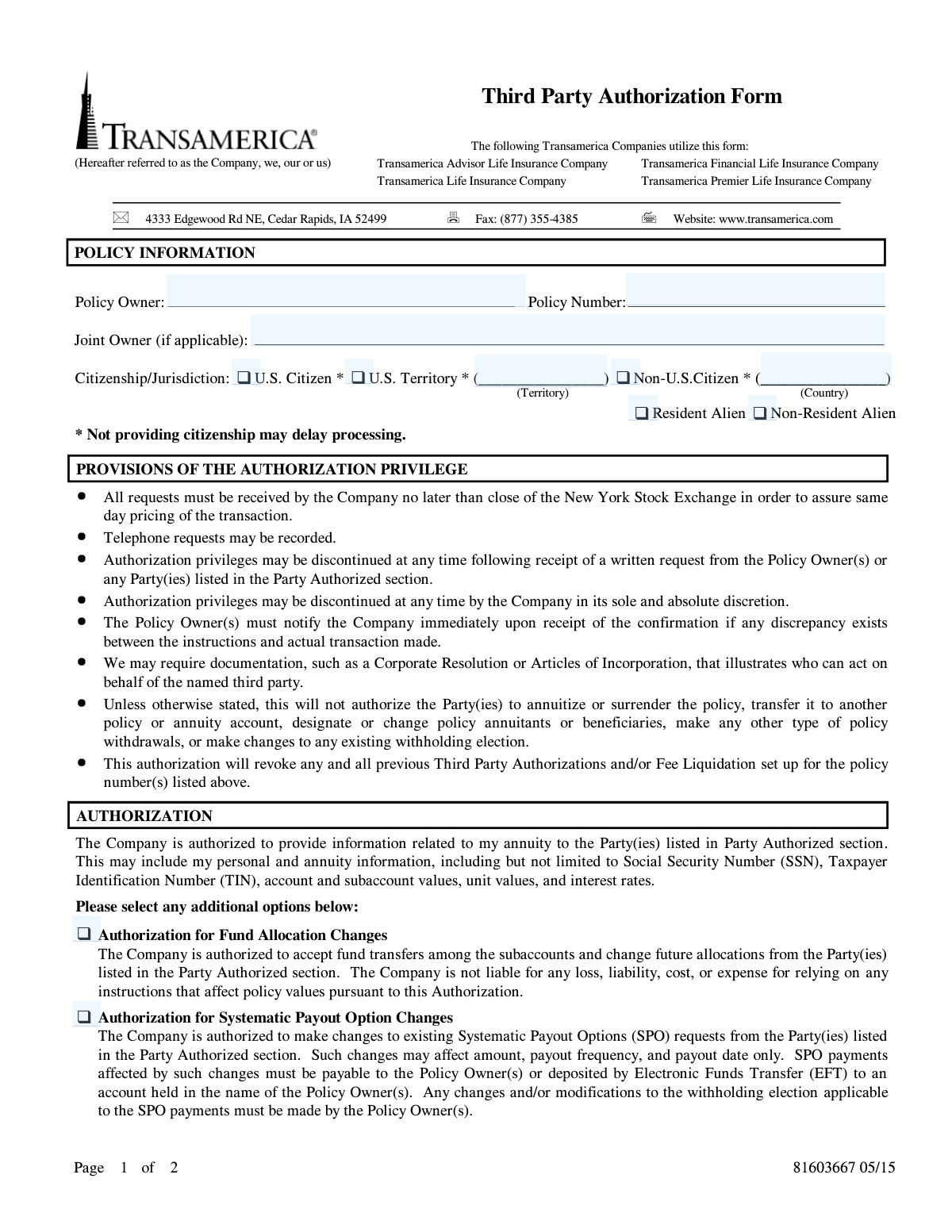
The Transamerica Third Party Authorization Form is a legal document used by policyholders to grant a specific individual or firm permission to access their annuity or life insurance policy information. Depending on the options selected, this authorization can also allow the third party to make changes to fund allocations or systematic payout options on the policyholder's behalf. Today, this form can be filled out quickly and accurately using AI-powered services like Instafill.ai, which can also convert non-fillable PDF versions into interactive fillable forms.
Transamerica Third Party Authorization is part of the
Transamerica forms category on Instafill.
Rather not fill this in by hand? Instafill is an online form filler that completes PDF forms automatically — upload the blank form, answer a few questions, and the AI fills every field.
Form specifications
| Form name: | Third Party Authorization Form - Transamerica |
| Number of pages: | 1 |
| Language: | English |
Our AI automatically handles information lookup, data retrieval, formatting, and form filling.
It takes less than a minute to fill out Transamerica Third Party Authorization using our AI form filling.
Securely upload your data. Information is encrypted in transit and deleted immediately after the form is filled out.
Instafill Demo: How to fill out PDF forms in seconds with AI
How to Fill Out Transamerica Third Party Authorization Online for Free in 2026
Are you looking to fill out a TRANSAMERICA THIRD PARTY AUTHORIZATION form online quickly and accurately? Instafill.ai offers the #1 AI-powered PDF filling software of 2026, allowing you to complete your TRANSAMERICA THIRD PARTY AUTHORIZATION form in just 37 seconds or less.
Follow these steps to fill out your TRANSAMERICA THIRD PARTY AUTHORIZATION form online using Instafill.ai:
- 1 Navigate to Instafill.ai and upload or select the Transamerica Third Party Authorization Form.
- 2 Use the AI assistant to automatically fill in your Policy Information, including the policy owner's name, policy number, and citizenship status.
- 3 Enter the details for the 'Party Authorized' section, providing the name, firm, contact information, and SSN/TIN of the third party.
- 4 In the 'Authorization' section, check the boxes to specify the level of access you are granting, such as providing information, allowing fund allocation changes, or permitting systematic payout option changes.
- 5 Carefully review all the information pre-filled by the AI for accuracy, making any necessary corrections.
- 6 Electronically sign and date the form in the 'Required Acknowledgements & Signatures' section to finalize the authorization.
Our AI-powered system ensures each field is filled out correctly, reducing errors and saving you time.
Why Choose Instafill.ai for Your Fillable Transamerica Third Party Authorization Form?
Speed
Complete your Transamerica Third Party Authorization in as little as 37 seconds.
Up-to-Date
Always use the latest 2026 Transamerica Third Party Authorization form version.
Cost-effective
No need to hire expensive lawyers.
Accuracy
Our AI performs 10 compliance checks to ensure your form is error-free.
Security
Your personal information is protected with bank-level encryption.
Frequently Asked Questions About Transamerica Third Party Authorization
This form allows you, the policy owner, to grant a third party, such as a financial advisor or firm, permission to access your policy information and potentially make certain changes on your behalf.
Any Transamerica policy owner who wishes to authorize another person or company to view their policy details or manage specific aspects of their annuity must complete and submit this form.
Submitting this form will automatically revoke any and all previous Third Party Authorizations and/or Fee Liquidation setups you have on file for the policy number listed.
The third party can view your personal and annuity information, and if you grant additional permission, they can also make fund allocation changes or modify existing systematic payout options.
Yes, the third party cannot surrender the policy, change beneficiaries, make most types of withdrawals, or alter your tax withholding elections unless specifically stated otherwise.
You must provide the authorized party's name, SSN or TIN, mailing address, and contact information. If they are not a registered representative, their signature and potentially a Corporate Resolution will also be required.
You can submit the completed and signed form by faxing it to (877) 355-4385 or by mailing it to Transamerica at 4333 Edgewood Rd NE, Cedar Rapids, IA 52499.
The form indicates that providing your citizenship status is important because failing to do so may result in delays in processing your authorization request.
You can revoke authorization by sending a written request to the company or by completing the 'Third Party Termination' section on a new form. The authorized party can also request to terminate their own access.
Yes, the form requires signatures from the primary policy owner and the joint owner, if applicable, in the 'Required Acknowledgements & Signatures' section.
Yes, services like Instafill.ai use AI to accurately auto-fill form fields with your information, which can save you time and help reduce errors.
You can use a service like Instafill.ai to upload the PDF, which makes it an interactive, fillable form. You can then type your information, sign electronically, and download the completed document.
If you have a non-fillable or 'flat' PDF, you can use Instafill.ai to instantly convert it into an interactive form that you can easily fill out on your computer or mobile device.
Compliance Transamerica Third Party Authorization
Validation Checks by Instafill.ai
1
Ensures Policy Owner Signature and Date are Present
This check verifies that the 'Policy Owner Signature' and 'Date' fields in the 'Required Acknowledgements & Signatures' section are both completed. This is critical as the signature legally binds the policy owner to the authorization, and the date establishes when the authorization became effective. A missing signature or date invalidates the entire form, and the submission will be rejected.
2
Validates Policy Number Presence and Format
This check ensures the 'Policy Number' field is not empty and conforms to Transamerica's expected format. The policy number is the primary identifier for the account being accessed, so its accuracy is paramount for linking the authorization to the correct policy. If the number is missing or invalid, the system cannot process the request, leading to an immediate rejection and a request for correction.
3
Conditional Requirement for Joint Owner Information
This validation triggers if a 'Joint Owner Name' is entered in the 'Policy Information' section. It then requires the 'Joint Owner Signature', 'Date', 'Social Security Number', and 'Telephone Number' fields to be completed. For jointly owned policies, all owners must consent to the authorization to ensure it is legally sound and to prevent unauthorized access. Incomplete joint owner information will halt processing until all required fields are provided.
4
Verifies SSN/TIN Format for All Parties
This check validates that all Social Security Number (SSN) and Taxpayer Identification Number (TIN) fields for the Policy Owner, Joint Owner, and Authorized Party adhere to the standard 9-digit format. Correct SSN/TINs are essential for proper tax reporting and identity verification as required by law. An incorrectly formatted number will cause the form to fail validation and be returned for correction to prevent processing delays and compliance issues.
5
Requires at Least One Authorization Type to be Selected
This validation ensures that the policy owner has selected at least one checkbox in the 'Authorization' section (e.g., 'provide information', 'Fund Allocation Changes'). Without a selected authorization, the form has no purpose, as it does not grant any specific permissions to the third party. The submission will be considered incomplete and rejected if no authorization level is defined.
6
Validates Citizenship Status Selection Logic
This check ensures that if 'Non-U.S. Citizen' or 'U.S. Territory' is selected, the corresponding country or territory name field is filled out. This information is required for regulatory compliance and proper record-keeping. An incomplete selection will delay processing as the company must obtain the missing information to meet its legal obligations.
7
Ensures Authorized Party Type is Selected
This validation confirms that one of the two mutually exclusive options, 'Registered Representative/Agent' or 'Third Party', is selected in the 'Party Authorized' section. This distinction is crucial as it determines the documentation requirements and the relationship context for the authorization. Failure to select a type results in an ambiguous request that cannot be processed.
8
Conditional Signature Requirement for 'Third Party' Type
This check verifies that if the 'Third Party (Not a Registered Representative/Agent)' option is selected, the 'Authorized Person Signature' field is signed. The form explicitly requires this signature for non-agent third parties to confirm their identity and acknowledgement. A missing signature for this party type will render the authorization incomplete and lead to rejection.
9
Validates Completeness of Authorized Party Contact Information
This check ensures that the authorized party's name (firm or individual), full mailing address (including city, state, zip), and telephone number are all provided. This information is essential for communication, sending confirmations, and maintaining a complete record of the authorized entity. Missing contact details will result in the form being flagged as incomplete and returned to the sender.
10
Validates Email Address Format
This check verifies that if an email address is entered in the 'Party Authorized' section, it follows the standard '[email protected]' format. While potentially optional, an invalid email address can lead to failed communications and undelivered electronic notices. The system should flag invalid formats to ensure any provided contact information is usable.
11
Validates All Date Fields for Format and Logicality
This check ensures all date fields on the form (e.g., Policy Owner Date, Joint Owner Date) are entered in a valid format (e.g., MM/DD/YYYY) and are not set to a future date. A valid, current or past date is necessary to establish a clear and legally sound timeline for when the authorization was granted. An invalid or future date will cause a processing error and require correction.
12
Ensures Policy Owner Identifying Information is Complete
This validation confirms that the 'Policy Owner Name', 'Social Security Number/Taxpayer Identification Number', and 'Telephone Number' fields are all filled out. This core information is necessary to uniquely and correctly identify the policy owner granting the authorization, preventing potential fraud or misapplication of the request. The form cannot be processed without this fundamental identifying data.
Common Mistakes in Completing Transamerica Third Party Authorization
If a policy is jointly owned, both the primary policy owner and the joint owner must sign the form. This is often missed if the joint owner is not present when the form is being filled out, leading to immediate rejection and processing delays. Always verify if a joint owner is listed on the policy and ensure their signature, date, and SSN/TIN are provided in the designated section.
The citizenship section has multiple options and fields, causing confusion. Users may check multiple boxes or forget to write in the specific country or territory, which the form notes can delay processing. To avoid this, carefully select only one status (e.g., U.S. Citizen, Non-U.S. Citizen) and fill in the corresponding country or territory name if required.
Simply signing the form does not grant all permissions; specific authorizations must be explicitly selected. Users often forget to check the boxes for 'Authorization for Fund Allocation Changes' or 'Systematic Payout Option Changes', assuming the main authorization covers everything. This results in the third party being unable to perform these actions, requiring a new form to be submitted.
The form distinguishes between a 'Registered Representative/Agent' and a general 'Third Party', with different requirements for each. Selecting 'Third Party' necessitates an additional signature and may require a Corporate Resolution, which people often miss. This mistake can halt the authorization process until the correct designation is chosen and all required documentation is provided.
When authorizing a 'Third Party (Not a Registered Representative/Agent)', the form requires a signature from that authorized person. This is a conditional field that is easily overlooked, rendering the authorization for that party invalid. Double-check the party type; if it's not a registered representative, ensure the authorized person signs in the 'Party Authorized' section.
The policy number is the primary identifier for the account, and any error, such as a typo or transposed digit, will prevent Transamerica from locating the correct policy. This leads to an automatic rejection of the form. Carefully copy the policy number from an official policy statement to ensure it is 100% accurate before submitting.
Users intending to add a new authorized party sometimes get confused and fill out the 'Third Party Termination' section instead. This can lead to the accidental removal of an existing, valid authorization. To avoid this, carefully read each section header and only complete the termination section if you intend to revoke a previously granted authorization.
When the authorized party is a firm or company, its Taxpayer Identification Number (TIN) should be used, not the personal Social Security Number (SSN) of an individual representative. This error causes data mismatches and can delay verification of the authorized firm. Always confirm whether the authorized entity is an individual or a company and provide the correct corresponding identification number.
The 'Party Authorized' section requires a full mailing address, telephone number, and email. Omitting any of this information can make it difficult for the company to communicate with or verify the third party, causing processing delays. Using an AI-powered tool like Instafill.ai can help prevent this by flagging incomplete fields and ensuring all required contact information is present before submission.
The most common and critical error is forgetting to sign and date the form in the 'Required Acknowledgements & Signatures' section. An unsigned or undated form is legally invalid and will be rejected immediately, requiring the entire process to start over. Before submitting, always perform a final check to ensure the policy owner's signature and the current date are correctly filled in. Since this form is a non-fillable PDF, tools like Instafill.ai can convert it into a fillable version, making it easier to add digital signatures and dates correctly.
Saved over 80 hours a year
“I was never sure if my IRS forms like W-9 were filled correctly. Now, I can complete the forms accurately without any external help.”
Kevin Martin Green
Your data stays secure with advanced protection from Instafill and our subprocessors




Robust compliance program
Transparent business model
You’re not the product. You always know where your data is and what it is processed for.
ISO 27001, HIPAA, and GDPR
Our subprocesses adhere to multiple compliance standards, including but not limited to ISO 27001, HIPAA, and GDPR.
Security & privacy by design
We consider security and privacy from the initial design phase of any new service or functionality. It’s not an afterthought, it’s built-in, including support for two-factor authentication (2FA) to further protect your account.
Fill out Transamerica Third Party Authorization with Instafill.ai
Worried about filling PDFs wrong? Instafill securely fills third-party-authorization-form-transamerica forms, ensuring each field is accurate.
